

Microsoft’s Teams roadmap item for “Interactive Agents for Teams Meetings and Calls” is scheduled to begin rollout in September 2026, bringing agents into Teams meetings and 1-on-1 calls with group and private interactions, while session memory is currently limited to agents built on Copilot. The practical move for IT is not to wait for a shiny demo; it is to start deciding which meetings should allow agents, what those agents may remember inside a session, and how users will distinguish sanctioned assistants from experimental ones. The headline is “agents in meetings,” but the real product change is that Microsoft is pushing Teams toward a persistent, agent-mediated workspace where the meeting itself becomes part interface, part workflow engine, and part governance problem.
The roadmap entry is easy to underestimate because it sounds like another incremental Teams add-on. Microsoft says the feature will bring interactive agents into Teams meetings and 1-on-1 calls, allowing people to engage with agents either as a group or privately. It is marked in development, with a rollout start listed for September 2026, and the roadmap metadata places it on Desktop with General Availability and Targeted Release phases.
That sounds tidy, but the architectural implication is messier. A Teams meeting has historically been a communications container: audio, video, chat, screen share, files, transcript, and recordings orbiting a scheduled event. Microsoft’s agent language suggests something more active: a participant-like software layer that can respond inside the flow of a live conversation.
The most important sentence in the roadmap text is not the one about meetings or calls. It is Microsoft’s note that only agents built on Copilot currently support sessions, meaning they can remember the context of previous interactions within the same session, while custom agents do not yet have session support. That single distinction turns this from a feature announcement into a governance boundary.
If the agent can remember context during a session, the meeting is no longer merely a place where humans talk and software records. It becomes a short-lived working memory space. For users, that may feel like convenience. For administrators, security teams, and meeting organizers, it is the beginning of a new category of policy design.
That means admins should watch the Microsoft 365 admin center and Message center for tenant-specific details as the date approaches. Roadmap entries are directional signals, not binding deployment contracts, and Microsoft frequently clarifies licensing, admin controls, availability, and rollout sequencing closer to release. The current public facts are enough to plan the questions, not enough to write a final operating procedure.
The roadmap metadata also matters because it puts the feature in both General Availability and Targeted Release. For IT teams that use Targeted Release tenants or pilot groups, the feature is likely to become a test-and-observe item before it becomes a broad user education issue. That pilot window is where organizations should validate whether agent behavior fits the meeting types they actually run.
The broader WindowsForum context is already pointing in this direction. Recent Microsoft 365 and Teams coverage has tracked a clear turn from isolated Copilot features toward agent-driven work across Teams, Office, Copilot Studio, and the wider Microsoft 365 estate. This new roadmap item fits that pattern: Microsoft is not merely adding AI to Teams; it is trying to make Teams a runtime for collaborative agent interaction.
That creates a two-tier agent world. Copilot-built agents are positioned as the more context-aware participants, while custom agents may be present but less capable of maintaining a live thread of interaction. In a meeting, that difference could be decisive: an agent that remembers the last ten minutes of back-and-forth is a collaborator; one that treats each prompt as isolated is closer to a lookup tool.
It also subtly favors Microsoft’s own agent-building path. The roadmap says agents from BizChat and Copilot Studio are available for use in meetings and calls, but the session-memory note makes clear that not all agents are equal yet. If Copilot-built agents get the richer meeting experience first, organizations may feel pressure to build within Microsoft’s preferred agent architecture rather than treat Teams as a neutral container for every bot.
That is not inherently bad. Enterprise platforms need a controlled model before they let arbitrary agents participate in sensitive work. But it does mean the release should be read as much as a platform strategy as a Teams feature.
The governance question follows naturally: when an agent has session context, who is responsible for what it does with that context? Microsoft’s roadmap language describes same-session relevance, not long-term memory or cross-meeting retention. That limitation is important. But even session-bound context can contain sensitive client names, legal strategy, HR issues, sales forecasts, incident response details, or unreleased product plans.
That split mirrors the two ways people already use meetings. Sometimes the room needs a common answer: summarize the decision, pull up the policy, draft the follow-up, identify open action items. Sometimes an individual needs help without derailing the meeting: clarify an acronym, reframe a technical answer, prepare a response, or ask for a private synthesis of what just happened.
The second use case is powerful, but it changes the social contract. In a traditional meeting, private note-taking is expected, but private AI assistance during the same meeting may feel different. If one participant is quietly asking an agent to interpret the room, identify weaknesses in another participant’s argument, or draft negotiation language, the meeting has acquired an invisible second layer.
That does not make the feature inappropriate. It makes meeting design more important. Organizations already distinguish between recorded and unrecorded meetings, internal and external meetings, confidential and routine meetings. Agent-enabled meetings may need the same kind of explicit norms.
A board prep call, sales negotiation, HR investigation, security incident bridge, classroom session, and weekly project stand-up should not all have the same agent posture. The feature headline says “interactive agents.” The operational question is which meetings should become agent-mediated and which should remain human-first.
That is a meaningful shift. An agent that lives in a chat pane or app tab is optional in a different way. A meeting agent is present at the point where decisions are made, commitments are negotiated, and misunderstandings happen. It can become the thing participants consult before they speak, after they speak, or while someone else is speaking.
For IT pros, that raises the priority of agent catalog hygiene. If users can bring agents into meetings, the question becomes whether the tenant has a trustworthy set of approved agents, clear naming, ownership, and lifecycle management. An abandoned departmental experiment should not become a trusted meeting participant because its name sounds official.
This is also where Microsoft’s broader Copilot agent push matters. WindowsForum readers following the recent wave of Copilot agent and Teams update coverage will recognize the cadence: Microsoft first normalizes agents as productivity helpers, then embeds them more deeply into daily work surfaces. Teams meetings are a high-value surface because they concentrate context, authority, and urgency.
The result is that Copilot Studio governance can no longer be treated as a niche automation concern. If those agents can appear in meetings and calls, they become part of collaboration governance, records policy, security review, and user training.
That means the practical preparation is conceptual and procedural. Admins should inventory where agents already exist, who is building them, what data they can access, and which business units are likely to request meeting use first. They should also identify meeting categories that are too sensitive for early experimentation.
A useful starting point is to separate three concerns that often get blurred in AI rollout discussions. First, there is agent access: what the agent can reach. Second, there is meeting context: what the agent can infer or remember inside the session. Third, there is user behavior: what participants ask the agent to do. A governance model that covers only the first category will miss the other two.
This is where enthusiasts and power users can help rather than hinder. Early adopters inside an organization often discover the practical edge cases first. They will find whether an agent is helpful in a sprint review, distracting in a design critique, or risky in an executive call. The best pilot programs will use that feedback before policy is frozen.
The danger is the familiar Microsoft 365 pattern: a feature arrives in Targeted Release, enthusiastic users discover it before administrators have socialized the rules, and IT is left writing policy after habits form. September 2026 sounds distant, but governance lead time disappears quickly in large tenants.
That is why “meeting assistant” is too small a frame. A meeting assistant takes notes. An interactive agent can potentially help formulate prompts, retrieve business context, draft language, test assumptions, or guide the next step while the conversation is still happening. Even if Microsoft starts conservatively, the direction is clear.
For workers, this may reduce the cognitive tax of meetings. People join late, miss context, lose track of action items, or need a quick private clarification before responding. An agent that understands the current session could make meetings more navigable, especially in large organizations where every call has its own acronym soup and political history.
For managers, the same feature could become a crutch. If every meeting assumes participants can privately ask an agent what happened, organizers may become less disciplined about agendas, decisions, and follow-up. AI can make a bad meeting more searchable without making it better.
For security teams, the concern is different. Meetings are where sensitive information appears before it is formalized. A document may be classified; a meeting conversation may not be. If agents are present in that formative space, organizations need to think about whether their information protection model covers the moment when sensitive work is still being spoken, debated, or drafted.
That could be benign. A new hire might ask the agent to explain a term without interrupting the team. A project manager might ask for a clean summary before assigning follow-up. A non-native speaker might ask for a simpler restatement of a fast technical exchange. Accessibility and comprehension benefits are real.
But private interactions also raise transparency questions. Should meeting organizers know whether agents are being used privately? Should external guests be told when internal participants may consult agents? Should highly sensitive meetings disable private agent prompts even if group prompts are allowed? Microsoft’s roadmap text does not answer those questions, but enterprises will have to.
There is a cultural dimension too. Teams has already blurred the boundaries between meeting, chat, document workspace, and task hub. Agents push that further by making every participant potentially augmented. Some organizations will celebrate that. Others will see it as another reason to define stricter meeting norms.
This is not a reason to panic. It is a reason to stop treating AI meeting features as if they are all the same. A transcript recap, a screen-content analysis feature, and an interactive private agent are different governance objects. Bundling them together under “Copilot in Teams” may be convenient marketing, but it is poor operational thinking.
That uncertainty should not be filled with invented certainty. It should be treated as the planning state Microsoft has given customers. Roadmap entries are early weather reports, not deployment manuals.
Still, the feature’s direction is legible. Microsoft wants agents to participate where work happens, not merely wait in a separate app. It wants Copilot-built agents to carry contextual advantage. It wants Teams to be more than meetings and chats; it wants Teams to become the live operating surface for agent-assisted collaboration.
That is the sharper read than “Microsoft is adding AI agents to Teams.” The roadmap item is an early sign that the next Teams battlefield will be meeting governance. Who can invite agents, what they can remember, how private their interactions are, and which agent-building paths get first-class capabilities will matter more than the novelty of asking a bot a question during a call.
Microsoft’s roadmap item is a small entry with large implications: Teams meetings and 1-on-1 calls are being prepared for interactive agents, but the real shift is toward a workspace where conversation, memory, automation, and governance converge in real time. If Microsoft delivers this as described in September 2026, the winning organizations will be the ones that stopped asking whether AI could join the meeting and started asking what kind of meeting was worth letting it into.
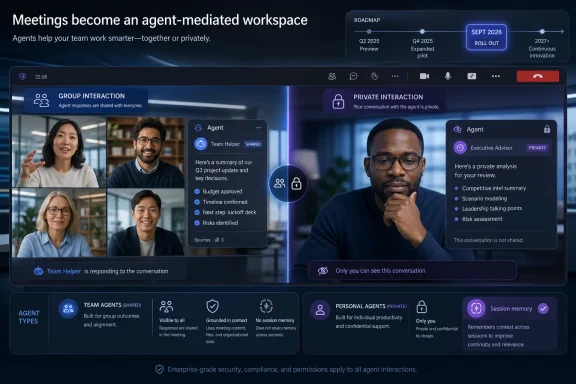 Microsoft Is Moving the Agent From the Sidebar Into the Room
The roadmap entry is easy to underestimate because it sounds like another incremental Teams add-on. Microsoft says the feature will bring interactive agents into Teams meetings and 1-on-1 calls, allowing people to engage with agents either as a group or privately. It is marked in development, with a rollout start listed for September 2026, and the roadmap metadata places it on Desktop with General Availability and Targeted Release phases.That sounds tidy, but the architectural implication is messier. A Teams meeting has historically been a communications container: audio, video, chat, screen share, files, transcript, and recordings orbiting a scheduled event. Microsoft’s agent language suggests something more active: a participant-like software layer that can respond inside the flow of a live conversation.
The most important sentence in the roadmap text is not the one about meetings or calls. It is Microsoft’s note that only agents built on Copilot currently support sessions, meaning they can remember the context of previous interactions within the same session, while custom agents do not yet have session support. That single distinction turns this from a feature announcement into a governance boundary.
If the agent can remember context during a session, the meeting is no longer merely a place where humans talk and software records. It becomes a short-lived working memory space. For users, that may feel like convenience. For administrators, security teams, and meeting organizers, it is the beginning of a new category of policy design.
The September 2026 Date Buys Time, Not Certainty
The concrete answer for readers is straightforward: there is nothing ordinary users can enable today from the roadmap item alone. Microsoft has listed the rollout start as September 2026, and the entry was added to the roadmap on 05/06/2025. The sensible preparation path is to treat 2026 as a policy-design window rather than a countdown to a toggle.That means admins should watch the Microsoft 365 admin center and Message center for tenant-specific details as the date approaches. Roadmap entries are directional signals, not binding deployment contracts, and Microsoft frequently clarifies licensing, admin controls, availability, and rollout sequencing closer to release. The current public facts are enough to plan the questions, not enough to write a final operating procedure.
The roadmap metadata also matters because it puts the feature in both General Availability and Targeted Release. For IT teams that use Targeted Release tenants or pilot groups, the feature is likely to become a test-and-observe item before it becomes a broad user education issue. That pilot window is where organizations should validate whether agent behavior fits the meeting types they actually run.
The broader WindowsForum context is already pointing in this direction. Recent Microsoft 365 and Teams coverage has tracked a clear turn from isolated Copilot features toward agent-driven work across Teams, Office, Copilot Studio, and the wider Microsoft 365 estate. This new roadmap item fits that pattern: Microsoft is not merely adding AI to Teams; it is trying to make Teams a runtime for collaborative agent interaction.
Session Memory Is the Real Product Boundary
The phrase session support deserves more scrutiny than it will probably get in casual coverage. Microsoft says Copilot-built agents can remember the context of previous interactions within the same session for more relevant responses. Custom agents, according to the same roadmap text, do not yet have that support.That creates a two-tier agent world. Copilot-built agents are positioned as the more context-aware participants, while custom agents may be present but less capable of maintaining a live thread of interaction. In a meeting, that difference could be decisive: an agent that remembers the last ten minutes of back-and-forth is a collaborator; one that treats each prompt as isolated is closer to a lookup tool.
It also subtly favors Microsoft’s own agent-building path. The roadmap says agents from BizChat and Copilot Studio are available for use in meetings and calls, but the session-memory note makes clear that not all agents are equal yet. If Copilot-built agents get the richer meeting experience first, organizations may feel pressure to build within Microsoft’s preferred agent architecture rather than treat Teams as a neutral container for every bot.
That is not inherently bad. Enterprise platforms need a controlled model before they let arbitrary agents participate in sensitive work. But it does mean the release should be read as much as a platform strategy as a Teams feature.
The governance question follows naturally: when an agent has session context, who is responsible for what it does with that context? Microsoft’s roadmap language describes same-session relevance, not long-term memory or cross-meeting retention. That limitation is important. But even session-bound context can contain sensitive client names, legal strategy, HR issues, sales forecasts, incident response details, or unreleased product plans.
Group and Private Interactions Change Meeting Etiquette
Microsoft’s promise of both group and private interactions is where the user experience becomes politically interesting. A group interaction is visible and collaborative: everyone can see what was asked and how the agent responded. A private interaction, by contrast, lets an individual query the agent in the context of a shared meeting or call.That split mirrors the two ways people already use meetings. Sometimes the room needs a common answer: summarize the decision, pull up the policy, draft the follow-up, identify open action items. Sometimes an individual needs help without derailing the meeting: clarify an acronym, reframe a technical answer, prepare a response, or ask for a private synthesis of what just happened.
The second use case is powerful, but it changes the social contract. In a traditional meeting, private note-taking is expected, but private AI assistance during the same meeting may feel different. If one participant is quietly asking an agent to interpret the room, identify weaknesses in another participant’s argument, or draft negotiation language, the meeting has acquired an invisible second layer.
That does not make the feature inappropriate. It makes meeting design more important. Organizations already distinguish between recorded and unrecorded meetings, internal and external meetings, confidential and routine meetings. Agent-enabled meetings may need the same kind of explicit norms.
A board prep call, sales negotiation, HR investigation, security incident bridge, classroom session, and weekly project stand-up should not all have the same agent posture. The feature headline says “interactive agents.” The operational question is which meetings should become agent-mediated and which should remain human-first.
Copilot Studio Moves From Build Tool to Meeting Infrastructure
The roadmap text says agents from BizChat and Copilot Studio are available for use in meetings and calls. That sentence is doing a lot of work. Copilot Studio has often been discussed as a place to create agents for workflows, internal knowledge, service tasks, or line-of-business automation. Bringing those agents into meetings makes them part of the live collaboration surface.That is a meaningful shift. An agent that lives in a chat pane or app tab is optional in a different way. A meeting agent is present at the point where decisions are made, commitments are negotiated, and misunderstandings happen. It can become the thing participants consult before they speak, after they speak, or while someone else is speaking.
For IT pros, that raises the priority of agent catalog hygiene. If users can bring agents into meetings, the question becomes whether the tenant has a trustworthy set of approved agents, clear naming, ownership, and lifecycle management. An abandoned departmental experiment should not become a trusted meeting participant because its name sounds official.
This is also where Microsoft’s broader Copilot agent push matters. WindowsForum readers following the recent wave of Copilot agent and Teams update coverage will recognize the cadence: Microsoft first normalizes agents as productivity helpers, then embeds them more deeply into daily work surfaces. Teams meetings are a high-value surface because they concentrate context, authority, and urgency.
The result is that Copilot Studio governance can no longer be treated as a niche automation concern. If those agents can appear in meetings and calls, they become part of collaboration governance, records policy, security review, and user training.
The Admin Burden Starts Before the Admin Controls Arrive
The frustrating part for administrators is that the roadmap item does not yet spell out the controls. It does not say which policies will govern agent use in meetings, how private interactions will be surfaced to organizers, what licensing gates will apply, how external participants are handled, or how meeting sensitivity labels might intersect with agent availability. Those omissions are not evidence of absence; they are simply not public facts in the roadmap text.That means the practical preparation is conceptual and procedural. Admins should inventory where agents already exist, who is building them, what data they can access, and which business units are likely to request meeting use first. They should also identify meeting categories that are too sensitive for early experimentation.
A useful starting point is to separate three concerns that often get blurred in AI rollout discussions. First, there is agent access: what the agent can reach. Second, there is meeting context: what the agent can infer or remember inside the session. Third, there is user behavior: what participants ask the agent to do. A governance model that covers only the first category will miss the other two.
This is where enthusiasts and power users can help rather than hinder. Early adopters inside an organization often discover the practical edge cases first. They will find whether an agent is helpful in a sprint review, distracting in a design critique, or risky in an executive call. The best pilot programs will use that feedback before policy is frozen.
The danger is the familiar Microsoft 365 pattern: a feature arrives in Targeted Release, enthusiastic users discover it before administrators have socialized the rules, and IT is left writing policy after habits form. September 2026 sounds distant, but governance lead time disappears quickly in large tenants.
The Meeting Becomes a Workspace With Memory
The bigger strategic move is that Microsoft is trying to make meetings less ephemeral. Teams already stores chats, files, transcripts, recordings, attendance, recaps, and shared artifacts. Interactive agents with session context add a live reasoning layer to that stack.That is why “meeting assistant” is too small a frame. A meeting assistant takes notes. An interactive agent can potentially help formulate prompts, retrieve business context, draft language, test assumptions, or guide the next step while the conversation is still happening. Even if Microsoft starts conservatively, the direction is clear.
For workers, this may reduce the cognitive tax of meetings. People join late, miss context, lose track of action items, or need a quick private clarification before responding. An agent that understands the current session could make meetings more navigable, especially in large organizations where every call has its own acronym soup and political history.
For managers, the same feature could become a crutch. If every meeting assumes participants can privately ask an agent what happened, organizers may become less disciplined about agendas, decisions, and follow-up. AI can make a bad meeting more searchable without making it better.
For security teams, the concern is different. Meetings are where sensitive information appears before it is formalized. A document may be classified; a meeting conversation may not be. If agents are present in that formative space, organizations need to think about whether their information protection model covers the moment when sensitive work is still being spoken, debated, or drafted.
The Private Agent Is Where Trust Gets Tested
Private interactions are likely to be the most useful part of the feature and the hardest to explain. In a 1-on-1 call, the distinction is less dramatic because the conversation is already private between participants. In a group meeting, however, a private agent interaction creates a separate channel of assistance inside a shared event.That could be benign. A new hire might ask the agent to explain a term without interrupting the team. A project manager might ask for a clean summary before assigning follow-up. A non-native speaker might ask for a simpler restatement of a fast technical exchange. Accessibility and comprehension benefits are real.
But private interactions also raise transparency questions. Should meeting organizers know whether agents are being used privately? Should external guests be told when internal participants may consult agents? Should highly sensitive meetings disable private agent prompts even if group prompts are allowed? Microsoft’s roadmap text does not answer those questions, but enterprises will have to.
There is a cultural dimension too. Teams has already blurred the boundaries between meeting, chat, document workspace, and task hub. Agents push that further by making every participant potentially augmented. Some organizations will celebrate that. Others will see it as another reason to define stricter meeting norms.
This is not a reason to panic. It is a reason to stop treating AI meeting features as if they are all the same. A transcript recap, a screen-content analysis feature, and an interactive private agent are different governance objects. Bundling them together under “Copilot in Teams” may be convenient marketing, but it is poor operational thinking.
The Thin Facts Are Themselves a Signal
The public facts here are thin, and that matters. We know the rollout month, the date the roadmap item was added, the basic interaction model, the session-support distinction, the mention of BizChat and Copilot Studio agents, and the roadmap metadata for platform and release phase. We do not yet know the final admin experience, licensing details, tenant controls, retention behavior, external-user treatment, or exact user interface.That uncertainty should not be filled with invented certainty. It should be treated as the planning state Microsoft has given customers. Roadmap entries are early weather reports, not deployment manuals.
Still, the feature’s direction is legible. Microsoft wants agents to participate where work happens, not merely wait in a separate app. It wants Copilot-built agents to carry contextual advantage. It wants Teams to be more than meetings and chats; it wants Teams to become the live operating surface for agent-assisted collaboration.
That is the sharper read than “Microsoft is adding AI agents to Teams.” The roadmap item is an early sign that the next Teams battlefield will be meeting governance. Who can invite agents, what they can remember, how private their interactions are, and which agent-building paths get first-class capabilities will matter more than the novelty of asking a bot a question during a call.
The September 2026 Checklist Starts With Meeting Design
The organizations that handle this well will not begin with a feature toggle. They will begin with meeting categories, agent ownership, and user expectations. A few practical conclusions already follow from the roadmap text, even before Microsoft publishes the fine print.- Organizations should treat September 2026 as the start of a rollout window, not as a guarantee that every tenant and user will see the same behavior on the same day.
- IT teams should distinguish Copilot-built agents from custom agents because Microsoft says only Copilot-built agents currently support session memory.
- Meeting organizers should plan separate norms for group agent interactions and private agent interactions, because those modes create different transparency and trust issues.
- Copilot Studio governance should be reviewed before agents enter meetings, since agents from BizChat and Copilot Studio are described as available for meetings and calls.
- Targeted Release should be used as an observation period for real meeting behavior rather than merely a way to get the feature early.
- Sensitive meeting types should be identified in advance so the organization is not inventing policy during the first controversial use case.
Microsoft’s roadmap item is a small entry with large implications: Teams meetings and 1-on-1 calls are being prepared for interactive agents, but the real shift is toward a workspace where conversation, memory, automation, and governance converge in real time. If Microsoft delivers this as described in September 2026, the winning organizations will be the ones that stopped asking whether AI could join the meeting and started asking what kind of meeting was worth letting it into.
References
- Primary source: microsoft.com
Microsoft 365 Roadmap | Microsoft 365
The Microsoft 365 Roadmap lists updates that are currently planned for applicable subscribers. Check here for more information on the status of new features and updates.www.microsoft.com
- Primary source: WindowsForum
Microsoft 365 Roadmap 2025–26: Copilot Agents, Edge AI, Excel GA & Governance | Windows Forum
Microsoft’s public roadmap entries and recent admin notices show a coordinated next wave of Microsoft 365 updates that touch the browser, mobile Outlook...windowsforum.com
