

The Notes App Has Become the New Workplace Surveillance Layer
AI note-taking used to be a polite productivity feature. A tool listened, transcribed, summarized, and perhaps highlighted action items. In 2026, that description is too small for what these products are becoming.
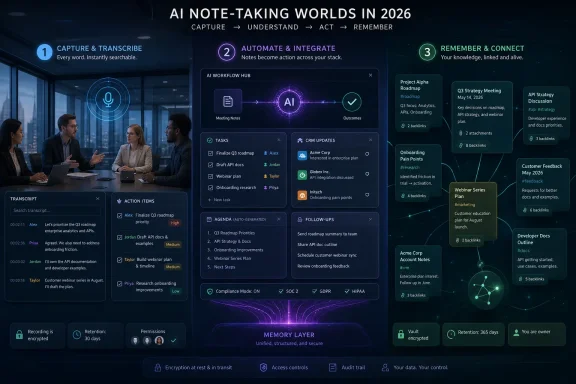
The new note-taking stack is a memory layer for work. It captures meetings, private drafts, emails, PDFs, sales calls, therapy notes, design reviews, sprint retrospectives, investor pitches, and customer objections. The best tools do not merely preserve what was said; they make it searchable, comparable, and reusable.
That is both the promise and the risk. A searchable meeting archive can rescue a project from institutional amnesia. It can also create a permanent record of remarks that were once understood as conversational, provisional, or sensitive.
This is why the market now splits along a sharper line than price or feature count. Some tools want to join every meeting as a visible participant. Others hide from the meeting platform and capture audio locally. Some tools are built for compliance departments, while others are built for growth teams trying to squeeze one more field update into Salesforce.
Otter and Fireflies Built the Default Model, but the Default Is Showing Its Age
Otter.ai remains the old reliable of AI notes. It is mature, widely recognized, and still strong at live transcription, searchable archives, and meeting summaries. For teams that simply want a bot to join Zoom, Google Meet, or Teams and produce a usable record, Otter is difficult to dismiss.
Its weakness is not that it fails at the basics. The problem is that the basics have become commoditized. In a market where unlimited or near-unlimited transcription is increasingly common, Otter’s value has to come from reliability, integrations, and the comfort of buying from a known name.
Fireflies.ai pushes the same model harder into the workflow layer. Its pitch is not just that it records meetings, but that it connects meeting outcomes to CRMs, project tools, Slack, Notion, HubSpot, and Salesforce. For sales and customer success teams, that can matter more than transcript elegance.
The bot-based model is still the easiest to deploy at scale. It is also the most visible. Every participant sees the assistant enter the room, and that has become a cultural signal: this conversation is being converted into organizational data.
Fathom Turned “Free” Into a Competitive Weapon
Fathom’s enduring advantage is its unusually generous free plan for individuals. Unlimited recordings, transcriptions, and AI summaries changed expectations across the category. Once one capable tool offers that much for free, every paid product has to justify why its version of meeting notes deserves budget.
That makes Fathom especially attractive for consultants, freelancers, recruiters, and salespeople who need fast meeting summaries without building a full knowledge-management system. It is not trying to be the operating system for your company. It is trying to remove the dead time after calls.
The bigger question is what happens when free individual use becomes team infrastructure. A solo user may be happy with a polished summary. A company needs admin controls, retention policies, shared libraries, security reviews, and predictable billing.
That is where the note-taking market keeps repeating the same pattern. The free tier wins the user. Governance wins the enterprise sale.
The Bot-Free Tools Are Really Selling Social Comfort
Granola, Jamie, Tactiq, and Krisp are part of a different movement. Their pitch is not merely better transcription; it is a less awkward meeting. They recognize something the first generation of AI note-takers underestimated: people behave differently when a named recording bot joins the call.
Granola’s approach is especially interesting because it does not try to erase human note-taking. It blends the user’s rough notes with captured audio, then produces a more polished version afterward. That makes it feel less like outsourcing memory and more like upgrading a familiar habit.
Jamie leans harder into privacy and discretion, with bot-free meeting capture, broad language support, templates, and cross-note querying. It is priced more like a premium assistant than a casual utility, but that positioning makes sense for consultants, legal professionals, executives, and regulated teams.
Tactiq’s browser-extension model is lighter-weight. By capturing live captions from meetings, it avoids some of the friction of bot-based tools while still delivering transcripts and summaries. For users who live in Google Meet, Zoom, and Teams through the browser, that can be enough.
Krisp’s evolution is also telling. It began as noise cancellation and moved into notes because clean audio is the foundation of good transcription. In noisy home offices, hybrid rooms, and multilingual calls, the best AI summary still depends on whether the system heard the meeting correctly.
Microsoft and Google Are Turning Notes Into Ecosystem Gravity
The most consequential products in this market may not be the specialist note-takers at all. Microsoft Copilot and Google NotebookLM approach notes from opposite ends of the same strategic problem: if users already store their work inside your ecosystem, AI notes become a retention feature.
Microsoft’s advantage is enterprise adjacency. Copilot can operate across OneNote, Teams, Outlook, Word, Excel, SharePoint, and the broader Microsoft 365 graph. That gives it context most standalone tools can only dream of, provided the organization is willing to pay and has its permissions in order.
This is where WindowsForum readers should pay attention. Copilot in OneNote is not just a note summarizer. In a Microsoft 365 tenant, it is part of a permissions-sensitive information system. If your SharePoint libraries are messy, your Teams channels are chaotic, and your document permissions are too loose, AI will not magically fix that. It may expose it.
NotebookLM is the more surprising counterweight. It is not primarily a meeting recorder. It is a research environment where users upload sources and ask questions grounded in those documents. For students, analysts, researchers, journalists, and policy teams, that can be more valuable than yet another meeting bot.
The philosophical difference matters. Copilot wants to reason across the work you already do inside Microsoft’s cloud. NotebookLM wants to turn a selected bundle of sources into a temporary research brain. One is persistent enterprise memory; the other is controlled-context synthesis.
Notion, ClickUp, and Fellow Want Notes to Become Workflows
Notion AI, ClickUp AI, and Fellow represent the “notes are not enough” school. Their argument is straightforward: a summary that does not become a task, database entry, agenda item, or project update is still half-manual work.
Notion AI is strongest where Notion is already the team workspace. It can summarize messy notes, rewrite drafts, extract action items, and help query workspace content. For teams that use Notion as a shared operating system, the AI layer reduces the distance between meeting notes and structured documentation.
ClickUp makes a similar move from the project-management side. If action items are discussed in a meeting, ClickUp wants them created as tasks in the relevant project, not copied later by a tired manager. That is the right instinct, because the biggest failure point in meetings is not remembering what happened. It is converting decisions into tracked work.
Fellow is more meeting-native. It focuses on agendas, recurring meeting structures, one-on-ones, action item follow-up, and organizational accountability. Its value is not just transcription; it is continuity. The next meeting begins with the last meeting’s promises.
This is the dividing line between note-taking and management software. A transcript tells you what happened. A workflow tool changes what happens next.
Sales Teams Are Buying Memory With a Quota Attached
Avoma and Grain show what happens when AI notes are shaped by revenue teams. In sales, a meeting record is not just institutional memory. It is pipeline data, coaching material, objection analysis, qualification evidence, and CRM hygiene.
Avoma is built for that world. It supports sales methodologies, call scorecards, CRM updates, deal intelligence, and coaching workflows. That makes it overkill for a student or general office worker, but highly relevant for a VP of Sales trying to understand why deals stall.
Grain’s emphasis on clips and coaching libraries is equally practical. A transcript is useful, but a 90-second clip of a strong objection handle or discovery question is often better training material. Sales enablement teams do not just need notes; they need examples of what good sounds like.
This is why general-purpose note-takers often struggle to satisfy sales organizations beyond the first few months. Sales teams eventually want scoring, CRM sync, playbook compliance, and manager dashboards. The meeting summary is only the front door.
Personal Knowledge Tools Are Fighting a Different Battle
Obsidian, Logseq, Mem, Reflect, Evernote, and Apple Notes are not merely alternatives to meeting bots. They belong to a different tradition: personal knowledge management. Their goal is to help an individual think, remember, connect, and retrieve.
Obsidian remains the power-user favorite for people who care about local files, Markdown, backlinks, and long-term ownership. With AI plugins such as Smart Connections, it can add semantic search and chat-style retrieval without surrendering the underlying archive to a proprietary format.
Logseq appeals to a similar audience, especially those who like outliners and daily journals. Its local-first, open-source model gives technically confident users control. The tradeoff is that it asks more of the user than a cloud-first AI notes app.
Mem takes the opposite position. It assumes users do not want to organize. The AI should connect ideas, surface related notes, and synthesize past writing without elaborate structure. That is attractive, but it also creates dependency on the vendor’s interpretation of your archive.
Reflect sits between privacy and polish. End-to-end encryption, backlinks, calendar integration, and an AI assistant make it appealing for sensitive personal notes. Its fixed subscription model is refreshingly simple in a market full of upsells.
Evernote is the elder statesman trying to become modern again. Its AI transcription, meeting notes, and semantic search features make sense, but its pricing increases have made long-time users more willing to reconsider the alternatives. For some, Evernote’s mature clipping and organization still win. For others, it now feels like yesterday’s default asking tomorrow’s price.
Apple Notes is the quiet giant. With Apple Intelligence, summarization, smart organization, and system-level integration make it increasingly capable for ordinary users. It will not satisfy every power user, but it has the unbeatable advantage of already being on the device.
Pricing Is Less Important Than Retention, Permissions, and Exit Strategy
Most comparison posts obsess over monthly prices, but the better question is what happens after a year. By then, an AI note-taking tool may contain hundreds of meetings, private reflections, customer objections, internal disputes, product decisions, and research fragments.
That archive has value. It also has gravity. The more useful the tool becomes, the harder it is to leave.
This is why export formats matter. Markdown, plain text, PDF, and open local files remain boring in the best possible way. Proprietary databases, opaque AI memories, and summary-only histories are convenient until the vendor changes pricing, sells the company, or removes a feature.
Administrators should also look closely at retention controls. A tool that records everything forever may look powerful to managers and terrifying to legal teams. The right policy is rarely “keep it all.” The right policy is to keep what the organization can justify, protect, search, and delete.
The Best Tool Depends on Which Problem You Actually Have
The market’s most annoying truth is also its most useful one: there is no single best AI note-taking tool. There are best tools for specific environments.
A student reviewing lectures does not need Avoma. A sales manager probably should not run a revenue team from Apple Notes. A lawyer may care more about encryption and bot-free capture than CRM sync. A sysadmin may care less about summary prose and more about export, permissions, retention, and tenant governance.
For most individuals, the starting point should be low-friction and reversible. Try Fathom, Granola, Apple Notes, NotebookLM, Obsidian, or Notion AI depending on whether your notes come from meetings, documents, or personal writing. The goal is not to marry the first tool. It is to learn which type of memory you are actually trying to augment.
For organizations, the starting point should be policy rather than product. Decide whether bots are allowed in external meetings, whether transcripts are retained, who can search them, how sensitive meetings are excluded, and how employees disclose recording. Only then does the feature checklist become meaningful.
The Winners Will Be the Tools That Respect Context
The AI note-taking category is moving from transcription to context management. That shift rewards tools that understand why information was captured, who should see it, how long it should live, and what should happen next.
This is where Microsoft has a structural advantage in enterprises, Google has an advantage in source-grounded research, and specialized tools retain an advantage in focused workflows. A product like Avoma can beat Copilot for sales coaching because it understands sales process. A tool like NotebookLM can beat a meeting bot for research because it starts with curated sources. A tool like Obsidian can beat cloud suites for long-term personal archives because the user owns the files.
The weaker products will be those that treat every conversation as the same object. A hiring interview, therapy note, board discussion, sprint standup, customer complaint, and classroom lecture should not all be governed by the same assumptions. The next phase of competition will be less about prettier summaries and more about context-aware capture.
That is good news for users, if vendors handle it responsibly. It means AI notes can become less invasive and more useful. It also means buyers need to stop treating note-taking tools as harmless utilities.
The Shortlist Changes Once the Notes Become Evidence
Before adopting one of these tools, users should think less about novelty and more about where the captured information will live. The best AI notes system is the one that fits the risk profile of the work, not just the one with the slickest summary.
- Fathom, Otter, and Fireflies are strong starting points for general meeting transcription, but they represent the visible bot-based model that not every meeting culture will accept.
- Granola, Jamie, Tactiq, and Krisp are better fits when discretion, audio quality, or bot-free capture matters more than raw platform visibility.
- Microsoft Copilot, Notion AI, ClickUp, and Fellow are most useful when notes need to become tasks, documents, agendas, or enterprise knowledge.
- NotebookLM is the standout option when the job is research synthesis rather than live meeting capture.
- Obsidian, Logseq, Reflect, Mem, Evernote, and Apple Notes are better understood as personal knowledge systems, not just AI note apps.
- Sales teams should evaluate Avoma and Grain separately from general-purpose note-takers because revenue workflows need coaching, CRM sync, and deal intelligence rather than generic summaries.
AI note-taking is no longer a side feature bolted onto productivity software; it is becoming the memory infrastructure of modern work. The winners in 2026 will not simply be the tools that transcribe fastest or summarize most elegantly, but the ones that help users decide what should be captured, what should be forgotten, and what should become action.