

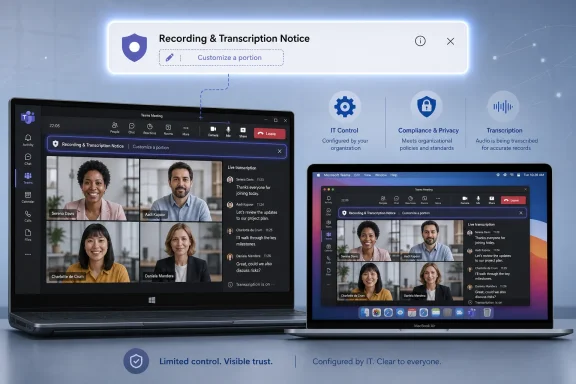
Microsoft 365 Roadmap ID 567302 is an in-development Teams feature that will let IT admins customize a portion of the user notification messages for recording and transcription during Teams calls. The roadmap scopes the feature to Microsoft Teams and Microsoft Copilot for Microsoft 365, Desktop and Mac platforms, Worldwide Standard Multi-Tenant and GCC cloud instances, and the General Availability release ring.
The practical answer for admins is straightforward: when this ships, organizations should expect to gain limited control over part of the recording and transcription notice users see in Teams calls on Desktop and Mac. The roadmap does not publish implementation details yet, so admins should not plan policy changes around assumed Teams admin center controls, PowerShell cmdlets, CSV workflows, audit-log behavior, consent-dialog behavior, exact character limits, mobile support, web support, Teams Rooms behavior, or any other client or management surface not stated in the roadmap item.
The roadmap item says the feature “enables IT admins to customize a portion of the user notification messages for recording and transcription during Teams calls.” That is the core change. It is narrow, but it matters.
Recording and transcription notices are among the most visible trust signals in Teams. They tell participants when a call has moved from ordinary conversation into a captured or transcribed interaction. In many organizations, that notice is not just a product banner. It is also where users first see that the conversation may be subject to organizational rules, privacy expectations, retention requirements, or internal policy.
The roadmap does not say Microsoft is giving admins full control over the notification. It says admins can customize “a portion” of the message. That wording should shape expectations. This is not a blank-check rewrite of Teams’ recording and transcription disclosure model. It is a planned customization capability inside Microsoft’s existing product experience.
The roadmap also tags Microsoft Copilot for Microsoft 365 as a product, alongside Microsoft Teams. That tag is worth noting, but it should not be overread. The roadmap description is about notification messages for recording and transcription during Teams calls. It does not state that Copilot behavior, AI processing, transcript access, recording storage, meeting recap, or consent handling is changing. The safe interpretation is that Microsoft Copilot for Microsoft 365 is listed as an associated product for the roadmap item, not that admins should infer new AI-processing behavior from this entry alone.
The most important operational point is the status: in development. Implementation details are not yet published in the roadmap text. Admins should treat this as an early planning signal, not as a finished deployment guide.
The roadmap supports these expectations:
A generic notification can tell users that recording or transcription has started. A customized portion of that notification may let an organization add context that is more meaningful for its workforce or participant base. For example, a company may want language that points users to internal recording practices. A public-sector organization may want wording that reflects agency policy. A support organization may want participants to understand that calls may be captured for service or quality purposes.
Those examples are planning concepts, not confirmed templates. The roadmap does not provide sample messages, supported fields, or approved scenarios. The broader point is that recording and transcription notices sit at an important moment in the user experience: the moment a live call becomes a captured or transcribed interaction. Even limited customization can be useful if it makes that moment clearer.
Admins should also be careful not to turn this into a broader compliance project before Microsoft publishes the final details. The roadmap item does not replace legal review, privacy notices, records-management policy, employee training, contract language, or external participant disclosures. It simply signals a future Teams capability to customize part of a notice.
That limitation is sensible. Recording and transcription notices need to remain clear, recognizable, and operationally useful. If every tenant could fully replace the notification, users might see inconsistent or confusing language that obscures the fact that a call is being recorded or transcribed. A limited customization area gives organizations some flexibility without necessarily removing Microsoft’s baseline notice experience.
For admins, the practical conclusion is simple: write for clarity, not completeness. The custom portion, whatever form it takes, should not try to carry an entire privacy policy or records-management framework. It should help users understand the immediate significance of the call being recorded or transcribed, using language the organization is prepared to maintain.
A good notice is short, direct, and owned by the right stakeholders. A bad notice is vague, overloaded, or written by whoever happens to find the setting first.
First, the product scope includes Microsoft Teams and Microsoft Copilot for Microsoft 365. The feature description itself is about Teams recording and transcription notification messages during calls. The Copilot product tag should be acknowledged, but not expanded into claims the roadmap does not make. Admins should not infer from this item alone that Copilot settings, transcript processing, meeting intelligence, recap behavior, or AI governance controls are changing.
Second, the platform scope is Desktop and Mac. That is important. Many organizations use Teams across multiple endpoint types, but this roadmap item only lists Desktop and Mac. If a company relies heavily on browser, mobile, room, shared-device, or specialized endpoint scenarios, it should not assume the custom notice will appear consistently across those experiences until Microsoft says so.
Third, the cloud scope includes Worldwide Standard Multi-Tenant and GCC. That gives both commercial and GCC admins a reason to monitor the item. It does not prove that every administrative or client detail will be identical across environments at launch. The roadmap simply lists both cloud instances for this feature.
Fourth, the status is in development. That should keep planning grounded. Admins can prepare ownership, inventory, and review processes now. They should not configure dependent controls, update official procedures, or promise business stakeholders a specific rollout process until Microsoft publishes implementation details.
At minimum, identify owners from the teams that already care about recording and transcription notices. Depending on the organization, that may include collaboration engineering, security, privacy, legal, compliance, records management, HR, customer support, public affairs, or departmental communications. The exact group will vary, but the ownership question should be answered before the feature appears in production.
The goal is to avoid a last-minute scramble where the setting arrives and nobody knows who is authorized to write the message.
Useful categories may include:
For example:
Do not assume that this feature will use any current or previous Teams customization workflow. Do not assume there will be a specific admin-center panel, file upload process, PowerShell cmdlet, Graph API, audit event, consent behavior, or policy object until Microsoft publishes those details.
A practical test plan should confirm:
Admins should mention the Copilot tag in internal tracking because stakeholders may ask why it appears next to a Teams recording and transcription notice feature. The safest explanation is that the roadmap associates the feature with both Microsoft Teams and Microsoft Copilot for Microsoft 365. The feature description itself remains focused on customizable notification messages for recording and transcription during Teams calls.
Do not use this roadmap item to claim that Copilot will gain new access to calls, that AI processing is changing, that transcript permissions are changing, or that users will see a new Copilot-specific consent prompt. Those may be separate product questions, but they are not answered by this roadmap entry.
If internal stakeholders ask whether custom recording and transcription notices should mention Copilot, the answer should be: not automatically. Any Copilot-related wording should be based on the organization’s actual Microsoft 365 configuration and Microsoft’s final documentation, not on the roadmap product tag alone.
The likely value for GCC tenants is clearer organization-specific wording around recording and transcription notices in Teams calls. But the roadmap does not define the administrative workflow, the exact message surface, the supported scenarios, or any records-management behavior. GCC admins should therefore focus now on ownership and inventory.
For public-sector environments, ownership is especially important. Recording and transcription notice wording may need review from records officers, legal teams, privacy officials, accessibility stakeholders, or communications staff. A Teams admin may eventually configure the setting, but the wording itself may be a policy artifact.
That does not mean the message should become dense or legalistic. In many cases, the best notice is plain and short. The custom portion should help users understand what is happening without overwhelming the call experience.
Many organizations have mixed Teams usage. Employees may start calls from managed Windows devices, Mac users may join from laptops, external participants may use different endpoints, and mobile or room systems may appear in common workflows. Because this roadmap item only names Desktop and Mac, admins should not make the custom notice a dependency for scenarios that require guaranteed display across all possible Teams clients.
When the feature becomes available, test the exact client combinations that matter to the organization. For now, the planning assumption should be conservative: Desktop and Mac are in scope because the roadmap says they are. Everything else requires confirmation from future Microsoft documentation or testing.
The feature is about customizing a portion of user notification messages for recording and transcription during Teams calls. It is not a complete compliance solution. It is not a substitute for privacy notices. It is not a records policy. It is not a Copilot governance control. It is not evidence of a new consent model. It is not documentation for audit behavior. It is not a client-support matrix beyond Desktop and Mac.
That narrower scope is still useful. In enterprise administration, small wording controls can matter because they appear at high-friction, high-visibility moments. A recording or transcription notice is one of those moments. If Microsoft gives tenants a supported way to adjust part of that notice, admins can make the experience more aligned with organizational expectations.
The key is discipline: use the feature to clarify, not to overpromise.
This timeline is intentionally cautious. The roadmap item gives enough signal for preparation, not enough for final deployment design.
Admins should act now by assigning owners for notice text, inventorying where Teams recording and transcription notices matter, and monitoring the roadmap item for final implementation details. They should not assume character limits, admin-center workflows, CSV templates, PowerShell support, explicit-consent behavior, audit-log details, mobile or web support, Teams Rooms behavior, or Copilot processing changes from this roadmap entry.
When the feature ships, its best use will be simple: make recording and transcription notices clearer for the people who see them, without pretending the banner can carry the full weight of legal, privacy, records, or AI governance.
The practical answer for admins is straightforward: when this ships, organizations should expect to gain limited control over part of the recording and transcription notice users see in Teams calls on Desktop and Mac. The roadmap does not publish implementation details yet, so admins should not plan policy changes around assumed Teams admin center controls, PowerShell cmdlets, CSV workflows, audit-log behavior, consent-dialog behavior, exact character limits, mobile support, web support, Teams Rooms behavior, or any other client or management surface not stated in the roadmap item.
 Microsoft Is Adding Limited Admin Customization for Teams Call Recording and Transcription Notices
The roadmap item says the feature “enables IT admins to customize a portion of the user notification messages for recording and transcription during Teams calls.” That is the core change. It is narrow, but it matters.Recording and transcription notices are among the most visible trust signals in Teams. They tell participants when a call has moved from ordinary conversation into a captured or transcribed interaction. In many organizations, that notice is not just a product banner. It is also where users first see that the conversation may be subject to organizational rules, privacy expectations, retention requirements, or internal policy.
The roadmap does not say Microsoft is giving admins full control over the notification. It says admins can customize “a portion” of the message. That wording should shape expectations. This is not a blank-check rewrite of Teams’ recording and transcription disclosure model. It is a planned customization capability inside Microsoft’s existing product experience.
The roadmap also tags Microsoft Copilot for Microsoft 365 as a product, alongside Microsoft Teams. That tag is worth noting, but it should not be overread. The roadmap description is about notification messages for recording and transcription during Teams calls. It does not state that Copilot behavior, AI processing, transcript access, recording storage, meeting recap, or consent handling is changing. The safe interpretation is that Microsoft Copilot for Microsoft 365 is listed as an associated product for the roadmap item, not that admins should infer new AI-processing behavior from this entry alone.
| Cloud instance | Products | Platforms | Release ring | Status |
|---|---|---|---|---|
| Worldwide Standard Multi-Tenant | Microsoft Teams; Microsoft Copilot for Microsoft 365 | Desktop; Mac | General Availability | In development |
| GCC | Microsoft Teams; Microsoft Copilot for Microsoft 365 | Desktop; Mac | General Availability | In development |
What Admins Should Expect When It Ships
Based on the roadmap text, Teams admins should expect a future capability to customize part of the notification users see for recording and transcription during Teams calls on Desktop and Mac. That could help organizations make notices more specific to their environment, but only within whatever limits Microsoft ultimately documents.The roadmap supports these expectations:
- The feature applies to Teams calls. The description specifically mentions user notification messages for recording and transcription during Teams calls.
- The customization is partial. Microsoft says admins can customize “a portion” of the notification messages, not the entire experience.
- The listed platforms are Desktop and Mac. Admins should not assume support for web, mobile, Teams Rooms, VDI, phones, or other endpoints unless Microsoft later documents them for this feature.
- The listed cloud instances are Worldwide Standard Multi-Tenant and GCC. Organizations in those environments can begin tracking the item, but should wait for implementation details before planning a rollout.
- Microsoft Copilot for Microsoft 365 is listed as a product. That is a product tag in the roadmap item, not a source for assumptions about AI behavior, transcript processing, or Copilot policy changes.
Why This Small Change Matters
The value of the feature is not that admins get to write prettier banner text. The value is that organizations may be able to align Teams call recording and transcription notices with their own user-facing policy language.A generic notification can tell users that recording or transcription has started. A customized portion of that notification may let an organization add context that is more meaningful for its workforce or participant base. For example, a company may want language that points users to internal recording practices. A public-sector organization may want wording that reflects agency policy. A support organization may want participants to understand that calls may be captured for service or quality purposes.
Those examples are planning concepts, not confirmed templates. The roadmap does not provide sample messages, supported fields, or approved scenarios. The broader point is that recording and transcription notices sit at an important moment in the user experience: the moment a live call becomes a captured or transcribed interaction. Even limited customization can be useful if it makes that moment clearer.
Admins should also be careful not to turn this into a broader compliance project before Microsoft publishes the final details. The roadmap item does not replace legal review, privacy notices, records-management policy, employee training, contract language, or external participant disclosures. It simply signals a future Teams capability to customize part of a notice.
The New Control Is Narrow by Design
The phrase “customize a portion” is doing a lot of work. It implies Microsoft will preserve some standard elements of the notification while allowing tenant-specific text in a defined area.That limitation is sensible. Recording and transcription notices need to remain clear, recognizable, and operationally useful. If every tenant could fully replace the notification, users might see inconsistent or confusing language that obscures the fact that a call is being recorded or transcribed. A limited customization area gives organizations some flexibility without necessarily removing Microsoft’s baseline notice experience.
For admins, the practical conclusion is simple: write for clarity, not completeness. The custom portion, whatever form it takes, should not try to carry an entire privacy policy or records-management framework. It should help users understand the immediate significance of the call being recorded or transcribed, using language the organization is prepared to maintain.
A good notice is short, direct, and owned by the right stakeholders. A bad notice is vague, overloaded, or written by whoever happens to find the setting first.
Scope: Teams, Copilot Product Tag, Desktop and Mac, Worldwide and GCC
The roadmap item’s scope is specific enough to guide early planning.First, the product scope includes Microsoft Teams and Microsoft Copilot for Microsoft 365. The feature description itself is about Teams recording and transcription notification messages during calls. The Copilot product tag should be acknowledged, but not expanded into claims the roadmap does not make. Admins should not infer from this item alone that Copilot settings, transcript processing, meeting intelligence, recap behavior, or AI governance controls are changing.
Second, the platform scope is Desktop and Mac. That is important. Many organizations use Teams across multiple endpoint types, but this roadmap item only lists Desktop and Mac. If a company relies heavily on browser, mobile, room, shared-device, or specialized endpoint scenarios, it should not assume the custom notice will appear consistently across those experiences until Microsoft says so.
Third, the cloud scope includes Worldwide Standard Multi-Tenant and GCC. That gives both commercial and GCC admins a reason to monitor the item. It does not prove that every administrative or client detail will be identical across environments at launch. The roadmap simply lists both cloud instances for this feature.
Fourth, the status is in development. That should keep planning grounded. Admins can prepare ownership, inventory, and review processes now. They should not configure dependent controls, update official procedures, or promise business stakeholders a specific rollout process until Microsoft publishes implementation details.
What To Do Now
The roadmap is not detailed enough for a configuration runbook, but it is detailed enough for preparation. Teams admins can take useful action now without inventing unsupported implementation assumptions.1. Identify owners for recording and transcription notice text
Decide who will approve the wording if and when the feature becomes available. This should not be left only to the Teams administrator who manages the setting.At minimum, identify owners from the teams that already care about recording and transcription notices. Depending on the organization, that may include collaboration engineering, security, privacy, legal, compliance, records management, HR, customer support, public affairs, or departmental communications. The exact group will vary, but the ownership question should be answered before the feature appears in production.
The goal is to avoid a last-minute scramble where the setting arrives and nobody knows who is authorized to write the message.
2. Inventory where Teams recording and transcription notices matter
Create a simple inventory of call scenarios where recording and transcription notices are operationally important. Keep the inventory grounded in real usage, not theoretical risk.Useful categories may include:
- Internal one-to-one or group calls where recording or transcription is common.
- External customer, client, vendor, student, patient, or citizen calls where notice language may need extra care.
- Departments that already have rules about recording conversations.
- Teams-heavy workflows where transcription is frequently used.
- GCC environments or public-sector business units where wording may require additional review.
3. Draft principles, not final copy
Because Microsoft has not published implementation details for this roadmap item, final message copy may be premature. Instead, draft principles.For example:
- The notice should clearly state when recording or transcription is occurring.
- The notice should avoid vague language that softens or obscures capture.
- The notice should use plain US English unless localization is later supported and required.
- The notice should not promise behavior that Teams, Microsoft 365, or the organization cannot guarantee.
- The notice should not mention Copilot, AI, retention, consent, or legal rights unless the organization has verified the statement against its own policies and Microsoft’s final documentation.
4. Monitor Roadmap ID 567302 for implementation details
The roadmap item is the source to watch. Admins should monitor it for changes to status, timing, platform scope, cloud scope, rollout notes, and links to documentation.Do not assume that this feature will use any current or previous Teams customization workflow. Do not assume there will be a specific admin-center panel, file upload process, PowerShell cmdlet, Graph API, audit event, consent behavior, or policy object until Microsoft publishes those details.
5. Prepare a test plan for Desktop and Mac
The listed platforms are Desktop and Mac, so those should be the first test targets when the feature becomes available.A practical test plan should confirm:
- What the default notification looks like before customization.
- What portion of the message can be customized.
- Whether the custom text appears during recording, transcription, or both.
- Whether the experience differs between Desktop and Mac.
- What internal and external participants see.
- Whether the final Microsoft documentation describes any limits, fallback behavior, or unsupported scenarios.
Action Checklist for Teams Admins
- Track Roadmap ID 567302 and wait for Microsoft’s implementation details before planning policy or runbook changes.
- Assign ownership for notice wording across Teams administration and the business groups responsible for privacy, legal, records, or communications review.
- Inventory call scenarios where recording and transcription notices matter most, especially Desktop and Mac usage in Worldwide or GCC tenants.
- Draft message principles now so final copy can be approved quickly once Microsoft documents the supported customization model.
- Avoid unsupported assumptions about character limits, CSV files, templates, PowerShell, audit logs, explicit consent, web, mobile, Teams Rooms, or Copilot behavior.
How to Think About the Copilot Product Tag
The roadmap lists Microsoft Copilot for Microsoft 365 as one of the products for the feature. That is all the roadmap fact supports.Admins should mention the Copilot tag in internal tracking because stakeholders may ask why it appears next to a Teams recording and transcription notice feature. The safest explanation is that the roadmap associates the feature with both Microsoft Teams and Microsoft Copilot for Microsoft 365. The feature description itself remains focused on customizable notification messages for recording and transcription during Teams calls.
Do not use this roadmap item to claim that Copilot will gain new access to calls, that AI processing is changing, that transcript permissions are changing, or that users will see a new Copilot-specific consent prompt. Those may be separate product questions, but they are not answered by this roadmap entry.
If internal stakeholders ask whether custom recording and transcription notices should mention Copilot, the answer should be: not automatically. Any Copilot-related wording should be based on the organization’s actual Microsoft 365 configuration and Microsoft’s final documentation, not on the roadmap product tag alone.
Government and GCC Planning Considerations
Because GCC is listed, government and public-sector admins should track this item closely. They should also keep planning modest until Microsoft publishes more detail.The likely value for GCC tenants is clearer organization-specific wording around recording and transcription notices in Teams calls. But the roadmap does not define the administrative workflow, the exact message surface, the supported scenarios, or any records-management behavior. GCC admins should therefore focus now on ownership and inventory.
For public-sector environments, ownership is especially important. Recording and transcription notice wording may need review from records officers, legal teams, privacy officials, accessibility stakeholders, or communications staff. A Teams admin may eventually configure the setting, but the wording itself may be a policy artifact.
That does not mean the message should become dense or legalistic. In many cases, the best notice is plain and short. The custom portion should help users understand what is happening without overwhelming the call experience.
Desktop and Mac Scope Should Shape Testing
The roadmap lists Desktop and Mac. It does not list other clients or endpoints. That is not a minor detail.Many organizations have mixed Teams usage. Employees may start calls from managed Windows devices, Mac users may join from laptops, external participants may use different endpoints, and mobile or room systems may appear in common workflows. Because this roadmap item only names Desktop and Mac, admins should not make the custom notice a dependency for scenarios that require guaranteed display across all possible Teams clients.
When the feature becomes available, test the exact client combinations that matter to the organization. For now, the planning assumption should be conservative: Desktop and Mac are in scope because the roadmap says they are. Everything else requires confirmation from future Microsoft documentation or testing.
Keep the Feature in Its Lane
It is tempting to treat this feature as part of a larger story about privacy, compliance, records management, AI governance, and user trust. Those topics may be relevant to how an organization writes the notice, but the roadmap item itself is much narrower.The feature is about customizing a portion of user notification messages for recording and transcription during Teams calls. It is not a complete compliance solution. It is not a substitute for privacy notices. It is not a records policy. It is not a Copilot governance control. It is not evidence of a new consent model. It is not documentation for audit behavior. It is not a client-support matrix beyond Desktop and Mac.
That narrower scope is still useful. In enterprise administration, small wording controls can matter because they appear at high-friction, high-visibility moments. A recording or transcription notice is one of those moments. If Microsoft gives tenants a supported way to adjust part of that notice, admins can make the experience more aligned with organizational expectations.
The key is discipline: use the feature to clarify, not to overpromise.
Suggested Admin Timeline
| Phase | What admins can do | What to avoid |
|---|---|---|
| Now, while the item is in development | Track Roadmap ID 567302, identify message owners, inventory important call scenarios, draft wording principles | Do not assume UI, cmdlets, templates, character limits, audit behavior, consent behavior, or unsupported client behavior |
| When Microsoft publishes implementation details | Compare documentation against the inventory, confirm supported platforms and clouds, decide whether customization is needed | Do not copy old Teams workflows into this feature unless Microsoft confirms they apply |
| During tenant testing | Test Desktop and Mac, internal and external call scenarios, recording and transcription cases, and user comprehension | Do not treat the custom notice as a compliance dependency until behavior is verified |
| Before production use | Approve final wording, document ownership, communicate support expectations, define review cadence | Do not let message text become stale or disconnected from actual policy |
| After rollout | Monitor feedback, update wording when policy changes, retest after major Teams client or service updates | Do not assume initial behavior will remain unchanged forever |
Bottom Line
Roadmap ID 567302 is a focused but useful Teams administration feature: Microsoft plans to let IT admins customize part of the recording and transcription notification shown during Teams calls, with the roadmap listing Microsoft Teams, Microsoft Copilot for Microsoft 365, Desktop and Mac, Worldwide Standard Multi-Tenant, GCC, General Availability, and an in-development status.Admins should act now by assigning owners for notice text, inventorying where Teams recording and transcription notices matter, and monitoring the roadmap item for final implementation details. They should not assume character limits, admin-center workflows, CSV templates, PowerShell support, explicit-consent behavior, audit-log details, mobile or web support, Teams Rooms behavior, or Copilot processing changes from this roadmap entry.
When the feature ships, its best use will be simple: make recording and transcription notices clearer for the people who see them, without pretending the banner can carry the full weight of legal, privacy, records, or AI governance.
References
- Primary source: Microsoft 365 Roadmap
Published: 2026-07-08T23:10:57.8991775Z
Microsoft 365 Roadmap | Microsoft 365
The Microsoft 365 Roadmap lists updates that are currently planned for applicable subscribers. Check here for more information on the status of new features and updates.www.microsoft.com
- Official source: learn.microsoft.com
Custom in-meeting notification for recording and transcription - Microsoft Teams | Microsoft Learn
Instruction on how IT admin can customize the recording and transcription banner/notification/messagelearn.microsoft.com - Official source: support.microsoft.com
Record and transcribe calls in Microsoft Teams | Microsoft Support
Transcribe and record Microsoft Teams calls. Start, stop, and find transcriptions and recordings from 1:1 calls in Teams.support.microsoft.com - Related coverage: blog-en.topedia.com
Customize consent notifications for Teams recording and transcription | Topedia Blog
Microsoft has rolled out new admin controls to customize consent notifications for recording and transcription in Teams meetings.blog-en.topedia.com - Related coverage: blog.hametbenoit.info
Teams – You can now customize your recording and transcription notifications
As you know, when using Teams for meetings and authorized users (usually organizers) start recording and/or transcription a notification is displayed to all participants. This notification is enabled and can not be disabled. Well, good news as Teams administrators can now customized the...blog.hametbenoit.info - Related coverage: assets.publishing.service.gov.uk
- Related coverage: teleware.com
Teleware365 - Compliance Recording for Microsoft Teams - Factsheet (Sept 2021)
PDF documentwww.teleware.com
- Related coverage: nhsshetland.scot
- Related coverage: tmcnet.com
- Related coverage: infrastructure.gov.au
- Related coverage: oakinnovate.com

Oak Innovation transition | Subphonic
Oak Innovation and ClarifyGo are now part of Subphonic. ClarifyGo customers can continue with confidence and access Subphonic Focus capabilities.
oakinnovate.com