

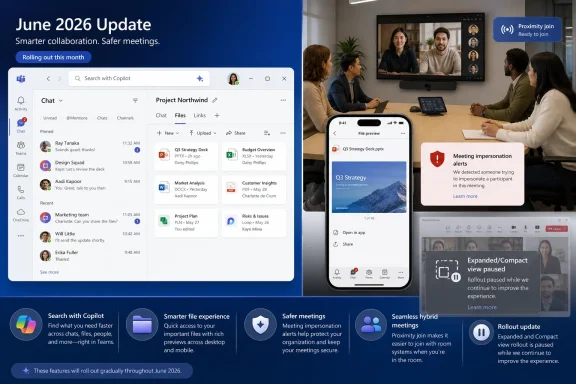
Microsoft’s June 2026 Teams update delivered seven visible improvements across desktop, web, mobile, calling, and Teams Rooms, while Microsoft paused the general-availability rollout of minimized meeting views that had been expected in May and were designed to make multitasking during meetings less painful. For admins and power users, the verdict is simple: take the June update, but do not plan workflows, training, or support guidance around Expanded view or Compact view yet. The upgrade is real, but the feature that best matched how many people actually use Teams during calls is still waiting offstage.
That tension is the story. Microsoft shipped useful work in search, files, app discovery, mobile previews, impersonation alerts, room display control, and proximity join, according to its Teams “What’s new” page for June 2026. But as WindowsForum reported on July 7, Microsoft has paused the general-availability rollout of Teams minimized meeting views after testing Expanded view and Compact view earlier this year. The result is a classic Microsoft 365 decision point: accept the incremental productivity gains now, but keep expectations conservative where meeting-window behavior is concerned.
The June Teams batch is not filler. Search with Copilot fits Microsoft’s larger push to make Teams less like a chat archive and more like a front end for organizational memory. “Find files faster” aims at one of Teams’ most persistent annoyances: the sense that a file exists somewhere in a chat, channel, or meeting thread, but the interface has turned retrieval into a scavenger hunt.
Simplified app discovery is another small but meaningful concession to Teams sprawl. Teams has become a canvas for meetings, calls, files, channels, apps, workflows, and AI surfaces; simplifying app discovery is Microsoft acknowledging that a platform is only as valuable as users’ ability to find the thing they need before they give up. It is not glamorous, but it is the kind of interface work that reduces helpdesk friction.
The mobile update matters because Teams is no longer just a desktop meeting client. File previews on mobile recognize that users increasingly triage work between meetings, in transit, or away from their primary workstation. That does not turn a phone into a full productivity rig, but it does remove one more “I’ll check that when I’m back at my desk” delay from the collaboration loop.
The device-side additions are similarly practical. Meeting impersonation alerts address trust in calls, while front-of-room view control and proximity join for Teams Rooms speak to the hybrid meeting room as a managed endpoint rather than a dumb display. Microsoft is still treating Teams as infrastructure: part communications client, part security surface, part room system, part AI workbench.
That is the upgrade case. If your organization already moves with Teams’ regular cadence, there is no strong reason in the verified June list to hold back broadly. The improvements are scattered, but they are aligned with the real shape of modern Teams usage: find the thing, join the room, preview the file, trust the call, and let Copilot sit closer to the work.
WindowsForum’s July 7 coverage put the pause in context: Microsoft had tested Expanded view and Compact view earlier in 2026 for meetings whose main window had been minimized, and the general-availability rollout was paused after previously being expected in May 2026. That chronology matters because it turns this from a speculative feature request into a delayed product commitment. Users were not merely dreaming up a better meeting window; Microsoft had already been testing the shape of one.
The irony is hard to miss. Teams has spent years adding capabilities for multitasking around the meeting experience: pop-out windows, app panes, Edge-adjacent workflows, richer file surfaces, and channel improvements. WindowsForum has covered that trajectory before, including Microsoft’s earlier push toward new-window workflows and pop-out panes for multitasking. But the most basic meeting reality remains stubborn: people minimize calls because calls compete with the rest of their work.
That is why the pause lands differently from a postponed AI feature or a delayed room-device nicety. A minimized meeting view is not a moonshot. It is the kind of everyday affordance that determines whether Teams feels like a tool that adapts to work or a tool that demands the user adapt to it.
That distinction matters for support readiness. When a feature is visible, user education can reduce tickets. When a feature is paused, over-education creates tickets: users go looking for controls they do not have, managers ask why one tenant or channel does not match another, and helpdesk staff spend time explaining that the calendar said one thing and product reality says another.
Power users should make the same split decision. Use the new search and file capabilities if they appear in your client, test mobile file previews if you work across devices, and pay attention to meeting impersonation alerts when they appear. But if your productivity pain is specifically “I need Teams to behave better while minimized,” the June batch does not solve that problem.
This is also a reminder to separate Teams features into two mental buckets. Some Teams improvements are additive surfaces, where Microsoft can ship a new search behavior, preview mode, or device capability without changing the core meeting flow. Others alter the live meeting experience, where window behavior, controls, shared content, and presenter expectations collide. The paused minimized views sit in the second bucket, where small changes can have outsized consequences.
But the minimized-view pause exposes a gap between knowledge work as Microsoft imagines it and knowledge work as users experience it. Copilot can help locate information, but it cannot give a user back the slice of screen space consumed by a meeting window. It can summarize a discussion, but it cannot make a live call less intrusive while someone updates a spreadsheet, reviews a ticket, or follows a deployment dashboard.
That does not make the AI features unimportant. It does make them incomplete. The modern workday is not a clean sequence of meetings, then work, then recap. It is a collision of live calls, chat interruptions, file retrieval, incident response, approvals, and half-finished documents. Any collaboration platform that improves the archive while leaving the live window awkward is solving only part of the problem.
The same critique applies to mobile and room workflows. File previews on mobile, front-of-room view control, and proximity join all help Teams follow users across contexts. But the desktop meeting remains the center of gravity for many power users and admins. If the desktop meeting window is still the thing people fight during multitasking, Teams has not escaped its most familiar productivity complaint.
For security-minded admins, that is a useful direction. Voice and video meetings can carry social-engineering risk, particularly when participants are primed to accept interruptions from IT, finance, vendors, or executives. A warning inside the communications tool is not a security program, but it is a meaningful layer when the attack surface is human attention.
Teams Rooms also gets practical attention. Front-of-room view control and proximity join for Teams Rooms are not features every home user will care about, but they matter in offices where meeting rooms are shared infrastructure. Hybrid work lives or dies on these details: whether a room joins cleanly, whether the front-of-room display shows the right perspective, and whether the presenter or attendee experience is predictable.
This is where Microsoft’s prioritization makes business sense. Teams Rooms hardware, managed meeting spaces, and security alerts are enterprise concerns with direct administrative value. But that is precisely why the minimized-view pause is frustrating. Microsoft is improving the managed edges of Teams while leaving a common individual workflow unresolved.
Expanded view and Compact view, as covered by WindowsForum, were meant to improve that middle ground after testing earlier this year. The names alone suggest the design trade-off: one view preserves more meeting context, while the other takes less space. That is exactly the kind of user choice Teams needs because not all meetings deserve the same visual footprint.
The pause also raises a product-quality possibility that Microsoft has not fully explained in the verified facts. Meeting-window changes can be risky because they touch shared content visibility, controls, accessibility expectations, focus behavior, and user muscle memory. If Microsoft paused general availability, it may be because the company saw enough friction in testing to slow down. That is better than forcing a flawed interface into production, but it still leaves users waiting.
There is a lesson here for anyone tracking the Microsoft 365 roadmap. Preview and expected rollout windows are useful signals, not guarantees. When a feature is tied to daily workflow, admins should avoid building communications, training materials, or executive expectations until the feature is truly available in their environment.
Instead, admins should communicate narrowly. Tell users that Teams search and file discovery may improve. Tell mobile-heavy users to look for file previews. Tell room managers and conferencing support teams to validate the Teams Rooms changes in their own spaces. Tell everyone else that the minimized meeting experience has not landed as expected.
For helpdesk teams, the best move is to prepare a short internal note. The note should say that Microsoft paused the general-availability rollout of Expanded view and Compact view after earlier testing, and that users should not expect those minimized meeting views to be available until Microsoft resumes the rollout. That saves support staff from improvising an answer when users compare screenshots, preview behavior, or old roadmap expectations.
For power users, the workaround remains behavioral rather than technical: use the Teams features that already exist in your client, keep meeting and work windows arranged intentionally, and resist assuming that every previewed meeting UI change will arrive on schedule. That is unsatisfying, but it is better than chasing a setting that is not generally available.
The sharper criticism is that Microsoft’s Teams priorities are coherent at the platform level while uneven at the user level. The platform wants AI-assisted retrieval, secure communications, mobile continuity, and managed room intelligence. The user wants to survive a meeting while doing the work that cannot wait. Both are legitimate, but only one got the June spotlight.
This is not new for Teams. The product has often advanced through a mix of platform expansion and belated quality-of-life improvements. WindowsForum’s prior coverage of Teams multitasking features, including new-window and pop-out-pane work, shows Microsoft has long understood that users need more flexible layouts. The pause on minimized meeting views is frustrating because it sits in that same lineage yet remains unresolved.
The risk for Microsoft is not that users reject the June update. They probably will not. The risk is that Teams continues to accumulate impressive adjacent capabilities while the core meeting experience remains a source of small, repeated irritation. In enterprise software, small repeated irritation is not small.
That two-track approach avoids both overreaction and complacency. There is no need to tell users that Teams is standing still; it is not. There is also no reason to pretend the most user-visible multitasking fix in this story arrived; it did not.
For organizations that publish monthly Microsoft 365 change digests, the June Teams entry should lead with the features users can actually use. Put search, file discovery, mobile previews, and room updates in the “available or rolling out” bucket, depending on what your tenant sees. Put Expanded view and Compact view in a separate “paused by Microsoft” note, with no target date unless Microsoft provides one.
For admins managing executives, trainers, support desks, or meeting-heavy teams, the paused feature deserves extra caution. Those are the groups most likely to notice meeting-window behavior and least likely to appreciate ambiguity. A simple message now can prevent a round of “where did this feature go?” later.
That tension is the story. Microsoft shipped useful work in search, files, app discovery, mobile previews, impersonation alerts, room display control, and proximity join, according to its Teams “What’s new” page for June 2026. But as WindowsForum reported on July 7, Microsoft has paused the general-availability rollout of Teams minimized meeting views after testing Expanded view and Compact view earlier this year. The result is a classic Microsoft 365 decision point: accept the incremental productivity gains now, but keep expectations conservative where meeting-window behavior is concerned.
 Microsoft Ships the Future Around the Window, Not Inside It
The June Teams batch is not filler. Search with Copilot fits Microsoft’s larger push to make Teams less like a chat archive and more like a front end for organizational memory. “Find files faster” aims at one of Teams’ most persistent annoyances: the sense that a file exists somewhere in a chat, channel, or meeting thread, but the interface has turned retrieval into a scavenger hunt.Simplified app discovery is another small but meaningful concession to Teams sprawl. Teams has become a canvas for meetings, calls, files, channels, apps, workflows, and AI surfaces; simplifying app discovery is Microsoft acknowledging that a platform is only as valuable as users’ ability to find the thing they need before they give up. It is not glamorous, but it is the kind of interface work that reduces helpdesk friction.
The mobile update matters because Teams is no longer just a desktop meeting client. File previews on mobile recognize that users increasingly triage work between meetings, in transit, or away from their primary workstation. That does not turn a phone into a full productivity rig, but it does remove one more “I’ll check that when I’m back at my desk” delay from the collaboration loop.
The device-side additions are similarly practical. Meeting impersonation alerts address trust in calls, while front-of-room view control and proximity join for Teams Rooms speak to the hybrid meeting room as a managed endpoint rather than a dumb display. Microsoft is still treating Teams as infrastructure: part communications client, part security surface, part room system, part AI workbench.
That is the upgrade case. If your organization already moves with Teams’ regular cadence, there is no strong reason in the verified June list to hold back broadly. The improvements are scattered, but they are aligned with the real shape of modern Teams usage: find the thing, join the room, preview the file, trust the call, and let Copilot sit closer to the work.
The Missing Multitasking Fix Says More Than the Seven Features That Shipped
The paused minimized meeting views are not a niche cosmetic issue. Microsoft’s own support documentation frames minimized meeting views as a way to multitask during meetings without losing track of speakers, shared content, and controls. That is exactly the compromise many Teams users want: stay present enough to follow the meeting, but recover enough screen real estate to keep doing the work the meeting is supposedly about.WindowsForum’s July 7 coverage put the pause in context: Microsoft had tested Expanded view and Compact view earlier in 2026 for meetings whose main window had been minimized, and the general-availability rollout was paused after previously being expected in May 2026. That chronology matters because it turns this from a speculative feature request into a delayed product commitment. Users were not merely dreaming up a better meeting window; Microsoft had already been testing the shape of one.
The irony is hard to miss. Teams has spent years adding capabilities for multitasking around the meeting experience: pop-out windows, app panes, Edge-adjacent workflows, richer file surfaces, and channel improvements. WindowsForum has covered that trajectory before, including Microsoft’s earlier push toward new-window workflows and pop-out panes for multitasking. But the most basic meeting reality remains stubborn: people minimize calls because calls compete with the rest of their work.
That is why the pause lands differently from a postponed AI feature or a delayed room-device nicety. A minimized meeting view is not a moonshot. It is the kind of everyday affordance that determines whether Teams feels like a tool that adapts to work or a tool that demands the user adapt to it.
Admins Should Treat June as an Upgrade, Not a Training Moment
For IT administrators, the cleanest reading is that June’s Teams update is safe to message as a collection of incremental improvements, not as a meeting-behavior change. The features Microsoft lists for June are worth surfacing in internal comms, especially search and file discovery improvements, because users are likely to notice them in ordinary work. But admins should avoid promising a new minimized meeting experience until Microsoft resumes the rollout.That distinction matters for support readiness. When a feature is visible, user education can reduce tickets. When a feature is paused, over-education creates tickets: users go looking for controls they do not have, managers ask why one tenant or channel does not match another, and helpdesk staff spend time explaining that the calendar said one thing and product reality says another.
Power users should make the same split decision. Use the new search and file capabilities if they appear in your client, test mobile file previews if you work across devices, and pay attention to meeting impersonation alerts when they appear. But if your productivity pain is specifically “I need Teams to behave better while minimized,” the June batch does not solve that problem.
This is also a reminder to separate Teams features into two mental buckets. Some Teams improvements are additive surfaces, where Microsoft can ship a new search behavior, preview mode, or device capability without changing the core meeting flow. Others alter the live meeting experience, where window behavior, controls, shared content, and presenter expectations collide. The paused minimized views sit in the second bucket, where small changes can have outsized consequences.
The AI Priority Is Obvious, but the Human Workflow Is Still the Bottleneck
Search with Copilot is the most strategically revealing June feature because it extends Microsoft’s AI thesis into the Teams retrieval problem. The company wants users to ask, search, summarize, and recover context through Copilot rather than manually reconstructing conversations. In theory, that is exactly where AI should help: Teams is full of fragmented knowledge, and the human cost of finding it is real.But the minimized-view pause exposes a gap between knowledge work as Microsoft imagines it and knowledge work as users experience it. Copilot can help locate information, but it cannot give a user back the slice of screen space consumed by a meeting window. It can summarize a discussion, but it cannot make a live call less intrusive while someone updates a spreadsheet, reviews a ticket, or follows a deployment dashboard.
That does not make the AI features unimportant. It does make them incomplete. The modern workday is not a clean sequence of meetings, then work, then recap. It is a collision of live calls, chat interruptions, file retrieval, incident response, approvals, and half-finished documents. Any collaboration platform that improves the archive while leaving the live window awkward is solving only part of the problem.
The same critique applies to mobile and room workflows. File previews on mobile, front-of-room view control, and proximity join all help Teams follow users across contexts. But the desktop meeting remains the center of gravity for many power users and admins. If the desktop meeting window is still the thing people fight during multitasking, Teams has not escaped its most familiar productivity complaint.
Security and Rooms Get Tangible Wins While Desktop Users Wait
Meeting impersonation alerts are one of the more concrete June additions because they address a recognizable risk: users need help identifying when a caller may not be who they appear to be. Microsoft’s verified June list describes this as part of the Teams update set, and it fits a broader pattern in collaboration software. The meeting client is increasingly a trust boundary, not just a camera-and-microphone app.For security-minded admins, that is a useful direction. Voice and video meetings can carry social-engineering risk, particularly when participants are primed to accept interruptions from IT, finance, vendors, or executives. A warning inside the communications tool is not a security program, but it is a meaningful layer when the attack surface is human attention.
Teams Rooms also gets practical attention. Front-of-room view control and proximity join for Teams Rooms are not features every home user will care about, but they matter in offices where meeting rooms are shared infrastructure. Hybrid work lives or dies on these details: whether a room joins cleanly, whether the front-of-room display shows the right perspective, and whether the presenter or attendee experience is predictable.
This is where Microsoft’s prioritization makes business sense. Teams Rooms hardware, managed meeting spaces, and security alerts are enterprise concerns with direct administrative value. But that is precisely why the minimized-view pause is frustrating. Microsoft is improving the managed edges of Teams while leaving a common individual workflow unresolved.
The Paused Views Were Small Because the Problem Is Small Every Five Minutes
Minimized meeting views matter because the pain is frequent, not because the feature is grand. A user joins a meeting, minimizes the window to answer a message, checks a file, follows a live dashboard, or updates notes. The meeting remains important enough not to ignore, but not important enough to occupy the whole screen. That is the daily middle ground Microsoft’s support documentation explicitly describes.Expanded view and Compact view, as covered by WindowsForum, were meant to improve that middle ground after testing earlier this year. The names alone suggest the design trade-off: one view preserves more meeting context, while the other takes less space. That is exactly the kind of user choice Teams needs because not all meetings deserve the same visual footprint.
The pause also raises a product-quality possibility that Microsoft has not fully explained in the verified facts. Meeting-window changes can be risky because they touch shared content visibility, controls, accessibility expectations, focus behavior, and user muscle memory. If Microsoft paused general availability, it may be because the company saw enough friction in testing to slow down. That is better than forcing a flawed interface into production, but it still leaves users waiting.
There is a lesson here for anyone tracking the Microsoft 365 roadmap. Preview and expected rollout windows are useful signals, not guarantees. When a feature is tied to daily workflow, admins should avoid building communications, training materials, or executive expectations until the feature is truly available in their environment.
The Upgrade Path Is Clearer Than the Roadmap
The practical recommendation is not to freeze Teams adoption over this pause. The June feature set contains enough useful improvements that organizations should let normal update processes continue unless they have a separate compatibility or governance reason to slow down. Search, files, app discovery, mobile previews, alerts, and room behaviors are not the kind of features that usually require a broad user retraining campaign.Instead, admins should communicate narrowly. Tell users that Teams search and file discovery may improve. Tell mobile-heavy users to look for file previews. Tell room managers and conferencing support teams to validate the Teams Rooms changes in their own spaces. Tell everyone else that the minimized meeting experience has not landed as expected.
For helpdesk teams, the best move is to prepare a short internal note. The note should say that Microsoft paused the general-availability rollout of Expanded view and Compact view after earlier testing, and that users should not expect those minimized meeting views to be available until Microsoft resumes the rollout. That saves support staff from improvising an answer when users compare screenshots, preview behavior, or old roadmap expectations.
For power users, the workaround remains behavioral rather than technical: use the Teams features that already exist in your client, keep meeting and work windows arranged intentionally, and resist assuming that every previewed meeting UI change will arrive on schedule. That is unsatisfying, but it is better than chasing a setting that is not generally available.
Microsoft’s Teams Strategy Is Coherent, Even When the User Experience Feels Backward
It is tempting to frame the June update as Microsoft chasing AI while ignoring basics. That is too simple. Search with Copilot, better file discovery, simplified app discovery, mobile file previews, impersonation alerts, and Teams Rooms improvements are all defensible investments. They solve real problems for real organizations.The sharper criticism is that Microsoft’s Teams priorities are coherent at the platform level while uneven at the user level. The platform wants AI-assisted retrieval, secure communications, mobile continuity, and managed room intelligence. The user wants to survive a meeting while doing the work that cannot wait. Both are legitimate, but only one got the June spotlight.
This is not new for Teams. The product has often advanced through a mix of platform expansion and belated quality-of-life improvements. WindowsForum’s prior coverage of Teams multitasking features, including new-window and pop-out-pane work, shows Microsoft has long understood that users need more flexible layouts. The pause on minimized meeting views is frustrating because it sits in that same lineage yet remains unresolved.
The risk for Microsoft is not that users reject the June update. They probably will not. The risk is that Teams continues to accumulate impressive adjacent capabilities while the core meeting experience remains a source of small, repeated irritation. In enterprise software, small repeated irritation is not small.
The Admin Decision Comes Down to Two Tracks
The concrete choice for IT is to split June into what can be adopted and what must be watched. Treat the shipped features as part of the normal Teams evolution. Treat minimized meeting views as a paused promise.That two-track approach avoids both overreaction and complacency. There is no need to tell users that Teams is standing still; it is not. There is also no reason to pretend the most user-visible multitasking fix in this story arrived; it did not.
For organizations that publish monthly Microsoft 365 change digests, the June Teams entry should lead with the features users can actually use. Put search, file discovery, mobile previews, and room updates in the “available or rolling out” bucket, depending on what your tenant sees. Put Expanded view and Compact view in a separate “paused by Microsoft” note, with no target date unless Microsoft provides one.
For admins managing executives, trainers, support desks, or meeting-heavy teams, the paused feature deserves extra caution. Those are the groups most likely to notice meeting-window behavior and least likely to appreciate ambiguity. A simple message now can prevent a round of “where did this feature go?” later.
The June Scorecard Favors Cautious Adoption Over Wishlist Planning
Here is the practical read for WindowsForum’s audience: Microsoft Teams improved in June 2026, but not in the place many multitaskers were watching. The seven shipped features are worth accepting; the paused minimized meeting views are worth tracking, not promising.- Microsoft’s June 2026 Teams update includes Search with Copilot, faster file discovery, simplified app discovery, mobile file previews, meeting impersonation alerts, front-of-room view control, and proximity join for Teams Rooms.
- The minimized meeting views that would have helped users multitask during calls did not reach general availability as expected, after Microsoft paused the rollout on July 7, 2026.
- Admins should update user communications to distinguish shipped June features from paused meeting-window changes.
- Power users should not waste time looking for Expanded view or Compact view as a dependable general-availability feature until Microsoft resumes the rollout.
- Teams Rooms and security-focused teams have more immediate June work to validate than desktop multitaskers do.
- The most realistic upgrade posture is to adopt the June improvements while keeping meeting-window expectations conservative.
References
- Primary source: support.microsoft.com
Loading…
support.microsoft.com - Independent coverage: microsoft.com
Microsoft 365 Roadmap | Microsoft 365
The Microsoft 365 Roadmap lists updates that are currently planned for applicable subscribers. Check here for more information on the status of new features and updates.www.microsoft.com
- Independent coverage: techcommunity.microsoft.com
Goodbye Together mode, hello simplified meeting layouts in Microsoft Teams | Microsoft Community Hub
Beginning June 30th, the Together mode experience will no longer be available. We recommend using the modern Gallery view. techcommunity.microsoft.com
- Primary source: WindowsForum
Loading…
windowsforum.com