

Microsoft 365 Roadmap ID 566696 is an in-development, web-only PDF navigation feature for OneDrive and SharePoint, currently targeted for general availability in August 2026. IT teams should monitor the roadmap entry and, once the feature reaches their tenant, test the three actions Microsoft has promised: open the thumbnail panel, browse PDF pages visually, and select a thumbnail to jump directly to that page.
The feature is listed for Targeted Release and General Availability across Worldwide (Standard Multi-Tenant), GCC, GCC High, and DoD. Microsoft has not provided tenant-level deployment timing, detailed interface documentation, or feature-specific release-management instructions.
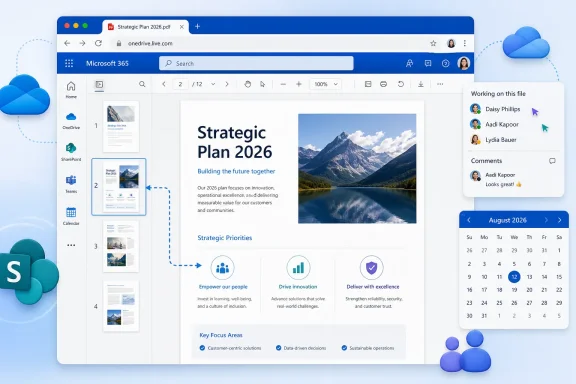
Roadmap ID 566696 adds a thumbnail panel to the PDF viewing experience in OneDrive and SharePoint on the web. After opening a PDF, users will be able to browse visual representations of its pages and select a thumbnail to open the corresponding page.
This creates another way to move through a document. Instead of relying only on scrolling, text search, or a known page number, a reader can use the appearance and approximate position of a page to find it. That may be particularly useful in longer or visually distinctive documents, although Microsoft has not published specific productivity claims or usage scenarios.
The announced workflow is narrow:
That distinction should guide internal descriptions of the update. Calling it a “PDF thumbnail navigation panel” is more accurate than describing it as a new PDF editor or document-management system.
The roadmap entry also does not establish particular business outcomes. Organizations should not claim that the panel will reduce downloads, replace specialized PDF software, change compliance behavior, or produce measurable productivity gains unless they later collect their own evidence or Microsoft publishes additional information.
The roadmap does not say that every Microsoft 365 route to a PDF is included. In particular, it does not define behavior in desktop or mobile applications, synchronized folders, or PDF experiences embedded in other Microsoft 365 interfaces. Testing should therefore begin directly in the two named web products rather than in an adjacent application.
The planned cloud scope is broad, covering commercial and US government environments, but Microsoft has not supplied a tenant-by-tenant schedule. The listing identifies the environments intended to receive the feature; it does not specify when an individual organization or user will see it.
August 2026 is Microsoft’s current target for general availability, not an exact launch date supplied for every tenant. Administrators should monitor Roadmap ID 566696 for changes rather than committing to a specific internal availability day.
Targeted Release is listed as a deployment ring, but the roadmap facts do not provide setup requirements, tenant eligibility criteria, or feature-specific enrollment instructions. Organizations already using Microsoft 365 release-management practices can monitor their normal test population, but they should not assume that a particular configuration guarantees early access to this feature.
The roadmap also does not provide detailed support material explaining how the panel will be introduced, what the control will look like, or whether OneDrive and SharePoint will receive it simultaneously within a tenant. Until Microsoft publishes more information, the reliable rollout test is direct observation in each named web surface.
IT should run the acceptance test independently in OneDrive and SharePoint. Successful behavior in one product should not be treated as proof that the feature is already visible in the other.
After that basic test passes, an organization may use representative internal PDFs to determine whether it needs additional help-desk notes. This is local validation, not a Microsoft deployment requirement. The roadmap does not prescribe a file test matrix or promise specific results for different document types.
WindowsForum’s value-add is straightforward: test directly in the two named web surfaces and document the visible control location for your help desk after it reaches your tenant.
This record should identify the test date, account, browser, product, and observed result. Those details help an organization distinguish direct evidence from assumptions, especially if different users report different experiences during deployment.
Microsoft’s roadmap does not provide tenant-level timing or detailed UI and support documentation. A local test record therefore has more operational value than speculative instructions about where the control should appear or when support teams should escalate its absence.
Support material should also make the product boundary explicit. The roadmap covers PDFs opened in OneDrive and SharePoint on the web. If a user is working in another application or interface, the roadmap entry alone does not establish that the same panel should be present there.
An internal availability notice could use similarly limited language:
Microsoft has not yet documented:
The absence of tenant-level timing also limits what a help desk can conclude before the feature is observed. Microsoft has named deployment rings and a target month, but it has not provided enough information to determine from the roadmap alone when a specific account should receive the change.
Similarly, the roadmap does not explain whether every way of reaching a PDF from within Microsoft 365 will display the panel. Validation should stay anchored to direct PDF opening in OneDrive on the web and SharePoint on the web. Results from other interfaces should be treated separately unless Microsoft later expands the documented scope.
Accessibility is another area where the roadmap entry does not provide enough detail for conclusions. The absence of feature-specific information is not evidence that accessibility support will or will not be present. Organizations with accessibility requirements should evaluate the released control using their established processes and compare their observations with any documentation Microsoft publishes.
IT should use the same discipline for performance and file behavior. The roadmap promises visual page browsing and navigation to a selected page, but it does not state how quickly thumbnails will appear, how the panel will behave with very large documents, or whether different browsers will present identical results. Such details can be measured after release, but they should not be reported as established characteristics in advance.
Roadmap ID 566696 remains a focused Microsoft 365 viewer update with a clear operational test. Microsoft plans to add a PDF thumbnail panel to OneDrive and SharePoint on the web, enabling users to browse pages visually and jump to the page they select. The current general-availability target is August 2026, with Targeted Release and General Availability listed across Worldwide (Standard Multi-Tenant), GCC, GCC High, and DoD.
For now, administrators should monitor the roadmap rather than build procedures around undocumented interface or deployment details. When the feature reaches the tenant, the next step is concrete: open a PDF directly in each named web product, locate the panel, select a page thumbnail, and verify that the viewer opens the selected page. After that validation, IT can document the observed control for users and the help desk while continuing to watch for fuller Microsoft documentation.
The feature is listed for Targeted Release and General Availability across Worldwide (Standard Multi-Tenant), GCC, GCC High, and DoD. Microsoft has not provided tenant-level deployment timing, detailed interface documentation, or feature-specific release-management instructions.
 What Changes
Roadmap ID 566696 adds a thumbnail panel to the PDF viewing experience in OneDrive and SharePoint on the web. After opening a PDF, users will be able to browse visual representations of its pages and select a thumbnail to open the corresponding page.This creates another way to move through a document. Instead of relying only on scrolling, text search, or a known page number, a reader can use the appearance and approximate position of a page to find it. That may be particularly useful in longer or visually distinctive documents, although Microsoft has not published specific productivity claims or usage scenarios.
The announced workflow is narrow:
- Open a PDF in OneDrive or SharePoint on the web.
- Open the thumbnail panel.
- Browse the page thumbnails.
- Select a thumbnail.
- Continue reading from the selected page.
What Is Included—and Not Announced
Microsoft has announced:- A thumbnail panel for PDFs.
- Visual browsing of PDF pages.
- Direct navigation to the page selected from the panel.
- Support in OneDrive on the web.
- Support in SharePoint on the web.
- Targeted Release and General Availability deployment rings.
- A general-availability target of August 2026.
- Planned availability in Worldwide (Standard Multi-Tenant), GCC, GCC High, and DoD.
- An in-development status.
That distinction should guide internal descriptions of the update. Calling it a “PDF thumbnail navigation panel” is more accurate than describing it as a new PDF editor or document-management system.
The roadmap entry also does not establish particular business outcomes. Organizations should not claim that the panel will reduce downloads, replace specialized PDF software, change compliance behavior, or produce measurable productivity gains unless they later collect their own evidence or Microsoft publishes additional information.
Rollout Scope
Microsoft identifies OneDrive and SharePoint on the web as the products and platform covered by this roadmap item. Those are the two surfaces administrators should use when verifying the rollout.| Product | Platform | Status | Planned behavior | Release rings | Planned cloud scope |
|---|---|---|---|---|---|
| OneDrive | Web | In development | Open a thumbnail panel, browse PDF pages visually, and jump to a selected page | Targeted Release and General Availability | Worldwide (Standard Multi-Tenant), GCC, GCC High, DoD |
| SharePoint | Web | In development | Open a thumbnail panel, browse PDF pages visually, and jump to a selected page | Targeted Release and General Availability | Worldwide (Standard Multi-Tenant), GCC, GCC High, DoD |
The planned cloud scope is broad, covering commercial and US government environments, but Microsoft has not supplied a tenant-by-tenant schedule. The listing identifies the environments intended to receive the feature; it does not specify when an individual organization or user will see it.
Rollout Timeline
| Stage | Current roadmap information |
|---|---|
| Development status | In development |
| Early release ring | Targeted Release |
| Broad release ring | General Availability |
| General-availability target | August 2026 |
| Planned cloud scope | Worldwide (Standard Multi-Tenant), GCC, GCC High, DoD |
| Tenant-level timing | Not provided |
Targeted Release is listed as a deployment ring, but the roadmap facts do not provide setup requirements, tenant eligibility criteria, or feature-specific enrollment instructions. Organizations already using Microsoft 365 release-management practices can monitor their normal test population, but they should not assume that a particular configuration guarantees early access to this feature.
The roadmap also does not provide detailed support material explaining how the panel will be introduced, what the control will look like, or whether OneDrive and SharePoint will receive it simultaneously within a tenant. Until Microsoft publishes more information, the reliable rollout test is direct observation in each named web surface.
What IT Should Test
The core acceptance test should map exactly to Microsoft’s announced capability:That procedure avoids assumptions about the panel’s position, icon, label, or visual design. Those interface details have not been documented in the roadmap description and should be recorded only after the feature becomes visible.Open a PDF directly in OneDrive on the web and SharePoint on the web; locate the thumbnail-panel control once released; select a page thumbnail; confirm the viewer opens that page.
IT should run the acceptance test independently in OneDrive and SharePoint. Successful behavior in one product should not be treated as proof that the feature is already visible in the other.
Administrator Checklist
The first test file should be a straightforward multipage PDF that already opens normally in the web viewer. The goal is to verify the promised navigation workflow without introducing unrelated file-specific variables.WindowsForum rollout guidance
- Monitor Roadmap ID 566696. Track its development status, August 2026 target, listed release rings, and cloud scope.
- Wait for direct tenant evidence. Do not announce availability solely because the target month has begun or the roadmap status has changed.
- Open a PDF directly in OneDrive on the web. Locate the thumbnail-panel control once it appears.
- Test the three promised actions. Open the panel, browse page thumbnails, and select one to confirm that the viewer opens that page.
- Repeat the same test in SharePoint on the web. Record whether the feature is visible and functional there.
- Document the observed interface. Capture the visible control’s name and location for internal support material without assuming that preview behavior will remain unchanged.
- Keep user guidance narrow. Describe the control as a way to browse PDF pages visually and jump to a selected page.
- Separate observations from Microsoft’s commitments. If local testing uncovers additional behavior, label it as tenant testing rather than a roadmap promise.
After that basic test passes, an organization may use representative internal PDFs to determine whether it needs additional help-desk notes. This is local validation, not a Microsoft deployment requirement. The roadmap does not prescribe a file test matrix or promise specific results for different document types.
WindowsForum’s value-add is straightforward: test directly in the two named web surfaces and document the visible control location for your help desk after it reaches your tenant.
Recording the Result
A short validation record can prevent later confusion about what was actually tested:| Check | OneDrive on the web | SharePoint on the web |
|---|---|---|
| PDF opens in the web viewer | Pass / Fail / Not tested | Pass / Fail / Not tested |
| Thumbnail-panel control is visible | Pass / Fail / Not tested | Pass / Fail / Not tested |
| Panel displays page thumbnails | Pass / Fail / Not tested | Pass / Fail / Not tested |
| Selecting a thumbnail opens that page | Pass / Fail / Not tested | Pass / Fail / Not tested |
| Control location documented for support | Yes / No | Yes / No |
| Test date and account recorded | Yes / No | Yes / No |
Microsoft’s roadmap does not provide tenant-level timing or detailed UI and support documentation. A local test record therefore has more operational value than speculative instructions about where the control should appear or when support teams should escalate its absence.
Help-Desk Wording
Once the feature is confirmed, a concise support description can state:The help desk should replace “open the page-thumbnail panel” with the observed control name and location after testing. Before that observation, internal documentation should avoid inventing an icon, menu path, side-panel position, or keyboard command.Open the PDF in OneDrive or SharePoint on the web, open the page-thumbnail panel, and select a thumbnail to jump to that page.
Support material should also make the product boundary explicit. The roadmap covers PDFs opened in OneDrive and SharePoint on the web. If a user is working in another application or interface, the roadmap entry alone does not establish that the same panel should be present there.
An internal availability notice could use similarly limited language:
The final sentence should be added only after direct validation. Before the feature is observed, communications can mention Microsoft’s August 2026 target but should not present a tenant-specific launch date.Microsoft is adding a PDF page-thumbnail panel to OneDrive and SharePoint on the web. The panel lets users browse pages visually and select a thumbnail to open that page. IT has confirmed the feature in our tenant as of [date].
What Remains Undocumented
Roadmap ID 566696 establishes the purpose, products, platform, release rings, target month, and planned cloud scope. It does not provide detailed interface or support documentation.Microsoft has not yet documented:
- The name, icon, or location of the thumbnail-panel control.
- Whether the interface will look identical in OneDrive and SharePoint.
- Tenant-level or user-level deployment timing.
- Feature-specific Targeted Release enrollment or configuration procedures.
- Browser, device, or layout details for the panel.
- Keyboard and assistive-technology behavior specific to the new control.
- Performance characteristics or published file limits for the thumbnail experience.
- Support procedures for investigating a panel that is not visible.
- Whether separate administrator or end-user documentation will accompany the release.
The absence of tenant-level timing also limits what a help desk can conclude before the feature is observed. Microsoft has named deployment rings and a target month, but it has not provided enough information to determine from the roadmap alone when a specific account should receive the change.
Similarly, the roadmap does not explain whether every way of reaching a PDF from within Microsoft 365 will display the panel. Validation should stay anchored to direct PDF opening in OneDrive on the web and SharePoint on the web. Results from other interfaces should be treated separately unless Microsoft later expands the documented scope.
Accessibility is another area where the roadmap entry does not provide enough detail for conclusions. The absence of feature-specific information is not evidence that accessibility support will or will not be present. Organizations with accessibility requirements should evaluate the released control using their established processes and compare their observations with any documentation Microsoft publishes.
IT should use the same discipline for performance and file behavior. The roadmap promises visual page browsing and navigation to a selected page, but it does not state how quickly thumbnails will appear, how the panel will behave with very large documents, or whether different browsers will present identical results. Such details can be measured after release, but they should not be reported as established characteristics in advance.
Roadmap ID 566696 remains a focused Microsoft 365 viewer update with a clear operational test. Microsoft plans to add a PDF thumbnail panel to OneDrive and SharePoint on the web, enabling users to browse pages visually and jump to the page they select. The current general-availability target is August 2026, with Targeted Release and General Availability listed across Worldwide (Standard Multi-Tenant), GCC, GCC High, and DoD.
For now, administrators should monitor the roadmap rather than build procedures around undocumented interface or deployment details. When the feature reaches the tenant, the next step is concrete: open a PDF directly in each named web product, locate the panel, select a page thumbnail, and verify that the viewer opens the selected page. After that validation, IT can document the observed control for users and the help desk while continuing to watch for fuller Microsoft documentation.
References
- Primary source: Microsoft 365 Roadmap
Published: 2026-07-09T23:00:39.7653153Z
Loading…
www.microsoft.com - Official source: learn.microsoft.com
Loading…
learn.microsoft.com - Official source: support.microsoft.com
Loading…
support.microsoft.com - Related coverage: adobe.com
Loading…
www.adobe.com - Official source: adoption.microsoft.com