

Outlook produced the strongest reported problem signal on Friday morning, while Copilot drew a smaller cluster and Microsoft 365 attracted only a handful of complaints. Microsoft had not confirmed an outage or identified a cause at the time of reporting. Administrators should verify the status of their own tenant before resetting passwords, rebuilding Outlook profiles, or making other client-side changes.
Metro reported the apparent service problems after users began flagging trouble across several parts of Microsoft’s portfolio on Friday. Outlook generated the clearest public signal: according to the DownDetector figures described by Metro, reports began shortly after 7am, increased through the morning, and approached 100 shortly before 9am.
The symptom categories suggested disruption to core email functions. Twenty-five percent of reporting Outlook users selected login problems, while 43 percent selected difficulty sending messages. Those symptoms can look similar from a user’s perspective but require different tests: one prevents access, while the other may leave Outlook apparently functional until a message remains queued, returns an error, or fails to arrive.
Copilot produced a smaller cluster. Thirty users reported problems, and 63 percent of those reports concerned its website. Microsoft 365 also attracted a handful of complaints, while Metro did not describe comparable widespread trouble involving Microsoft Store or Microsoft Azure.
At the time of Metro’s report, Microsoft had not issued a statement about the apparent disruption. There was no confirmed scope, affected-region list, root cause, recovery estimate, or official connection between the Outlook and Copilot reports.
The available public reporting therefore supports only a narrow conclusion: users were reporting real problems, Outlook had the strongest signal, Copilot had a smaller web-focused cluster, and Microsoft had not confirmed that these reports represented one incident or a Microsoft-wide outage.
A compact decision tree can prevent unnecessary changes:
A login failure is usually unmistakable. The user may receive an error, face repeated prompts, or be unable to reach the mailbox. Because the symptom resembles an account problem, support staff may be tempted to reset the password, remove stored credentials, reconfigure authentication, or recreate the Outlook profile.
Those actions can be appropriate for an isolated user after the service path has been tested. They are poor first moves when several users begin reporting similar errors at approximately the same time. Broad credential or profile changes add new variables and may make it harder to determine whether service recovery occurred independently of local intervention.
Sending failures can be less obvious and potentially more disruptive. A user may still be able to open Outlook, read synchronized messages, search existing content, and compose new mail. The problem may become visible only when a message remains in the outbox, generates a delivery error, or does not reach its recipient.
Administrators should ask affected users for observable details rather than interpretations:
This table describes the public report pattern, not the architecture behind it. It does not establish that Outlook and Copilot shared a dependency, that Microsoft 365 represented a separate incident, or that services without a visible report spike were technically relevant or irrelevant.
The reasonable assessment, based only on the reports described by Metro, is that the visible impact appeared concentrated rather than universal. That is an interpretation of public symptoms, not a confirmed Microsoft characterization of the incident.
Microsoft 365 complaints are especially difficult to interpret because users may use that name for the broader subscription, a portal, or an individual application. A person encountering an Outlook problem could describe it as an Outlook failure, a Microsoft 365 failure, or both. Public categories should therefore not be treated as cleanly separated technical datasets.
The Copilot figures require similar restraint. Metro’s breakdown identifies the website as the most commonly reported area, but it does not establish the underlying failure point. A web-facing error can arise at several stages between the user and the requested function. Without a Microsoft statement, the root cause should remain unspecified.
The Outlook peak of almost 100 reports must not be read as meaning that only 100 people were affected. It must not be multiplied by an assumed reporting rate to estimate the number of affected accounts. It also does not establish the number of organizations, tenants, regions, devices, or mailboxes involved.
The category percentages have the same limitation. The reported 25 percent for login trouble and 43 percent for sending problems describe the selections made within the reporting population. They are not measurements of every affected Outlook user, and they do not identify the technical component responsible.
Likewise, similar timing across Outlook and Copilot can justify checking for a shared pattern, but it cannot prove a shared cause. The reports could describe one provider-side incident, separate service problems, regional connectivity effects, account-specific issues, local failures, or a combination of conditions.
Microsoft’s lack of a statement at the time also cuts both ways. It means there was no provider confirmation supporting a broad outage claim, but it does not prove that every reported problem was local. The appropriate position is to preserve uncertainty while gathering tenant-specific evidence.
That evidence hierarchy should remain simple:
A later update can add recovery evidence:
The first support question should be: What exactly failed?
Useful evidence includes:
Administrators should also avoid turning a Copilot error into an Azure diagnosis, an AI-model failure, or an identity incident without supporting evidence. The public reports identify where users noticed the problem, not which underlying component caused it.
A practical workaround may simply be to continue the task without the unavailable feature, use an approved manual process, or postpone the AI-assisted step. The correct fallback depends on the organization’s policies and the work involved, but it should not require an unsupported technical explanation.
Microsoft 365 admin center > Health > Service health
Access requires a Microsoft 365 admin role and permission to access the affected tenant. An ordinary end user, an administrator signed into another tenant, or an outside observer may not be able to view the information relevant to the organization experiencing the problem.
If a matching service-health item appears, record its title, stated impact, publication time, latest update, and any instructions visible to the tenant administrator. Use that information when briefing users, but continue to distinguish Microsoft’s stated scope from the organization’s locally observed impact.
If no matching item appears, record that result accurately: “No matching item was visible in the affected tenant at 8:40am,” for example. Do not translate it into “Microsoft confirms there is no problem.” The timestamp matters because the available information can change during an investigation.
Only after checking scope should support teams consider disruptive endpoint actions. Rebuilding an Outlook profile, clearing application data, removing credentials, resetting passwords, or reconfiguring authentication may be justified for a persistent isolated problem. Performing those actions across multiple users during a shared symptom burst can waste time and complicate recovery.
A useful rule is:
During the morning: Users also submitted reports involving Copilot and a smaller number under Microsoft 365.
Shortly before 9am Friday: Outlook reports approached 100. Among reporting users, 25 percent selected login trouble and 43 percent selected difficulty sending messages.
At the time of Metro’s report: Copilot had 30 reports, with 63 percent involving the website. Microsoft had not issued a statement confirming an outage or identifying a cause.
The timeline should not be extended with estimated recovery times or technical milestones that were not reported. If an organization observed its own recovery, that local timestamp should be labeled as an internal observation rather than a universal service-restoration time.
There is also no evidence in the report that the event was a cybersecurity incident. Login and sending failures can occur under many conditions. Treating them as proof of compromise would introduce unnecessary alarm and could divert responders from the immediate task of establishing scope.
Geographic claims require the same restraint. The report did not establish worldwide impact, a nationwide outage, a defined regional boundary, or a split between consumer and organizational accounts. The safest wording remains that Microsoft users reported problems during the specified Friday-morning period.
Even where a local IT team confirms that several users are affected, it should distinguish between three statements:
The first layer is the user alert. It should say what users may experience, what they should try, what they should avoid changing, and where they should report errors. A concise alert might read:
The third layer is the management update. It should describe observed business impact, the number or groups of users known to be affected, available workarounds, tenant-health findings, and the next update time. It should not turn an unconfirmed public report into a definitive provider diagnosis.
The fourth layer is the technical incident record. It should preserve timestamps, client and network comparisons, exact errors, service-health observations, support case details, interventions, and recovery tests. That record will remain useful even if the disruption ends before Microsoft publishes an explanation.
The Friday-morning reports did not establish a broad Microsoft outage, but they did create a valid reason for administrators to investigate. Outlook showed the clearest public signal, Copilot showed a smaller web-focused cluster, and the cause remained unknown. The correct response is neither to dismiss the reports nor to rebuild every affected endpoint: verify the tenant, reproduce the symptom, preserve evidence, protect alternate communications, and keep every update within the limits of what has actually been confirmed.
Immediate response
- Sign in to Microsoft 365 admin center > Health > Service health using an account with a Microsoft 365 admin role and access to the affected tenant.
- Test Outlook on the web against the affected desktop or mobile client.
- Capture the exact error text, affected account, access method, and timestamp.
- If multiple users show the same symptom, do not reset passwords or rebuild profiles until the scope is clearer.
- Move incident coordination to an alternate communications channel if email delivery is unreliable.
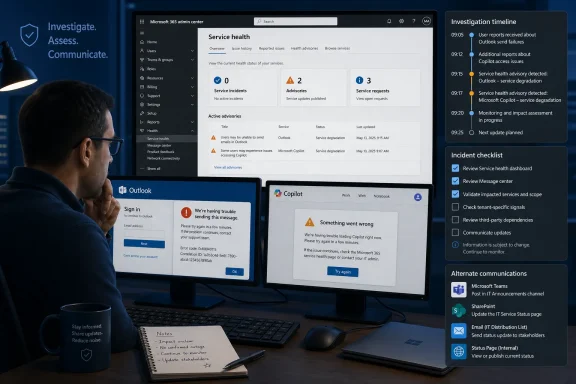 The Reports Arrived Before the Explanation
Metro reported the apparent service problems after users began flagging trouble across several parts of Microsoft’s portfolio on Friday. Outlook generated the clearest public signal: according to the DownDetector figures described by Metro, reports began shortly after 7am, increased through the morning, and approached 100 shortly before 9am.The symptom categories suggested disruption to core email functions. Twenty-five percent of reporting Outlook users selected login problems, while 43 percent selected difficulty sending messages. Those symptoms can look similar from a user’s perspective but require different tests: one prevents access, while the other may leave Outlook apparently functional until a message remains queued, returns an error, or fails to arrive.
Copilot produced a smaller cluster. Thirty users reported problems, and 63 percent of those reports concerned its website. Microsoft 365 also attracted a handful of complaints, while Metro did not describe comparable widespread trouble involving Microsoft Store or Microsoft Azure.
At the time of Metro’s report, Microsoft had not issued a statement about the apparent disruption. There was no confirmed scope, affected-region list, root cause, recovery estimate, or official connection between the Outlook and Copilot reports.
The available public reporting therefore supports only a narrow conclusion: users were reporting real problems, Outlook had the strongest signal, Copilot had a smaller web-focused cluster, and Microsoft had not confirmed that these reports represented one incident or a Microsoft-wide outage.
What Administrators Should Do First
The most important early decision is whether to continue investigating individual devices or pause local repairs and treat the symptoms as a possible shared-service problem.A compact decision tree can prevent unnecessary changes:
- Many users, similar symptoms, multiple devices or networks: Pause endpoint repairs. Check Microsoft 365 admin center > Health > Service health, record the first known failure time, and compare affected accounts and access methods.
- One user, one desktop or mobile client: Test Outlook on the web. If web mail works, investigate the local application, device, cached credentials, connectivity, or profile without assuming a provider incident.
- One user, every Outlook access method: Record the exact errors and test whether the account can reach other required services. Escalate through the organization’s normal support path if the failure persists.
- Users can receive but cannot send: Determine whether messages remain queued, fail immediately, or appear sent without arriving. Test both internal and external recipients with non-sensitive messages.
- Users cannot sign in: Check whether failures affect several accounts before resetting credentials. A simultaneous burst of login errors is not, by itself, evidence that all affected passwords are wrong.
- Copilot website only: Record the browser, account type, page or action attempted, exact error, and timestamp. Do not describe it as a failure of all Copilot experiences unless other access points have also been tested.
- Email is unreliable: Move help-desk coordination and executive updates to an approved alternate channel rather than depending on the service under investigation.
Outlook’s Two Symptoms Require Different Responses
Login trouble and message-sending trouble should not be handled as interchangeable failures.A login failure is usually unmistakable. The user may receive an error, face repeated prompts, or be unable to reach the mailbox. Because the symptom resembles an account problem, support staff may be tempted to reset the password, remove stored credentials, reconfigure authentication, or recreate the Outlook profile.
Those actions can be appropriate for an isolated user after the service path has been tested. They are poor first moves when several users begin reporting similar errors at approximately the same time. Broad credential or profile changes add new variables and may make it harder to determine whether service recovery occurred independently of local intervention.
Sending failures can be less obvious and potentially more disruptive. A user may still be able to open Outlook, read synchronized messages, search existing content, and compose new mail. The problem may become visible only when a message remains in the outbox, generates a delivery error, or does not reach its recipient.
Administrators should ask affected users for observable details rather than interpretations:
- Can the user sign in through Outlook on the web?
- Can the user receive new messages?
- Does the message stay in the outbox?
- Does Outlook display an immediate error?
- Does the message appear in Sent Items?
- Can an internal recipient receive it?
- Can an external recipient receive it?
- Does the same behavior occur on another device or network?
- What is the exact timestamp, including time zone?
- What is the complete error text or code?
The Reported Service Pattern
The services named in the reporting did not show identical report levels or symptom detail.| Service | Public report level | Reported timing | Most specific symptom data | What the public reporting supports |
|---|---|---|---|---|
| Outlook | Almost 100 at peak | Began shortly after 7am; peaked shortly before 9am | 25% login problems; 43% sending problems | A distinct morning increase involving core email functions |
| Copilot | 30 reports | Covered during the same Friday period | 63% involved the website | A smaller problem cluster concentrated on the web experience |
| Microsoft 365 | A handful | Friday | No symptom breakdown reported | Possible limited or overlapping complaints |
| Microsoft Store | No widespread outage described | Friday | None reported | No reported basis for including it in a broad outage claim |
| Microsoft Azure | No widespread outage described | Friday | None reported | No reported basis for saying Azure broadly failed |
The reasonable assessment, based only on the reports described by Metro, is that the visible impact appeared concentrated rather than universal. That is an interpretation of public symptoms, not a confirmed Microsoft characterization of the incident.
Microsoft 365 complaints are especially difficult to interpret because users may use that name for the broader subscription, a portal, or an individual application. A person encountering an Outlook problem could describe it as an Outlook failure, a Microsoft 365 failure, or both. Public categories should therefore not be treated as cleanly separated technical datasets.
The Copilot figures require similar restraint. Metro’s breakdown identifies the website as the most commonly reported area, but it does not establish the underlying failure point. A web-facing error can arise at several stages between the user and the requested function. Without a Microsoft statement, the root cause should remain unspecified.
Evidence and Limits: What Public Trackers Can and Cannot Tell Us
Public outage trackers are useful early-warning signals because they show that users are independently reporting trouble around the same period. They are not affected-user censuses, provider telemetry systems, or root-cause tools.The Outlook peak of almost 100 reports must not be read as meaning that only 100 people were affected. It must not be multiplied by an assumed reporting rate to estimate the number of affected accounts. It also does not establish the number of organizations, tenants, regions, devices, or mailboxes involved.
The category percentages have the same limitation. The reported 25 percent for login trouble and 43 percent for sending problems describe the selections made within the reporting population. They are not measurements of every affected Outlook user, and they do not identify the technical component responsible.
Likewise, similar timing across Outlook and Copilot can justify checking for a shared pattern, but it cannot prove a shared cause. The reports could describe one provider-side incident, separate service problems, regional connectivity effects, account-specific issues, local failures, or a combination of conditions.
Microsoft’s lack of a statement at the time also cuts both ways. It means there was no provider confirmation supporting a broad outage claim, but it does not prove that every reported problem was local. The appropriate position is to preserve uncertainty while gathering tenant-specific evidence.
That evidence hierarchy should remain simple:
- Directly observed behavior in the affected organization
- Tenant service-health information available to an authorized administrator
- Reproducible tests across accounts, clients, devices, and networks
- Support communications or provider updates
- Public report trends and third-party coverage
Use a Consistent Incident-Update Template
Rather than repeatedly debating whether the word outage applies, organizations can issue short updates that separate known facts from pending questions.This format prevents assumptions from becoming institutional facts. It also gives management useful information without requiring the help desk to claim knowledge it does not have.Incident: Outlook login or message-sending reports
Status: Investigating
First observed: [date, time, and time zone]
Observed impact: [number or group of users reporting symptoms]
Confirmed symptoms: [exact login, sending, delivery, or access behavior]
Access methods tested: [web, desktop, mobile]
Networks tested: [corporate, home, mobile, or other approved test paths]
Tenant health: [matching item found, no matching item visible, or not yet checked]
Microsoft confirmation: No confirmation identified at the time of this update
User action: Do not reset passwords or rebuild Outlook profiles unless directed by IT
Workaround: Use [approved alternate channel or tested access method]
Next update: [specific time]
A later update can add recovery evidence:
“Service appears restored in our tests” is more defensible than “Microsoft fixed the outage” when no provider explanation is available.Recovery assessment: Users can now [sign in/send/receive] through [tested methods]. Monitoring continues because Microsoft has not yet provided, or the organization has not yet obtained, a confirmed cause.
Copilot Reports Need a Narrower Test
The smaller Copilot cluster should be handled proportionately. Thirty reports, 63 percent of them associated with the website, indicate that some users had trouble with that access point. They do not establish failure across every product or feature carrying the Copilot name.The first support question should be: What exactly failed?
Useful evidence includes:
- The web address or application being used
- Whether the page loaded
- Whether sign-in completed
- The account type used
- The browser and device
- The action attempted
- The exact error text
- The failure timestamp
- Whether retrying from another approved browser or network changed the result
Administrators should also avoid turning a Copilot error into an Azure diagnosis, an AI-model failure, or an identity incident without supporting evidence. The public reports identify where users noticed the problem, not which underlying component caused it.
A practical workaround may simply be to continue the task without the unavailable feature, use an approved manual process, or postpone the AI-assisted step. The correct fallback depends on the organization’s policies and the work involved, but it should not require an unsupported technical explanation.
Tenant Verification Comes Before Destructive Repair
An administrator checking for tenant information should use the exact path:Microsoft 365 admin center > Health > Service health
Access requires a Microsoft 365 admin role and permission to access the affected tenant. An ordinary end user, an administrator signed into another tenant, or an outside observer may not be able to view the information relevant to the organization experiencing the problem.
If a matching service-health item appears, record its title, stated impact, publication time, latest update, and any instructions visible to the tenant administrator. Use that information when briefing users, but continue to distinguish Microsoft’s stated scope from the organization’s locally observed impact.
If no matching item appears, record that result accurately: “No matching item was visible in the affected tenant at 8:40am,” for example. Do not translate it into “Microsoft confirms there is no problem.” The timestamp matters because the available information can change during an investigation.
Only after checking scope should support teams consider disruptive endpoint actions. Rebuilding an Outlook profile, clearing application data, removing credentials, resetting passwords, or reconfiguring authentication may be justified for a persistent isolated problem. Performing those actions across multiple users during a shared symptom burst can waste time and complicate recovery.
A useful rule is:
- One user plus one failing client: Local investigation remains reasonable.
- One user plus all access methods failing: Investigate the account and tenant path.
- Many users plus similar symptoms: Stop broad endpoint changes and treat the issue as a coordinated incident until evidence narrows it.
- Mixed results: Segment affected users by client, network, location, account type, and exact symptom.
Timeline
Shortly after 7am Friday: Outlook reports began to rise, according to Metro’s description of the DownDetector data.During the morning: Users also submitted reports involving Copilot and a smaller number under Microsoft 365.
Shortly before 9am Friday: Outlook reports approached 100. Among reporting users, 25 percent selected login trouble and 43 percent selected difficulty sending messages.
At the time of Metro’s report: Copilot had 30 reports, with 63 percent involving the website. Microsoft had not issued a statement confirming an outage or identifying a cause.
The timeline should not be extended with estimated recovery times or technical milestones that were not reported. If an organization observed its own recovery, that local timestamp should be labeled as an internal observation rather than a universal service-restoration time.
The Missing Root Cause Remains Important
No root cause was available in the supplied reporting. There is no supported basis to attribute the Outlook symptoms to Azure, Copilot, a deployment, authentication infrastructure, network routing, capacity, or any other specific component.There is also no evidence in the report that the event was a cybersecurity incident. Login and sending failures can occur under many conditions. Treating them as proof of compromise would introduce unnecessary alarm and could divert responders from the immediate task of establishing scope.
Geographic claims require the same restraint. The report did not establish worldwide impact, a nationwide outage, a defined regional boundary, or a split between consumer and organizational accounts. The safest wording remains that Microsoft users reported problems during the specified Friday-morning period.
Even where a local IT team confirms that several users are affected, it should distinguish between three statements:
- Confirmed locally: Multiple users in our organization can reproduce the symptom.
- Reported publicly: Other users have submitted similar reports.
- Confirmed by Microsoft: Microsoft has acknowledged and characterized the issue.
Administrator Checklist
Confirm access and status
- [ ] Sign in to the affected tenant with a Microsoft 365 admin role.
- [ ] Open Microsoft 365 admin center > Health > Service health.
- [ ] Record whether a matching item is visible.
- [ ] Record the time and time zone of the check.
- [ ] Recheck according to the organization’s incident schedule rather than refreshing continuously.
Establish scope
- [ ] Identify the first known affected user and timestamp.
- [ ] Determine how many users have reported the same symptom.
- [ ] Compare different devices and networks.
- [ ] Test Outlook on the web against desktop and mobile clients.
- [ ] Separate login, sending, receiving, and delivery symptoms.
- [ ] Determine whether internal and external mail behave differently.
- [ ] Record whether Copilot trouble is limited to its website.
Preserve evidence
- [ ] Capture exact error text and codes.
- [ ] Save screenshots that do not expose unnecessary sensitive information.
- [ ] Record account type, client, browser, device, network, and timestamp.
- [ ] Note which tests succeeded as well as which failed.
- [ ] Avoid changing several variables at once.
Avoid unnecessary intervention
- [ ] Do not conduct mass password resets based only on simultaneous login errors.
- [ ] Do not rebuild multiple Outlook profiles while a shared incident remains possible.
- [ ] Do not clear application data across affected devices without a specific reason.
- [ ] Do not declare a security incident without supporting indicators.
- [ ] Do not describe public report counts as affected-user totals.
- [ ] Do not assign a root cause based on timing alone.
Maintain communications
- [ ] Move coordination to an approved alternate channel if email is unreliable.
- [ ] Tell users which symptoms are under investigation.
- [ ] State what users should not change.
- [ ] Provide a tested workaround when one exists.
- [ ] Give a specific time for the next update.
- [ ] Separate local observations, public reports, and Microsoft-confirmed information.
Communicate in Layers
Finally, communicate in layers so that each audience gets the information it needs without unsupported technical claims.The first layer is the user alert. It should say what users may experience, what they should try, what they should avoid changing, and where they should report errors. A concise alert might read:
The second layer is the help-desk briefing. It should define the tests to run, the evidence to collect, the escalation criteria, and any changes that have been temporarily paused. This keeps technicians from applying inconsistent repairs to what may be the same shared symptom.We are investigating reports of Outlook login and message-sending problems. If affected, test Outlook on the web and send IT the exact error and time of failure. Do not reset your password or recreate your Outlook profile unless directed. Use the approved alternate communications channel for urgent messages.
The third layer is the management update. It should describe observed business impact, the number or groups of users known to be affected, available workarounds, tenant-health findings, and the next update time. It should not turn an unconfirmed public report into a definitive provider diagnosis.
The fourth layer is the technical incident record. It should preserve timestamps, client and network comparisons, exact errors, service-health observations, support case details, interventions, and recovery tests. That record will remain useful even if the disruption ends before Microsoft publishes an explanation.
The Friday-morning reports did not establish a broad Microsoft outage, but they did create a valid reason for administrators to investigate. Outlook showed the clearest public signal, Copilot showed a smaller web-focused cluster, and the cause remained unknown. The correct response is neither to dismiss the reports nor to rebuild every affected endpoint: verify the tenant, reproduce the symptom, preserve evidence, protect alternate communications, and keep every update within the limits of what has actually been confirmed.
References
- Primary source: metro.co.uk
Published: 2026-07-10T11:12:07.878803
Loading…
metro.co.uk - Official source: status.cloud.microsoft
Loading…
status.cloud.microsoft - Related coverage: hindustantimes.com
Microsoft Copilot down update: Why Copilot is so slow today. How to solve issues?
Many users have reported problems with Microsoft Copilot on Friday as the AI assistant experienced outages and slow responses from the app.www.hindustantimes.com - Related coverage: downdetector.com.co
Loading…
downdetector.com.co - Related coverage: downdetector.gr
Loading…
downdetector.gr - Related coverage: androidauthority.com
Is Microsoft Copilot not working? Here's what's going on (Update: Back up)
If you're having problems with Microsoft Copilot and Azure, you're not alone. Multiple Microsoft services appear to be down.www.androidauthority.com
- Related coverage: isdown.app
Is Microsoft Copilot Down? Check current status and user reports | IsDown
Check if Microsoft Copilot is down right now. Live Microsoft Copilot status, real-time outage detection, and instant alerts when Microsoft Copilot has issues. Free 14-day trial. isdown.app
- Related coverage: downdetector.ca
Loading…
downdetector.ca - Related coverage: bleepingcomputer.com
Loading…
www.bleepingcomputer.com - Related coverage: tomsguide.com
Outlook is down — the latest on the ongoing Microsoft outage | Tom's Guide
What's happening with Microsoft's popular service?www.tomsguide.com - Related coverage: gvwire.com
Microsoft Copilot Goes Down for Thousands, Downdetector Shows - GV Wire
Microsoft Copilot faced an outage, impacting thousands of users. Discover more about the reported issues and updates.gvwire.com - Related coverage: downdetector.ro
Loading…
downdetector.ro - Related coverage: handlewithcaremo.org
Loading…
handlewithcaremo.org - Related coverage: techxplore.com
Loading…
techxplore.com - Related coverage: feministfutures.socialsciences.ucsb.edu
Loading…
feministfutures.socialsciences.ucsb.edu - Related coverage: windowscentral.com
"We’ve confirmed service health has returned to normal": Microsoft 365 and Outlook are back up and running | Windows Central
If you're just sitting down to your desk, you may not be able to use Outlook or Microsoft 365.www.windowscentral.com - Related coverage: techradar.com
Microsoft Outlook down? Email problems hit users across the world - here's what we know | TechRadar
A major Microsoft Outlook outage took placewww.techradar.com - Official source: support.microsoft.com
Loading…
support.microsoft.com - Official source: learn.microsoft.com
Loading…
learn.microsoft.com - Official source: status.visualstudio.microsoft.com
Loading…
status.visualstudio.microsoft.com - Official source: microsoft.com
Loading…
www.microsoft.com - Official source: partner.microsoft.com
Loading…
partner.microsoft.com - Official source: adoption.microsoft.com
Loading…
adoption.microsoft.com - Official source: news.microsoft.com