

Techiexpert’s 2026 review evaluates 12 AI agents spanning business automation, software development, no-code orchestration, enterprise knowledge, and CRM, with prices ranging from free or open-source access to subscriptions, usage-based billing, per-seat licenses, and custom enterprise contracts for organizations deploying agents across their existing systems. The 19-minute guide is useful, but its most important finding is not that Lindy AI ranks first or that any one product has “won” the market. It is that AI agent now describes several fundamentally different kinds of software whose costs, risks, and operating models cannot be judged on one leaderboard. For Windows users and IT departments, choosing among them is becoming less like buying an assistant and more like deciding which software is allowed to act inside the organization.
Techiexpert presents the products as the 12 best AI agents of 2026, yet the list is better understood as a map of four markets that happen to share the language of agency.
The first is business automation, represented by Lindy AI and Zapier AI Agents. These products connect applications, interpret instructions, and perform routine operational work without requiring users to build the underlying orchestration in code. Their appeal is accessibility: the buyer is often a founder, an operations manager, or a departmental administrator rather than a software engineer.
The second is agentic software development. Claude Code, Cursor, Devin AI, OpenAI Codex, and GitHub Copilot all help produce code, but they do so at different layers of the development process. Cursor puts the agent inside a familiar editor, Claude Code works through the terminal and codebase, Devin runs tasks in its own development environment, Codex emphasizes sandboxed and reviewable work across multiple surfaces, and Copilot derives much of its value from its position inside GitHub.
The third market is agent infrastructure. CrewAI is not merely another assistant waiting for instructions; it is a Python-based framework for assembling multiple agents with separate roles, tools, and responsibilities. Comparing CrewAI directly with a no-code business service is like comparing a development framework with an installed desktop application: both can produce an outcome, but the ownership burden is radically different.
The final category is enterprise platform integration. Microsoft Copilot Studio, Salesforce Agentforce, and Glean are valuable primarily because of the systems around them. Copilot Studio belongs inside Microsoft 365, Agentforce inside Salesforce CRM, and Glean across enterprise knowledge repositories. Their competitive advantage is not simply the intelligence of a model. It is authenticated access to organizational context.
This is why the phrase “best AI agent” is already losing precision. A developer choosing between Cursor and Claude Code is making a workflow decision. A Microsoft 365 administrator evaluating Copilot Studio is making an identity, licensing, and data-governance decision. A small business comparing Lindy with Zapier is choosing how much operational complexity it is willing to hide behind a no-code interface.
Techiexpert’s list captures that breadth, but the ranking format risks flattening it. The useful comparison is not which product appears first. It is which category of autonomy an organization is prepared to operate.
Code repositories give an agent boundaries. Tests provide feedback, compilers expose mistakes, version control records changes, and pull requests create a review checkpoint before generated work reaches production. This environment is not safe by default, but it is more observable than an agent making loosely defined decisions across email, CRM, finance, and customer-support systems.
Claude Code represents the terminal-first model. According to Techiexpert, it can read and write files, execute commands, run tests, and reason across a project rather than responding only to the file currently open. Anthropic’s documentation and pricing material reinforce the distinction between subscription access and usage-based consumption, which matters because an agent reading and modifying a large codebase can consume substantially more resources than a conventional autocomplete request.
Cursor instead makes the editor the agent’s home. Its VS Code basis lowers migration friction because developers can retain a familiar interface, extensions, themes, and keybindings. That familiarity is strategically important: the winning coding agent may not be the one that performs best in an isolated demonstration, but the one developers can introduce without reorganizing the rest of their work.
Devin pushes further toward delegation. Techiexpert’s example—“build a REST API that pulls data from this third-party service”—illustrates the kind of bounded, mechanical assignment on which an autonomous coding system can be useful. Devin can work with a terminal, browser, and editor, then test and debug its output in a sandboxed environment rather than merely suggesting a block of code.
The limitation is contained in the example itself. Building a clearly described integration is different from deciding whether that integration belongs in the architecture, how it should behave under failure, which data it may retain, or what operational obligations it creates. Devin may execute a plan, but a senior engineer must still decide whether it is the right plan.
OpenAI Codex emphasizes another model: asynchronous work that returns a reviewable difference rather than silently changing production code. OpenAI’s official material confirms the importance of usage-based billing and isolated execution. The conceptual advantage is accountability: the agent can perform the work, but a person can inspect exactly what changed before accepting it.
GitHub Copilot derives its advantage from workflow gravity. GitHub’s official product pages describe an agent that participates not only in the editor but also in issues, reviews, repositories, and pull requests. For teams already organizing development through GitHub, assigning work to an agent can feel less like launching a separate AI product and more like adding another participant to an existing process.
These products are therefore not interchangeable. Cursor competes for the developer’s editor, Claude Code for the terminal and codebase, Devin for delegated execution, Codex for sandboxed handoffs, and Copilot for the software-development lifecycle around GitHub. Workflow fit beats benchmark prestige because an impressive model in the wrong operational surface creates more friction than a slightly weaker one embedded where work is already reviewed and approved.
That shift changes what teams must measure. Lines generated and suggestions accepted become less informative when an agent can produce an entire pull request. The relevant questions are whether the code solves the intended problem, whether reviewers can understand it, how many correction cycles it requires, and whether it creates maintenance work that appears only after deployment.
An agent can make a team look faster while transferring effort downstream. A developer may save an hour generating a change, only for reviewers to spend two hours discovering hidden assumptions across multiple files. If organizations measure only output volume, they will reward the production of code rather than the delivery of reliable software.
The appropriate unit is therefore the reviewed task, not the generated token or changed line. Teams should compare completion time, review time, defect rate, rollback frequency, security findings, and the amount of human rework required before a change is accepted. Without those measurements, “productivity” becomes whatever number the vendor dashboard happens to expose.
Coding agents also raise a source-control question that autocomplete never fully confronted. Once an agent can accept an issue, create a branch, execute commands, and open a pull request, it behaves less like an editor feature and more like a machine identity participating in engineering operations. It needs defined repository access, constrained credentials, auditable actions, and a clear human owner.
The safest implementation is not the agent with the fewest capabilities. It is the deployment in which capabilities are explicit, reversible, and observable.
Zapier AI Agents starts at $19.99 per month, while Lindy AI’s paid plans begin at $49.99 per month. Devin AI is listed from $20 per month, and Techiexpert highlights its reduction from an initial $500 paid plan to a $20 individual option. Claude Code can begin through a $20 subscription or usage-based access, depending on how it is consumed.
Those figures show how quickly the entry barrier has collapsed. Cognition’s own pricing announcements confirm that Devin’s lower-cost plans are intended to make autonomous coding accessible beyond teams able to justify the earlier $500 starting point. The strategic effect is significant: agent trials no longer require an enterprise procurement cycle or a large experimental budget.
But entry price and operating cost are different numbers. Usage-based products can expand with the amount of context read, the number of attempts made, the models selected, and the length of the task. Subscription products may impose usage allowances, while no-code platforms can meter agent runs, tasks, actions, or connected services.
Open-source software creates another illusion. CrewAI may be available as an open-source framework, but the organization still pays for models, infrastructure, observability, integration work, security review, and the engineers who keep the system running. “Free” describes access to the framework, not the completed automation.
Per-seat pricing has its own trap. GitHub Copilot’s cost may look predictable because it is purchased for individual users, but a broad rollout can create a substantial recurring expense before an organization knows which developers benefit. Enterprise products complicate the picture further because an agent may be bundled with a wider license while its actions, external deployment, capacity, or connected services are billed separately.
The correct budget model includes human supervision. Every failed agent run that requires diagnosis is labor. Every generated pull request that needs extensive rewriting is labor. Every security or compliance exception is labor. Every integration that breaks after an upstream application changes is labor.
Cheap entry price is not cheap operation. The economically successful agent is the one that reduces the total cost of a repeatable process after review, failures, licensing, integration, and governance are included.
Lindy is positioned as an AI employee for tasks such as scheduling meetings, responding to email, and managing support tickets. Its appeal comes from native connections to widely used business services and an interface designed to avoid programming or formal prompt engineering. Techiexpert ranks it as the best overall agent for business automation, particularly for small and mid-sized organizations seeking enterprise-style automation without enterprise-style complexity.
Zapier’s advantage is reach. The review cites more than 6,000 app integrations, making it attractive to businesses whose operational reality is a patchwork of CRM, spreadsheets, support systems, publishing tools, and messaging applications. The agent extends Zapier’s established automation model by adding decision-making and exception handling rather than following only rigid triggers and actions.
The tradeoff is that no-code simplicity depends on prebuilt assumptions. A platform can make common workflows easy because it has already decided how applications connect, which actions are available, and how users should configure them. The further a company moves from those supported patterns, the more the abstraction begins to leak.
Complex branching, real-time data requirements, unusual authentication, custom APIs, and tightly controlled transactions can expose the difference between an approachable agent builder and an engineering platform. No-code tools are strongest when the organization can adapt its process to the platform. Developer frameworks are stronger when the platform must adapt to the organization.
Manus occupies a different position. Instead of specializing in application-to-application automation, it is presented as a general-purpose autonomous worker capable of open-ended research and document production. Techiexpert’s example—“research competitor pricing and build me a comparison spreadsheet”—captures its appeal: the user specifies a deliverable rather than designing the steps.
That kind of asynchronous delegation can be genuinely useful. It can also conceal uncertainty in a polished file. A completed spreadsheet does not guarantee that the sources were current, the products were comparable, missing prices were handled consistently, or regional differences were recognized.
The more finished an agent’s output appears, the easier it is to skip verification. No-code agents reduce technical friction, but they do not eliminate the need for process ownership.
For Windows-oriented organizations, Microsoft Copilot Studio is the most consequential product in Techiexpert’s list. It is designed to build low-code agents that operate through Microsoft 365 services such as Teams, Outlook, and SharePoint. Microsoft’s official pricing material says agent-building capabilities are available within Microsoft 365 Copilot licensing, while broader or externally published deployments can involve separate Copilot Studio arrangements.
The decisive advantage is context. An authenticated Microsoft 365 agent can potentially work with calendars, messages, documents, collaboration spaces, and organizational data without forcing a company to reproduce all of that information in another platform. Its strongest use cases are not generic chat but tasks such as answering internal policy questions, guiding support processes, or coordinating work across services employees already use.
That advantage is also the risk. An agent that can see a calendar, read documents, inspect messages, and trigger workflows sits at a sensitive intersection of identity and data. A configuration error is no longer just a bad answer. It can become an unauthorized disclosure or an incorrect action carried out under a legitimate user’s access.
Agentforce follows the same logic inside Salesforce. Its value depends on accounts, opportunities, case history, customer records, and CRM workflows already being present in the platform. An agent can qualify leads, process routine service requests, update records, or escalate to a person because Salesforce supplies both the context and the action surface.
Glean approaches the enterprise from the knowledge layer. It connects information across systems such as Slack, Google Drive, Confluence, Salesforce, Jira, and GitHub, then gives users a unified way to search and act on that knowledge. Techiexpert notes that Glean respects existing access controls, an essential distinction in environments where two employees asking the same question should not necessarily receive the same documents.
The enterprise battle is therefore about permission-aware context. Models will continue to improve and may increasingly be interchangeable behind the application layer. The durable advantage belongs to platforms that know who the user is, what the user may access, which business objects exist, and which actions require approval.
This is why switching costs will be high. A company does not merely train employees to use an agent; it connects data, defines permissions, creates workflows, approves connectors, establishes logging, and redesigns processes around the platform. Once deployed deeply, the agent becomes part of the organization’s operating architecture.
Techiexpert names support for GPT-4, Claude, and open-source models such as LLaMA. That model flexibility matters because it allows developers to choose different engines for different jobs rather than binding the entire workflow to one provider. A research agent, reviewer, and writer do not necessarily need the same model, context window, latency, or cost profile.
The multi-agent metaphor is appealing because it resembles a team. One agent researches, another drafts, and another checks the result. Yet adding agents does not automatically create reliable collaboration any more than adding employees automatically creates a well-managed department.
Each handoff introduces another point where context can be lost, errors can be amplified, and costs can multiply. A reviewing agent can approve an incorrect answer produced by another model, particularly when both share similar training biases. Two agents agreeing is not independent verification if they rely on the same evidence and reasoning patterns.
Operational visibility becomes indispensable. Developers need to know which agent selected a tool, what data it received, what instruction governed its decision, how much the run cost, and why the workflow stopped. The source review describes CrewAI as accessible by developer standards, but its stated high operational cost is the more important warning for production use.
Multi-agent orchestration does not remove complexity. It relocates complexity from application code into prompts, tool definitions, role boundaries, shared state, model selection, and runtime supervision. The resulting system may be more adaptable than a fixed workflow, but it can also be more difficult to test deterministically.
At the perception stage, the agent can receive incomplete, misleading, malicious, or stale information. An email may contain instructions designed to manipulate the system. A web page may present unverified claims. A connected data source may return records the user can technically access but should not use for the assigned task.
Planning introduces interpretation risk. The agent must transform a high-level goal into actions, often filling gaps the user did not specify. “Resolve this support issue” may imply issuing a refund, changing an account, sending a message, or escalating to a human. Unless boundaries are explicit, the model may choose a reasonable-sounding path that violates policy.
Action converts uncertainty into consequence. Reading the wrong file is one problem; sending it to an external recipient is another. Suggesting a database command is different from executing it. Drafting a customer reply is lower risk than transmitting it automatically under a company identity.
Evaluation can compound the problem because the agent judges its own output. If it misunderstands the goal, it may interpret an incorrect result as success. If a tool returns an ambiguous response, it may retry repeatedly, generating duplicate messages, duplicate records, or unnecessary consumption charges.
This is the central difference between an assistant and an agent. A poor assistant answer wastes attention. A poorly controlled agent can change systems.
Autonomy is a permissions problem before it is a model-quality problem. Organizations should decide what the agent may see, what it may propose, what it may execute, and what must stop for human approval. That separation is more dependable than hoping the model will infer the right boundary every time.
The primary security boundary is the connected identity. If an agent uses an account with broad SharePoint access, mailbox privileges, CRM rights, repository permissions, and API credentials, the agent inherits a large blast radius. A compromised or misdirected session can then act through permissions that were originally granted to a trusted person or integration.
Traditional service-account practices apply, but agents add complications. Their actions are probabilistic, they may choose tools dynamically, and they can be influenced by untrusted content encountered during a task. Administrators must assume the instruction that starts a run will not be the only instruction the agent sees.
Human approval should therefore be tied to consequence, not merely task complexity. A complicated internal analysis may be safe to execute autonomously if it is read-only. A simple instruction to delete a record, publish a page, reset an account, or email an attachment may require approval because the outcome is difficult to reverse.
Data minimization matters as well. An agent summarizing a support ticket does not need unrestricted access to the entire customer database. A coding agent fixing a test may not need production secrets. A meeting assistant may not need indefinite retention of every transcript it processes.
Agents should also have kill switches that work outside the agent itself. An administrator must be able to revoke tokens, disable connectors, block network paths, suspend the machine identity, and stop scheduled runs without asking the compromised or malfunctioning system to shut itself down.
The security objective is not perfect behavior. It is containment when behavior is imperfect.
Ecosystem fit is a legitimate advantage, but it should not replace evaluation. Microsoft 365 integration can reduce setup while increasing the amount of organizational data within reach. GitHub integration can make delegation seamless while giving the agent a more direct path into repositories and pull-request workflows.
A useful pilot starts with a process that is frequent, measurable, reversible, and currently expensive enough to justify automation. Internal document retrieval, support-ticket classification, draft responses, test generation, or preparation of a reviewable code change are stronger candidates than open-ended operational control.
The organization should establish the baseline before enabling the agent. How long does the task take today? How often is it completed incorrectly? How much review is required? What is the business cost of delay or failure? Without that baseline, the team can demonstrate novelty but not value.
The agent should then be tested on normal work and deliberately difficult cases. Ambiguous instructions reveal whether it invents assumptions. Missing information shows whether it pauses or guesses. Conflicting records expose how it chooses sources. Tool failures show whether it retries responsibly or enters a costly loop.
The pilot must also include the people receiving the output. A generated report that saves the author an hour but imposes an hour of verification on a manager has not necessarily improved the process. A code agent that accelerates implementation while overwhelming reviewers may simply move the bottleneck.
The final decision should consider operational burden. An agent that performs slightly less impressively but produces clear logs, predictable bills, manageable permissions, and reviewable outputs may be a better enterprise choice than a more autonomous system that cannot explain what it did.
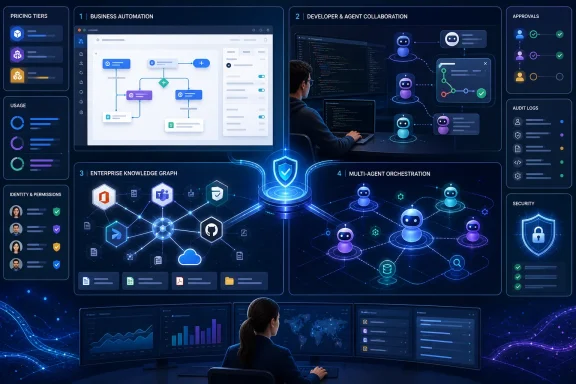 One Ranking Now Covers Four Different Markets
Techiexpert presents the products as the 12 best AI agents of 2026, yet the list is better understood as a map of four markets that happen to share the language of agency.The first is business automation, represented by Lindy AI and Zapier AI Agents. These products connect applications, interpret instructions, and perform routine operational work without requiring users to build the underlying orchestration in code. Their appeal is accessibility: the buyer is often a founder, an operations manager, or a departmental administrator rather than a software engineer.
The second is agentic software development. Claude Code, Cursor, Devin AI, OpenAI Codex, and GitHub Copilot all help produce code, but they do so at different layers of the development process. Cursor puts the agent inside a familiar editor, Claude Code works through the terminal and codebase, Devin runs tasks in its own development environment, Codex emphasizes sandboxed and reviewable work across multiple surfaces, and Copilot derives much of its value from its position inside GitHub.
The third market is agent infrastructure. CrewAI is not merely another assistant waiting for instructions; it is a Python-based framework for assembling multiple agents with separate roles, tools, and responsibilities. Comparing CrewAI directly with a no-code business service is like comparing a development framework with an installed desktop application: both can produce an outcome, but the ownership burden is radically different.
The final category is enterprise platform integration. Microsoft Copilot Studio, Salesforce Agentforce, and Glean are valuable primarily because of the systems around them. Copilot Studio belongs inside Microsoft 365, Agentforce inside Salesforce CRM, and Glean across enterprise knowledge repositories. Their competitive advantage is not simply the intelligence of a model. It is authenticated access to organizational context.
| AI agent | Best fit in Techiexpert’s review | Operating model | Stated pricing | Central tradeoff |
|---|---|---|---|---|
| Lindy AI | Business automation | No-code AI employees and app integrations | Free + paid plans from $49.99/month | Easy deployment, less depth for complex custom logic |
| Claude Code | Software engineering | Terminal-based autonomous code work | From $20/month or usage-based | Strong codebase reasoning, potentially unpredictable cost |
| Cursor | AI-first coding in an IDE | VS Code-based editor with agent features | Free + paid plans | Familiar workflow, paid access needed for serious use |
| Devin AI | Autonomous coding | Sandboxed development environment | From $20/month | End-to-end execution, weaker on ambiguous architecture |
| OpenAI Codex | Multi-surface coding | Sandboxed tasks with reviewable changes | Usage based | Verifiable output, but scope and usage matter |
| GitHub Copilot | GitHub-native development | Editor, repository, issue, and pull-request workflows | Per-seat subscription | Deep GitHub fit, reduced value outside that ecosystem |
| CrewAI | Multi-agent systems | Open-source Python framework with paid options | Open-source/paid | Extensive control, substantial engineering responsibility |
| Zapier AI Agents | No-code automation | Agents acting across connected applications | From $19.99/month | Broad integration reach, limited complex branching |
| Manus | General autonomous work | Asynchronous research and document tasks | Free + paid plans | Broad task coverage, less specialized depth |
| Microsoft Copilot Studio | Microsoft 365 agents | Low-code enterprise agent builder | Custom/licensed; bundled with Microsoft 365 | Strong Microsoft context, licensing and ecosystem dependence |
| Salesforce Agentforce | CRM automation | Agents operating over Salesforce records and workflows | Custom pricing | Rich CRM context, value tied to Salesforce adoption |
| Glean | Enterprise knowledge | Search and agents over connected company information | Custom pricing | Permission-aware knowledge access, enterprise cost and setup |
Techiexpert’s list captures that breadth, but the ranking format risks flattening it. The useful comparison is not which product appears first. It is which category of autonomy an organization is prepared to operate.
Coding Agents Have Become the Center of Gravity
Five of the 12 reviewed products are primarily coding agents, making software development the list’s largest single use case. That concentration reflects where agentic systems currently have one of their strongest combinations of structured inputs, available tools, measurable outputs, and human review.Code repositories give an agent boundaries. Tests provide feedback, compilers expose mistakes, version control records changes, and pull requests create a review checkpoint before generated work reaches production. This environment is not safe by default, but it is more observable than an agent making loosely defined decisions across email, CRM, finance, and customer-support systems.
Claude Code represents the terminal-first model. According to Techiexpert, it can read and write files, execute commands, run tests, and reason across a project rather than responding only to the file currently open. Anthropic’s documentation and pricing material reinforce the distinction between subscription access and usage-based consumption, which matters because an agent reading and modifying a large codebase can consume substantially more resources than a conventional autocomplete request.
Cursor instead makes the editor the agent’s home. Its VS Code basis lowers migration friction because developers can retain a familiar interface, extensions, themes, and keybindings. That familiarity is strategically important: the winning coding agent may not be the one that performs best in an isolated demonstration, but the one developers can introduce without reorganizing the rest of their work.
Devin pushes further toward delegation. Techiexpert’s example—“build a REST API that pulls data from this third-party service”—illustrates the kind of bounded, mechanical assignment on which an autonomous coding system can be useful. Devin can work with a terminal, browser, and editor, then test and debug its output in a sandboxed environment rather than merely suggesting a block of code.
The limitation is contained in the example itself. Building a clearly described integration is different from deciding whether that integration belongs in the architecture, how it should behave under failure, which data it may retain, or what operational obligations it creates. Devin may execute a plan, but a senior engineer must still decide whether it is the right plan.
OpenAI Codex emphasizes another model: asynchronous work that returns a reviewable difference rather than silently changing production code. OpenAI’s official material confirms the importance of usage-based billing and isolated execution. The conceptual advantage is accountability: the agent can perform the work, but a person can inspect exactly what changed before accepting it.
GitHub Copilot derives its advantage from workflow gravity. GitHub’s official product pages describe an agent that participates not only in the editor but also in issues, reviews, repositories, and pull requests. For teams already organizing development through GitHub, assigning work to an agent can feel less like launching a separate AI product and more like adding another participant to an existing process.
These products are therefore not interchangeable. Cursor competes for the developer’s editor, Claude Code for the terminal and codebase, Devin for delegated execution, Codex for sandboxed handoffs, and Copilot for the software-development lifecycle around GitHub. Workflow fit beats benchmark prestige because an impressive model in the wrong operational surface creates more friction than a slightly weaker one embedded where work is already reviewed and approved.
The Agent Is Becoming a New Kind of Software Contributor
Traditional coding assistants accelerated typing. Agentic coding systems claim a larger portion of the task: inspecting a repository, identifying files, planning changes, running commands, testing results, and revising failed attempts.That shift changes what teams must measure. Lines generated and suggestions accepted become less informative when an agent can produce an entire pull request. The relevant questions are whether the code solves the intended problem, whether reviewers can understand it, how many correction cycles it requires, and whether it creates maintenance work that appears only after deployment.
An agent can make a team look faster while transferring effort downstream. A developer may save an hour generating a change, only for reviewers to spend two hours discovering hidden assumptions across multiple files. If organizations measure only output volume, they will reward the production of code rather than the delivery of reliable software.
The appropriate unit is therefore the reviewed task, not the generated token or changed line. Teams should compare completion time, review time, defect rate, rollback frequency, security findings, and the amount of human rework required before a change is accepted. Without those measurements, “productivity” becomes whatever number the vendor dashboard happens to expose.
Coding agents also raise a source-control question that autocomplete never fully confronted. Once an agent can accept an issue, create a branch, execute commands, and open a pull request, it behaves less like an editor feature and more like a machine identity participating in engineering operations. It needs defined repository access, constrained credentials, auditable actions, and a clear human owner.
The safest implementation is not the agent with the fewest capabilities. It is the deployment in which capabilities are explicit, reversible, and observable.
The $20 Agent Is Not Necessarily a $20 Workload
Techiexpert states that small and mid-sized businesses can obtain capable agents for between $20 and $100 per month. That range accurately describes several entry points, but it should not be mistaken for the total cost of operating an agent.Zapier AI Agents starts at $19.99 per month, while Lindy AI’s paid plans begin at $49.99 per month. Devin AI is listed from $20 per month, and Techiexpert highlights its reduction from an initial $500 paid plan to a $20 individual option. Claude Code can begin through a $20 subscription or usage-based access, depending on how it is consumed.
Those figures show how quickly the entry barrier has collapsed. Cognition’s own pricing announcements confirm that Devin’s lower-cost plans are intended to make autonomous coding accessible beyond teams able to justify the earlier $500 starting point. The strategic effect is significant: agent trials no longer require an enterprise procurement cycle or a large experimental budget.
But entry price and operating cost are different numbers. Usage-based products can expand with the amount of context read, the number of attempts made, the models selected, and the length of the task. Subscription products may impose usage allowances, while no-code platforms can meter agent runs, tasks, actions, or connected services.
Open-source software creates another illusion. CrewAI may be available as an open-source framework, but the organization still pays for models, infrastructure, observability, integration work, security review, and the engineers who keep the system running. “Free” describes access to the framework, not the completed automation.
Per-seat pricing has its own trap. GitHub Copilot’s cost may look predictable because it is purchased for individual users, but a broad rollout can create a substantial recurring expense before an organization knows which developers benefit. Enterprise products complicate the picture further because an agent may be bundled with a wider license while its actions, external deployment, capacity, or connected services are billed separately.
The correct budget model includes human supervision. Every failed agent run that requires diagnosis is labor. Every generated pull request that needs extensive rewriting is labor. Every security or compliance exception is labor. Every integration that breaks after an upstream application changes is labor.
Cheap entry price is not cheap operation. The economically successful agent is the one that reduces the total cost of a repeatable process after review, failures, licensing, integration, and governance are included.
No-Code Agents Win by Hiding the Machinery
Lindy AI and Zapier AI Agents offer the most immediately understandable business proposition in the review: describe the work in plain English, connect the required applications, and let the platform handle the orchestration.Lindy is positioned as an AI employee for tasks such as scheduling meetings, responding to email, and managing support tickets. Its appeal comes from native connections to widely used business services and an interface designed to avoid programming or formal prompt engineering. Techiexpert ranks it as the best overall agent for business automation, particularly for small and mid-sized organizations seeking enterprise-style automation without enterprise-style complexity.
Zapier’s advantage is reach. The review cites more than 6,000 app integrations, making it attractive to businesses whose operational reality is a patchwork of CRM, spreadsheets, support systems, publishing tools, and messaging applications. The agent extends Zapier’s established automation model by adding decision-making and exception handling rather than following only rigid triggers and actions.
The tradeoff is that no-code simplicity depends on prebuilt assumptions. A platform can make common workflows easy because it has already decided how applications connect, which actions are available, and how users should configure them. The further a company moves from those supported patterns, the more the abstraction begins to leak.
Complex branching, real-time data requirements, unusual authentication, custom APIs, and tightly controlled transactions can expose the difference between an approachable agent builder and an engineering platform. No-code tools are strongest when the organization can adapt its process to the platform. Developer frameworks are stronger when the platform must adapt to the organization.
Manus occupies a different position. Instead of specializing in application-to-application automation, it is presented as a general-purpose autonomous worker capable of open-ended research and document production. Techiexpert’s example—“research competitor pricing and build me a comparison spreadsheet”—captures its appeal: the user specifies a deliverable rather than designing the steps.
That kind of asynchronous delegation can be genuinely useful. It can also conceal uncertainty in a polished file. A completed spreadsheet does not guarantee that the sources were current, the products were comparable, missing prices were handled consistently, or regional differences were recognized.
The more finished an agent’s output appears, the easier it is to skip verification. No-code agents reduce technical friction, but they do not eliminate the need for process ownership.
Enterprise Agents Are Identity Systems Wearing Conversational Interfaces
Microsoft Copilot Studio, Salesforce Agentforce, and Glean reveal the deeper enterprise contest. These companies are not simply selling access to a large language model. They are selling an agent that can interpret the information already governed by their platforms.For Windows-oriented organizations, Microsoft Copilot Studio is the most consequential product in Techiexpert’s list. It is designed to build low-code agents that operate through Microsoft 365 services such as Teams, Outlook, and SharePoint. Microsoft’s official pricing material says agent-building capabilities are available within Microsoft 365 Copilot licensing, while broader or externally published deployments can involve separate Copilot Studio arrangements.
The decisive advantage is context. An authenticated Microsoft 365 agent can potentially work with calendars, messages, documents, collaboration spaces, and organizational data without forcing a company to reproduce all of that information in another platform. Its strongest use cases are not generic chat but tasks such as answering internal policy questions, guiding support processes, or coordinating work across services employees already use.
That advantage is also the risk. An agent that can see a calendar, read documents, inspect messages, and trigger workflows sits at a sensitive intersection of identity and data. A configuration error is no longer just a bad answer. It can become an unauthorized disclosure or an incorrect action carried out under a legitimate user’s access.
Agentforce follows the same logic inside Salesforce. Its value depends on accounts, opportunities, case history, customer records, and CRM workflows already being present in the platform. An agent can qualify leads, process routine service requests, update records, or escalate to a person because Salesforce supplies both the context and the action surface.
Glean approaches the enterprise from the knowledge layer. It connects information across systems such as Slack, Google Drive, Confluence, Salesforce, Jira, and GitHub, then gives users a unified way to search and act on that knowledge. Techiexpert notes that Glean respects existing access controls, an essential distinction in environments where two employees asking the same question should not necessarily receive the same documents.
The enterprise battle is therefore about permission-aware context. Models will continue to improve and may increasingly be interchangeable behind the application layer. The durable advantage belongs to platforms that know who the user is, what the user may access, which business objects exist, and which actions require approval.
This is why switching costs will be high. A company does not merely train employees to use an agent; it connects data, defines permissions, creates workflows, approves connectors, establishes logging, and redesigns processes around the platform. Once deployed deeply, the agent becomes part of the organization’s operating architecture.
Multi-Agent Systems Move Complexity Rather Than Removing It
CrewAI is the list’s clearest reminder that an AI agent can be infrastructure rather than a finished product. The Python-based framework allows developers to define agents with distinct roles, tools, and goals, then organize their work sequentially or in parallel.Techiexpert names support for GPT-4, Claude, and open-source models such as LLaMA. That model flexibility matters because it allows developers to choose different engines for different jobs rather than binding the entire workflow to one provider. A research agent, reviewer, and writer do not necessarily need the same model, context window, latency, or cost profile.
The multi-agent metaphor is appealing because it resembles a team. One agent researches, another drafts, and another checks the result. Yet adding agents does not automatically create reliable collaboration any more than adding employees automatically creates a well-managed department.
Each handoff introduces another point where context can be lost, errors can be amplified, and costs can multiply. A reviewing agent can approve an incorrect answer produced by another model, particularly when both share similar training biases. Two agents agreeing is not independent verification if they rely on the same evidence and reasoning patterns.
Operational visibility becomes indispensable. Developers need to know which agent selected a tool, what data it received, what instruction governed its decision, how much the run cost, and why the workflow stopped. The source review describes CrewAI as accessible by developer standards, but its stated high operational cost is the more important warning for production use.
Multi-agent orchestration does not remove complexity. It relocates complexity from application code into prompts, tool definitions, role boundaries, shared state, model selection, and runtime supervision. The resulting system may be more adaptable than a fixed workflow, but it can also be more difficult to test deterministically.
The Four-Step Agent Loop Is Also a Four-Step Failure Loop
Techiexpert defines agent operation as a four-step cycle: perceive, plan, act, and evaluate. That is a useful explanation of capability, but it doubles as a threat and failure model.At the perception stage, the agent can receive incomplete, misleading, malicious, or stale information. An email may contain instructions designed to manipulate the system. A web page may present unverified claims. A connected data source may return records the user can technically access but should not use for the assigned task.
Planning introduces interpretation risk. The agent must transform a high-level goal into actions, often filling gaps the user did not specify. “Resolve this support issue” may imply issuing a refund, changing an account, sending a message, or escalating to a human. Unless boundaries are explicit, the model may choose a reasonable-sounding path that violates policy.
Action converts uncertainty into consequence. Reading the wrong file is one problem; sending it to an external recipient is another. Suggesting a database command is different from executing it. Drafting a customer reply is lower risk than transmitting it automatically under a company identity.
Evaluation can compound the problem because the agent judges its own output. If it misunderstands the goal, it may interpret an incorrect result as success. If a tool returns an ambiguous response, it may retry repeatedly, generating duplicate messages, duplicate records, or unnecessary consumption charges.
This is the central difference between an assistant and an agent. A poor assistant answer wastes attention. A poorly controlled agent can change systems.
Autonomy is a permissions problem before it is a model-quality problem. Organizations should decide what the agent may see, what it may propose, what it may execute, and what must stop for human approval. That separation is more dependable than hoping the model will infer the right boundary every time.
Action checklist for admins
- Inventory every application, repository, mailbox, data store, and API the agent can access.
- Use a dedicated identity where possible instead of inheriting unrestricted administrator or user credentials.
- Apply least privilege and separate read, draft, execute, approve, and publish permissions.
- Require human approval for destructive, external, financial, security-sensitive, or production-changing actions.
- Enable detailed logs for prompts, tool calls, actions, failures, approvals, and usage costs.
- Pilot with representative low-risk tasks and test malformed, ambiguous, and adversarial inputs.
- Define spending limits, retry limits, timeouts, escalation paths, and an immediate disable procedure.
- Review vendor data-handling, retention, training, residency, and compliance terms before connecting sensitive information.
Security Starts With the Connected Account
Techiexpert correctly warns that agents require stronger scrutiny than ordinary chatbots because they can access several systems and execute actions across them. Its reference to security-focused platforms such as IBM watsonx.ai points toward the right concern, but platform selection alone cannot make an agent safe.The primary security boundary is the connected identity. If an agent uses an account with broad SharePoint access, mailbox privileges, CRM rights, repository permissions, and API credentials, the agent inherits a large blast radius. A compromised or misdirected session can then act through permissions that were originally granted to a trusted person or integration.
Traditional service-account practices apply, but agents add complications. Their actions are probabilistic, they may choose tools dynamically, and they can be influenced by untrusted content encountered during a task. Administrators must assume the instruction that starts a run will not be the only instruction the agent sees.
Human approval should therefore be tied to consequence, not merely task complexity. A complicated internal analysis may be safe to execute autonomously if it is read-only. A simple instruction to delete a record, publish a page, reset an account, or email an attachment may require approval because the outcome is difficult to reverse.
Data minimization matters as well. An agent summarizing a support ticket does not need unrestricted access to the entire customer database. A coding agent fixing a test may not need production secrets. A meeting assistant may not need indefinite retention of every transcript it processes.
Agents should also have kill switches that work outside the agent itself. An administrator must be able to revoke tokens, disable connectors, block network paths, suspend the machine identity, and stop scheduled runs without asking the compromised or malfunctioning system to shut itself down.
The security objective is not perfect behavior. It is containment when behavior is imperfect.
Windows Teams Should Pilot Processes, Not Personalities
For Windows-focused IT departments, the temptation will be to begin with whichever agent appears closest to the existing environment. That often means Microsoft Copilot Studio for Microsoft 365 work and GitHub Copilot for organizations developing through GitHub, Visual Studio, or VS Code.Ecosystem fit is a legitimate advantage, but it should not replace evaluation. Microsoft 365 integration can reduce setup while increasing the amount of organizational data within reach. GitHub integration can make delegation seamless while giving the agent a more direct path into repositories and pull-request workflows.
A useful pilot starts with a process that is frequent, measurable, reversible, and currently expensive enough to justify automation. Internal document retrieval, support-ticket classification, draft responses, test generation, or preparation of a reviewable code change are stronger candidates than open-ended operational control.
The organization should establish the baseline before enabling the agent. How long does the task take today? How often is it completed incorrectly? How much review is required? What is the business cost of delay or failure? Without that baseline, the team can demonstrate novelty but not value.
The agent should then be tested on normal work and deliberately difficult cases. Ambiguous instructions reveal whether it invents assumptions. Missing information shows whether it pauses or guesses. Conflicting records expose how it chooses sources. Tool failures show whether it retries responsibly or enters a costly loop.
The pilot must also include the people receiving the output. A generated report that saves the author an hour but imposes an hour of verification on a manager has not necessarily improved the process. A code agent that accelerates implementation while overwhelming reviewers may simply move the bottleneck.
The final decision should consider operational burden. An agent that performs slightly less impressively but produces clear logs, predictable bills, manageable permissions, and reviewable outputs may be a better enterprise choice than a more autonomous system that cannot explain what it did.
The Winning Agent Will Be the One the Organization Can Govern
Techiexpert’s review demonstrates that useful agents are already available at nearly every layer of work, from a $19.99 no-code automation plan to custom-priced enterprise knowledge and CRM platforms. It also reveals why a universal ranking cannot settle the buying decision: the products automate different jobs, assume different levels of technical skill, and expose organizations to different kinds of risk.- Lindy AI and Zapier AI Agents offer the clearest route into no-code business automation.
- Claude Code, Cursor, Devin AI, OpenAI Codex, and GitHub Copilot represent distinct coding surfaces rather than five versions of the same tool.
- Devin’s move from an initial $500 paid plan to a $20 individual option shows how rapidly autonomous development is being commoditized.
- CrewAI offers open, Python-based multi-agent control, but the framework shifts deployment and governance responsibilities to the developer.
- Microsoft Copilot Studio, Agentforce, and Glean derive their strongest value from authenticated enterprise context.
- Pricing must include usage, licenses, integration, supervision, review, security, and failed runs—not only the advertised monthly fee.
References
- Primary source: techiexpert.com
Published: 2026-07-10T14:34:13.371990
Loading…
techiexpert.com - Related coverage: techradar.com
I tried 70+ best AI tools in 2026 | TechRadar
The tools, the guides, the insights. If it’s AI, it’s herewww.techradar.com - Official source: docs.github.com
Loading…
docs.github.com - Related coverage: docs.crewai.com
Loading…
docs.crewai.com - Related coverage: crewai.com
Loading…
crewai.com