

Microsoft lists PST calendar and contact import to a mailbox in new Outlook for Windows as Launched, but Roadmap 486839 alone does not document the procedure or import behavior.
Administrator action list:
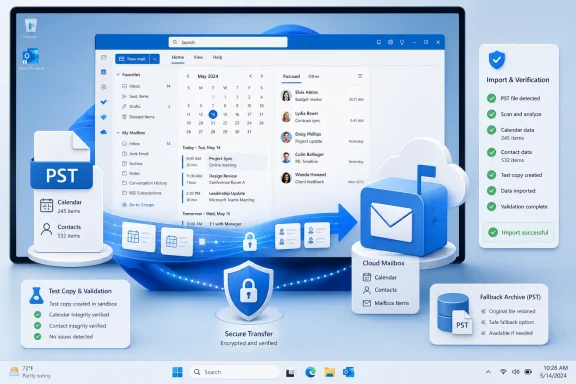
Roadmap item 486839 covers two specific content categories: calendars and contacts. Microsoft describes the capability as importing calendars and contacts from an Outlook Data File, or PST file, into a mailbox in new Outlook for Windows.
The announcement should be reported at that level of precision. It does not establish that every PST item type can be imported, that every property will be preserved, or that the workflow will behave like the corresponding process in classic Outlook.
The mailbox destination is an important part of the description. Microsoft is not merely describing access to calendar and contact items while they remain in a locally attached file. The roadmap says the identified content can be imported into a mailbox.
That could help users whose transition to new Outlook depends on recovering calendar or contact information from an existing PST. It may also reduce the need to retain an old Windows installation solely to reach those two categories of information. Whether it does so successfully in a particular case depends on the documented workflow and the observed import result.
The Roadmap 486839 entry itself does not provide the detailed prerequisites, navigation, source-file controls, destination options, duplicate rules, completion reporting, or validation procedure. Those details must come from Microsoft’s applicable support documentation, tenant-specific guidance, or a controlled test in an eligible client.
Likewise, the 2026-06 General Availability value is a month-level roadmap listing rather than evidence of one universal release day. The precise statement is that the roadmap lists GA as 2026-06 and the status as Launched. As of the roadmap information reflected here, whether the feature is available to a particular user must still be confirmed in the relevant client and Microsoft 365 environment.
The roadmap entry applies to Worldwide Standard Multi-Tenant. It should not be generalized to other Microsoft cloud environments without separate confirmation.
The Roadmap 486839 entry itself does not provide the following operational details:
A Launched roadmap status is not, by itself, tenant-level proof. It does not demonstrate that a command is visible on a particular PC, that the signed-in account is eligible, or that the user’s source file meets the workflow’s requirements.
Conversely, failure to find the command on one PC does not prove that the roadmap entry is incorrect. The user may be in a different cloud environment, using an ineligible account or mailbox, running a client that has not received the required interface, or encountering another deployment-specific condition. The cause should be investigated rather than assumed.
Classic Outlook instructions should not be copied into a new Outlook guide unless Microsoft explicitly says that the procedure applies to both applications. Similar concepts do not guarantee identical menu labels, destination choices, duplicate behavior, or completion reporting.
Until the applicable workflow is documented or directly verified, WindowsForum’s end-user guidance is simple: do not begin a production PST calendar or contact import solely because the roadmap says Launched. Ask an administrator or support provider to verify the command, supported scope, and procedure for your environment.
WindowsForum analysis: The source-and-destination wording is consistent with using the PST as an import source for selected content. That is an interpretation of the roadmap description, not an additional Microsoft commitment about long-term PST strategy or feature parity with classic Outlook.
The entry does not describe what happens after the import beyond identifying the mailbox as the destination. Administrators should not infer specific synchronization, retention, compliance, discovery, backup, quota, or preservation behavior from that word alone.
Those topics may matter in a business deployment, but they must be evaluated using the documentation and policies that apply to the destination mailbox. Roadmap 486839 does not define them.
The restrained conclusion is that Microsoft lists a mailbox-import path for PST calendars and contacts. Whether that path satisfies a user’s recovery need or an organization’s data requirements depends on the supported scope and tested result.
The accurate summary is:
The distinction matters because a roadmap announcement can confirm that a feature exists without supplying everything needed for a safe production procedure. The missing information should be treated as a verification checklist, not as proof that the feature lacks those controls.
June 2026 — The roadmap lists General Availability as 2026-06 for Worldwide Standard Multi-Tenant. This is a month-level roadmap value, not a verified exact release date for every tenant.
July 10, 2026 — The record carries this last-updated timestamp. The timestamp does not establish which field changed or prove that the feature was marked Launched on that date.
Current roadmap position — The record lists the status as Launched. Availability and behavior for a particular user remain subject to environmental verification.
Follow-up update trigger — Once Microsoft publishes the exact new Outlook workflow, WindowsForum should replace rollout-watch language with a tested guide that records the Microsoft-documented menu path, supported account and mailbox scope, source-file constraints, destination behavior, duplicate handling, and validation steps. If WindowsForum also tests the workflow, the guide should identify the tested client version, Windows version, cloud environment, account type, mailbox type, and test date.
These examples are test candidates, not claims about what the feature supports or how it processes those records. The purpose is to determine whether the observed workflow produces an acceptable result for the specific source file and destination mailbox.
Testing should answer practical questions:
Microsoft’s roadmap wording says future releases will expand support for PST capabilities. It does not identify the final feature set, order of delivery, or timetable for additional capabilities.
The practical question is therefore not simply, “Does new Outlook support PST files?” It is:
Does the verified new Outlook workflow support this user’s source file, required calendars and contacts, destination mailbox, operational controls, and validation criteria?
If the answer is not yet known, classic Outlook or another supported method may still be needed. Keeping a fallback available is a safeguard against retiring a required workflow before its replacement has been validated.
For a small, user-owned archive, an interactive client import may be appropriate once the command and procedure are confirmed and a representative test succeeds. More sensitive or multi-user work may require additional organizational controls, but Roadmap 486839 should not be treated as either endorsing or rejecting a particular migration methodology.
The governance decision should remain proportional to the job. A single low-risk recovery does not need to become a large migration program. At the same time, a visible client command should not automatically be used for shared, disputed, regulated, or legally significant data without the organization’s normal review and approval.
Those fields support an availability signal at the roadmap level. They do not, by themselves, establish the procedure, eligibility, import controls, or result for a particular user.
The next useful milestone is Microsoft documentation that turns the roadmap description into an operational workflow. When Microsoft publishes that workflow, WindowsForum should update this feature with the exact documented menu path, supported accounts and mailbox types, PST constraints, destination behavior, duplicate handling, completion and error reporting, and validation steps. Any WindowsForum testing should then be reported separately with the precise environment and date.
Until then, administrators should verify the feature in the intended environment, test it with representative data, validate the destination, and preserve the original PST.
Microsoft’s roadmap lists the capability as Launched. Readiness for a particular user still depends on a documented workflow and a controlled, accepted result.
Administrator action list:
- Verify that the feature is present for the specific user, client, mailbox, tenant, and cloud environment.
- Obtain Microsoft documentation that explicitly applies to the new Outlook workflow before publishing internal instructions.
- Test with a protected copy of a representative PST and a low-risk destination.
- Validate the resulting calendars and contacts against the source.
- Preserve the original PST and an alternative supported access method until the result is accepted.
 Microsoft Addresses Calendar and Contact Data in PST Files
Roadmap item 486839 covers two specific content categories: calendars and contacts. Microsoft describes the capability as importing calendars and contacts from an Outlook Data File, or PST file, into a mailbox in new Outlook for Windows.The announcement should be reported at that level of precision. It does not establish that every PST item type can be imported, that every property will be preserved, or that the workflow will behave like the corresponding process in classic Outlook.
The mailbox destination is an important part of the description. Microsoft is not merely describing access to calendar and contact items while they remain in a locally attached file. The roadmap says the identified content can be imported into a mailbox.
That could help users whose transition to new Outlook depends on recovering calendar or contact information from an existing PST. It may also reduce the need to retain an old Windows installation solely to reach those two categories of information. Whether it does so successfully in a particular case depends on the documented workflow and the observed import result.
The Roadmap 486839 entry itself does not provide the detailed prerequisites, navigation, source-file controls, destination options, duplicate rules, completion reporting, or validation procedure. Those details must come from Microsoft’s applicable support documentation, tenant-specific guidance, or a controlled test in an eligible client.
What Roadmap Item 486839 Confirms
The roadmap record establishes the following limited scope:- The product is Outlook.
- The platform is desktop, specifically new Outlook for Windows.
- The source is a PST file, also called an Outlook Data File.
- The identified content categories are calendars and contacts.
- The destination is a mailbox.
- The release phase is General Availability.
- General Availability is listed as 2026-06.
- The listed cloud environment is Worldwide Standard Multi-Tenant.
- The roadmap status is Launched.
- The record has a created timestamp of March 25, 2025.
- The record has a last-updated timestamp of July 10, 2026.
- Microsoft says future releases will expand support for PST capabilities.
Likewise, the 2026-06 General Availability value is a month-level roadmap listing rather than evidence of one universal release day. The precise statement is that the roadmap lists GA as 2026-06 and the status as Launched. As of the roadmap information reflected here, whether the feature is available to a particular user must still be confirmed in the relevant client and Microsoft 365 environment.
The roadmap entry applies to Worldwide Standard Multi-Tenant. It should not be generalized to other Microsoft cloud environments without separate confirmation.
What Is Confirmed—and What You Must Verify
Roadmap 486839 confirms a defined product capability: new Outlook for Windows can import calendars and contacts from a PST source into a mailbox. It also provides Microsoft’s release phase, cloud-environment listing, month-level GA value, and current roadmap status.The Roadmap 486839 entry itself does not provide the following operational details:
- The minimum new Outlook or Windows version.
- Supported account and mailbox types.
- Licensing or administrative prerequisites.
- The exact menu and button sequence.
- The method used to select the PST.
- Source-file location, size, password, or health constraints.
- Whether calendars and contacts can be selected separately.
- Whether individual folders or subfolders can be selected.
- How the destination mailbox is chosen when multiple accounts are configured.
- Whether the user can select a particular calendar or contacts folder.
- How duplicates are identified or processed.
- Whether repeated imports are detected.
- Whether the operation can be canceled, retried, or reversed.
- What progress, warning, completion, or error information is displayed.
- How imported content should be validated.
- Which calendar and contact properties are preserved, changed, or omitted.
- Whether source and destination item counts are reported.
- Whether administrators can control or restrict the capability.
A Launched roadmap status is not, by itself, tenant-level proof. It does not demonstrate that a command is visible on a particular PC, that the signed-in account is eligible, or that the user’s source file meets the workflow’s requirements.
Conversely, failure to find the command on one PC does not prove that the roadmap entry is incorrect. The user may be in a different cloud environment, using an ineligible account or mailbox, running a client that has not received the required interface, or encountering another deployment-specific condition. The cause should be investigated rather than assumed.
Classic Outlook instructions should not be copied into a new Outlook guide unless Microsoft explicitly says that the procedure applies to both applications. Similar concepts do not guarantee identical menu labels, destination choices, duplicate behavior, or completion reporting.
Until the applicable workflow is documented or directly verified, WindowsForum’s end-user guidance is simple: do not begin a production PST calendar or contact import solely because the roadmap says Launched. Ask an administrator or support provider to verify the command, supported scope, and procedure for your environment.
The Mailbox Destination Is the Key Product Detail
Microsoft’s use of the word mailbox distinguishes the announced capability from simply viewing calendar and contact items while they remain in a local PST.WindowsForum analysis: The source-and-destination wording is consistent with using the PST as an import source for selected content. That is an interpretation of the roadmap description, not an additional Microsoft commitment about long-term PST strategy or feature parity with classic Outlook.
The entry does not describe what happens after the import beyond identifying the mailbox as the destination. Administrators should not infer specific synchronization, retention, compliance, discovery, backup, quota, or preservation behavior from that word alone.
Those topics may matter in a business deployment, but they must be evaluated using the documentation and policies that apply to the destination mailbox. Roadmap 486839 does not define them.
The restrained conclusion is that Microsoft lists a mailbox-import path for PST calendars and contacts. Whether that path satisfies a user’s recovery need or an organization’s data requirements depends on the supported scope and tested result.
Evaluate the Exact Operation, Not “PST Support” in General
The phrase “PST support” is too broad to describe what Roadmap 486839 announces. The roadmap verifies one specific operation involving one source, two content categories, one destination type, and one Outlook application.The accurate summary is:
That statement should not be expanded into a claim that new Outlook supports every workflow associated with PST files. Roadmap 486839 does not establish the status of unrelated PST operations or content categories.Microsoft lists the import of calendars and contacts from a PST file into a mailbox in new Outlook for Windows as Launched for the applicable roadmap environment.
| Requirement | What Roadmap 486839 establishes | What still requires verification |
|---|---|---|
| Product and platform | New Outlook for Windows on desktop | Eligible client version and device configuration |
| Source | PST, or Outlook Data File | File location, accessibility, password support, size limits, and file-health constraints |
| Content | Calendars and contacts | Supported folders, subtypes, properties, structures, and exclusions |
| Destination | A mailbox | Eligible account and mailbox types, destination choices, and behavior with multiple accounts |
| Release phase | General Availability | Availability for a specific user and deployment |
| Cloud environment | Worldwide Standard Multi-Tenant | Availability in other Microsoft cloud environments |
| Timing | GA is listed as 2026-06 | When each eligible user or deployment receives the capability |
| Status | Launched | Whether the required interface is present for a particular user |
| Procedure | The roadmap identifies the capability | Exact navigation, selection, confirmation, and completion workflow |
| Import behavior | Not defined by the roadmap entry | Fidelity, duplicate handling, error reporting, counts, and property preservation |
| Administration | Not defined by the roadmap entry | Policy controls, restrictions, monitoring, or reporting |
Timeline
March 25, 2025 — Roadmap 486839 carries this created timestamp. The timestamp shows when the roadmap record was created, not necessarily when development began, when deployment started, or when users first received the feature.June 2026 — The roadmap lists General Availability as 2026-06 for Worldwide Standard Multi-Tenant. This is a month-level roadmap value, not a verified exact release date for every tenant.
July 10, 2026 — The record carries this last-updated timestamp. The timestamp does not establish which field changed or prove that the feature was marked Launched on that date.
Current roadmap position — The record lists the status as Launched. Availability and behavior for a particular user remain subject to environmental verification.
Follow-up update trigger — Once Microsoft publishes the exact new Outlook workflow, WindowsForum should replace rollout-watch language with a tested guide that records the Microsoft-documented menu path, supported account and mailbox scope, source-file constraints, destination behavior, duplicate handling, and validation steps. If WindowsForum also tests the workflow, the guide should identify the tested client version, Windows version, cloud environment, account type, mailbox type, and test date.
Test Before Depending on the Import
A representative test remains necessary even after the command appears. Product availability and data suitability are different questions: the first asks whether the feature can be used, while the second asks whether the result is acceptable for the user’s actual PST and mailbox.A useful test should reflect the information that matters to the user rather than relying on the smallest convenient sample. For calendars, that may include ordinary appointments, older entries, recurring events, invitations, reminders, and exceptions where those records are important. For contacts, it may include older and newer entries and the particular fields on which the user depends.WindowsForum operational guidance—not a Microsoft requirement derived from Roadmap 486839
Work from a protected copy of the PST, use a low-risk destination where practical, record the test configuration, compare the result with the source, and retain the original PST unchanged until the data owner accepts the import.
These examples are test candidates, not claims about what the feature supports or how it processes those records. The purpose is to determine whether the observed workflow produces an acceptable result for the specific source file and destination mailbox.
Testing should answer practical questions:
- Can the eligible user see and open the import workflow?
- Can the intended PST be selected?
- Can the correct destination be identified without ambiguity?
- Does the workflow clearly state what will be imported?
- Is progress or completion communicated?
- Do the expected calendars and contacts appear in the destination?
- Are the fields and event characteristics important to the user present and usable?
- Does a retry or repeated import create unexpected duplicates?
- Are errors or skipped content reported clearly enough to investigate?
- Can the user or data owner approve the result?
This May Remove One Migration Blocker, Not Every Outlook Dependency
Calendar and contact import could remove an important obstacle for users whose required information is stored in those categories. It does not establish complete equivalence between new Outlook and classic Outlook.Microsoft’s roadmap wording says future releases will expand support for PST capabilities. It does not identify the final feature set, order of delivery, or timetable for additional capabilities.
The practical question is therefore not simply, “Does new Outlook support PST files?” It is:
Does the verified new Outlook workflow support this user’s source file, required calendars and contacts, destination mailbox, operational controls, and validation criteria?
If the answer is not yet known, classic Outlook or another supported method may still be needed. Keeping a fallback available is a safeguard against retiring a required workflow before its replacement has been validated.
For a small, user-owned archive, an interactive client import may be appropriate once the command and procedure are confirmed and a representative test succeeds. More sensitive or multi-user work may require additional organizational controls, but Roadmap 486839 should not be treated as either endorsing or rejecting a particular migration methodology.
The governance decision should remain proportional to the job. A single low-risk recovery does not need to become a large migration program. At the same time, a visible client command should not automatically be used for shared, disputed, regulated, or legally significant data without the organization’s normal review and approval.
WindowsForum Decision Framework
Consider the new Outlook client import when:Editorial guidance—not Microsoft product documentation
- The supported command is visible for the intended user.
- Current Microsoft instructions explicitly cover the workflow.
- The account, mailbox, and cloud environment are within the documented scope.
- The PST can be handled through a controlled interactive process.
- The destination can be positively identified.
- A representative test succeeds.
- The user can validate the calendars and contacts that matter.
- The original PST will be preserved until acceptance is complete.
- The source is shared or its ownership is unclear.
- Many PSTs or users are involved.
- The content is sensitive, regulated, disputed, or legally significant.
- Repeatable approvals, reporting, exception handling, or audit records are required.
- A partial or duplicated import would create substantial operational risk.
- The client provides insufficient information to validate the result.
- The new Outlook import command is absent.
- The account, mailbox, file, or client does not meet the documented scope.
- The destination cannot be selected confidently.
- Duplicate behavior remains unclear for the intended use.
- Required calendar or contact information cannot be verified after testing.
- The organization or data owner has not accepted the result.
- The user depends on capabilities outside the scope confirmed by Roadmap 486839.
Action Checklist for Administrators
Priority 1: Confirm the environment
- Verify that the user is in the Worldwide Standard Multi-Tenant environment identified by Roadmap 486839.
- Record the new Outlook version, Windows version, account type, mailbox type, and verification date.
- Confirm that the calendar-and-contact PST import command is visible for the affected user.
- Do not infer the new Outlook path from classic Outlook instructions.
- If the command is absent, treat the capability as unavailable for that user until the cause is established.
Priority 2: Check Microsoft’s current procedure
- Find Microsoft instructions that explicitly apply to new Outlook for Windows and the import of PST calendars and contacts into a mailbox.
- Confirm the documented account and mailbox scope.
- Confirm source-file prerequisites and constraints.
- Identify the exact navigation and selection sequence.
- Determine how the destination is selected.
- Check documented duplicate, error, completion, and validation behavior.
- Do not publish an internal self-service guide that fills missing steps with assumptions.
- Use the organization’s Microsoft support channel if production use is required before the scope can be confirmed.
Priority 3: Run a controlled test
- As WindowsForum operational guidance, use a protected copy of the PST rather than the only source copy.
- Prefer a noncritical file, test mailbox, or approved low-risk destination where practical.
- Record the source-file identity and intended destination.
- Include representative calendar and contact records relevant to the user’s actual requirements.
- Avoid repeating the import until duplicate behavior is understood.
- Capture the messages, progress information, warnings, and errors displayed by the client.
Priority 4: Validate the result
- Compare expected calendar and contact content with what appears in the destination mailbox.
- Inspect representative historical and current records.
- Check the fields and event characteristics the user considers essential.
- Record missing, changed, duplicated, or unexpected content without assuming the cause.
- Confirm that the imported data appears where the user needs to access it.
- Obtain acceptance from the user or responsible data owner before declaring completion.
Priority 5: Preserve a fallback
- As WindowsForum operational guidance, retain the original PST unchanged until validation and acceptance are complete.
- Keep classic Outlook or another supported access or migration method available when necessary.
- Do not delete, overwrite, or discard the only usable source because the client displayed a completion message.
- Document the tested configuration and any observed limitations.
- Reassess the process when Microsoft publishes more complete instructions or expands PST capabilities.
The Next Milestone Is a Documented, Testable Workflow
Roadmap 486839 is a meaningful but narrow announcement. Microsoft lists the import of calendars and contacts from a PST file into a mailbox in new Outlook for Windows as General Availability, identifies Worldwide Standard Multi-Tenant as the cloud environment, lists GA as 2026-06, and shows the status as Launched.Those fields support an availability signal at the roadmap level. They do not, by themselves, establish the procedure, eligibility, import controls, or result for a particular user.
The next useful milestone is Microsoft documentation that turns the roadmap description into an operational workflow. When Microsoft publishes that workflow, WindowsForum should update this feature with the exact documented menu path, supported accounts and mailbox types, PST constraints, destination behavior, duplicate handling, completion and error reporting, and validation steps. Any WindowsForum testing should then be reported separately with the precise environment and date.
Until then, administrators should verify the feature in the intended environment, test it with representative data, validate the destination, and preserve the original PST.
Microsoft’s roadmap lists the capability as Launched. Readiness for a particular user still depends on a documented workflow and a controlled, accepted result.
References
- Primary source: Microsoft 365 Roadmap
Published: 2026-07-10T21:58:35.1674832Z
Microsoft 365 Roadmap | Microsoft 365
The Microsoft 365 Roadmap lists updates that are currently planned for applicable subscribers. Check here for more information on the status of new features and updates.www.microsoft.com
- Official source: support.microsoft.com
What's new in new Outlook for Windows | Microsoft Support
What's new in new Outlook for Windowssupport.microsoft.com - Official source: learn.microsoft.com
Learn about importing organization PST files | Microsoft Learn
Learn how to use the Import service in the Microsoft Purview portal to bulk-import email data (PST files) to user mailboxes.learn.microsoft.com - Official source: download.microsoft.com
- Related coverage: surfpac.navy.mil
Loading…
www.surfpac.navy.mil - Official source: apps.apple.com
Loading…
apps.apple.com
- Related coverage: drwindows.de
Neues Outlook für Windows: Unterstützung für pst-Dateien wird massiv erweitert - Update - Dr. Windows
Beim Wechsel vom „klassischen“ Outlook auf das neue Outlook für Windows spielt die Unterstützung der Outlook-Datendateien mit der Endung .pst eine wichtige Rolle, wenn man nach dem Umstieg noch auf ältere E-Mails, Kontakte und Kalenderdaten zugreifen möchte. Hier wird Microsoft in...www.drwindows.de
- Related coverage: onlinecomputertips.com
Add Email Accounts, Calendars & Contacts to Outlook for Windows
You can add multiple email accounts to the Outlook for Windows app to view your email, calendar and contact information.onlinecomputertips.com - Related coverage: geekchamp.com
Loading…
geekchamp.com - Related coverage: lamar.edu
Using Your LU Email | knowledge base |how to - Lamar University
Using Your LU Email-Faculty/Staff/Studentswww.lamar.edu
- Related coverage: workspacemigration.com
Email Migration Services - Microsoft 365 & Google Workspace
Data migration, cold email infrastructure, and email deliverability for growth teams. Expert email migration services for Microsoft 365 tenant-to-tenant, Google Workspace, GoDaddy defederation, IONOS, Rackspace & more. Zero downtime, 1,200+ migrations, 700+ five-star reviews. Free quote. workspacemigration.com
- Related coverage: techriver.com
- Related coverage: files-backend.assets.thrillshare.com