

Secure Boot certificates protecting older Windows PCs reached their expiration date on June 24, and Microsoft widened its automatic certificate-upgrade effort that same day, leaving many Windows 10 users unsure whether their machines had been updated, remained secure, or were quietly falling behind. The expiration did not suddenly brick those computers, but it created a subtler and more durable problem: a PC could appear to operate normally while losing access to future protections for the earliest and most privileged stage of startup. As The Cool Down reported, Microsoft’s broader rollout helped some users, yet the timing exposed how poorly the Windows ecosystem communicates security states that depend on the operating system, Windows Update, firmware, and hardware manufacturers all working together. This was not merely a certificate-maintenance mishap; it was a demonstration of how aging PCs accumulate security debt long before their owners believe they have stopped working.
Secure Boot is intended to prevent untrusted software from loading before Windows has established control of the computer. That makes it different from an antivirus scanner or an ordinary operating-system patch: it sits close to the boundary between the machine’s firmware and the software responsible for starting Windows.
Certificates provide part of the trust framework behind that process. Firmware uses trusted certificates and related databases to decide whether boot managers, low-level drivers, and other startup components have been signed by an accepted authority rather than substituted or modified by an attacker.
When a Secure Boot certificate expires, the immediate outcome is not necessarily a black screen. Microsoft’s guidance says a machine without replacement certificates can generally continue to start, run applications, connect to networks, and install ordinary Windows updates. That distinction is essential because reports that computers were suddenly “exposed” can otherwise sound as though every affected PC became compromised at midnight on June 24.
The practical problem is prospective rather than instantly catastrophic. A machine still relying on expired trust material may be unable to receive new protections for Windows Boot Manager, Secure Boot databases, revocation information, or vulnerabilities discovered later in the boot process. The PC can still boot, but its ability to adapt to the next boot-level threat may be degraded.
That is a difficult condition for consumers to recognize. A failed hard drive announces itself. An expired certificate that prevents some future security mitigation from being applied may leave no obvious symptom beyond a warning that is easy to misunderstand or dismiss.
The resulting risk increases unevenly. A home computer used occasionally for browsing does not automatically become infected because a certificate reached its expiration date. But a system used for banking, remote work, password storage, or sensitive documents now deserves closer attention because the assurance protecting its startup environment may no longer be advancing alongside current security research.
This is what makes the episode more serious than a routine expiration notice. Secure Boot’s usefulness depends not simply on whether it is switched on, but on whether the trust information behind it remains serviceable. A green-looking security setting can therefore conceal a support problem lower in the stack.
That sequence matters. Automatic deployment was the only realistic way to protect a mass population of Windows users, most of whom would never knowingly inspect a firmware certificate database. But expanding the rollout at the deadline meant Microsoft was still increasing coverage at the moment users needed a definitive answer about whether their systems were protected.
Microsoft’s official guidance presents automatic delivery as the normal path for many personal computers. Windows Update can coordinate the replacement process when the operating system, firmware, device configuration, and eligibility rules permit it. Some systems, however, may still require a firmware update supplied by the PC or motherboard manufacturer.
This is where the phrase “automatic update” becomes misleadingly reassuring. It describes Microsoft’s intended delivery mechanism, not a guarantee that every eligible machine will accept the change successfully. Firmware limitations, unsupported configurations, update failures, disabled security features, and absent manufacturer support can all break the chain.
A conventional Windows patch largely belongs to Microsoft. A Secure Boot certificate transition crosses administrative boundaries: Microsoft supplies Windows components and servicing logic, while device makers control firmware implementations that vary by model and generation. Consumers are left to interpret the result even though they did not choose that architecture and have little ability to diagnose it.
The wider rollout was therefore both necessary and revealing. It reduced the number of systems left behind, but it also confirmed that Microsoft did not have a single universal path capable of bringing every affected PC forward before expiration.
A staged deployment is defensible when a firmware-level change could make a machine unbootable if mishandled. Rolling cautiously allows Microsoft to identify incompatible configurations before they affect the whole installed base. Yet cautious rollout and clear communication are separate responsibilities, and the latter was where the process looked weakest.
Users needed one intelligible status: updated, waiting safely for an update, or unable to update without intervention. Instead, many encountered a moving target in which warnings, Windows Update history, firmware availability, and online explanations did not always produce an obvious conclusion.
PCWorld senior editor Alaina Yee summarized that experience bluntly: “I have a headache from dealing with Secure Boot this past week.” The significance of the remark is not simply its frustration. Yee covers Windows and PC hardware professionally; if the state of a machine was difficult for an experienced technology journalist to establish, the average Windows 10 owner had little chance of confidently navigating the same process.
This matrix explains why the story resists both panic and complacency. The expiration did not transform every affected computer into an emergency, but neither did successful startup prove that the problem had been resolved.
Microsoft’s official position is that replacement certificates can still be installed after expiration if a machine remains capable of starting Windows and applying the required updates. June 24 was therefore not an irreversible cutoff after which remediation became impossible.
But post-expiration recovery does not eliminate the management failure. Once the deadline passed, users had to distinguish between systems that were fully updated, systems awaiting automatic servicing, systems blocked by firmware, and systems whose manufacturers might never provide the needed support.
That is an unusually heavy diagnostic burden to place on consumers. Windows Update has trained users to expect that supported security maintenance arrives as a package: install the update, restart, and return to work. Secure Boot servicing instead exposes the seams beneath that experience.
The machine’s age becomes relevant in ways that are not visible in its everyday performance. A ten-year-old computer with an upgraded drive and sufficient memory may still feel responsive, yet its firmware vendor may no longer be producing updates. Performance life and security-service life are no longer the same measurement.
Microsoft’s decision to extend Windows 10 security updates for another year offers temporary breathing room. It does not, however, guarantee that every aging PC will receive every kind of protection it needs, particularly when a security transition depends on firmware support rather than an ordinary operating-system update alone.
This is where support is not a binary state. A computer may still receive Windows security patches while its firmware remains outside the manufacturer’s active maintenance window. It may qualify for an additional year of operating-system updates while lacking the platform changes needed to keep Secure Boot’s trust chain current.
For users, that fragmentation is nearly invisible until something goes wrong. The familiar Windows Update screen suggests one centralized maintenance relationship, but the actual machine depends on Microsoft, the PC manufacturer, the motherboard or firmware provider, and sometimes third-party hardware vendors.
A Windows 10 extension can keep fixing vulnerabilities in supported Windows components. It cannot compel an equipment manufacturer to revive firmware engineering for a product it considers retired. Nor can it guarantee compatibility where an old firmware implementation handles certificate changes incorrectly.
That makes the extra year valuable but incomplete. It postpones one deadline without erasing all the other deadlines embedded in the hardware.
The economic context matters because many Windows 10 owners are not refusing an upgrade out of nostalgia. They may be keeping a functional PC because replacing it is expensive, because their applications still run adequately, or because the machine cannot move cleanly to a newer operating system without hardware changes.
Security policy often assumes that retirement is a technical decision. For households and small organizations, it is frequently a budget decision. A computer can become difficult to secure before its owner can reasonably afford to replace it.
Traditional obsolescence was visible. New software ran slowly, storage filled up, or hardware failed. Modern security obsolescence is quieter: the computer keeps performing its basic tasks while the chain of organizations responsible for maintaining trust gradually withdraws.
That creates an uncomfortable incentive structure. Microsoft can recommend moving to newer hardware, while manufacturers can point to the age of the product and the end of firmware support. Both positions may be technically defensible, yet the user remains the one holding a functioning computer whose security status has become uncertain.
Calling every support cutoff malicious would be simplistic. Firmware updates carry testing costs and substantial risk, particularly across thousands of hardware configurations. An update that corrupts Secure Boot data or clashes with a vendor-specific implementation can prevent Windows from starting, trigger recovery procedures, or disrupt security features associated with the boot process.
No company can support every device indefinitely. The stronger criticism is that the industry has not aligned hardware life, operating-system life, certificate life, and firmware-support life in a way consumers can understand before purchase.
Buyers are told about processor speed, screen resolution, storage, and battery life. They are rarely given an enforceable, prominent statement explaining how long the manufacturer expects to supply firmware updates needed for future platform-security transitions.
The Secure Boot expiration turns that omission into a material cost. A computer’s security lifespan may depend on manufacturer work years after the initial sale, yet the buyer has little information about whether that work will happen.
Yee’s argument, as summarized by The Cool Down, is that technology companies possess enough device and update information to identify many of these risks sooner. That does not mean every compatibility issue can be predicted, but it does weaken the idea that users should be surprised by certificate deadlines or forced to assemble their own status from scattered support pages.
Certificate expiration is not an unexpected event. It is built into the certificate. The industry had years to know that a large, heterogeneous population of Windows devices would eventually need replacement trust material.
The technical challenge was real; the calendar was not a surprise.
Organizations without that visibility are forced into reactive troubleshooting. They may know that Windows patches are current while lacking reliable information about the firmware trust store, Secure Boot state, or whether a certificate update has completed.
That gap is common because endpoint-management practices tend to concentrate on operating-system versions, application inventories, malware protection, and patch compliance. Firmware and boot-chain state are more difficult to normalize across vendors and are often examined only after a security incident or failed update.
The expiration demonstrates why “fully patched” needs a more precise definition. A machine can be current according to a monthly Windows compliance report and still be unable to receive a future boot-level mitigation because its certificate state was not updated.
Administrators should also resist treating mass hardware replacement as the only response. Some devices may simply be awaiting Microsoft’s expanded automatic deployment. Others may need a manufacturer firmware package. Still others may have configuration issues that can be corrected without retiring the PC.
The first task is classification, not disposal. IT needs to separate successfully updated machines from those pending normal servicing, those blocked by correctable conditions, and those genuinely stranded by unsupported firmware.
Administrators must also plan for devices that cannot be remediated immediately. Network segmentation, reduced privileges, removal from sensitive workflows, stronger monitoring, and accelerated replacement can reduce exposure while procurement catches up.
A certificate inventory should become part of lifecycle planning rather than a one-time cleanup. The next platform-security transition will also depend on knowing which systems can accept a change before the deadline arrives.
That coordination has to preserve bootability throughout the transition. Trust cannot simply be ripped out and replaced in one reckless step, because the firmware must continue recognizing the boot components required to start the system before, during, and after the update.
The cautious design is justified. A security update that makes a machine unbootable can be worse for an ordinary user than a warning about a gradually increasing risk, especially if recovery requires another computer, removable media, encryption recovery information, or technical knowledge.
But caution increases the need for observability. If servicing is staged, conditional, and dependent on firmware, Windows must give users a reliable way to see which stage their computer has reached and what remains to be done.
Microsoft has attempted to surface Secure Boot certificate status through Windows security interfaces and guidance. The broader communication challenge remains translating an intricate state machine into instructions that are accurate without being paralyzing.
“Install updates” is necessary advice, but it is not sufficient when the update may be blocked by hardware or firmware. “Contact your manufacturer” is technically appropriate, but it can become a dead end for an old computer whose support page has not changed in years.
The support chain is only as strong as its least responsive participant. Microsoft can distribute a certificate package, but it cannot promise that every old firmware implementation will store it correctly. A manufacturer can publish firmware, but it cannot ensure that every owner finds and installs it. The user can follow instructions, but may lack the recovery tools needed if an update fails.
This fragmentation is precisely why platform trust should be treated as an ecosystem obligation. Each party’s narrow responsibility may be clear, while the outcome for the customer remains unacceptable.
The first message should have been reassuringly specific: an unupdated PC does not necessarily stop starting on June 24. The second should have been equally direct: continued operation does not mean the machine can receive every future boot-security protection.
Without both statements, communication veers toward one of two failures. Alarmist coverage implies that millions of computers have instantly become unsafe, while overly soothing guidance encourages users to ignore a real degradation because Windows still loads normally.
The Cool Down’s report captured the confusion but also illustrates the challenge of translating a platform-security transition for a broad audience. “Exposed” is directionally reasonable because the affected systems can lose access to future protections, yet it needs qualification: expiration changes the machine’s ability to respond to emerging boot threats rather than proving an existing compromise.
Microsoft also had to explain why some machines updated before June 24, some were included only when the effort widened that day, and others might still need intervention. From a deployment perspective, those categories may reflect sensible compatibility controls. From a user’s perspective, they look like inconsistent treatment.
This is where a single, authoritative status display matters more than another support article. Users should not have to infer certificate state from whether an update was offered, whether a firmware package exists, or whether a warning appeared.
The ideal message is actionable and bounded. It should say whether the device has the replacement certificates, whether Microsoft expects an automatic update to arrive, whether a known hardware barrier exists, and whether the manufacturer must supply firmware.
Anything less pushes ordinary owners toward web searches, command-line experiments, or advice of uncertain quality. Firmware security is a particularly dangerous area for improvisation because a mistaken change can affect startup or recovery.
The extension should not be mistaken for a guarantee that every Windows 10 device remains equally maintainable. Operating-system patches and Secure Boot certificate servicing overlap, but they are not interchangeable.
A machine may receive the additional Windows 10 security coverage while still depending on an OEM firmware update for the certificate transition. If that firmware is unavailable, the extra year protects supported Windows components without necessarily restoring the complete early-boot update path.
For households, the extension should be used as planning time. Owners can verify updates, investigate firmware availability, back up their data, and decide whether the computer remains appropriate for sensitive activities.
For businesses, the year is a migration window rather than permission to defer indefinitely. Devices that cannot demonstrate current boot-chain trust should be moved away from high-value roles even if they continue receiving other security patches.
The distinction also matters environmentally. Keeping serviceable hardware in use can reduce waste and defer replacement costs, but extending device life responsibly requires continued access to security maintenance. Sustainability arguments collapse if older machines are retained without an honest assessment of their declining protections.
The better policy is not “replace everything old” or “keep everything until it physically fails.” It is to measure whether a device can still participate in the current security ecosystem and assign it work appropriate to that state.
June 24 should therefore be remembered less as the day a certificate expired than as the day Windows’ support model became harder to describe honestly. Microsoft’s expanded rollout may eventually bring many remaining systems across the divide, but the industry now needs clearer status reporting, longer and more explicit firmware commitments, and lifecycle policies that warn buyers before functioning hardware becomes cryptographically stranded.
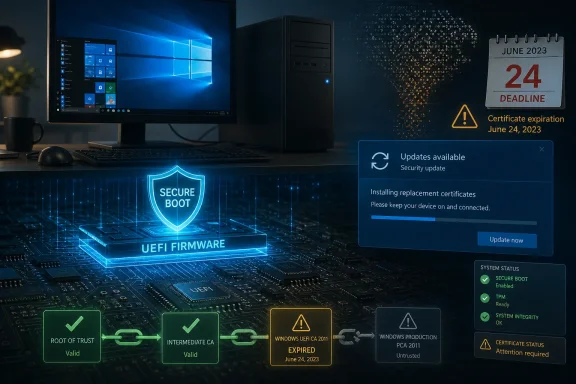 The Expiration Did Not Kill Windows, but It Divided the Boot Chain
Secure Boot is intended to prevent untrusted software from loading before Windows has established control of the computer. That makes it different from an antivirus scanner or an ordinary operating-system patch: it sits close to the boundary between the machine’s firmware and the software responsible for starting Windows.Certificates provide part of the trust framework behind that process. Firmware uses trusted certificates and related databases to decide whether boot managers, low-level drivers, and other startup components have been signed by an accepted authority rather than substituted or modified by an attacker.
When a Secure Boot certificate expires, the immediate outcome is not necessarily a black screen. Microsoft’s guidance says a machine without replacement certificates can generally continue to start, run applications, connect to networks, and install ordinary Windows updates. That distinction is essential because reports that computers were suddenly “exposed” can otherwise sound as though every affected PC became compromised at midnight on June 24.
The practical problem is prospective rather than instantly catastrophic. A machine still relying on expired trust material may be unable to receive new protections for Windows Boot Manager, Secure Boot databases, revocation information, or vulnerabilities discovered later in the boot process. The PC can still boot, but its ability to adapt to the next boot-level threat may be degraded.
That is a difficult condition for consumers to recognize. A failed hard drive announces itself. An expired certificate that prevents some future security mitigation from being applied may leave no obvious symptom beyond a warning that is easy to misunderstand or dismiss.
The resulting risk increases unevenly. A home computer used occasionally for browsing does not automatically become infected because a certificate reached its expiration date. But a system used for banking, remote work, password storage, or sensitive documents now deserves closer attention because the assurance protecting its startup environment may no longer be advancing alongside current security research.
This is what makes the episode more serious than a routine expiration notice. Secure Boot’s usefulness depends not simply on whether it is switched on, but on whether the trust information behind it remains serviceable. A green-looking security setting can therefore conceal a support problem lower in the stack.
Microsoft Chose the Deadline to Widen the Safety Net
According to The Cool Down’s account, Microsoft had distributed replacement certificates to some PCs before June 24, but many systems had not yet received them. Microsoft widened its automatic upgrade effort on the same day the certificates began to expire.That sequence matters. Automatic deployment was the only realistic way to protect a mass population of Windows users, most of whom would never knowingly inspect a firmware certificate database. But expanding the rollout at the deadline meant Microsoft was still increasing coverage at the moment users needed a definitive answer about whether their systems were protected.
Microsoft’s official guidance presents automatic delivery as the normal path for many personal computers. Windows Update can coordinate the replacement process when the operating system, firmware, device configuration, and eligibility rules permit it. Some systems, however, may still require a firmware update supplied by the PC or motherboard manufacturer.
This is where the phrase “automatic update” becomes misleadingly reassuring. It describes Microsoft’s intended delivery mechanism, not a guarantee that every eligible machine will accept the change successfully. Firmware limitations, unsupported configurations, update failures, disabled security features, and absent manufacturer support can all break the chain.
A conventional Windows patch largely belongs to Microsoft. A Secure Boot certificate transition crosses administrative boundaries: Microsoft supplies Windows components and servicing logic, while device makers control firmware implementations that vary by model and generation. Consumers are left to interpret the result even though they did not choose that architecture and have little ability to diagnose it.
The wider rollout was therefore both necessary and revealing. It reduced the number of systems left behind, but it also confirmed that Microsoft did not have a single universal path capable of bringing every affected PC forward before expiration.
A staged deployment is defensible when a firmware-level change could make a machine unbootable if mishandled. Rolling cautiously allows Microsoft to identify incompatible configurations before they affect the whole installed base. Yet cautious rollout and clear communication are separate responsibilities, and the latter was where the process looked weakest.
Users needed one intelligible status: updated, waiting safely for an update, or unable to update without intervention. Instead, many encountered a moving target in which warnings, Windows Update history, firmware availability, and online explanations did not always produce an obvious conclusion.
PCWorld senior editor Alaina Yee summarized that experience bluntly: “I have a headache from dealing with Secure Boot this past week.” The significance of the remark is not simply its frustration. Yee covers Windows and PC hardware professionally; if the state of a machine was difficult for an experienced technology journalist to establish, the average Windows 10 owner had little chance of confidently navigating the same process.
A Working PC Can Now Occupy Two Very Different Security States
The certificate transition creates a distinction that ordinary update language rarely captures. Two Windows PCs can both start successfully, report that Secure Boot is enabled, and install routine updates while having materially different prospects for receiving future boot-chain protections.| Device state | Starts normally | Ordinary Windows use | Future boot protections | Likely user action |
|---|---|---|---|---|
| Replacement certificates installed | Yes | Continues normally | Can continue receiving applicable protections | Keep Windows and firmware updated |
| Old certificates expired | Generally yes | May appear unchanged | New boot-level protections may be unavailable | Check update status and manufacturer firmware |
| Automatic update blocked | Generally yes | May appear unchanged | Depends on resolving the firmware or configuration barrier | Follow manufacturer or IT guidance |
| Secure Boot disabled | Windows may still start | Normal use may continue | Secure Boot enforcement is absent | Do not treat disabling it as a certificate fix |
Microsoft’s official position is that replacement certificates can still be installed after expiration if a machine remains capable of starting Windows and applying the required updates. June 24 was therefore not an irreversible cutoff after which remediation became impossible.
But post-expiration recovery does not eliminate the management failure. Once the deadline passed, users had to distinguish between systems that were fully updated, systems awaiting automatic servicing, systems blocked by firmware, and systems whose manufacturers might never provide the needed support.
That is an unusually heavy diagnostic burden to place on consumers. Windows Update has trained users to expect that supported security maintenance arrives as a package: install the update, restart, and return to work. Secure Boot servicing instead exposes the seams beneath that experience.
The machine’s age becomes relevant in ways that are not visible in its everyday performance. A ten-year-old computer with an upgraded drive and sufficient memory may still feel responsive, yet its firmware vendor may no longer be producing updates. Performance life and security-service life are no longer the same measurement.
Windows 10 Owners Inherit the Worst Ambiguity
The Cool Down identified Windows 10 as the affected operating system at the center of the problem, and that context raises the stakes. Windows 10 users are already operating near a support boundary, often because their computers remain useful but are not straightforward candidates for a newer Windows release.Microsoft’s decision to extend Windows 10 security updates for another year offers temporary breathing room. It does not, however, guarantee that every aging PC will receive every kind of protection it needs, particularly when a security transition depends on firmware support rather than an ordinary operating-system update alone.
This is where support is not a binary state. A computer may still receive Windows security patches while its firmware remains outside the manufacturer’s active maintenance window. It may qualify for an additional year of operating-system updates while lacking the platform changes needed to keep Secure Boot’s trust chain current.
For users, that fragmentation is nearly invisible until something goes wrong. The familiar Windows Update screen suggests one centralized maintenance relationship, but the actual machine depends on Microsoft, the PC manufacturer, the motherboard or firmware provider, and sometimes third-party hardware vendors.
A Windows 10 extension can keep fixing vulnerabilities in supported Windows components. It cannot compel an equipment manufacturer to revive firmware engineering for a product it considers retired. Nor can it guarantee compatibility where an old firmware implementation handles certificate changes incorrectly.
That makes the extra year valuable but incomplete. It postpones one deadline without erasing all the other deadlines embedded in the hardware.
The economic context matters because many Windows 10 owners are not refusing an upgrade out of nostalgia. They may be keeping a functional PC because replacing it is expensive, because their applications still run adequately, or because the machine cannot move cleanly to a newer operating system without hardware changes.
Security policy often assumes that retirement is a technical decision. For households and small organizations, it is frequently a budget decision. A computer can become difficult to secure before its owner can reasonably afford to replace it.
Planned Obsolescence Becomes a Security Policy
PCWorld framed the episode as a form of planned obsolescence, and The Cool Down carried that argument into its coverage. The phrase is provocative, but it identifies a real structural problem: hardware is often usable for longer than its full security-maintenance ecosystem remains willing to support it.Traditional obsolescence was visible. New software ran slowly, storage filled up, or hardware failed. Modern security obsolescence is quieter: the computer keeps performing its basic tasks while the chain of organizations responsible for maintaining trust gradually withdraws.
That creates an uncomfortable incentive structure. Microsoft can recommend moving to newer hardware, while manufacturers can point to the age of the product and the end of firmware support. Both positions may be technically defensible, yet the user remains the one holding a functioning computer whose security status has become uncertain.
Calling every support cutoff malicious would be simplistic. Firmware updates carry testing costs and substantial risk, particularly across thousands of hardware configurations. An update that corrupts Secure Boot data or clashes with a vendor-specific implementation can prevent Windows from starting, trigger recovery procedures, or disrupt security features associated with the boot process.
No company can support every device indefinitely. The stronger criticism is that the industry has not aligned hardware life, operating-system life, certificate life, and firmware-support life in a way consumers can understand before purchase.
Buyers are told about processor speed, screen resolution, storage, and battery life. They are rarely given an enforceable, prominent statement explaining how long the manufacturer expects to supply firmware updates needed for future platform-security transitions.
The Secure Boot expiration turns that omission into a material cost. A computer’s security lifespan may depend on manufacturer work years after the initial sale, yet the buyer has little information about whether that work will happen.
Yee’s argument, as summarized by The Cool Down, is that technology companies possess enough device and update information to identify many of these risks sooner. That does not mean every compatibility issue can be predicted, but it does weaken the idea that users should be surprised by certificate deadlines or forced to assemble their own status from scattered support pages.
Certificate expiration is not an unexpected event. It is built into the certificate. The industry had years to know that a large, heterogeneous population of Windows devices would eventually need replacement trust material.
The technical challenge was real; the calendar was not a surprise.
Enterprise IT Should Read This as an Inventory Failure
For IT departments, the Secure Boot transition is less a consumer-warning story than an asset-management test. Organizations that know which devices they own, what firmware they run, who supports them, and whether they have received the replacement certificates can treat the change as a controlled migration.Organizations without that visibility are forced into reactive troubleshooting. They may know that Windows patches are current while lacking reliable information about the firmware trust store, Secure Boot state, or whether a certificate update has completed.
That gap is common because endpoint-management practices tend to concentrate on operating-system versions, application inventories, malware protection, and patch compliance. Firmware and boot-chain state are more difficult to normalize across vendors and are often examined only after a security incident or failed update.
The expiration demonstrates why “fully patched” needs a more precise definition. A machine can be current according to a monthly Windows compliance report and still be unable to receive a future boot-level mitigation because its certificate state was not updated.
Administrators should also resist treating mass hardware replacement as the only response. Some devices may simply be awaiting Microsoft’s expanded automatic deployment. Others may need a manufacturer firmware package. Still others may have configuration issues that can be corrected without retiring the PC.
The first task is classification, not disposal. IT needs to separate successfully updated machines from those pending normal servicing, those blocked by correctable conditions, and those genuinely stranded by unsupported firmware.
Action checklist for admins
- Inventory Windows 10 devices and record their Secure Boot status, firmware version, model, and manufacturer-support state.
- Confirm that current Windows updates have been installed and that affected machines have restarted as required.
- Check the PC or motherboard manufacturer for applicable firmware updates and deployment warnings.
- Identify systems that have not received replacement certificates rather than assuming a successful boot means successful remediation.
- Test firmware and Secure Boot changes on representative hardware before broad deployment.
- Back up recovery information and critical data before making firmware-level changes.
- Prioritize computers used for privileged administration, finance, remote access, or sensitive data.
- Do not disable Secure Boot as a workaround for certificate-expiration warnings.
Administrators must also plan for devices that cannot be remediated immediately. Network segmentation, reduced privileges, removal from sensitive workflows, stronger monitoring, and accelerated replacement can reduce exposure while procurement catches up.
A certificate inventory should become part of lifecycle planning rather than a one-time cleanup. The next platform-security transition will also depend on knowing which systems can accept a change before the deadline arrives.
Firmware Is the Part of Windows That Microsoft Does Not Fully Own
The most revealing aspect of this episode is that Windows security is partly constrained by code Microsoft does not directly control. Secure Boot resides in the UEFI environment, and certificate servicing requires Windows to coordinate safely with firmware implementations supplied across a sprawling hardware market.That coordination has to preserve bootability throughout the transition. Trust cannot simply be ripped out and replaced in one reckless step, because the firmware must continue recognizing the boot components required to start the system before, during, and after the update.
The cautious design is justified. A security update that makes a machine unbootable can be worse for an ordinary user than a warning about a gradually increasing risk, especially if recovery requires another computer, removable media, encryption recovery information, or technical knowledge.
But caution increases the need for observability. If servicing is staged, conditional, and dependent on firmware, Windows must give users a reliable way to see which stage their computer has reached and what remains to be done.
Microsoft has attempted to surface Secure Boot certificate status through Windows security interfaces and guidance. The broader communication challenge remains translating an intricate state machine into instructions that are accurate without being paralyzing.
“Install updates” is necessary advice, but it is not sufficient when the update may be blocked by hardware or firmware. “Contact your manufacturer” is technically appropriate, but it can become a dead end for an old computer whose support page has not changed in years.
The support chain is only as strong as its least responsive participant. Microsoft can distribute a certificate package, but it cannot promise that every old firmware implementation will store it correctly. A manufacturer can publish firmware, but it cannot ensure that every owner finds and installs it. The user can follow instructions, but may lack the recovery tools needed if an update fails.
This fragmentation is precisely why platform trust should be treated as an ecosystem obligation. Each party’s narrow responsibility may be clear, while the outcome for the customer remains unacceptable.
Microsoft’s Messaging Arrived Too Close to the Consequence
A certificate transition of this scale requires communication long before the expiry warning becomes urgent. Users need to know not only that certificates are expiring but what the event will and will not do.The first message should have been reassuringly specific: an unupdated PC does not necessarily stop starting on June 24. The second should have been equally direct: continued operation does not mean the machine can receive every future boot-security protection.
Without both statements, communication veers toward one of two failures. Alarmist coverage implies that millions of computers have instantly become unsafe, while overly soothing guidance encourages users to ignore a real degradation because Windows still loads normally.
The Cool Down’s report captured the confusion but also illustrates the challenge of translating a platform-security transition for a broad audience. “Exposed” is directionally reasonable because the affected systems can lose access to future protections, yet it needs qualification: expiration changes the machine’s ability to respond to emerging boot threats rather than proving an existing compromise.
Microsoft also had to explain why some machines updated before June 24, some were included only when the effort widened that day, and others might still need intervention. From a deployment perspective, those categories may reflect sensible compatibility controls. From a user’s perspective, they look like inconsistent treatment.
This is where a single, authoritative status display matters more than another support article. Users should not have to infer certificate state from whether an update was offered, whether a firmware package exists, or whether a warning appeared.
The ideal message is actionable and bounded. It should say whether the device has the replacement certificates, whether Microsoft expects an automatic update to arrive, whether a known hardware barrier exists, and whether the manufacturer must supply firmware.
Anything less pushes ordinary owners toward web searches, command-line experiments, or advice of uncertain quality. Firmware security is a particularly dangerous area for improvisation because a mistaken change can affect startup or recovery.
The Extra Windows 10 Year Buys Time, Not Certainty
Microsoft’s extension of Windows 10 security updates by another year reduces immediate pressure on users who cannot yet replace their PCs. It is a pragmatic concession to the reality that a large operating-system population does not disappear simply because a support calendar reaches its planned end.The extension should not be mistaken for a guarantee that every Windows 10 device remains equally maintainable. Operating-system patches and Secure Boot certificate servicing overlap, but they are not interchangeable.
A machine may receive the additional Windows 10 security coverage while still depending on an OEM firmware update for the certificate transition. If that firmware is unavailable, the extra year protects supported Windows components without necessarily restoring the complete early-boot update path.
For households, the extension should be used as planning time. Owners can verify updates, investigate firmware availability, back up their data, and decide whether the computer remains appropriate for sensitive activities.
For businesses, the year is a migration window rather than permission to defer indefinitely. Devices that cannot demonstrate current boot-chain trust should be moved away from high-value roles even if they continue receiving other security patches.
The distinction also matters environmentally. Keeping serviceable hardware in use can reduce waste and defer replacement costs, but extending device life responsibly requires continued access to security maintenance. Sustainability arguments collapse if older machines are retained without an honest assessment of their declining protections.
The better policy is not “replace everything old” or “keep everything until it physically fails.” It is to measure whether a device can still participate in the current security ecosystem and assign it work appropriate to that state.
The Real Lessons From the June 24 Divide
The Secure Boot expiration was neither an instant Windows catastrophe nor an irrelevant paperwork event. It exposed a widening gap between computers that continue to function and computers that remain fully serviceable against future threats.- June 24 marked the certificate expiration date and the day Microsoft widened its automatic upgrade effort.
- Affected PCs can generally keep starting even when their Secure Boot trust material is outdated.
- Continued operation does not prove that future boot-level protections can be installed.
- Windows 10’s additional year of security updates provides time but does not solve every firmware-support gap.
- Users should install Windows and manufacturer firmware updates, investigate warnings, and maintain current backups.
- IT departments should track certificate and firmware state separately from ordinary Windows patch compliance.
June 24 should therefore be remembered less as the day a certificate expired than as the day Windows’ support model became harder to describe honestly. Microsoft’s expanded rollout may eventually bring many remaining systems across the divide, but the industry now needs clearer status reporting, longer and more explicit firmware commitments, and lifecycle policies that warn buyers before functioning hardware becomes cryptographically stranded.