

The usable answer is straightforward: the redesigned Settings > System > About page in Windows 10 appears to be a cosmetic interface change, not evidence that the page has lost its core function. Users can still check device specifications and Windows details there. The reported feature-ID attempts did not restore the original interface, and Microsoft has not provided a verified, supported rollback in the material supplied. Administrators should therefore verify that the page works, update support documentation where necessary, and avoid removing security updates merely to recover the older appearance.
Neowin highlighted the redesigned Windows 10 About page after Reddit user Androbots posted an image showing a layout that appeared visually closer to Windows 11 than to the surrounding Windows 10 Settings interface.
Androbots summarized the objection this way: “How was this UI update approved? This looks like it was glued on by someone in a modernization team and called it a day without any respect to the original Windows 10 design language.” The quotation and accompanying image were reported by Neowin from the Reddit post.
The criticism is specifically about presentation. The page remains available at:
Settings > System > About
Users can still go there to inspect device specifications and Windows details. Nothing in the supplied reporting establishes that the redesign removes those basic capabilities. The problem shown in the image is that the page’s cards, spacing, and overall presentation appear inconsistent with the older Windows 10 Settings environment around them.
That distinction matters for both users and administrators. A page that looks unfamiliar is not automatically broken. Before attempting remediation, users should confirm whether the expected information is present and whether Settings navigation continues to work normally.
The supplied material establishes that the redesigned page existed in Neowin’s 2024 coverage. It does not establish exactly when Microsoft deployed it broadly, which servicing mechanism delivered it, or whether every Windows 10 installation received the same presentation. It is therefore safer to describe the page as a documented Windows 10 redesign than to claim Microsoft “pushed” it through a particular rollout.
The redesigned About page presents a different kind of inconsistency. According to Neowin’s description of the Reddit image, newer Windows 11-style material appears inside Windows 10 rather than as a clearly preserved legacy component. That can make the page look unfinished or transplanted even when its information remains accurate.
This is a limited design criticism, not proof of a larger technical failure. The About page is mainly informational, and the available evidence does not show that the visual mismatch prevents users from checking their hardware or Windows version. The strongest supported conclusion is simply that a newer visual treatment does not blend cleanly with the Windows 10 interface shown around it.
Neowin placed the dispute in the context of Microsoft’s broader interface modernization work, including efforts involving the Windows spinner and the Run dialog. Those examples show that Microsoft continues to revisit visible Windows components, including elements with roots in older releases.
Modernizing an old spinner or dialog and restyling a Windows 10 Settings page are not identical projects. The comparison is useful only because it illustrates a component-driven approach: individual Windows surfaces can change on different schedules, sometimes producing an uneven result when viewed as one operating environment.
For users, that unevenness is mostly cosmetic in this case. For support teams, it is a reminder that familiar Windows instructions may need updated screenshots even when the underlying task has not changed.
As Neowin reported, Androbots found earlier 2024 coverage of the redesigned About page and attempted to use feature IDs associated with the work to restore the older interface. Those reported attempts did not bring the original page back.
That outcome does not prove that reverting the page is technically impossible. It does show that the specific feature-ID approach described in the reporting did not work. Microsoft has not provided a verified, supported rollback method in the supplied material.
Feature IDs are often used by Windows enthusiasts to investigate staged or experimental functionality. They can be useful in test environments, but they are not equivalent to a supported configuration control. A flag associated with an earlier implementation may stop affecting the visible interface after code is integrated, reorganized, or serviced differently.
Administrators should not interpret the failed experiment as a reason to try additional undocumented switches across production systems. Even if a community-discovered configuration appears to work on one build, that does not establish that Microsoft supports it, that it will survive later servicing, or that it has been validated against security and reliability requirements.
The same caution applies to uninstalling updates. Nothing in the supplied reporting identifies a specific security update as a supported boundary between the two About-page designs. Removing updates in pursuit of the old appearance could reduce security without reliably changing the page.
The defensible operating position is therefore:
That status limits reasonable expectations for future design work. Windows 10 users should not assume that Microsoft will revisit a visually awkward page simply because it does not match the rest of the operating system. ESU availability also should not be treated as a promise that cosmetic inconsistencies will be redesigned.
This does not establish that the About page was delivered through ESU, nor does it explain the page’s deployment mechanism. It means only that Windows 10 is now in a phase where security and migration concerns are more important than visual refinement.
For remaining Windows 10 users, the most useful response is to verify operation rather than pursue an unsupported cosmetic rollback. At Settings > System > About, confirm that the page still provides the device specifications and Windows details needed for inventory, troubleshooting, and support.
Organizations should also compare devices with similar servicing states before concluding that the page indicates corruption. Differences may deserve documentation, but the supplied material does not establish that the redesign itself is a sign of a damaged Windows installation.
If two comparable machines show different layouts, administrators can record that difference alongside build and servicing information. That creates a useful baseline if a later functional problem appears, without prematurely treating a visual change as a security or reliability incident.
The material supplied does not establish a particular number or class of affected devices, so the issue should not be described as occurring “on certain computers.” It is sufficient to state the reported Windows version scope and the existence of the recent fix.
More importantly, the Windows 11 shell problem and the Windows 10 About-page redesign should not be presented as sharing a technical cause. There is no evidence here that the two changes depend on the same code, team, deployment mechanism, or engineering decision.
The valid comparison is narrower:
This contrast is useful because it prevents two opposite mistakes. Users should not dismiss every interface problem as decoration, because shell failures can directly disrupt interaction. They also should not treat every visual inconsistency as evidence that Windows itself is malfunctioning.
A narrower editorial assessment is justified: changed screenshots can cause avoidable confusion when users are following visual instructions.
For example, a help-desk document may tell a user to open Settings > System > About and compare the screen with an older Windows 10 screenshot. If the user sees a different card layout, the technician may need to confirm that the user is still on the correct page before collecting device or Windows information.
That is an operational example, not evidence that the redesign has caused widespread disruption. The appropriate response is to update the relevant screenshot or add a note explaining that the page’s appearance may differ while its core purpose remains the same.
Support teams should also write instructions around labels and information rather than relying exclusively on visual placement. “Open Settings > System > About and read the Windows specifications section” is more resilient than “look at the box in the lower-right corner,” particularly when Microsoft can revise page layouts independently of the task.
No specific accessibility defect has been established in the supplied reporting. If an organization observes missing labels, unreadable text, keyboard-navigation failures, scaling problems, or screen-reader issues, those should be recorded and escalated as concrete defects rather than inferred from the design mismatch alone.
It would be speculation to state that a future web-based AI operating environment will necessarily feel hosted rather than native, or that Microsoft teams lack clear ownership of the complete Windows experience. The supplied evidence does not establish either conclusion.
The Windows 10 image does, however, illustrate a design risk that becomes more relevant as Windows uses more independently serviced components. A component can function correctly by itself while looking inconsistent in its host environment. Faster updates and shared technologies can increase the number of opportunities for that mismatch unless Microsoft adapts each surface to the release in which users encounter it.
This is analysis rather than a claim about Microsoft’s internal structure. Component-driven development can improve code reuse and delivery speed, but users ultimately judge the combined screen. Microsoft’s challenge is to preserve recognizable navigation and presentation even when the underlying components come from different development eras or servicing channels.
The Windows 10 About page is a modest example. Users can still reach it through Settings > System > About, and the available reporting does not show that its essential information has disappeared. But its presentation offers an early test of how well Microsoft can integrate newer visual components into established Windows environments.
That question becomes more important, not less, as Copilot and AI-related experiences expand. Neowin’s AI and Copilot context suggests that Microsoft’s attention is increasingly directed toward those newer interfaces. Windows 10 users should consequently expect security and migration decisions to take priority over cosmetic refinement of an older Settings page.
Users should not uninstall security updates merely because the page looks different. Windows 10 systems outside ordinary support already require careful security decisions, while ESU systems should be managed with attention to supported servicing. Recovering an earlier visual layout is not a sufficient reason to weaken that posture.
If the page is blank, crashes, omits expected information, opens the wrong destination, displays corrupted controls, or prevents normal navigation, that is a different case. Record the symptom, Windows build, update state, and any relevant error information before troubleshooting or escalating it.
The longer-term warning is not that this cosmetic page and the Windows 11 shell issue share a technical cause. They do not, based on the available evidence. It is that future Windows experiences—including the AI and Copilot work discussed by Neowin—will increasingly depend on Microsoft’s ability to integrate independently evolving components without sacrificing either visual consistency or functional reliability.
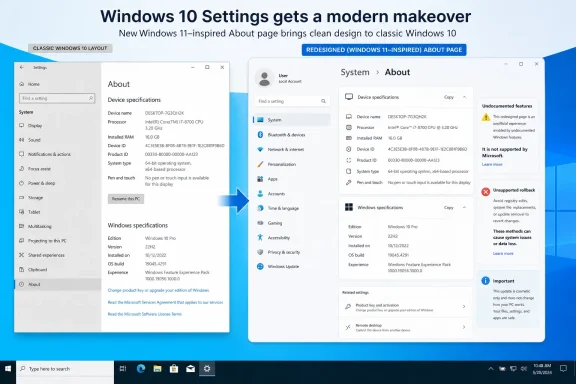 What Changed on the Windows 10 About Page
Neowin highlighted the redesigned Windows 10 About page after Reddit user Androbots posted an image showing a layout that appeared visually closer to Windows 11 than to the surrounding Windows 10 Settings interface.Androbots summarized the objection this way: “How was this UI update approved? This looks like it was glued on by someone in a modernization team and called it a day without any respect to the original Windows 10 design language.” The quotation and accompanying image were reported by Neowin from the Reddit post.
The criticism is specifically about presentation. The page remains available at:
Settings > System > About
Users can still go there to inspect device specifications and Windows details. Nothing in the supplied reporting establishes that the redesign removes those basic capabilities. The problem shown in the image is that the page’s cards, spacing, and overall presentation appear inconsistent with the older Windows 10 Settings environment around them.
That distinction matters for both users and administrators. A page that looks unfamiliar is not automatically broken. Before attempting remediation, users should confirm whether the expected information is present and whether Settings navigation continues to work normally.
The supplied material establishes that the redesigned page existed in Neowin’s 2024 coverage. It does not establish exactly when Microsoft deployed it broadly, which servicing mechanism delivered it, or whether every Windows 10 installation received the same presentation. It is therefore safer to describe the page as a documented Windows 10 redesign than to claim Microsoft “pushed” it through a particular rollout.
Why the Redesign Looks Out of Place
Windows has long mixed interface generations. Modern Settings pages coexist with classic dialogs, management consoles, Control Panel components, and tools preserved for compatibility. A legacy dialog can look dated without confusing users about where it came from: its age is part of the explanation for why it remains.The redesigned About page presents a different kind of inconsistency. According to Neowin’s description of the Reddit image, newer Windows 11-style material appears inside Windows 10 rather than as a clearly preserved legacy component. That can make the page look unfinished or transplanted even when its information remains accurate.
This is a limited design criticism, not proof of a larger technical failure. The About page is mainly informational, and the available evidence does not show that the visual mismatch prevents users from checking their hardware or Windows version. The strongest supported conclusion is simply that a newer visual treatment does not blend cleanly with the Windows 10 interface shown around it.
Neowin placed the dispute in the context of Microsoft’s broader interface modernization work, including efforts involving the Windows spinner and the Run dialog. Those examples show that Microsoft continues to revisit visible Windows components, including elements with roots in older releases.
Modernizing an old spinner or dialog and restyling a Windows 10 Settings page are not identical projects. The comparison is useful only because it illustrates a component-driven approach: individual Windows surfaces can change on different schedules, sometimes producing an uneven result when viewed as one operating environment.
For users, that unevenness is mostly cosmetic in this case. For support teams, it is a reminder that familiar Windows instructions may need updated screenshots even when the underlying task has not changed.
The Feature-ID Workaround Did Not Restore the Old Page
The practical problem is that no verified rollback has been identified.As Neowin reported, Androbots found earlier 2024 coverage of the redesigned About page and attempted to use feature IDs associated with the work to restore the older interface. Those reported attempts did not bring the original page back.
That outcome does not prove that reverting the page is technically impossible. It does show that the specific feature-ID approach described in the reporting did not work. Microsoft has not provided a verified, supported rollback method in the supplied material.
Feature IDs are often used by Windows enthusiasts to investigate staged or experimental functionality. They can be useful in test environments, but they are not equivalent to a supported configuration control. A flag associated with an earlier implementation may stop affecting the visible interface after code is integrated, reorganized, or serviced differently.
Administrators should not interpret the failed experiment as a reason to try additional undocumented switches across production systems. Even if a community-discovered configuration appears to work on one build, that does not establish that Microsoft supports it, that it will survive later servicing, or that it has been validated against security and reliability requirements.
The same caution applies to uninstalling updates. Nothing in the supplied reporting identifies a specific security update as a supported boundary between the two About-page designs. Removing updates in pursuit of the old appearance could reduce security without reliably changing the page.
The defensible operating position is therefore:
- Treat the redesign as cosmetic unless testing shows a functional defect.
- Do not assume that an undocumented feature ID provides a stable rollback.
- Do not remove security updates solely to restore the earlier layout.
- Escalate the problem only when information, navigation, or rendering is actually impaired.
Windows 10 and ESU Change the Expectations
Windows 10 is no longer under ordinary support, except for systems covered through Extended Security Updates, or ESU. Neowin’s coverage provides that support-status context while discussing the likelihood of further attention to the interface.That status limits reasonable expectations for future design work. Windows 10 users should not assume that Microsoft will revisit a visually awkward page simply because it does not match the rest of the operating system. ESU availability also should not be treated as a promise that cosmetic inconsistencies will be redesigned.
This does not establish that the About page was delivered through ESU, nor does it explain the page’s deployment mechanism. It means only that Windows 10 is now in a phase where security and migration concerns are more important than visual refinement.
For remaining Windows 10 users, the most useful response is to verify operation rather than pursue an unsupported cosmetic rollback. At Settings > System > About, confirm that the page still provides the device specifications and Windows details needed for inventory, troubleshooting, and support.
Organizations should also compare devices with similar servicing states before concluding that the page indicates corruption. Differences may deserve documentation, but the supplied material does not establish that the redesign itself is a sign of a damaged Windows installation.
If two comparable machines show different layouts, administrators can record that difference alongside build and servicing information. That creates a useful baseline if a later functional problem appears, without prematurely treating a visual change as a security or reliability incident.
Do Not Conflate This With the Windows 11 Shell Issue
Neowin also reported a more consequential problem involving Windows 11 shell components. The affected version scope identified in that reporting was Windows 11 24H2 and Windows 11 25H2, and Neowin reported that Microsoft recently delivered a fix.The material supplied does not establish a particular number or class of affected devices, so the issue should not be described as occurring “on certain computers.” It is sufficient to state the reported Windows version scope and the existence of the recent fix.
More importantly, the Windows 11 shell problem and the Windows 10 About-page redesign should not be presented as sharing a technical cause. There is no evidence here that the two changes depend on the same code, team, deployment mechanism, or engineering decision.
The valid comparison is narrower:
- The Windows 10 story concerns cosmetic consistency on an informational Settings page.
- The Windows 11 story concerns functional shell reliability across the reported 24H2 and 25H2 scope.
| Windows version | Surface | What the supplied reporting establishes | Practical response |
|---|---|---|---|
| Windows 10 | Settings > System > About | Neowin showed a redesign criticized by Reddit user Androbots as visually inconsistent; reported feature-ID attempts did not restore the old page | Verify the displayed information and navigation; do not use unsupported rollback methods |
| Windows 11 24H2 | Shell components | Neowin reported the version within the scope of a shell-components issue and a recent Microsoft fix | Apply and validate the appropriate supported servicing fix |
| Windows 11 25H2 | Shell components | Neowin reported the version within the same issue scope and a recent Microsoft fix | Apply and validate the appropriate supported servicing fix |
What the Change Means for Support Work
The supplied evidence does not quantify support costs, accessibility effects, or enterprise impact. Claims that the page will be expensive at scale or will impair accessibility would therefore go beyond what has been established.A narrower editorial assessment is justified: changed screenshots can cause avoidable confusion when users are following visual instructions.
For example, a help-desk document may tell a user to open Settings > System > About and compare the screen with an older Windows 10 screenshot. If the user sees a different card layout, the technician may need to confirm that the user is still on the correct page before collecting device or Windows information.
That is an operational example, not evidence that the redesign has caused widespread disruption. The appropriate response is to update the relevant screenshot or add a note explaining that the page’s appearance may differ while its core purpose remains the same.
Support teams should also write instructions around labels and information rather than relying exclusively on visual placement. “Open Settings > System > About and read the Windows specifications section” is more resilient than “look at the box in the lower-right corner,” particularly when Microsoft can revise page layouts independently of the task.
No specific accessibility defect has been established in the supplied reporting. If an organization observes missing labels, unreadable text, keyboard-navigation failures, scaling problems, or screen-reader issues, those should be recorded and escalated as concrete defects rather than inferred from the design mismatch alone.
The Warning for Component-Driven Windows Design
The larger concern is forward-looking. Neowin connected Windows modernization to Microsoft’s increased emphasis on AI and Copilot, as well as reporting around possible web-based Windows AI concepts. That context indicates that Microsoft is exploring interfaces and services that may be updated more independently than traditional operating-system features.It would be speculation to state that a future web-based AI operating environment will necessarily feel hosted rather than native, or that Microsoft teams lack clear ownership of the complete Windows experience. The supplied evidence does not establish either conclusion.
The Windows 10 image does, however, illustrate a design risk that becomes more relevant as Windows uses more independently serviced components. A component can function correctly by itself while looking inconsistent in its host environment. Faster updates and shared technologies can increase the number of opportunities for that mismatch unless Microsoft adapts each surface to the release in which users encounter it.
This is analysis rather than a claim about Microsoft’s internal structure. Component-driven development can improve code reuse and delivery speed, but users ultimately judge the combined screen. Microsoft’s challenge is to preserve recognizable navigation and presentation even when the underlying components come from different development eras or servicing channels.
The Windows 10 About page is a modest example. Users can still reach it through Settings > System > About, and the available reporting does not show that its essential information has disappeared. But its presentation offers an early test of how well Microsoft can integrate newer visual components into established Windows environments.
That question becomes more important, not less, as Copilot and AI-related experiences expand. Neowin’s AI and Copilot context suggests that Microsoft’s attention is increasingly directed toward those newer interfaces. Windows 10 users should consequently expect security and migration decisions to take priority over cosmetic refinement of an older Settings page.
What Windows 10 Users Should Do
Individual users who encounter the redesigned page should first confirm that they are in the correct location:- Open Settings.
- Select System.
- Select About.
- Confirm that device specifications are displayed.
- Confirm that Windows details are displayed.
Users should not uninstall security updates merely because the page looks different. Windows 10 systems outside ordinary support already require careful security decisions, while ESU systems should be managed with attention to supported servicing. Recovering an earlier visual layout is not a sufficient reason to weaken that posture.
If the page is blank, crashes, omits expected information, opens the wrong destination, displays corrupted controls, or prevents normal navigation, that is a different case. Record the symptom, Windows build, update state, and any relevant error information before troubleshooting or escalating it.
Action Checklist for Administrators
- Capture the affected build and servicing state. Record the Windows edition, version, OS build, recent servicing history, update channel, and ESU enrollment status where applicable. Save a screenshot of the page before making changes.
- Open the exact path. On the affected device, go to Settings > System > About rather than relying on a shortcut or search result that might open a different system-information surface.
- Compare with a control device. Check Settings > System > About on a representative machine with the same Windows edition, build, update state, architecture, and management profile where possible. Record whether the difference is visual only.
- Verify the displayed data. Confirm that expected device specifications and Windows details are present and plausible. Where necessary, compare them with an approved inventory or management source.
- Test navigation and rendering. Confirm that the page opens reliably, scrolls correctly, responds to keyboard and pointer input, and returns to adjacent Settings pages without errors. Test relevant scaling or remote-session conditions if those are part of the reported problem.
- Update help-desk screenshots. Replace outdated images in support documents or add a note showing the redesigned layout. Keep written instructions anchored to Settings > System > About and to named information sections rather than screen coordinates.
- Do not deploy undocumented feature IDs as a fleet remedy. Neowin reported that the attempted feature IDs did not restore the original interface. That approach is not a verified supported rollback.
- Do not remove security updates solely for appearance. No supplied evidence identifies update removal as a supported or reliable way to recover the previous page. Protecting the system takes precedence over restoring a preferred cosmetic layout.
- Escalate only for a functional defect. Escalation is appropriate if content is missing or incorrect, navigation fails, Settings crashes, controls are unusable, or rendering is materially broken. A different but functional layout should normally be documented rather than treated as an outage.
The longer-term warning is not that this cosmetic page and the Windows 11 shell issue share a technical cause. They do not, based on the available evidence. It is that future Windows experiences—including the AI and Copilot work discussed by Neowin—will increasingly depend on Microsoft’s ability to integrate independently evolving components without sacrificing either visual consistency or functional reliability.
References
- Primary source: Neowin
Published: Sat, 11 Jul 2026 12:46:00 GMT
Loading…
www.neowin.net - Official source: learn.microsoft.com
Extended Security Updates (ESU) program for Windows 10 | Microsoft Learn
Learn about the Extended Security Updates (ESU) program for Windows 10. The ESU program gives customers the option to receive security updates for Windows 10.learn.microsoft.com - Official source: microsoft.com
Loading…
www.microsoft.com - Official source: download.microsoft.com
Loading…
download.microsoft.com - Official source: cdn-dynmedia-1.microsoft.com
Loading…
cdn-dynmedia-1.microsoft.com