

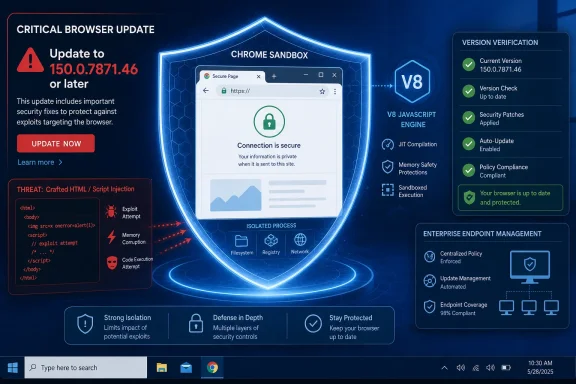
Google has fixed CVE-2026-14405 in Chrome 150.0.7871.46. The vulnerability is an uninitialized-use issue in V8 that can allow a remote attacker to execute arbitrary code inside the browser sandbox when a user opens crafted HTML content. Google Chrome installations running versions earlier than 150.0.7871.46 should be updated and relaunched.Direct answer
- Affected product: Google Chrome versions earlier than 150.0.7871.46.
- Required action: Update Google Chrome to 150.0.7871.46 or later, relaunch the browser, and verify the displayed version.
- Exploitation status: The provided public record does not identify observed exploitation.
- Impact boundary: CVE-2026-14405 can allow arbitrary code execution inside Chrome’s sandbox through crafted HTML. That must not be described as automatic or complete compromise of Windows.
The most important attribution correction is that the 9.6 Critical CVSS 3.1 score displayed by the National Vulnerability Database is a CISA-ADP contribution. NVD has not supplied its own CVSS assessment in the provided record. That distinction should lead directly to remediation rather than to a debate over which label should dominate: update Google Chrome, relaunch it, and confirm that the running version is 150.0.7871.46 or later.
 One Chrome Bug, Two Radically Different Risk Signals
CVE-2026-14405 is a memory-safety vulnerability in V8, Chrome’s JavaScript engine. According to the Chrome CVE information and the NVD record, crafted HTML can trigger an uninitialized-use condition and produce arbitrary code execution inside Chrome’s sandbox on Google Chrome versions earlier than 150.0.7871.46.The public description establishes several important boundaries:
- The attack is delivered through crafted HTML.
- User interaction is required because the target must process that content.
- The attacker does not need an existing account or prior browser privilege.
- Successful exploitation produces arbitrary code execution inside the sandbox.
- The record does not state that this vulnerability alone escapes the sandbox.
- The record does not establish complete control of Windows or the wider endpoint.
- The provided record does not identify observed exploitation.
CVSS:3.1/AV:N/AC:L/PR:N/UI:R/S:C/C:H/I:H/A:H, which produces a 9.6 Critical base score. NVD displays that contribution but has not supplied an independent NVD CVSS assessment in the provided material.| Assessment source | Rating or status | What the record establishes | Administrative interpretation |
|---|---|---|---|
| Chromium | Low | Crafted HTML can cause arbitrary code execution inside the sandbox | Do not treat “Low” as permission to leave affected builds running |
| CISA-ADP CVSS 3.1 | 9.6 Critical | Network attack vector, low complexity, no privileges, user interaction, changed scope, and high impact selections | Preserve the source and vector when importing the score into security tooling |
| CISA-ADP SSVC | Exploitation: none; automatable: no; technical impact: total | The assessment does not identify observed exploitation and does not classify the attack as automatable | Remediate promptly without claiming active exploitation |
| NVD | No NVD CVSS assessment supplied | NVD displays the CISA-ADP contribution but has not added its own score | Do not call 9.6 “the NVD score” |
Security dashboards should therefore retain the score provider instead of flattening every displayed number into an “NVD rating.” A ticket may accurately say that NVD displays a CISA-ADP CVSS 3.1 score of 9.6. It should not say that NVD itself assessed the vulnerability at 9.6.
The Sandbox Is an Important Impact Boundary
Chrome’s sandbox is a security boundary intended to constrain code associated with web content. The public CVE outcome must be stated precisely: CVE-2026-14405 can allow arbitrary code execution inside the sandbox.That is a significant security failure, but it is not the same claim as unrestricted operating-system execution. The provided record does not document a sandbox escape, privilege escalation, persistence mechanism, or direct takeover of Windows. It would therefore be inaccurate to convert the phrase “arbitrary code execution” into “complete endpoint compromise” without evidence of an additional boundary-crossing capability.
The reverse mistake would be to dismiss the issue because the execution is sandboxed. A security control has already failed when attacker-controlled web content obtains code execution in a constrained browser environment. The sandbox affects the scope of the documented outcome; it does not make the underlying vulnerability irrelevant.
This is the context administrators need when communicating the issue:
That wording avoids both exaggeration and minimization. It identifies the security boundary, preserves the published impact, and does not assign capabilities that the record does not support.CVE-2026-14405 allows arbitrary code execution inside Chrome’s sandbox through crafted HTML. The available record does not establish that the vulnerability alone escapes the sandbox or compromises the Windows host.
The restricted Chromium issue does not change those facts. The record supports only that access to the underlying issue requires permission. It does not establish why access is restricted, how long the restriction will remain, or what unpublished technical details may exist. Defenders should not fill that gap with assumptions about Google’s disclosure practices, patch propagation, related products, exploit development, or ongoing exposure.
Crafted HTML Makes Browser Version Compliance the Key Control
The attack medium is ordinary web content rather than an authenticated administrative interface or a locally installed specialist tool. The CVSS user-interaction metric indicates that the browser must be made to process the crafted HTML; the vulnerability description does not say an idle Chrome installation can be compromised without that interaction.The public record does not identify a specific delivery method. It is unnecessary to speculate about links, advertisements, compromised websites, attachments, redirects, or other possible routes. The fact-grounded statement is narrower: an attacker can use crafted HTML, and the target must process it.
CVE-2026-14405 is associated with CWE-457, “Use of Uninitialized Variable.” That classification identifies the weakness category, while the CVE description supplies the relevant security outcome for this case. Administrators do not need an unpublished proof of concept or a detailed V8 execution sequence to act on the version boundary.
The dependable control is to eliminate vulnerable Google Chrome versions from the organization’s installed and running inventory. That requires more than confirming that an update was downloaded. A browser that has staged an update but has not been relaunched may still have an older process running.
Long browser sessions deserve particular attention. Users may leave Chrome open while laptops sleep and resume, virtual desktops persist, or workstations remain signed in. Organizations should verify the version after restart rather than treating package delivery as proof that the fixed code is active.
Chrome 150.0.7871.46 Is the Remediation Threshold
The affected-version boundary is clear for Google Chrome: versions earlier than 150.0.7871.46 are affected. The remediation target is 150.0.7871.46 or later.This threshold applies to Google Chrome only. The supplied CVE product record does not establish the affected or fixed version for every other browser that uses Chromium or V8 components. Administrators should not copy Chrome’s exact version threshold into tickets for Microsoft Edge, Brave, Opera, Vivaldi, or another Chromium-based product without that product vendor’s own affected-version information.
Exact update procedure for individual Google Chrome users
- Open Google Chrome.
- Enter
chrome://settings/helpin the address bar and press Enter.- Alternatively, select the three-dot menu, then Help, then About Google Chrome.
- Allow Chrome’s update check to finish.
- If Chrome presents a Relaunch button, click it.
- Return to
chrome://settings/help. - Confirm that the displayed Google Chrome version is 150.0.7871.46 or later.
Users should save work in browser tabs and web applications before relaunching. Chrome may restore tabs, but administrators should not rely on session restoration as a substitute for normal change communication.
Enterprise remediation procedure
Enterprise administrators should use their organization’s existing browser-management, software-inventory, endpoint-management, or endpoint-detection tool to complete four concrete steps:- Inventory installed and running Google Chrome versions.
Query the organization’s existing management source for both installed Chrome versions and, where that telemetry is available, active Chrome processes. - Target versions below 150.0.7871.46.
Create the affected population using the explicit version boundary rather than a broad “Chrome 150” label. Any Google Chrome version numerically earlier than 150.0.7871.46 requires remediation. - Force or schedule relaunches where organizational policy permits.
Deploy the update through the existing browser or endpoint-management process, then require or schedule a browser restart. Use normal maintenance, user-notification, and business-continuity controls where a forced relaunch could interrupt active work. - Re-query after restart to verify remediation.
Run the inventory again after the relaunch window. Confirm that affected installed versions have been replaced and that no in-scope running Chrome process remains below 150.0.7871.46.
Windows Fleets Need Running-Version Evidence
For Windows administrators, CVE-2026-14405 is a browser-lifecycle problem as much as a vulnerability-scoring problem. Chrome has its own update and relaunch behavior, and that lifecycle may not align with the organization’s Windows servicing cycle.A device can be current on Windows security updates while continuing to run an affected browser. It can also have a corrected Chrome package staged on disk while an older Chrome process remains open. Vulnerability management therefore needs evidence about the active browser version rather than a general statement that updates are enabled.
Several endpoint categories warrant explicit review because ordinary user-driven relaunch behavior may not be reliable:
- Privileged administrative workstations
- Developer and support systems
- Devices used to access sensitive cloud or financial services
- Shared workstations
- Kiosks and unattended terminals
- Persistent virtual desktops
- Meeting-room and laboratory systems
- Laptops with long sleep-and-resume cycles
- Machines that have not recently checked in to central management
Disconnected and intermittently managed devices also need a defined path back into compliance. Inventory queries should identify systems that have not reported recently, but the absence of fresh telemetry should not be interpreted as evidence that they are patched. Those systems should be re-evaluated when they reconnect.
Action checklist for administrators
- [ ] Inventory installed and running Google Chrome versions using the organization’s existing browser-management or endpoint tool.
- [ ] Identify all Google Chrome versions below 150.0.7871.46.
- [ ] Deploy an update that brings Google Chrome to 150.0.7871.46 or later.
- [ ] Force or schedule browser relaunches where policy permits.
- [ ] Notify users before forced relaunches when active work could be interrupted.
- [ ] Re-query versions after restart and verify that no affected Chrome process remains.
- [ ] Give additional attention to privileged, shared, unattended, virtual, and intermittently connected endpoints.
- [ ] Record Chromium Low as the vendor severity.
- [ ] Record 9.6 Critical as the CISA-ADP CVSS 3.1 contribution displayed by NVD, not as an NVD-generated score.
- [ ] Record that the provided SSVC assessment lists exploitation as none and automatable as no.
- [ ] State that the provided record does not identify observed exploitation.
- [ ] Do not describe sandboxed execution as confirmed full Windows compromise.
- [ ] Check other Chromium-based browsers against their own vendor information rather than assigning them Chrome’s build threshold.
Four Record Changes Added Different Types of Context
The supplied history describes four record changes. A narrow timeline is more useful here than an interpretation of how scanners, feeds, or ticketing systems may have reacted. The changes show what information was added or modified without assigning unsupported behavior to downstream products.Timeline
Record 1 — Initial CVE informationThe Chrome record supplied the vulnerability description, the CWE-457 weakness classification, affected-version information, the Chrome advisory reference, and the permission-restricted Chromium issue reference.
Record 2 — CISA-ADP assessment added
CISA-ADP contributed the CVSS 3.1 vector
CVSS:3.1/AV:N/AC:L/PR:N/UI:R/S:C/C:H/I:H/A:H, producing the 9.6 Critical base score. It also supplied SSVC information.Record 3 — NIST product configuration added
NIST added the Google Chrome product configuration identifying versions earlier than 150.0.7871.46 as affected. Reference classifications were also added for the available Chrome and Chromium materials.
Record 4 — SSVC metadata modified
CISA-ADP modified the SSVC record metadata without changing the listed decision points: exploitation remained none, automatable remained no, technical impact remained total, and the role and SSVC version fields remained unchanged.
This sequence is enough to explain the present record. Chrome supplied the vulnerability and version information, CISA-ADP supplied the 9.6 CVSS calculation and SSVC context, and NIST added the affected-product configuration. NVD displays these contributions together, but displaying a contributed assessment does not turn it into an NVD-authored score.
The timeline should not be stretched into claims about scanner omissions, duplicate tickets, delayed feed ingestion, or automatic escalation. No such behavior is needed to make the operational point: security teams should preserve assessment provenance whenever they ingest vulnerability metadata.
What the Public Record Does—and Does Not—Say
A concise evidence boundary keeps remediation communications accurate.Established by the provided record
- CVE-2026-14405 affects Google Chrome versions earlier than 150.0.7871.46.
- The affected component is V8.
- The weakness is associated with uninitialized use and CWE-457.
- Crafted HTML is the attack medium.
- User interaction is required.
- No prior privileges are required in the CISA-ADP CVSS vector.
- The stated outcome is arbitrary code execution inside Chrome’s sandbox.
- Chromium classifies the issue as Low.
- CISA-ADP contributed a CVSS 3.1 score of 9.6 Critical.
- NVD displays that contribution but has not supplied its own CVSS assessment in the provided record.
- The supplied SSVC fields list exploitation as none, automatable as no, and technical impact as total.
- Access to the underlying Chromium issue requires permission.
- Updating Google Chrome to 150.0.7871.46 or later moves the browser beyond the stated affected range.
Not established by the provided record
- That CVE-2026-14405 alone escapes Chrome’s sandbox
- That successful exploitation automatically compromises Windows
- That attackers have used the vulnerability in observed attacks
- That the SSVC exploitation field determines whether the issue is or was a zero-day
- That the permission restriction reflects a standard Google disclosure policy
- That access is restricted because fixes are still propagating
- That related software remains exposed
- That a public proof of concept exists
- That researchers or attackers have reconstructed the issue from code changes
- That a particular delivery mechanism has been used
- That every Chromium-based browser shares Chrome’s affected-version threshold
- That the 9.6 score was calculated by NVD
The Correct Priority Is Fast, Calm, and Verifiable
CVE-2026-14405 calls for prompt remediation without inflated language. The available record does not identify observed exploitation, and it does not state that the vulnerability alone escapes Chrome’s sandbox or takes control of Windows. It does establish arbitrary code execution inside the sandbox through crafted HTML on affected Google Chrome versions.The corrective action is direct. Open Google Chrome, navigate to
chrome://settings/help or use the three-dot menu under Help > About Google Chrome, allow the update check to finish, click Relaunch, and confirm that the displayed version is 150.0.7871.46 or later. That procedure applies to Google Chrome only.Enterprises should perform the same process at fleet scale: inventory installed and running Chrome versions through existing management tools, target every version below 150.0.7871.46, force or schedule relaunches where policy permits, and re-query after restart. Remediation is complete when post-restart evidence shows that affected Chrome versions are no longer running.
The scoring discrepancy remains useful because it exposes an attribution mistake that can spread through dashboards and advisories. Chromium calls the issue Low. NVD displays a CISA-ADP CVSS 3.1 contribution of 9.6 Critical, while NVD has not supplied its own CVSS assessment in the provided record. Neither label changes the fixed-version boundary.
The durable lesson is that browser vulnerability management should be built around evidence: the named product, the affected range, the running version, the documented impact, the exploitation field, the assessment source, and the available fix. For CVE-2026-14405, those fields point to one practical outcome—move every managed Google Chrome installation to 150.0.7871.46 or later, relaunch it, and verify that the corrected version is actually running.
References
- Primary source: NVD / Chromium
Published: 2026-07-11T15:37:50-07:00
NVD - CVE-2026-14405
 nvd.nist.gov
- Security advisory: MSRC
Published: 2026-07-11T15:37:50-07:00
Original feed URL
Security Update Guide - Microsoft Security Response Center
 msrc.microsoft.com
- Related coverage: govcert.gov.hk
GovCERT.HK - Security Alert (A26-07-02): Multiple Vulnerabilities in Google Chrome
Security Alert (A26-07-02): Multiple Vulnerabilities in Google Chromewww.govcert.gov.hk