

A retailer listing is selling a used 500GB Seagate Barracuda 3.5-inch hard drive with Windows 11 Pro 64-bit already installed, presenting the 7200 RPM SATA disk as a plug-and-play system drive for older desktops, budget PCs, home offices, gaming, and general use. The hardware may be perfectly serviceable, but the bundle’s central promise confuses three separate things: a bootable Windows installation, a valid Windows license, and a Windows 11-compatible computer. Those are not interchangeable, and the listing establishes only the first.
That distinction turns an apparently convenient bargain into a product that should be treated as untrusted storage, not a ready-made operating system. A buyer may receive a functioning Seagate hard disk containing Windows files, yet still face activation failure, unsupported hardware, driver conflicts, unknown disk health, or an operating-system image whose provenance cannot be independently verified. The safest practical advice is therefore the opposite of “just plug it in”: test the drive, erase it, and install Windows from Microsoft’s own media.
Taken strictly as a hardware listing, the offer is straightforward. It describes a used, silver Seagate Barracuda with 500GB of capacity, a 3.5-inch desktop form factor, 7200 RPM rotational speed, 16MB of cache, and a SATA interface rated at 3.0 Gb/s. The stated dimensions are 5.79 by 4.00 by 0.79 inches, the weight is 0.91 pounds, and the country of manufacture is China.
None of those specifications makes the drive inherently unusable. A 500GB mechanical disk can still serve as expendable secondary storage, a test-system disk, a temporary migration target, or a component in a low-cost machine where performance and longevity are not critical. A 7200 RPM spindle is preferable to a slower desktop drive for general responsiveness, although the 16MB cache and mechanical design place obvious limits on what buyers should expect from Windows 11.
The trouble begins when an ordinary used disk is marketed as a shortcut around operating-system deployment. The listing says the drive is “fully functional” and may show minor cosmetic wear, but it provides no model-specific MPN or UPC. Without an exact model number, serial-number evidence, health report, usage history, or diagnostic results, “fully functional” means only that the seller reportedly considers the disk operational.
That is a much lower standard than an IT department would apply to redeployed storage. A disk can format correctly, copy files, and boot an operating system while already accumulating reallocated sectors, recording read errors, struggling to spin up, or approaching a failure threshold. Cosmetic wear is largely irrelevant to a sealed mechanical drive; the important wear is internal and cannot be judged from the color or condition of its metal enclosure.
The product title introduces another credibility problem by calling the device both a SATA hard drive and a “500 GB IDE Hard Drive.” Those are different interface descriptions, while the detailed specifications identify SATA 3.0 Gb/s. The most charitable interpretation is sloppy marketplace metadata, but interface confusion is not trivial when the product is being pitched to owners of older desktops who may be least able to absorb a compatibility surprise.
The result is a product with one clear, measurable component—the hard disk—and one ambiguous component—the supposedly ready-to-use Windows environment. The listing asks buyers to value the second component without supplying the evidence needed to trust it.
Microsoft’s activation guidance explains that digital licenses are associated with device hardware and may also be linked to a Microsoft account. When Windows is reinstalled on the same properly licensed device, the operating system can often reactivate automatically because Microsoft recognizes that device. Moving a prepared disk into an unrelated desktop does not move the original computer’s hardware identity along with it.
This is particularly important for Windows 11 Pro. If the destination computer previously held a valid digital license for Windows 11 Home, inserting a disk containing the Pro edition does not transform that entitlement into a Pro license. Microsoft says a valid product key is required when installing an edition that was not previously activated on the device.
The listing says Windows 11 Pro 64-bit is included, but the supplied description does not identify an accompanying product key, Certificate of Authenticity, digital entitlement, license documentation, or qualifying computer chassis. It also lists no MPN or UPC that might help establish the origin of a packaged product. The existence of an activated desktop before shipment, if it is activated at all, would not by itself prove that the software will remain activated after the disk is transplanted.
Microsoft makes an equally important distinction between activation and legitimacy. Activation is the technical process that pairs a key or digital entitlement with hardware; a successful activation state is not an all-purpose guarantee that the software’s origin and licensing are proper. Keys can be misapplied, volume activation can be used outside its intended organization, and an installation can inherit an activation state that does not survive a hardware change or later validation.
The absence of license detail does not prove that the seller is distributing unauthorized software. A transferable retail license could theoretically be supplied, or the destination PC could already own a matching Pro entitlement. The problem is that the listing, as presented, does not explain either path, while its “ready to go” language encourages buyers to assume that Windows travels with the drive.
Microsoft’s own refurbished-PC guidance shows how differently legitimate preinstallation is normally documented. A refurbished computer supplied through an authorized refurbishing channel carries licensing evidence associated with the device, such as an appropriate Certificate of Authenticity or genuine-refurbisher label affixed to the chassis. The key word is computer: Microsoft’s model centers the license on a qualifying device, not on a loose used hard disk sold as a universal boot accessory.
That is why a disk containing Windows has little licensing value by itself. If the buyer already owns a valid Windows 11 Pro license for the destination machine, the preloaded installation is unnecessary because Microsoft provides official installation media. If the buyer does not own such a license, the files on the disk do not solve that problem.
Microsoft’s published requirements call for a compatible 64-bit processor with at least two cores, at least 4GB of memory, at least 64GB of available storage, UEFI firmware capable of Secure Boot, and TPM 2.0. Graphics and display requirements also apply. A 500GB drive comfortably clears the storage-capacity threshold, but it can do nothing to supply a missing security processor, modernize an unsupported CPU, or convert legacy firmware into a supported UEFI configuration.
This makes “Windows 11 installed” a weak compatibility signal. Windows can be written to a disk without demonstrating that the eventual host system meets Microsoft’s requirements. An image could also have been prepared using workarounds, deployed from another machine, or captured from hardware with an entirely different firmware configuration.
Microsoft warns that installing Windows 11 on hardware that does not meet its minimum requirements is not recommended and can produce compatibility and support consequences. The listing does not identify the system on which Windows was installed, the system for which it was prepared, or whether requirement checks were bypassed. It therefore cannot establish supported Windows 11 compatibility for an unknown buyer’s PC.
The phrase “older desktop” also collides with the disk’s physical format. A 3.5-inch SATA drive belongs in a desktop with the appropriate bay, data connection, and power connector. It is not a general replacement for laptop storage, and it will not fit machines designed only for smaller SATA devices or modern compact storage modules without additional hardware that the listing does not mention.
Even in a physically compatible tower, the preinstalled image may not boot. The destination system may use a different firmware mode, partition scheme, storage-controller setting, boot order, or driver stack. Windows is better than it once was at detecting changed hardware, but transporting a complete installation between unrelated PCs remains fundamentally different from installing the operating system on its intended host.
If the disk does boot, Windows may spend time discovering devices, replacing drivers, rebuilding hardware configuration, and requesting restarts. Network access may not work until a suitable driver is installed. Vendor utilities or drivers left in the image may belong to the seller’s preparation system rather than the buyer’s computer.
A genuinely useful system-drive service would identify the intended computer model, deployment method, activation mechanism, firmware mode, and out-of-box state. This listing instead offers one generic disk for “home office, gaming, or general use,” three workloads with very different reliability and performance expectations.
Booting a second-hand operating-system image means trusting every executable, service, driver, scheduled task, policy, account, boot component, and configuration change placed on it before delivery. A conventional antivirus scan can find known threats, but it cannot establish the full provenance of an installation or prove that every administrative change was benign.
The seller’s description does not explain how Windows was obtained, whether the image was built from official Microsoft media, whether the disk was completely erased beforehand, whether updates were applied, whether audit mode or deployment tools were used, or whether a local account already exists. It makes no claims about image hashes, malware scanning, secure preparation, or chain of custody.
This matters because the operating-system disk occupies a privileged position. The installed environment controls the login process, local security policy, update configuration, browser, credential storage, and any applications the user subsequently installs. If that baseline is untrusted, adding security software after the first boot is not equivalent to starting from a known-clean image.
BleepingComputer has separately documented how modified Windows installation images can carry malware and manipulate normally overlooked parts of the boot disk. That reporting does not implicate this seller, but it demonstrates why “Windows is already installed” should not be treated as a security feature when the installation source is unknown. Convenience and trust are not the same thing.
Nor is a factory-reset option necessarily enough. A recovery environment stored on the same untrusted disk could simply reinstall the same image. “Reset this PC” is useful when the existing Windows installation has a trusted origin; it is not a substitute for independently sourced installation media when the provenance of the entire disk is in doubt.
Microsoft provides a media-creation path specifically for performing a clean installation on a new or used PC. That route gives the buyer a known source for the operating-system files and allows setup to detect the actual target hardware. It also removes the need to preserve whatever partitioning, accounts, drivers, or configuration the seller placed on the drive.
For a personal hobby machine, the risk calculation is simple enough: erase the disk before entering passwords or connecting sensitive accounts. For business use, the standard should be stricter. An organization should not join an externally prepared, second-hand Windows image to its domain, management platform, VPN, or cloud identity environment.
The professional refurbishing industry exists in part to manage these questions systematically. Ars Technica’s reporting on industrial IT asset disposition has shown how serious operators track, process, sanitize, test, and redistribute large volumes of used hardware. A bare marketplace assertion that a disk is functional is not equivalent to that documented chain of custody.
NIST’s media-sanitization guidance describes sanitization as making access to target data infeasible for an appropriate level of effort. Merely deleting files, formatting a partition quickly, or installing Windows over an existing volume may not meet that objective. Residual material can remain in unused sectors, old partitions, unallocated space, or areas untouched by a superficial reinstall.
The listing says Windows 11 Pro is installed but does not describe the sanitization process that preceded installation. It does not say whether the entire device was overwritten, whether old partitions were removed, or whether sanitization was verified. That omission creates a privacy problem for the previous owner and a governance problem for any business buyer who inadvertently acquires someone else’s data.
The buyer should not explore that residual data out of curiosity. Discovering personal records, credentials, business documents, or other sensitive information can create ethical and potentially legal complications. The operationally sound response is to avoid browsing the supplied environment and sanitize the drive as part of intake.
A complete erase also removes the seller’s Windows installation, which may feel like discarding the feature that justified the purchase. That is precisely the point. If the correct security procedure eliminates the product’s headline benefit, the headline benefit had little defensible value.
There is a subtle difference between erasing a newly acquired used drive and certifying a drive for disposal. A buyer who intends to reuse the device mainly needs a clean baseline and confidence that prior files and partitions are gone. An organization later disposing of the drive must choose a sanitization method appropriate to the sensitivity of the data it placed there and record that process under its own policy.
Either way, the preloaded Windows environment should not survive.
The listing provides rotational speed and cache size but no operational history. It does not report power-on time, start-stop counts, reallocated sectors, pending sectors, interface errors, temperature history, or the results of a surface test. It also supplies no exact model identifier through an MPN, making it harder to evaluate the unit before purchase.
Seagate provides SeaTools for diagnosing hard drives and examining their health. Its available checks include SMART inspection, a short drive self-test, and longer generic testing. Seagate notes that SMART warnings can indicate a near-term prediction of failure even when a drive appears to work normally.
A passing quick test is useful but not conclusive. It says that the disk did not fail that test at that moment, not that it will remain reliable through years of operating-system updates, application installations, paging, indexing, and repeated boots. A longer read test provides more information because it exercises more of the surface, although no diagnostic can transform a used mechanical device into new hardware.
For a secondary copy of replaceable data, this uncertainty may be tolerable. For the only copy of tax records, business files, family photographs, or an active Windows installation, it is not. The buyer must budget for backup as part of the drive’s real cost.
The “gaming” claim deserves particular skepticism as a statement of suitability rather than compatibility. Games may install and run from a mechanical disk, but capacity, access latency, update behavior, and workload demands all matter. A 500GB disk also provides less practical headroom once Windows, applications, update files, and modern game installations begin competing for space.
The drive may make sense in a retrofitted desktop where the choice is between cheap storage and no storage. It makes less sense when the preinstalled operating system is being used to justify a premium over a plain tested disk, because the operating-system image should be erased and the license may not transfer.
An exact model number and serial number would allow the buyer to identify the unit through Seagate’s tools, inspect firmware availability, and better understand what was actually delivered. The supplied description offers generic dimensions and weight but not that model-level transparency.
The mismatch between “IDE” in the product title and SATA in the specifications further weakens confidence in the catalog record. If the title was automatically assembled or copied from another listing, other fields may also deserve verification rather than assumption. Buyers should rely on a photograph of the drive label and controller connector, not merely the category assigned by a storefront.
There is also no stated warranty in the supplied material. A buyer should not infer manufacturer coverage simply because the casing says Seagate. Used drives may have exhausted any original coverage, may have been removed from another system, or may lack the documentation required for a claim.
None of this proves the disk is defective. It means the offer lacks enough device-specific evidence to distinguish a carefully tested used component from an anonymous pull that happened to accept an operating-system image.
The safe deployment process removes most of the time advantage. The buyer must inspect the hardware, run diagnostics, erase the supplied partitions, create official installation media, reinstall Windows, obtain drivers, apply updates, and verify activation. That is more work than installing Windows onto a known-new drive, although the diagnostic and installation steps are still manageable for an experienced PC builder.
The licensing uncertainty removes much of the monetary advantage. If the destination PC already has a valid Windows 11 Pro entitlement, the included installation adds no license value. If it lacks a Pro entitlement, the buyer may still need to purchase one.
What remains is the market value of a used 500GB Seagate Barracuda whose exact model, history, and diagnostic condition are not specified. Without a disclosed price in the supplied material, it is impossible to judge whether that remaining value is attractive. The correct comparison, however, is not against a new PC with Windows Pro; it is against other used 500GB hard drives plus the cost and risk of testing one.
For hobbyists, repair benches, training environments, and non-critical lab machines, a sufficiently cheap used disk can be rational. The user must simply understand that the preinstalled Windows image is something to remove, not something to pay extra to preserve.
For a home-office machine, the tradeoff is harsher. Reliability, data protection, and a trustworthy software baseline matter more than saving the short period required for a clean installation. For business use, undocumented licensing and untrusted imaging should disqualify the supplied installation entirely.
Better still, the seller could erase the disk and ship it blank. That would avoid implying that Windows licensing belongs to the storage device and would reduce the security risks associated with booting an unknown image. Buyers who own eligible hardware could then use Microsoft’s installation media and allow the correct edition to activate against the destination machine’s entitlement.
If the seller intends to provide a licensed refurbished Windows product, the appropriate product is a documented refurbished computer, not an anonymous hard drive. The license evidence, supported hardware, operating-system edition, and disk should be delivered as one coherent system.
The current description instead tries to make the hard drive carry promises that only the rest of the computer can fulfill. The disk cannot guarantee Windows 11 eligibility, establish a digital license for unrelated hardware, or prove the integrity of the software written onto it.
That is why “with Windows 11 Pro installed” is simultaneously the listing’s most prominent feature and its least dependable one.
That distinction turns an apparently convenient bargain into a product that should be treated as untrusted storage, not a ready-made operating system. A buyer may receive a functioning Seagate hard disk containing Windows files, yet still face activation failure, unsupported hardware, driver conflicts, unknown disk health, or an operating-system image whose provenance cannot be independently verified. The safest practical advice is therefore the opposite of “just plug it in”: test the drive, erase it, and install Windows from Microsoft’s own media.
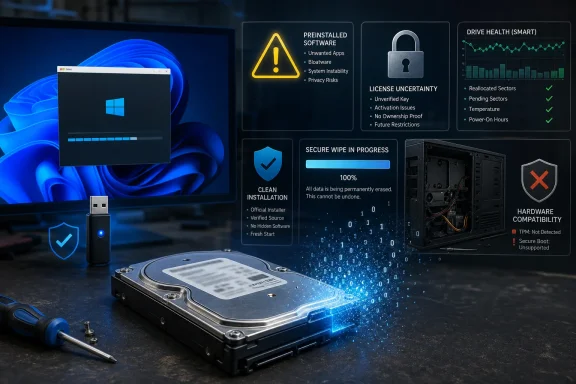 The Hard Drive Is Real; the Convenience Is Not
Taken strictly as a hardware listing, the offer is straightforward. It describes a used, silver Seagate Barracuda with 500GB of capacity, a 3.5-inch desktop form factor, 7200 RPM rotational speed, 16MB of cache, and a SATA interface rated at 3.0 Gb/s. The stated dimensions are 5.79 by 4.00 by 0.79 inches, the weight is 0.91 pounds, and the country of manufacture is China.None of those specifications makes the drive inherently unusable. A 500GB mechanical disk can still serve as expendable secondary storage, a test-system disk, a temporary migration target, or a component in a low-cost machine where performance and longevity are not critical. A 7200 RPM spindle is preferable to a slower desktop drive for general responsiveness, although the 16MB cache and mechanical design place obvious limits on what buyers should expect from Windows 11.
The trouble begins when an ordinary used disk is marketed as a shortcut around operating-system deployment. The listing says the drive is “fully functional” and may show minor cosmetic wear, but it provides no model-specific MPN or UPC. Without an exact model number, serial-number evidence, health report, usage history, or diagnostic results, “fully functional” means only that the seller reportedly considers the disk operational.
That is a much lower standard than an IT department would apply to redeployed storage. A disk can format correctly, copy files, and boot an operating system while already accumulating reallocated sectors, recording read errors, struggling to spin up, or approaching a failure threshold. Cosmetic wear is largely irrelevant to a sealed mechanical drive; the important wear is internal and cannot be judged from the color or condition of its metal enclosure.
The product title introduces another credibility problem by calling the device both a SATA hard drive and a “500 GB IDE Hard Drive.” Those are different interface descriptions, while the detailed specifications identify SATA 3.0 Gb/s. The most charitable interpretation is sloppy marketplace metadata, but interface confusion is not trivial when the product is being pitched to owners of older desktops who may be least able to absorb a compatibility surprise.
| Listing promise | What the listing establishes | What remains unverified | Practical consequence |
|---|---|---|---|
| Windows 11 Pro is installed | Windows files are reportedly present on the disk | License legitimacy, activation status, image integrity | Windows may boot but remain unlicensed or untrustworthy |
| “Just plug it in” | The disk uses a desktop SATA interface | Boot mode, drivers, controller compatibility, system requirements | The destination PC may fail to boot or support Windows 11 |
| Fully functional | The seller describes the used drive as operational | SMART history, bad sectors, power-on history, diagnostic results | Failure risk cannot be priced intelligently |
| Suitable for older desktops | The 3.5-inch form factor fits many desktop bays | Processor, TPM, Secure Boot, firmware and memory compatibility | An older PC may not qualify for supported Windows 11 use |
| 500GB of storage | Nominal capacity is stated | Remaining reliability and actual usable partition layout | Capacity alone says little about suitability as a system drive |
Windows Activation Follows the Computer, Not the Platter
The most important licensing fact is also the one most likely to be obscured by the bundle: an installation is not a license. Copying Windows onto a hard drive does not automatically grant the next owner the right to activate that copy on any computer into which the drive is inserted.Microsoft’s activation guidance explains that digital licenses are associated with device hardware and may also be linked to a Microsoft account. When Windows is reinstalled on the same properly licensed device, the operating system can often reactivate automatically because Microsoft recognizes that device. Moving a prepared disk into an unrelated desktop does not move the original computer’s hardware identity along with it.
This is particularly important for Windows 11 Pro. If the destination computer previously held a valid digital license for Windows 11 Home, inserting a disk containing the Pro edition does not transform that entitlement into a Pro license. Microsoft says a valid product key is required when installing an edition that was not previously activated on the device.
The listing says Windows 11 Pro 64-bit is included, but the supplied description does not identify an accompanying product key, Certificate of Authenticity, digital entitlement, license documentation, or qualifying computer chassis. It also lists no MPN or UPC that might help establish the origin of a packaged product. The existence of an activated desktop before shipment, if it is activated at all, would not by itself prove that the software will remain activated after the disk is transplanted.
Microsoft makes an equally important distinction between activation and legitimacy. Activation is the technical process that pairs a key or digital entitlement with hardware; a successful activation state is not an all-purpose guarantee that the software’s origin and licensing are proper. Keys can be misapplied, volume activation can be used outside its intended organization, and an installation can inherit an activation state that does not survive a hardware change or later validation.
The absence of license detail does not prove that the seller is distributing unauthorized software. A transferable retail license could theoretically be supplied, or the destination PC could already own a matching Pro entitlement. The problem is that the listing, as presented, does not explain either path, while its “ready to go” language encourages buyers to assume that Windows travels with the drive.
Microsoft’s own refurbished-PC guidance shows how differently legitimate preinstallation is normally documented. A refurbished computer supplied through an authorized refurbishing channel carries licensing evidence associated with the device, such as an appropriate Certificate of Authenticity or genuine-refurbisher label affixed to the chassis. The key word is computer: Microsoft’s model centers the license on a qualifying device, not on a loose used hard disk sold as a universal boot accessory.
That is why a disk containing Windows has little licensing value by itself. If the buyer already owns a valid Windows 11 Pro license for the destination machine, the preloaded installation is unnecessary because Microsoft provides official installation media. If the buyer does not own such a license, the files on the disk do not solve that problem.
“Older Desktop” Is Where the Windows 11 Claim Gets Hardest
The listing describes the disk as suitable for upgrading an older desktop, but Windows 11 eligibility depends primarily on the computer surrounding the drive. Storage capacity is only one line in a larger hardware and firmware checklist.Microsoft’s published requirements call for a compatible 64-bit processor with at least two cores, at least 4GB of memory, at least 64GB of available storage, UEFI firmware capable of Secure Boot, and TPM 2.0. Graphics and display requirements also apply. A 500GB drive comfortably clears the storage-capacity threshold, but it can do nothing to supply a missing security processor, modernize an unsupported CPU, or convert legacy firmware into a supported UEFI configuration.
This makes “Windows 11 installed” a weak compatibility signal. Windows can be written to a disk without demonstrating that the eventual host system meets Microsoft’s requirements. An image could also have been prepared using workarounds, deployed from another machine, or captured from hardware with an entirely different firmware configuration.
Microsoft warns that installing Windows 11 on hardware that does not meet its minimum requirements is not recommended and can produce compatibility and support consequences. The listing does not identify the system on which Windows was installed, the system for which it was prepared, or whether requirement checks were bypassed. It therefore cannot establish supported Windows 11 compatibility for an unknown buyer’s PC.
The phrase “older desktop” also collides with the disk’s physical format. A 3.5-inch SATA drive belongs in a desktop with the appropriate bay, data connection, and power connector. It is not a general replacement for laptop storage, and it will not fit machines designed only for smaller SATA devices or modern compact storage modules without additional hardware that the listing does not mention.
Even in a physically compatible tower, the preinstalled image may not boot. The destination system may use a different firmware mode, partition scheme, storage-controller setting, boot order, or driver stack. Windows is better than it once was at detecting changed hardware, but transporting a complete installation between unrelated PCs remains fundamentally different from installing the operating system on its intended host.
If the disk does boot, Windows may spend time discovering devices, replacing drivers, rebuilding hardware configuration, and requesting restarts. Network access may not work until a suitable driver is installed. Vendor utilities or drivers left in the image may belong to the seller’s preparation system rather than the buyer’s computer.
A genuinely useful system-drive service would identify the intended computer model, deployment method, activation mechanism, firmware mode, and out-of-box state. This listing instead offers one generic disk for “home office, gaming, or general use,” three workloads with very different reliability and performance expectations.
A Preinstalled Image Creates a Trust Problem Before It Creates a Desktop
The security issue is not that this particular disk is known to contain malware. There is no evidence in the supplied material proving that it does. The issue is that a buyer has no reliable basis for concluding that it does not.Booting a second-hand operating-system image means trusting every executable, service, driver, scheduled task, policy, account, boot component, and configuration change placed on it before delivery. A conventional antivirus scan can find known threats, but it cannot establish the full provenance of an installation or prove that every administrative change was benign.
The seller’s description does not explain how Windows was obtained, whether the image was built from official Microsoft media, whether the disk was completely erased beforehand, whether updates were applied, whether audit mode or deployment tools were used, or whether a local account already exists. It makes no claims about image hashes, malware scanning, secure preparation, or chain of custody.
This matters because the operating-system disk occupies a privileged position. The installed environment controls the login process, local security policy, update configuration, browser, credential storage, and any applications the user subsequently installs. If that baseline is untrusted, adding security software after the first boot is not equivalent to starting from a known-clean image.
BleepingComputer has separately documented how modified Windows installation images can carry malware and manipulate normally overlooked parts of the boot disk. That reporting does not implicate this seller, but it demonstrates why “Windows is already installed” should not be treated as a security feature when the installation source is unknown. Convenience and trust are not the same thing.
Nor is a factory-reset option necessarily enough. A recovery environment stored on the same untrusted disk could simply reinstall the same image. “Reset this PC” is useful when the existing Windows installation has a trusted origin; it is not a substitute for independently sourced installation media when the provenance of the entire disk is in doubt.
Microsoft provides a media-creation path specifically for performing a clean installation on a new or used PC. That route gives the buyer a known source for the operating-system files and allows setup to detect the actual target hardware. It also removes the need to preserve whatever partitioning, accounts, drivers, or configuration the seller placed on the drive.
For a personal hobby machine, the risk calculation is simple enough: erase the disk before entering passwords or connecting sensitive accounts. For business use, the standard should be stricter. An organization should not join an externally prepared, second-hand Windows image to its domain, management platform, VPN, or cloud identity environment.
The professional refurbishing industry exists in part to manage these questions systematically. Ars Technica’s reporting on industrial IT asset disposition has shown how serious operators track, process, sanitize, test, and redistribute large volumes of used hardware. A bare marketplace assertion that a disk is functional is not equivalent to that documented chain of custody.
The Previous Owner’s Data Is Another Reason to Erase It
A used storage device presents risk in both directions. The buyer should worry not only about hostile additions but also about residual information that the seller failed to remove.NIST’s media-sanitization guidance describes sanitization as making access to target data infeasible for an appropriate level of effort. Merely deleting files, formatting a partition quickly, or installing Windows over an existing volume may not meet that objective. Residual material can remain in unused sectors, old partitions, unallocated space, or areas untouched by a superficial reinstall.
The listing says Windows 11 Pro is installed but does not describe the sanitization process that preceded installation. It does not say whether the entire device was overwritten, whether old partitions were removed, or whether sanitization was verified. That omission creates a privacy problem for the previous owner and a governance problem for any business buyer who inadvertently acquires someone else’s data.
The buyer should not explore that residual data out of curiosity. Discovering personal records, credentials, business documents, or other sensitive information can create ethical and potentially legal complications. The operationally sound response is to avoid browsing the supplied environment and sanitize the drive as part of intake.
A complete erase also removes the seller’s Windows installation, which may feel like discarding the feature that justified the purchase. That is precisely the point. If the correct security procedure eliminates the product’s headline benefit, the headline benefit had little defensible value.
There is a subtle difference between erasing a newly acquired used drive and certifying a drive for disposal. A buyer who intends to reuse the device mainly needs a clean baseline and confidence that prior files and partitions are gone. An organization later disposing of the drive must choose a sanitization method appropriate to the sensitivity of the data it placed there and record that process under its own policy.
Either way, the preloaded Windows environment should not survive.
“Fully Functional” Is Not a Health Report
Mechanical hard drives wear through use, vibration, heat, power cycles, head movement, and media degradation. A used drive’s purchase price can be low enough to make that acceptable, but only when the buyer understands that the useful life remaining is unknown.The listing provides rotational speed and cache size but no operational history. It does not report power-on time, start-stop counts, reallocated sectors, pending sectors, interface errors, temperature history, or the results of a surface test. It also supplies no exact model identifier through an MPN, making it harder to evaluate the unit before purchase.
Seagate provides SeaTools for diagnosing hard drives and examining their health. Its available checks include SMART inspection, a short drive self-test, and longer generic testing. Seagate notes that SMART warnings can indicate a near-term prediction of failure even when a drive appears to work normally.
A passing quick test is useful but not conclusive. It says that the disk did not fail that test at that moment, not that it will remain reliable through years of operating-system updates, application installations, paging, indexing, and repeated boots. A longer read test provides more information because it exercises more of the surface, although no diagnostic can transform a used mechanical device into new hardware.
For a secondary copy of replaceable data, this uncertainty may be tolerable. For the only copy of tax records, business files, family photographs, or an active Windows installation, it is not. The buyer must budget for backup as part of the drive’s real cost.
The “gaming” claim deserves particular skepticism as a statement of suitability rather than compatibility. Games may install and run from a mechanical disk, but capacity, access latency, update behavior, and workload demands all matter. A 500GB disk also provides less practical headroom once Windows, applications, update files, and modern game installations begin competing for space.
The drive may make sense in a retrofitted desktop where the choice is between cheap storage and no storage. It makes less sense when the preinstalled operating system is being used to justify a premium over a plain tested disk, because the operating-system image should be erased and the license may not transfer.
The Missing Identity Matters More Than the Silver Casing
“No MPN” and “No UPC” may look like minor catalog fields, but they are meaningful omissions for used storage. Barracuda is a product line, not a complete device identity, and different models within a broad family can have different designs, firmware histories, performance characteristics, and ages.An exact model number and serial number would allow the buyer to identify the unit through Seagate’s tools, inspect firmware availability, and better understand what was actually delivered. The supplied description offers generic dimensions and weight but not that model-level transparency.
The mismatch between “IDE” in the product title and SATA in the specifications further weakens confidence in the catalog record. If the title was automatically assembled or copied from another listing, other fields may also deserve verification rather than assumption. Buyers should rely on a photograph of the drive label and controller connector, not merely the category assigned by a storefront.
There is also no stated warranty in the supplied material. A buyer should not infer manufacturer coverage simply because the casing says Seagate. Used drives may have exhausted any original coverage, may have been removed from another system, or may lack the documentation required for a claim.
None of this proves the disk is defective. It means the offer lacks enough device-specific evidence to distinguish a carefully tested used component from an anonymous pull that happened to accept an operating-system image.
Action Checklist for Admins
- Do not boot the supplied Windows installation on a trusted network or enter organizational credentials into it.
- Photograph and record the physical model and serial labels before deployment.
- Connect the disk to an isolated test system or use bootable diagnostic media.
- Run Seagate SeaTools SMART, short self-test, and long diagnostic checks; reject the disk if errors appear.
- Remove all existing partitions and sanitize the entire disk under the organization’s media-handling policy.
- Confirm that the destination PC meets Microsoft’s Windows 11 processor, firmware, TPM, memory, storage, graphics, and display requirements.
- Create fresh Windows installation media directly from Microsoft and install the required edition on the target computer.
- Activate Windows using the destination device’s valid digital entitlement or an independently documented product key.
- Install firmware, chipset, storage, network, and graphics drivers obtained from the destination PC or component manufacturers.
- Apply Windows updates before joining a domain, enrolling in device management, or adding user accounts.
- Treat the used drive as non-critical storage unless its diagnostic history and replacement plan justify broader use.
- Maintain a separate, tested backup; a passing health test is not a guarantee against mechanical failure.
The Economics Collapse Once the Safe Process Is Applied
A buyer considering this product is likely trying to save either money or time. The bundle appears to offer both: inexpensive storage plus Windows already waiting on the disk.The safe deployment process removes most of the time advantage. The buyer must inspect the hardware, run diagnostics, erase the supplied partitions, create official installation media, reinstall Windows, obtain drivers, apply updates, and verify activation. That is more work than installing Windows onto a known-new drive, although the diagnostic and installation steps are still manageable for an experienced PC builder.
The licensing uncertainty removes much of the monetary advantage. If the destination PC already has a valid Windows 11 Pro entitlement, the included installation adds no license value. If it lacks a Pro entitlement, the buyer may still need to purchase one.
What remains is the market value of a used 500GB Seagate Barracuda whose exact model, history, and diagnostic condition are not specified. Without a disclosed price in the supplied material, it is impossible to judge whether that remaining value is attractive. The correct comparison, however, is not against a new PC with Windows Pro; it is against other used 500GB hard drives plus the cost and risk of testing one.
For hobbyists, repair benches, training environments, and non-critical lab machines, a sufficiently cheap used disk can be rational. The user must simply understand that the preinstalled Windows image is something to remove, not something to pay extra to preserve.
For a home-office machine, the tradeoff is harsher. Reliability, data protection, and a trustworthy software baseline matter more than saving the short period required for a clean installation. For business use, undocumented licensing and untrusted imaging should disqualify the supplied installation entirely.
What the Listing Can Honestly Promise
The offer could be made far more defensible with narrower language. It could sell a tested used 500GB Seagate Barracuda SATA drive, disclose the exact model and serial information, publish the result of a recent SeaTools long test, and explain that any installed Windows files are provided only as an unactivated installation requiring the buyer’s own valid license.Better still, the seller could erase the disk and ship it blank. That would avoid implying that Windows licensing belongs to the storage device and would reduce the security risks associated with booting an unknown image. Buyers who own eligible hardware could then use Microsoft’s installation media and allow the correct edition to activate against the destination machine’s entitlement.
If the seller intends to provide a licensed refurbished Windows product, the appropriate product is a documented refurbished computer, not an anonymous hard drive. The license evidence, supported hardware, operating-system edition, and disk should be delivered as one coherent system.
The current description instead tries to make the hard drive carry promises that only the rest of the computer can fulfill. The disk cannot guarantee Windows 11 eligibility, establish a digital license for unrelated hardware, or prove the integrity of the software written onto it.
That is why “with Windows 11 Pro installed” is simultaneously the listing’s most prominent feature and its least dependable one.
What Buyers Should Carry Away From This Offer
The product is best understood as a used mechanical hard drive wrapped in an operating-system convenience claim. Its measurable specifications may be accurate, but they do not resolve the questions that determine whether the package is secure, licensed, compatible, or reliable.- The listing describes a used 500GB, 3.5-inch, 7200 RPM Seagate Barracuda with 16MB of cache and a SATA 3.0 Gb/s interface.
- Its title also calls the drive IDE, conflicting with the detailed SATA specification.
- Windows 11 Pro files on a disk do not establish a transferable Pro license for the destination PC.
- The surrounding computer—not the hard drive—must satisfy Windows 11’s hardware and firmware requirements.
- No exact MPN, UPC, diagnostic report, sanitization record, or license evidence is supplied in the description.
- The safe workflow is wipe first, trust later: diagnose, sanitize, clean-install, activate independently, and maintain backups.
References
- Primary source: santoandre.biz
Published: 2026-07-12T00:10:08.638106
Santo André
Notícias sobre Santo André. Empregos, política, curiosidades, prestação de serviços e memória. santoandre.biz
- Official source: support.microsoft.com
Activate Windows | Microsoft Support
Learn how to activate Windows using a product key or digital license, check your activation status, and link your Microsoft account.support.microsoft.com - Official source: learn.microsoft.com
Windows 11 requirements | Microsoft Learn
Hardware requirements to deploy Windows 11.learn.microsoft.com - Related coverage: seagate.com
- Related coverage: bleepingcomputer.com
- Related coverage: forums.tomshardware.com
