

Android Auto lag often comes not from the Android phone running the experience but from the car’s infotainment head unit, whose aging processor, touchscreen, software, audio stack, USB interface, and wireless radios remain directly involved every time a driver connects on the road. How-To Geek’s account of a 2020 Kia Sportage makes that overlooked dependency unusually visible: newer phones and Android Auto updates have not prevented slower starts, unreliable connections, and a roughly 30-second splash screen. The larger lesson is that “phone-powered” does not mean “car-independent.” Android Auto performs only as well as the entire projection chain.
Google describes Android Auto as a phone-based infotainment system projected onto the screens of compatible cars. That description is accurate, and it explains the platform’s core appeal: navigation, communications, media, and personal settings follow the user instead of remaining trapped inside one vehicle.
But “projected” is too easily understood as “mirrored onto a passive screen.” A head unit is not a television receiving an uncomplicated picture from a cable box. It is the host through which the driver sees the interface, hears the audio, issues commands, touches controls, and establishes the underlying connection.
How-To Geek puts the head unit’s workload plainly: “It has to display the video stream from your phone, process your touch input, manage the car's audio system,” while also coordinating Bluetooth and Wi-Fi. Some application logic and rendering originate on the phone, but the car must still receive, present, and respond to the resulting experience without introducing noticeable delay.
That distinction matters because users naturally blame the device they can see and replace. A phone has a recognizable processor, operating system, update history, storage capacity, and battery condition. The infotainment computer buried in the dashboard is comparatively opaque, even though it may be the oldest and least frequently maintained computer the driver uses every day.
Android Auto therefore creates an asymmetry of responsibility. Google develops the projected platform, phone manufacturers control the mobile hardware and software, automakers or stereo manufacturers maintain the receiving system, and accessory makers may insert another device between them. The user experiences one interface but is actually operating a distributed system assembled by several companies with different update schedules and support incentives.
The same applies to animation stutter. A powerful phone may prepare an interface quickly, but that advantage can be squandered if the head unit handles the incoming stream poorly or refreshes its display sluggishly. A low-resolution screen does not guarantee bad Android Auto performance, but cheap display hardware, weak touch sensing, limited processing resources, and neglected firmware often arrive together.
Audio adds another path that must remain synchronized with the visual interface. Navigation prompts, phone calls, media playback, voice commands, and the vehicle’s own audio controls all have to coexist. A head unit that struggles to switch sources, initialize its audio system, or recover from a failed handshake can make Android Auto feel broken even when the phone is performing normally.
This is why an Android Auto problem cannot always be reproduced by opening Maps or a music application directly on the phone. The car introduces display, input, audio, USB, Bluetooth, and Wi-Fi dependencies that do not exist during ordinary handheld use. A phone that feels perfectly responsive outside the vehicle may still participate in a terrible in-car experience.
The most misleading assumption is that a newer phone should brute-force its way through those weaknesses. It cannot accelerate a slow touchscreen controller, rewrite the car’s firmware, or make an unreliable vehicle USB port behave consistently. More mobile processing power helps only when the phone is the limiting component.
The article describes a Kia Sportage with a sluggish touchscreen that requires more deliberate input and displays Android Auto at relatively low resolution. In more expensive cars, the author reports a sharper, smoother, and faster experience. The phone is not the meaningful variable in that comparison; the dashboard system is.
Screen dimensions and shape also affect how Android Auto feels. Even when the software adapts successfully, a wider display, a more responsive touch layer, better placement, or clearer resolution can reduce the friction of using the same interface. The platform may be portable, but its physical presentation is not standardized in the way a phone application’s presentation is.
That variance undermines the comforting idea that Android Auto eliminates the importance of built-in infotainment. It reduces the importance of an automaker’s navigation database, media catalog, and account ecosystem, but it does not eliminate the need for competent in-car hardware. Android Auto can replace much of the native software experience without replacing the computer and controls through which that experience reaches the driver.
This is also why a dealership demonstration can be misleading. A driver may see Android Auto launch and conclude that the vehicle “has Android Auto,” treating compatibility as a yes-or-no specification. The more useful questions are how quickly it starts, how reliably it reconnects, how accurately the display responds, whether audio transitions work, and whether the manufacturer has a credible history of maintaining the unit.
Compatibility is merely the entry requirement. Quality depends on implementation.
The author now reports needing several attempts to establish a connection. Even after it succeeds, “I'm mainly looking at a splash screen for 30 seconds before getting to the main screen.”
That delay is more significant than it sounds. Drivers often start a trip while simultaneously fastening a seat belt, selecting a destination, choosing audio, and waiting for the vehicle’s systems to become ready. A half-minute delay can mean leaving before navigation is visible, handling the interface after the car begins moving, or abandoning Android Auto for a phone mounted elsewhere.
Repeated connection attempts are even more damaging because they remove predictability. A system that always takes a known amount of time can be accommodated; one that sometimes connects, sometimes stalls, and sometimes requires unplugging or re-pairing encourages trial-and-error behavior behind the wheel.
The article attributes the deterioration to the head unit’s software maintenance, noting that Kia had not issued an update for the car. That is an account of one vehicle rather than a controlled technical investigation, but the pattern is credible: the phone and Android Auto continue changing while the car-side implementation remains fixed.
Backward compatibility is not magic. A system that interoperated well with the phones and software available when a vehicle was sold may encounter new timing behavior, connection sequences, permissions, power-management rules, or wireless conditions later. Without car-side maintenance, the integration can age even if none of the participating companies formally withdraws support.
As How-To Geek explains, “wireless Android Auto continuously streams audio and video over Wi-Fi while Bluetooth handles discovery, phone calls, and other communication.” Both devices must establish the session and maintain sufficiently stable communication for touches, audio, and visuals to feel immediate.
Wireless operation therefore exposes weaknesses that a cable may conceal. Radio interference, slow session establishment, unreliable pairing records, head-unit firmware, and poor wireless implementation can all become part of what the driver perceives as “Android Auto lag.”
The three common connection paths place responsibility in different locations:
This is not an argument that wireless Android Auto is inherently bad. In a well-engineered system, it is a meaningful convenience: the driver enters the vehicle, the phone remains in a pocket or bag, and the interface appears without a cable ritual.
The problem is that wireless convenience depends on implementation quality. A weak head unit cannot be assumed to become reliable merely because the connection is now invisible.
The AAWireless TWO+ measures 5.5 × 3.5 × 1.5 cm. Its purpose is straightforward: connect the adapter to the vehicle’s wired interface, then allow the phone to establish a wireless session with the adapter.
From the head unit’s perspective, the adapter presents the sort of USB connection it already understands. From the phone’s perspective, it supplies a wireless path. That translation can be useful when an automaker never equipped the car with native wireless Android Auto or when the native implementation is less dependable than a third-party alternative.
AAWireless describes a product-specific connection sequence in which the dongle initially uses Bluetooth to exchange Wi-Fi credentials with the phone and then ends that Bluetooth connection. That detail is narrower than How-To Geek’s general description of wireless Android Auto, in which Bluetooth continues handling discovery, calls, and other communications, and it illustrates why “wireless Android Auto” should not be treated as one completely uniform implementation.
A dongle may solve a particular compatibility or connection problem because it replaces part of the automaker’s wireless stack. It may have newer firmware, more flexible configuration, or more effective wireless behavior than the system built into the dashboard.
It cannot, however, replace the head unit’s screen, touch processing, audio integration, or wired Android Auto host. If the fundamental problem is slow display hardware or a poor USB interface, the adapter still has to pass through that bottleneck.
The dongle also adds its own cable, firmware, power behavior, wireless radios, and startup sequence. That does not make it a bad solution; it makes it another variable. An adapter should be evaluated as a diagnostic substitution and convenience tool, not as a guaranteed performance upgrade.
Yet Google’s troubleshooting guidance distributes responsibility more realistically. It tells users to verify vehicle compatibility, ensure Android Auto is enabled in the infotainment system, restart that system, and contact the vehicle manufacturer when necessary. For aftermarket receivers, it advises checking the manufacturer’s website for firmware updates.
That is effectively an admission that the head unit is an active dependency. Google may not foreground dashboard processing power in consumer marketing, but its support flow recognizes that the car or receiver can be the component requiring attention.
The same documentation recommends a high-quality USB cable when using a wired connection. This reinforces the broader point: Android Auto is not an isolated application with a single owner. It is a chain, and the weakest participant can define the entire experience.
Where Google’s guidance remains unsatisfying is in diagnosis. “Contact your vehicle manufacturer” may be technically appropriate, but it rarely tells the owner whether a problem is caused by the display processor, USB stack, Bluetooth pairing, wireless radio, firmware, phone software, or an interoperability defect spanning several of them.
Automakers can be equally unhelpful by referring users back to Google or the phone manufacturer. The result is a support triangle in which every company controls one piece and no company owns the experience as the driver encounters it.
The interface has one logo, but the failure domain has several owners.
Several other causes could coexist with an aging head-unit implementation. A worn or marginal cable could harm wired reliability. A dirty or loose USB port could create intermittent data problems. Changed phone settings, stale pairing information, background power management, application behavior, or heat could also affect startup and responsiveness.
The author’s conclusion is nevertheless valuable because it challenges the default direction of blame. If several phone upgrades do not improve the experience, and the same phone behaves better in another car, the car becomes a much stronger suspect.
The best interpretation is not that head units always cause Android Auto lag. It is that they are frequently excluded from the investigation despite occupying several critical points in the path. The How-To Geek article restores the dashboard computer to the suspect list.
Its strongest evidence is comparative rather than forensic. The same mobile platform feels different in different vehicles; the Kia’s experience reportedly deteriorated while the car’s software remained unmaintained; and more capable head units reportedly delivered better responsiveness. Together, those observations justify a car-first test before a phone-first purchase.
A better approach begins by naming the symptom. Slow startup, failed connection, delayed touch input, choppy animation, audio interruption, call problems, and complete disconnection may feel like one general category of “lag,” but they travel through different parts of the system.
Slow or inconsistent startup points toward session negotiation, pairing records, USB detection, the adapter if one is present, or the head unit’s initialization. Delayed taps on an otherwise stable screen raise questions about the touch layer, head-unit processing, and round-trip communication. Audio glitches may involve the car’s audio routing, wireless stability, the phone, or an application rather than the visual projection path.
The first useful substitution is another phone in the same car. If both devices exhibit the same delay, the probability shifts toward the car, cable, adapter, or shared connection environment. If only one phone fails, the investigation should remain focused on that phone’s settings, software, port, and relationship with the head unit.
The second substitution is the original phone in another compatible car or receiver. If the phone immediately becomes responsive, that is strong practical evidence against buying a replacement handset. It does not identify the exact car-side component, but it narrows the failure domain dramatically.
The third test is wired against wireless. If a native wireless connection is unreliable but a direct cable is stable, the phone’s general ability to run Android Auto is probably not the central problem. Attention should shift toward wireless pairing, radio performance, head-unit firmware, or any adapter in the path.
If both wired and wireless operation are slow in the same vehicle, the shared components become more important. Those include the head unit’s display, input handling, audio subsystem, Android Auto host implementation, and general processing performance.
A dongle can serve as a fourth substitution. If the vehicle’s native wireless Android Auto is poor but the AAWireless TWO+ produces a stable experience through the wired interface, the adapter has effectively bypassed the problematic native wireless path. If nothing improves, the bottleneck may sit deeper in the head unit.
A driver touches a control with an expectation of immediate feedback. When the system hesitates, the driver may look back to confirm whether the command registered, tap again, or wait for an uncertain state change. A sluggish touchscreen can turn a simple action into a sequence of repeated glances and inputs.
Startup reliability shapes behavior before the trip as well. If Android Auto appears quickly, a destination and audio source can be selected while the vehicle is stationary. If the connection takes several attempts or presents a 30-second splash screen, the unfinished setup is more likely to spill into the drive.
This does not mean every delay creates an immediate safety event, nor does the Kia account establish a measured safety outcome. It means responsiveness is part of the human-machine interface, and poor performance imposes cognitive cost.
Automakers understand this when tuning steering-wheel controls, instrument clusters, and driver-assistance alerts. Projected infotainment deserves the same standard because it has become one of the dashboard’s most frequently used functions.
That mismatch is structural. Phone makers expect continuous software evolution and relatively short hardware replacement cycles. Vehicle owners expect the physical product to remain useful far longer, while automakers historically design infotainment around fixed configurations and model-year development schedules.
Projection platforms were supposed to ease this problem by moving applications and personal data onto the phone. They succeeded in reducing dependence on outdated built-in maps and media software, but they did not remove the need to maintain the interface between phone and car.
The 2020 Kia Sportage example captures the resulting frustration. The owner has upgraded phones several times, Android Auto has changed, and the car remains comparatively static. The newer component must continue negotiating with a host designed under older assumptions.
Automakers should therefore publish clearer infotainment support policies. Owners need to know whether updates exist, how they are delivered, how long compatibility fixes will be considered, and whether a given unit has known limitations. A vague instruction to visit a dealer is not an adequate software lifecycle.
Head-unit quality should also become a larger factor in vehicle reviews and purchasing decisions. Reviewers routinely evaluate acceleration, cabin materials, cargo space, and fuel economy, but a short demonstration rarely reveals how an infotainment system behaves after years of phone and software changes.
For many owners, replacing the factory unit is difficult, expensive, or effectively impossible because the display is integrated with vehicle settings, cameras, audio equipment, and physical controls. A bad infotainment choice may therefore be harder to correct than a bad phone choice.
A firmware update is the most logical remedy when one exists. It may improve compatibility, startup behavior, USB handling, wireless stability, or general responsiveness without changing hardware. The difficulty is that update availability and installation procedures vary widely by automaker and receiver manufacturer.
Restarting the infotainment system can also distinguish a persistent hardware limitation from accumulated software state. Some systems do not fully reboot whenever the ignition is cycled, so a documented restart procedure may accomplish more than simply turning the car off and on.
A cable remains the cheapest wired variable to eliminate. A cable can provide power while handling data poorly, creating the impression that the phone or Android Auto is unstable. Because the vehicle’s USB port is also part of that path, replacing the cable is informative but not definitive.
Wireless users should remove stale pairings and rebuild the connection deliberately. They should also compare native wireless operation with wired Android Auto before concluding that the entire platform is slow. A stable wired session sharply narrows the diagnosis.
The AAWireless TWO+ and similar adapters occupy a useful middle ground when the vehicle supports wired Android Auto but lacks reliable wireless operation. They are substantially cheaper and easier to reverse than replacing a built-in head unit, and they can bypass an automaker’s native wireless implementation.
Yet buyers should keep expectations realistic. The adapter cannot improve the panel’s touch sensitivity or transform a slow dashboard processor. It may fix connection behavior while leaving interface latency untouched.
A full head-unit replacement can be effective in cars with conventional aftermarket support, but modern integration often makes that option costly or impractical. The display may control vehicle configuration, cameras, climate functions, warning settings, or a factory amplifier. Replacing it can become an electrical and software integration project rather than a stereo upgrade.
That is why diagnosis should precede spending. The purpose of testing another car is not merely to satisfy curiosity; it is to avoid purchasing a new phone that reproduces the same problem the moment it connects to the old head unit.
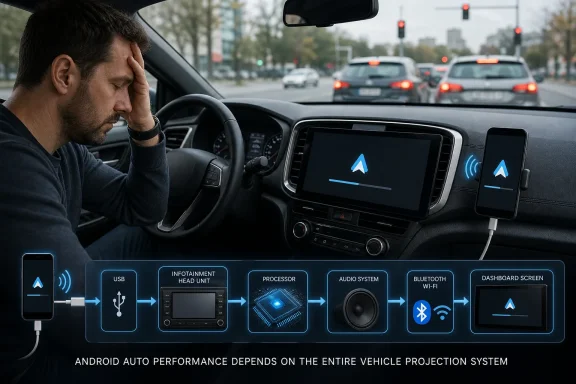 The Phone-Powered Story Is Technically True and Operationally Incomplete
Google describes Android Auto as a phone-based infotainment system projected onto the screens of compatible cars. That description is accurate, and it explains the platform’s core appeal: navigation, communications, media, and personal settings follow the user instead of remaining trapped inside one vehicle.But “projected” is too easily understood as “mirrored onto a passive screen.” A head unit is not a television receiving an uncomplicated picture from a cable box. It is the host through which the driver sees the interface, hears the audio, issues commands, touches controls, and establishes the underlying connection.
How-To Geek puts the head unit’s workload plainly: “It has to display the video stream from your phone, process your touch input, manage the car's audio system,” while also coordinating Bluetooth and Wi-Fi. Some application logic and rendering originate on the phone, but the car must still receive, present, and respond to the resulting experience without introducing noticeable delay.
That distinction matters because users naturally blame the device they can see and replace. A phone has a recognizable processor, operating system, update history, storage capacity, and battery condition. The infotainment computer buried in the dashboard is comparatively opaque, even though it may be the oldest and least frequently maintained computer the driver uses every day.
Android Auto therefore creates an asymmetry of responsibility. Google develops the projected platform, phone manufacturers control the mobile hardware and software, automakers or stereo manufacturers maintain the receiving system, and accessory makers may insert another device between them. The user experiences one interface but is actually operating a distributed system assembled by several companies with different update schedules and support incentives.
The Head Unit Sits Directly in the Latency Path
Every visible delay has to occur somewhere. If a tap takes too long to register, the cause could be the touchscreen hardware, the head unit’s input processing, the connection between car and phone, the phone itself, the application receiving the command, or some combination of those layers.The same applies to animation stutter. A powerful phone may prepare an interface quickly, but that advantage can be squandered if the head unit handles the incoming stream poorly or refreshes its display sluggishly. A low-resolution screen does not guarantee bad Android Auto performance, but cheap display hardware, weak touch sensing, limited processing resources, and neglected firmware often arrive together.
Audio adds another path that must remain synchronized with the visual interface. Navigation prompts, phone calls, media playback, voice commands, and the vehicle’s own audio controls all have to coexist. A head unit that struggles to switch sources, initialize its audio system, or recover from a failed handshake can make Android Auto feel broken even when the phone is performing normally.
This is why an Android Auto problem cannot always be reproduced by opening Maps or a music application directly on the phone. The car introduces display, input, audio, USB, Bluetooth, and Wi-Fi dependencies that do not exist during ordinary handheld use. A phone that feels perfectly responsive outside the vehicle may still participate in a terrible in-car experience.
The most misleading assumption is that a newer phone should brute-force its way through those weaknesses. It cannot accelerate a slow touchscreen controller, rewrite the car’s firmware, or make an unreliable vehicle USB port behave consistently. More mobile processing power helps only when the phone is the limiting component.
One Phone Can Produce Two Completely Different Cars
How-To Geek’s central observation is easy for any multi-car household to test: connect the same phone to more than one vehicle. The applications and account follow the driver, but the responsiveness, connection time, display quality, input accuracy, and reliability may change immediately.The article describes a Kia Sportage with a sluggish touchscreen that requires more deliberate input and displays Android Auto at relatively low resolution. In more expensive cars, the author reports a sharper, smoother, and faster experience. The phone is not the meaningful variable in that comparison; the dashboard system is.
Screen dimensions and shape also affect how Android Auto feels. Even when the software adapts successfully, a wider display, a more responsive touch layer, better placement, or clearer resolution can reduce the friction of using the same interface. The platform may be portable, but its physical presentation is not standardized in the way a phone application’s presentation is.
That variance undermines the comforting idea that Android Auto eliminates the importance of built-in infotainment. It reduces the importance of an automaker’s navigation database, media catalog, and account ecosystem, but it does not eliminate the need for competent in-car hardware. Android Auto can replace much of the native software experience without replacing the computer and controls through which that experience reaches the driver.
This is also why a dealership demonstration can be misleading. A driver may see Android Auto launch and conclude that the vehicle “has Android Auto,” treating compatibility as a yes-or-no specification. The more useful questions are how quickly it starts, how reliably it reconnects, how accurately the display responds, whether audio transitions work, and whether the manufacturer has a credible history of maintaining the unit.
Compatibility is merely the entry requirement. Quality depends on implementation.
A 30-Second Splash Screen Is a System Failure, Not a Cosmetic Delay
When the How-To Geek author first obtained the 2020 model car, Android Auto reportedly connected quickly, worked reliably, and felt responsive. After several phone upgrades and multiple Android Auto updates, the experience became worse rather than better.The author now reports needing several attempts to establish a connection. Even after it succeeds, “I'm mainly looking at a splash screen for 30 seconds before getting to the main screen.”
That delay is more significant than it sounds. Drivers often start a trip while simultaneously fastening a seat belt, selecting a destination, choosing audio, and waiting for the vehicle’s systems to become ready. A half-minute delay can mean leaving before navigation is visible, handling the interface after the car begins moving, or abandoning Android Auto for a phone mounted elsewhere.
Repeated connection attempts are even more damaging because they remove predictability. A system that always takes a known amount of time can be accommodated; one that sometimes connects, sometimes stalls, and sometimes requires unplugging or re-pairing encourages trial-and-error behavior behind the wheel.
The article attributes the deterioration to the head unit’s software maintenance, noting that Kia had not issued an update for the car. That is an account of one vehicle rather than a controlled technical investigation, but the pattern is credible: the phone and Android Auto continue changing while the car-side implementation remains fixed.
Backward compatibility is not magic. A system that interoperated well with the phones and software available when a vehicle was sold may encounter new timing behavior, connection sequences, permissions, power-management rules, or wireless conditions later. Without car-side maintenance, the integration can age even if none of the participating companies formally withdraws support.
Wireless Android Auto Turns Every Weak Link Into Visible Lag
A wired connection has obvious failure points: the cable, the phone connector, the vehicle’s USB port, and the software at either end. Wireless Android Auto removes the physical cable from daily use, but it does not remove the need for a reliable transport layer.As How-To Geek explains, “wireless Android Auto continuously streams audio and video over Wi-Fi while Bluetooth handles discovery, phone calls, and other communication.” Both devices must establish the session and maintain sufficiently stable communication for touches, audio, and visuals to feel immediate.
Wireless operation therefore exposes weaknesses that a cable may conceal. Radio interference, slow session establishment, unreliable pairing records, head-unit firmware, and poor wireless implementation can all become part of what the driver perceives as “Android Auto lag.”
The three common connection paths place responsibility in different locations:
| Connection path | Primary transport | What the head unit supports | Additional hardware | Likely troubleshooting focus |
|---|---|---|---|---|
| Wired Android Auto | USB | Wired Android Auto | USB cable | Cable, USB ports, phone, head-unit firmware |
| Native wireless Android Auto | Bluetooth and Wi-Fi | Wireless Android Auto | None | Pairing, wireless stability, phone, head-unit radios and firmware |
| Dongle-based wireless Android Auto | Bluetooth and Wi-Fi to the adapter; USB into the car | Wired Android Auto | Wireless adapter and cable | Adapter, cable, USB port, wireless environment, phone, head unit |
The problem is that wireless convenience depends on implementation quality. A weak head unit cannot be assumed to become reliable merely because the connection is now invisible.
A Dongle Can Bypass One Bad Implementation While Adding Another
The How-To Geek article highlights the AAWireless TWO+ Dongle as one possible route to wireless operation in a vehicle that provides only wired projection. The device supports Android Auto and Apple Carplay, connects through Bluetooth and Wi-Fi, and includes a USB-C to USB-A cable.The AAWireless TWO+ measures 5.5 × 3.5 × 1.5 cm. Its purpose is straightforward: connect the adapter to the vehicle’s wired interface, then allow the phone to establish a wireless session with the adapter.
From the head unit’s perspective, the adapter presents the sort of USB connection it already understands. From the phone’s perspective, it supplies a wireless path. That translation can be useful when an automaker never equipped the car with native wireless Android Auto or when the native implementation is less dependable than a third-party alternative.
AAWireless describes a product-specific connection sequence in which the dongle initially uses Bluetooth to exchange Wi-Fi credentials with the phone and then ends that Bluetooth connection. That detail is narrower than How-To Geek’s general description of wireless Android Auto, in which Bluetooth continues handling discovery, calls, and other communications, and it illustrates why “wireless Android Auto” should not be treated as one completely uniform implementation.
A dongle may solve a particular compatibility or connection problem because it replaces part of the automaker’s wireless stack. It may have newer firmware, more flexible configuration, or more effective wireless behavior than the system built into the dashboard.
It cannot, however, replace the head unit’s screen, touch processing, audio integration, or wired Android Auto host. If the fundamental problem is slow display hardware or a poor USB interface, the adapter still has to pass through that bottleneck.
The dongle also adds its own cable, firmware, power behavior, wireless radios, and startup sequence. That does not make it a bad solution; it makes it another variable. An adapter should be evaluated as a diagnostic substitution and convenience tool, not as a guaranteed performance upgrade.
Google’s Own Support Advice Quietly Points Back to the Car
Google’s public framing emphasizes that Android Auto is integrated into the phone and connects to a compatible vehicle display. That language naturally places the phone at the conceptual center of the product.Yet Google’s troubleshooting guidance distributes responsibility more realistically. It tells users to verify vehicle compatibility, ensure Android Auto is enabled in the infotainment system, restart that system, and contact the vehicle manufacturer when necessary. For aftermarket receivers, it advises checking the manufacturer’s website for firmware updates.
That is effectively an admission that the head unit is an active dependency. Google may not foreground dashboard processing power in consumer marketing, but its support flow recognizes that the car or receiver can be the component requiring attention.
The same documentation recommends a high-quality USB cable when using a wired connection. This reinforces the broader point: Android Auto is not an isolated application with a single owner. It is a chain, and the weakest participant can define the entire experience.
Where Google’s guidance remains unsatisfying is in diagnosis. “Contact your vehicle manufacturer” may be technically appropriate, but it rarely tells the owner whether a problem is caused by the display processor, USB stack, Bluetooth pairing, wireless radio, firmware, phone software, or an interoperability defect spanning several of them.
Automakers can be equally unhelpful by referring users back to Google or the phone manufacturer. The result is a support triangle in which every company controls one piece and no company owns the experience as the driver encounters it.
The interface has one logo, but the failure domain has several owners.
The Kia Sportage Case Is Persuasive, but It Is Not a Laboratory Test
The 2020 Kia Sportage account should not be stretched beyond what it proves. It is an experienced user’s comparison across time, phones, and vehicles, not a benchmark conducted with measured input latency, controlled wireless conditions, logged connection failures, or isolated firmware changes.Several other causes could coexist with an aging head-unit implementation. A worn or marginal cable could harm wired reliability. A dirty or loose USB port could create intermittent data problems. Changed phone settings, stale pairing information, background power management, application behavior, or heat could also affect startup and responsiveness.
The author’s conclusion is nevertheless valuable because it challenges the default direction of blame. If several phone upgrades do not improve the experience, and the same phone behaves better in another car, the car becomes a much stronger suspect.
The best interpretation is not that head units always cause Android Auto lag. It is that they are frequently excluded from the investigation despite occupying several critical points in the path. The How-To Geek article restores the dashboard computer to the suspect list.
Its strongest evidence is comparative rather than forensic. The same mobile platform feels different in different vehicles; the Kia’s experience reportedly deteriorated while the car’s software remained unmaintained; and more capable head units reportedly delivered better responsiveness. Together, those observations justify a car-first test before a phone-first purchase.
Good Diagnosis Changes One Variable at a Time
Android Auto troubleshooting usually fails when users reset everything simultaneously. They clear application data, replace the cable, delete Bluetooth pairings, restart the phone, reboot the car, and install updates in one burst. If the problem disappears, they have no idea which action fixed it; if it returns, they have learned almost nothing.A better approach begins by naming the symptom. Slow startup, failed connection, delayed touch input, choppy animation, audio interruption, call problems, and complete disconnection may feel like one general category of “lag,” but they travel through different parts of the system.
Slow or inconsistent startup points toward session negotiation, pairing records, USB detection, the adapter if one is present, or the head unit’s initialization. Delayed taps on an otherwise stable screen raise questions about the touch layer, head-unit processing, and round-trip communication. Audio glitches may involve the car’s audio routing, wireless stability, the phone, or an application rather than the visual projection path.
The first useful substitution is another phone in the same car. If both devices exhibit the same delay, the probability shifts toward the car, cable, adapter, or shared connection environment. If only one phone fails, the investigation should remain focused on that phone’s settings, software, port, and relationship with the head unit.
The second substitution is the original phone in another compatible car or receiver. If the phone immediately becomes responsive, that is strong practical evidence against buying a replacement handset. It does not identify the exact car-side component, but it narrows the failure domain dramatically.
The third test is wired against wireless. If a native wireless connection is unreliable but a direct cable is stable, the phone’s general ability to run Android Auto is probably not the central problem. Attention should shift toward wireless pairing, radio performance, head-unit firmware, or any adapter in the path.
If both wired and wireless operation are slow in the same vehicle, the shared components become more important. Those include the head unit’s display, input handling, audio subsystem, Android Auto host implementation, and general processing performance.
A dongle can serve as a fourth substitution. If the vehicle’s native wireless Android Auto is poor but the AAWireless TWO+ produces a stable experience through the wired interface, the adapter has effectively bypassed the problematic native wireless path. If nothing improves, the bottleneck may sit deeper in the head unit.
Lag Is Also a Driver-Attention Problem
Infotainment performance is often discussed as if it were a matter of polish: smoother animation, faster loading, and a more premium feel. In a vehicle, responsiveness has a more serious purpose.A driver touches a control with an expectation of immediate feedback. When the system hesitates, the driver may look back to confirm whether the command registered, tap again, or wait for an uncertain state change. A sluggish touchscreen can turn a simple action into a sequence of repeated glances and inputs.
Startup reliability shapes behavior before the trip as well. If Android Auto appears quickly, a destination and audio source can be selected while the vehicle is stationary. If the connection takes several attempts or presents a 30-second splash screen, the unfinished setup is more likely to spill into the drive.
This does not mean every delay creates an immediate safety event, nor does the Kia account establish a measured safety outcome. It means responsiveness is part of the human-machine interface, and poor performance imposes cognitive cost.
Automakers understand this when tuning steering-wheel controls, instrument clusters, and driver-assistance alerts. Projected infotainment deserves the same standard because it has become one of the dashboard’s most frequently used functions.
Automakers Own a Longer Software Lifecycle Than Their Sales Model Suggests
A car sold with Android Auto is implicitly sold with an interoperability promise. The vehicle may remain on the road through many phone replacements and many revisions of Google’s software, yet its head unit is often treated as finished shortly after production.That mismatch is structural. Phone makers expect continuous software evolution and relatively short hardware replacement cycles. Vehicle owners expect the physical product to remain useful far longer, while automakers historically design infotainment around fixed configurations and model-year development schedules.
Projection platforms were supposed to ease this problem by moving applications and personal data onto the phone. They succeeded in reducing dependence on outdated built-in maps and media software, but they did not remove the need to maintain the interface between phone and car.
The 2020 Kia Sportage example captures the resulting frustration. The owner has upgraded phones several times, Android Auto has changed, and the car remains comparatively static. The newer component must continue negotiating with a host designed under older assumptions.
Automakers should therefore publish clearer infotainment support policies. Owners need to know whether updates exist, how they are delivered, how long compatibility fixes will be considered, and whether a given unit has known limitations. A vague instruction to visit a dealer is not an adequate software lifecycle.
Head-unit quality should also become a larger factor in vehicle reviews and purchasing decisions. Reviewers routinely evaluate acceleration, cabin materials, cargo space, and fuel economy, but a short demonstration rarely reveals how an infotainment system behaves after years of phone and software changes.
For many owners, replacing the factory unit is difficult, expensive, or effectively impossible because the display is integrated with vehicle settings, cameras, audio equipment, and physical controls. A bad infotainment choice may therefore be harder to correct than a bad phone choice.
Action checklist for admins
Fleet administrators, vehicle-technology teams, and IT staff supporting mobile workers should treat Android Auto as a managed compatibility chain rather than an unsupported personal-phone complaint.- Record the vehicle, head-unit or receiver model, phone, connection method, cable or dongle, and exact symptom before changing anything.
- Test a second known-good phone in the affected vehicle and test the affected phone in another compatible vehicle.
- Compare a direct wired connection with native wireless operation, changing only the connection path.
- Restart the infotainment system and check the vehicle or receiver manufacturer for available firmware.
- Replace suspect USB cables with short, high-quality data cables and inspect both USB ports for looseness or contamination.
- If a dongle is used, test without it; if native wireless is unreliable, test a reputable dongle through the wired interface.
- Validate updates on a small group of vehicles and phones before recommending fleet-wide changes.
- Document which vehicle-phone combinations work reliably so recurring complaints can be triaged against known-good configurations.
Users Can Isolate the Problem More Easily Than They Can Repair It
Once the head unit is identified as the likely bottleneck, the available remedies become less satisfying. Phone applications can be updated or reinstalled, cables can be replaced, and pairing records can be cleared. Factory head units offer far less freedom.A firmware update is the most logical remedy when one exists. It may improve compatibility, startup behavior, USB handling, wireless stability, or general responsiveness without changing hardware. The difficulty is that update availability and installation procedures vary widely by automaker and receiver manufacturer.
Restarting the infotainment system can also distinguish a persistent hardware limitation from accumulated software state. Some systems do not fully reboot whenever the ignition is cycled, so a documented restart procedure may accomplish more than simply turning the car off and on.
A cable remains the cheapest wired variable to eliminate. A cable can provide power while handling data poorly, creating the impression that the phone or Android Auto is unstable. Because the vehicle’s USB port is also part of that path, replacing the cable is informative but not definitive.
Wireless users should remove stale pairings and rebuild the connection deliberately. They should also compare native wireless operation with wired Android Auto before concluding that the entire platform is slow. A stable wired session sharply narrows the diagnosis.
The AAWireless TWO+ and similar adapters occupy a useful middle ground when the vehicle supports wired Android Auto but lacks reliable wireless operation. They are substantially cheaper and easier to reverse than replacing a built-in head unit, and they can bypass an automaker’s native wireless implementation.
Yet buyers should keep expectations realistic. The adapter cannot improve the panel’s touch sensitivity or transform a slow dashboard processor. It may fix connection behavior while leaving interface latency untouched.
A full head-unit replacement can be effective in cars with conventional aftermarket support, but modern integration often makes that option costly or impractical. The display may control vehicle configuration, cameras, climate functions, warning settings, or a factory amplifier. Replacing it can become an electrical and software integration project rather than a stereo upgrade.
That is why diagnosis should precede spending. The purpose of testing another car is not merely to satisfy curiosity; it is to avoid purchasing a new phone that reproduces the same problem the moment it connects to the old head unit.
The Dashboard-First Rules That Save Time and Money
The How-To Geek argument is not that phones are innocent. Phones can overheat, suffer software regressions, mishandle USB connections, accumulate broken pairings, or behave badly with a particular application. The point is that the dashboard deserves equal scrutiny before the most visible device receives all the blame.- Android Auto is phone-powered, but the head unit still controls essential display, input, audio, and connection functions.
- The same phone behaving differently in two cars is meaningful diagnostic evidence.
- A 30-second startup delay and repeated connection attempts point to a system-level problem, not merely slow animation.
- Wireless Android Auto introduces additional Bluetooth and Wi-Fi dependencies that can expose weak head-unit implementations.
- The AAWireless TWO+ can bypass native wireless behavior, but it also adds an adapter and cable to the chain.
- A replacement phone should come after cross-testing the car, connection method, cable, firmware, and any dongle.
References
- Primary source: How-To Geek
Published: Sat, 11 Jul 2026 19:45:17 GMT
Stop blaming your phone for Android Auto lag—your head unit matters more than Google admits
Android Auto performance isn't just a phone problem. www.howtogeek.com
- Official source: support.google.com

Set up Android Auto - Android Auto Help
If you're using Android Auto for the first time, here are some steps to get started: Important: Android Auto 
support.google.com
- Official source: developers.google.com
Android for Cars | Google for Developers
Discover Android Auto and Android Automotive OS and get links to detailed documentation. developers.google.com
- Related coverage: androidcentral.com
Android Auto review: Everything you need to drive | Android Central
Android Auto is still the best way to use your phone while in the car, and it continues to evolve to make driving easier.www.androidcentral.com - Related coverage: developer.android.com
- Related coverage: autoblog.com
- Related coverage: androidlab.it
Android Auto lag: heat, cable and battery checks before you reset everything - AndroidLab
A practical Android Auto troubleshooting guide for lag, overheating, USB cables, wireless mode, cache and battery settings.androidlab.it - Related coverage: ford.com
- Related coverage: aaafoundation.org
- Related coverage: source.android.com
