

Google’s Android Auto 17.2 update is rolling out this week with clearer warnings for drivers whose wired Android Auto sessions fail because Android’s USB security controls are blocking a locked phone from sharing data with the car, as first reported by Modernet Digital and Android Authority.
The change does not appear to remove the restriction. Instead, Android Auto 17.2 makes the failure mode less mysterious. If a user connects a phone to a vehicle with a USB cable while the device is locked and Advanced Protection is blocking USB data access, Android Auto can now tell the user that the phone must be unlocked before the session can start.
That matters because the older behavior looked like a broken cable, a bad head unit, or another Android Auto compatibility failure. In reality, the phone was doing what Android’s newer security controls were designed to do: limit USB data access while the device is locked.
The practical change is messaging. Android Auto 17.2 adds clearer on-device language around the conflict between “start Android Auto while locked” and Android’s Advanced Protection behavior.
Android Authority, citing an APK teardown of Android Auto 17.2.662614, reported that Google added strings describing the issue and warning that a phone unlock is required to start Android Auto when Advanced Protection is on. Google’s Android support documentation says Advanced Protection can require the user to unlock the screen before allowing USB data transfer, including when using Android Auto over USB.
That distinction is important. Android Auto may still be allowed to start while the phone is locked in normal circumstances, but USB data restrictions can override that convenience feature. For drivers, the visible result is simple: plug in the cable, Android Auto does not start, unlock the phone, and the connection proceeds.
Advanced Protection is meant to reduce the risk of malicious or unauthorized USB access. A car’s infotainment system is still a USB-connected device from Android’s point of view, so Android may refuse to pass data until the owner unlocks the phone. That can be annoying in a vehicle, but it is consistent with the security model.
For users who connect wirelessly, this particular USB lock-screen issue should not be the main concern. For users who rely on a cable, especially in older vehicles without wireless Android Auto, the update should reduce the troubleshooting loop of swapping cables, rebooting the head unit, clearing cache, or assuming Android Auto itself has failed.
If wired Android Auto still will not start, the useful first checks are now straightforward:
The change does not appear to remove the restriction. Instead, Android Auto 17.2 makes the failure mode less mysterious. If a user connects a phone to a vehicle with a USB cable while the device is locked and Advanced Protection is blocking USB data access, Android Auto can now tell the user that the phone must be unlocked before the session can start.
That matters because the older behavior looked like a broken cable, a bad head unit, or another Android Auto compatibility failure. In reality, the phone was doing what Android’s newer security controls were designed to do: limit USB data access while the device is locked.
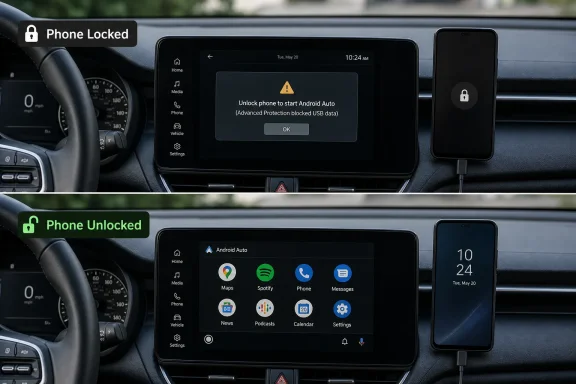 What changes for USB users
The practical change is messaging. Android Auto 17.2 adds clearer on-device language around the conflict between “start Android Auto while locked” and Android’s Advanced Protection behavior.Android Authority, citing an APK teardown of Android Auto 17.2.662614, reported that Google added strings describing the issue and warning that a phone unlock is required to start Android Auto when Advanced Protection is on. Google’s Android support documentation says Advanced Protection can require the user to unlock the screen before allowing USB data transfer, including when using Android Auto over USB.
That distinction is important. Android Auto may still be allowed to start while the phone is locked in normal circumstances, but USB data restrictions can override that convenience feature. For drivers, the visible result is simple: plug in the cable, Android Auto does not start, unlock the phone, and the connection proceeds.
Not a security rollback
This is not Google making Android Auto less strict. It is Google explaining the security block more clearly.Advanced Protection is meant to reduce the risk of malicious or unauthorized USB access. A car’s infotainment system is still a USB-connected device from Android’s point of view, so Android may refuse to pass data until the owner unlocks the phone. That can be annoying in a vehicle, but it is consistent with the security model.
For users who connect wirelessly, this particular USB lock-screen issue should not be the main concern. For users who rely on a cable, especially in older vehicles without wireless Android Auto, the update should reduce the troubleshooting loop of swapping cables, rebooting the head unit, clearing cache, or assuming Android Auto itself has failed.
How to get it
Android Auto 17.2 is rolling out through the Google Play Store, so not every phone will see the update at the same time. Users can check the Play Store listing for Android Auto and install the update when it appears. Some users may sideload the APK from third-party repositories, but that remains a higher-risk route and is better left to people who are comfortable verifying app sources and versions.If wired Android Auto still will not start, the useful first checks are now straightforward:
- Unlock the phone after plugging it into the car.
- Check whether Android’s Advanced Protection or USB protection setting is enabled.
- Try a known-good data-capable USB cable if the warning does not appear.
- Update Android Auto from the Play Store when version 17.2 is offered.
References
- Primary source: Modernet Digital
Published: Tue, 07 Jul 2026 21:49:03 GMT
Android Auto 17.2 now available: what changes for users connecting with a USB cable?
Discover how to update to Android Auto 17.2 and what the new protection mode means for those who use a USB connection in the car.www.modernetdigital.cat - Official source: support.google.com
- Related coverage: thundertiger-europe.com
Android Auto on Locked Pixels: The Advanced Protection Mode Fix
Android Auto v17.2 surfaces Advanced Protection Mode's USB block on locked phones, ending months of silent failures for Pixel 8, 9a, and 9 Pro XL drivers.thundertiger-europe.com - Related coverage: androidauthority.com
Google is finally fixing a confusing Android Auto connection roadblock
Google is finally fixing a confusing Android Auto connection roadblock caused by Android's Advanced Protection Mode. Here's what's changing!www.androidauthority.com - Related coverage: buzzarena.com
Android Auto traîne un bug que Google connaît mais refuse de corriger, la faute à Android 16
Android Auto 17.2 s'attaque au bug qui laisse l'écran de bord du véhicule tout noir quand le smartphone est verrouillé. Google le sait mais ne propose paswww.buzzarena.com
- Related coverage: technobezz.com
Android Auto Version 17.2 Update Crashes Apps and Forces Users to Downgrade | Technobezz
Android Auto's latest update crashes apps and forces downgrades, with wireless issues and Gemini AI adding to months of reliability problems.www.technobezz.com
- Related coverage: en.androidguias.com
Android Auto won't start with USB cable: problem and solutions
Android Auto is no longer starting when you connect the USB cable on many phones. We'll tell you what's causing the problem, who it affects, and what you can do in the meantime.en.androidguias.com - Related coverage: piunikaweb.com
Android Auto 'Start while locked' bug and steering wheel glitches frustrate users - PiunikaWeb
It feels like every time we get an Android Auto update to fix one thing, two more things break. Right now, I’m monitoring two distinct and highly annoying bugs plaguing Android Auto users: a widespread USB connection blocker and a bizarre media control glitch specific to newer Toyota... piunikaweb.com
- Related coverage: vucense.com
Android Auto Not Working After March 2026 Pixel Update? Fix | Guides & Security | Vucense
Android Auto wired connection broken after the March 2026 Google Pixel update? Here's the confirmed fix for the phone unlock and rotary knob bugs.vucense.com - Related coverage: windowsforum.com
Android Auto 17.2 Crashes in Wireless Sessions: Rollback, Gemini Issues, Fixes | Windows Forum
Google’s Android Auto version 17.2, released to the stable channel in early July 2026, is triggering app crashes for some drivers, especially in wireless...windowsforum.com - Related coverage: haznos.org
Android Auto USB Device Not Supported Fix Order
Android Auto says USB device not supported after an update? Use this fix order for cables, USB mode, permissions, infotainment resets, and saved-car cleanup.haznos.org