

Google fixed CVE-2026-13870 in Chrome for Android 150.0.7871.47, closing a CWE-416 WebView use-after-free flaw triggered by crafted HTML. Before that release, a remote attacker could potentially execute arbitrary code inside the browser sandbox after required user interaction. Chromium rates the vulnerability Medium, while CISA’s Authorized Data Publisher assessment assigns a CVSS 3.1 score of 8.8 HIGH. The immediate action is clear: update Chrome on Android and verify that the installed version is 150.0.7871.47 or later.
The official description is concise: a use-after-free condition in WebView could be reached through crafted HTML, allowing a remote attacker to execute arbitrary code inside a sandbox on Chrome for Android versions before 150.0.7871.47. Google, acting as the CVE source, classified the Chromium security severity as Medium.
CISA’s Authorized Data Publisher entry looks considerably less reassuring. Its CVSS 3.1 vector is
Translated into operational terms, the attack is network-reachable, does not require prior privileges, and is assessed as low complexity. It does require user interaction. Its unchanged-scope designation means the CVSS assessment does not assume that successful exploitation automatically crosses into another security authority.
The confidentiality, integrity, and availability impact ratings are all High. Under that scoring model, successful exploitation could seriously affect data exposure, content modification, or service availability within the compromised security context.
This is why “inside a sandbox” must not be read as “harmless.” A sandbox is a containment boundary. Arbitrary code execution inside that boundary is still a meaningful compromise, even if the public record does not establish a path to unrestricted control of the Android operating system.
At the same time, CVE-2026-13870 is not described as a complete device takeover. The supplied record does not identify a companion sandbox escape, privilege-escalation flaw, or exploit chain that would grant system-level control.
The security story therefore sits between two misleading extremes. Calling it only a Medium bug can obscure the potential impact represented by CISA-ADP’s vector, while calling it an immediate Android takeover would exceed the available evidence.
The table does not show that one organization is right and another is wrong. Chromium severity and CVSS serve different purposes. For remediation, the most important fact is the version boundary: Chrome for Android releases below 150.0.7871.47 are affected, and 150.0.7871.47 is the fixed threshold identified in the record.
The exact vulnerable code path, required document state, reliability conditions, and application-level prerequisites are not described publicly in the supplied material. Administrators should therefore avoid claims that any application workflow can reach the defect or that every application presenting web content creates the same level of exposure.
The WebView designation nevertheless matters operationally because it warns defenders not to evaluate the issue solely by asking whether users actively browse the web through the Chrome icon. Web content may be rendered through a browser component in contexts that are not obvious to the user or visible in a basic application inventory.
That does not justify assumptions about particular application features or industries. The appropriate conclusion is narrower: organizations should inventory the browser-engine version active on Android devices and should not treat an updated business application or current Android patch level as proof that Chrome has reached the fixed build.
For enterprise IT, the issue crosses several ownership boundaries. Mobile administrators may manage Chrome as an application, developers may regard WebView as a platform dependency, and vulnerability teams may focus on operating-system patch levels. CVE-2026-13870 requires those groups to verify the actual Chrome for Android version rather than relying on those indirect indicators.
The relevant security unit is the browser engine active on the device, not merely the icon or application through which content is presented.
After memory has been freed, an allocator may reuse it for another object or purpose. Code that still assumes the previous object exists can then read invalid data, write into memory now used by another structure, follow corrupted references, or crash.
Turning such a defect into controlled code execution generally requires more than causing an invalid access. An attacker may need to influence what replaces the freed object and shape the later access in a useful way. The public description confirms the code-execution consequence but does not provide the technical detail needed to judge exploit reliability across devices or configurations.
The Low attack-complexity value in CISA-ADP’s CVSS vector means that the contributing assessor did not assign the vulnerability the additional constraints represented by a High complexity rating. It does not prove that public exploit code exists, that exploitation is reliable on every Android device, or that the vulnerability is suitable for mass compromise.
CISA’s SSVC record explicitly lists exploitation as none. In the supplied assessment, there was no identified evidence of exploitation. The SSVC record also marks the flaw as not automatable, although the record provided here does not explain the detailed reasoning behind that selection.
Those findings should prevent unsupported claims of an active campaign. They should not be interpreted as a reason to leave affected versions installed.
The associated Chromium issue is access-restricted, leaving defenders with an intentionally limited public picture. They know the weakness class, affected platform, fixed-version boundary, crafted-HTML delivery method, user-interaction requirement, and potential consequence. They do not have enough official technical detail to build a precise detection rule for the underlying memory error.
Version compliance is therefore the primary control. Monitoring may still reveal suspicious links, navigation, or application behavior, but the supplied evidence does not support claims that network detection can reliably identify attempted exploitation of this specific flaw.
That is an important limitation. The supplied record does not state that exploitation escapes the sandbox, gains Android system privileges, reaches other applications’ private data, or crosses into another security authority.
It is equally important not to convert that limitation into a claim that exploitation has no meaningful consequences. CISA-ADP assigns High impact values to confidentiality, integrity, and availability and labels the SSVC technical impact as total. Those assessments describe a potentially serious compromise inside the affected security context.
Security teams should communicate both parts accurately:
For developers, component patching and application-level risk reduction are separate tasks. Updating Chrome addresses this particular fixed-version boundary. Application owners should also review where their software accepts or renders remote content, but they should avoid claiming that a specific hardening measure blocks CVE-2026-13870 unless testing or vendor guidance establishes that connection.
Where an application permits externally supplied destinations, developers can reduce general exposure by limiting navigation to necessary origins, validating links before loading them, and avoiding broader content access than the application requires. These are platform-neutral design precautions, not documented fixes for the underlying use-after-free.
Allowing an embedded browser to roam freely undermines the assumption that the surrounding application controls all content it presents. The safer model is to define which destinations and content sources are necessary, reject unexpected transitions, and keep the browser component itself current.
The supplied facts do not provide sufficiently supported publication dates for every step, so the operational timeline is best presented as an ordered sequence rather than as a calendar of unverified dates.
The supplied affected-version data also requires careful reading. The consistent operational boundary is that versions below 150.0.7871.47 are vulnerable and 150.0.7871.47 is the fixed release. Inventory and compliance systems should apply that exclusion boundary instead of presenting the fixed build itself as affected.
The supplied record identifies Chrome on Android as the affected product. A desktop release-note title or reference should not be used to expand the affected scope, and the record provided here does not support a claim that the desktop post itself lists this CVE.
The usual Google Play procedure is:
The required outcome does not vary: Chrome for Android must report version 150.0.7871.47 or later.
If the update is not shown:
Users should not assume that closing Chrome, clearing browsing data, changing the default browser, or updating an unrelated Android application removes the vulnerable engine. Those actions do not verify the installed Chrome version.
Possible compensating controls include restricting the device to controlled content, removing it from sensitive account access, limiting the applications available to it, or preventing it from reaching protected organizational resources. The exact control must match the organization’s management capabilities and risk model.
None of those measures is equivalent to replacing the vulnerable version. If a device cannot install a supported fixed release, retirement or reassignment may be the only durable response.
Developers still control how their applications select and trust content. They should identify every location where an application presents remote or externally influenced HTML and determine whether that behavior is necessary.
A practical review should ask:
Application owners should also coordinate with mobile administrators during rollout. If an application fails after the browser update, the failure should be investigated as a compatibility issue with a defined owner and timeline. Rolling an entire fleet back to an affected browser version would reintroduce the security condition the update was intended to remove.
Where minimum-version enforcement is technically possible, applications handling sensitive information may choose to detect unsupported browser-component versions and block or limit affected workflows. Such controls require careful testing and should provide users with a clear remediation message rather than failing silently.
Allowing an embedded browser to roam freely undermines the assumption that the surrounding application controls the content entering its interface. Developers should reduce unnecessary navigation, validate destinations, keep trust boundaries narrow, and ensure that security updates to the underlying browser engine can be deployed without indefinite compatibility holds.
The grounded conclusions are:
The forward-looking concern is not only this CVE. Android fleets increasingly depend on shared, frequently updated components whose versions may not be visible in traditional operating-system patch reports. Organizations that inventory only device models and Android security levels can miss a vulnerable browser engine operating underneath otherwise approved applications.
CVE-2026-13870 should therefore be used as a process test. If an organization cannot quickly answer which devices run Chrome below 150.0.7871.47, force the update, and prove that installation succeeded, the larger problem is not the difference between Medium and High. It is the absence of reliable browser-component governance across the Android fleet.
Who needs to act
How to verify
- Consumers and organizations running Chrome for Android below 150.0.7871.47.
- Administrators responsible for managed Android devices, including devices used primarily for line-of-business applications rather than ordinary browsing.
- Application owners whose Android deployments depend on WebView.
If the fixed build is unavailable
- Open Chrome, select the three-dot menu, open Settings, and select About Chrome.
- Confirm that the version is 150.0.7871.47 or later.
- On managed devices, verify the reported installed version through the organization’s mobile-device or enterprise-mobility management inventory rather than relying only on user confirmation.
- Check Google Play again after confirming that the device has network connectivity, sufficient storage, and access to its authorized Play account.
- Escalate managed-device failures through the organization’s application-management process.
- If a device cannot receive version 150.0.7871.47 or later, restrict its exposure to untrusted web content and plan to remove it from sensitive workflows. Compensating controls reduce exposure but do not fix the vulnerability.
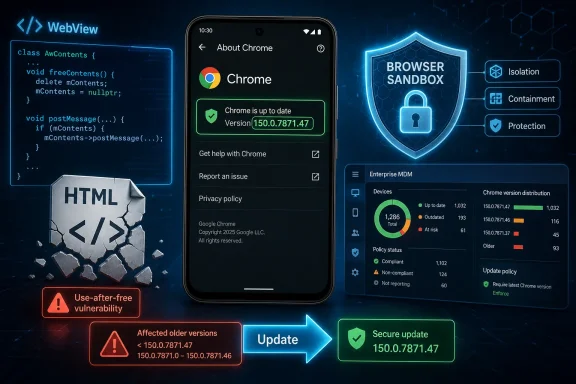 A Medium Chrome Bug With a High-Impact Attack Profile
The official description is concise: a use-after-free condition in WebView could be reached through crafted HTML, allowing a remote attacker to execute arbitrary code inside a sandbox on Chrome for Android versions before 150.0.7871.47. Google, acting as the CVE source, classified the Chromium security severity as Medium.CISA’s Authorized Data Publisher entry looks considerably less reassuring. Its CVSS 3.1 vector is
CVSS:3.1/AV:N/AC:L/PR:N/UI:R/S:U/C:H/I:H/A:H, producing a base score of 8.8 HIGH. The 8.8 score belongs specifically to CISA-ADP; it should not be described as an independent NVD score.Translated into operational terms, the attack is network-reachable, does not require prior privileges, and is assessed as low complexity. It does require user interaction. Its unchanged-scope designation means the CVSS assessment does not assume that successful exploitation automatically crosses into another security authority.
The confidentiality, integrity, and availability impact ratings are all High. Under that scoring model, successful exploitation could seriously affect data exposure, content modification, or service availability within the compromised security context.
This is why “inside a sandbox” must not be read as “harmless.” A sandbox is a containment boundary. Arbitrary code execution inside that boundary is still a meaningful compromise, even if the public record does not establish a path to unrestricted control of the Android operating system.
At the same time, CVE-2026-13870 is not described as a complete device takeover. The supplied record does not identify a companion sandbox escape, privilege-escalation flaw, or exploit chain that would grant system-level control.
The security story therefore sits between two misleading extremes. Calling it only a Medium bug can obscure the potential impact represented by CISA-ADP’s vector, while calling it an immediate Android takeover would exceed the available evidence.
| Assessment lens | Rating or status | What it measures | Practical reading |
|---|---|---|---|
| Chromium security severity | Medium | Google’s vulnerability triage | A security defect Google fixed, but not one it placed in Chromium’s highest severity categories |
| CISA-ADP CVSS 3.1 | 8.8 HIGH | Standardized exploit conditions and potential impact | Network-reachable, low complexity, no privileges required, user interaction required, and high potential impact |
| CISA SSVC | Exploitation: none | Evidence of exploitation at assessment time | No exploitation was identified in the supplied assessment |
| CISA SSVC | Automatable: no | Whether the attack was assessed as readily scalable end to end | The assessment did not classify it as fully automatable |
| CISA SSVC | Technical impact: total | Potential technical impact in the affected context | Successful exploitation could produce extensive control within that context |
| NVD assessment | Not provided in the supplied record | NIST’s independent vulnerability scoring | Do not attribute CISA-ADP’s 8.8 score to NVD |
WebView Makes the Browser Engine the Relevant Security Unit
The affected component is WebView, but the supplied record does not establish that every Android application using embedded web content is exploitable. It establishes a flaw in Chrome on Android’s WebView implementation, a crafted-HTML trigger, and the possibility of sandboxed code execution after user interaction.The exact vulnerable code path, required document state, reliability conditions, and application-level prerequisites are not described publicly in the supplied material. Administrators should therefore avoid claims that any application workflow can reach the defect or that every application presenting web content creates the same level of exposure.
The WebView designation nevertheless matters operationally because it warns defenders not to evaluate the issue solely by asking whether users actively browse the web through the Chrome icon. Web content may be rendered through a browser component in contexts that are not obvious to the user or visible in a basic application inventory.
That does not justify assumptions about particular application features or industries. The appropriate conclusion is narrower: organizations should inventory the browser-engine version active on Android devices and should not treat an updated business application or current Android patch level as proof that Chrome has reached the fixed build.
For enterprise IT, the issue crosses several ownership boundaries. Mobile administrators may manage Chrome as an application, developers may regard WebView as a platform dependency, and vulnerability teams may focus on operating-system patch levels. CVE-2026-13870 requires those groups to verify the actual Chrome for Android version rather than relying on those indirect indicators.
The relevant security unit is the browser engine active on the device, not merely the icon or application through which content is presented.
Use-After-Free Bugs Depend on Invalid Object Lifetimes
CVE-2026-13870 is mapped to CWE-416, Use After Free. This vulnerability class occurs when software releases an area of memory but later continues to access it through a stale pointer or reference.After memory has been freed, an allocator may reuse it for another object or purpose. Code that still assumes the previous object exists can then read invalid data, write into memory now used by another structure, follow corrupted references, or crash.
Turning such a defect into controlled code execution generally requires more than causing an invalid access. An attacker may need to influence what replaces the freed object and shape the later access in a useful way. The public description confirms the code-execution consequence but does not provide the technical detail needed to judge exploit reliability across devices or configurations.
The Low attack-complexity value in CISA-ADP’s CVSS vector means that the contributing assessor did not assign the vulnerability the additional constraints represented by a High complexity rating. It does not prove that public exploit code exists, that exploitation is reliable on every Android device, or that the vulnerability is suitable for mass compromise.
CISA’s SSVC record explicitly lists exploitation as none. In the supplied assessment, there was no identified evidence of exploitation. The SSVC record also marks the flaw as not automatable, although the record provided here does not explain the detailed reasoning behind that selection.
Those findings should prevent unsupported claims of an active campaign. They should not be interpreted as a reason to leave affected versions installed.
The associated Chromium issue is access-restricted, leaving defenders with an intentionally limited public picture. They know the weakness class, affected platform, fixed-version boundary, crafted-HTML delivery method, user-interaction requirement, and potential consequence. They do not have enough official technical detail to build a precise detection rule for the underlying memory error.
Version compliance is therefore the primary control. Monitoring may still reveal suspicious links, navigation, or application behavior, but the supplied evidence does not support claims that network detection can reliably identify attempted exploitation of this specific flaw.
The Sandbox Limits the Stated Scope, Not the Need to Patch
The CVE description says arbitrary code execution occurs inside a sandbox. CISA-ADP’s CVSS vector also uses an unchanged-scope designation.That is an important limitation. The supplied record does not state that exploitation escapes the sandbox, gains Android system privileges, reaches other applications’ private data, or crosses into another security authority.
It is equally important not to convert that limitation into a claim that exploitation has no meaningful consequences. CISA-ADP assigns High impact values to confidentiality, integrity, and availability and labels the SSVC technical impact as total. Those assessments describe a potentially serious compromise inside the affected security context.
Security teams should communicate both parts accurately:
- Successful exploitation can provide arbitrary code execution within the browser sandbox.
- The public record supplied for this article does not establish a sandbox escape or complete device compromise.
- The absence of an identified escape does not make an affected browser engine safe to retain.
- No active exploitation is identified in the supplied CISA SSVC assessment.
For developers, component patching and application-level risk reduction are separate tasks. Updating Chrome addresses this particular fixed-version boundary. Application owners should also review where their software accepts or renders remote content, but they should avoid claiming that a specific hardening measure blocks CVE-2026-13870 unless testing or vendor guidance establishes that connection.
Where an application permits externally supplied destinations, developers can reduce general exposure by limiting navigation to necessary origins, validating links before loading them, and avoiding broader content access than the application requires. These are platform-neutral design precautions, not documented fixes for the underlying use-after-free.
Allowing an embedded browser to roam freely undermines the assumption that the surrounding application controls all content it presents. The safer model is to define which destinations and content sources are necessary, reject unexpected transitions, and keep the browser component itself current.
The Public Record Arrived in Layers, Not as a Finished Verdict
CVE records can be enriched after their initial publication. CVE-2026-13870’s public record reflects contributions from more than one organization: Google supplied the vulnerability description and Chromium severity, CISA-ADP supplied CVSS and SSVC data, and NVD presented the record and associated analysis fields.The supplied facts do not provide sufficiently supported publication dates for every step, so the operational timeline is best presented as an ordered sequence rather than as a calendar of unverified dates.
Timeline
- Google’s CVE contribution identified the issue. The record described a WebView use-after-free triggered by crafted HTML, assigned CWE-416, classified the Chromium severity as Medium, and established Chrome for Android versions below 150.0.7871.47 as affected.
- CISA-ADP added standardized risk data. Its contribution supplied the CVSS 3.1 vector and 8.8 HIGH base score, along with SSVC values of exploitation none, automatable no, and total technical impact.
- NIST analysis added affected-platform context. The configuration associated the vulnerable Chrome version range with Android.
- The CISA-ADP record was subsequently updated. The supplied facts establish an additional update and related timestamp fields, but they do not establish that this edit was merely representational or that no other semantic change occurred.
- NVD had not supplied an independent score in the provided record. The visible 8.8 value must continue to be attributed to CISA-ADP unless NVD later publishes its own assessment.
The supplied affected-version data also requires careful reading. The consistent operational boundary is that versions below 150.0.7871.47 are vulnerable and 150.0.7871.47 is the fixed release. Inventory and compliance systems should apply that exclusion boundary instead of presenting the fixed build itself as affected.
The supplied record identifies Chrome on Android as the affected product. A desktop release-note title or reference should not be used to expand the affected scope, and the record provided here does not support a claim that the desktop post itself lists this CVE.
Consumer Remediation: Update and Confirm the Version
Consumers should not stop after pressing an update button. They should update the available browser components and then confirm that Chrome crossed the fixed-version boundary.The usual Google Play procedure is:
- Open the Google Play Store.
- Select the profile icon.
- Select Manage apps & device.
- Open Updates available.
- Update Google Chrome.
- If Android System WebView appears in the available updates, update it as well.
- After installation, open Chrome.
- Open the three-dot menu and select Settings.
- Select About Chrome.
- Verify that the installed Chrome version is 150.0.7871.47 or later.
The required outcome does not vary: Chrome for Android must report version 150.0.7871.47 or later.
If the update is not shown:
- Refresh the Play Store’s updates screen.
- Confirm that the device is online.
- Confirm that the Play Store is signed into the expected account.
- Check whether the device has enough free storage to complete an application update.
- Restart the device and check again.
- On an employer-managed device, contact the administrator rather than attempting to bypass management policy.
- If the device cannot receive the fixed build, avoid using it for untrusted web content or sensitive work until the organization determines a supported replacement or remediation path.
Users should not assume that closing Chrome, clearing browsing data, changing the default browser, or updating an unrelated Android application removes the vulnerable engine. Those actions do not verify the installed Chrome version.
Enterprise Procedure: Platform-Neutral Managed Deployment
The following procedure is intentionally platform-neutral because management-console names and available controls differ among enterprise mobility management products. Administrators should use the equivalent controls documented by their EMM vendor.Managed remediation procedure
- Identify the application record.
Locate the managed Google Chrome application assigned to Android devices. If the management platform separately inventories Android System WebView, locate that record as well. - Collect the installed version.
Run or refresh application inventory for all in-scope Android devices. Export device identifier, ownership type, operating-system version, Chrome version, last check-in time, and compliance state. - Create the affected population.
Filter for Chrome versions below 150.0.7871.47. Separate devices that have not recently checked in because their reported versions may be stale. - Make the current release available.
Synchronize the managed application catalog with the authorized application source. Confirm that the current Chrome release is visible to the management platform. - Assign the update as required.
Use the EMM’s mandatory-install, force-update, required-application, minimum-version, or equivalent supported control. Target a pilot group first if organizational policy requires application validation. - Run a short validation cycle.
Test critical managed applications that depend on web content. Record failures as application-compatibility incidents rather than leaving the vulnerable browser version broadly approved without a deadline. - Expand deployment.
Assign the fixed or later Chrome release to the remaining in-scope devices. Trigger a device sync or check-in using the management product’s supported action. - Enforce a minimum version where supported.
Set 150.0.7871.47 as the minimum compliant Chrome version. If the EMM cannot enforce application versions directly, create a compliance report or dynamic affected-device group and apply the organization’s documented access restrictions. - Verify installation, not assignment.
A successful application assignment does not prove that the device installed the update. Re-run inventory and require the device-reported version to show 150.0.7871.47 or later. - Handle exceptions explicitly.
Document devices that are offline, unsupported, unable to install the release, or blocked by compatibility problems. Assign an owner and remediation deadline to every exception. - Restrict unresolved devices.
Depending on organizational policy and available EMM controls, remove affected devices from sensitive application groups, block access to protected resources, or place them in a limited-use state until the fixed version is confirmed. - Close only on evidence.
Mark remediation complete when inventory reports the fixed or later version, not when the update was merely approved, published, or queued.
Platform-neutral admin checklist
- [ ] Inventory the active Chrome version on managed Android devices.
- [ ] Treat every Chrome version below 150.0.7871.47 as affected.
- [ ] Refresh managed application catalogs.
- [ ] Assign the current Chrome release through a mandatory or required-install policy.
- [ ] Update Android System WebView where it is separately presented and managed.
- [ ] Run a targeted pilot against critical applications.
- [ ] Trigger supported device synchronization or check-in actions.
- [ ] Re-query inventory after deployment.
- [ ] Enforce 150.0.7871.47 as the minimum acceptable Chrome version where supported.
- [ ] Quarantine or restrict unresolved devices according to organizational policy.
- [ ] Record compatibility exceptions with owners and deadlines.
- [ ] Continue monitoring for changes in exploitation status or affected-product information.
Possible compensating controls include restricting the device to controlled content, removing it from sensitive account access, limiting the applications available to it, or preventing it from reaching protected organizational resources. The exact control must match the organization’s management capabilities and risk model.
None of those measures is equivalent to replacing the vulnerable version. If a device cannot install a supported fixed release, retirement or reassignment may be the only durable response.
App Developers Cannot Outsource the Entire Problem to Google
Because the flaw resides in the browser component, developers do not repair CVE-2026-13870 by changing an ordinary application screen. The fixed Chrome release is the primary remediation identified in the supplied record.Developers still control how their applications select and trust content. They should identify every location where an application presents remote or externally influenced HTML and determine whether that behavior is necessary.
A practical review should ask:
- Does the application limit web navigation to intended destinations?
- Can external input select a destination without validation?
- Are unexpected redirects rejected or handed off safely?
- Does the application present content from origins that are not required for its business purpose?
- Can the application reduce the amount of untrusted content it accepts while component updates are being deployed?
- Does support documentation tell administrators how to identify the browser-component version on affected devices?
- Can the application fail safely when the device does not meet a minimum browser-version requirement?
Application owners should also coordinate with mobile administrators during rollout. If an application fails after the browser update, the failure should be investigated as a compatibility issue with a defined owner and timeline. Rolling an entire fleet back to an affected browser version would reintroduce the security condition the update was intended to remove.
Where minimum-version enforcement is technically possible, applications handling sensitive information may choose to detect unsupported browser-component versions and block or limit affected workflows. Such controls require careful testing and should provide users with a clear remediation message rather than failing silently.
Allowing an embedded browser to roam freely undermines the assumption that the surrounding application controls the content entering its interface. Developers should reduce unnecessary navigation, validate destinations, keep trust boundaries narrow, and ensure that security updates to the underlying browser engine can be deployed without indefinite compatibility holds.
The Remediation Decision Is Simpler Than the Scoring Debate
CVE-2026-13870 demonstrates why vulnerability labels should not be used without their underlying conditions. Chromium’s Medium classification and CISA-ADP’s 8.8 HIGH score describe different assessment perspectives, but neither changes the fixed-version boundary.The grounded conclusions are:
- The affected product is Chrome on Android.
- Versions below 150.0.7871.47 are affected.
- The weakness is CWE-416, Use After Free, in WebView.
- Crafted HTML is the identified trigger.
- Successful exploitation could provide arbitrary code execution inside a sandbox.
- User interaction is required.
- Chromium rates the vulnerability Medium.
- CISA-ADP assigns CVSS 3.1 8.8 HIGH.
- CISA’s SSVC assessment records exploitation as none, automatable as no, and technical impact as total.
- The supplied record does not establish active exploitation, a sandbox escape, or complete Android compromise.
- The remediation is to install Chrome for Android 150.0.7871.47 or later and verify the resulting version.
The forward-looking concern is not only this CVE. Android fleets increasingly depend on shared, frequently updated components whose versions may not be visible in traditional operating-system patch reports. Organizations that inventory only device models and Android security levels can miss a vulnerable browser engine operating underneath otherwise approved applications.
CVE-2026-13870 should therefore be used as a process test. If an organization cannot quickly answer which devices run Chrome below 150.0.7871.47, force the update, and prove that installation succeeded, the larger problem is not the difference between Medium and High. It is the absence of reliable browser-component governance across the Android fleet.
References
- Primary source: NVD / Chromium
Published: 2026-07-11T15:41:04-07:00
NVD - CVE-2026-13870
 nvd.nist.gov
- Security advisory: MSRC
Published: 2026-07-11T15:41:04-07:00
Original feed URL
Security Update Guide - Microsoft Security Response Center
 msrc.microsoft.com
- Related coverage: cvefeed.io
CVE-2026-13870 - Google Chrome Android Use-After-Free
Use after free in WebView in Google Chrome on Android prior to 150.0.7871.47 allowed a remote attacker to execute arbitrary code inside a sandbox via a crafted HTML page. (Chromium security severity: Medium)cvefeed.io - Official source: support.google.com

How do i enable android system webview? - Android Community
support.google.com
- Related coverage: developer.android.com
- Related coverage: chromium.org
