

Google fixed CVE-2026-13872 in Chrome for Android version 150.0.7871.47. The Chrome-sourced vulnerability description says insufficient validation in WebAppInstalls could let a local attacker use a malicious file to potentially escape the browser sandbox on devices running an earlier version. The scope is narrow, but the severity data is unsettled: Chrome rates the flaw Medium, while a CISA-ADP contribution assigns a CVSS 3.1 score of 9.1 CRITICAL. Administrators should update affected Android devices without turning that discrepancy into an unsupported claim about a complete exploit chain or active attacks.
On an Android device, use Chrome’s own version page to determine whether the installed application is affected:
A user or technician should not close the ticket merely because an update was requested. The useful completion evidence is the version displayed after installation: 150.0.7871.47 or later.
That establishes five operational facts:
“Local attacker” should therefore be preserved as the source’s description rather than expanded into a specific scenario. It does not, by itself, prove that an attacker must physically possess an unlocked phone. It also does not establish that the vulnerability can be reached remotely with no prior access or interaction.
The component name provides context but not a complete technical mechanism. WebAppInstalls indicates that the defect is associated with Chrome’s web-application installation handling, but the record does not identify a particular manifest field, file extension, intent, installation prompt, or web-app feature as the trigger. Those details should not be supplied through inference.
The CWE-20 classification, Improper Input Validation, is similarly broad. It describes the general class of programming failure, not the malformed input or exact validation check that was missing in this case.
The reference to a potential sandbox escape makes remediation important because the described impact concerns a security boundary. It does not establish unrestricted control of the Android operating system, access to all device data, persistence, credential theft, or a complete compromise chain. Any of those outcomes would require evidence that is not present in the supplied record.
The restricted Chromium issue also means the underlying technical report is not available for public inspection through the cited record. That limits what can responsibly be said about exploit prerequisites and post-exploitation impact. It does not change the version-based remediation: Android installations below 150.0.7871.47 should be updated.
CISA-ADP’s vector is:
Read literally, that vector models a network attack with low complexity, no required privileges, and no user interaction. It assigns high integrity and availability impact, no confidentiality impact, and unchanged scope.
That network/no-user-interaction framing appears inconsistent with the brief Chrome-sourced description of a local attacker using a malicious file. The supplied record does not reconcile the two descriptions, and it would be inappropriate to declare either one erroneous or invent hidden technical facts that make them agree.
The 9.1 value must be labeled as CISA-ADP’s contribution, even when it is displayed on an NVD page or ingested from an NVD feed. The supplied facts do not establish that NVD independently calculated or endorsed that vector.
Chrome’s Medium rating should also be reported without inventing a rationale. It may reflect considerations not visible in the brief public record, but the supplied material does not say what those considerations were. The rating alone does not prove physical-access requirements, difficult exploitation, limited privileges, or dependence on another vulnerability.
The score discrepancy is therefore a reporting issue, not a reason to delay the update. The affected platform and fixed version are clear even though the public attack model is incomplete.
“Exploitation: none” should be reported narrowly. It means the contribution does not identify exploitation; it is not proof that exploitation is impossible or that no unpublished research exists. Conversely, nothing in the supplied record supports calling CVE-2026-13872 an actively exploited zero-day.
“Automatable: yes” is part of CISA-ADP’s categorization, but it does not resolve how an attacker reaches the vulnerable component or reconcile the CVSS vector with the local-attacker description.
“Technical impact: total” represents the categorization recorded in that contribution. It does not tell administrators how many devices are exposed, whether a working exploit is available, or whether every successful sandbox escape would produce unrestricted control of Android.
The useful operational interpretation is straightforward: the record describes a potentially meaningful security-boundary failure, provides a definite fixed version, and does not document active exploitation. That supports prompt version-based remediation without unsupported incident language.
Machine-readable product configurations can look broader than the plain-language description when a generic Chrome product entry is paired with an Android platform condition. Administrators should preserve both parts of that match. A Chrome version below the threshold is not enough by itself; the affected platform must also be Android.
The same caution applies to vendor references whose titles or labels may not mirror the CVE’s platform wording. A reference attached to the record is not independent evidence that the declared scope includes desktop Chrome.
For WindowsForum readers, this creates a specific routing problem. Desktop vulnerability tools may ingest “Google Chrome” and a critical numerical score, then create findings for Windows endpoints based on product-name or version matching. A Windows security team should not accept that match without confirming the platform condition.
The correct workflow is:
An Android asset with a missing or stale Chrome version should be classified as unverified, not automatically compliant. The team should obtain a current inventory result or request the version directly from the device. If reliable application-version evidence cannot be obtained, the exception should remain visible until it is resolved.
This distinction is especially important when an update command and an inventory report are separate events. A successful command submission shows that remediation was attempted. It does not prove that the application reached the fixed version.
A scanner finding is supportable only when its evidence matches the vulnerability’s stated platform and version boundary. For this CVE, a valid match needs an Android device running Chrome below 150.0.7871.47. A Windows endpoint with desktop Chrome is not a valid match on the supplied evidence, even if the Chrome version happens to be numerically lower.
The displayed severity must also retain its source. A report should say “CISA-ADP CVSS 3.1: 9.1” rather than presenting 9.1 as an NVD-generated score. Chrome’s Medium rating should remain visible beside it, along with a short note that the public record does not reconcile the different attack framing.
Mobile inventory introduces its own uncertainty. A device that has not checked in recently may display an old version after the application was updated, or it may genuinely remain vulnerable. That ambiguity cannot be solved by assuming either outcome. Request a fresh inventory update or obtain the version from About Chrome.
A stale version should therefore trigger verification, not automatic closure and not an unsupported declaration of compromise. Once the device reports Chrome 150.0.7871.47 or later, the finding can be closed with evidence. If it remains below the threshold, remediation stays open. If it cannot be checked, its status remains unverified and should be handled through the organization’s exception process.
The forward-looking task is to watch for authoritative changes to the record: a revised affected range, a public technical explanation, a vendor clarification, an NVD assessment, or evidence concerning exploitation. Until then, the defensible response is narrow and measurable—exclude unsupported Windows matches, route the issue to the Android owner, update Chrome, and prove that affected mobile devices are running version 150.0.7871.47 or later.
What to do now
- Affected: Google Chrome on Android below version 150.0.7871.47
- Action: Update Chrome on Android to 150.0.7871.47 or later, then verify the installed version
- Desktop scope: The supplied record does not establish that Chrome on Windows is affected
- Prioritization: Treat this as a clear mobile-browser remediation task, while keeping Chrome’s Medium rating separate from CISA-ADP’s 9.1 contribution
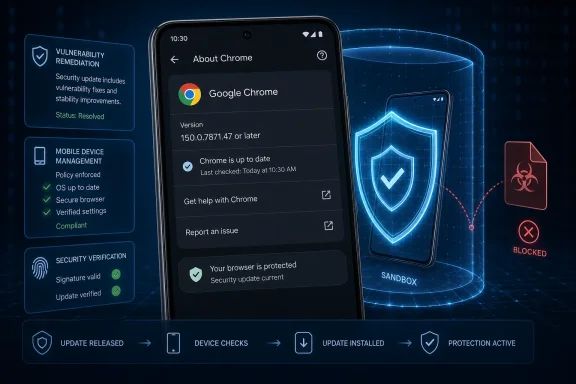 Update and Verify Chrome on Android
On an Android device, use Chrome’s own version page to determine whether the installed application is affected:- Open Chrome.
- Tap the three-dot menu.
- Select Settings.
- Select About Chrome.
- Note the version displayed under Application version.
- If the version is below 150.0.7871.47, close or leave Chrome and open the Google Play Store.
- Tap the profile icon.
- Select Manage apps & device.
- Open Updates available.
- Find Chrome and select Update.
- After the update finishes, reopen Chrome and return to Chrome > three-dot menu > Settings > About Chrome.
- Confirm that the installed version is 150.0.7871.47 or later.
A user or technician should not close the ticket merely because an update was requested. The useful completion evidence is the version displayed after installation: 150.0.7871.47 or later.
What the Record Establishes—and What It Does Not
CVE-2026-13872 affects WebAppInstalls in Google Chrome on Android before version 150.0.7871.47. The Chrome-sourced description identifies insufficient validation of untrusted input and says a local attacker could potentially perform a sandbox escape through a malicious file.That establishes five operational facts:
- The named product is Google Chrome on Android.
- The affected range is earlier than 150.0.7871.47.
- The named component is WebAppInstalls.
- The weakness involves insufficient validation of untrusted input.
- The described outcome is a potential sandbox escape involving a malicious file and a local attacker.
“Local attacker” should therefore be preserved as the source’s description rather than expanded into a specific scenario. It does not, by itself, prove that an attacker must physically possess an unlocked phone. It also does not establish that the vulnerability can be reached remotely with no prior access or interaction.
The component name provides context but not a complete technical mechanism. WebAppInstalls indicates that the defect is associated with Chrome’s web-application installation handling, but the record does not identify a particular manifest field, file extension, intent, installation prompt, or web-app feature as the trigger. Those details should not be supplied through inference.
The CWE-20 classification, Improper Input Validation, is similarly broad. It describes the general class of programming failure, not the malformed input or exact validation check that was missing in this case.
The reference to a potential sandbox escape makes remediation important because the described impact concerns a security boundary. It does not establish unrestricted control of the Android operating system, access to all device data, persistence, credential theft, or a complete compromise chain. Any of those outcomes would require evidence that is not present in the supplied record.
The restricted Chromium issue also means the underlying technical report is not available for public inspection through the cited record. That limits what can responsibly be said about exploit prerequisites and post-exploitation impact. It does not change the version-based remediation: Android installations below 150.0.7871.47 should be updated.
The severity discrepancy
The most notable analytical issue is the difference between Chrome’s Medium rating and the 9.1 CRITICAL CVSS 3.1 score contributed by CISA-ADP.CISA-ADP’s vector is:
CVSS:3.1/AV:N/AC:L/PR:N/UI:N/S:U/C:N/I:H/A:HRead literally, that vector models a network attack with low complexity, no required privileges, and no user interaction. It assigns high integrity and availability impact, no confidentiality impact, and unchanged scope.
That network/no-user-interaction framing appears inconsistent with the brief Chrome-sourced description of a local attacker using a malicious file. The supplied record does not reconcile the two descriptions, and it would be inappropriate to declare either one erroneous or invent hidden technical facts that make them agree.
| Assessment or record | Severity or score | Attack framing | Impact framing | Current limitation |
|---|---|---|---|---|
| Chrome-sourced description | Medium | Local attacker using a malicious file | Potential sandbox escape | Public technical details are limited |
| CISA-ADP CVSS 3.1 contribution | 9.1 CRITICAL | Network, low complexity, no privileges, no user interaction | High integrity and availability; no confidentiality impact | Vector appears inconsistent with the brief local-attacker description; no reconciliation is provided |
| CISA-ADP SSVC contribution | Exploitation “none”; automatable “yes”; technical impact “total” | Categorization rather than a full exploit narrative | Models potentially broad technical impact | Does not establish observed exploitation |
| NVD CVSS 4.0 | Not available in the supplied record | Not assessed | Not assessed | No NVD score provided |
| NVD CVSS 3.x | Not available in the supplied record | Not assessed | Not assessed | No NVD score provided |
| NVD CVSS 2.0 | Not available in the supplied record | Not assessed | Not assessed | No NVD score provided |
Chrome’s Medium rating should also be reported without inventing a rationale. It may reflect considerations not visible in the brief public record, but the supplied material does not say what those considerations were. The rating alone does not prove physical-access requirements, difficult exploitation, limited privileges, or dependence on another vulnerability.
The score discrepancy is therefore a reporting issue, not a reason to delay the update. The affected platform and fixed version are clear even though the public attack model is incomplete.
What the SSVC contribution means
The CISA-ADP SSVC contribution records exploitation as “none,” automatable as “yes,” and technical impact as “total.”“Exploitation: none” should be reported narrowly. It means the contribution does not identify exploitation; it is not proof that exploitation is impossible or that no unpublished research exists. Conversely, nothing in the supplied record supports calling CVE-2026-13872 an actively exploited zero-day.
“Automatable: yes” is part of CISA-ADP’s categorization, but it does not resolve how an attacker reaches the vulnerable component or reconcile the CVSS vector with the local-attacker description.
“Technical impact: total” represents the categorization recorded in that contribution. It does not tell administrators how many devices are exposed, whether a working exploit is available, or whether every successful sandbox escape would produce unrestricted control of Android.
The useful operational interpretation is straightforward: the record describes a potentially meaningful security-boundary failure, provides a definite fixed version, and does not document active exploitation. That supports prompt version-based remediation without unsupported incident language.
Keep the Android Scope Intact
The supplied record identifies Chrome on Android before 150.0.7871.47. It does not establish that Chrome on Windows, macOS, Linux, ChromeOS, or iOS is affected by this CVE.Machine-readable product configurations can look broader than the plain-language description when a generic Chrome product entry is paired with an Android platform condition. Administrators should preserve both parts of that match. A Chrome version below the threshold is not enough by itself; the affected platform must also be Android.
The same caution applies to vendor references whose titles or labels may not mirror the CVE’s platform wording. A reference attached to the record is not independent evidence that the declared scope includes desktop Chrome.
For WindowsForum readers, this creates a specific routing problem. Desktop vulnerability tools may ingest “Google Chrome” and a critical numerical score, then create findings for Windows endpoints based on product-name or version matching. A Windows security team should not accept that match without confirming the platform condition.
The correct workflow is:
- Identify the source of the finding. Determine whether it came from desktop vulnerability scanning, a mobile inventory system, threat intelligence, or a manually reviewed CVE alert.
- Check the platform attached to the asset. If the asset is a Windows PC, do not mark desktop Chrome vulnerable solely because its version is below 150.0.7871.47.
- Exclude unsupported desktop matches. Record that the supplied CVE description names Chrome on Android and does not establish Windows impact. Preserve the exclusion evidence so the same false match does not repeatedly generate tickets.
- Route the finding to the mobile owner. Assign remediation to the team responsible for Android application inventory and updates rather than leaving the issue in a Windows endpoint queue.
- Build the affected set from Android inventory. Filter for Android devices reporting Chrome versions below 150.0.7871.47.
- Remediate and force a fresh inventory check. After the update window, require affected devices to report again so the finding is closed from observed version data rather than policy intent.
- Export compliance evidence. Retain the device identifier, Android platform designation, Chrome version, inventory timestamp, and final compliance status.
- Document exceptions. Devices that remain below the fixed version should have an owner, reason, deadline, and an approved access decision.
A defensible compliance test
For this CVE, the technical compliance rule is simple:Android device AND Chrome version < 150.0.7871.47 = affectedAndroid device AND Chrome version >= 150.0.7871.47 = compliantWindows device = not established as affected by the supplied recordAn Android asset with a missing or stale Chrome version should be classified as unverified, not automatically compliant. The team should obtain a current inventory result or request the version directly from the device. If reliable application-version evidence cannot be obtained, the exception should remain visible until it is resolved.
This distinction is especially important when an update command and an inventory report are separate events. A successful command submission shows that remediation was attempted. It does not prove that the application reached the fixed version.
Timeline
The supplied facts establish a sequence of record events, but they do not justify attributing every field to the organization associated with each timestamp.- New CVE received from Chrome: The NVD record shows a “New CVE Received from Chrome” event and identifies Chrome as the CVE source. The Chrome-sourced description names WebAppInstalls, Chrome on Android before 150.0.7871.47, insufficient validation, a local attacker, a malicious file, and a potential sandbox escape.
- CISA-ADP enrichment: CISA-ADP contributed the CVSS 3.1 vector and 9.1 CRITICAL score, along with SSVC values recording exploitation “none,” automatable “yes,” and technical impact “total.”
- CWE handling: The NVD page displays Chrome’s CWE-20 classification. The record history also reflects changes to CISA-ADP’s separate contribution, which should not be described as changing the Chrome-sourced classification.
- NIST initial analysis: NIST added machine-readable configuration information and reference classifications during its analysis.
- Current scoring state in the supplied record: NVD’s own CVSS 4.0, CVSS 3.x, and CVSS 2.0 assessments are not available, leaving CISA-ADP’s 9.1 as a contributed score rather than an NVD-generated assessment.
Action Checklist for Administrators
End-user or help-desk remediation
- Open Chrome > three-dot menu > Settings > About Chrome.
- Record the displayed application version.
- If it is below 150.0.7871.47, open Google Play Store > profile icon > Manage apps & device > Updates available > Chrome > Update.
- Reopen Chrome after installation.
- Return to About Chrome and confirm version 150.0.7871.47 or later.
- Escalate devices that cannot install the fixed version rather than closing the request as complete.
Windows-centric security-team routing
- Do not create or retain a Windows desktop Chrome finding based only on the CVE number, generic product name, or 9.1 score.
- Require the Android platform condition before classifying an asset as affected.
- Send valid Android matches to the mobile security or device-management owner.
- Search mobile application inventory for Chrome versions below 150.0.7871.47.
- Treat missing or stale application-version data as unverified.
- Require a post-remediation inventory check.
- Preserve proof containing device identity, platform, installed Chrome version, observation time, and disposition.
- Record why any desktop scanner matches were excluded.
- Track Android devices that remain below the threshold through a formal exception or access decision.
Internal reporting language
A concise internal finding can state:That wording preserves the actionable facts, attributes the score correctly, and avoids turning incomplete public details into a speculative attack narrative.CVE-2026-13872 affects Google Chrome on Android before version 150.0.7871.47. The Chrome-sourced description identifies insufficient input validation in WebAppInstalls that could let a local attacker use a malicious file to potentially escape the browser sandbox. Update affected Android devices to 150.0.7871.47 or later and verify the installed version. Chrome rates the issue Medium; CISA-ADP separately contributed a 9.1 CRITICAL CVSS 3.1 score whose network/no-user-interaction vector appears inconsistent with the brief local-attacker description. The supplied record does not establish that Chrome on Windows is affected.
Scanner Logic Must Not Turn Ambiguity Into False Precision
Security tools often compress a CVE description, product configuration, severity contribution, and asset inventory into one red or green result. CVE-2026-13872 shows why that compression must be reviewed.A scanner finding is supportable only when its evidence matches the vulnerability’s stated platform and version boundary. For this CVE, a valid match needs an Android device running Chrome below 150.0.7871.47. A Windows endpoint with desktop Chrome is not a valid match on the supplied evidence, even if the Chrome version happens to be numerically lower.
The displayed severity must also retain its source. A report should say “CISA-ADP CVSS 3.1: 9.1” rather than presenting 9.1 as an NVD-generated score. Chrome’s Medium rating should remain visible beside it, along with a short note that the public record does not reconcile the different attack framing.
Mobile inventory introduces its own uncertainty. A device that has not checked in recently may display an old version after the application was updated, or it may genuinely remain vulnerable. That ambiguity cannot be solved by assuming either outcome. Request a fresh inventory update or obtain the version from About Chrome.
A stale version should therefore trigger verification, not automatic closure and not an unsupported declaration of compromise. Once the device reports Chrome 150.0.7871.47 or later, the finding can be closed with evidence. If it remains below the threshold, remediation stays open. If it cannot be checked, its status remains unverified and should be handled through the organization’s exception process.
The forward-looking task is to watch for authoritative changes to the record: a revised affected range, a public technical explanation, a vendor clarification, an NVD assessment, or evidence concerning exploitation. Until then, the defensible response is narrow and measurable—exclude unsupported Windows matches, route the issue to the Android owner, update Chrome, and prove that affected mobile devices are running version 150.0.7871.47 or later.
References
- Primary source: NVD / Chromium
Published: 2026-07-11T15:41:05-07:00
NVD - CVE-2026-13872
 nvd.nist.gov
- Security advisory: MSRC
Published: 2026-07-11T15:41:05-07:00
Original feed URL
Security Update Guide - Microsoft Security Response Center
 msrc.microsoft.com
- Related coverage: cvefeed.io
CVE-2026-13872 - Google Chrome Android WebAppInstalls Sandbox Escape
Insufficient validation of untrusted input in WebAppInstalls in Google Chrome on Android prior to 150.0.7871.47 allowed a local attacker to potentially perform a sandbox escape via a malicious file. (Chromium security severity: Medium)cvefeed.io - Related coverage: chromium.org
- Related coverage: chromium.googlesource.com
