

Google Chrome on Android earlier than version 150.0.7871.47 is affected by CVE-2026-13910. Windows Chrome, Microsoft Edge, and the Android operating system alone are not established as affected by the supplied CVE description.
Update and verify now: On the Android device, open Google Play Store > profile icon > Manage apps & device > See details under “Updates available” — or open Updates available directly — then select Google Chrome > Update. After the update, open Chrome > ⋮ > Settings > About Chrome and confirm that the installed version is 150.0.7871.47 or later; menu labels can vary slightly by device and Google Play Store version.
For managed devices, the exact procedure is vendor- and MDM/UEM-dependent. In the management console, locate the Android application inventory, select Google Chrome, require a minimum version of 150.0.7871.47, initiate an application update or device sync where supported, and then query the inventory again to verify the reported version. If the platform supports compliance and conditional-access integration, mark devices below the threshold noncompliant and restrict organizational access until a new inventory check confirms the fixed version. Administrators should test those controls on a small device group first because update modes, synchronization commands, grace periods, and compliance-rule labels differ among management products.
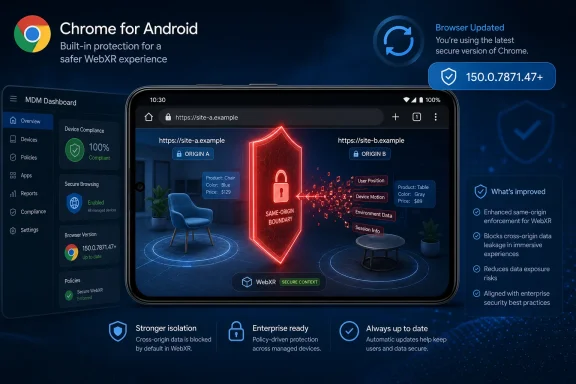
CVE-2026-13910 is titled “Insufficient policy enforcement in WebXR,” but the important phrase in its description is leak cross-origin data. The web’s origin boundaries are intended to prevent a page controlled by one site from reading protected content associated with another unless an applicable policy permits that exchange.
According to the Chrome-submitted CVE information, the failure existed in Google Chrome on Android before 150.0.7871.47. A remote attacker could exploit it through a crafted HTML page, meaning the disclosed attack begins with web content rather than physical access to the device.
The confirmed impact is cross-origin data leakage. The available CISA-ADP CVSS 3.1 assessment lists high confidentiality impact and no integrity or availability impact.
That is the appropriate boundary for describing the outcome. The public record supplied for this analysis does not establish whether the issue could or could not be combined with other flaws to produce effects beyond the disclosed leak, and it does not support categorical claims about code execution, persistence, software installation, sandbox escape, device takeover, or operating-system control.
The CISA-ADP assessment gives the flaw a CVSS 3.1 base score of 6.5. Its vector describes a network-accessible, low-complexity attack requiring no attacker privileges but requiring user interaction. The score is medium even though the modeled confidentiality impact is high because CVSS evaluates the complete combination of exploit conditions and consequences.
The disclosed information does not identify the exact internal check that failed, the specific WebXR operation involved, the form of the exposed data, or the sequence of browser actions required to demonstrate the issue. The associated Chromium issue requires permission, so those implementation details cannot be inferred safely from the public title alone.
The supported conclusion is narrower: an attacker controlling a crafted HTML page could use the affected Chrome implementation to obtain cross-origin data that should not have been accessible. That establishes a confidentiality-boundary failure without requiring speculation about the internal exploit mechanics.
The issue is classified under CWE-693, Protection Mechanism Failure. That category is consistent with a security control not providing its intended protection, but the classification is broad. It should not be treated as evidence of a particular memory-safety error, sandbox failure, or browser-wide collapse of origin isolation.
Website operators may still choose to review whether their applications expose unnecessary browser features or embed unnecessary third-party content as a general defense-in-depth exercise. The supplied CVE information, however, does not establish a server-side workaround, a specific header configuration, an iframe setting, or a cross-origin resource policy that prevents exploitation. Such controls should not be presented as substitutes for installing the corrected Chrome version.
Administrators should evaluate Android endpoints using the installed Chrome version. The device’s Android version, hardware model, enrollment date, or past use of immersive websites does not replace that application-version check.
The public reference trail includes a desktop stable-channel release page even though the vulnerability description identifies Chrome on Android as the affected product. The supplied information does not establish that the referenced desktop release included 150.0.7871.47 for Windows or macOS, so no desktop version claim should be derived from that reference.
More importantly, the existence of a desktop release-note reference does not rewrite the CVE’s affected-product statement. It does not establish that Chrome on Windows, macOS, or Linux is affected by this Android-specific issue.
That distinction matters for Windows administrators because security feeds and vulnerability dashboards may display the linked desktop page more prominently than the natural-language product description. An analyst encountering that reference should return to the affected-product and version data before assigning the issue to Windows endpoints.
The same caution applies to Microsoft Edge and other Chromium-derived browsers. A reference to Chromium or a Chromium component is not, by itself, proof that every browser using Chromium contains the affected platform-specific implementation or shares the same vulnerable version range.
For WindowsForum readers, the directly established endpoint concern is Chrome installed on Android devices. Those devices may be corporate-owned, enrolled personal devices, or unmanaged systems used to reach organizational resources, but Windows Chrome and Edge should not be added to the affected scope without a separate vendor statement.
The vector’s AV:N value means the attack is network-accessible. That aligns with the CVE description’s crafted-HTML delivery mechanism.
AC:L marks attack complexity as low under the CVSS model. It does not prove that exploit code is public, that a demonstration is easy to reproduce, or that every Android device presents identical conditions. It means the assessment does not score exploitation as dependent on the special conditions represented by a high-complexity rating.
PR:N means the attacker requires no privileges on the target system. This metric concerns attacker privileges and should not be confused with user interaction.
UI:R means user interaction is required. The public description does not define the exact interaction, so administrators should not translate this metric into a specific gesture, prompt, click, WebXR session, or hardware action without additional technical evidence.
The vector assigns C:H, or high confidentiality impact. That is consistent with the disclosed ability to leak cross-origin data.
Integrity and availability are rated none. The disclosed impact and the available scoring record do not report modification of protected data or interruption of the browser or device.
CVSS scope is rated unchanged. CVSS scope and browser origin boundaries are separate concepts: an unchanged CVSS scope does not contradict a vulnerability description centered on cross-origin data leakage.
“Exploitation: none” indicates that the assessment did not identify known exploitation at the time represented by that record. It is not proof that exploitation is impossible, that no private demonstration exists, or that the status cannot change.
“Automatable: no” is a confirmed SSVC field, but the public record supplied here does not explain why that value was selected. It should therefore be reported as an assessment result rather than converted into claims about WebXR availability, browser state, page context, device capability, required hardware, or the exact user action.
“Technical impact: partial” is consistent with the recorded confidentiality impact and the absence of recorded integrity and availability impact. It should not be expanded into a definitive account of every possible exploit consequence.
Taken together, the metrics support prompt patching without justifying claims of an active mass-exploitation campaign. The practical response is to update, verify, measure remaining exposure, and continue monitoring the record for substantive changes.
That machine-readable structure is broader-looking than the natural-language CVE description, which identifies Google Chrome on Android before the fixed threshold. The description does not present CVE-2026-13910 as an Android operating-system vulnerability affecting every Android installation independently of Chrome.
An important operational interpretation follows: a vulnerability-management product that relies heavily on the CPE configuration could potentially associate the CVE with Android assets before confirming the installed Chrome version. This is an interpretation of how the NVD configuration may affect matching, not proof that any particular scanner, vendor, or deployment will generate an incorrect alert.
Security teams should inspect the evidence attached to each finding. If a ticket identifies only the Android operating system and does not provide Chrome’s installed version, the ticket has not yet established that the device falls within the CVE’s stated affected range.
The correct validation sequence is:
The reverse visibility problem also deserves attention. An organization may maintain detailed desktop-browser inventories while excluding mobile or personally owned devices from browser-version reporting. In that environment, a narrow scanner match could miss the systems most relevant to this CVE because Android Chrome is outside the normal software-management workflow.
The operational question is whether an organization permits Android Chrome to access sensitive web resources and whether it can determine the installed browser version on those devices. If the answer to the first question is yes and the second is no, the organization has an inventory and compliance gap independent of the exact exploit mechanics.
Corporate-owned devices should be queried through the organization’s MDM or UEM platform. Enrolled bring-your-own devices should be evaluated according to the permissions and privacy boundaries of the enrollment model. Completely unmanaged devices may require a combination of user notification, access-policy review, and manual version verification.
A practical managed-device workflow is:
Unmanaged users should receive the direct Google Play and Chrome verification procedure, not a vague instruction to “update your phone.” Updating Android itself does not prove that Chrome has reached 150.0.7871.47, and automatic updates may be delayed by device state, Play Store settings, staged distribution, connectivity, or lack of storage.
Application teams can still review embedded third-party content, powerful browser-feature usage, and cross-origin design as part of normal security engineering. Those reviews may reduce unnecessary exposure generally, but the supplied CVE record does not establish that a particular Permissions Policy directive, iframe attribute, Site Isolation setting, response header, or request-validation technique blocks this vulnerability.
That distinction is important in incident communications. A defense-in-depth change should be labeled as such, not described as a complete CVE mitigation unless the browser vendor or reproducible technical analysis confirms it.
The published remediation boundary remains the corrected Chrome version. Server-side changes may complement browser patching, but they should not be used to mark vulnerable Android Chrome installations as remediated.
The stable operational facts are the affected product, the vulnerable version range, the crafted-HTML delivery description, the cross-origin confidentiality effect, and the fixed-version threshold.
Without the implementation notes, administrators should separate confirmed facts from unanswered questions.
Confirmed facts include:
A report driven by the reference alone could mischaracterize the issue as a Windows Chrome vulnerability. A report driven by the Android CPE alone could imply that the operating system itself is vulnerable regardless of whether Chrome is installed. Neither conclusion is established by the supplied natural-language description.
The better approach is equally direct: patch Android Chrome, verify the installed version, validate broad scanner matches, and avoid assigning the CVE to Windows Chrome, Edge, or Android OS alone without additional vendor evidence.
Future enrichment may clarify the restricted implementation details, exploitation status, or product mapping. Until then, the most defensible response is not to wait for perfect technical visibility, but to act on the precise facts already available: identify Android devices running Chrome below 150.0.7871.47, update them, and prove through fresh inventory that the vulnerable version is gone.
Update and verify now: On the Android device, open Google Play Store > profile icon > Manage apps & device > See details under “Updates available” — or open Updates available directly — then select Google Chrome > Update. After the update, open Chrome > ⋮ > Settings > About Chrome and confirm that the installed version is 150.0.7871.47 or later; menu labels can vary slightly by device and Google Play Store version.
For managed devices, the exact procedure is vendor- and MDM/UEM-dependent. In the management console, locate the Android application inventory, select Google Chrome, require a minimum version of 150.0.7871.47, initiate an application update or device sync where supported, and then query the inventory again to verify the reported version. If the platform supports compliance and conditional-access integration, mark devices below the threshold noncompliant and restrict organizational access until a new inventory check confirms the fixed version. Administrators should test those controls on a small device group first because update modes, synchronization commands, grace periods, and compliance-rule labels differ among management products.
 A Medium-Rated Flaw Reaches a High-Value Browser Boundary
CVE-2026-13910 is titled “Insufficient policy enforcement in WebXR,” but the important phrase in its description is leak cross-origin data. The web’s origin boundaries are intended to prevent a page controlled by one site from reading protected content associated with another unless an applicable policy permits that exchange.According to the Chrome-submitted CVE information, the failure existed in Google Chrome on Android before 150.0.7871.47. A remote attacker could exploit it through a crafted HTML page, meaning the disclosed attack begins with web content rather than physical access to the device.
The confirmed impact is cross-origin data leakage. The available CISA-ADP CVSS 3.1 assessment lists high confidentiality impact and no integrity or availability impact.
That is the appropriate boundary for describing the outcome. The public record supplied for this analysis does not establish whether the issue could or could not be combined with other flaws to produce effects beyond the disclosed leak, and it does not support categorical claims about code execution, persistence, software installation, sandbox escape, device takeover, or operating-system control.
The CISA-ADP assessment gives the flaw a CVSS 3.1 base score of 6.5. Its vector describes a network-accessible, low-complexity attack requiring no attacker privileges but requiring user interaction. The score is medium even though the modeled confidentiality impact is high because CVSS evaluates the complete combination of exploit conditions and consequences.
WebXR Is the Component, but the Public Technical Detail Is Limited
WebXR is a browser technology associated with virtual-reality and augmented-reality experiences delivered through web content. CVE-2026-13910 identifies insufficient policy enforcement in this component as the source of the cross-origin exposure.The disclosed information does not identify the exact internal check that failed, the specific WebXR operation involved, the form of the exposed data, or the sequence of browser actions required to demonstrate the issue. The associated Chromium issue requires permission, so those implementation details cannot be inferred safely from the public title alone.
The supported conclusion is narrower: an attacker controlling a crafted HTML page could use the affected Chrome implementation to obtain cross-origin data that should not have been accessible. That establishes a confidentiality-boundary failure without requiring speculation about the internal exploit mechanics.
The issue is classified under CWE-693, Protection Mechanism Failure. That category is consistent with a security control not providing its intended protection, but the classification is broad. It should not be treated as evidence of a particular memory-safety error, sandbox failure, or browser-wide collapse of origin isolation.
Website operators may still choose to review whether their applications expose unnecessary browser features or embed unnecessary third-party content as a general defense-in-depth exercise. The supplied CVE information, however, does not establish a server-side workaround, a specific header configuration, an iframe setting, or a cross-origin resource policy that prevents exploitation. Such controls should not be presented as substitutes for installing the corrected Chrome version.
The Version Boundary Is Clear
The CVE record identifies one affected product and one concrete remediation threshold. Google Chrome on Android is affected when the installed version is earlier than 150.0.7871.47.| Deployment state | Chrome on Android version | CVE status | Operational interpretation |
|---|---|---|---|
| Below the security threshold | Earlier than 150.0.7871.47 | Affected | Update should be prioritized |
| At the stated threshold | 150.0.7871.47 | Outside the stated affected range | Meets the published remediation boundary |
| Beyond the threshold | Later than 150.0.7871.47 | Outside the stated affected range | Verify inventory and retain normal update enforcement |
The public reference trail includes a desktop stable-channel release page even though the vulnerability description identifies Chrome on Android as the affected product. The supplied information does not establish that the referenced desktop release included 150.0.7871.47 for Windows or macOS, so no desktop version claim should be derived from that reference.
More importantly, the existence of a desktop release-note reference does not rewrite the CVE’s affected-product statement. It does not establish that Chrome on Windows, macOS, or Linux is affected by this Android-specific issue.
That distinction matters for Windows administrators because security feeds and vulnerability dashboards may display the linked desktop page more prominently than the natural-language product description. An analyst encountering that reference should return to the affected-product and version data before assigning the issue to Windows endpoints.
The same caution applies to Microsoft Edge and other Chromium-derived browsers. A reference to Chromium or a Chromium component is not, by itself, proof that every browser using Chromium contains the affected platform-specific implementation or shares the same vulnerable version range.
For WindowsForum readers, the directly established endpoint concern is Chrome installed on Android devices. Those devices may be corporate-owned, enrolled personal devices, or unmanaged systems used to reach organizational resources, but Windows Chrome and Edge should not be added to the affected scope without a separate vendor statement.
The CVSS Vector Describes the Confirmed Security Effect
The available CVSS 3.1 score was contributed by CISA-ADP rather than presented as an independent NVD score. Dashboards that display only the number can hide that provenance, so incident records should identify the source of the assessment where practical.The vector’s AV:N value means the attack is network-accessible. That aligns with the CVE description’s crafted-HTML delivery mechanism.
AC:L marks attack complexity as low under the CVSS model. It does not prove that exploit code is public, that a demonstration is easy to reproduce, or that every Android device presents identical conditions. It means the assessment does not score exploitation as dependent on the special conditions represented by a high-complexity rating.
PR:N means the attacker requires no privileges on the target system. This metric concerns attacker privileges and should not be confused with user interaction.
UI:R means user interaction is required. The public description does not define the exact interaction, so administrators should not translate this metric into a specific gesture, prompt, click, WebXR session, or hardware action without additional technical evidence.
The vector assigns C:H, or high confidentiality impact. That is consistent with the disclosed ability to leak cross-origin data.
Integrity and availability are rated none. The disclosed impact and the available scoring record do not report modification of protected data or interruption of the browser or device.
CVSS scope is rated unchanged. CVSS scope and browser origin boundaries are separate concepts: an unchanged CVSS scope does not contradict a vulnerability description centered on cross-origin data leakage.
The SSVC Fields Support a Measured Response
The CISA-ADP SSVC record lists exploitation as none, automation as no, and technical impact as partial.“Exploitation: none” indicates that the assessment did not identify known exploitation at the time represented by that record. It is not proof that exploitation is impossible, that no private demonstration exists, or that the status cannot change.
“Automatable: no” is a confirmed SSVC field, but the public record supplied here does not explain why that value was selected. It should therefore be reported as an assessment result rather than converted into claims about WebXR availability, browser state, page context, device capability, required hardware, or the exact user action.
“Technical impact: partial” is consistent with the recorded confidentiality impact and the absence of recorded integrity and availability impact. It should not be expanded into a definitive account of every possible exploit consequence.
Taken together, the metrics support prompt patching without justifying claims of an active mass-exploitation campaign. The practical response is to update, verify, measure remaining exposure, and continue monitoring the record for substantive changes.
NVD’s Machine-Readable Configuration Can Broaden Scanner Matching
NVD’s analysis includes a Chrome application CPE covering versions up to, but excluding, 150.0.7871.47. It also includes a Google Android operating-system CPE, with the published configuration presenting the entries through an OR relationship.That machine-readable structure is broader-looking than the natural-language CVE description, which identifies Google Chrome on Android before the fixed threshold. The description does not present CVE-2026-13910 as an Android operating-system vulnerability affecting every Android installation independently of Chrome.
An important operational interpretation follows: a vulnerability-management product that relies heavily on the CPE configuration could potentially associate the CVE with Android assets before confirming the installed Chrome version. This is an interpretation of how the NVD configuration may affect matching, not proof that any particular scanner, vendor, or deployment will generate an incorrect alert.
Security teams should inspect the evidence attached to each finding. If a ticket identifies only the Android operating system and does not provide Chrome’s installed version, the ticket has not yet established that the device falls within the CVE’s stated affected range.
The correct validation sequence is:
- Confirm that the endpoint is an Android device.
- Confirm that Google Chrome is installed.
- Collect the installed Chrome version.
- Compare that version with 150.0.7871.47.
- Treat versions earlier than the threshold as affected.
- Update and re-inventory the device.
- Close or suppress the finding only after the reported application version meets or exceeds the threshold.
The reverse visibility problem also deserves attention. An organization may maintain detailed desktop-browser inventories while excluding mobile or personally owned devices from browser-version reporting. In that environment, a narrow scanner match could miss the systems most relevant to this CVE because Android Chrome is outside the normal software-management workflow.
Mobile Chrome Belongs in Enterprise Browser Inventory
Android Chrome may be used to reach organizational websites and cloud applications, but the CVE record does not identify which services, session types, or categories of enterprise data are exposed in a successful attack. Risk assessments should not present a speculative list of affected applications as though it came from the advisory.The operational question is whether an organization permits Android Chrome to access sensitive web resources and whether it can determine the installed browser version on those devices. If the answer to the first question is yes and the second is no, the organization has an inventory and compliance gap independent of the exact exploit mechanics.
Corporate-owned devices should be queried through the organization’s MDM or UEM platform. Enrolled bring-your-own devices should be evaluated according to the permissions and privacy boundaries of the enrollment model. Completely unmanaged devices may require a combination of user notification, access-policy review, and manual version verification.
A practical managed-device workflow is:
- Open the MDM or UEM console’s Android application inventory.
- Filter for Google Chrome.
- Export or display the installed version by device.
- Create a device group for versions earlier than 150.0.7871.47.
- Assign the managed Chrome application or update policy to that group.
- Send a device synchronization or check-in command where the product supports one.
- Re-run application inventory after the check-in interval.
- Apply a compliance rule requiring 150.0.7871.47 or later.
- Where integrated access controls support it, restrict access from devices that remain noncompliant after the approved grace period.
- Document exceptions, including devices that cannot receive the current Chrome build or cannot report application inventory.
Unmanaged users should receive the direct Google Play and Chrome verification procedure, not a vague instruction to “update your phone.” Updating Android itself does not prove that Chrome has reached 150.0.7871.47, and automatic updates may be delayed by device state, Play Store settings, staged distribution, connectivity, or lack of storage.
Website Owners Should Avoid Claiming an Unproven Workaround
CVE-2026-13910 is a browser implementation vulnerability. A website operator cannot update the affected Chrome binary on a visitor’s device.Application teams can still review embedded third-party content, powerful browser-feature usage, and cross-origin design as part of normal security engineering. Those reviews may reduce unnecessary exposure generally, but the supplied CVE record does not establish that a particular Permissions Policy directive, iframe attribute, Site Isolation setting, response header, or request-validation technique blocks this vulnerability.
That distinction is important in incident communications. A defense-in-depth change should be labeled as such, not described as a complete CVE mitigation unless the browser vendor or reproducible technical analysis confirms it.
The published remediation boundary remains the corrected Chrome version. Server-side changes may complement browser patching, but they should not be used to mark vulnerable Android Chrome installations as remediated.
The Record’s Evolution Does Not Establish an Attack Wave
The CVE record developed through several stages as the submitting and enrichment organizations added product information, scoring, classification, configuration data, and reference labels. The supplied information does not reliably support the article’s previous exact calendar dates, so those dates should not be repeated as confirmed facts.Timeline
- Vendor submission: Chrome supplied the Android product description, the affected-version threshold, a vendor advisory reference, and a restricted Chromium issue reference.
- CISA-ADP enrichment: CISA-ADP supplied the CVSS 3.1 vector, CWE-693 classification, and SSVC fields reporting exploitation as none, automation as no, and technical impact as partial.
- NVD analysis: NVD added machine-readable product configuration information, including the Chrome application CPE and an Android operating-system CPE.
- Operational review: Administrators must reconcile the broad-looking CPE relationship with the narrower natural-language statement identifying Chrome on Android before 150.0.7871.47.
The stable operational facts are the affected product, the vulnerable version range, the crafted-HTML delivery description, the cross-origin confidentiality effect, and the fixed-version threshold.
Restricted Bug Access Requires a Narrow Reading
The associated Chromium issue requires permission. That confirms only that its technical contents are not publicly accessible through the referenced issue at present; it does not establish why access is restricted or how long that restriction will remain.Without the implementation notes, administrators should separate confirmed facts from unanswered questions.
Confirmed facts include:
- The affected product is Google Chrome on Android.
- Versions earlier than 150.0.7871.47 are affected.
- The component is identified as WebXR.
- The weakness is described as insufficient policy enforcement.
- A remote attacker can use a crafted HTML page to leak cross-origin data.
- The available CVSS assessment requires user interaction.
- The record lists high confidentiality impact and no integrity or availability impact.
- The available SSVC fields report no known exploitation, no automation, and partial technical impact.
- The exact WebXR API operation involved.
- The exact data that can be recovered.
- The exact user interaction required.
- Whether an active immersive session or specialized hardware is necessary.
- Whether public proof-of-concept code exists.
- Whether a reliable server-side workaround exists.
- Whether Windows Chrome, Microsoft Edge, or Android itself is independently affected.
- Whether additional effects are possible through chaining with other vulnerabilities.
Action Checklist for Admins
- Notify Android users immediately: Direct them to Google Play Store > profile icon > Manage apps & device > See details/Updates available > Google Chrome > Update.
- Verify the result: Open Chrome > ⋮ > Settings > About Chrome and confirm version 150.0.7871.47 or later.
- Allow for interface differences: Note that Google Play Store and Chrome menu labels may vary slightly by device and application version.
- Inventory managed devices: Query the MDM or UEM application inventory for Google Chrome on Android.
- Build an affected-device group: Include installations reporting a version earlier than 150.0.7871.47.
- Enforce the update: Use the management platform’s Android application-update policy, managed application assignment, or device synchronization function.
- Verify after enforcement: Do not rely solely on a successful policy deployment message; collect the installed version again.
- Set compliance where supported: Require Chrome 150.0.7871.47 or later and use an approved grace period before restricting access.
- Treat management steps as vendor-dependent: Validate console labels, update modes, reporting intervals, and conditional-access behavior against the organization’s specific MDM or UEM product.
- Review scanner findings carefully: If a finding lists Android but not Chrome’s version, obtain the application evidence before declaring the device affected.
- Do not expand scope without evidence: The supplied CVE description does not establish impact to Windows Chrome, Microsoft Edge, or the Android operating system independently of Chrome.
- Avoid unverified workarounds: Do not mark an endpoint remediated solely because WebXR use was limited or a website configuration was changed.
- Monitor for substantive updates: Reassess if the vendor publishes technical details, changes the affected-product list, revises the version boundary, or reports exploitation.
The Reference and Configuration Mismatch Is the Reporting Trap
CVE-2026-13910 is straightforward to remediate but easy to scope incorrectly. The affected product is Chrome on Android below 150.0.7871.47, yet the record also contains a desktop release-note reference and a machine-readable Android operating-system CPE.A report driven by the reference alone could mischaracterize the issue as a Windows Chrome vulnerability. A report driven by the Android CPE alone could imply that the operating system itself is vulnerable regardless of whether Chrome is installed. Neither conclusion is established by the supplied natural-language description.
The better approach is equally direct: patch Android Chrome, verify the installed version, validate broad scanner matches, and avoid assigning the CVE to Windows Chrome, Edge, or Android OS alone without additional vendor evidence.
Future enrichment may clarify the restricted implementation details, exploitation status, or product mapping. Until then, the most defensible response is not to wait for perfect technical visibility, but to act on the precise facts already available: identify Android devices running Chrome below 150.0.7871.47, update them, and prove through fresh inventory that the vulnerable version is gone.
References
- Primary source: NVD / Chromium
Published: 2026-07-11T15:41:09-07:00
Loading…
nvd.nist.gov - Security advisory: MSRC
Published: 2026-07-11T15:41:09-07:00
Original feed URL
Loading…
msrc.microsoft.com - Related coverage: chromium.org
Loading…
www.chromium.org - Related coverage: developer.chrome.com
Loading…
developer.chrome.com - Related coverage: chromium.googlesource.com
Loading…
chromium.googlesource.com - Related coverage: blog.chromium.org
Loading…
blog.chromium.org
- Related coverage: issues.chromium.org
Loading…
issues.chromium.org