

Google Chrome versions before 150.0.7871.46 are affected by CVE-2026-14390, a use-after-free vulnerability in ANGLE that Chromium rates High. The public description says a remote attacker could potentially exploit heap corruption through a crafted HTML page to escape the browser sandbox. CISA-ADP separately contributed a 9.6 Critical CVSS 3.1 score, while NVD had not supplied its own CVSS assessment in the available record. The accompanying CISA-ADP SSVC entry records exploitation as none, automation as no, and technical impact as total.
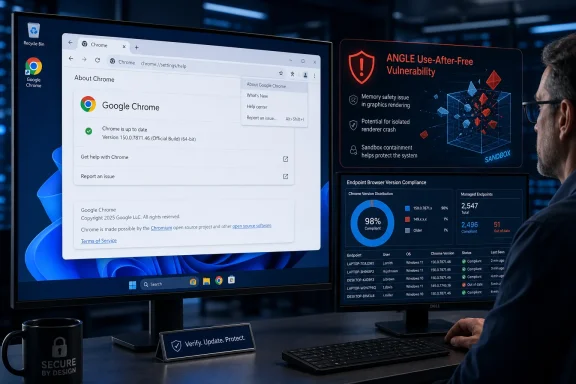
The remediation test is direct: open Chrome > ⋮ > Help > About Google Chrome, allow the update to complete, click Relaunch, return to the same page, and confirm that the complete displayed version is 150.0.7871.46 or later. Do not close the finding based only on an approved deployment, a successful update job, or a major-version result such as “Chrome 150.”
The supplied NVD information establishes a precise affected-version boundary for Google Chrome:
Version components must be compared numerically and in order:
The record supports the threshold, but it does not establish when the corrected build entered a particular Chrome release channel, how quickly it was distributed, which operating systems received specific packaging revisions, or whether every device can obtain it immediately. Those release and rollout questions should not be inferred from the affected-version range.
The practical security rule remains straightforward: Google Chrome below 150.0.7871.46 requires remediation; 150.0.7871.46 or later meets this CVE’s documented version threshold.
The post-relaunch check is essential. Seeing an update download is not proof that the corrected browser is running. Clicking Relaunch without checking the resulting version is also incomplete verification. If Chrome continues to report a version earlier than 150.0.7871.46, the installation remains within the affected range.
On an organization-managed computer, users who cannot complete the update should contact the responsible support team rather than bypassing management controls. Chrome must also be checked independently of Windows Update: a fully patched Windows installation does not prove that a separately installed Chrome browser meets this version threshold.
That wording should be preserved carefully. It supports a potential sandbox escape, but it does not document the exact vulnerable object, memory layout, graphics operation, browser state, or steps needed to create a reliable exploit. It also does not establish malware installation, persistence, credential theft, Windows privilege escalation, or a complete endpoint compromise.
A use-after-free occurs when software continues to access an object after the memory associated with that object has been released. That general weakness category can produce outcomes ranging from a crash to security-relevant memory corruption. For this CVE, however, reporting should remain tied to the published description rather than attempting to reconstruct undisclosed implementation details.
The public record provides enough information to justify prompt patching:
The CISA-ADP vector is:
Under that assessment, the attack vector is network-based, attack complexity is low, no existing privileges are required, and user interaction is required. Scope is changed, and the potential effects on confidentiality, integrity, and availability are each rated High.
Those values explain the 9.6 result, but the score must be attributed correctly. It is inaccurate to call 9.6 “NVD’s score” or “NIST’s score.” The available NVD page displays the CISA-ADP contribution while showing no separate NVD-authored CVSS 4.0, CVSS 3.x, or CVSS 2.0 assessment.
Chromium’s High classification and CISA-ADP’s 9.6 Critical result are not interchangeable labels. They come from different assessment systems and should remain visible side by side rather than being collapsed into a single severity statement.
This provenance can affect vulnerability-management workflows. A tool may display the CISA-ADP score, emphasize Chromium’s High rating, or treat the CVE as lacking an NVD-authored score. Administrators should therefore preserve the source of each value in tickets, dashboards, and executive summaries.
The correct summary is:
These values should be reported as written.
“Exploitation: none” means the supplied SSVC entry records no known exploitation at that snapshot. It should not be expanded into a guarantee that exploitation is impossible, that no private exploit exists, or that exploitation could never be reported later.
“Automatable: no” is likewise a recorded decision value. The supplied material does not explain whether that selection reflects reliability, environmental conditions, required interaction, delivery constraints, or another factor. It should not be converted into claims about which victims could be targeted or how an attack campaign might operate.
“Technical impact: total” is the listed SSVC selection. It is consistent with treating the possible consequence seriously, but it does not add undocumented post-exploitation outcomes to the Chrome description.
The appropriate posture is prompt, calm, and verifiable remediation. The record does not identify observed exploitation, but it does establish a High-severity browser memory-safety vulnerability, a potential sandbox escape, a contributed 9.6 score, and a measurable fixed-version threshold.
CISA-ADP enrichment — CISA-ADP contributes the CVSS 3.1 vector and 9.6 Critical score. It also supplies the SSVC values listing exploitation as none, automation as no, and technical impact as total.
NIST/NVD analysis — The NVD record presents the affected Google Chrome configuration and the contributed assessment information. NVD’s presentation of the CISA-ADP score does not turn that value into an NVD-authored CVSS assessment.
Later SSVC metadata activity — The available change history reflects a subsequent modification to SSVC metadata without changing the substantive values listed for exploitation, automation, and technical impact.
This sequence is useful because it preserves attribution. It should not be stretched into assertions about the date on which a corrected Chrome build entered Stable, platform-specific build availability, scanner ingestion delays, endpoint deployment speed, or internal review practices at Chrome, CISA, NIST, or other organizations.
A defensible fleet procedure is:
Organizations may implement that workflow using their established enterprise browser, endpoint, software-distribution, or device-management platform. The supplied vulnerability record does not prescribe a universal Group Policy setting, MDM profile, MSI command, Google Update control, registry value, or management-console path. Any such implementation detail should come from the organization’s current vendor documentation and tested operating procedures—not from assumptions about this CVE.
That evidence supports a direct remediation order for Chrome. It does not establish whether Microsoft Edge, Brave, Opera, Vivaldi, or another Chromium-derived browser is affected, nor does it establish the corrected version for any of those products.
Shared Chromium technology is a reason to check each vendor’s advisory, not a reason to copy Chrome’s version number into another browser’s compliance rule. Other vendors use their own release numbers, packaging, update channels, code revisions, and security notices.
Administrators should avoid both unsupported conclusions:
Updating Edge does not remediate an outdated Chrome installation on the same computer, and updating Chrome does not verify another installed browser. Environments with multiple browsers should inventory each product independently and apply only vendor-supported affected-version and fixed-version criteria.
For individual users, that means opening Chrome > ⋮ > Help > About Google Chrome, allowing the update to complete, clicking Relaunch, and confirming 150.0.7871.46 or later.
For enterprise teams, it means saving an initial inventory of affected Chrome installations, deploying an approved corrected version through the established management process, requiring a relaunch, repeating the inventory query, and investigating every remaining or unknown result.
The broader lesson is operational rather than speculative. Update assignment shows what an organization intended to happen. Installed-version verification shows what actually happened. For CVE-2026-14390, the closing test is measurable: Google Chrome below 150.0.7871.46 remains within the documented affected range; 150.0.7871.46 or later crosses the stated remediation threshold.
The remediation test is direct: open Chrome > ⋮ > Help > About Google Chrome, allow the update to complete, click Relaunch, return to the same page, and confirm that the complete displayed version is 150.0.7871.46 or later. Do not close the finding based only on an approved deployment, a successful update job, or a major-version result such as “Chrome 150.”
 The Fixed-Version Threshold Is the Most Important Fact
The supplied NVD information establishes a precise affected-version boundary for Google Chrome:| Reported Google Chrome version | CVE status | Required action |
|---|---|---|
| Earlier than 150.0.7871.46 | Within the documented affected range | Update, relaunch, and verify |
| Exactly 150.0.7871.46 | Meets the stated remediation threshold | Confirm the full version after relaunch |
| Later than 150.0.7871.46 | Outside this CVE’s documented affected range | Record the verified result |
| “Chrome 150” without the remaining components | Insufficient evidence | Collect the complete version |
| Missing, stale, or conflicting version | Unresolved | Keep the finding open |
150, then 0, then 7871, and finally 46. The number is not a decimal value, and the major version alone cannot establish whether an installation is below or above the fixed boundary.The record supports the threshold, but it does not establish when the corrected build entered a particular Chrome release channel, how quickly it was distributed, which operating systems received specific packaging revisions, or whether every device can obtain it immediately. Those release and rollout questions should not be inferred from the affected-version range.
The practical security rule remains straightforward: Google Chrome below 150.0.7871.46 requires remediation; 150.0.7871.46 or later meets this CVE’s documented version threshold.
Exact update and verification procedure
Windows users and support staff should use the following process:- Open Google Chrome.
- Select the three-dot menu, ⋮, in the upper-right corner.
- Select Help.
- Select About Google Chrome.
- Allow Chrome to finish checking for and applying an available update.
- Save any necessary browser work and click Relaunch when Chrome presents that option.
- After Chrome reopens, return to ⋮ > Help > About Google Chrome.
- Read the complete displayed version.
- Confirm that it is 150.0.7871.46 or later.
chrome://settings/help in the address bar to reach the same version-information page. The menu path should still be included in help-desk instructions so users do not need to know an internal Chrome address.The post-relaunch check is essential. Seeing an update download is not proof that the corrected browser is running. Clicking Relaunch without checking the resulting version is also incomplete verification. If Chrome continues to report a version earlier than 150.0.7871.46, the installation remains within the affected range.
On an organization-managed computer, users who cannot complete the update should contact the responsible support team rather than bypassing management controls. Chrome must also be checked independently of Windows Update: a fully patched Windows installation does not prove that a separately installed Chrome browser meets this version threshold.
What the Public Record Establishes
CVE-2026-14390 is described as a use-after-free vulnerability in ANGLE and is mapped to CWE-416. The Chrome-originated description identifies crafted HTML as the attacker-controlled input and says a remote attacker could potentially exploit heap corruption to escape the browser sandbox.That wording should be preserved carefully. It supports a potential sandbox escape, but it does not document the exact vulnerable object, memory layout, graphics operation, browser state, or steps needed to create a reliable exploit. It also does not establish malware installation, persistence, credential theft, Windows privilege escalation, or a complete endpoint compromise.
A use-after-free occurs when software continues to access an object after the memory associated with that object has been released. That general weakness category can produce outcomes ranging from a crash to security-relevant memory corruption. For this CVE, however, reporting should remain tied to the published description rather than attempting to reconstruct undisclosed implementation details.
The public record provides enough information to justify prompt patching:
- The affected product is Google Chrome.
- Versions before 150.0.7871.46 are affected.
- The affected component is ANGLE.
- The weakness is use-after-free.
- Crafted HTML is the documented attack medium.
- The stated potential consequence is a browser sandbox escape.
- Chromium classifies the vulnerability as High.
- CISA-ADP contributed a CVSS 3.1 score of 9.6 Critical.
- CISA-ADP’s SSVC entry records exploitation as none, automation as no, and technical impact as total.
- NVD had not supplied its own CVSS assessment in the available material.
“High,” “9.6 Critical,” and an Unscored NVD Record Can Coexist
The most useful added context is the distinction among Chromium’s product severity, CISA-ADP’s contributed CVSS calculation, and NVD’s own assessment status.| Assessment source | Rating or status | Correct interpretation |
|---|---|---|
| Chromium | High | Product-specific severity associated with the Chrome vulnerability |
| CISA-ADP CVSS 3.1 | 9.6 Critical | Contributed standardized assessment displayed in the NVD record |
| NVD/NIST CVSS | Not supplied in the available record | NVD displayed contributed data but had not published its own CVSS assessment |
| CISA-ADP SSVC | Exploitation: none; automatable: no; technical impact: total | Point-in-time decision values that should be repeated without unsupported expansion |
CVSS:3.1/AV:N/AC:L/PR:N/UI:R/S:C/C:H/I:H/A:HUnder that assessment, the attack vector is network-based, attack complexity is low, no existing privileges are required, and user interaction is required. Scope is changed, and the potential effects on confidentiality, integrity, and availability are each rated High.
Those values explain the 9.6 result, but the score must be attributed correctly. It is inaccurate to call 9.6 “NVD’s score” or “NIST’s score.” The available NVD page displays the CISA-ADP contribution while showing no separate NVD-authored CVSS 4.0, CVSS 3.x, or CVSS 2.0 assessment.
Chromium’s High classification and CISA-ADP’s 9.6 Critical result are not interchangeable labels. They come from different assessment systems and should remain visible side by side rather than being collapsed into a single severity statement.
This provenance can affect vulnerability-management workflows. A tool may display the CISA-ADP score, emphasize Chromium’s High rating, or treat the CVE as lacking an NVD-authored score. Administrators should therefore preserve the source of each value in tickets, dashboards, and executive summaries.
The correct summary is:
An absent NVD-authored score is a metadata condition, not a determination that the vulnerability is low risk or does not require remediation.Chromium classifies CVE-2026-14390 as High. CISA-ADP separately contributed a 9.6 Critical CVSS 3.1 score. NVD had not provided its own CVSS assessment in the available record.
Read the SSVC Values Narrowly
The CISA-ADP SSVC contribution records three relevant values:| SSVC field | Recorded value |
|---|---|
| Exploitation | None |
| Automatable | No |
| Technical impact | Total |
“Exploitation: none” means the supplied SSVC entry records no known exploitation at that snapshot. It should not be expanded into a guarantee that exploitation is impossible, that no private exploit exists, or that exploitation could never be reported later.
“Automatable: no” is likewise a recorded decision value. The supplied material does not explain whether that selection reflects reliability, environmental conditions, required interaction, delivery constraints, or another factor. It should not be converted into claims about which victims could be targeted or how an attack campaign might operate.
“Technical impact: total” is the listed SSVC selection. It is consistent with treating the possible consequence seriously, but it does not add undocumented post-exploitation outcomes to the Chrome description.
The appropriate posture is prompt, calm, and verifiable remediation. The record does not identify observed exploitation, but it does establish a High-severity browser memory-safety vulnerability, a potential sandbox escape, a contributed 9.6 score, and a measurable fixed-version threshold.
How the Vulnerability Record Was Enriched
The supplied record history supports a contribution-based timeline without requiring unsupported conclusions about Chrome’s release schedule or downstream product behavior.Timeline
Chrome-originated vulnerability information — The core CVE material supplies the use-after-free description, the ANGLE component name, Chromium’s High classification, the CWE-416 mapping, the crafted-HTML attack description, the potential sandbox-escape consequence, and the affected-version boundary below 150.0.7871.46.CISA-ADP enrichment — CISA-ADP contributes the CVSS 3.1 vector and 9.6 Critical score. It also supplies the SSVC values listing exploitation as none, automation as no, and technical impact as total.
NIST/NVD analysis — The NVD record presents the affected Google Chrome configuration and the contributed assessment information. NVD’s presentation of the CISA-ADP score does not turn that value into an NVD-authored CVSS assessment.
Later SSVC metadata activity — The available change history reflects a subsequent modification to SSVC metadata without changing the substantive values listed for exploitation, automation, and technical impact.
This sequence is useful because it preserves attribution. It should not be stretched into assertions about the date on which a corrected Chrome build entered Stable, platform-specific build availability, scanner ingestion delays, endpoint deployment speed, or internal review practices at Chrome, CISA, NIST, or other organizations.
Enterprise Remediation Must End With Installed-Version Evidence
Managed environments should begin with a repeatable inventory query, use their documented deployment process, and then run the same query again after users have relaunched Chrome.A defensible fleet procedure is:
- In the organization’s approved software-inventory or browser-management system, filter specifically for Google Chrome.
- Collect the complete four-part installed version from every in-scope endpoint.
- Flag all installations reporting a version lower than 150.0.7871.46.
- Treat missing, stale, truncated, or conflicting inventory results as unresolved.
- Save the initial affected-device list and query time as the remediation baseline.
- Deploy an approved Chrome version that is 150.0.7871.46 or later through the organization’s documented software-deployment process.
- Set and communicate a deadline for relaunching Chrome.
- After that deadline, repeat the original inventory query using the same product and version criteria.
- Investigate every remaining installation below the threshold.
- On a representative sample of endpoints, open Chrome > ⋮ > Help > About Google Chrome and verify the complete version manually.
- Close remediation only when no unexplained in-scope Chrome installation remains below 150.0.7871.46.
Organizations may implement that workflow using their established enterprise browser, endpoint, software-distribution, or device-management platform. The supplied vulnerability record does not prescribe a universal Group Policy setting, MDM profile, MSI command, Google Update control, registry value, or management-console path. Any such implementation detail should come from the organization’s current vendor documentation and tested operating procedures—not from assumptions about this CVE.
Admin checklist
Identification
- Inventory Google Chrome, not generic “Chromium” software.
- Record the complete four-part version.
- Save a baseline list of installations below 150.0.7871.46.
- Treat stale, missing, or incomplete results as unresolved.
- Confirm that each result represents the Chrome installation users actually launch.
Deployment
- Use the organization’s documented enterprise deployment process.
- Target an approved Chrome release at or above 150.0.7871.46.
- Communicate a clear relaunch deadline.
- Escalate devices that cannot receive the approved version.
- Do not present site blocking, browser flags, or configuration changes as equivalent to the version-based fix unless separately supported by Google.
Verification
- Repeat the original affected-version inventory query.
- Investigate every result still below 150.0.7871.46.
- Manually verify a representative endpoint sample through Help > About Google Chrome.
- Keep unknown devices open until current evidence is available.
- Close findings based on the installed version, not deployment-tool status.
Reporting
- Record Chromium’s severity as High.
- Record 9.6 Critical as the CISA-ADP CVSS 3.1 contribution.
- Note that NVD had not supplied its own CVSS assessment in the available record.
- Record the SSVC values as exploitation none, automation no, and technical impact total.
- Do not describe the issue as confirmed active exploitation or an automatic Windows takeover.
- Keep the finding specific to Google Chrome unless another vendor publishes product-specific evidence.
Chrome Is Confirmed; Other Chromium Browsers Are Not
The affected-product information supplied for CVE-2026-14390 identifies Google Chrome and establishes Chrome’s fixed-version threshold as 150.0.7871.46.That evidence supports a direct remediation order for Chrome. It does not establish whether Microsoft Edge, Brave, Opera, Vivaldi, or another Chromium-derived browser is affected, nor does it establish the corrected version for any of those products.
Shared Chromium technology is a reason to check each vendor’s advisory, not a reason to copy Chrome’s version number into another browser’s compliance rule. Other vendors use their own release numbers, packaging, update channels, code revisions, and security notices.
Administrators should avoid both unsupported conclusions:
- Do not assume another Chromium-based browser is vulnerable solely because Chrome is affected.
- Do not assume another Chromium-based browser is safe solely because the supplied NVD configuration names Chrome.
Updating Edge does not remediate an outdated Chrome installation on the same computer, and updating Chrome does not verify another installed browser. Environments with multiple browsers should inventory each product independently and apply only vendor-supported affected-version and fixed-version criteria.
Version Verification Is the Durable Control
CVE-2026-14390 does not require administrators to reconstruct an undisclosed exploit or settle every difference between product severity and standardized scoring. It requires them to apply a clear version rule and produce evidence that the rule has been met.For individual users, that means opening Chrome > ⋮ > Help > About Google Chrome, allowing the update to complete, clicking Relaunch, and confirming 150.0.7871.46 or later.
For enterprise teams, it means saving an initial inventory of affected Chrome installations, deploying an approved corrected version through the established management process, requiring a relaunch, repeating the inventory query, and investigating every remaining or unknown result.
The broader lesson is operational rather than speculative. Update assignment shows what an organization intended to happen. Installed-version verification shows what actually happened. For CVE-2026-14390, the closing test is measurable: Google Chrome below 150.0.7871.46 remains within the documented affected range; 150.0.7871.46 or later crosses the stated remediation threshold.
References
- Primary source: NVD / Chromium
Published: 2026-07-11T15:37:31-07:00
Loading…
nvd.nist.gov - Security advisory: MSRC
Published: 2026-07-11T15:37:31-07:00
Original feed URL
Loading…
msrc.microsoft.com - Related coverage: soc.cyber.wa.gov.au
ANGLE in Google Chrome - 20260708001 - WA Cyber Security Unit (DGOV Technical)
 soc.cyber.wa.gov.au
- Related coverage: chromium.googlesource.com
angle/angle - Git at Google
chromium.googlesource.com