

Microsoft’s July 14, 2026 security updates fix CVE-2026-50374, a use-after-free flaw in the Windows Cloud Files Mini Filter Driver that can let a locally authorized attacker elevate privileges. The vulnerability reaches Windows 10, Windows 11, Windows Server 2019, Windows Server 2022, and Windows Server 2025, making the monthly cumulative update the practical remediation.
Detailed in Microsoft’s Security Update Guide and newly recorded by the National Vulnerability Database, CVE-2026-50374 carries a CVSS 3.1 base score of 6.3. That Medium numerical rating should not obscure the potential result: successful exploitation can compromise confidentiality, integrity, and availability at a high level.
The constraints are substantial, however. Microsoft’s scoring describes a physical attack requiring existing low-level privileges and high attack complexity, with no separate user interaction. This is not a vulnerability that an unauthenticated attacker can directly trigger across the internet.
Microsoft identifies the underlying weakness as CWE-416, or use after free. This class of vulnerability occurs when software continues to access a memory object after that object has been released, potentially allowing an attacker to influence what occupies the freed memory and redirect privileged execution.
The affected component is the Windows Cloud Files Mini Filter Driver, commonly associated with
That architectural position explains why an elevation-of-privilege bug in the component matters. A successful attacker is not merely abusing the interface of a cloud-storage application; they are crossing a privilege boundary in Windows code operating close to the kernel and file system.
The advisory’s “physical” attack vector narrows the threat model. The attacker must have physical access or an equivalent local foothold rather than being able to send a malicious network request from elsewhere. The low-privilege requirement also means the attacker must already be authorized to perform some actions on the target machine.
In practical attack chains, that still has value. Malware running under a standard user, an intruder who has obtained a limited account, or someone with hands-on access could potentially use a privilege-escalation flaw to move beyond restrictions imposed on that initial session. Elevation to a more powerful security context can turn a contained compromise into control of the device.
Microsoft has not provided public proof-of-concept details in the material available at publication time. The company’s acknowledgement confirms the vulnerability’s existence, but confirmation should not be confused with evidence that attacks are occurring in the wild.
The affected versions and corrected build thresholds are:
Windows 10 requires closer inventory scrutiny. Ordinary support for Windows 10 version 22H2 ended on October 14, 2025, so continued security servicing depends on eligibility such as Extended Security Updates or a supported long-term servicing edition. A machine reporting Windows 10 22H2 is not necessarily receiving KB5099539 merely because the update exists.
For managed estates, update compliance reports should be checked against the corrected builds rather than relying solely on a “success” status for the latest scan. Devices can miss an update through stale WSUS approvals, paused Windows Update for Business policies, servicing-stack prerequisites, pending restarts, or an edition that has fallen outside support.
That creates an awkward security-management case. Windows 11 24H2 and 25H2 devices behind the hold remain below builds 26100.8875 and 26200.8875, the fixed thresholds recorded for CVE-2026-50374, but forcing the update may expose them to the separate platform-stability problem.
Administrators should not bypass the safeguard simply to make compliance dashboards turn green. The safer response is to identify affected Dell hardware, monitor Microsoft’s release-health information and Dell’s remediation guidance, and apply the corrected update path when it is released. Compensating controls should focus on restricting physical access, limiting local accounts, reducing unnecessary interactive sign-ins, and monitoring suspicious privilege changes.
The Dell hold also illustrates why “install Patch Tuesday” is not always a single action. Security teams, endpoint engineers, and hardware-support groups need a shared exception record that distinguishes a justified compatibility deferral from an unmanaged or forgotten device.
“No user interaction” means exploitation does not require another user to open a document, approve a prompt, or visit a malicious page once the attacker is in the required position. “Scope unchanged” indicates that exploitation remains within the same security authority represented by the vulnerable component rather than crossing into a separately governed component.
The distinction is important for prioritization. An internet-facing remote-code-execution flaw with no authentication would normally demand faster emergency action, but a physical-vector privilege escalation can still be serious on shared workstations, kiosks, labs, jump hosts, reception systems, contractor devices, and endpoints where standard users are deliberately prevented from obtaining administrative control.
The high attack-complexity rating also means reliable exploitation depends on conditions beyond ordinary attacker control. It does not mean exploitation is impossible, and memory-corruption techniques can become more dependable as researchers learn more about object lifetimes, heap behavior, and the exact code path involved.
Security products may eventually add behavioral detections or vulnerability checks for CVE-2026-50374, but those controls do not repair the faulty lifetime handling in
For most environments, CVE-2026-50374 belongs in the normal accelerated Patch Tuesday cycle rather than an internet-wide emergency response. The immediate work is concrete: deploy the July 14 updates, confirm the resulting OS builds, document Dell systems blocked from KB5101650, and make sure unsupported Windows 10 installations are not silently mistaken for patched machines.
Detailed in Microsoft’s Security Update Guide and newly recorded by the National Vulnerability Database, CVE-2026-50374 carries a CVSS 3.1 base score of 6.3. That Medium numerical rating should not obscure the potential result: successful exploitation can compromise confidentiality, integrity, and availability at a high level.
The constraints are substantial, however. Microsoft’s scoring describes a physical attack requiring existing low-level privileges and high attack complexity, with no separate user interaction. This is not a vulnerability that an unauthenticated attacker can directly trigger across the internet.
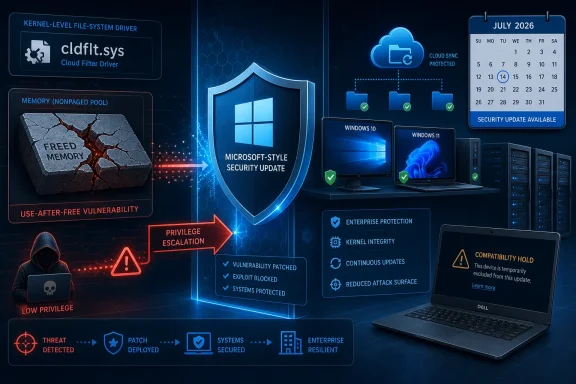 A Memory-Safety Bug Inside the Cloud Files Path
Microsoft identifies the underlying weakness as CWE-416, or use after free. This class of vulnerability occurs when software continues to access a memory object after that object has been released, potentially allowing an attacker to influence what occupies the freed memory and redirect privileged execution.The affected component is the Windows Cloud Files Mini Filter Driver, commonly associated with
cldflt.sys. Windows file-system minifilters run through the Filter Manager infrastructure in kernel mode, where they can observe or modify file-system operations. Microsoft’s driver documentation lists cldflt.sys as a Microsoft minifilter, while Cloud Files technology supports placeholder and hydration behavior used by sync providers.That architectural position explains why an elevation-of-privilege bug in the component matters. A successful attacker is not merely abusing the interface of a cloud-storage application; they are crossing a privilege boundary in Windows code operating close to the kernel and file system.
The advisory’s “physical” attack vector narrows the threat model. The attacker must have physical access or an equivalent local foothold rather than being able to send a malicious network request from elsewhere. The low-privilege requirement also means the attacker must already be authorized to perform some actions on the target machine.
In practical attack chains, that still has value. Malware running under a standard user, an intruder who has obtained a limited account, or someone with hands-on access could potentially use a privilege-escalation flaw to move beyond restrictions imposed on that initial session. Elevation to a more powerful security context can turn a contained compromise into control of the device.
Microsoft has not provided public proof-of-concept details in the material available at publication time. The company’s acknowledgement confirms the vulnerability’s existence, but confirmation should not be confused with evidence that attacks are occurring in the wild.
July’s Cumulative Updates Set the Safe Build Floor
CVE-2026-50374 is serviced through the July 14 cumulative updates rather than through a standalone Cloud Files package. Administrators should therefore verify both the installed KB and the resulting operating-system build, particularly on machines governed by deferral rings, maintenance windows, or manual approval policies.The affected versions and corrected build thresholds are:
- Windows 10 version 1809 is addressed by KB5099538, which raises the system to OS Build 17763.9020.
- Windows 10 versions 21H2 and 22H2 are addressed by KB5099539, producing builds 19044.7548 and 19045.7548 respectively.
- Windows 11 versions 24H2 and 25H2 are addressed by KB5101650, bringing both branches to build 8875: 26100.8875 and 26200.8875.
- Windows 11 version 26H1 is addressed by KB5101649, producing OS Build 28000.2525.
- Windows Server 2022 is addressed by KB5099540, producing OS Build 20348.5386.
- Windows Server 2025 is addressed by KB5099536, producing OS Build 26100.33158.
- Windows Server 2019, including Server Core, moves to OS Build 17763.9020 through KB5099538.
Windows 10 requires closer inventory scrutiny. Ordinary support for Windows 10 version 22H2 ended on October 14, 2025, so continued security servicing depends on eligibility such as Extended Security Updates or a supported long-term servicing edition. A machine reporting Windows 10 22H2 is not necessarily receiving KB5099539 merely because the update exists.
For managed estates, update compliance reports should be checked against the corrected builds rather than relying solely on a “success” status for the latest scan. Devices can miss an update through stale WSUS approvals, paused Windows Update for Business policies, servicing-stack prerequisites, pending restarts, or an edition that has fallen outside support.
One Dell Compatibility Hold Complicates Windows 11 Rollout
Microsoft says KB5101650 may be temporarily unavailable to a limited number of Dell PCs with Intel processors. Dell reported an incompatibility that can produce unexpected shutdowns, reduced performance, excessive heat, and battery drain, leading Microsoft to place a safeguard hold on affected models while the companies prepare a resolution.That creates an awkward security-management case. Windows 11 24H2 and 25H2 devices behind the hold remain below builds 26100.8875 and 26200.8875, the fixed thresholds recorded for CVE-2026-50374, but forcing the update may expose them to the separate platform-stability problem.
Administrators should not bypass the safeguard simply to make compliance dashboards turn green. The safer response is to identify affected Dell hardware, monitor Microsoft’s release-health information and Dell’s remediation guidance, and apply the corrected update path when it is released. Compensating controls should focus on restricting physical access, limiting local accounts, reducing unnecessary interactive sign-ins, and monitoring suspicious privilege changes.
The Dell hold also illustrates why “install Patch Tuesday” is not always a single action. Security teams, endpoint engineers, and hardware-support groups need a shared exception record that distinguishes a justified compatibility deferral from an unmanaged or forgotten device.
The CVSS Score Describes Difficulty, Not the Worst Outcome
CVE-2026-50374’s vector isCVSS:3.1/AV:P/AC:H/PR:L/UI:N/S:U/C:H/I:H/A:H. The physical attack vector and high complexity pull the score downward, while the potential damage metrics remain high.“No user interaction” means exploitation does not require another user to open a document, approve a prompt, or visit a malicious page once the attacker is in the required position. “Scope unchanged” indicates that exploitation remains within the same security authority represented by the vulnerable component rather than crossing into a separately governed component.
The distinction is important for prioritization. An internet-facing remote-code-execution flaw with no authentication would normally demand faster emergency action, but a physical-vector privilege escalation can still be serious on shared workstations, kiosks, labs, jump hosts, reception systems, contractor devices, and endpoints where standard users are deliberately prevented from obtaining administrative control.
The high attack-complexity rating also means reliable exploitation depends on conditions beyond ordinary attacker control. It does not mean exploitation is impossible, and memory-corruption techniques can become more dependable as researchers learn more about object lifetimes, heap behavior, and the exact code path involved.
Security products may eventually add behavioral detections or vulnerability checks for CVE-2026-50374, but those controls do not repair the faulty lifetime handling in
cldflt.sys. Installing the corrected cumulative update remains the definitive fix.For most environments, CVE-2026-50374 belongs in the normal accelerated Patch Tuesday cycle rather than an internet-wide emergency response. The immediate work is concrete: deploy the July 14 updates, confirm the resulting OS builds, document Dell systems blocked from KB5101650, and make sure unsupported Windows 10 installations are not silently mistaken for patched machines.
References
- Primary source: MSRC
Published: 2026-07-14T07:00:00-07:00
Security Update Guide - Microsoft Security Response Center
 msrc.microsoft.com
- Official source: learn.microsoft.com
CDO File System Minifilter Driver - Code Samples | Microsoft Learn
An example of using a control device object (CDO) with a minifilter.learn.microsoft.com - Related coverage: aha.org
