

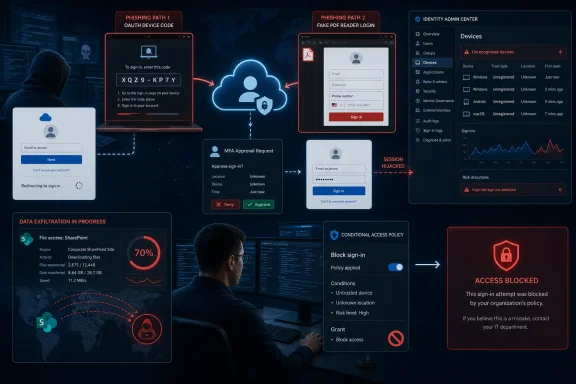
Two phishing toolkits targeting Microsoft 365 can turn legitimate Microsoft sign-in workflows into an initial-access channel, leaving multi-factor authentication intact but effectively routing around the protection it was expected to provide. Jalisco abuses the OAuth 2.0 device authorization flow, while OmegaLord collects passwords and phone numbers through a fake PDF reader page designed to support follow-on MFA manipulation.
ReliaQuest researchers detailed the campaigns, with BleepingComputer reporting the findings on July 14, 2026, and The National CIO Review following on July 15. The immediate concern for administrators is that Jalisco does not need to steal a password: it persuades the victim to authorize an attacker-controlled session through Microsoft’s real login infrastructure.
That distinction matters during incident response. A password reset may not remove every token, registered device, application grant, or authenticated session created after the account was compromised.
Microsoft’s OAuth 2.0 Device Authorization Grant exists for hardware and software that cannot easily present a normal browser-based login experience. Smart displays, shared devices, some Microsoft Teams hardware, command-line tools, and other input-constrained clients can display a short code that the user enters on a separate device.
Jalisco starts that process on equipment controlled by the attacker. It then gives the resulting code to the victim and directs that person to Microsoft’s legitimate device sign-in page.
The victim may see the correct Microsoft domain, a valid TLS connection, their organization’s branding, and the normal MFA experience. Those familiar trust signals do not reveal the central problem: the code belongs to the attacker’s session, not to a device the employee intended to connect.
After the victim completes authentication and approves the request, Microsoft issues access and refresh tokens for the authorized session. Jalisco therefore does not have to recreate the Microsoft password page, intercept the password, or directly defeat the MFA algorithm. It convinces the user to complete valid authentication for the wrong endpoint.
ReliaQuest found that the toolkit generates device codes in real time when someone opens its phishing page. Microsoft device codes expire after approximately 15 minutes, but on-demand generation lets the operator continually supply fresh codes instead of relying on a static lure that quickly becomes useless.
Jalisco also reportedly includes an operator portal for tracking captured sessions and compromised accounts. That packaging turns a known social-engineering technique into something less experienced attackers can deploy and manage as a service.
Device registration is not merely an inventory detail. Entra device identities can participate in single sign-on and Conditional Access decisions, depending on how the tenant is configured. An unauthorized registration can consequently give an attacker another foothold in the organization’s identity environment.
Microsoft Entra ID allows 50 registered or joined devices per user by default, although administrators can lower the ceiling. ReliaQuest recommends reducing the limit to one or two where operationally practical, which narrows the room available for mass registration and makes an unexpected device easier to spot.
The trade-off is that a limit that aggressive may not fit organizations with desktops, laptops, phones, tablets, virtual machines, and lab systems assigned to the same employee. IT teams should determine a defensible limit from actual device ownership patterns rather than applying a figure that creates a flood of enrollment failures.
The more important lesson is that account recovery must address the identity artifacts created during the intrusion. Responders should review and remove unauthorized Entra devices, revoke active sessions and refresh tokens, inspect authentication methods, and check OAuth consent and application registrations alongside the password reset.
A compromised account should also trigger examination of Microsoft Entra sign-in logs for device-code authentication, unexpected locations, unfamiliar clients, and unusual device-registration events. Microsoft 365 audit records can help establish whether the intruder reached Exchange Online, SharePoint Online, OneDrive, Microsoft Teams, or connected SaaS applications.
That speed leaves little room for an alert that depends on a human analyst opening a ticket and contacting the employee. Effective controls need to detect or contain the authentication behavior itself, followed by automated scrutiny of rapid downloads, bulk searches, unusual API activity, and access to sensitive SharePoint sites.
The reported objective is also broader than inbox fraud. ReliaQuest observed stolen data being used to support extortion demands, with attackers threatening to publish information removed from cloud services.
Microsoft 365 has become the document repository, communications archive, and identity hub for many organizations. A valid token can therefore be more valuable than a Windows malware infection, particularly when the attacker can use standard Microsoft APIs and web applications that already appear in normal network traffic.
ReliaQuest assesses that the phone-number request may help operators interfere with the MFA stage after obtaining the credentials. Possible follow-on techniques include impersonating support staff, calling the victim during authentication, targeting SMS-based verification, or using the additional personal detail to make another social-engineering attempt more convincing.
The researchers have not established that every captured number leads to a specific MFA interception method. Even so, collecting it shows that the campaign has been designed around the authentication sequence rather than stopping after password theft.
Organizations should continue moving away from SMS and voice verification toward phishing-resistant methods such as FIDO2 security keys, passkeys, and Windows Hello for Business. Number matching in Microsoft Authenticator provides stronger resistance than simple push approval, but it cannot protect a user who knowingly completes a legitimate authentication flow for an attacker-controlled request.
A blanket block may disrupt Microsoft Teams Rooms, shared Teams devices, Azure CLI workflows, developer utilities, or older tools that still require device authorization. Microsoft’s current guidance is to block the flow by default and make tightly scoped, monitored exceptions for accounts with a documented business requirement.
The practical response for Microsoft 365 administrators is concentrated in a few identity controls:
For tenants that do not need device-code authentication, the cleanest move is to block it. For those that do, the next task is narrower but more demanding: identify every legitimate dependency, isolate it with Conditional Access, and treat any device-code sign-in outside that boundary as a potential Microsoft 365 compromise.
ReliaQuest researchers detailed the campaigns, with BleepingComputer reporting the findings on July 14, 2026, and The National CIO Review following on July 15. The immediate concern for administrators is that Jalisco does not need to steal a password: it persuades the victim to authorize an attacker-controlled session through Microsoft’s real login infrastructure.
That distinction matters during incident response. A password reset may not remove every token, registered device, application grant, or authenticated session created after the account was compromised.
 Jalisco Makes the Genuine Login Page Part of the Phish
Microsoft’s OAuth 2.0 Device Authorization Grant exists for hardware and software that cannot easily present a normal browser-based login experience. Smart displays, shared devices, some Microsoft Teams hardware, command-line tools, and other input-constrained clients can display a short code that the user enters on a separate device.Jalisco starts that process on equipment controlled by the attacker. It then gives the resulting code to the victim and directs that person to Microsoft’s legitimate device sign-in page.
The victim may see the correct Microsoft domain, a valid TLS connection, their organization’s branding, and the normal MFA experience. Those familiar trust signals do not reveal the central problem: the code belongs to the attacker’s session, not to a device the employee intended to connect.
After the victim completes authentication and approves the request, Microsoft issues access and refresh tokens for the authorized session. Jalisco therefore does not have to recreate the Microsoft password page, intercept the password, or directly defeat the MFA algorithm. It convinces the user to complete valid authentication for the wrong endpoint.
ReliaQuest found that the toolkit generates device codes in real time when someone opens its phishing page. Microsoft device codes expire after approximately 15 minutes, but on-demand generation lets the operator continually supply fresh codes instead of relying on a static lure that quickly becomes useless.
Jalisco also reportedly includes an operator portal for tracking captured sessions and compromised accounts. That packaging turns a known social-engineering technique into something less experienced attackers can deploy and manage as a service.
Rogue Devices Extend the Cleanup Job
ReliaQuest observed attackers registering as many as five unauthorized devices against a compromised account. Some used innocuous names containing terms such as “Microsoft” or “Windows,” making them easier to overlook among legitimate endpoints in the Microsoft Entra admin center.Device registration is not merely an inventory detail. Entra device identities can participate in single sign-on and Conditional Access decisions, depending on how the tenant is configured. An unauthorized registration can consequently give an attacker another foothold in the organization’s identity environment.
Microsoft Entra ID allows 50 registered or joined devices per user by default, although administrators can lower the ceiling. ReliaQuest recommends reducing the limit to one or two where operationally practical, which narrows the room available for mass registration and makes an unexpected device easier to spot.
The trade-off is that a limit that aggressive may not fit organizations with desktops, laptops, phones, tablets, virtual machines, and lab systems assigned to the same employee. IT teams should determine a defensible limit from actual device ownership patterns rather than applying a figure that creates a flood of enrollment failures.
The more important lesson is that account recovery must address the identity artifacts created during the intrusion. Responders should review and remove unauthorized Entra devices, revoke active sessions and refresh tokens, inspect authentication methods, and check OAuth consent and application registrations alongside the password reset.
A compromised account should also trigger examination of Microsoft Entra sign-in logs for device-code authentication, unexpected locations, unfamiliar clients, and unusual device-registration events. Microsoft 365 audit records can help establish whether the intruder reached Exchange Online, SharePoint Online, OneDrive, Microsoft Teams, or connected SaaS applications.
Six Minutes Can Be Enough to Reach SharePoint
ReliaQuest said attackers have moved from account access to data exfiltration in as little as six minutes. Compromised identities were reportedly used to search SharePoint and other SaaS services for customer or employee personally identifiable information, financial records, and internal communications.That speed leaves little room for an alert that depends on a human analyst opening a ticket and contacting the employee. Effective controls need to detect or contain the authentication behavior itself, followed by automated scrutiny of rapid downloads, bulk searches, unusual API activity, and access to sensitive SharePoint sites.
The reported objective is also broader than inbox fraud. ReliaQuest observed stolen data being used to support extortion demands, with attackers threatening to publish information removed from cloud services.
Microsoft 365 has become the document repository, communications archive, and identity hub for many organizations. A valid token can therefore be more valuable than a Windows malware infection, particularly when the attacker can use standard Microsoft APIs and web applications that already appear in normal network traffic.
OmegaLord Still Wants the Password—and the Phone
OmegaLord uses a more recognizable phishing design, presenting victims with a fake PDF reader login page. It collects email addresses, passwords, and phone numbers rather than relying entirely on device authorization.ReliaQuest assesses that the phone-number request may help operators interfere with the MFA stage after obtaining the credentials. Possible follow-on techniques include impersonating support staff, calling the victim during authentication, targeting SMS-based verification, or using the additional personal detail to make another social-engineering attempt more convincing.
The researchers have not established that every captured number leads to a specific MFA interception method. Even so, collecting it shows that the campaign has been designed around the authentication sequence rather than stopping after password theft.
Organizations should continue moving away from SMS and voice verification toward phishing-resistant methods such as FIDO2 security keys, passkeys, and Windows Hello for Business. Number matching in Microsoft Authenticator provides stronger resistance than simple push approval, but it cannot protect a user who knowingly completes a legitimate authentication flow for an attacker-controlled request.
Conditional Access Becomes the Main Control Point
Microsoft describes device-code authentication as a high-risk flow and recommends blocking it wherever possible. Administrators with Microsoft Entra ID P1 or higher can create a Conditional Access policy targeting the device code flow, initially running it in report-only mode to identify legitimate dependencies.A blanket block may disrupt Microsoft Teams Rooms, shared Teams devices, Azure CLI workflows, developer utilities, or older tools that still require device authorization. Microsoft’s current guidance is to block the flow by default and make tightly scoped, monitored exceptions for accounts with a documented business requirement.
The practical response for Microsoft 365 administrators is concentrated in a few identity controls:
- Organizations should inventory device-code sign-ins before enforcing a block so that legitimate Teams hardware, automation, and developer workflows are identified.
- Conditional Access should block device code flow for ordinary users and permit exceptions only through controlled groups.
- Administrators should restrict who can register devices and require appropriate authentication controls for registration or join operations.
- Device limits should reflect genuine business requirements instead of retaining Entra ID’s default allowance without review.
- Security teams should audit OAuth application permissions, consent grants, application registrations, authentication methods, and newly added devices.
- Incident playbooks should revoke sessions and tokens and remove persistence artifacts rather than treating a password reset as complete remediation.
For tenants that do not need device-code authentication, the cleanest move is to block it. For those that do, the next task is narrower but more demanding: identify every legitimate dependency, isolate it with Conditional Access, and treat any device-code sign-in outside that boundary as a potential Microsoft 365 compromise.
References
- Primary source: The National CIO Review
Published: 2026-07-15T14:14:28+00:00
Attackers Find a New Way Into Microsoft 365 - The National CIO Review
Stealing passwords is no longer the only way into a Microsoft 365 account. Researchers at ReliaQuest have identified two phishing toolkitsnationalcioreview.com
