

CVE-2026-55031 is an Important-rated Microsoft Excel vulnerability that can let an attacker run code on a victim’s computer after the victim opens or otherwise processes malicious content. Despite Microsoft calling it a “Remote Code Execution Vulnerability,” its CVSS 3.1 vector begins with
That combination is not contradictory. In Microsoft’s terminology, remote code execution describes the outcome and the attacker’s position, while the CVSS Attack Vector metric describes where the vulnerable component must process the exploit. The attacker may send a weaponized workbook from another system, but Excel ultimately triggers the flaw locally on the victim’s device.
Microsoft published CVE-2026-55031 on July 14, 2026, as part of its July security release. The Microsoft Security Response Center describes the underlying weakness as an out-of-bounds read in Microsoft Office Excel, while the National Vulnerability Database records a CVSS 3.1 base score of 7.8.
The CVSS vector for CVE-2026-55031 is:
The important distinction is between delivering malicious content and exploiting the vulnerable software. An attacker could distribute a malicious Excel file through email, Microsoft Teams, a messaging platform, cloud storage, a website or a shared drive. That attacker does not need physical access to the target computer and may be thousands of miles away.
The vulnerability is not, however, triggered merely by sending network traffic to an exposed Excel service. The malicious content has to reach the target and be processed by Excel on that machine. This is why CVSS classifies the Attack Vector as Local rather than Network.
Microsoft addresses the naming issue directly in its advisory. The company says “Remote” refers to the location of the attacker and notes that this class of vulnerability is also sometimes called arbitrary code execution, or ACE. The actual exploit operation takes place locally because the victim or another local process must cause Excel to handle the malicious content.
A useful comparison is an exposed web server vulnerability. If an attacker can send a specially constructed HTTP request directly to a vulnerable server and achieve code execution, the CVSS Attack Vector would typically be Network. With a malicious spreadsheet, the network may transport the file, but the decisive action happens when the locally installed application processes it.
That action is the boundary CVSS is measuring. An email attachment does not become a Network-vector vulnerability merely because it arrived over SMTP, just as a malicious file downloaded through a browser does not automatically make every flaw in the file parser remotely exploitable at the protocol level.
The 7.8 score reflects the seriousness of the result once exploitation succeeds. Code could execute in the context available to Excel and the signed-in user, potentially allowing an attacker to access documents, alter data, install additional payloads or disrupt the system. Existing privilege boundaries still matter: code running under a standard user generally starts with fewer rights than code running under an administrator account.
An out-of-bounds read occurs when software accesses memory beyond the valid boundary of an allocated buffer. Depending on the surrounding code, memory layout and attacker-controlled input, such a defect can contribute to a chain that exposes memory contents, crashes the application or enables control over program execution.
Microsoft’s impact assessment is therefore the more relevant field for patch prioritization. The company concluded that CVE-2026-55031 could result in code execution, giving it high confidentiality, integrity and availability impact values rather than treating it solely as an information leak.
The available advisory does not provide enough technical detail to reconstruct the exploit primitive or explain exactly how the read condition becomes reliable code execution. Administrators should not infer from the CWE label that the vulnerability is harmless or limited to crashing Excel.
Microsoft rated exploitation “Less Likely” at publication. The flaw was not listed as publicly disclosed or exploited when the July 14 advisory was issued, according to Microsoft’s exploitability assessment as reproduced in the July Patch Tuesday reporting from BleepingComputer and Trend Micro’s Zero Day Initiative.
That assessment is a forecast, not a mitigation. It means Microsoft did not expect dependable exploitation to be among the most likely immediate threats; it does not mean a working exploit is impossible.
For the MSI-based Excel 2016 release, Microsoft’s July update is KB5002886. The fixed Excel 2016 version is 16.0.5561.1001, so systems running an earlier applicable build require the update.
Office 2019, Office LTSC and Microsoft 365 Apps generally receive fixes through their respective Click-to-Run servicing channels rather than the standalone Excel 2016 MSI package. Administrators should verify the installed channel and build instead of assuming that the presence of a July Windows cumulative update also proves Office has been patched.
Mac deployments require the corrected Office build appropriate to their servicing branch. The CVE record identifies version 16.111.26071215 as the relevant boundary for affected Microsoft 365 and LTSC Office releases on macOS.
Office Online Server is also included, with versions before 16.0.10417.20175 identified as affected. That entry deserves separate attention from administrators who patch desktop Office automatically but maintain Office Online Server through a controlled server-update process.
Microsoft’s July 2026 Office update listing recommends installing every applicable security update. For managed estates, the practical checks are straightforward: confirm Click-to-Run update compliance, deploy KB5002886 to supported MSI-based Excel 2016 installations, update Mac clients and verify the Office Online Server build.
Those controls are layers rather than substitutes for updating Excel. A malicious workbook can arrive through collaboration tools, removable storage, cloud synchronization or internal file shares as easily as through conventional email. Files may also lose provenance metadata as they pass through archives, document-management systems or third-party transfer services.
Security teams should treat unexpected Excel files as potentially hostile even when they come from familiar accounts. Compromised mailboxes and collaboration identities give attackers a convincing route for the social-engineering step represented by
The key operational lesson is that
AV:L, meaning exploitation occurs through a local attack vector rather than directly over a network connection.That combination is not contradictory. In Microsoft’s terminology, remote code execution describes the outcome and the attacker’s position, while the CVSS Attack Vector metric describes where the vulnerable component must process the exploit. The attacker may send a weaponized workbook from another system, but Excel ultimately triggers the flaw locally on the victim’s device.
Microsoft published CVE-2026-55031 on July 14, 2026, as part of its July security release. The Microsoft Security Response Center describes the underlying weakness as an out-of-bounds read in Microsoft Office Excel, while the National Vulnerability Database records a CVSS 3.1 base score of 7.8.
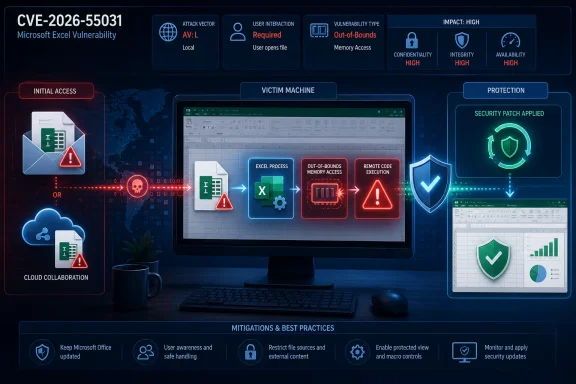 Remote Delivery Does Not Require a Network Attack Vector
The CVSS vector for CVE-2026-55031 is:CVSS:3.1/AV:L/AC:L/PR:N/UI:R/S:U/C:H/I:H/A:HThe important distinction is between delivering malicious content and exploiting the vulnerable software. An attacker could distribute a malicious Excel file through email, Microsoft Teams, a messaging platform, cloud storage, a website or a shared drive. That attacker does not need physical access to the target computer and may be thousands of miles away.
The vulnerability is not, however, triggered merely by sending network traffic to an exposed Excel service. The malicious content has to reach the target and be processed by Excel on that machine. This is why CVSS classifies the Attack Vector as Local rather than Network.
Microsoft addresses the naming issue directly in its advisory. The company says “Remote” refers to the location of the attacker and notes that this class of vulnerability is also sometimes called arbitrary code execution, or ACE. The actual exploit operation takes place locally because the victim or another local process must cause Excel to handle the malicious content.
A useful comparison is an exposed web server vulnerability. If an attacker can send a specially constructed HTTP request directly to a vulnerable server and achieve code execution, the CVSS Attack Vector would typically be Network. With a malicious spreadsheet, the network may transport the file, but the decisive action happens when the locally installed application processes it.
The CVSS Vector Describes the Required Chain
Every component of Microsoft’s vector helps explain the expected attack path.AV:Lmeans the exploit must be executed or processed in a local system context.AC:Lmeans Microsoft considers the attack complexity low once the necessary conditions are met.PR:Nmeans the attacker does not require an existing account or privileges on the target system.UI:Rmeans user interaction is required.S:Umeans the security scope remains unchanged.C:H/I:H/A:Hmeans successful exploitation could have a high effect on confidentiality, integrity and availability.
AV:L, PR:N and UI:R is common for document-based Office vulnerabilities. The attacker does not need to log on to the victim’s PC, but must persuade the victim to perform an action that causes the malicious document to be processed.That action is the boundary CVSS is measuring. An email attachment does not become a Network-vector vulnerability merely because it arrived over SMTP, just as a malicious file downloaded through a browser does not automatically make every flaw in the file parser remotely exploitable at the protocol level.
The 7.8 score reflects the seriousness of the result once exploitation succeeds. Code could execute in the context available to Excel and the signed-in user, potentially allowing an attacker to access documents, alter data, install additional payloads or disrupt the system. Existing privilege boundaries still matter: code running under a standard user generally starts with fewer rights than code running under an administrator account.
An Out-of-Bounds Read Can Still End in Code Execution
Microsoft and the CVE record classify CVE-2026-55031 as CWE-125, an out-of-bounds read. At first glance, that description may sound closer to an information-disclosure bug than an RCE vulnerability, but weakness categories describe the underlying programming error rather than every possible effect of exploiting it.An out-of-bounds read occurs when software accesses memory beyond the valid boundary of an allocated buffer. Depending on the surrounding code, memory layout and attacker-controlled input, such a defect can contribute to a chain that exposes memory contents, crashes the application or enables control over program execution.
Microsoft’s impact assessment is therefore the more relevant field for patch prioritization. The company concluded that CVE-2026-55031 could result in code execution, giving it high confidentiality, integrity and availability impact values rather than treating it solely as an information leak.
The available advisory does not provide enough technical detail to reconstruct the exploit primitive or explain exactly how the read condition becomes reliable code execution. Administrators should not infer from the CWE label that the vulnerability is harmless or limited to crashing Excel.
Microsoft rated exploitation “Less Likely” at publication. The flaw was not listed as publicly disclosed or exploited when the July 14 advisory was issued, according to Microsoft’s exploitability assessment as reproduced in the July Patch Tuesday reporting from BleepingComputer and Trend Micro’s Zero Day Initiative.
That assessment is a forecast, not a mitigation. It means Microsoft did not expect dependable exploitation to be among the most likely immediate threats; it does not mean a working exploit is impossible.
The Patch Reaches Several Office Branches
The affected-product data covers more than a single retail edition of Excel. Microsoft identifies Microsoft 365 Apps for enterprise, Excel 2016, Office 2019, Office LTSC 2021, Office LTSC 2024, Office for Mac and Office Online Server among the affected product families.For the MSI-based Excel 2016 release, Microsoft’s July update is KB5002886. The fixed Excel 2016 version is 16.0.5561.1001, so systems running an earlier applicable build require the update.
Office 2019, Office LTSC and Microsoft 365 Apps generally receive fixes through their respective Click-to-Run servicing channels rather than the standalone Excel 2016 MSI package. Administrators should verify the installed channel and build instead of assuming that the presence of a July Windows cumulative update also proves Office has been patched.
Mac deployments require the corrected Office build appropriate to their servicing branch. The CVE record identifies version 16.111.26071215 as the relevant boundary for affected Microsoft 365 and LTSC Office releases on macOS.
Office Online Server is also included, with versions before 16.0.10417.20175 identified as affected. That entry deserves separate attention from administrators who patch desktop Office automatically but maintain Office Online Server through a controlled server-update process.
Microsoft’s July 2026 Office update listing recommends installing every applicable security update. For managed estates, the practical checks are straightforward: confirm Click-to-Run update compliance, deploy KB5002886 to supported MSI-based Excel 2016 installations, update Mac clients and verify the Office Online Server build.
Email Controls Reduce Exposure but Do Not Replace the Fix
Because CVE-2026-55031 requires user interaction, attachment scanning, mail filtering, Mark of the Web handling and Microsoft Defender protections may interfere with common delivery attempts. Standard-user accounts and application-control policies can also restrict what successfully executed code can do afterward.Those controls are layers rather than substitutes for updating Excel. A malicious workbook can arrive through collaboration tools, removable storage, cloud synchronization or internal file shares as easily as through conventional email. Files may also lose provenance metadata as they pass through archives, document-management systems or third-party transfer services.
Security teams should treat unexpected Excel files as potentially hostile even when they come from familiar accounts. Compromised mailboxes and collaboration identities give attackers a convincing route for the social-engineering step represented by
UI:R.The key operational lesson is that
AV:L does not mean an attacker must already have interactive access to the computer. It means the exploit must be activated in the local Excel process. CVE-2026-55031 remains a remotely deliverable path to local arbitrary code execution, and the July 14 Office updates close that path before “Exploitation Less Likely” has a chance to become an outdated assessment.References
- Primary source: MSRC
Published: 2026-07-14T07:00:00-07:00
Security Update Guide - Microsoft Security Response Center
 msrc.microsoft.com
- Official source: support.microsoft.com
Description of the security update for Excel 2016: September 10, 2024 (KB5002605) | Microsoft Support
Description of the security update for Excel 2016: September 10, 2024 (KB5002605)support.microsoft.com
