

CVE-2026-55025 is a high-severity Microsoft Excel code-execution vulnerability that requires a malicious file or equivalent local input to reach Excel, but successful exploitation can still give a remote attacker control of code running on the victim’s computer. Microsoft published the flaw on July 14, 2026, with a CVSS 3.1 score of 7.8 and the vector
That combination can look contradictory: Microsoft calls the issue a Remote Code Execution Vulnerability, while the Common Vulnerability Scoring System assigns it a Local attack vector. The distinction is that “remote code execution” describes the potential outcome and the attacker’s relationship to the target, while
Microsoft addresses the apparent mismatch directly in its Security Update Guide. The company says “Remote” in the title refers to the attacker’s location, while exploitation itself occurs locally when the victim or another local process opens or executes the attacker-controlled content. The same class of vulnerability is also commonly described as arbitrary code execution.
CVE-2026-55025 is a type-confusion vulnerability, tracked as CWE-843, in Microsoft Office Excel. According to Microsoft’s CVE record and the National Vulnerability Database, the flaw can allow an unauthorized attacker to execute code locally.
The vulnerability is not a network service bug that an attacker can trigger merely by sending packets to an exposed TCP or UDP port. Excel is not waiting on the network for a specially crafted request in the way that a vulnerable web server, DHCP service, or remote-management daemon might be.
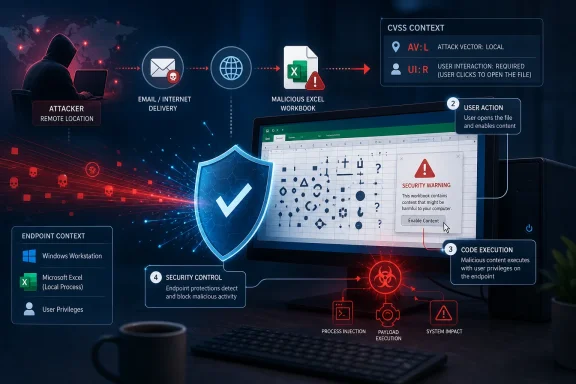
Instead, attacker-controlled content must be delivered to the computer and processed by Excel. A likely attack chain is familiar to Office administrators:
This is why “local” must not be read as “the attacker needs to sit at the keyboard.” A malicious document sent from another country can still receive
The definition expressly includes social-engineering scenarios in which another person is persuaded to open a malicious document. It can also cover cases where an attacker already has remote shell access and launches an exploit against a local component.
Emailing or hosting the spreadsheet does not automatically make the attack vector Network. Those services are delivery mechanisms, not necessarily the vulnerable components. The flaw is triggered when Excel consumes the file after it has arrived on the endpoint.
A true
The remaining CVSS fields make the expected chain clearer:
That distinction matters because code execution is an impact category, while Attack Vector is an exploitability metric. The former tells administrators what may happen after successful exploitation; the latter helps describe the conditions needed to get there.
Calling CVE-2026-55025 a local privilege-escalation vulnerability would be misleading. Microsoft’s vector says the attacker needs no prior privileges, and the flaw is not described as elevating an existing local account into a more powerful one. The attacker supplies hostile input from outside the trust boundary and seeks to gain execution through Excel.
Calling it a network RCE would also be misleading. The
“Remote code execution through a locally opened document” is the less compact but more precise description. Microsoft’s shorter RCE title communicates the ultimate security impact, while the CVSS vector supplies the operational caveats.
The exact consequence depends heavily on how the workstation and account are configured. A standard user operating on a segmented endpoint presents a different risk from a finance employee with access to sensitive workbooks, an administrator using an elevated Office process, or an IT operator with privileged network shares mounted.
Least privilege remains important, but it is not a substitute for patching. A standard user account can still expose valuable business data, browser sessions, OneDrive content, Microsoft 365 tokens, locally synchronized files, and internal resources available to that identity.
Protected View, Mark of the Web handling, mail filtering, attack-surface reduction rules, application control, and endpoint detection can provide additional barriers. Administrators should verify that Internet-delivered Office files retain their origin metadata and investigate workflows that routinely remove it, including archive extraction tools, document-management platforms, and file-transfer products.
Users should also be warned against treating
For Excel 2016, Microsoft identifies versions earlier than
IT teams should not limit deployment checks to Windows Update compliance. Click-to-Run installations, volume-licensed Office builds, Mac deployments, disconnected systems, virtual desktop images, and Office Online Server farms may follow different servicing paths.
The immediate response is to deploy the July 14, 2026 Office security updates and verify the resulting application versions rather than relying solely on a patch-management tool’s success status. Until coverage is confirmed, organizations should treat unexpected Excel attachments and downloaded workbooks as possible code-delivery vehicles.
CVE-2026-55025’s title and vector are therefore describing different parts of the same attack. The attacker can be remote, the malicious workbook can arrive over the Internet, and the resulting code can be attacker-controlled—but the vulnerable operation still occurs when Excel processes that content on the local machine.
CVSS:3.1/AV:L/AC:L/PR:N/UI:R/S:U/C:H/I:H/A:H.That combination can look contradictory: Microsoft calls the issue a Remote Code Execution Vulnerability, while the Common Vulnerability Scoring System assigns it a Local attack vector. The distinction is that “remote code execution” describes the potential outcome and the attacker’s relationship to the target, while
AV:L describes how the vulnerable Excel component processes the exploit.Microsoft addresses the apparent mismatch directly in its Security Update Guide. The company says “Remote” in the title refers to the attacker’s location, while exploitation itself occurs locally when the victim or another local process opens or executes the attacker-controlled content. The same class of vulnerability is also commonly described as arbitrary code execution.
 The Spreadsheet Must Reach Excel First
CVE-2026-55025 is a type-confusion vulnerability, tracked as CWE-843, in Microsoft Office Excel. According to Microsoft’s CVE record and the National Vulnerability Database, the flaw can allow an unauthorized attacker to execute code locally.The vulnerability is not a network service bug that an attacker can trigger merely by sending packets to an exposed TCP or UDP port. Excel is not waiting on the network for a specially crafted request in the way that a vulnerable web server, DHCP service, or remote-management daemon might be.
Instead, attacker-controlled content must be delivered to the computer and processed by Excel. A likely attack chain is familiar to Office administrators:
- An attacker prepares a malicious Excel document.
- The file reaches the target through email, messaging, a website, cloud storage, a shared drive, or removable media.
- The victim opens the file, satisfying the user-interaction requirement.
- Excel processes the malicious content on the local computer and triggers the type confusion.
- Attacker-supplied code runs in the security context of the affected user.
This is why “local” must not be read as “the attacker needs to sit at the keyboard.” A malicious document sent from another country can still receive
AV:L if the vulnerable application must open and parse the file locally before exploitation occurs.CVSS Measures the Path, Not the Delivery Channel
FIRST, the organization responsible for CVSS, defines the Local attack vector more broadly than physical access. Under CVSS 3.1,AV:L applies when the vulnerable component is not directly exploitable through its network stack and the attack instead depends on local read, write, or execution capabilities.The definition expressly includes social-engineering scenarios in which another person is persuaded to open a malicious document. It can also cover cases where an attacker already has remote shell access and launches an exploit against a local component.
Emailing or hosting the spreadsheet does not automatically make the attack vector Network. Those services are delivery mechanisms, not necessarily the vulnerable components. The flaw is triggered when Excel consumes the file after it has arrived on the endpoint.
A true
AV:N Excel vulnerability would require a materially different path: the vulnerable component would need to be reachable and exploitable across a network without first depending on local file processing or comparable user-driven activity. CVSS intentionally separates that condition from document-borne attacks.The remaining CVSS fields make the expected chain clearer:
AC:Lmeans Microsoft considers the attack complexity low once the required conditions are present.PR:Nmeans the attacker does not need an existing account or privileges on the victim’s machine before attempting exploitation.UI:Rmeans another user must perform an action for exploitation to succeed.S:Umeans the security scope remains unchanged.C:H/I:H/A:Hindicates potentially high impact to confidentiality, integrity, and availability.
“Remote” Describes Who Gains Execution
In Microsoft security terminology, an RCE classification generally signals that an external attacker may cause attacker-chosen code to run on a target system. It does not guarantee that the initial vulnerability is reachable directly over a network socket or can be exploited without human involvement.That distinction matters because code execution is an impact category, while Attack Vector is an exploitability metric. The former tells administrators what may happen after successful exploitation; the latter helps describe the conditions needed to get there.
Calling CVE-2026-55025 a local privilege-escalation vulnerability would be misleading. Microsoft’s vector says the attacker needs no prior privileges, and the flaw is not described as elevating an existing local account into a more powerful one. The attacker supplies hostile input from outside the trust boundary and seeks to gain execution through Excel.
Calling it a network RCE would also be misleading. The
AV:L and UI:R fields establish that Excel must process the content locally and that a user must participate in the attack chain.“Remote code execution through a locally opened document” is the less compact but more precise description. Microsoft’s shorter RCE title communicates the ultimate security impact, while the CVSS vector supplies the operational caveats.
The User’s Privileges Define the Blast Radius
Microsoft assigns high confidentiality, integrity, and availability impacts because successful exploitation can permit substantial control within the affected user’s security context. Code running as the user may be able to read accessible documents, modify files, access mapped resources, install user-level persistence, or launch additional payloads.The exact consequence depends heavily on how the workstation and account are configured. A standard user operating on a segmented endpoint presents a different risk from a finance employee with access to sensitive workbooks, an administrator using an elevated Office process, or an IT operator with privileged network shares mounted.
Least privilege remains important, but it is not a substitute for patching. A standard user account can still expose valuable business data, browser sessions, OneDrive content, Microsoft 365 tokens, locally synchronized files, and internal resources available to that identity.
Protected View, Mark of the Web handling, mail filtering, attack-surface reduction rules, application control, and endpoint detection can provide additional barriers. Administrators should verify that Internet-delivered Office files retain their origin metadata and investigate workflows that routinely remove it, including archive extraction tools, document-management platforms, and file-transfer products.
Users should also be warned against treating
.xlsx files as inherently passive. Excel supports a complex collection of parsers, embedded objects, external references, formulas, legacy formats, and interoperability features. Code execution vulnerabilities do not necessarily depend on traditional VBA macros, so disabling macros alone cannot be assumed to block this flaw.The Update Reaches Multiple Office Generations
The affected-product data published with CVE-2026-55025 covers Microsoft 365 Apps for Enterprise, Microsoft Excel 2016, Microsoft Office 2019, Office LTSC 2021, Office LTSC 2024, Microsoft 365 and LTSC editions for Mac, and Office Online Server.For Excel 2016, Microsoft identifies versions earlier than
16.0.5561.1001 as affected. Office Online Server installations should be brought to at least 16.0.10417.20175, while affected Mac installations should reach 16.111.26071215 or later. Microsoft 365 Apps and the newer perpetual Office releases receive fixes through their applicable Office security-release channels.IT teams should not limit deployment checks to Windows Update compliance. Click-to-Run installations, volume-licensed Office builds, Mac deployments, disconnected systems, virtual desktop images, and Office Online Server farms may follow different servicing paths.
The immediate response is to deploy the July 14, 2026 Office security updates and verify the resulting application versions rather than relying solely on a patch-management tool’s success status. Until coverage is confirmed, organizations should treat unexpected Excel attachments and downloaded workbooks as possible code-delivery vehicles.
CVE-2026-55025’s title and vector are therefore describing different parts of the same attack. The attacker can be remote, the malicious workbook can arrive over the Internet, and the resulting code can be attacker-controlled—but the vulnerable operation still occurs when Excel processes that content on the local machine.
References
- Primary source: MSRC
Published: 2026-07-14T07:00:00-07:00
Security Update Guide - Microsoft Security Response Center
 msrc.microsoft.com
- Related coverage: techradar.com
This 'fascinating' Microsoft Excel security flaw teams up spreadsheets and Copilot Agent to steal data | TechRadar
There's more than one way to skin an Excel tablewww.techradar.com
