

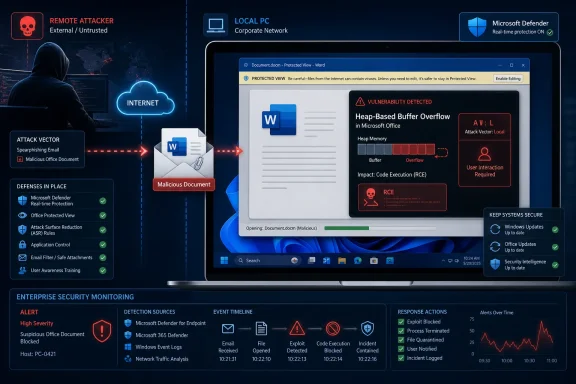
Microsoft published the vulnerability on July 14, 2026, as part of its July Office security updates. Its Security Response Center describes the flaw as a heap-based buffer overflow and explicitly explains that “remote” refers to the attacker’s location, while the malicious content must be executed or opened locally by the victim.
The distinction matters to administrators assessing exposure. CVE-2026-55017 is not a network worm-style vulnerability that can independently compromise an Office installation simply because the computer is online, but it can still let a remote attacker achieve code execution after persuading a user to interact with malicious content.
Remote Code Execution Describes the Result
The CVE title identifies the vulnerability’s security impact: successful exploitation can cause Microsoft Office to execute code supplied or controlled by an attacker. That outcome is commonly classified as remote code execution when the attacker can initiate the attack from another location, such as by delivering a malicious file through email, a messaging platform, cloud storage, or a website.
Microsoft notes that this class of vulnerability may also be described as arbitrary code execution, or ACE. That term often provides a clearer description because it focuses on what happens after exploitation: the attacker gains the ability to run code that the vulnerable application was never intended to execute.
Neither RCE nor ACE necessarily means the vulnerable program exposes a network listener. Microsoft Word, Excel, PowerPoint, and other Office components routinely process files that originated outside the computer, but the parsing operation itself occurs inside the locally installed application.
In practical terms, the attacker can be remote while the vulnerable operation remains local. A malicious document may travel across the internet, but Office ultimately parses that document using code running on the victim’s Windows PC.
That is why the title and CVSS vector can both be accurate.
AV:L Identifies Where Exploitation Happens
Microsoft assigned CVE-2026-55017 the CVSS 3.1 vector AV:L/AC:L/PR:N/UI:R/S:U/C:H/I:H/A:H, producing a base score of 7.8. The National Vulnerability Database reproduces Microsoft’s description of the issue as a CWE-122 heap-based buffer overflow.
The AV:L component does not mean an attacker must be physically seated at the target computer. Under CVSS, local means exploitation occurs through a local access path rather than by sending network traffic directly to a vulnerable service.
The remaining metrics clarify the expected attack conditions:
AC:Lindicates that exploitation does not depend on unusually complex conditions.PR:Nmeans the attacker does not need an existing account or privileges on the target system.UI:Rmeans a user must perform an action before exploitation can succeed.C:H/I:H/A:Hrepresents potentially high impact to confidentiality, integrity, and availability.
User interaction is therefore the bridge between the remote attacker and the local vulnerability. The attacker prepares or distributes the malicious content, but someone or something on the target system must cause Office to process it.
Microsoft has not described CVE-2026-55017 as a zero-click vulnerability. The UI:R rating instead indicates that administrators should expect a socially engineered delivery chain in which the recipient is persuaded to open or otherwise interact with hostile content.
This also explains why PR:N and AV:L can appear together. The attacker does not require local credentials, yet exploitation still takes place through a locally running Office process after the user’s action.
A Heap Overflow Raises the Stakes After the Click
CVE-2026-55017 is rooted in a heap-based buffer overflow, a memory-safety error in which software writes more data into a heap allocation than the allocated region can safely contain. Depending on the surrounding code and available mitigations, that corruption can cause an application crash or potentially redirect execution into attacker-controlled behavior.
Microsoft rates the vulnerability’s possible confidentiality, integrity, and availability effects as high. Successful exploitation could therefore go beyond crashing an Office application and allow actions within the security context of the affected process and signed-in user.
The user’s privilege level remains consequential. Code running from an Office process under a standard user account would generally start with fewer rights than code launched under an administrator account, although attackers may combine an Office vulnerability with other techniques to expand access.
Security controls can also affect whether a delivered file reaches the vulnerable processing path. Microsoft Defender, attachment filtering, Mark of the Web handling, Protected View, Application Guard, Attack Surface Reduction rules, and endpoint detection tools may all add barriers, depending on the file type and precise exploit chain.
Those defenses should not be treated as replacements for the security update. Microsoft’s advisory establishes the underlying memory corruption and code-execution impact, but it does not publish enough exploit detail to assume that every existing Office hardening control will stop every viable delivery method.
The Fix Spans Current Office Families
Microsoft identifies Microsoft 365 Apps for Enterprise, Office 2016, Office 2019, Office LTSC 2021, and Office LTSC 2024 among the affected product families, covering both 32-bit and 64-bit installations. Organizations should validate update status by Office servicing model rather than assuming that installing the latest Windows cumulative update also patches every Office deployment.
For MSI-based Office 2016 installations, Microsoft associates CVE-2026-55017 with the July 14 security release, including KB5002273 for the Visual Basic for Applications component. Microsoft says that package applies to MSI-based Office 2016 and does not apply to Office 2016 Click-to-Run installations, which follow a separate servicing route.
Microsoft’s July 2026 Office update index also lists component-specific packages for Excel 2016, Word 2016, PowerPoint 2016, and shared Office components. Administrators running Microsoft 365 Apps or newer perpetual releases should check the deployed update channel and security-release build rather than attempting to apply the Office 2016 MSI package.
A useful deployment check should confirm:
- The installed Office product, architecture, and servicing technology are correctly inventoried.
- Click-to-Run devices have received a July 2026 security build through their assigned update channel.
- MSI-based Office 2016 systems have the applicable component updates, including KB5002273 where required.
- Devices that defer Microsoft 365 Apps updates have not remained on a vulnerable build.
- Email and endpoint telemetry are monitored for suspicious Office child processes and unusual activity following document access.
As of July 15, the CISA vulnerability record reported no known exploitation for CVE-2026-55017 and classified the attack as not readily automatable because user interaction is required. That lowers the immediate risk compared with a network-accessible, zero-click Office flaw, but it does not remove the familiar threat of targeted phishing and malicious document delivery.
The practical reading is straightforward: RCE describes the attacker-controlled code execution outcome; AV:L describes the local mechanism used to reach it. Patch the affected Office installation, retain document and attachment protections, and do not interpret “local” as meaning that only someone with physical access or an existing Windows account can exploit the flaw.
References
- CVE-2026-55017 Microsoft Office Remote Code Execution Vulnerability MSRC · 2026-07-14T07:00:00-07:00