

CVE-2026-55039 is an important-severity Microsoft Excel vulnerability that can let malicious workbook content execute code on a user’s computer, but its CVSS attack vector is Local (AV:L) because exploitation occurs only after the file reaches that computer and is opened there. The apparent contradiction comes from two different uses of “remote”: the vulnerability title describes the attacker’s potential code-execution impact, while CVSS describes how the vulnerable component is reached.
Microsoft published CVE-2026-55039 on July 14, 2026, as part of its monthly security releases. Detailed in Microsoft’s Security Update Guide, the flaw carries a CVSS 3.1 base score of 7.8 and the vector
The practical takeaway is straightforward: this is not a network-service vulnerability that can be exploited merely by sending packets to an exposed Windows PC. An attacker must persuade a user to open or otherwise process malicious Excel content locally. Once that happens, however, the attacker’s code could run with the victim’s permissions.
In Microsoft vulnerability naming, remote code execution generally means that an attacker who is not already operating interactively on the target can cause attacker-controlled code to run there. It does not necessarily mean that the vulnerability has a CVSS Network attack vector or that Excel is listening for inbound connections.
A malicious workbook can originate remotely through email, Microsoft Teams, an instant-messaging service, a compromised website, cloud storage, or another delivery channel. The person behind the file may be on another continent, but the vulnerable parsing and memory-corruption sequence occurs when Excel processes that file on the victim’s machine.
Microsoft addresses this distinction directly in its advisory. The company explains that “remote” refers to the attacker’s location, while the attack itself is carried out locally because the victim or attacker must execute code from the local machine. Microsoft notes that this class of issue is also sometimes described as arbitrary code execution, or ACE.
That terminology can be confusing because CVSS uses “attack vector” in a more narrowly defined way. The AV field does not identify where the attacker is physically located, where a phishing message originated, or how a document was delivered. It identifies the access path required to trigger the vulnerable behavior.
For CVE-2026-55039, the relevant access path is a locally processed Excel file. That produces
That requirement lowers the CVSS score compared with an unauthenticated, no-interaction network exploit, but it does not make the flaw harmless. Spreadsheet attachments remain a common and credible route into business environments, especially when a message impersonates a supplier, finance department, customer, or internal colleague.
A successful attack could run code in the security context of the signed-in user. Users with local administrator rights would therefore expose more of the system than users operating under standard accounts, reinforcing the value of least-privilege policies even after the Excel update is deployed.
An integer underflow occurs when a calculation produces a value below the minimum representable by its data type. Instead of retaining the mathematically correct negative result, the value can wrap into a very large positive number or otherwise be misinterpreted.
In a file parser, that faulty value may influence memory allocation, length validation, indexing, or copying. An attacker who carefully controls workbook data may be able to turn the arithmetic error into heap corruption and then redirect execution to attacker-controlled instructions.
Microsoft has not publicly provided a proof of concept or the exact malformed workbook structure required to trigger CVE-2026-55039. The CVE record nevertheless identifies total potential technical impact across confidentiality, integrity, and availability, consistent with arbitrary code execution rather than a simple Excel crash.
The distinction matters for incident response. A suspicious Excel crash should not automatically be treated as proof that CVE-2026-55039 was exploited, but unexpected crashes involving untrusted workbooks warrant investigation. Security teams should preserve the document, collect Microsoft Defender and endpoint detection telemetry, and review child processes launched by
Processes such as PowerShell, Command Prompt,
For Excel 2016, Microsoft’s July 14 security release includes KB5002886 and raises the relevant Office 2016 build baseline to 16.0.5561.1001. Office Online Server is addressed through KB5002884, with Microsoft listing 16.0.10417.20175 as the corrected version threshold. Microsoft 365 Apps and supported Click-to-Run Office editions receive fixes through their servicing channels rather than the standalone Excel 2016 MSI package.
Mac users are also in scope. Microsoft’s CVE data identifies version 16.111.26071215 as the fixed threshold for Microsoft 365 for Mac and supported Office LTSC editions for Mac.
Administrators should verify the installed Office build rather than assuming that a fully patched Windows installation also means Office is current. Click-to-Run update policies, deferred Microsoft 365 channels, disabled Office updates, disconnected systems, and separately managed Office Online Server farms can all leave the vulnerable application behind the Windows patch level.
Until deployment is complete, organizations can reduce exposure by filtering unsolicited spreadsheet attachments, preserving Mark of the Web metadata, using Microsoft Defender Attack Surface Reduction rules, and preventing Office applications from creating child processes where business workflows allow it. These controls do not replace Microsoft’s update, but they can disrupt the delivery and post-exploitation stages that make a local Excel parsing flaw useful to a remote attacker.
The title and metric therefore describe different parts of the same attack. The attacker can operate remotely, but Excel must process the exploit locally—which is why CVE-2026-55039 can correctly be called remote code execution while still carrying
Microsoft published CVE-2026-55039 on July 14, 2026, as part of its monthly security releases. Detailed in Microsoft’s Security Update Guide, the flaw carries a CVSS 3.1 base score of 7.8 and the vector
AV:L/AC:L/PR:N/UI:R/S:U/C:H/I:H/A:H.The practical takeaway is straightforward: this is not a network-service vulnerability that can be exploited merely by sending packets to an exposed Windows PC. An attacker must persuade a user to open or otherwise process malicious Excel content locally. Once that happens, however, the attacker’s code could run with the victim’s permissions.
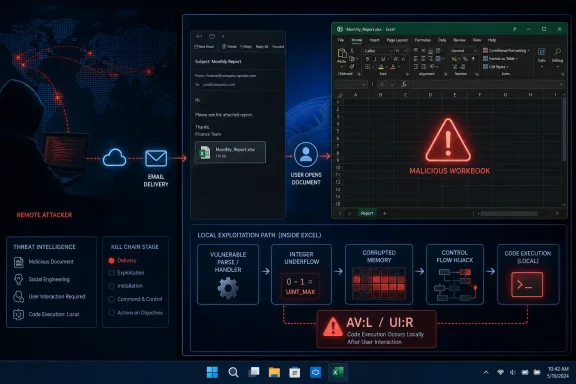 “Remote Code Execution” Describes the Result
In Microsoft vulnerability naming, remote code execution generally means that an attacker who is not already operating interactively on the target can cause attacker-controlled code to run there. It does not necessarily mean that the vulnerability has a CVSS Network attack vector or that Excel is listening for inbound connections.A malicious workbook can originate remotely through email, Microsoft Teams, an instant-messaging service, a compromised website, cloud storage, or another delivery channel. The person behind the file may be on another continent, but the vulnerable parsing and memory-corruption sequence occurs when Excel processes that file on the victim’s machine.
Microsoft addresses this distinction directly in its advisory. The company explains that “remote” refers to the attacker’s location, while the attack itself is carried out locally because the victim or attacker must execute code from the local machine. Microsoft notes that this class of issue is also sometimes described as arbitrary code execution, or ACE.
That terminology can be confusing because CVSS uses “attack vector” in a more narrowly defined way. The AV field does not identify where the attacker is physically located, where a phishing message originated, or how a document was delivered. It identifies the access path required to trigger the vulnerable behavior.
For CVE-2026-55039, the relevant access path is a locally processed Excel file. That produces
AV:L, even though an attacker could conduct the broader operation remotely.The CVSS Vector Maps the Required Attack Chain
The full CVSS vector provides a clearer description than either the CVE title or the AV field alone:AV:Lmeans exploitation requires local access to the vulnerable processing path, such as a file opened on the affected system.AC:Lmeans Microsoft considers the attack complexity low once the required conditions are present.PR:Nmeans the attacker does not need an existing account or privileges on the target.UI:Rmeans user interaction is required.S:Umeans the code executes within an unchanged security authority or scope.C:H/I:H/A:Hmeans successful exploitation could have a high impact on confidentiality, integrity, and availability.
UI:R metric is particularly important for administrators assessing immediate exposure. CVE-2026-55039 is not documented as a zero-click network attack against ordinary Excel installations. A user must take an action that causes the malicious content to be processed, typically opening a crafted workbook or attachment.That requirement lowers the CVSS score compared with an unauthenticated, no-interaction network exploit, but it does not make the flaw harmless. Spreadsheet attachments remain a common and credible route into business environments, especially when a message impersonates a supplier, finance department, customer, or internal colleague.
A successful attack could run code in the security context of the signed-in user. Users with local administrator rights would therefore expose more of the system than users operating under standard accounts, reinforcing the value of least-privilege policies even after the Excel update is deployed.
An Integer Underflow Opens the Door to Memory Corruption
Microsoft describes the underlying weakness as an integer underflow, or wraparound, in Microsoft Office Excel. The CVE record associates the vulnerability with CWE-191, Integer Underflow, and CWE-122, Heap-based Buffer Overflow.An integer underflow occurs when a calculation produces a value below the minimum representable by its data type. Instead of retaining the mathematically correct negative result, the value can wrap into a very large positive number or otherwise be misinterpreted.
In a file parser, that faulty value may influence memory allocation, length validation, indexing, or copying. An attacker who carefully controls workbook data may be able to turn the arithmetic error into heap corruption and then redirect execution to attacker-controlled instructions.
Microsoft has not publicly provided a proof of concept or the exact malformed workbook structure required to trigger CVE-2026-55039. The CVE record nevertheless identifies total potential technical impact across confidentiality, integrity, and availability, consistent with arbitrary code execution rather than a simple Excel crash.
The distinction matters for incident response. A suspicious Excel crash should not automatically be treated as proof that CVE-2026-55039 was exploited, but unexpected crashes involving untrusted workbooks warrant investigation. Security teams should preserve the document, collect Microsoft Defender and endpoint detection telemetry, and review child processes launched by
EXCEL.EXE.Processes such as PowerShell, Command Prompt,
mshta.exe, rundll32.exe, or scripting hosts appearing directly beneath Excel deserve particular scrutiny. Those process relationships are not unique to this vulnerability, but they can indicate that a document-based attack moved beyond parsing into code execution.July’s Office Updates Close the Local Trigger
The affected product range is broader than the standalone Excel 2016 package. Microsoft’s CVE data lists Microsoft 365 Apps for enterprise, Excel 2016, Office 2019, Office LTSC 2021, Office LTSC 2024, Office editions for Mac, and Office Online Server among the affected products.For Excel 2016, Microsoft’s July 14 security release includes KB5002886 and raises the relevant Office 2016 build baseline to 16.0.5561.1001. Office Online Server is addressed through KB5002884, with Microsoft listing 16.0.10417.20175 as the corrected version threshold. Microsoft 365 Apps and supported Click-to-Run Office editions receive fixes through their servicing channels rather than the standalone Excel 2016 MSI package.
Mac users are also in scope. Microsoft’s CVE data identifies version 16.111.26071215 as the fixed threshold for Microsoft 365 for Mac and supported Office LTSC editions for Mac.
Administrators should verify the installed Office build rather than assuming that a fully patched Windows installation also means Office is current. Click-to-Run update policies, deferred Microsoft 365 channels, disabled Office updates, disconnected systems, and separately managed Office Online Server farms can all leave the vulnerable application behind the Windows patch level.
Until deployment is complete, organizations can reduce exposure by filtering unsolicited spreadsheet attachments, preserving Mark of the Web metadata, using Microsoft Defender Attack Surface Reduction rules, and preventing Office applications from creating child processes where business workflows allow it. These controls do not replace Microsoft’s update, but they can disrupt the delivery and post-exploitation stages that make a local Excel parsing flaw useful to a remote attacker.
The title and metric therefore describe different parts of the same attack. The attacker can operate remotely, but Excel must process the exploit locally—which is why CVE-2026-55039 can correctly be called remote code execution while still carrying
AV:L and UI:R in its CVSS vector.References
- Primary source: MSRC
Published: 2026-07-14T07:00:00-07:00
Security Update Guide - Microsoft Security Response Center
 msrc.microsoft.com
- Official source: support.microsoft.com
Description of the security update for Excel 2016: July 8, 2025 (KB5002749) | Microsoft Support
Description of the security update for Excel 2016: July 8, 2025 (KB5002749)support.microsoft.com
