

Microsoft’s Wording Exposes a Long-Running CVSS Trap
The confusion around CVE-2026-45456 comes from a collision between plain-English security marketing and the more formal grammar of CVSS. “Remote code execution” has become the industry’s shorthand for the scary outcome: an attacker may cause arbitrary code to run on a target system. CVSS, by contrast, uses Attack Vector to describe the route to the vulnerable component, not the attacker’s mailing address, phishing infrastructure, or physical distance from the user.
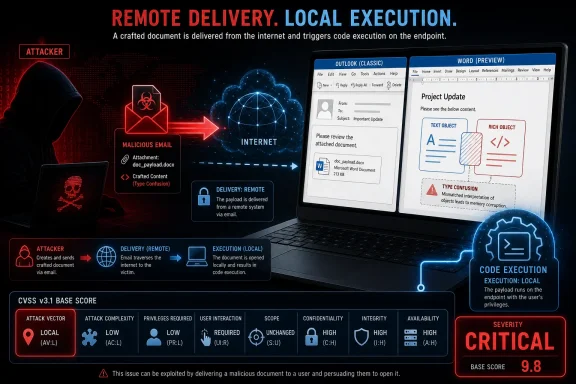
That is why Microsoft can call this an Outlook and Word remote code execution vulnerability while also assigning AV:L. The attacker may be remote in the real-world attack chain, but the vulnerable Office functionality is invoked locally on the victim’s endpoint. The victim’s machine is the place where the malicious content is parsed, rendered, and ultimately turned into the condition Microsoft is warning about.
This is a common pattern in document-handling bugs. A crafted file, message, attachment, or previewable object may be delivered over email, chat, web download, cloud sync, or some other remote path. But the actual exploit happens when a local application opens, previews, indexes, or otherwise processes that content.
The result is a naming paradox that looks contradictory only if “remote” is treated as a CVSS synonym. It is not. Microsoft’s title is describing the consequence and attacker posture; CVSS is describing the exploitation mechanics.
The Local Vector Does Not Mean a Local Attacker
The most important sentence in Microsoft’s explanation is that the attack itself is carried out locally. That does not mean the attacker needs a keyboard, a badge, or a foothold on the victim’s desktop. It means the vulnerable component is not being exploited over a network protocol exposed by the application itself.
In CVSS terms, Local can include cases where an attacker relies on a user or a local process to perform the exploitation step. A malicious document that detonates when rendered by Word is a classic example. So is a hostile email that triggers vulnerable parsing logic when Outlook displays or previews it.
CVE-2026-45456 is especially awkward because Microsoft also says the Preview Pane is an attack vector. That means the user may not need to double-click an attachment in the familiar sense for Outlook to place the vulnerable code path in motion. If Outlook’s preview or rendering pipeline touches the malicious content, the attack is still happening inside a local application on the local machine.
This is why “AV:L” should not be read as comforting shorthand for “the attacker must already be on the box.” It often means something narrower and more technical: the vulnerable code is reached through local read, write, execute, rendering, or file-processing behavior rather than through a network service accepting packets directly.
Outlook Is the Delivery Vehicle, Word Is the Engine Room
Microsoft’s advisory also answers another subtle question: why Word appears in the affected products when the title calls out Outlook. The reason is that classic Outlook uses Word functionality to render email. The vulnerability sits in Word-related functionality, but Outlook can expose that functionality during normal mail handling.
That makes the bug operationally an Outlook problem even when the vulnerable code lives in Word. From a user’s perspective, the risky moment may be reading or previewing a message. From an engineering perspective, the risky component may be the Word rendering stack doing work on behalf of Outlook.
This is not unusual in Office security. Office applications are not sealed islands; they share parsers, rendering components, file format logic, object handling, and legacy compatibility layers. A vulnerability in one of those shared pieces can surface through another application’s workflow.
The practical implication is that patching only the application named in the title is not always the right mental model. Administrators need to look at the affected software table, installed Office channels, Click-to-Run builds, standalone Office editions, Mac availability, and server-side products where Microsoft lists them. The title is the headline; the affected-products matrix is the work order.
“Remote Code Execution” Still Means the Worst Outcome
The phrase remote code execution has acquired almost talismanic force in security advisories because it describes one of the most consequential outcomes: attacker-controlled code running on a machine the attacker does not own. That is still the risk category here. The fact that CVSS says Local does not turn the issue into a mere local privilege quirk or a post-compromise footnote.
Microsoft’s executive summary describes a type confusion issue in Microsoft Office that allows an unauthorized attacker to execute code locally. Type confusion vulnerabilities are dangerous because software believes it is handling one kind of object or memory structure when it is actually dealing with another. In a complex application suite built around decades of document formats, rendering paths, embedded objects, and compatibility promises, those mistakes can become powerful primitives.
The CVSS vector Microsoft assigned is severe: low attack complexity, no privileges required, no user interaction, unchanged scope, and high impact to confidentiality, integrity, and availability. The base score is Critical. Those fields matter more than the intuitive discomfort of seeing “Remote” and “Local” in the same advisory.
If anything, the no-user-interaction field should make administrators pause. It suggests Microsoft believes successful exploitation does not require a separate user action beyond the conditions in the attack scenario. Combined with the Preview Pane note, that puts this vulnerability in the class of Office bugs that security teams tend to prioritize quickly.
The Preview Pane Is Where Semantics Meet Reality
For many users, “do not open suspicious attachments” has been the default Office security advice for a generation. It is still useful, but it is no longer sufficient as a complete model. Preview features, automatic rendering, search indexing, content extraction, thumbnail generation, and cloud-backed productivity workflows all blur the line between opening and merely receiving.
That is why the Preview Pane matters. If a mail client can trigger the vulnerable path simply by displaying a message or previewing content, the user’s conscious decision point may be reduced or removed. The exploit still runs locally, but the attacker’s leverage comes from a remote delivery channel that places malicious content in front of a local renderer.
This is the reason the industry keeps using RCE language for these bugs. The victim is not inviting the attacker into the building; the victim’s software is processing attacker-supplied material. If that processing leads to code execution, the outcome is remote in the sense that matters to incident responders: an external adversary can reach into an endpoint through routine communication.
The better way to describe CVE-2026-45456 is not “remote or local,” but “remote delivery, local execution.” That phrase captures the attack chain more faithfully than either label alone.
CVSS Is Precise, but Not Always Intuitive
CVSS is useful because it forces vendors and defenders to score vulnerabilities using a common vocabulary. It is also a frequent source of misunderstanding because the vocabulary is specialized. “Local” in CVSS does not always map to “local attacker” in everyday speech, just as “user interaction” does not always map neatly to whether a person consciously clicked a bad file.
The Attack Vector metric asks how exploitation reaches the vulnerable component. Network means the vulnerable component is exploitable over a network stack. Adjacent means the attacker must share a logical or physical network. Local means exploitation requires local access, local execution, or local processing. Physical means the attacker must physically interact with the device.
Office document bugs often land in the Local bucket because Word, Excel, PowerPoint, or Outlook is doing the vulnerable work after content arrives. The content may have crossed the internet, but the parser is not a listening network daemon. It is a local application chewing on local data.
This distinction can feel academic until patch prioritization enters the room. Some organizations sort vulnerability queues by CVSS vector strings, and AV:N often gets reflexively treated as more urgent than AV:L. CVE-2026-45456 is a reminder that such automation can miss the practical exploitability of client-side content bugs.
The Advisory’s Severity Is Not Just a Label
Microsoft rates CVE-2026-45456 as Critical, with high impact across confidentiality, integrity, and availability. That combination means Microsoft believes exploitation could have consequences across the classic security triad: data exposure, data modification, and disruption. Even without public exploitation at release, that is not a bug to leave for the next quiet maintenance window.
The exploitability assessment says exploitation is less likely at original publication, and Microsoft indicates it was not publicly disclosed or exploited when published. That is useful context, but not a reason for complacency. Office file-format vulnerabilities have a long history of moving from advisory page to weaponized lure once enough patch-diffing and reverse engineering has occurred.
The presence of an official fix also changes the attacker-defender race. Once patches ship, defenders gain a remediation path, but attackers gain a before-and-after comparison target. That does not guarantee exploitation, but it shortens the distance between a vague advisory and technical understanding.
The better reading is straightforward: this is not described as actively exploited at publication, but it affects widely deployed productivity software and has a severe outcome. Treat it as a priority client-side patch, especially in environments where Outlook classic and Word-based rendering are still central to daily work.
The Office Patch Surface Is Broader Than the Desktop Icon
CVE-2026-45456 is not merely a “Word 2016” issue, even though Word 2016 appears among the affected products. Microsoft lists multiple Office editions, Microsoft 365 Apps for Enterprise, Office LTSC releases, Mac variants, and SharePoint products in the update matrix. That breadth reflects how Office components and document rendering functionality travel through Microsoft’s productivity stack.
For Windows administrators, the immediate job is to verify which Office servicing model is in use. Click-to-Run installations follow a different update rhythm than older MSI-based Office packages. LTSC deployments may be intentionally conservative, which is precisely why they need deliberate patch validation rather than assumptions based on consumer Microsoft 365 behavior.
For Mac administrators, Microsoft’s note that some Mac updates were not immediately available at publication is important. A fleet that is otherwise disciplined about Microsoft AutoUpdate can still have a temporary gap if the relevant package has not shipped yet. That should be tracked as an exception, not ignored as a platform footnote.
SharePoint’s presence in the affected table is also a reminder that document-processing vulnerabilities do not always stay on endpoints. Server-side document handling, indexing, conversion, preview, or Office integration can expose similar underlying code paths. The endpoint story is the obvious one, but the server estate deserves inventory attention too.
“No User Interaction” Should Change the Helpdesk Script
Many organizations still train users around a binary model: safe if you preview, dangerous if you open. CVE-2026-45456 undermines that distinction. If Preview Pane is an attack vector, the safe behavior is not merely refusing to double-click; it may require patched software before routine message handling is safe.
That does not mean every organization should panic-disable preview features across the board. It does mean security teams should stop treating preview as a harmless halfway state. Preview is rendering, rendering is parsing, and parsing is code exercising complex input-handling logic.
In practical terms, helpdesk and SOC messaging should be careful. Telling users “don’t open attachments” may still reduce risk, but it does not fully describe this class of vulnerability. If a mitigation conversation is needed before patches are deployed, it should mention preview behavior explicitly.
The same applies to phishing simulations and tabletop exercises. A malicious email that compromises a machine through preview is not a user failure in the same way as a credential-harvesting click. It is a software exposure triggered through ordinary mail-client behavior, and the response should focus on patching, detection, and containment.
Patch Management Needs More Than a CVSS Sort
A vulnerability management dashboard that sorts by CVSS score alone will probably catch this issue because Microsoft rates it Critical. But a dashboard that downranks Local attack vector items may not. That is the mistake CVE-2026-45456 invites: assuming AV:L means hands-on-keyboard exploitation.
A better triage model gives special treatment to client-side parsers for ubiquitous content types. Office documents, email bodies, compressed archives, PDFs, image codecs, browser engines, and media parsers often sit at the boundary between untrusted remote content and local execution. Their attack vector may not always be Network, but their exposure is internet-scale.
Administrators should also think in terms of blast radius. Outlook and Word sit on privileged user workstations, executive laptops, finance desktops, legal machines, and helpdesk systems that process unsolicited content all day. Those are exactly the endpoints attackers like to target because they combine access to sensitive data with trusted identity.
The safest operational stance is to patch Office clients quickly, confirm build numbers, monitor for delayed Mac packages, and review whether Outlook classic is present in the environment. The “new Outlook” versus classic Outlook distinction matters because Microsoft’s advisory specifically calls out rendering in Outlook classic. But organizations should avoid assuming safety without checking the affected software list and installed components.
The Real Lesson Is to Read CVEs as Attack Chains
CVE titles are compressed artifacts. They are written to fit update guides, dashboards, RSS feeds, and vulnerability databases. They are not full threat models. CVSS strings are also compressed artifacts, and they are written for scoring consistency rather than narrative clarity.
The defender’s job is to expand both into an attack chain. In this case, the chain appears to be: an attacker supplies malicious Office-renderable content; Outlook classic or Word functionality processes that content locally; a type confusion condition is triggered; code execution becomes possible on the target system. The attacker is remote, but the vulnerable computation is local.
That model resolves the contradiction without weakening the severity. It also explains why the advisory can truthfully say “remote code execution,” “AV:L,” “execute code locally,” and “Preview Pane is an attack vector” in the same entry. Each phrase is looking at a different slice of the same event.
Security teams that internalize this pattern will make fewer mistakes during Patch Tuesday triage. The most dangerous bugs are not always the ones with the cleanest labels. Sometimes the important signal is the messy combination: local vector, remote delivery, no privileges, no interaction, critical impact.
The Outlook-and-Word Clue Sheet for Administrators
The practical reading of CVE-2026-45456 is narrower than panic and broader than complacency. It is not a wormable network service bug in the usual sense, but it is also not a bug that requires an attacker to already be sitting at the victim’s console. It belongs to the well-worn and dangerous category of remote-supplied content causing local application compromise.
- CVE-2026-45456 was published by Microsoft on June 9, 2026, as a Critical Microsoft Outlook and Word remote code execution vulnerability.
- The CVSS Local attack vector means the vulnerable Office code is exercised locally on the victim’s system, not that the attacker must be physically local.
- Microsoft says the issue can be exploited through Outlook classic because Outlook uses Word functionality to render email.
- Microsoft explicitly identifies the Preview Pane as an attack vector, so merely previewing malicious content may be relevant to exposure.
- The advisory says exploitation was not publicly disclosed or observed at original publication, but an official fix is available for supported affected products.
- Administrators should verify Office, Microsoft 365 Apps, LTSC, Mac, and listed SharePoint updates rather than relying only on the words “Outlook” and “Word” in the title.
The industry could use clearer language for vulnerabilities like this, because “remote code execution with a local attack vector” sounds like a contradiction until the scoring model is unpacked. But the underlying risk is not ambiguous: hostile content can arrive from a remote attacker and be processed by local Office components in a way that may execute code. The forward-looking lesson for Windows shops is to treat client-side rendering engines as exposed attack surface, not as passive document viewers, and to make Patch Tuesday triage smart enough to understand the difference between the attacker’s location and the exploit’s point of impact.