

Microsoft’s “Remote” Means the Attacker Does Not Need Your Keyboard
The confusion starts with a phrase that has outlived its original simplicity. “Remote code execution” sounds as if packets arrive over the network, strike an exposed service, and immediately run code on a target. That is one kind of RCE, and it is the one that gave the term its fearsome reputation.
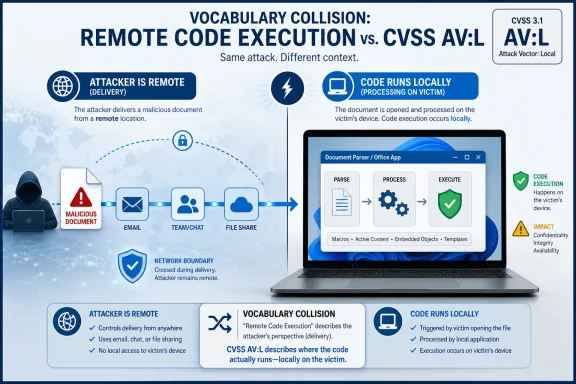
Office vulnerabilities often live in a different neighborhood. A malicious document, spreadsheet, email attachment, or previewed file may be delivered from somewhere else, but the vulnerable parsing happens when Office, Outlook, Windows Search, or another local component opens or inspects the content. The attacker is remote in the ordinary sense: they are not sitting at the victim’s computer.
That is why Microsoft’s explanation says the word “Remote” refers to the location of the attacker. The exploit path still needs local execution of the vulnerable code path. In plainer English: the attacker can send the trap from afar, but the trap springs when the victim’s machine handles it.
This is also why “arbitrary code execution” is often the cleaner technical phrase. It avoids implying that the vulnerability is necessarily reachable over TCP or UDP. But Microsoft’s advisory naming convention has long used “Remote Code Execution” for bugs where attacker-supplied content can cause code to run, even if the vulnerable component is a local application.
CVSS Scores the Doorway, Not the Distance Between People
CVSS attack vector is not a measure of whether the attacker is physically nearby, emotionally remote, or operating from another country. It asks a narrower question: what kind of access path reaches the vulnerable component?
If a bug is exploitable by sending traffic directly to a vulnerable network service, CVSS normally calls that Network. If it requires the same local network segment or a limited adjacent domain, it may be Adjacent. If it requires the attacker to plant, open, execute, or otherwise cause code or content to be processed on the target system itself, CVSS can mark it Local.
That last category is where many Office bugs land. The file may arrive by email, Teams, SharePoint, OneDrive, a web download, or a removable drive, but Office’s vulnerable logic runs locally. The CVSS metric is therefore describing the final exploitation condition, not the whole social or delivery chain.
This is the point that gets lost in Patch Tuesday summaries. A “local” attack vector does not necessarily mean an attacker already has an interactive logon session. It can mean the vulnerable application must be induced to process attacker-controlled material on the target endpoint.
The Office Threat Model Is Built Around Dangerous Documents
Office remains one of the classic places where this distinction matters. Word, Excel, PowerPoint, Outlook, and their supporting components are designed to open rich, complex, historically messy file formats. That complexity is useful for users and attractive to attackers.
A crafted Office document can be remote in delivery but local in detonation. The victim might download it from a phishing site, receive it as an attachment, open it from a shared location, or preview it in an email client. Once the local Office stack parses the content, the vulnerability may be triggered.
That does not make the bug harmless or theoretical. It means the risk depends heavily on exposure paths: who receives untrusted documents, whether preview handlers are involved, whether protected view or application control policies are enforced, and how quickly Office updates are deployed.
For home users, the message is simple: keep Office updated and treat unsolicited documents as executable-adjacent objects. For enterprise defenders, the message is more operational: document ingress, preview behavior, endpoint hardening, and update compliance are all part of the mitigation story.
“Local” Is Not the Same as “Low Risk”
The security industry has trained people to flinch harder at Network than Local, and usually for good reason. A network-reachable unauthenticated RCE in a server component can become worm fuel. A local document parser bug generally needs a delivery mechanism and often some degree of user or application interaction.
But “local” should not be read as “requires the attacker to already own the machine.” That is the trap. In document-driven attacks, the attacker’s first foothold can be the local processing event itself.
The practical difference is exploitability, not impact. If successful exploitation lets attacker-controlled code run in the context of the current user, the damage can still include data theft, malware installation, lateral movement staging, or credential access. If the victim is an administrator, the blast radius grows.
This is why Microsoft can reasonably label the vulnerability as remote code execution while CVSS can reasonably score AV:L. Both statements can be true because they are answering different questions. The title tells you what kind of security outcome the vulnerability enables. The vector tells you how the vulnerable component is reached.
The Preview Pane Caveat Keeps Coming Back
Office and Outlook advisories often include another wrinkle: preview handling. If a preview pane is an attack vector, the victim may not need to explicitly double-click a file in the way users imagine. Local processing can happen because the shell, mail client, or preview handler renders enough of the content to trigger the vulnerable path.
That does not automatically mean every Office RCE is zero-click. Advisory language must be read carefully. But it does mean defenders should resist the comforting mental model that “user interaction” always means a reckless employee opening a suspicious file and clicking through warnings.
Previewers, indexers, converters, and collaboration workflows have blurred the line between opening a document and merely encountering it. In modern Windows environments, files are not inert until a user ceremonially launches them. They are often scanned, inspected, previewed, synchronized, and enriched by local components.
That is precisely why the CVSS local vector can coexist with a remote attacker. The machine does local work on content supplied from outside. The exploit lives in that handoff.
Microsoft’s Naming Is Imperfect, but the Alternative Is Not Simple
It would be tempting to say Microsoft should stop calling these bugs RCE and call them ACE instead. There is merit to that argument. “Arbitrary Code Execution” more accurately describes the technical result without implying a network-listening attack surface.
But vulnerability titles also serve a triage function. “Remote Code Execution” immediately tells defenders that code execution may be achieved without the attacker first having legitimate local control of the target machine. In the Office context, that often means malicious content can be delivered remotely and weaponized through normal user workflows.
The drawback is predictable confusion. Admins see AV:L and wonder whether the title is inflated. Users see RCE and wonder whether they can be attacked merely by being online. Both interpretations can lead to bad decisions.
The better reading is layered. The vulnerability is not a remotely reachable service flaw in the classic wormable sense. It is also not a benign local-only issue that can be ignored unless an attacker already has a shell. It sits in the large and uncomfortable middle: remotely delivered content that causes local code execution.
The Patch Priority Should Follow Exposure, Not Semantics
For IT teams, the naming debate is less important than the deployment decision. If Office is broadly installed, if users receive external documents, if Outlook preview is enabled, or if business workflows depend on third-party attachments, the exposure is real.
The right prioritization should account for several factors: whether Microsoft rates exploitation as more or less likely, whether proof-of-concept code is circulating, whether the affected Office versions are widely deployed, and whether compensating controls reduce document-processing risk. The CVSS vector is useful, but it should not be the only signal.
Security teams often over-index on the base score and under-index on where the vulnerable software sits in daily work. Office sits directly in the path of email, finance documents, HR paperwork, procurement forms, legal attachments, and customer communications. That makes even “local” Office vulnerabilities operationally significant.
The most dangerous endpoint bugs are often the ones that arrive dressed as routine work. A document parser vulnerability does not need to scan the Internet if the Internet is already sending documents to your users all day.
The Real Lesson Is to Read CVEs as a Stack of Claims
CVE titles, CVSS vectors, vendor FAQs, and exploitability assessments are not interchangeable. Each compresses a different part of the story. Treating any one of them as the whole truth is how teams misread risk.
For CVE-2026-45475, the clean interpretation is this: Microsoft is saying the vulnerability can result in code execution by an attacker who is not locally present, while the CVSS vector says the vulnerable action occurs through local processing on the target system. There is no contradiction once those scopes are separated.
This distinction also helps explain why security advisories sometimes feel inconsistent across products. A server RCE, a browser RCE, an Office RCE, and a local privilege escalation can all end in attacker-controlled code running, but their routes, prerequisites, and urgency profiles differ sharply.
Good patch management depends on preserving those differences. Bad patch management turns everything into either panic or dismissal.
The Practical Reading for CVE-2026-45475
The safest operational interpretation is conservative but not alarmist.
- CVE-2026-45475 should be treated as a code-execution risk in Microsoft Office, not as a remotely exposed network service vulnerability.
- The CVSS AV:L metric means exploitation depends on code or content being processed on the victim’s local machine.
- The “Remote Code Execution” title means the attacker can be remote from the victim and still cause attacker-controlled code to run if the exploit conditions are met.
- Document delivery channels such as email, downloads, collaboration platforms, and shared storage are the realistic paths defenders should think about.
- Updating Office remains the primary fix, while attachment controls, protected view, preview-pane policy, and endpoint detection reduce the chance of successful exploitation.
- Administrators should prioritize based on affected versions, user exposure to untrusted documents, and Microsoft’s exploitability guidance rather than the word “local” alone.
The best way to read this advisory is not as Microsoft contradicting CVSS, but as Microsoft exposing the limits of shorthand language in vulnerability management. “Remote” describes the attacker’s position and the security impact; “Local” describes the execution path through the victim’s machine. In a world where hostile files move faster than patches and Office documents remain part of the daily bloodstream of business, that distinction is not pedantry — it is the difference between dismissing a bug and defending against the way it will actually be used.