

Microsoft’s CVE-2026-45474 advisory describes a Microsoft Office remote code execution vulnerability because the attacker can be remote from the victim, even though the CVSS attack vector is local because exploitation requires malicious code or content to run on the target machine during the exploit path. That sounds contradictory only if “remote” is treated as a network-routing term. In Microsoft’s vulnerability taxonomy, it is often closer to a threat-modeling term: the attacker does not need to be sitting at the keyboard. For defenders, the distinction matters because this is not the same as a wormable network bug, but it is also not harmless just because the vector says AV:L.
The confusion around CVE-2026-45474 comes from two overlapping vocabularies. CVSS uses Attack Vector to describe how the vulnerable component is reached. Microsoft’s title uses Remote Code Execution to describe the outcome and the attacker’s position relative to the victim.
In plain English, AV:L means the vulnerable Office component is exploited through local processing on the affected computer. A malicious file, document, embedded object, or other crafted content has to be opened, previewed, indexed, rendered, or otherwise handled by software running on the victim’s machine. The exploit does not directly traverse the network stack like an exposed SMB, RDP, HTTP, or RPC service might.
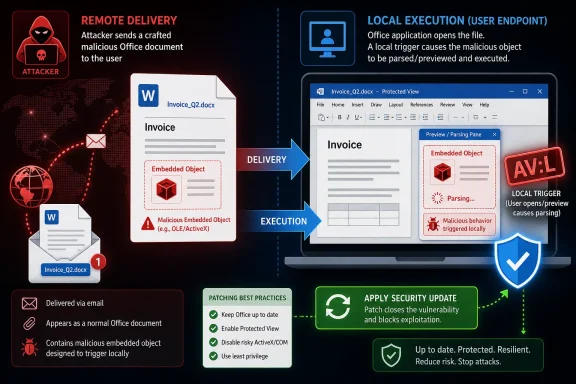
But that does not mean the attacker must already have a local account. The attacker may send a malicious Office document by email, host it on a file share, place it in a synced folder, deliver it through Teams or a browser download, or persuade the victim to interact with it. The delivery can be remote while the trigger is local.
This is why Microsoft’s own explanation says the word “Remote” refers to the location of the attacker. The attack itself is carried out locally. That is a subtle distinction, and it is exactly the kind of subtle distinction that turns Patch Tuesday tables into arguments in security teams.
A network attack vector means the vulnerable component can be attacked over a network path. A local attack vector means the attack path depends on local read, write, or execution behavior on the target system. For Office vulnerabilities, that often means the parsing engine, document renderer, preview handler, macro-adjacent component, file converter, or embedded content handler is doing something unsafe after the file lands on the machine.
That makes AV:L less alarming than AV:N in one narrow sense: the bug is not typically reachable by sending packets to an open port. But it can still be dangerous in the real world because Office documents are designed to cross trust boundaries. They arrive from strangers, customers, vendors, lawyers, recruiters, school administrators, and internal colleagues whose accounts may already be compromised.
The CVSS field is therefore correct and incomplete in the way all structured scoring is incomplete. It tells you the exploit requires local processing. It does not tell you whether getting a victim to perform that processing is hard.
That is why the phrase “local attack vector” can understate the practical exposure. If the victim has to compile a tool, open a terminal, authenticate to a shell, and run a command, AV:L feels meaningfully local. If the victim only has to receive and preview a document in a common workflow, the distance between remote delivery and local execution becomes much shorter.
This is the same conceptual space that has made Office vulnerabilities so persistent in phishing campaigns. Attackers do not need a listening service when the user’s inbox is the transport layer. The document becomes the payload carrier, and Office becomes the parser that turns untrusted content into a security boundary test.
The result is a class of vulnerability that looks local to CVSS but remote to everyone managing users. The machine executes the exploit locally, but the attacker’s hands are not on the keyboard.
Microsoft’s usage in Office advisories tends to emphasize the attacker’s ability to cause code execution from outside the local system’s normal trust boundary. If a malicious document sent from afar can lead to attacker-controlled code running in the context of the current user, Microsoft may label the impact as remote code execution even when the CVSS attack vector is local.
This is why Microsoft sometimes notes that this kind of issue may also be described as arbitrary code execution. ACE is often the cleaner technical phrase because it focuses on what the attacker gains: the ability to run code of their choosing. RCE adds the attacker-location framing, which is useful for users but confusing when placed next to AV:L.
Neither term means the attacker automatically gets administrator rights. Office code execution typically runs in the context of the user who opened or previewed the malicious content, unless another vulnerability or misconfiguration provides elevation. That still matters enormously, because a normal user account may have access to mail, documents, browser sessions, cloud tokens, network shares, and business applications.
Preview is local processing. The vulnerable code runs on the local machine. But the user experience feels remote and passive: an email arrives, a document is selected, and the software helpfully renders a preview. Security people may see a local attack vector; users see an attachment they never deliberately launched.
Not every Office RCE vulnerability is preview-pane exploitable, and defenders should avoid assuming that CVE-2026-45474 has a specific trigger beyond what Microsoft states for the advisory. But the broader lesson remains. Modern endpoint software performs a great deal of automatic or semi-automatic content handling, and that makes “local” a less reassuring word than it was in the era of floppy disks and manually launched executables.
For administrators, the practical question is not whether the title and vector can be reconciled. They can. The practical question is how much user interaction, preview behavior, policy configuration, and document-handling exposure exist in the environment.
A remote attacker can prepare a malicious Office file and send it to the victim. That part may happen through email, messaging, cloud collaboration, a compromised supplier portal, or any other content-delivery route. The vulnerability is not exploited merely because the attacker transmitted bytes across the internet.
The exploit begins when the vulnerable Office component processes the crafted content on the target system. That is the local step. The attacker has caused local software to mishandle attacker-controlled input, and if exploitation succeeds, code runs on the victim’s computer.
This is why “remote” and “local” are not mutually exclusive here. They describe different points in the chain. Remote is about who initiated the attack and from where. Local is about where the vulnerable operation happens.
But it would be a mistake to demote every AV:L Office RCE as if it were merely a post-compromise local exploit. Office sits directly on the boundary between outside content and inside trust. If your organization receives documents from the internet, you have an attack surface even when the exploit is technically local.
The right triage question is not “Is AV:L safe?” It is “How likely is untrusted content to be processed by affected Office components before the patch is applied?” In a law firm, HR department, finance office, school district, or procurement team, that likelihood may be high. In a locked-down server environment with no Office installed, it may be irrelevant.
This is also why endpoint controls matter. Protected View, attachment detonation, application control, attack surface reduction rules, email filtering, and least-privilege user design all shape the real exploitability of a document-based vulnerability. None of those controls changes the CVSS vector, but they change the defender’s odds.
That middle path is social, procedural, and deeply familiar. Attackers send files. Users handle files. Software parses files. Memory corruption, unsafe deserialization, type confusion, or other implementation flaws turn parsing into execution. The network was used to deliver the lure, but the exploit detonated inside the victim’s local application.
This is not a pedantic distinction. Incident response teams build very different playbooks for direct network exploitation, malicious attachment campaigns, and local privilege escalation. A mislabeled mental model can lead to the wrong monitoring, the wrong urgency, or the wrong user guidance.
Microsoft could probably reduce confusion by using titles such as “Microsoft Office Arbitrary Code Execution Vulnerability” for AV:L document bugs. But the industry has long used RCE as a broad impact bucket, and Microsoft is unlikely to rewrite years of naming convention every time CVSS semantics collide with plain English.
That combination matters more than the title. A vulnerability that is AV:L, PR:N, UI:R, and high impact may be a classic malicious-document scenario. A vulnerability that is AV:L, PR:L, UI:N may be closer to a local post-compromise escalation or authenticated local abuse. A vulnerability that is AV:N, PR:N, UI:N is the kind that makes defenders sit up straight immediately.
For CVE-2026-45474, Microsoft’s explanatory note is the essential interpretive key: the attacker can be remote, but exploitation requires code or content to be executed or processed locally. That means defenders should think in terms of content handling, user exposure, and Office patch status rather than open ports alone.
The vector string is not there to soothe or scare. It is there to constrain the scenario. The title is there to classify the impact. The advisory only makes sense when both are read together.
The better advice is layered. Keep Office patched. Treat unexpected documents as untrusted even when they appear to come from known senders. Be cautious with previewing attachments from outside the organization. Avoid enabling active content unless there is a verified business need. Report suspicious files rather than experimenting with them.
For enterprise environments, user caution should be the last layer, not the first. Administrators can reduce exposure through policy and tooling: block or detonate risky attachment types, harden Office behavior, disable legacy features that are not needed, and prevent Office child processes where practical. These controls are not glamorous, but they are exactly the kind of friction that turns a document exploit from reliable to noisy.
The key is to stop treating “local” as synonymous with “the user did something foolish.” Local processing is what productivity software does all day. The security model has to assume that untrusted files will sometimes be processed despite training.
Office is powerful because it turns documents into rich, interactive containers. That same richness gives attackers places to hide malformed structures and unexpected behavior. Microsoft has spent years hardening this terrain, but the attack surface remains large because compatibility remains valuable.
Security teams should therefore read Office RCE advisories as warnings about content trust, not just application bugs. The attacker’s goal is to cross from untrusted document into trusted process. Whether the CVSS attack vector says local or network, the defender’s job is to control that crossing.
This is where patching and policy converge. Patching removes known unsafe behavior. Policy reduces the number of times risky behavior can be reached. Detection catches the attempts that survive both.
That makes it a phishing-and-document-handling risk more than a perimeter-exposure risk. The affected asset is the endpoint running Office, not a server port waiting for inbound traffic. The attack surface is the organization’s flow of Office content.
This distinction should influence response, not diminish it. Prioritize updates for endpoints where Office is installed and where users handle external documents. Pay particular attention to high-risk roles: finance, HR, legal, executive assistants, sales, support, procurement, and anyone who routinely opens files from outside parties.
Home users should read it the same way. The danger is not that strangers can magically reach into Office over the network. The danger is that a file from a stranger, or from a compromised account, may cause Office to do something unsafe when handled locally.
Here is the useful decoder for CVE-2026-45474 and similar advisories:
 Microsoft’s Wording Is Awkward, but the Risk Model Is Familiar
The confusion around CVE-2026-45474 comes from two overlapping vocabularies. CVSS uses Attack Vector to describe how the vulnerable component is reached. Microsoft’s title uses Remote Code Execution to describe the outcome and the attacker’s position relative to the victim.In plain English, AV:L means the vulnerable Office component is exploited through local processing on the affected computer. A malicious file, document, embedded object, or other crafted content has to be opened, previewed, indexed, rendered, or otherwise handled by software running on the victim’s machine. The exploit does not directly traverse the network stack like an exposed SMB, RDP, HTTP, or RPC service might.
But that does not mean the attacker must already have a local account. The attacker may send a malicious Office document by email, host it on a file share, place it in a synced folder, deliver it through Teams or a browser download, or persuade the victim to interact with it. The delivery can be remote while the trigger is local.
This is why Microsoft’s own explanation says the word “Remote” refers to the location of the attacker. The attack itself is carried out locally. That is a subtle distinction, and it is exactly the kind of subtle distinction that turns Patch Tuesday tables into arguments in security teams.
CVSS Describes the Doorway, Not the Whole Burglary
CVSS is not a marketing label and it is not a complete incident narrative. It is a scoring system that tries to compress exploitability and impact into comparable fields. In that system, the Attack Vector field asks where the vulnerable component is reachable from, not where the attacker happens to live.A network attack vector means the vulnerable component can be attacked over a network path. A local attack vector means the attack path depends on local read, write, or execution behavior on the target system. For Office vulnerabilities, that often means the parsing engine, document renderer, preview handler, macro-adjacent component, file converter, or embedded content handler is doing something unsafe after the file lands on the machine.
That makes AV:L less alarming than AV:N in one narrow sense: the bug is not typically reachable by sending packets to an open port. But it can still be dangerous in the real world because Office documents are designed to cross trust boundaries. They arrive from strangers, customers, vendors, lawyers, recruiters, school administrators, and internal colleagues whose accounts may already be compromised.
The CVSS field is therefore correct and incomplete in the way all structured scoring is incomplete. It tells you the exploit requires local processing. It does not tell you whether getting a victim to perform that processing is hard.
Office Is Where “Local” Stops Feeling Local
Office is a special case because documents are executable-adjacent objects in everyday business life. A Word file is not just a static sheet of text. It can contain structured data, formatting instructions, embedded media, external references, legacy constructs, previewable content, and enough historical compatibility baggage to keep exploit writers interested for decades.That is why the phrase “local attack vector” can understate the practical exposure. If the victim has to compile a tool, open a terminal, authenticate to a shell, and run a command, AV:L feels meaningfully local. If the victim only has to receive and preview a document in a common workflow, the distance between remote delivery and local execution becomes much shorter.
This is the same conceptual space that has made Office vulnerabilities so persistent in phishing campaigns. Attackers do not need a listening service when the user’s inbox is the transport layer. The document becomes the payload carrier, and Office becomes the parser that turns untrusted content into a security boundary test.
The result is a class of vulnerability that looks local to CVSS but remote to everyone managing users. The machine executes the exploit locally, but the attacker’s hands are not on the keyboard.
Remote Code Execution Is an Outcome, Not Always a Network Path
The term remote code execution is often used casually to mean “an attacker can run code on someone else’s machine.” In strict network-security conversations, people sometimes expect RCE to mean unauthenticated exploitation over the network. That narrower meaning is common, but it is not universal.Microsoft’s usage in Office advisories tends to emphasize the attacker’s ability to cause code execution from outside the local system’s normal trust boundary. If a malicious document sent from afar can lead to attacker-controlled code running in the context of the current user, Microsoft may label the impact as remote code execution even when the CVSS attack vector is local.
This is why Microsoft sometimes notes that this kind of issue may also be described as arbitrary code execution. ACE is often the cleaner technical phrase because it focuses on what the attacker gains: the ability to run code of their choosing. RCE adds the attacker-location framing, which is useful for users but confusing when placed next to AV:L.
Neither term means the attacker automatically gets administrator rights. Office code execution typically runs in the context of the user who opened or previewed the malicious content, unless another vulnerability or misconfiguration provides elevation. That still matters enormously, because a normal user account may have access to mail, documents, browser sessions, cloud tokens, network shares, and business applications.
The Preview Pane Has Made This Debate More Than Semantic
The argument becomes sharper when preview handlers are involved. If a vulnerability can be triggered by the Windows or Outlook Preview Pane, the traditional advice to “don’t open suspicious attachments” loses some of its force. The user may not think they opened the file at all.Preview is local processing. The vulnerable code runs on the local machine. But the user experience feels remote and passive: an email arrives, a document is selected, and the software helpfully renders a preview. Security people may see a local attack vector; users see an attachment they never deliberately launched.
Not every Office RCE vulnerability is preview-pane exploitable, and defenders should avoid assuming that CVE-2026-45474 has a specific trigger beyond what Microsoft states for the advisory. But the broader lesson remains. Modern endpoint software performs a great deal of automatic or semi-automatic content handling, and that makes “local” a less reassuring word than it was in the era of floppy disks and manually launched executables.
For administrators, the practical question is not whether the title and vector can be reconciled. They can. The practical question is how much user interaction, preview behavior, policy configuration, and document-handling exposure exist in the environment.
The Attacker’s Journey Has Two Stages
The cleanest way to understand CVE-2026-45474 is to split the attack into delivery and execution. Delivery may be remote. Execution is local. Microsoft’s title points at the first fact and the consequence; CVSS AV:L points at the second fact and the exploit mechanics.A remote attacker can prepare a malicious Office file and send it to the victim. That part may happen through email, messaging, cloud collaboration, a compromised supplier portal, or any other content-delivery route. The vulnerability is not exploited merely because the attacker transmitted bytes across the internet.
The exploit begins when the vulnerable Office component processes the crafted content on the target system. That is the local step. The attacker has caused local software to mishandle attacker-controlled input, and if exploitation succeeds, code runs on the victim’s computer.
This is why “remote” and “local” are not mutually exclusive here. They describe different points in the chain. Remote is about who initiated the attack and from where. Local is about where the vulnerable operation happens.
Why This Matters for Patch Triage
Patch teams often sort vulnerabilities by severity, exploitability, product exposure, and whether the attack vector is network-accessible. That is sensible. A wormable network RCE in a default Windows service deserves a different emergency posture from a document parsing bug that requires user interaction.But it would be a mistake to demote every AV:L Office RCE as if it were merely a post-compromise local exploit. Office sits directly on the boundary between outside content and inside trust. If your organization receives documents from the internet, you have an attack surface even when the exploit is technically local.
The right triage question is not “Is AV:L safe?” It is “How likely is untrusted content to be processed by affected Office components before the patch is applied?” In a law firm, HR department, finance office, school district, or procurement team, that likelihood may be high. In a locked-down server environment with no Office installed, it may be irrelevant.
This is also why endpoint controls matter. Protected View, attachment detonation, application control, attack surface reduction rules, email filtering, and least-privilege user design all shape the real exploitability of a document-based vulnerability. None of those controls changes the CVSS vector, but they change the defender’s odds.
The Name Can Mislead Both Optimists and Alarmists
Microsoft’s title can mislead people in two opposite directions. The alarmist reading says “remote code execution” and imagines a no-click internet worm. The complacent reading says “AV:L” and assumes the attacker must already be on the machine. Both readings skip the middle path where many Office bugs live.That middle path is social, procedural, and deeply familiar. Attackers send files. Users handle files. Software parses files. Memory corruption, unsafe deserialization, type confusion, or other implementation flaws turn parsing into execution. The network was used to deliver the lure, but the exploit detonated inside the victim’s local application.
This is not a pedantic distinction. Incident response teams build very different playbooks for direct network exploitation, malicious attachment campaigns, and local privilege escalation. A mislabeled mental model can lead to the wrong monitoring, the wrong urgency, or the wrong user guidance.
Microsoft could probably reduce confusion by using titles such as “Microsoft Office Arbitrary Code Execution Vulnerability” for AV:L document bugs. But the industry has long used RCE as a broad impact bucket, and Microsoft is unlikely to rewrite years of naming convention every time CVSS semantics collide with plain English.
Administrators Should Read the Vector String Like a Sentence
A CVSS vector string is dense, but it tells a story if read carefully. AV:L says the vulnerable component is reached through local execution or processing. UI:R, when present, would say user interaction is required. PR:N would say no prior privileges are needed. The impact fields say what happens to confidentiality, integrity, and availability if exploitation succeeds.That combination matters more than the title. A vulnerability that is AV:L, PR:N, UI:R, and high impact may be a classic malicious-document scenario. A vulnerability that is AV:L, PR:L, UI:N may be closer to a local post-compromise escalation or authenticated local abuse. A vulnerability that is AV:N, PR:N, UI:N is the kind that makes defenders sit up straight immediately.
For CVE-2026-45474, Microsoft’s explanatory note is the essential interpretive key: the attacker can be remote, but exploitation requires code or content to be executed or processed locally. That means defenders should think in terms of content handling, user exposure, and Office patch status rather than open ports alone.
The vector string is not there to soothe or scare. It is there to constrain the scenario. The title is there to classify the impact. The advisory only makes sense when both are read together.
Users Need Better Advice Than “Do Not Open Weird Files”
The old advice to avoid suspicious attachments remains true, but it is too thin for modern Office security. Users cannot reliably identify every malicious document. Attackers use compromised accounts, real conversation threads, convincing branding, and business processes that make document exchange unavoidable.The better advice is layered. Keep Office patched. Treat unexpected documents as untrusted even when they appear to come from known senders. Be cautious with previewing attachments from outside the organization. Avoid enabling active content unless there is a verified business need. Report suspicious files rather than experimenting with them.
For enterprise environments, user caution should be the last layer, not the first. Administrators can reduce exposure through policy and tooling: block or detonate risky attachment types, harden Office behavior, disable legacy features that are not needed, and prevent Office child processes where practical. These controls are not glamorous, but they are exactly the kind of friction that turns a document exploit from reliable to noisy.
The key is to stop treating “local” as synonymous with “the user did something foolish.” Local processing is what productivity software does all day. The security model has to assume that untrusted files will sometimes be processed despite training.
The Real Lesson Is About Trust Boundaries
CVE-2026-45474 is a small example of a larger Windows security problem: trust boundaries are not always where users think they are. A file on disk feels inert. A preview feels safer than opening. A document from a colleague feels internal. A cloud-synced folder feels managed. Each assumption can be wrong.Office is powerful because it turns documents into rich, interactive containers. That same richness gives attackers places to hide malformed structures and unexpected behavior. Microsoft has spent years hardening this terrain, but the attack surface remains large because compatibility remains valuable.
Security teams should therefore read Office RCE advisories as warnings about content trust, not just application bugs. The attacker’s goal is to cross from untrusted document into trusted process. Whether the CVSS attack vector says local or network, the defender’s job is to control that crossing.
This is where patching and policy converge. Patching removes known unsafe behavior. Policy reduces the number of times risky behavior can be reached. Detection catches the attempts that survive both.
The Practical Reading for CVE-2026-45474
For day-to-day defenders, the right interpretation is straightforward: CVE-2026-45474 is not described as a network-service RCE that an attacker can trigger simply by connecting to a listening Office service across the internet. It is described as an Office code execution vulnerability where the attacker may be remote, but the exploit requires local processing on the victim’s machine.That makes it a phishing-and-document-handling risk more than a perimeter-exposure risk. The affected asset is the endpoint running Office, not a server port waiting for inbound traffic. The attack surface is the organization’s flow of Office content.
This distinction should influence response, not diminish it. Prioritize updates for endpoints where Office is installed and where users handle external documents. Pay particular attention to high-risk roles: finance, HR, legal, executive assistants, sales, support, procurement, and anyone who routinely opens files from outside parties.
Home users should read it the same way. The danger is not that strangers can magically reach into Office over the network. The danger is that a file from a stranger, or from a compromised account, may cause Office to do something unsafe when handled locally.
The Office RCE Label Needs a Decoder Ring
The debate over “remote” versus “local” will keep recurring because Microsoft’s advisory language is optimized for classification, not for human intuition. CVSS is precise but compressed. Product titles are readable but lossy. Office vulnerabilities sit exactly at the seam between the two.Here is the useful decoder for CVE-2026-45474 and similar advisories:
- Remote code execution means successful exploitation may let an attacker run code on a victim’s system from outside the victim’s physical or administrative control.
- AV:L means the vulnerable operation happens through local processing on the target machine, not by directly attacking a network-exposed service.
- A remote attacker may still deliver the malicious content through email, messaging, downloads, shared storage, or collaboration platforms.
- The practical risk depends heavily on whether users or automated preview/indexing components process untrusted Office content.
- The correct mitigation path is to patch Office promptly and reduce exposure to untrusted document handling wherever policy allows.
- The label should not be treated as either a worm warning or a reason to ignore the vulnerability.
References
- Primary source: MSRC
Published: 2026-06-09T07:00:00-07:00
Security Update Guide - Microsoft Security Response Center
 msrc.microsoft.com
- Related coverage: first.org
CVSS v3.1 User Guide
 www.first.org
- Official source: microsoft.com
Microsoft discovers threat actor targeting SolarWinds Serv-U software with 0-day exploit | Microsoft Security Blog
Microsoft has detected a 0-day remote code execution exploit being used to attack SolarWinds Serv-U FTP software in limited and targeted attacks. The Microsoft Threat Intelligence Center (MSTIC) attributes this campaign with high confidence to DEV-0322, a group operating out of China.www.microsoft.com - Related coverage: windowscentral.com
Microsoft Office Critical Security Flaws: How to Fix Them | Windows Central
Microsoft\u2019s March Patch Tuesday addresses two critical Office vulnerabilities, but don't let the "local access" label fool you into skipping these updates.www.windowscentral.com
