

Microsoft labels CVE-2026-44824 as a Microsoft Office remote code execution vulnerability because the attacker can be remote, even though the vulnerable Office code is ultimately triggered on the victim’s local machine after a file or content path is opened, previewed, or otherwise processed. The apparent contradiction is not a typo; it is a collision between Microsoft’s plain-language vulnerability taxonomy and CVSS’s stricter scoring vocabulary. For defenders, the distinction matters because “local” in the CVSS vector should not be read as “requires the attacker to sit at the keyboard.” It means the exploit runs through local processing, not that the threat is confined to local users.
The phrase “Remote Code Execution” has always carried a certain drama in vulnerability advisories. It sounds like a packet hits a service, a shell appears, and the attacker never needs the victim to do anything. That is one kind of RCE, but it is not the only kind Microsoft has historically placed under the label.
In Office vulnerabilities, the more common pattern is document-mediated execution. An attacker crafts a malicious Word, Excel, PowerPoint, or related Office file, then sends it over email, chat, cloud storage, a file share, or a download link. The attacker is remote in the ordinary sense: they are not logged into the target system and do not need physical access to it.
CVSS, however, asks a narrower question when it scores Attack Vector. It asks where the vulnerable component must be reached from and how exploitation is initiated. If successful exploitation depends on the victim’s machine processing a malicious file locally, the vector can be scored as Local even when the attacker delivered that file from across the internet.
That is why CVE-2026-44824 can wear an RCE title while carrying AV:L. The “remote” part describes the attacker’s position and the impact. The “local” part describes the mechanism by which the vulnerable code is reached.
Office sits in the dangerous middle ground between local software and network-delivered content. It is a local application, but it spends its life opening documents that arrive from remote people, remote services, and remote workflows. The parser runs locally, the memory corruption or logic flaw is triggered locally, and the resulting code executes locally under the user’s context.
From the attacker’s perspective, that is still a remote campaign. They can send the lure from another country, automate distribution, and target thousands of users without touching the endpoint directly. From CVSS’s perspective, the vulnerable component was not attacked over a network protocol like SMB, HTTP, or RDP; it was fed hostile content and executed on the victim’s machine.
This is why Microsoft’s own explanation uses the idea of arbitrary code execution as a clarifying term. The exploit gives the attacker a way to run code of their choosing, but the trigger is local processing. The RCE label is about the outcome and the attacker’s distance, not a promise that AV:N will appear in the vector string.
A crafted document can be passive from the user’s point of view and active from the application’s point of view. Opening, previewing, indexing, converting, or rendering a file may cause Office components to parse embedded structures, fonts, formulas, images, metadata, macros, OLE objects, or legacy formats. If the vulnerable path is reached during that processing, the attacker may not need interactive “code” in the familiar macro sense.
This is also why “the victim needs to execute code from the local machine” should not be read too narrowly. In security-advisory language, that can mean the user opened a file that caused Office to process malicious content. It does not necessarily mean the victim knowingly launched an executable or approved a warning dialog.
The practical lesson is blunt: file types are interfaces. A Word document is not just a bag of text, and an Excel workbook is not just a spreadsheet. In the Office ecosystem, documents are structured inputs to a very powerful local application.
Attack Vector is only one piece of the base score. User Interaction, Privileges Required, Attack Complexity, Scope, and the confidentiality, integrity, and availability impacts all matter. A local vector with no privileges required and meaningful impact can still deserve urgent patching, especially if the delivery path is something ordinary users encounter every day.
This is where security teams should resist score worship. A vulnerability with AV:N may be easier to explain to executives, but an AV:L Office bug may be more likely to land in an inbox, sync folder, Teams chat, or third-party document workflow. The rating tells you something important, but it does not tell you whether your finance department receives hundreds of external spreadsheets a week.
Microsoft’s advisory wording is therefore doing something CVSS does not. It communicates the broad exploit class to the public: code execution from afar, usually through a crafted input. CVSS then supplies the mechanical nuance: the malicious input must be processed locally.
Desktop RCE is different. The target is not always a daemon waiting on a port; it may be a user workflow waiting for a document. The exploit path may begin with email, but the vulnerable component is reached only when the endpoint renders or opens the content.
That distinction matters because server-shaped intuition can lead to bad triage. A team may patch internet-facing systems first and postpone Office because AV:L appears to imply a lower operational risk. But Office is one of the most exposed parsing engines in the enterprise precisely because employees are paid to open files from other people.
Attackers understand this. Phishing, business email compromise, fake invoices, resume lures, procurement documents, and shared-drive planting all exploit the same truth: people and organizations must process untrusted documents to function. A local parser bug in a ubiquitous application can be a remote intrusion path in practice.
Delivery is how the attacker gets the malicious content near the victim. That could be email, a cloud link, a compromised website, a collaboration platform, removable media, or a file copied into a shared location. CVSS does not automatically treat all remote delivery as a network attack vector.
The trigger is the moment the vulnerable component processes the content. For Office bugs, that usually happens inside the local Office application or a related preview/rendering component. If exploitation requires that local processing step, AV:L can be the correct score.
The impact is what happens after the vulnerability is exploited. If the attacker can run code, alter data, steal information, or install a payload in the user’s context, the security consequence is severe regardless of whether the triggering parser lived on a desktop application rather than a network service.
That three-part model resolves the apparent contradiction. Remote attacker, local trigger, code execution impact. Microsoft’s title compresses the first and third ideas; CVSS exposes the second.
If preview is a valid path, the victim may not need to double-click the attachment in the ordinary sense. Selecting a message or allowing a document preview may be enough to cause local parsing. That still fits the AV:L concept if the vulnerable code is reached through local rendering, but the user-experience barrier is much lower.
Even when preview is not involved, enterprises often process Office files automatically. Email security gateways detonate attachments, document management systems index content, endpoint search tools parse metadata, and collaboration platforms generate previews. Depending on the vulnerable component and product boundary, those processing paths can change who is exposed and how urgent mitigation becomes.
The advisory details matter here more than the title. Defenders should look for Microsoft’s notes about user interaction, preview pane exposure, exploitability assessment, affected Office versions, and available mitigations. The RCE label tells you the class of consequence; the fine print tells you how the exploit is likely to arrive.
That is materially different from a vulnerability that requires an attacker to already have a local account, shell access, or physical access. It expands the pool of plausible attackers from insiders and post-compromise actors to anyone who can deliver content into the victim’s workflow. In the modern workplace, that is a large population.
The distinction also matters for home users. A consumer who receives a malicious Office document from an email account that appears to belong to a contractor, school, bank, or friend is facing a remote threat even if the CVSS vector says Local. The attacker’s keyboard is not on the victim’s desk, but the payload is designed to make the victim’s own machine do the dangerous work.
For administrators, the right mental model is not “local means low risk.” It is “local means I should identify the local action or processing step required.” If that action is common, invisible, or easily induced, the operational risk can be high.
Security teams should ask how malicious Office content could enter the environment. Email attachments are the obvious route, but cloud collaboration and file-sharing workflows are just as important. Attackers increasingly exploit the fact that modern users trust documents delivered through legitimate platforms.
Administrators should also look at update mechanics. Microsoft 365 Apps, Office LTSC, Office on Mac, and server-side Office components may have different servicing paths and timelines. A patch that lands automatically for one channel may require testing and deployment work in another.
Mitigations can help, but they are rarely a substitute for patching. Protected View, attachment detonation, Attack Surface Reduction rules, macro restrictions, file-block policies, and email filtering all reduce risk. None of them should become an excuse to leave a code execution flaw unpatched across a broad Office estate.
Vendors write for multiple audiences at once. A title must be short enough for dashboards, patch reports, and search results. A CVSS vector must be formal enough for scoring systems. An FAQ entry must translate the gap for humans who reasonably wonder why “remote” and “local” appear in the same advisory.
That layered communication creates friction, but it is not necessarily evidence of inconsistency. Microsoft is using “Remote Code Execution” as a vulnerability impact category: an attacker can cause code to run without being locally present. CVSS is using “Local” as an attack-vector category: exploitation requires local interaction with or processing by the vulnerable component.
The problem is that dashboards flatten both into adjacent fields. A busy admin sees “Remote Code Execution” and “AV:L” and must mentally reconcile them while triaging dozens of patches. Microsoft’s FAQ answer is short because the explanation is conceptually simple, but the implications are operationally messy.
That translation should shape detection and response. Mail telemetry, attachment sandboxing, endpoint alerts, Office child-process monitoring, suspicious document provenance, and unusual script or executable launches from Office processes are all relevant. The vulnerability may be patched through Office, but exploitation often leaves traces in the broader endpoint and identity environment.
It should also shape user guidance. Telling users “don’t open suspicious attachments” is not enough, and it has not been enough for years. Organizations need technical controls that assume some documents will be opened because the business requires it.
The best security posture is layered: patch quickly, reduce the ability of Office to spawn dangerous child processes, restrict active content, harden preview and attachment handling where appropriate, and monitor for the post-exploitation behaviors that follow successful document-based attacks. The CVSS vector helps describe the doorway; it does not replace the building plan.
This distinction should prevent both overreaction and underreaction. It is not evidence that the advisory is mislabeled. It is also not permission to dismiss the bug because AV:L appears in the vector.
For many WindowsForum readers, the right home-lab analogy is simple: if you email yourself a malicious document and open it on your PC, the attack came from outside but executed through local Office processing. CVSS calls that local because the vulnerable component was not directly reached over the network. Microsoft calls it RCE because the attacker’s goal is to run code on your machine.
For enterprise readers, the analogy scales into a workflow problem. Every process that accepts external Office files is a possible delivery channel. Every endpoint or service that parses those files is a possible trigger point.
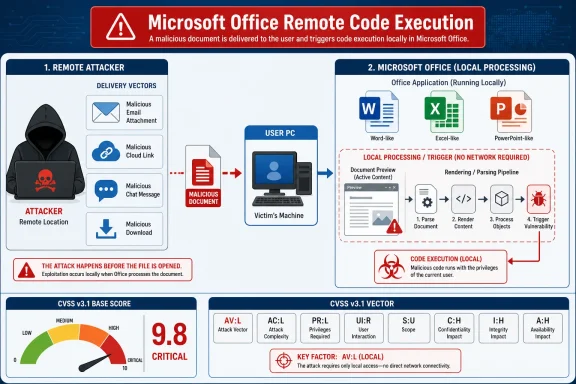 Microsoft’s Wording Describes the Attacker, While CVSS Describes the Execution Path
The phrase “Remote Code Execution” has always carried a certain drama in vulnerability advisories. It sounds like a packet hits a service, a shell appears, and the attacker never needs the victim to do anything. That is one kind of RCE, but it is not the only kind Microsoft has historically placed under the label.In Office vulnerabilities, the more common pattern is document-mediated execution. An attacker crafts a malicious Word, Excel, PowerPoint, or related Office file, then sends it over email, chat, cloud storage, a file share, or a download link. The attacker is remote in the ordinary sense: they are not logged into the target system and do not need physical access to it.
CVSS, however, asks a narrower question when it scores Attack Vector. It asks where the vulnerable component must be reached from and how exploitation is initiated. If successful exploitation depends on the victim’s machine processing a malicious file locally, the vector can be scored as Local even when the attacker delivered that file from across the internet.
That is why CVE-2026-44824 can wear an RCE title while carrying AV:L. The “remote” part describes the attacker’s position and the impact. The “local” part describes the mechanism by which the vulnerable code is reached.
“Local” Is Not a Comfort Word
The most common mistake in reading AV:L is to treat it as a downgrade from “serious” to “mostly theoretical.” In enterprise risk meetings, “local attack vector” often gets mentally translated into “the attacker already has the box.” That translation is sometimes correct for privilege escalation bugs, but it is often misleading for file-parsing vulnerabilities.Office sits in the dangerous middle ground between local software and network-delivered content. It is a local application, but it spends its life opening documents that arrive from remote people, remote services, and remote workflows. The parser runs locally, the memory corruption or logic flaw is triggered locally, and the resulting code executes locally under the user’s context.
From the attacker’s perspective, that is still a remote campaign. They can send the lure from another country, automate distribution, and target thousands of users without touching the endpoint directly. From CVSS’s perspective, the vulnerable component was not attacked over a network protocol like SMB, HTTP, or RDP; it was fed hostile content and executed on the victim’s machine.
This is why Microsoft’s own explanation uses the idea of arbitrary code execution as a clarifying term. The exploit gives the attacker a way to run code of their choosing, but the trigger is local processing. The RCE label is about the outcome and the attacker’s distance, not a promise that AV:N will appear in the vector string.
Office Turns Files Into an Attack Surface
Microsoft Office is not merely a document editor. It is a large rendering, parsing, automation, previewing, linking, and compatibility engine wrapped in familiar productivity software. That complexity is why Office vulnerabilities so often look odd when reduced to a single CVSS vector.A crafted document can be passive from the user’s point of view and active from the application’s point of view. Opening, previewing, indexing, converting, or rendering a file may cause Office components to parse embedded structures, fonts, formulas, images, metadata, macros, OLE objects, or legacy formats. If the vulnerable path is reached during that processing, the attacker may not need interactive “code” in the familiar macro sense.
This is also why “the victim needs to execute code from the local machine” should not be read too narrowly. In security-advisory language, that can mean the user opened a file that caused Office to process malicious content. It does not necessarily mean the victim knowingly launched an executable or approved a warning dialog.
The practical lesson is blunt: file types are interfaces. A Word document is not just a bag of text, and an Excel workbook is not just a spreadsheet. In the Office ecosystem, documents are structured inputs to a very powerful local application.
CVSS Is a Scoring Grammar, Not a Headline Writer
The Common Vulnerability Scoring System is useful because it forces vendors and analysts to express risk in a structured way. But structured language creates its own traps. A single metric such as AV:L cannot carry all the social engineering, file-delivery, preview-pane, endpoint-control, and business-process context that determines real-world exposure.Attack Vector is only one piece of the base score. User Interaction, Privileges Required, Attack Complexity, Scope, and the confidentiality, integrity, and availability impacts all matter. A local vector with no privileges required and meaningful impact can still deserve urgent patching, especially if the delivery path is something ordinary users encounter every day.
This is where security teams should resist score worship. A vulnerability with AV:N may be easier to explain to executives, but an AV:L Office bug may be more likely to land in an inbox, sync folder, Teams chat, or third-party document workflow. The rating tells you something important, but it does not tell you whether your finance department receives hundreds of external spreadsheets a week.
Microsoft’s advisory wording is therefore doing something CVSS does not. It communicates the broad exploit class to the public: code execution from afar, usually through a crafted input. CVSS then supplies the mechanical nuance: the malicious input must be processed locally.
The Old RCE Mental Model Is Too Server-Shaped
Many administrators learned RCE through server vulnerabilities. Think exposed Exchange, SharePoint, IIS, VPN appliances, Java deserialization flaws, and unauthenticated network services. In that world, “remote” usually means the attacker sends packets directly to a listening service and code runs without a local user opening anything.Desktop RCE is different. The target is not always a daemon waiting on a port; it may be a user workflow waiting for a document. The exploit path may begin with email, but the vulnerable component is reached only when the endpoint renders or opens the content.
That distinction matters because server-shaped intuition can lead to bad triage. A team may patch internet-facing systems first and postpone Office because AV:L appears to imply a lower operational risk. But Office is one of the most exposed parsing engines in the enterprise precisely because employees are paid to open files from other people.
Attackers understand this. Phishing, business email compromise, fake invoices, resume lures, procurement documents, and shared-drive planting all exploit the same truth: people and organizations must process untrusted documents to function. A local parser bug in a ubiquitous application can be a remote intrusion path in practice.
The Real Boundary Is Between Delivery and Trigger
The cleanest way to understand CVE-2026-44824 is to separate delivery from trigger. The delivery can be remote. The trigger is local. The impact is code execution.Delivery is how the attacker gets the malicious content near the victim. That could be email, a cloud link, a compromised website, a collaboration platform, removable media, or a file copied into a shared location. CVSS does not automatically treat all remote delivery as a network attack vector.
The trigger is the moment the vulnerable component processes the content. For Office bugs, that usually happens inside the local Office application or a related preview/rendering component. If exploitation requires that local processing step, AV:L can be the correct score.
The impact is what happens after the vulnerability is exploited. If the attacker can run code, alter data, steal information, or install a payload in the user’s context, the security consequence is severe regardless of whether the triggering parser lived on a desktop application rather than a network service.
That three-part model resolves the apparent contradiction. Remote attacker, local trigger, code execution impact. Microsoft’s title compresses the first and third ideas; CVSS exposes the second.
Preview Panes and Automated Processing Complicate the Comfort Zone
Office vulnerabilities become more uncomfortable when previewing or automated processing enters the picture. In some Microsoft Office advisories, the Preview Pane is explicitly called out as an attack vector; in others, it is not. That difference is important and should be read carefully for each CVE.If preview is a valid path, the victim may not need to double-click the attachment in the ordinary sense. Selecting a message or allowing a document preview may be enough to cause local parsing. That still fits the AV:L concept if the vulnerable code is reached through local rendering, but the user-experience barrier is much lower.
Even when preview is not involved, enterprises often process Office files automatically. Email security gateways detonate attachments, document management systems index content, endpoint search tools parse metadata, and collaboration platforms generate previews. Depending on the vulnerable component and product boundary, those processing paths can change who is exposed and how urgent mitigation becomes.
The advisory details matter here more than the title. Defenders should look for Microsoft’s notes about user interaction, preview pane exposure, exploitability assessment, affected Office versions, and available mitigations. The RCE label tells you the class of consequence; the fine print tells you how the exploit is likely to arrive.
“Remote” Still Matters Because the Attacker Does Not Need an Account
One reason Microsoft keeps the RCE language is that it distinguishes these bugs from purely local privilege abuses. In many Office RCE scenarios, the attacker does not begin with credentials on the target machine. They begin with a file and a way to convince or cause the victim environment to process it.That is materially different from a vulnerability that requires an attacker to already have a local account, shell access, or physical access. It expands the pool of plausible attackers from insiders and post-compromise actors to anyone who can deliver content into the victim’s workflow. In the modern workplace, that is a large population.
The distinction also matters for home users. A consumer who receives a malicious Office document from an email account that appears to belong to a contractor, school, bank, or friend is facing a remote threat even if the CVSS vector says Local. The attacker’s keyboard is not on the victim’s desk, but the payload is designed to make the victim’s own machine do the dangerous work.
For administrators, the right mental model is not “local means low risk.” It is “local means I should identify the local action or processing step required.” If that action is common, invisible, or easily induced, the operational risk can be high.
Patch Priority Should Follow Exposure, Not Just Semantics
A Microsoft Office RCE with AV:L belongs in a different bucket from a wormable network service flaw, but it does not belong in the backlog by default. The correct priority depends on how exposed the affected application is in the organization. A locked-down kiosk with no Office document intake is not the same as a legal department reviewing external contracts all day.Security teams should ask how malicious Office content could enter the environment. Email attachments are the obvious route, but cloud collaboration and file-sharing workflows are just as important. Attackers increasingly exploit the fact that modern users trust documents delivered through legitimate platforms.
Administrators should also look at update mechanics. Microsoft 365 Apps, Office LTSC, Office on Mac, and server-side Office components may have different servicing paths and timelines. A patch that lands automatically for one channel may require testing and deployment work in another.
Mitigations can help, but they are rarely a substitute for patching. Protected View, attachment detonation, Attack Surface Reduction rules, macro restrictions, file-block policies, and email filtering all reduce risk. None of them should become an excuse to leave a code execution flaw unpatched across a broad Office estate.
The Language Problem Is Bigger Than This CVE
CVE-2026-44824 is a useful example because it exposes a broader weakness in vulnerability communication. Security labels are overloaded. “Remote,” “local,” “critical,” “important,” “exploitation less likely,” and “user interaction required” all mean specific things in specific frameworks, but readers often import their own meanings.Vendors write for multiple audiences at once. A title must be short enough for dashboards, patch reports, and search results. A CVSS vector must be formal enough for scoring systems. An FAQ entry must translate the gap for humans who reasonably wonder why “remote” and “local” appear in the same advisory.
That layered communication creates friction, but it is not necessarily evidence of inconsistency. Microsoft is using “Remote Code Execution” as a vulnerability impact category: an attacker can cause code to run without being locally present. CVSS is using “Local” as an attack-vector category: exploitation requires local interaction with or processing by the vulnerable component.
The problem is that dashboards flatten both into adjacent fields. A busy admin sees “Remote Code Execution” and “AV:L” and must mentally reconcile them while triaging dozens of patches. Microsoft’s FAQ answer is short because the explanation is conceptually simple, but the implications are operationally messy.
The Defender’s Translation Layer Matters Most
The job for IT is to translate advisory language into controls. For CVE-2026-44824, that means treating the issue as a remotely deliverable Office code execution risk that depends on local processing. It is not the same as an unauthenticated network worm, but it is also not a harmless local-only bug.That translation should shape detection and response. Mail telemetry, attachment sandboxing, endpoint alerts, Office child-process monitoring, suspicious document provenance, and unusual script or executable launches from Office processes are all relevant. The vulnerability may be patched through Office, but exploitation often leaves traces in the broader endpoint and identity environment.
It should also shape user guidance. Telling users “don’t open suspicious attachments” is not enough, and it has not been enough for years. Organizations need technical controls that assume some documents will be opened because the business requires it.
The best security posture is layered: patch quickly, reduce the ability of Office to spawn dangerous child processes, restrict active content, harden preview and attachment handling where appropriate, and monitor for the post-exploitation behaviors that follow successful document-based attacks. The CVSS vector helps describe the doorway; it does not replace the building plan.
The Practical Reading for CVE-2026-44824 Is Narrow but Important
The most useful interpretation of Microsoft’s wording is that CVE-2026-44824 is an Office flaw that can let an attacker achieve code execution through content processed on the victim system. The attacker may be remote, but the vulnerable operation occurs locally. That is the entire “remote title, local vector” puzzle.This distinction should prevent both overreaction and underreaction. It is not evidence that the advisory is mislabeled. It is also not permission to dismiss the bug because AV:L appears in the vector.
For many WindowsForum readers, the right home-lab analogy is simple: if you email yourself a malicious document and open it on your PC, the attack came from outside but executed through local Office processing. CVSS calls that local because the vulnerable component was not directly reached over the network. Microsoft calls it RCE because the attacker’s goal is to run code on your machine.
For enterprise readers, the analogy scales into a workflow problem. Every process that accepts external Office files is a possible delivery channel. Every endpoint or service that parses those files is a possible trigger point.
The Patch-Triage Sentence Admins Should Remember
CVE-2026-44824 is best read as a remotely deliverable, locally triggered Microsoft Office code execution vulnerability, not as a contradiction between Microsoft’s title and the CVSS vector. That wording keeps the important pieces in view without letting one label swallow the others.- The word “remote” in Microsoft’s title refers to the attacker’s location and the fact that the attacker does not need to be physically present at the victim’s machine.
- The CVSS value AV:L means the vulnerable Office code is exploited through local processing on the target system rather than through direct network access to the vulnerable component.
- The practical attack path is typically a crafted file or content stream that the victim opens, previews, receives, or otherwise causes Office-related components to process.
- The impact can still be serious because successful exploitation may allow arbitrary code to run in the context of the affected user or application.
- Patch priority should be based on Office exposure, document intake, preview behavior, user interaction requirements, and compensating controls—not on the word “local” alone.
References
- Primary source: MSRC
Published: 2026-06-09T07:00:00-07:00
Security Update Guide - Microsoft Security Response Center
 msrc.microsoft.com
- Related coverage: threats.kaspersky.com
Kaspersky Threats — KLA90842
threats.kaspersky.com
- Official source: support.microsoft.com
Description of the security update for Office Online Server: January 13, 2026 (KB5002824) | Microsoft Support
Description of the security update for Office Online Server: January 13, 2026 (KB5002824)support.microsoft.com - Related coverage: windowsforum.com
CVE-2026-26110 Explained: Remote Delivery, Local Execution in Office | Windows Forum
Microsoft’s advisory for CVE-2026-26110 labels the defect as a “Remote Code Execution” (RCE) vulnerability in Microsoft Office, yet the published CVSS...windowsforum.com - Related coverage: bleepingcomputer.com
- Related coverage: first.org
CVSS v3.1 User Guide
 www.first.org
- Official source: microsoft.com
Security Update Guide FAQs
Frequently asked questions on the Security Update Guidewww.microsoft.com
- Official source: learn.microsoft.com
Microsoft Security Bulletin MS17-014 - Important | Microsoft Learn
learn.microsoft.com - Related coverage: windowscentral.com
Microsoft Office Critical Security Flaws: How to Fix Them | Windows Central
Microsoft\u2019s March Patch Tuesday addresses two critical Office vulnerabilities, but don't let the "local access" label fool you into skipping these updates.www.windowscentral.com
