

Microsoft labels CVE-2026-44820 as a Microsoft Excel Remote Code Execution vulnerability because a remote attacker can cause code to run on a victim’s computer, even though the CVSS attack vector is Local because the vulnerable Excel processing happens on the target machine. The apparent contradiction is really a vocabulary collision between a product-security headline and a scoring-system field. For defenders, the important lesson is not that the bug is “less remote” than it sounds, but that document-based attacks often cross the network first and detonate locally later.
The phrase “Remote Code Execution” has become one of the most heavily loaded labels in security. To many administrators, it implies a network-facing service, a listening port, and an attacker sending packets directly into a vulnerable process. That is the classic nightmare: no user click, no local staging, just code execution from across the internet.
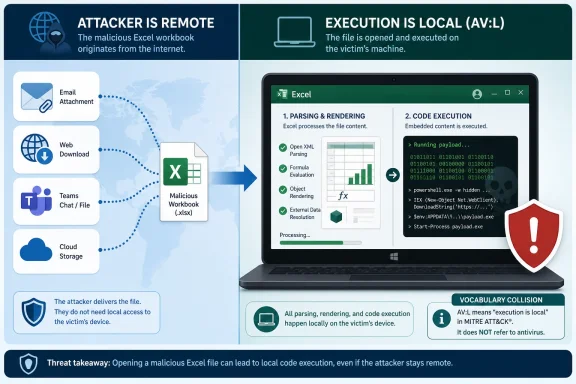
Office vulnerabilities often work differently. An attacker may be remote in every practical sense: they send a malicious spreadsheet by email, host it on a file-sharing site, place it in a Teams chat, or lure a user to download it from the web. But the exploit path still depends on Excel, running on the victim’s local system, parsing or opening the crafted content.
That is why CVE-2026-44820 can carry both ideas at once. The attacker is remote; the exploit trigger is local. Microsoft’s own explanation makes that distinction explicit: “Remote” in the title refers to the attacker’s location, while the attack itself is carried out locally.
This is not merely semantic hair-splitting. It changes how defenders should read the advisory, how they should prioritize the patch, and how they should explain risk to users who may otherwise assume “local” means “someone already has hands on the machine.”
That is why AV:L appears in so many file-parsing vulnerabilities. A malicious Excel workbook may arrive from the internet, but Excel generally processes that workbook locally. The code path that fails is not necessarily a remote service accepting inbound connections; it is the local application consuming crafted input.
This is especially common in Office, PDF readers, image libraries, archive tools, and media players. The attacker can be on the other side of the world, but the vulnerable parser runs on the user’s endpoint. CVSS captures that second part.
The result feels counterintuitive because ordinary language collapses delivery and execution into one story. Security scoring separates them. “Remote Code Execution” describes the outcome and adversary posture; “AV:L” describes the exploit mechanics.
Once the workbook is opened, previewed, indexed, rendered, or otherwise handled, the local Excel process becomes the place where the bug matters. If exploitation succeeds, code runs with the privileges available to that user or process. That is why user interaction is often part of the vector, and why endpoint controls still matter.
This is also why “local” should not be read as reassuring. In enterprise environments, users open documents all day. Finance departments open spreadsheets from vendors, HR opens attachments from applicants, sales teams open price sheets, and executives open files from people they do not know well. A vulnerability that requires a document to be processed locally still has a large attack surface if the business runs on documents.
The uncomfortable reality is that Microsoft Office is both productivity software and an attack surface. Excel is trusted, ubiquitous, and deeply integrated into workflows. That combination makes “send a file, wait for local processing” a perfectly viable remote attack pattern.
In practice, the industry often uses RCE broadly. A browser bug triggered by a malicious web page is RCE. A mail client bug triggered by a crafted message may be RCE. A document parser bug triggered by a malicious attachment is also frequently called RCE, even when the CVSS Attack Vector is Local.
That broad usage is not perfect, but it has staying power because it communicates severity quickly. If a vulnerability allows attacker-controlled code to run on a victim system, defenders need to know that immediately. The exact CVSS vector then supplies the operational nuance.
For CVE-2026-44820, that nuance is the difference between “an attacker can directly hit Excel across the network” and “an attacker can remotely deliver content that causes local Excel code execution when processed.” Those are not the same threat model, but both can be serious.
That is the bucket where many document attacks live. The user does not need to understand that they are launching a local exploit chain. Opening a spreadsheet, previewing a file, or allowing an application to inspect content can be enough, depending on the vulnerability and the affected feature.
For administrators, this means AV:L should trigger a second question: local in what sense? If the answer is “a malicious file must be opened or processed,” the bug may still be phishing-friendly and internet-deliverable. If the answer is “the attacker must already have local shell access,” the operational urgency may be different.
Microsoft’s advisory language tries to compress this distinction into a short explanation. It succeeds technically, but it also exposes how awkward vulnerability naming has become. One field says Local. The title says Remote. Both are defensible, but neither tells the whole story alone.
But many organizations are built around exactly those workflows. A law firm, accounting team, procurement office, or school district may treat spreadsheets as routine external input. In those environments, “requires a user to open a file” is not a meaningful barrier. It is Tuesday.
This is where patch management needs context. If Excel is broadly deployed, if users routinely receive external workbooks, or if preview/automation features process Office files, the bug deserves attention even if the CVSS vector says Local. The exploit chain may not begin with a packet against a listening service, but it can still begin outside the organization.
Security teams should also avoid over-rotating on the word “Remote.” Not every RCE title implies internet-wide scanning risk. The more useful question is whether an attacker can get malicious content into a place where Excel will process it. If the answer is yes, the remote attacker has a plausible path.
Email filtering, attachment detonation, Mark of the Web handling, Protected View, endpoint detection, application control, and least-privilege user accounts all matter. None is a perfect substitute for the security update, but each can reduce the odds that a malicious workbook turns into code execution.
Admins should also pay attention to preview behavior. In past Office-class vulnerabilities, preview panes and automatic rendering paths have mattered because they blur the line between “opened” and “processed.” If an advisory states that preview is an attack vector, user guidance must be stricter than “do not double-click suspicious files.”
The broader point is that document-handling software should be treated like a boundary-crossing component. A spreadsheet from outside the organization is not just business data; it is structured input for a large, complex parser. CVE-2026-44820 is another reminder that productivity files deserve the same suspicion as executables, even when they look ordinary.
That mismatch can produce two bad outcomes. Some teams panic as if every RCE is a remotely reachable server flaw. Others dismiss the issue because Local sounds like post-compromise territory. Both readings are too blunt.
A better reading is: this is code execution reachable through local processing of attacker-supplied content. That phrasing is less dramatic, but it is operationally clearer. It tells the mail team, endpoint team, and patch team why they all have a role.
The security industry loves compact labels, but compact labels often move faster than meaning. “Remote” tells you where the adversary may be. “Local” tells you where the vulnerable action occurs. “Code execution” tells you why the advisory matters.
 Microsoft’s Wording Is Clumsy, but Not Random
The phrase “Remote Code Execution” has become one of the most heavily loaded labels in security. To many administrators, it implies a network-facing service, a listening port, and an attacker sending packets directly into a vulnerable process. That is the classic nightmare: no user click, no local staging, just code execution from across the internet.Office vulnerabilities often work differently. An attacker may be remote in every practical sense: they send a malicious spreadsheet by email, host it on a file-sharing site, place it in a Teams chat, or lure a user to download it from the web. But the exploit path still depends on Excel, running on the victim’s local system, parsing or opening the crafted content.
That is why CVE-2026-44820 can carry both ideas at once. The attacker is remote; the exploit trigger is local. Microsoft’s own explanation makes that distinction explicit: “Remote” in the title refers to the attacker’s location, while the attack itself is carried out locally.
This is not merely semantic hair-splitting. It changes how defenders should read the advisory, how they should prioritize the patch, and how they should explain risk to users who may otherwise assume “local” means “someone already has hands on the machine.”
CVSS Measures the Route to the Vulnerable Code, Not the Attacker’s Zip Code
The CVSS Attack Vector field answers a narrow question: how must the vulnerability be reached? If the vulnerable component is exploited over a network protocol, the answer may be Network. If the vulnerable component is reached only after content is present and processed on the victim machine, the answer may be Local.That is why AV:L appears in so many file-parsing vulnerabilities. A malicious Excel workbook may arrive from the internet, but Excel generally processes that workbook locally. The code path that fails is not necessarily a remote service accepting inbound connections; it is the local application consuming crafted input.
This is especially common in Office, PDF readers, image libraries, archive tools, and media players. The attacker can be on the other side of the world, but the vulnerable parser runs on the user’s endpoint. CVSS captures that second part.
The result feels counterintuitive because ordinary language collapses delivery and execution into one story. Security scoring separates them. “Remote Code Execution” describes the outcome and adversary posture; “AV:L” describes the exploit mechanics.
The Spreadsheet Is the Delivery Vehicle, Excel Is the Blast Chamber
For Excel bugs, the attacker’s job is usually to get a crafted workbook in front of the victim or some automated component that processes the file. The file may travel through email, cloud storage, instant messaging, or a browser download. None of that necessarily makes the vulnerable Excel code reachable over the network in the CVSS sense.Once the workbook is opened, previewed, indexed, rendered, or otherwise handled, the local Excel process becomes the place where the bug matters. If exploitation succeeds, code runs with the privileges available to that user or process. That is why user interaction is often part of the vector, and why endpoint controls still matter.
This is also why “local” should not be read as reassuring. In enterprise environments, users open documents all day. Finance departments open spreadsheets from vendors, HR opens attachments from applicants, sales teams open price sheets, and executives open files from people they do not know well. A vulnerability that requires a document to be processed locally still has a large attack surface if the business runs on documents.
The uncomfortable reality is that Microsoft Office is both productivity software and an attack surface. Excel is trusted, ubiquitous, and deeply integrated into workflows. That combination makes “send a file, wait for local processing” a perfectly viable remote attack pattern.
Arbitrary Code Execution Is the More Precise Phrase
Microsoft’s note that this class of issue is sometimes called Arbitrary Code Execution, or ACE, is useful because it removes some ambiguity. ACE focuses on what the attacker gains: the ability to run code of their choosing. RCE adds a common attacker-location assumption: the adversary does not need to be physically present at the machine.In practice, the industry often uses RCE broadly. A browser bug triggered by a malicious web page is RCE. A mail client bug triggered by a crafted message may be RCE. A document parser bug triggered by a malicious attachment is also frequently called RCE, even when the CVSS Attack Vector is Local.
That broad usage is not perfect, but it has staying power because it communicates severity quickly. If a vulnerability allows attacker-controlled code to run on a victim system, defenders need to know that immediately. The exact CVSS vector then supplies the operational nuance.
For CVE-2026-44820, that nuance is the difference between “an attacker can directly hit Excel across the network” and “an attacker can remotely deliver content that causes local Excel code execution when processed.” Those are not the same threat model, but both can be serious.
The Local Vector Does Not Mean the Attacker Is Local
The most dangerous misunderstanding is to equate AV:L with “the attacker must already be logged into the computer.” Sometimes that is true, particularly for privilege-escalation bugs that require a local account. But CVSS Local also covers cases where the attacker relies on a user to perform an action that causes local processing.That is the bucket where many document attacks live. The user does not need to understand that they are launching a local exploit chain. Opening a spreadsheet, previewing a file, or allowing an application to inspect content can be enough, depending on the vulnerability and the affected feature.
For administrators, this means AV:L should trigger a second question: local in what sense? If the answer is “a malicious file must be opened or processed,” the bug may still be phishing-friendly and internet-deliverable. If the answer is “the attacker must already have local shell access,” the operational urgency may be different.
Microsoft’s advisory language tries to compress this distinction into a short explanation. It succeeds technically, but it also exposes how awkward vulnerability naming has become. One field says Local. The title says Remote. Both are defensible, but neither tells the whole story alone.
Patch Priority Should Follow the Workflow, Not Just the Acronym
A spreadsheet RCE with AV:L is not the same as a wormable server vulnerability. It usually requires a delivery path and some form of local handling. That makes exploitation more dependent on social engineering, document workflows, and endpoint exposure.But many organizations are built around exactly those workflows. A law firm, accounting team, procurement office, or school district may treat spreadsheets as routine external input. In those environments, “requires a user to open a file” is not a meaningful barrier. It is Tuesday.
This is where patch management needs context. If Excel is broadly deployed, if users routinely receive external workbooks, or if preview/automation features process Office files, the bug deserves attention even if the CVSS vector says Local. The exploit chain may not begin with a packet against a listening service, but it can still begin outside the organization.
Security teams should also avoid over-rotating on the word “Remote.” Not every RCE title implies internet-wide scanning risk. The more useful question is whether an attacker can get malicious content into a place where Excel will process it. If the answer is yes, the remote attacker has a plausible path.
Defenses Live Between the Mailbox and the Process
The practical defense model for this kind of flaw sits in layers. Patching Excel or Microsoft 365 Apps is the center of gravity, because the vulnerability is in the product. But the surrounding controls determine how much opportunity an attacker has before the patch lands everywhere.Email filtering, attachment detonation, Mark of the Web handling, Protected View, endpoint detection, application control, and least-privilege user accounts all matter. None is a perfect substitute for the security update, but each can reduce the odds that a malicious workbook turns into code execution.
Admins should also pay attention to preview behavior. In past Office-class vulnerabilities, preview panes and automatic rendering paths have mattered because they blur the line between “opened” and “processed.” If an advisory states that preview is an attack vector, user guidance must be stricter than “do not double-click suspicious files.”
The broader point is that document-handling software should be treated like a boundary-crossing component. A spreadsheet from outside the organization is not just business data; it is structured input for a large, complex parser. CVE-2026-44820 is another reminder that productivity files deserve the same suspicion as executables, even when they look ordinary.
The Naming Problem Is Now a Defender Problem
Microsoft is not alone in using RCE as a headline category while CVSS supplies more granular mechanics. The problem is that many dashboards, ticketing systems, and vulnerability reports flatten both into a single severity narrative. A scanner may surface “Remote Code Execution,” while an analyst sees AV:L and downgrades it too aggressively.That mismatch can produce two bad outcomes. Some teams panic as if every RCE is a remotely reachable server flaw. Others dismiss the issue because Local sounds like post-compromise territory. Both readings are too blunt.
A better reading is: this is code execution reachable through local processing of attacker-supplied content. That phrasing is less dramatic, but it is operationally clearer. It tells the mail team, endpoint team, and patch team why they all have a role.
The security industry loves compact labels, but compact labels often move faster than meaning. “Remote” tells you where the adversary may be. “Local” tells you where the vulnerable action occurs. “Code execution” tells you why the advisory matters.
What Windows Admins Should Actually Carry Into Change Control
CVE-2026-44820 is less a contradiction than a test of whether vulnerability triage is reading beyond the headline. The title and the vector are describing different dimensions of the same attack path, and both should inform the response.- Microsoft calls the flaw Remote Code Execution because a remote attacker can cause attacker-controlled code to run on a victim system.
- CVSS lists AV:L because the vulnerable Excel code is exploited through local processing on the target machine.
- The likely risk pattern is malicious-content delivery followed by Excel opening, previewing, or otherwise handling that content.
- Administrators should not treat AV:L as automatically low priority when the affected application routinely processes untrusted files.
- The safest response is to deploy the relevant Microsoft update and keep layered document-handling defenses in place until coverage is complete.
References
- Primary source: MSRC
Published: 2026-06-09T07:00:00-07:00
Security Update Guide - Microsoft Security Response Center
 msrc.microsoft.com
- Related coverage: bleepingcomputer.com
- Official source: microsoft.com
MSRC - Microsoft Security Response Center
The Microsoft Security Response Center is part of the defender community and on the front line of security response evolution. For over twenty years, we have been engaged with security researchers working to protect customers and the broader ecosystem.www.microsoft.com
- Related coverage: techradar.com
This 'fascinating' Microsoft Excel security flaw teams up spreadsheets and Copilot Agent to steal data | TechRadar
There's more than one way to skin an Excel tablewww.techradar.com - Related coverage: first.org
CVSS v3.1 User Guide
 www.first.org
- Related coverage: windowsforum.com
CVE-2026-20955: Remote Code Execution and CVSS AV L Explained | Windows Forum
Title: Why CVE-2026-20955 is Called “Remote Code Execution” Even Though CVSS Says AV:L (Local) Executive summary — short answer The phrasing “Remote Code...windowsforum.com
