

CVE-2026-55141 is a Microsoft Excel code-execution vulnerability that requires a user to open or otherwise process malicious content on the affected device. That requirement gives it a Local attack vector in CVSS, even though Microsoft classifies the security impact as remote code execution.
Microsoft disclosed the flaw on July 14, 2026, as part of its monthly security release. The Microsoft Security Response Center describes it as a stack-based buffer overflow that allows an unauthorized attacker to execute code locally. Its CVSS 3.1 score is 7.8, with the vector
The apparently conflicting terminology reflects two different measurements. CVSS Attack Vector describes where exploitation occurs, while “remote code execution” describes the result and the attacker’s relationship to the target.
In this context, remote does not mean that an attacker can connect directly to Excel over the network and send it an exploit. Excel is not acting like an exposed web server, Remote Desktop endpoint, or listening network service.
Instead, the attacker can prepare a malicious workbook or other Excel-compatible content somewhere else and deliver it to the victim. The attacker may use email, Microsoft Teams, a cloud-storage link, a compromised website, an instant-messaging platform, or another file-transfer mechanism. The exploit runs only after Excel processes that content on the target machine.
Microsoft explains that “remote” in the vulnerability title refers to the attacker’s location. The attacker does not need to be sitting at the victim’s keyboard or already logged on to the PC. The malicious input can originate outside the organization, but the vulnerable operation occurs inside the locally running copy of Excel.
This category is also commonly described as arbitrary code execution, or ACE. That term avoids some of the ambiguity because it focuses on the attacker’s ability to make the affected application execute unintended code rather than on how the malicious document reached the device.
The final confidentiality, integrity, and availability metrics are all rated High. Successful exploitation could therefore let attacker-controlled code access data, alter information, and disrupt the affected system. The code would generally run in the security context of the user operating Excel, making account privileges an important practical limit on the damage.
A standard user account can reduce the immediate reach of an exploit, but it does not make the vulnerability harmless. The attacker may still be able to steal documents available to that user, access browser or application data, modify files, establish persistence within the profile, or launch a second exploit intended to elevate privileges.
First, the attacker delivers a malicious file from a remote location. That is the social-engineering and content-delivery stage, and it may occur entirely over the internet.
Second, the victim’s locally installed Excel application opens or processes the file. The stack-based buffer overflow is triggered within that local process, and attacker-supplied code begins running on the victim’s machine.
CVSS assigns the Attack Vector according to the second stage. It asks how the vulnerable component is reached at exploitation time, not how far the file traveled or whether the person who created it was in another country.
This distinction appears across document-reader and media-processing vulnerabilities. A Word document, spreadsheet, PDF, image, archive, or video can be created and delivered remotely while still receiving an
“Remote code execution” remains useful as an impact label because it warns defenders that an outside attacker can potentially achieve code execution without first receiving legitimate access to the machine. It should not, however, be read as shorthand for “unauthenticated exploitation over a network socket.”
For MSI-based Excel 2016 installations, Microsoft’s July Office release provides KB5002886. The corrected Excel 2016 version is 16.0.5561.1001, according to the affected-version information supplied with the CVE.
Microsoft identifies version 16.111.26071215 as the corrected threshold for the listed Mac editions. Office Online Server is affected below version 16.0.10417.20175. Microsoft 365 Apps and supported perpetual Click-to-Run installations should receive the relevant corrected Office build through their configured update channels.
Administrators should not assume that Windows Update compliance alone proves Office has been patched. Microsoft 365 Apps may follow a separate servicing channel, Office 2016 MSI deployments can depend on WSUS or endpoint-management approvals, and Office Online Server requires its own maintenance workflow.
Inventory checks should cover both the installed Office edition and its actual build. Environments using delayed Microsoft 365 Apps channels should confirm when the security build becomes available under their channel policy rather than treating the presence of July’s Windows cumulative update as sufficient evidence.
Until updates are deployed, organizations can reduce risk by limiting unexpected spreadsheet attachments and encouraging users to verify externally supplied workbooks before opening them. Security teams should also watch for Excel spawning unusual child processes, writing executables or scripts into user-writable directories, or launching command interpreters after a document is opened.
CVE-2026-55141 is therefore neither a contradiction nor a network-service vulnerability disguised by Microsoft’s title. It is an RCE-class outcome reached through a local, user-assisted execution path: the attacker can remain remote, but the vulnerable copy of Excel and the code it is tricked into running are on the victim’s device.
Microsoft disclosed the flaw on July 14, 2026, as part of its monthly security release. The Microsoft Security Response Center describes it as a stack-based buffer overflow that allows an unauthorized attacker to execute code locally. Its CVSS 3.1 score is 7.8, with the vector
CVSS:3.1/AV:L/AC:L/PR:N/UI:R/S:U/C:H/I:H/A:H.The apparently conflicting terminology reflects two different measurements. CVSS Attack Vector describes where exploitation occurs, while “remote code execution” describes the result and the attacker’s relationship to the target.
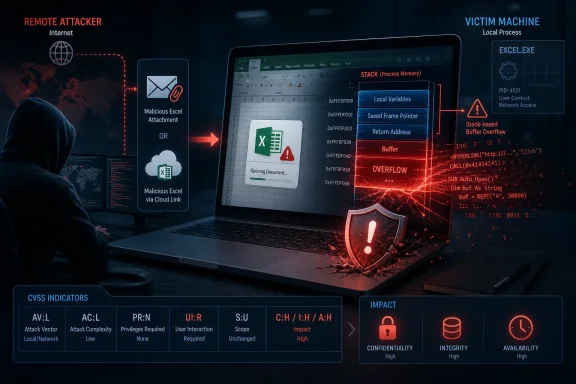 Remote Does Not Mean Network-Reachable
In this context, remote does not mean that an attacker can connect directly to Excel over the network and send it an exploit. Excel is not acting like an exposed web server, Remote Desktop endpoint, or listening network service.Instead, the attacker can prepare a malicious workbook or other Excel-compatible content somewhere else and deliver it to the victim. The attacker may use email, Microsoft Teams, a cloud-storage link, a compromised website, an instant-messaging platform, or another file-transfer mechanism. The exploit runs only after Excel processes that content on the target machine.
Microsoft explains that “remote” in the vulnerability title refers to the attacker’s location. The attacker does not need to be sitting at the victim’s keyboard or already logged on to the PC. The malicious input can originate outside the organization, but the vulnerable operation occurs inside the locally running copy of Excel.
This category is also commonly described as arbitrary code execution, or ACE. That term avoids some of the ambiguity because it focuses on the attacker’s ability to make the affected application execute unintended code rather than on how the malicious document reached the device.
The CVSS Vector Tells the Full Attack Story
The individual CVSS metrics provide a more useful description than the vulnerability title alone.AV:L means exploitation must be initiated through a local execution path. For CVE-2026-55141, the vulnerable Excel process runs on the victim’s system and processes the attacker-controlled input there. A malicious workbook arriving from the internet does not automatically turn the Attack Vector into AV:N.AC:L indicates low attack complexity. Microsoft does not identify unusual race conditions, specialized environmental preparation, or other circumstances outside the attacker’s control as prerequisites for exploitation.PR:N means the attacker does not need existing privileges on the target system before beginning the attack. That distinction matters because the user who opens the file supplies the required local execution context; the attacker does not first need a Windows account or an established foothold.UI:R is the key qualifier. User interaction is required, which is consistent with an attack involving a victim opening or processing malicious content. It separates this flaw from vulnerabilities that can be exploited silently by sending traffic to an exposed service.The final confidentiality, integrity, and availability metrics are all rated High. Successful exploitation could therefore let attacker-controlled code access data, alter information, and disrupt the affected system. The code would generally run in the security context of the user operating Excel, making account privileges an important practical limit on the damage.
A standard user account can reduce the immediate reach of an exploit, but it does not make the vulnerability harmless. The attacker may still be able to steal documents available to that user, access browser or application data, modify files, establish persistence within the profile, or launch a second exploit intended to elevate privileges.
A Malicious Workbook Crosses Two Boundaries
The easiest way to understand the classification is to separate delivery from execution.First, the attacker delivers a malicious file from a remote location. That is the social-engineering and content-delivery stage, and it may occur entirely over the internet.
Second, the victim’s locally installed Excel application opens or processes the file. The stack-based buffer overflow is triggered within that local process, and attacker-supplied code begins running on the victim’s machine.
CVSS assigns the Attack Vector according to the second stage. It asks how the vulnerable component is reached at exploitation time, not how far the file traveled or whether the person who created it was in another country.
This distinction appears across document-reader and media-processing vulnerabilities. A Word document, spreadsheet, PDF, image, archive, or video can be created and delivered remotely while still receiving an
AV:L assessment when a local application must open it. Conversely, a flaw in a listening service that can be triggered directly with network traffic would normally receive AV:N.“Remote code execution” remains useful as an impact label because it warns defenders that an outside attacker can potentially achieve code execution without first receiving legitimate access to the machine. It should not, however, be read as shorthand for “unauthenticated exploitation over a network socket.”
The Patch Covers Current and Perpetual Office Releases
Microsoft lists affected editions across Windows and macOS, including Microsoft 365 Apps for Enterprise, Microsoft Office 2019, Office LTSC 2021, Office LTSC 2024, Microsoft 365 for Mac, Office LTSC for Mac 2021, Office LTSC for Mac 2024, Excel 2016, and Office Online Server.For MSI-based Excel 2016 installations, Microsoft’s July Office release provides KB5002886. The corrected Excel 2016 version is 16.0.5561.1001, according to the affected-version information supplied with the CVE.
Microsoft identifies version 16.111.26071215 as the corrected threshold for the listed Mac editions. Office Online Server is affected below version 16.0.10417.20175. Microsoft 365 Apps and supported perpetual Click-to-Run installations should receive the relevant corrected Office build through their configured update channels.
Administrators should not assume that Windows Update compliance alone proves Office has been patched. Microsoft 365 Apps may follow a separate servicing channel, Office 2016 MSI deployments can depend on WSUS or endpoint-management approvals, and Office Online Server requires its own maintenance workflow.
Inventory checks should cover both the installed Office edition and its actual build. Environments using delayed Microsoft 365 Apps channels should confirm when the security build becomes available under their channel policy rather than treating the presence of July’s Windows cumulative update as sufficient evidence.
File Filtering Helps, but Updating Excel Is the Fix
Email scanning, attachment detonation, Mark of the Web protections, Protected View, and restrictions on downloads from untrusted sources can reduce exposure. None of those controls reliably replaces the corrected Excel binaries, particularly when documents move through trusted collaboration platforms or internal file shares.Until updates are deployed, organizations can reduce risk by limiting unexpected spreadsheet attachments and encouraging users to verify externally supplied workbooks before opening them. Security teams should also watch for Excel spawning unusual child processes, writing executables or scripts into user-writable directories, or launching command interpreters after a document is opened.
CVE-2026-55141 is therefore neither a contradiction nor a network-service vulnerability disguised by Microsoft’s title. It is an RCE-class outcome reached through a local, user-assisted execution path: the attacker can remain remote, but the vulnerable copy of Excel and the code it is tricked into running are on the victim’s device.
References
- Primary source: MSRC
Published: 2026-07-14T07:00:00-07:00
Security Update Guide - Microsoft Security Response Center
 msrc.microsoft.com
- Official source: learn.microsoft.com
- Related coverage: eccentrix.ca
Microsoft Excel Basics Training | ME-55141 | Eccentrix
Learn the essentials of Microsoft Excel worksheets manipulation techniques by attending our Microsoft Excel Basics Training. Attend online, register now!www.eccentrix.ca
