

CVE-2026-56156 is a Microsoft Excel remote code execution vulnerability that requires malicious content to be processed on the victim’s device, which is why its CVSS vector uses the Local attack vector rather than Network. The apparent contradiction comes from two different meanings of “remote”: Microsoft’s title describes where the attacker may be, while CVSS describes how the vulnerable Excel component is reached during exploitation.
Microsoft published the vulnerability on July 14, 2026, as part of its July security releases. The Microsoft Security Response Center identifies the underlying weakness as a heap-based buffer overflow and says successful exploitation could allow an unauthorized attacker to execute code locally.
The National Vulnerability Database records the CVSS 3.1 vector as
In Microsoft vulnerability titles, remote code execution generally means an attacker can cause code of their choosing to run on another person’s system. It does not necessarily mean that the vulnerable application exposes a remotely reachable network service.
Excel is a document-processing application, not a server listening for unauthenticated commands from the internet. The vulnerable operation occurs when Excel running on the target computer processes crafted data and triggers the heap-based buffer overflow.
The attacker can still be remote in the ordinary security sense. A malicious workbook might be delivered through email, a collaboration platform, cloud storage, an instant-messaging service, or a website. The attacker does not need to sit at the victim’s keyboard merely because the CVSS attack vector is Local.
What matters for CVSS is the final path into the vulnerable component. If Excel must open or otherwise process a file on the target device, exploitation takes place through local file-processing capabilities rather than through Excel’s network stack.
Microsoft addresses this distinction directly in its Security Update Guide. The company explains that the word “Remote” refers to the attacker’s location, while the exploit itself is carried out locally. Microsoft also notes that this class of issue is sometimes described more precisely as arbitrary code execution, or ACE.
A vulnerability is scored
The CVSS user guide provides an example closely matching an Office vulnerability: a document-parsing flaw should generally be scored Local regardless of how the document reaches the target. Sending it by email or placing it on a website changes the delivery mechanism, but it does not turn the document parser into a network-facing component.
That separates CVE-2026-56156 from a true
This distinction is easy to miss because “local vulnerability” is often used informally to mean a post-compromise privilege-escalation bug. CVSS uses the term more broadly. A remotely located attacker can exploit an
The
That requirement should not be mistaken for a dependable defense. Email attachments and shared spreadsheets are routine business objects, particularly in finance, operations, sales, and administration. Attackers frequently design document lures around invoices, payroll data, shipping notices, procurement requests, and internal reports precisely because opening those files can appear normal.
For Mac installations, the vulnerability record identifies version 16.111.26071215 as the relevant corrected threshold. Windows administrators should use Microsoft’s Office security release information and their configured Microsoft 365 Apps update channel to verify that managed installations have received the July 14, 2026 fixes.
This matters in environments where Office updates are deferred separately from Windows cumulative updates. Installing the July Windows update does not by itself prove that Click-to-Run Microsoft 365 Apps, Office LTSC, or Mac Office deployments have reached a fixed build.
Administrators should inventory Office versions and channels, force update scans where policy permits, and confirm installation through their normal endpoint-management reporting. Organizations using 32-bit Excel for compatibility with legacy add-ins should pay particular attention, because the CVE record covers both architectures rather than limiting exposure to one build type.
Until patch coverage is confirmed, existing controls around files from external sources remain valuable. Protected View, Microsoft Defender protections, attachment filtering, reputation checks, and restrictions on untrusted downloads can reduce exposure, although none should be treated as a substitute for the vendor update.
The terminology ultimately reflects two separate questions. CVSS
Microsoft published the vulnerability on July 14, 2026, as part of its July security releases. The Microsoft Security Response Center identifies the underlying weakness as a heap-based buffer overflow and says successful exploitation could allow an unauthorized attacker to execute code locally.
The National Vulnerability Database records the CVSS 3.1 vector as
AV:L/AC:L/PR:N/UI:R/S:U/C:H/I:H/A:H, producing a base score of 7.8. In practical terms, the attacker does not need an existing account or elevated privileges, but a user must take an action that causes Excel to process the attacker’s content.
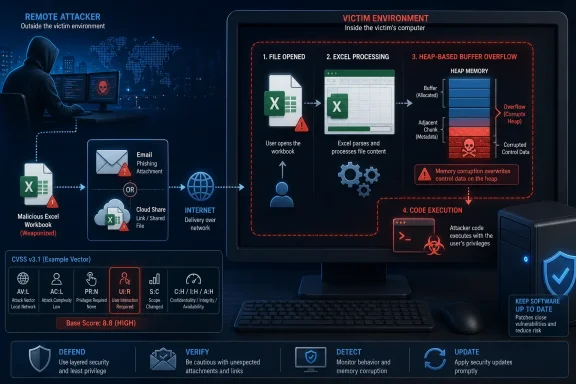 “Remote” Describes the Attacker, Not a Network Service
In Microsoft vulnerability titles, remote code execution generally means an attacker can cause code of their choosing to run on another person’s system. It does not necessarily mean that the vulnerable application exposes a remotely reachable network service.Excel is a document-processing application, not a server listening for unauthenticated commands from the internet. The vulnerable operation occurs when Excel running on the target computer processes crafted data and triggers the heap-based buffer overflow.
The attacker can still be remote in the ordinary security sense. A malicious workbook might be delivered through email, a collaboration platform, cloud storage, an instant-messaging service, or a website. The attacker does not need to sit at the victim’s keyboard merely because the CVSS attack vector is Local.
What matters for CVSS is the final path into the vulnerable component. If Excel must open or otherwise process a file on the target device, exploitation takes place through local file-processing capabilities rather than through Excel’s network stack.
Microsoft addresses this distinction directly in its Security Update Guide. The company explains that the word “Remote” refers to the attacker’s location, while the exploit itself is carried out locally. Microsoft also notes that this class of issue is sometimes described more precisely as arbitrary code execution, or ACE.
CVSS Treats Malicious Documents as Local Attacks
The CVSS definition maintained by FIRST makes the scoring logic explicit. Under CVSS 3.1, an Attack Vector of Local does not mean an attacker must have physical access, an interactive login, or a pre-existing foothold on the computer.A vulnerability is scored
AV:L when the vulnerable component is not attacked through its network stack and exploitation instead depends on local read, write, or execution behavior. FIRST specifically includes cases where an attacker persuades another person to open a malicious document.The CVSS user guide provides an example closely matching an Office vulnerability: a document-parsing flaw should generally be scored Local regardless of how the document reaches the target. Sending it by email or placing it on a website changes the delivery mechanism, but it does not turn the document parser into a network-facing component.
That separates CVE-2026-56156 from a true
AV:N Excel vulnerability. A Network score would imply that Excel, or a component within the vulnerability’s defined scope, could be attacked directly over a network protocol without first relying on local document processing.This distinction is easy to miss because “local vulnerability” is often used informally to mean a post-compromise privilege-escalation bug. CVSS uses the term more broadly. A remotely located attacker can exploit an
AV:L vulnerability if a victim performs the local action required to complete the chain.The Rest of the Vector Shows the Actual Risk
The complete vector provides more useful information than the Attack Vector field in isolation:AC:Lmeans Microsoft considers the attack complexity low, without specialized conditions expected to make exploitation unreliable.PR:Nmeans the attacker does not need prior privileges on the target system.UI:Rconfirms that successful exploitation requires action by someone other than the attacker.S:Umeans the security scope remains unchanged.C:H/I:H/A:Hindicates potentially high impact to confidentiality, integrity, and availability.
The
UI:R value is therefore an important qualification. CVE-2026-56156 is not described as an unauthenticated internet worm that can independently scan for and compromise Excel installations. It depends on a user or user-initiated process participating in the attack.That requirement should not be mistaken for a dependable defense. Email attachments and shared spreadsheets are routine business objects, particularly in finance, operations, sales, and administration. Attackers frequently design document lures around invoices, payroll data, shipping notices, procurement requests, and internal reports precisely because opening those files can appear normal.
Supported Microsoft 365 and Office Releases Need Updates
Affected products listed in the CVE record include Microsoft 365 Apps for enterprise, Microsoft Office LTSC 2021, Microsoft Office LTSC 2024, Office 365 for Mac, Office LTSC for Mac 2021, and Office LTSC for Mac 2024. Both 32-bit and 64-bit Windows editions are represented where applicable.For Mac installations, the vulnerability record identifies version 16.111.26071215 as the relevant corrected threshold. Windows administrators should use Microsoft’s Office security release information and their configured Microsoft 365 Apps update channel to verify that managed installations have received the July 14, 2026 fixes.
This matters in environments where Office updates are deferred separately from Windows cumulative updates. Installing the July Windows update does not by itself prove that Click-to-Run Microsoft 365 Apps, Office LTSC, or Mac Office deployments have reached a fixed build.
Administrators should inventory Office versions and channels, force update scans where policy permits, and confirm installation through their normal endpoint-management reporting. Organizations using 32-bit Excel for compatibility with legacy add-ins should pay particular attention, because the CVE record covers both architectures rather than limiting exposure to one build type.
Until patch coverage is confirmed, existing controls around files from external sources remain valuable. Protected View, Microsoft Defender protections, attachment filtering, reputation checks, and restrictions on untrusted downloads can reduce exposure, although none should be treated as a substitute for the vendor update.
The terminology ultimately reflects two separate questions. CVSS
AV:L asks whether the vulnerable Excel code is reached through a network interface or through processing on the target machine. Microsoft’s “remote code execution” title asks whether an attacker elsewhere can cause arbitrary code to run on that target. For CVE-2026-56156, the attacker may be remote, but the malicious workbook completes the attack locally.References
- Primary source: MSRC
Published: 2026-07-14T07:00:00-07:00
Security Update Guide - Microsoft Security Response Center
 msrc.microsoft.com
- Official source: support.microsoft.com
Description of the security update for Excel 2016: June 9, 2026 (KB5002877) | Microsoft Support
Description of the security update for Excel 2016: June 9, 2026 (KB5002877)support.microsoft.com
