

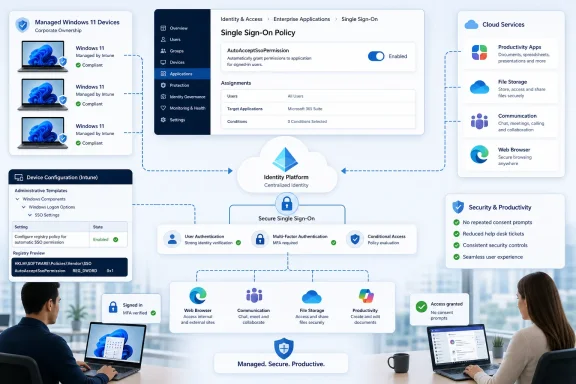
Windows 11 versions 24H2 and 25H2 now include a machine-level policy that lets IT administrators automatically accept single sign-on permission prompts on managed Microsoft Entra devices. Delivered with the July 14, 2026 Patch Tuesday update, the setting can remove an extra authentication decision when employees open Microsoft apps and services.
Neowin first reported the policy after Microsoft documented the change for enterprise customers. When enabled, Windows can use the organizational credentials associated with the user’s Windows session instead of waiting for the user to approve the SSO request manually.
The policy is aimed particularly at organizations operating in the European Economic Area, where Microsoft has changed Windows account behavior to give users more control over whether credentials are shared with other Microsoft software. That consent-oriented design makes sense on personal PCs, but it can add friction to company-owned endpoints where administrators have already established the device, account, and application trust relationship.
Microsoft’s answer is AutoAcceptSsoPermission, a DWORD value under the Windows AAD policy branch:
The setting applies only to managed devices using Microsoft Entra accounts. It does not silently extend the same behavior to personal Microsoft accounts or unmanaged Windows PCs.
Single sign-on allows a user’s existing organizational identity to authenticate supported applications without requiring another complete credential exchange. In Windows environments, Microsoft’s Web Account Manager and Entra integration can provide those credentials to applications such as Microsoft 365 and Edge.
The process is supposed to reduce password prompts while preserving controls including multifactor authentication and Conditional Access. Microsoft’s support documentation explains that adding a work or school account to Windows can make that account available to desktop applications, many of which can then sign in without additional interaction.
The new policy deals with the permission step surrounding that experience. It does not create an Entra identity, join an unmanaged computer to an organization, or turn off the tenant’s broader authentication requirements. Instead, it lets the administrator preapprove Windows’ use of an existing organizational account for SSO on an already managed endpoint.
That distinction matters. Describing the policy as a general-purpose automatic login switch would overstate its reach and could lead administrators to expect it to bypass controls that remain enforced by Entra ID.
Conditional Access, multifactor authentication, application-specific authorization, token lifetime rules, and tenant consent policies remain separate parts of the identity stack. An application can still require additional authentication when organizational policy or risk evaluation demands it.
For employees, however, the visible effect should be straightforward: fewer prompts asking whether Windows may use the signed-in work account with another Microsoft application or service.
An enterprise commonly provisions a PC through Windows Autopilot, joins it to Microsoft Entra ID, enrolls it in Intune, assigns applications, applies compliance requirements, and controls access through Conditional Access. Asking the employee to approve a predictable SSO handoff after all those administrative decisions can become little more than an extra support ticket opportunity.
The new setting effectively allows the organization to make that choice at the device-policy level. It treats automatic acceptance as part of the managed Windows configuration rather than a decision every employee must repeat.
That should be useful for shared deployment standards covering Microsoft 365 Apps, Edge, Teams, OneDrive, and other software that understands the Windows account broker. It may also help organizations maintain a more consistent first-run experience across regional fleets.
Microsoft has nevertheless kept the scope deliberately narrow. According to Neowin’s account of the company’s documentation, the policy requires all of the following:
The update moves Windows 11 25H2 to OS Build 26200.8875 and Windows 11 24H2 to OS Build 26100.8875. Microsoft’s Update Catalog likewise lists KB5101650 packages for both releases and both x64 and Arm64 systems.
That differs from the KB breakdown in Neowin’s initial report, which associated KB5101650 with 25H2 and KB5094126 with 24H2. Microsoft’s own servicing records show that KB5094126 was the June 9, 2026 cumulative update for both versions, while KB5101650 is the July 14 release. Administrators building detection rules should follow Microsoft’s current servicing metadata rather than assigning the June package to 24H2.
The July update is also subject to a separate deployment caveat. Microsoft temporarily withheld KB5101650 from a limited number of Dell PCs with Intel processors after Dell reported an incompatibility that could cause unexpected shutdowns, reduced performance, additional heat, and battery drain. An affected Dell device may therefore lack the SSO policy support until Microsoft and Dell clear the update for installation.
That makes build-based targeting preferable to assuming every device received Patch Tuesday successfully. A deployment script or Intune remediation should confirm that 24H2 systems have reached build 26100.8875 and 25H2 systems have reached build 26200.8875 before relying on the policy.
For traditional environments, a Group Policy preference can create the DWORD under the AAD policy key. Intune customers can use an appropriate policy mechanism, remediation script, or custom configuration, depending on how Microsoft exposes the setting through its management templates and Policy CSP documentation.
Administrators should resist enabling it across the entire tenant before confirming application behavior. A sensible pilot would include EEA users, non-EEA users, Entra-joined PCs, hybrid-joined systems where applicable, and the Microsoft applications most likely to invoke the account broker.
Help-desk teams should also be told what changes. If the deployment works as intended, the disappearance of a consent prompt is expected behavior, not evidence that authentication has been disabled.
Identity and security teams may want to review whether automatic acceptance matches the organization’s employee-notice, privacy, and device-use policies. A company-managed PC gives IT substantial configuration authority, but that does not eliminate the need to document how organizational credentials are made available to applications.
Microsoft says it is working on additional policies that will give organizations more control over authentication experiences on managed devices. For now, AutoAcceptSsoPermission addresses one specific point of friction: after KB5101650 is installed, Entra administrators can decide centrally whether trusted Windows 11 endpoints should stop asking employees to approve an SSO relationship that the organization has already established.
Neowin first reported the policy after Microsoft documented the change for enterprise customers. When enabled, Windows can use the organizational credentials associated with the user’s Windows session instead of waiting for the user to approve the SSO request manually.
The policy is aimed particularly at organizations operating in the European Economic Area, where Microsoft has changed Windows account behavior to give users more control over whether credentials are shared with other Microsoft software. That consent-oriented design makes sense on personal PCs, but it can add friction to company-owned endpoints where administrators have already established the device, account, and application trust relationship.
Microsoft’s answer is AutoAcceptSsoPermission, a DWORD value under the Windows AAD policy branch:
Code:
Registry path:
HKLM\SOFTWARE\Policies\Microsoft\Windows\AAD

Value name:
AutoAcceptSsoPermission

Value type:
DWORD

Enabled value:
1
 Microsoft Hands the Consent Decision to IT
Single sign-on allows a user’s existing organizational identity to authenticate supported applications without requiring another complete credential exchange. In Windows environments, Microsoft’s Web Account Manager and Entra integration can provide those credentials to applications such as Microsoft 365 and Edge.The process is supposed to reduce password prompts while preserving controls including multifactor authentication and Conditional Access. Microsoft’s support documentation explains that adding a work or school account to Windows can make that account available to desktop applications, many of which can then sign in without additional interaction.
The new policy deals with the permission step surrounding that experience. It does not create an Entra identity, join an unmanaged computer to an organization, or turn off the tenant’s broader authentication requirements. Instead, it lets the administrator preapprove Windows’ use of an existing organizational account for SSO on an already managed endpoint.
That distinction matters. Describing the policy as a general-purpose automatic login switch would overstate its reach and could lead administrators to expect it to bypass controls that remain enforced by Entra ID.
Conditional Access, multifactor authentication, application-specific authorization, token lifetime rules, and tenant consent policies remain separate parts of the identity stack. An application can still require additional authentication when organizational policy or risk evaluation demands it.
For employees, however, the visible effect should be straightforward: fewer prompts asking whether Windows may use the signed-in work account with another Microsoft application or service.
The EEA Trade-Off Moves From Users to Administrators
Microsoft’s revised sign-in behavior in the EEA was designed to avoid automatically carrying a Windows account into other Microsoft products without a clear user decision. That gives individuals more control over where their identity is used, but it also creates a mismatch on tightly managed corporate hardware.An enterprise commonly provisions a PC through Windows Autopilot, joins it to Microsoft Entra ID, enrolls it in Intune, assigns applications, applies compliance requirements, and controls access through Conditional Access. Asking the employee to approve a predictable SSO handoff after all those administrative decisions can become little more than an extra support ticket opportunity.
The new setting effectively allows the organization to make that choice at the device-policy level. It treats automatic acceptance as part of the managed Windows configuration rather than a decision every employee must repeat.
That should be useful for shared deployment standards covering Microsoft 365 Apps, Edge, Teams, OneDrive, and other software that understands the Windows account broker. It may also help organizations maintain a more consistent first-run experience across regional fleets.
Microsoft has nevertheless kept the scope deliberately narrow. According to Neowin’s account of the company’s documentation, the policy requires all of the following:
- The PC must be managed by an organization.
- The affected identity must be a Microsoft Entra account.
- The computer must run a supported, fully patched Windows 11 release.
- Personal Microsoft accounts and unmanaged devices remain outside the policy’s scope.
July’s KB Number Covers Both Supported Releases
Administrators should verify the update requirement before deploying the registry value. Microsoft’s July 2026 release documentation identifies KB5101650 as the cumulative security update for both Windows 11 version 25H2 and version 24H2.The update moves Windows 11 25H2 to OS Build 26200.8875 and Windows 11 24H2 to OS Build 26100.8875. Microsoft’s Update Catalog likewise lists KB5101650 packages for both releases and both x64 and Arm64 systems.
That differs from the KB breakdown in Neowin’s initial report, which associated KB5101650 with 25H2 and KB5094126 with 24H2. Microsoft’s own servicing records show that KB5094126 was the June 9, 2026 cumulative update for both versions, while KB5101650 is the July 14 release. Administrators building detection rules should follow Microsoft’s current servicing metadata rather than assigning the June package to 24H2.
The July update is also subject to a separate deployment caveat. Microsoft temporarily withheld KB5101650 from a limited number of Dell PCs with Intel processors after Dell reported an incompatibility that could cause unexpected shutdowns, reduced performance, additional heat, and battery drain. An affected Dell device may therefore lack the SSO policy support until Microsoft and Dell clear the update for installation.
That makes build-based targeting preferable to assuming every device received Patch Tuesday successfully. A deployment script or Intune remediation should confirm that 24H2 systems have reached build 26100.8875 and 25H2 systems have reached build 26200.8875 before relying on the policy.
Deployment Needs the Same Restraint as Any Identity Change
Microsoft says administrators can distribute the setting through Group Policy, Microsoft Intune, Configuration Manager, or another mobile device management platform. Because the value sits underHKLM, it is a device-wide policy rather than a per-user preference.For traditional environments, a Group Policy preference can create the DWORD under the AAD policy key. Intune customers can use an appropriate policy mechanism, remediation script, or custom configuration, depending on how Microsoft exposes the setting through its management templates and Policy CSP documentation.
Administrators should resist enabling it across the entire tenant before confirming application behavior. A sensible pilot would include EEA users, non-EEA users, Entra-joined PCs, hybrid-joined systems where applicable, and the Microsoft applications most likely to invoke the account broker.
Help-desk teams should also be told what changes. If the deployment works as intended, the disappearance of a consent prompt is expected behavior, not evidence that authentication has been disabled.
Identity and security teams may want to review whether automatic acceptance matches the organization’s employee-notice, privacy, and device-use policies. A company-managed PC gives IT substantial configuration authority, but that does not eliminate the need to document how organizational credentials are made available to applications.
Microsoft says it is working on additional policies that will give organizations more control over authentication experiences on managed devices. For now, AutoAcceptSsoPermission addresses one specific point of friction: after KB5101650 is installed, Entra administrators can decide centrally whether trusted Windows 11 endpoints should stop asking employees to approve an SSO relationship that the organization has already established.
References
- Primary source: Neowin
Published: 2026-07-15T18:58:01+00:00
Windows 11 gets new registry policy to give IT admins more control - Neowin
A small but potentially impactful addition in July's Windows 11 updates gives organizations another way to tailor their managed experiences. www.neowin.net
- Official source: learn.microsoft.com
Enroll a Windows device automatically using Group Policy | Microsoft Learn
Learn how to use a Group Policy to trigger autoenrollment to MDM for Active Directory (AD) domain-joined devices.learn.microsoft.com
