

Microsoft’s March 10, 2026 Windows 11 security update, KB5079473, broke Microsoft account sign-ins for some users on Windows 11 24H2 and 25H2, causing apps including Teams Free, OneDrive, Edge, Word, Excel, and Microsoft 365 Copilot to claim there was no internet connection even when the device was online. The fix arrived eleven days later as an out-of-band update, KB5085516, but the episode is more than another entry in the long ledger of Patch Tuesday mishaps. It exposes a brittle seam in modern Windows: the operating system is now so tightly bound to identity, cloud services, and account brokers that a local update can make half the Microsoft ecosystem look offline.
As detailed by Microsoft’s own release health notes and reported by Windows Latest, Windows Central, PCWorld, and TechRadar, the failure was tied specifically to Microsoft account authentication rather than Entra ID sign-ins used by most businesses. That distinction spared many managed enterprise fleets, but it also sharpened the irony. The people most likely to be told “you’ll need the Internet for this” were home users, freelancers, students, and small-office customers — the very audience least equipped to diagnose a broken authentication stack hiding behind a fake network error.
The defining symptom of the bug was not simply that sign-in failed. It was that Windows and Microsoft apps pointed users toward the wrong culprit. A device could browse the web, stream video, sync non-Microsoft services, and still be told by Teams Free or OneDrive that it did not appear to be connected to the internet.
Microsoft described the message as text similar to: “You’ll need the Internet for this. It doesn’t look like you’re connected to the Internet.” That kind of phrasing is meant to be friendly, but in this case it became actively misleading. For a normal user, the implied troubleshooting path is obvious: check Wi-Fi, reboot the router, run the network troubleshooter, maybe blame the ISP.
The reality was more specific and more awkward. The network was not necessarily broken; Microsoft account sign-in was. The device had connectivity, but the authentication path used by certain Microsoft consumer services had entered a bad state after the March security update.
That matters because Windows has trained users to treat internet access as a binary condition. Either the globe icon says you are offline, or your browser says you are online. Modern Windows, however, lives in the gray area between those states, where DNS, captive portal detection, cloud token refresh, account brokers, app-specific identity providers, and Store licensing can fail independently while the rest of the machine appears healthy.
The March 2026 failure is different because it hit the connective tissue between Windows and Microsoft’s cloud-facing identity layer. OneDrive, Teams Free, Microsoft 365 Copilot, Edge, Word, Excel, the Microsoft Store, and Feedback Hub are not just applications installed on Windows. They are also clients in a sprawling authentication system that expects the OS, account broker, service endpoints, cached credentials, and connectivity state to agree.
When that agreement breaks, the user does not experience it as a nuanced authentication defect. They experience it as Windows lying. A login box fails, a productivity app refuses to activate, a sync client stalls, or the Store throws an error code such as 0x800704cf.
Windows Latest reported that some Feedback Hub users saw the problem extend into Edge, Word, Excel, and the Microsoft Store. That is exactly the kind of cross-app pattern that points away from individual app bugs and toward shared infrastructure. If several Microsoft apps fail in the same way after the same OS update, the issue is rarely Teams being Teams or OneDrive being OneDrive. It is usually something beneath them.
For large organizations, that separation is reassuring. Entra ID, formerly Azure Active Directory, is now the authentication backbone for Microsoft 365 tenants, Intune-managed PCs, conditional access policies, and enterprise app sign-ins. If that path had been broken broadly by a Windows security update, the story would have shifted from annoying consumer outage to major IT incident.
But the enterprise carve-out also underscores a long-running divide in Windows reliability. Business customers increasingly get the stronger administrative model: update rings, deferrals, Autopatch, Intune policies, telemetry, and identity systems with dedicated documentation. Home and small-business users get a simpler experience until it stops being simple.
The affected group here includes the people who often sit between consumer and enterprise support models. A freelancer using OneDrive for client files, Word for paid work, and Teams Free for calls is not “just a home user” in any meaningful economic sense. A student locked out of Office apps before a deadline does not care that Entra ID tenants are unaffected. The distinction is technically important, but it does not soften the impact for those caught on the wrong side of it.
That alone tells us how Microsoft judged the severity of the issue. A sign-in failure across common Microsoft apps is not cosmetic. OneDrive is backup, sync, file access, and in many households the closest thing to a document management system. Teams Free is a communication tool. Word and Excel remain core productivity apps. Edge and the Store are gateways to broader platform functionality.
Windows Latest reported that the emergency update appeared as “2026-03 Update (KB5085516) (26200.8039)” and did not seem to download automatically for at least some users. TechRadar likewise noted that users might need to manually select the update rather than wait for it to arrive in the normal background flow.
That creates a familiar Windows paradox. The users who most need the fix may be the least likely to know the fix exists. If the Microsoft Store is failing, Feedback Hub is failing, OneDrive is failing, and sign-in prompts are blaming the internet, the instruction to go find an optional out-of-band update in Windows Update is not exactly frictionless.
A reboot can clear transient network states, restart services, refresh token brokers, reinitialize account components, and trigger pending servicing actions. From Microsoft’s perspective, it is a reasonable first move. From a user’s perspective, it feels like superstition dressed as support.
The deeper problem is not that rebooting sometimes works. The problem is that Windows still tends to collapse complicated failures into vague, user-hostile categories. “No internet” is a category. “Something went wrong” is a category. “Try again later” is a category. None of them tells the user whether the problem is the router, the Microsoft account service, a cached credential, a bad cumulative update, or an app-specific outage.
For sysadmins, event logs and update history provide clues. For home users, the operating system becomes a maze of plausible but wrong fixes. Reinstalling an app, resetting a network adapter, changing DNS, disabling a firewall, signing out and back in, or deleting credentials may all seem logical. In this case, the real answer was a servicing fix.
Microsoft has spent years nudging Windows toward cloud attachment. Setup flows prefer Microsoft accounts. OneDrive is woven into File Explorer. The Store mediates app delivery. Edge promotes profile sync. Microsoft 365 apps expect license and identity checks. Copilot adds another cloud-mediated layer on top.
There are good reasons for some of this. Cloud identity enables device recovery, settings portability, subscription management, family safety controls, and cross-device continuity. For users who live inside Microsoft’s ecosystem, it can make a new PC feel familiar in minutes.
But the trade-off is fragility. A local account on an older version of Windows could be inelegant and isolated, but it was also less dependent on distant services and identity plumbing. A modern Microsoft-account Windows installation is more capable, more integrated, and more exposed to failures that look like app bugs even when they are really platform bugs.
The plain-English message told users they needed internet. The machine often already had it. The code hinted at a connectivity or reachability problem. The root cause was tied to sign-in operations after a Windows update. Each layer was partially true and therefore practically misleading.
This is where Windows still struggles as a consumer product. The system knows more than it says. It knows the update history. It knows whether Microsoft account sign-in is failing across multiple apps. It knows whether the device can reach the public internet. It knows whether Entra ID is in play. It knows whether a known issue has been published for the installed build.
Yet the user-facing diagnosis remained generic. In 2026, that feels increasingly outdated. If Windows Update can deliver a cumulative servicing stack to hundreds of millions of machines, Windows should also be better at saying, “This looks like a known Microsoft account sign-in issue after KB5079473; install KB5085516.”
Microsoft later said the Samsung issue was not caused by current or previous Windows monthly updates. According to Microsoft’s release health information and reporting from Windows Central, Tom’s Hardware, TechSpot, and others, the root cause was tied to Samsung’s Galaxy Connect app. Microsoft and Samsung removed the problematic app version from distribution and provided recovery guidance.
This distinction matters. The Microsoft account sign-in failure appears to have been a Windows update regression. The Samsung C: drive issue, despite arriving in the same general patch-season chaos, was attributed to OEM software. Collapsing both into “Windows Update broke everything” is emotionally understandable but technically wrong.
Still, Microsoft does not get to escape the reputational damage entirely. Windows is the platform, and Windows users experience the platform as a whole. OEM utilities, Store-distributed companion apps, Microsoft account brokers, update stacks, drivers, security patches, and app permissions all meet on the same desktop. When the result is failure, the user sees a Windows PC failing.
OEM utilities often sit close to sensitive parts of the system. They manage device integration, phone pairing, firmware hooks, power profiles, hotkeys, audio routing, display features, and vendor-specific services. Many are useful. Many are also poorly understood by users and rarely audited with the scrutiny applied to core OS components.
When an OEM app can apparently contribute to a condition where the system drive becomes inaccessible, it raises uncomfortable questions about privilege boundaries and validation. A companion app should not be able to turn a laptop into a permissions crime scene. If it can, the ecosystem has allowed convenience software too much room to damage core usability.
Microsoft has tried to modernize this world through the Store, driver policies, and better update channels. But the old PC problem remains: the Windows experience is only as reliable as the software stack the user actually receives. A clean Microsoft image and a retail laptop image are not the same operating environment.
Consumer Windows does not work that way. Home users are encouraged, often correctly, to install security updates promptly. They generally lack test machines, rollback plans, update dashboards, or a help desk. Their security model depends on Microsoft getting the servicing pipeline right most of the time.
That tension is not easy to resolve. Delaying security patches carries real risk. Installing them immediately can also carry real operational risk. Microsoft’s job is to make the second risk small enough that the first argument wins.
When a security update breaks account sign-in across multiple Microsoft apps, it weakens that trust. Not because users should stop patching, but because the system asks them to accept automatic change while providing limited transparency when that change goes wrong. Trust is not merely a matter of update quality; it is also a matter of recovery quality.
But from the user’s perspective, optional delivery is awkward. The symptom is not obscure. It affects sign-in to core Microsoft apps. The fix is known. The affected update is known. The impacted Windows versions are known. This is precisely the scenario where Windows should be aggressive about surfacing the repair to machines that match the risk profile.
Microsoft has the machinery to do this better. Windows Update already knows installed KBs and OS builds. Release health already tracks known issues. The platform can target safeguard holds and compatibility blocks when upgrades might cause trouble. A similar user-facing mechanism for urgent post-patch remediation would make sense.
The fix should not feel like a rumor passed around tech sites. Windows Latest, Windows Central, PCWorld, and TechRadar all performed a public service by amplifying the update path, but ordinary users should not need to read the trade press to discover why Word thinks the internet disappeared.
But the broader story is about confidence in a platform that increasingly presents local and cloud failures through the same glass. When a Microsoft app cannot sign in, is the problem Windows, the app, the account, the network, the cloud service, the Store, the subscription, or the last update? The average user cannot know, and Windows often does not explain.
That opacity is survivable when failures are rare and recovery is automatic. It becomes corrosive when the fix requires users to manually install an out-of-band update that does not necessarily arrive on its own. Every vague dialog box spends a little bit of trust. Every misleading “you’re offline” message spends more.
Microsoft has spent the Windows 11 era trying to make the PC feel like an endpoint in a larger service fabric. That strategy is not inherently wrong. But service fabrics need service-grade diagnostics, not desktop-era shrug messages.
As detailed by Microsoft’s own release health notes and reported by Windows Latest, Windows Central, PCWorld, and TechRadar, the failure was tied specifically to Microsoft account authentication rather than Entra ID sign-ins used by most businesses. That distinction spared many managed enterprise fleets, but it also sharpened the irony. The people most likely to be told “you’ll need the Internet for this” were home users, freelancers, students, and small-office customers — the very audience least equipped to diagnose a broken authentication stack hiding behind a fake network error.
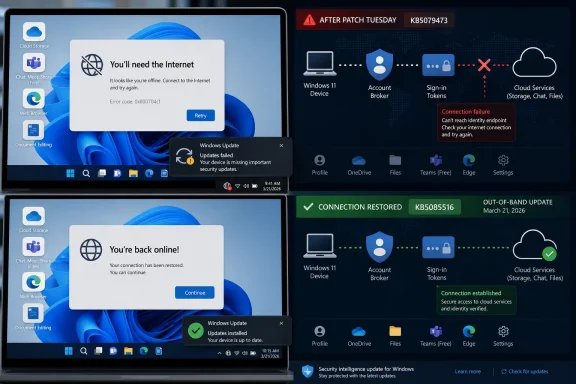 The Error Message Was Wrong, but the Confusion Was Rational
The defining symptom of the bug was not simply that sign-in failed. It was that Windows and Microsoft apps pointed users toward the wrong culprit. A device could browse the web, stream video, sync non-Microsoft services, and still be told by Teams Free or OneDrive that it did not appear to be connected to the internet.Microsoft described the message as text similar to: “You’ll need the Internet for this. It doesn’t look like you’re connected to the Internet.” That kind of phrasing is meant to be friendly, but in this case it became actively misleading. For a normal user, the implied troubleshooting path is obvious: check Wi-Fi, reboot the router, run the network troubleshooter, maybe blame the ISP.
The reality was more specific and more awkward. The network was not necessarily broken; Microsoft account sign-in was. The device had connectivity, but the authentication path used by certain Microsoft consumer services had entered a bad state after the March security update.
That matters because Windows has trained users to treat internet access as a binary condition. Either the globe icon says you are offline, or your browser says you are online. Modern Windows, however, lives in the gray area between those states, where DNS, captive portal detection, cloud token refresh, account brokers, app-specific identity providers, and Store licensing can fail independently while the rest of the machine appears healthy.
Patch Tuesday Has Become a Cloud Dependency Event
Patch Tuesday used to be mostly about local code. Microsoft shipped fixes for kernel bugs, driver issues, browser vulnerabilities, and desktop components. Those updates could still break things, of course, but the blast radius was usually understood in terms of boot failures, printing problems, performance regressions, or application compatibility.The March 2026 failure is different because it hit the connective tissue between Windows and Microsoft’s cloud-facing identity layer. OneDrive, Teams Free, Microsoft 365 Copilot, Edge, Word, Excel, the Microsoft Store, and Feedback Hub are not just applications installed on Windows. They are also clients in a sprawling authentication system that expects the OS, account broker, service endpoints, cached credentials, and connectivity state to agree.
When that agreement breaks, the user does not experience it as a nuanced authentication defect. They experience it as Windows lying. A login box fails, a productivity app refuses to activate, a sync client stalls, or the Store throws an error code such as 0x800704cf.
Windows Latest reported that some Feedback Hub users saw the problem extend into Edge, Word, Excel, and the Microsoft Store. That is exactly the kind of cross-app pattern that points away from individual app bugs and toward shared infrastructure. If several Microsoft apps fail in the same way after the same OS update, the issue is rarely Teams being Teams or OneDrive being OneDrive. It is usually something beneath them.
Microsoft’s Enterprise Escape Hatch Worked — for Enterprises
Microsoft’s most important clarification was that the issue affected Microsoft account sign-ins, not business authentication through Entra ID. That sentence did a lot of work. It told administrators in managed environments that their domain-joined and cloud-managed users were unlikely to be hit by this specific bug, while also confirming that the consumer Microsoft account path was the problem area.For large organizations, that separation is reassuring. Entra ID, formerly Azure Active Directory, is now the authentication backbone for Microsoft 365 tenants, Intune-managed PCs, conditional access policies, and enterprise app sign-ins. If that path had been broken broadly by a Windows security update, the story would have shifted from annoying consumer outage to major IT incident.
But the enterprise carve-out also underscores a long-running divide in Windows reliability. Business customers increasingly get the stronger administrative model: update rings, deferrals, Autopatch, Intune policies, telemetry, and identity systems with dedicated documentation. Home and small-business users get a simpler experience until it stops being simple.
The affected group here includes the people who often sit between consumer and enterprise support models. A freelancer using OneDrive for client files, Word for paid work, and Teams Free for calls is not “just a home user” in any meaningful economic sense. A student locked out of Office apps before a deadline does not care that Entra ID tenants are unaffected. The distinction is technically important, but it does not soften the impact for those caught on the wrong side of it.
The Emergency Patch Proved the Bug Was Serious
Microsoft released KB5085516 on March 21, 2026 as an out-of-band update for Windows 11 24H2 and 25H2, with OS builds 26100.8039 and 26200.8039. Out-of-band updates are not routine housekeeping. They are Microsoft’s mechanism for addressing problems that cannot reasonably wait for the next scheduled cumulative update.That alone tells us how Microsoft judged the severity of the issue. A sign-in failure across common Microsoft apps is not cosmetic. OneDrive is backup, sync, file access, and in many households the closest thing to a document management system. Teams Free is a communication tool. Word and Excel remain core productivity apps. Edge and the Store are gateways to broader platform functionality.
Windows Latest reported that the emergency update appeared as “2026-03 Update (KB5085516) (26200.8039)” and did not seem to download automatically for at least some users. TechRadar likewise noted that users might need to manually select the update rather than wait for it to arrive in the normal background flow.
That creates a familiar Windows paradox. The users who most need the fix may be the least likely to know the fix exists. If the Microsoft Store is failing, Feedback Hub is failing, OneDrive is failing, and sign-in prompts are blaming the internet, the instruction to go find an optional out-of-band update in Windows Update is not exactly frictionless.
The Workaround Was a Reboot, Which Is Not a Strategy
Microsoft’s suggested workaround, before or alongside the emergency update, was essentially to restart the device and keep it connected to the internet during the reboot. That advice may have been technically sound for a state-dependent authentication issue. It is also the kind of guidance that reveals how little diagnostic surface Windows exposes to ordinary users.A reboot can clear transient network states, restart services, refresh token brokers, reinitialize account components, and trigger pending servicing actions. From Microsoft’s perspective, it is a reasonable first move. From a user’s perspective, it feels like superstition dressed as support.
The deeper problem is not that rebooting sometimes works. The problem is that Windows still tends to collapse complicated failures into vague, user-hostile categories. “No internet” is a category. “Something went wrong” is a category. “Try again later” is a category. None of them tells the user whether the problem is the router, the Microsoft account service, a cached credential, a bad cumulative update, or an app-specific outage.
For sysadmins, event logs and update history provide clues. For home users, the operating system becomes a maze of plausible but wrong fixes. Reinstalling an app, resetting a network adapter, changing DNS, disabling a firewall, signing out and back in, or deleting credentials may all seem logical. In this case, the real answer was a servicing fix.
The Microsoft Account Is Now Part of Windows’ Load-Bearing Architecture
The March bug is a reminder that a Microsoft account is no longer just a login convenience. On consumer Windows 11 systems, it can be the hinge for sync settings, Store access, OneDrive, Microsoft 365 subscription validation, Edge profile sync, Copilot features, device recovery, and app identity. Break that hinge and the OS still boots, but the experience fractures.Microsoft has spent years nudging Windows toward cloud attachment. Setup flows prefer Microsoft accounts. OneDrive is woven into File Explorer. The Store mediates app delivery. Edge promotes profile sync. Microsoft 365 apps expect license and identity checks. Copilot adds another cloud-mediated layer on top.
There are good reasons for some of this. Cloud identity enables device recovery, settings portability, subscription management, family safety controls, and cross-device continuity. For users who live inside Microsoft’s ecosystem, it can make a new PC feel familiar in minutes.
But the trade-off is fragility. A local account on an older version of Windows could be inelegant and isolated, but it was also less dependent on distant services and identity plumbing. A modern Microsoft-account Windows installation is more capable, more integrated, and more exposed to failures that look like app bugs even when they are really platform bugs.
The Error Code Told a Truer Story Than the Dialog Box
Some users reportedly saw Microsoft Store or Feedback Hub failures with error code 0x800704cf. Windows veterans may recognize that family of errors as network-related, which explains why users and support scripts alike can be pulled toward connectivity troubleshooting. But error codes are only useful when they are attached to meaningful context.The plain-English message told users they needed internet. The machine often already had it. The code hinted at a connectivity or reachability problem. The root cause was tied to sign-in operations after a Windows update. Each layer was partially true and therefore practically misleading.
This is where Windows still struggles as a consumer product. The system knows more than it says. It knows the update history. It knows whether Microsoft account sign-in is failing across multiple apps. It knows whether the device can reach the public internet. It knows whether Entra ID is in play. It knows whether a known issue has been published for the installed build.
Yet the user-facing diagnosis remained generic. In 2026, that feels increasingly outdated. If Windows Update can deliver a cumulative servicing stack to hundreds of millions of machines, Windows should also be better at saying, “This looks like a known Microsoft account sign-in issue after KB5079473; install KB5085516.”
The Samsung C: Drive Scare Shows Why Everyone Blamed Windows First
The same March window produced another alarming story: some Samsung device owners reported losing access to the C: drive, seeing “C:\ is not accessible — Access denied,” and finding that apps such as Office, Outlook, browsers, and system utilities would not launch properly. The timing made Windows Update the obvious suspect.Microsoft later said the Samsung issue was not caused by current or previous Windows monthly updates. According to Microsoft’s release health information and reporting from Windows Central, Tom’s Hardware, TechSpot, and others, the root cause was tied to Samsung’s Galaxy Connect app. Microsoft and Samsung removed the problematic app version from distribution and provided recovery guidance.
This distinction matters. The Microsoft account sign-in failure appears to have been a Windows update regression. The Samsung C: drive issue, despite arriving in the same general patch-season chaos, was attributed to OEM software. Collapsing both into “Windows Update broke everything” is emotionally understandable but technically wrong.
Still, Microsoft does not get to escape the reputational damage entirely. Windows is the platform, and Windows users experience the platform as a whole. OEM utilities, Store-distributed companion apps, Microsoft account brokers, update stacks, drivers, security patches, and app permissions all meet on the same desktop. When the result is failure, the user sees a Windows PC failing.
OEM Software Remains the Uninvited Guest at the Reliability Table
The Samsung Galaxy Connect episode is a useful companion to the Microsoft account bug because it shows a different kind of fragility. Windows Update did not have to be the root cause for users to associate the failure with Windows servicing. The app, the OS, the Store, and the update timeline were all tangled together in the user’s lived experience.OEM utilities often sit close to sensitive parts of the system. They manage device integration, phone pairing, firmware hooks, power profiles, hotkeys, audio routing, display features, and vendor-specific services. Many are useful. Many are also poorly understood by users and rarely audited with the scrutiny applied to core OS components.
When an OEM app can apparently contribute to a condition where the system drive becomes inaccessible, it raises uncomfortable questions about privilege boundaries and validation. A companion app should not be able to turn a laptop into a permissions crime scene. If it can, the ecosystem has allowed convenience software too much room to damage core usability.
Microsoft has tried to modernize this world through the Store, driver policies, and better update channels. But the old PC problem remains: the Windows experience is only as reliable as the software stack the user actually receives. A clean Microsoft image and a retail laptop image are not the same operating environment.
The Consumer Patch Model Still Assumes Too Much Trust
For enterprise administrators, the lesson is boring and familiar: test rings matter. Deploy to a pilot group, monitor known issues, watch telemetry, and hold broad rollout until the patch looks safe. The March Microsoft account bug is exactly the sort of failure that staged deployment is designed to catch before it becomes a fleet-wide headache.Consumer Windows does not work that way. Home users are encouraged, often correctly, to install security updates promptly. They generally lack test machines, rollback plans, update dashboards, or a help desk. Their security model depends on Microsoft getting the servicing pipeline right most of the time.
That tension is not easy to resolve. Delaying security patches carries real risk. Installing them immediately can also carry real operational risk. Microsoft’s job is to make the second risk small enough that the first argument wins.
When a security update breaks account sign-in across multiple Microsoft apps, it weakens that trust. Not because users should stop patching, but because the system asks them to accept automatic change while providing limited transparency when that change goes wrong. Trust is not merely a matter of update quality; it is also a matter of recovery quality.
Optional Fixes Are a Bad Fit for Broken Sign-In
The emergency update’s optional or manually triggered behavior is understandable in servicing terms. Out-of-band updates are targeted. Microsoft may not want to push them to every system if only a subset is affected, especially when the next cumulative update will eventually supersede the fix.But from the user’s perspective, optional delivery is awkward. The symptom is not obscure. It affects sign-in to core Microsoft apps. The fix is known. The affected update is known. The impacted Windows versions are known. This is precisely the scenario where Windows should be aggressive about surfacing the repair to machines that match the risk profile.
Microsoft has the machinery to do this better. Windows Update already knows installed KBs and OS builds. Release health already tracks known issues. The platform can target safeguard holds and compatibility blocks when upgrades might cause trouble. A similar user-facing mechanism for urgent post-patch remediation would make sense.
The fix should not feel like a rumor passed around tech sites. Windows Latest, Windows Central, PCWorld, and TechRadar all performed a public service by amplifying the update path, but ordinary users should not need to read the trade press to discover why Word thinks the internet disappeared.
The Real Outage Was Confidence
It is tempting to treat this as a narrow incident: KB5079473 introduced a Microsoft account sign-in problem; KB5085516 fixed it; Entra ID businesses were spared; some Samsung C: drive reports were a separate OEM app issue. That is the tidy version, and it is mostly accurate as a chronology.But the broader story is about confidence in a platform that increasingly presents local and cloud failures through the same glass. When a Microsoft app cannot sign in, is the problem Windows, the app, the account, the network, the cloud service, the Store, the subscription, or the last update? The average user cannot know, and Windows often does not explain.
That opacity is survivable when failures are rare and recovery is automatic. It becomes corrosive when the fix requires users to manually install an out-of-band update that does not necessarily arrive on its own. Every vague dialog box spends a little bit of trust. Every misleading “you’re offline” message spends more.
Microsoft has spent the Windows 11 era trying to make the PC feel like an endpoint in a larger service fabric. That strategy is not inherently wrong. But service fabrics need service-grade diagnostics, not desktop-era shrug messages.
The March Patch Leaves a Short Checklist for Windows Users
The practical lesson from KB5079473 is not to panic, stop updating, or assume every post-patch failure has the same cause. It is to recognize the pattern: after a cumulative update, multiple Microsoft apps failing to sign in with a fake offline message points toward a known Windows account issue, not a router problem. For Windows 11 24H2 and 25H2 users, KB5085516 was the targeted fix Microsoft issued on March 21.- If Microsoft apps suddenly claimed there was no internet after the March 10, 2026 security update, the relevant update to check for was KB5079473.
- If the affected apps used a personal Microsoft account, the incident matched Microsoft’s known issue more closely than it did a general network outage.
- If the device was managed by a business using Entra ID authentication, Microsoft said that specific sign-in bug should not apply.
- If Windows Update offered KB5085516, installing it was Microsoft’s direct remediation for the Microsoft account sign-in failure.
- If a Samsung PC showed “C:\ is not accessible — Access denied,” Microsoft attributed that separate issue to Samsung Galaxy Connect rather than to the March Windows update itself.
- If the symptoms were severe or involved drive access, app launch failures, or repeated update installation errors, treating the case as a generic Wi-Fi problem was the wrong starting point.
References
- Primary source: TechRepublic
Published: 2026-07-08T06:42:09.293918
Windows 11 Patch Triggers Sign-In Failures Across Microsoft Apps
A Windows 11 security update triggered Microsoft app sign-in failures, prompting an emergency patch and a manual workaround for affected users.www.techrepublic.com
- Related coverage: windowslatest.com
Windows 11 KB5085516 released after KB5079473 breaks Microsoft account sign-in in popular apps
Windows 11 KB5085516 is rolling out to address major issues affecting internet connectivity in some apps after the March 2026 Update. www.windowslatest.com
- Related coverage: windowscentral.com
Windows 11’s March update is breaking sign-in, here's the fix | Windows Central
Microsoft breaks sign-ins on Windows 11, but this quick fix gets you back in instantly.www.windowscentral.com - Related coverage: allthings.how
How to Fix the Windows 11 Microsoft Account Sign-In Bug With KB5085516
Microsoft's out-of-band patch resolves the "no Internet" error that blocked sign-in across Teams, OneDrive, Outlook, and Office apps.allthings.how - Official source: learn.microsoft.com
how to fix 2026-03 update (KB5085516) (26200.8039) - Microsoft Q&A
how to fix 2026-03 update (KB5085516) (26200.8039)learn.microsoft.com - Related coverage: pcworld.com
Windows 11's emergency update fixes broken Microsoft app logins | PCWorld
After the March update for Windows 11, some users were unable to log in to apps like Teams, OneDrive, and the Microsoft Store.www.pcworld.com
- Official source: support.microsoft.com
- Related coverage: techpress.net
KB5085516 OOB Update Fixes Microsoft Account Sign In Issues
Microsoft has released KB5085516, an out-of-band (OOB) update for Windows 11 versions 24H2 and 25H2, published on March 21, 2026. This update is designed totechpress.net - Related coverage: notebookcheck.net
Windows 11 KB5079473 update causing BSOD and freezes for some users - Notebookcheck News
Windows 11 users are reporting crashes, freezes, BSODs, and failed installs after KB5079473, but Microsoft still lists no known issues for the March 2026 update. www.notebookcheck.net
- Related coverage: notebookcheck.com
Microsoft bestätigt Probleme mit Logins durch Windows 11 KB5079473 - Notebookcheck News
Microsoft hat ein bekanntes Problem mit dem Windows-11-Update KB5079473 bestätigt, das Anmeldungen mit Microsoft-Konten in Apps blockieren kann, darunter Teams Free, OneDrive, Edge, Word und Excel. www.notebookcheck.com
- Related coverage: techstepby.com
KB5079473 Issues Fix: Microsoft Account Sign-In Error After March 2026 Update - TechStepBy
KB5079473 introduced a WAM regression that breaks Microsoft account sign-in in Teams, OneDrive, and Edge. Here's the root cause, the official fix (KB5085516), a temporary workaround, and rollback steps.techstepby.com - Related coverage: technetbooks.com
Windows 11 KB5079473 Update March 2026 Features Security Patches Gaming Crashes and Troubleshooting Guide | Technetbook
Windows 11 KB5079473 March 2026 update brings webp support and security fixes but causes gaming crashes. Learn how to fix BSOD and installation errorswww.technetbooks.com
- Related coverage: techradar.com
Microsoft fixes nasty Windows 11 bug that breaks Edge, OneDrive, and other apps, but you won't get it automatically — here's what you need to do | TechRadar
Most people will need to manually grab the patch in Windows Updatewww.techradar.com - Related coverage: tomshardware.com
Microsoft issues emergency update for Windows 11 — fixes broken March preview update rollout from last week | Tom's Hardware
Out-of-band patch addresses installation failures.www.tomshardware.com - Related coverage: techriver.com
- Official source: learn-attachment.microsoft.com
- Related coverage: techspot.com
Microsoft says Samsung Galaxy app bug, not Windows update, locked some users out of C: drive | TechSpot
Because the failures appeared around March Patch Tuesday and followed recent security updates, plenty of people blamed Microsoft's latest patches. Now, the company says the real culprit...www.techspot.com - Related coverage: sammobile.com
Windows 11 and Galaxy Connect bug breaks Samsung laptops and desktop PCs - SamMobile
Galaxy Connect glitch breaks Galaxy Books and Samsung PCs on Windows 11, preventing access to C drive and apps. There is no clear fix yet. - SamMobilewww.sammobile.com - Related coverage: notebookcheck.org
Windows 11 KB5077181 hace que algunos PC Samsung no puedan acceder a la unidad C:, confirma Microsoft - NotebookCheck.org News
Microsoft ha confirmado un problema conocido de Windows 11 que puede hacer inaccesible la unidad C: en algunos PC Samsung, aunque afirma que la causa principal es la aplicación Galaxy Connect. www.notebookcheck.org
- Related coverage: pcgamer.com
'C:\ is not accessible – Access denied': Windows 11 users locked out of own boot drive on Samsung PCs due to major issue | PC Gamer
The fix is unfortunately not yet in.www.pcgamer.com - Related coverage: androidcentral.com
Samsung just removed a big barrier between Galaxy phones and Windows PCs | Android Central
Samsung has updated its Galaxy Connect app to work with all x64 Windows 11 PCs.www.androidcentral.com
