

Microsoft is rolling out support for breakout rooms in Teams meetings with up to 1,000 attendees, lifting a longstanding practical ceiling for organizations that want smaller-group discussion inside large interactive meetings. The change is listed as Microsoft 365 Roadmap item 560320, with general availability targeted for July 2026.
The capability applies to Teams on Windows desktop and macOS, and is rolling out to both Targeted Release and General Availability tenants. Microsoft lists the commercial Worldwide cloud as supported, alongside GCC, GCC High, and Department of Defense environments.
For organizers, the appeal is straightforward: a large all-hands, training session, workshop, or class can remain a conventional Teams meeting rather than being split into separate calls or redesigned as a webinar. Attendees can be distributed into smaller rooms for discussion, exercises, or team work, then returned to the main session.
Teams already supports meetings with up to 1,000 interactive attendees; beyond that point, additional people can join view-only, according to Microsoft’s support documentation. Until now, Microsoft’s large-meeting guidance said breakout rooms could not be created once a meeting exceeded 300 attendees.
The roadmap entry indicates that restriction is being raised to 1,000 attendees as the service update reaches tenants. Microsoft has not published a revised support article at the time of writing, so admins should expect documentation and the in-client experience to update on different schedules during the rollout.
The increase does not turn Teams breakout rooms into a substitute for a town hall or webinar. Meetings at this size still require active moderation, clear presenter roles, and a plan for handling chat, Q&A, and participant admission. It does, however, make the standard meeting format more usable where interaction—not just broadcast reach—is the point.
For meetings approaching the new 1,000-attendee limit, organizers should avoid manual assignments unless there is a compelling reason to use them. Automatic distribution is the realistic option at that scale, while named groups can be prepared beforehand for recurring sessions or structured workshops.
Admins do not appear to have a new tenant switch to enable from the roadmap entry. The practical task is to notify event owners that the capability may arrive gradually, verify it in a controlled meeting before relying on it for a major event, and ensure organizers use the supported desktop Teams client on Windows or Mac.
Microsoft’s rollout is underway, so the higher breakout-room limit should appear in eligible tenants through July 2026.
The capability applies to Teams on Windows desktop and macOS, and is rolling out to both Targeted Release and General Availability tenants. Microsoft lists the commercial Worldwide cloud as supported, alongside GCC, GCC High, and Department of Defense environments.
For organizers, the appeal is straightforward: a large all-hands, training session, workshop, or class can remain a conventional Teams meeting rather than being split into separate calls or redesigned as a webinar. Attendees can be distributed into smaller rooms for discussion, exercises, or team work, then returned to the main session.
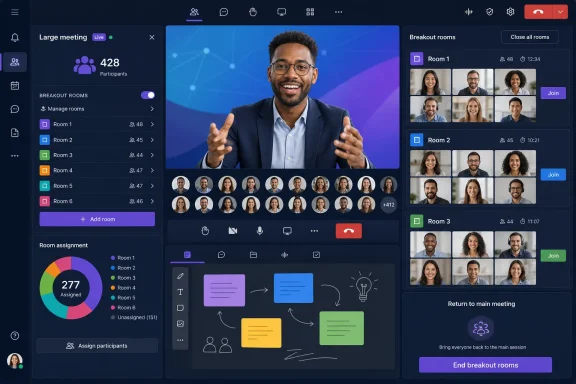 A change for large interactive meetings
Teams already supports meetings with up to 1,000 interactive attendees; beyond that point, additional people can join view-only, according to Microsoft’s support documentation. Until now, Microsoft’s large-meeting guidance said breakout rooms could not be created once a meeting exceeded 300 attendees.The roadmap entry indicates that restriction is being raised to 1,000 attendees as the service update reaches tenants. Microsoft has not published a revised support article at the time of writing, so admins should expect documentation and the in-client experience to update on different schedules during the rollout.
The increase does not turn Teams breakout rooms into a substitute for a town hall or webinar. Meetings at this size still require active moderation, clear presenter roles, and a plan for handling chat, Q&A, and participant admission. It does, however, make the standard meeting format more usable where interaction—not just broadcast reach—is the point.
What organizers and admins should check
Microsoft’s existing Teams guidance says organizers can create up to 50 breakout rooms. They can assign attendees automatically or manually, open and close rooms, send announcements, and join rooms to supervise activity. Breakout room managers and co-organizers can help, although co-organizers who manage rooms must be from the organizer’s organization.For meetings approaching the new 1,000-attendee limit, organizers should avoid manual assignments unless there is a compelling reason to use them. Automatic distribution is the realistic option at that scale, while named groups can be prepared beforehand for recurring sessions or structured workshops.
Admins do not appear to have a new tenant switch to enable from the roadmap entry. The practical task is to notify event owners that the capability may arrive gradually, verify it in a controlled meeting before relying on it for a major event, and ensure organizers use the supported desktop Teams client on Windows or Mac.
Microsoft’s rollout is underway, so the higher breakout-room limit should appear in eligible tenants through July 2026.