

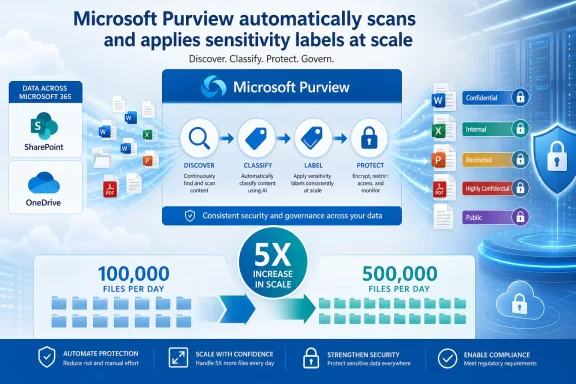
Microsoft is preparing a fivefold increase to Microsoft Purview’s auto-labeling throughput for files stored in SharePoint and OneDrive, raising the tenant-wide daily limit from 100,000 to 500,000 files.
The change is listed as Microsoft 365 Roadmap item 567890, published July 17, 2026. Microsoft marks it as in development, with general availability targeted for August 2026 in the worldwide multi-tenant cloud. The same entry lists a preview date of September 2026, an unusual sequence that administrators should treat as provisional because roadmap dates can change.
Purview auto-labeling examines saved content against policy conditions and applies sensitivity labels without relying on a user to classify the document. Those labels can carry protection settings such as encryption, access restrictions, and visual markings, depending on how the organization configured them.
Microsoft’s current Purview documentation still specifies the 100,000-file daily ceiling for SharePoint and OneDrive. At that limit, large tenants with substantial backlogs of unclassified historical documents could need days or weeks to work through matching content. Moving to 500,000 files daily should shorten that catch-up period considerably, particularly where an organization is expanding protection policies across broad SharePoint estates or OneDrive collections.
The limit is tenant-wide, not per policy, site, library, or user. Admins running several auto-labeling policies should therefore expect them to draw from the same daily capacity.
Supported at-rest files include Word, Excel, PowerPoint, and PDF documents, but files open by a user or another process cannot be labeled during that session. List-item attachments are not supported by this auto-labeling path. Microsoft also notes that failures can stem from unsupported formats, file protection, policy configuration, or transient SharePoint and OneDrive service conditions; the latter are retried automatically.
Organizations enabling PDF protection should pay particular attention. Microsoft’s documentation warns that turning on PDF support can increase the number of files matched by existing policies, which may make the higher daily limit especially relevant.
Before broadening a policy, verify its simulation results, confirm that the intended SharePoint and OneDrive locations are included, and review recent labeling failures in the Purview portal. A higher limit accelerates both correct classification and mistakes from an overly broad rule.
If Microsoft meets its roadmap target, tenants should see the 500,000-file daily ceiling begin rolling out in August 2026.
The change is listed as Microsoft 365 Roadmap item 567890, published July 17, 2026. Microsoft marks it as in development, with general availability targeted for August 2026 in the worldwide multi-tenant cloud. The same entry lists a preview date of September 2026, an unusual sequence that administrators should treat as provisional because roadmap dates can change.
 Faster coverage for data already at rest
Purview auto-labeling examines saved content against policy conditions and applies sensitivity labels without relying on a user to classify the document. Those labels can carry protection settings such as encryption, access restrictions, and visual markings, depending on how the organization configured them.Microsoft’s current Purview documentation still specifies the 100,000-file daily ceiling for SharePoint and OneDrive. At that limit, large tenants with substantial backlogs of unclassified historical documents could need days or weeks to work through matching content. Moving to 500,000 files daily should shorten that catch-up period considerably, particularly where an organization is expanding protection policies across broad SharePoint estates or OneDrive collections.
The limit is tenant-wide, not per policy, site, library, or user. Admins running several auto-labeling policies should therefore expect them to draw from the same daily capacity.
What remains unchanged
The capacity increase does not eliminate the safeguards and constraints around service-side labeling. Per Microsoft Learn documentation, administrators must first run an auto-labeling policy in simulation mode before turning it on. Simulation is intended to expose false positives and let teams adjust sensitive-information types, trainable classifiers, locations, or conditions before labels and protection are applied in production.Supported at-rest files include Word, Excel, PowerPoint, and PDF documents, but files open by a user or another process cannot be labeled during that session. List-item attachments are not supported by this auto-labeling path. Microsoft also notes that failures can stem from unsupported formats, file protection, policy configuration, or transient SharePoint and OneDrive service conditions; the latter are retried automatically.
Organizations enabling PDF protection should pay particular attention. Microsoft’s documentation warns that turning on PDF support can increase the number of files matched by existing policies, which may make the higher daily limit especially relevant.
Admin action
There is no announced configuration change or migration requirement. Administrators using Purview Information Protection should use the extra capacity as a reason to review policies that were deliberately scoped narrowly to avoid prolonged historical backlogs.Before broadening a policy, verify its simulation results, confirm that the intended SharePoint and OneDrive locations are included, and review recent labeling failures in the Purview portal. A higher limit accelerates both correct classification and mistakes from an overly broad rule.
If Microsoft meets its roadmap target, tenants should see the 500,000-file daily ceiling begin rolling out in August 2026.