

Microsoft’s separate Windows Insider release notes for Calculator, Paint, Photos, Media Player and other Windows 11 inbox apps should change how IT departments manage them. Organizations should stop assuming these utilities remain fixed with the deployed Windows image and introduce a lightweight inventory, pilot, change-review and rollback process before their independent updates affect production workflows.
Microsoft Learn now maintains individual release-note pages for Calculator, Camera, Clock, Media Player, Paint, Photos and Sound Recorder. Each page tracks app-specific versions, Insider flight availability and the relevant Feedback Hub category, giving administrators an early-warning system that previously existed only in fragmented announcements.
The immediate task is not to block every Microsoft Store update. It is to establish enough visibility to distinguish a harmless utility refresh from a change that can alter calculations, saved files, media playback or generated images.
A workable process can remain small:
The app’s own version display, installed-app inventory and endpoint-management reports can provide rollout evidence, depending on the organization’s tooling. Screenshots are useful for isolated test PCs, but structured exports are preferable because they allow administrators to compare versions across deployment rings and dates.
On June 24, Microsoft moved those same June app builds to Beta and Release Preview. That progression is important rollout evidence, but it does not mean every computer running a corresponding Windows preview build immediately received every app version.
Microsoft explicitly describes the new pages as records of updates announced for Windows Insider flights. A version appearing there is therefore an early-change signal, not proof of installation on a particular PC and not confirmation of general production availability.
IT inventories consequently need to keep four concepts separate:
That distinction also changes troubleshooting. When a user reports that Paint started saving differently, checking Windows Update history alone may not identify the relevant change. The support record must include Paint’s version and the date it was first observed.
Those issues touch two very different controls. Precision should be checked with a small library of known inputs and expected results, while launch reliability should be tested across the same upgrade path used by the organization. Opening Calculator once on a freshly provisioned test machine does not cover either risk adequately.
Paint 11.2605.61.0 changes JPEG save-in-place behavior and the handling of invalid images. An application used casually for screenshots can still sit inside documentation, support and content-production workflows where overwriting, converting or reopening a JPEG has operational consequences.
A Paint pilot should include existing JPEG files rather than only newly created images. Testers should verify the resulting file, confirm that its location and expected save behavior remain clear, and reopen it in another approved viewer or editor.
Photos 2026.11060.2004.0 adds optional visible Copilot watermarking. That creates a governance question even when the feature is functioning exactly as Microsoft intends: should exported material contain the watermark, and can users distinguish an approved output from one that violates a documentation or branding standard?
Organizations already evaluating AI additions to Windows utilities should treat watermark presence as test evidence, not decoration. A pilot record should state whether the option was enabled, which output was produced and whether the result remained acceptable after sharing or export.
Media Player 11.2605.14.0 changes supported-file recognition and caption behavior. Those updates may improve playback, but they also require representative testing wherever Media Player supports training, accessibility, communications or locally stored media libraries.
The correct test set is not “one MP4 played successfully.” It is the organization’s real collection of approved file formats, caption configurations and files known to require additional codec handling.
That does not justify sending every Calculator fix through the same review board used for a Windows feature update. A proportional model is more practical.
Low-impact changes can move through a short pilot after launch and smoke testing. Changes involving calculations, file writes, AI-generated output, captions, codec recognition or accessibility should trigger workflow-specific validation and an identified recovery option.
The threshold should depend on use, not the app’s reputation. Paint may be trivial on a general office PC but operationally significant on a support workstation used to annotate evidence. Media Player may be removable entertainment software in one environment and the approved playback tool for captioned training in another.
The same reasoning applies to Calculator. It may not contain organizational data, but undocumented result differences or post-upgrade launch failures can still disrupt scripts performed by humans, help-desk instructions and controlled calculation procedures.
Rollback is the weakest part of many Store-app strategies. Administrators should not assume that discovering a problem automatically means an earlier package will remain conveniently available. Where direct version restoration is uncertain, the recovery plan may need to rely on a validated replacement application, device restoration or suspension of the affected task.
A useful change record for each observed build should contain the application name, application version, device or pilot ring, Windows version and build, observation date, release-note date, documented channel, tested workflows, result and rollback decision. This is enough to reconstruct most app-update incidents without turning a small utility into a major release project.
The Microsoft Learn pages should be monitored for newly documented versions and channel movement. Movement from Experimental to Beta or Release Preview can raise the priority of testing because the change is progressing toward a wider audience, but deployment decisions should still be based on observed versions rather than the announcement alone.
Feedback Hub categories provide a consistent route for Insider findings, particularly when a defect can be reproduced on the documented build. Internal tickets should preserve the exact app version and reproduction steps so the issue does not get filed merely as a generic “Windows 11 problem.”
Microsoft has provided the missing upstream signal. The remaining decision belongs to IT: continue treating Calculator, Paint, Photos and Media Player as low-risk Store updates, or recognize that independently changing software needs independently recorded versions. The June builds make the safer answer clear—start with a lightweight process now, before the first consequential app change reaches production unnoticed.
Microsoft Learn now maintains individual release-note pages for Calculator, Camera, Clock, Media Player, Paint, Photos and Sound Recorder. Each page tracks app-specific versions, Insider flight availability and the relevant Feedback Hub category, giving administrators an early-warning system that previously existed only in fragmented announcements.
 Build an App-Level Version Process Now
The immediate task is not to block every Microsoft Store update. It is to establish enough visibility to distinguish a harmless utility refresh from a change that can alter calculations, saved files, media playback or generated images.A workable process can remain small:
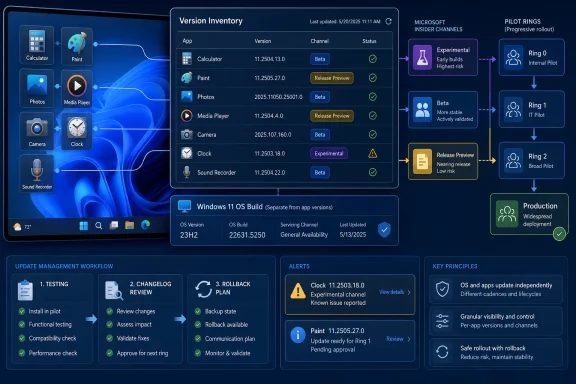
- Create an inventory of inbox apps that matter to business processes. Start with Calculator, Paint, Photos and Media Player, then add Camera, Clock and Sound Recorder where they are used in kiosks, training rooms, support desks or operational workflows.
- Record the installed app version separately from the Windows version and OS build. A device record that contains only “Windows 11” and its build number is no longer sufficient evidence of the software state presented to the user.
- Capture the update channel and observation date. Note whether the version was documented for Experimental, Beta or Release Preview, along with when it was first observed on a test PC. This prevents an Insider announcement from being mistaken for broad production availability.
- Attach changelog provenance to each approved version. Store the Microsoft release-note date, the documented version and a short summary of behavior changes in the same change record used for the pilot decision.
- Test affected workflows rather than merely confirming that the app opens. Calculator needs known-result calculations and upgrade-launch checks; Paint needs open-save-reopen tests; Photos needs export and watermark validation; Media Player needs representative files, captions and missing-codec scenarios.
- Promote the version through a pilot ring before broad acceptance. The pilot should include the file types, accessibility settings, hardware and user roles that depend on the app, not just a convenient collection of spare PCs.
- Define rollback before approval. Record whether the organization can restore a previous package, reimage the device, substitute another approved application or temporarily remove the affected workflow from service.
The app’s own version display, installed-app inventory and endpoint-management reports can provide rollout evidence, depending on the organization’s tooling. Screenshots are useful for isolated test PCs, but structured exports are preferable because they allow administrators to compare versions across deployment rings and dates.
The Windows Build No Longer Tells the Whole Story
The June 2026 rollout demonstrates why app versions and Windows builds require separate records. Microsoft initially sent Calculator 11.2605.9.0, Paint 11.2605.61.0, Photos 2026.11060.2004.0 and Media Player 11.2605.14.0 to Experimental flights on June 12.On June 24, Microsoft moved those same June app builds to Beta and Release Preview. That progression is important rollout evidence, but it does not mean every computer running a corresponding Windows preview build immediately received every app version.
Microsoft explicitly describes the new pages as records of updates announced for Windows Insider flights. A version appearing there is therefore an early-change signal, not proof of installation on a particular PC and not confirmation of general production availability.
IT inventories consequently need to keep four concepts separate:
- The Windows 11 version identifies the operating-system release family.
- The Windows build identifies the installed operating-system servicing level.
- The Insider channel describes the preview audience targeted by an announcement.
- The application version identifies the actual Calculator, Paint, Photos or Media Player package being tested or used.
That distinction also changes troubleshooting. When a user reports that Paint started saving differently, checking Windows Update history alone may not identify the relevant change. The support record must include Paint’s version and the date it was first observed.
Small Apps Can Carry Material Workflow Changes
The June updates are a useful warning because the documented changes are not limited to icon adjustments or visual polish. Calculator 11.2605.9.0 includes fixes for mathematical precision and failures that prevented the app from launching after an upgrade.Those issues touch two very different controls. Precision should be checked with a small library of known inputs and expected results, while launch reliability should be tested across the same upgrade path used by the organization. Opening Calculator once on a freshly provisioned test machine does not cover either risk adequately.
Paint 11.2605.61.0 changes JPEG save-in-place behavior and the handling of invalid images. An application used casually for screenshots can still sit inside documentation, support and content-production workflows where overwriting, converting or reopening a JPEG has operational consequences.
A Paint pilot should include existing JPEG files rather than only newly created images. Testers should verify the resulting file, confirm that its location and expected save behavior remain clear, and reopen it in another approved viewer or editor.
Photos 2026.11060.2004.0 adds optional visible Copilot watermarking. That creates a governance question even when the feature is functioning exactly as Microsoft intends: should exported material contain the watermark, and can users distinguish an approved output from one that violates a documentation or branding standard?
Organizations already evaluating AI additions to Windows utilities should treat watermark presence as test evidence, not decoration. A pilot record should state whether the option was enabled, which output was produced and whether the result remained acceptable after sharing or export.
Media Player 11.2605.14.0 changes supported-file recognition and caption behavior. Those updates may improve playback, but they also require representative testing wherever Media Player supports training, accessibility, communications or locally stored media libraries.
The correct test set is not “one MP4 played successfully.” It is the organization’s real collection of approved file formats, caption configurations and files known to require additional codec handling.
Change Review Should Follow Impact, Not Branding
Calling these programs “inbox apps” can make them sound like permanent Windows components. Their separate release notes expose a more accurate model: they are independently versioned applications whose updates may be announced, staged and delivered on a schedule that does not match monthly Windows servicing.That does not justify sending every Calculator fix through the same review board used for a Windows feature update. A proportional model is more practical.
Low-impact changes can move through a short pilot after launch and smoke testing. Changes involving calculations, file writes, AI-generated output, captions, codec recognition or accessibility should trigger workflow-specific validation and an identified recovery option.
The threshold should depend on use, not the app’s reputation. Paint may be trivial on a general office PC but operationally significant on a support workstation used to annotate evidence. Media Player may be removable entertainment software in one environment and the approved playback tool for captioned training in another.
The same reasoning applies to Calculator. It may not contain organizational data, but undocumented result differences or post-upgrade launch failures can still disrupt scripts performed by humans, help-desk instructions and controlled calculation procedures.
Rollback is the weakest part of many Store-app strategies. Administrators should not assume that discovering a problem automatically means an earlier package will remain conveniently available. Where direct version restoration is uncertain, the recovery plan may need to rely on a validated replacement application, device restoration or suspension of the affected task.
Release Notes Are an Alert, Not an Inventory
Microsoft’s per-app pages solve the changelog-discovery problem, but they do not establish what is installed across an organization. That evidence must come from managed endpoints.A useful change record for each observed build should contain the application name, application version, device or pilot ring, Windows version and build, observation date, release-note date, documented channel, tested workflows, result and rollback decision. This is enough to reconstruct most app-update incidents without turning a small utility into a major release project.
The Microsoft Learn pages should be monitored for newly documented versions and channel movement. Movement from Experimental to Beta or Release Preview can raise the priority of testing because the change is progressing toward a wider audience, but deployment decisions should still be based on observed versions rather than the announcement alone.
Feedback Hub categories provide a consistent route for Insider findings, particularly when a defect can be reproduced on the documented build. Internal tickets should preserve the exact app version and reproduction steps so the issue does not get filed merely as a generic “Windows 11 problem.”
Microsoft has provided the missing upstream signal. The remaining decision belongs to IT: continue treating Calculator, Paint, Photos and Media Player as low-risk Store updates, or recognize that independently changing software needs independently recorded versions. The June builds make the safer answer clear—start with a lightweight process now, before the first consequential app change reaches production unnoticed.
References
- Primary source: learn.microsoft.com
Media Player release notes - Windows Insider Program | Microsoft Learn
Release notes for Media Player updates in Windows Insider builds.learn.microsoft.com - Independent coverage: blogs.windows.com
Notepad and Paint updates begin rolling out to Windows Insiders
Hello Windows Insiders, today we are beginning to roll out updates for Notepad and Paint apps to Windows Insiders in the Canary and Dev Channels on Windows 11. Notepad (version 11.2512.10.0) In this update, we’re introduciblogs.windows.com - Independent coverage: support.microsoft.com
Pictures, videos, and documents library access and privacy | Microsoft Support
Find out why some apps need access to your pictures, videos, and documents libraries, and how to allow or deny apps from accessing these locations.support.microsoft.com - Primary source: WindowsForum
Windows 11 Inbox Apps Get Local AI: Notepad, Paint, Snipping Tool Upgrade | Windows Forum
Microsoft is quietly rolling out another round of practical — and strategically significant — updates to three of Windows 11’s oldest built‑in utilities...windowsforum.com
