

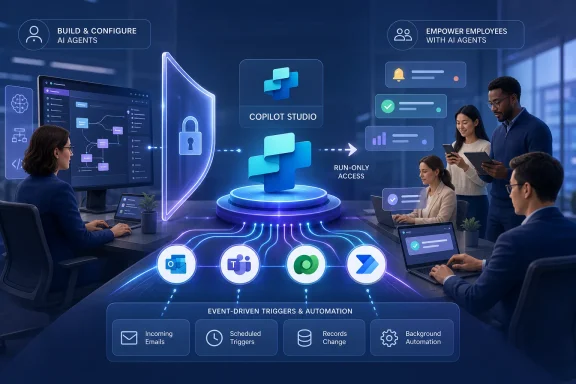
Microsoft is preparing to remove one of the most consequential barriers to enterprise adoption of autonomous agents in Copilot Studio: the inability to distribute those agents broadly without also giving recipients maker-level access. A new run-only sharing model, scheduled for preview in August 2026 and general availability in January 2027, will let organizations place autonomous, event-driven agents into the hands of employees while preserving the separation between those who build automation and those who merely benefit from it. That distinction sounds like a permissions adjustment, but it represents a larger shift from experimental agent development toward governed, production-scale automation.
Microsoft Copilot Studio has evolved from a conversational bot builder into a broader platform for creating agents that can answer questions, use business data, call tools, execute Power Automate flows, and react to external events. The arrival of autonomous agents expanded that model beyond a user typing into a chat window.
An autonomous agent can act when a trigger occurs, such as a new email arriving, a business record changing, a deadline approaching, or an item entering a work queue. It can evaluate the event, gather context, determine an appropriate response, and invoke approved tools without waiting for a person to initiate every step.
Autonomous agents introduce a different operating pattern:
That limitation weakened the value proposition. The people with the skills and permissions to create an agent are not necessarily the people who need its output, and employees should not require authoring privileges merely to receive an alert, approve a recommendation, or benefit from background automation.
Run-only sharing is intended to close that gap. Makers will retain control over the agent’s configuration while end users receive permission to run or consume the finished automation.
The roadmap currently places preview availability in August 2026, followed by general availability in January 2027. As always, roadmap dates describe Microsoft’s present release plan rather than an absolute commitment, and deployment timing may change before either milestone.
Run-only users would not be expected to:
It is therefore important not to assume that every autonomous-agent scenario will immediately support run-only sharing in August. Microsoft could apply prerequisites involving environments, security roles, authentication types, agent publication status, or supported connectors.
Giving every beneficiary maker-level access would create unnecessary risk. It could allow recipients to alter prompts, change connections, introduce unapproved tools, republish an agent, or interfere with production behavior.
For an accounts-payable agent, for example, one group might build and maintain the automation, another might review exceptions, and a much larger group might receive status notifications. Those audiences do not need equivalent rights.
A workable permission design might distinguish among:
Run-only sharing addresses one of those production gaps. Instead of treating an autonomous agent as a private maker asset, businesses can treat it more like a managed service with a defined audience.
That does not solve every deployment problem, but it removes a significant architectural obstacle. The agent can remain centrally governed while its benefits extend across departments, security groups, or potentially the wider organization.
Run-only sharing for autonomous agents appears to extend that general philosophy into background and event-driven execution.
Chat access is narrower. It allows a person or group to interact with a published agent without necessarily receiving editing permissions. Microsoft’s current sharing documentation supports audiences such as individual users, security groups, or an entire organization, depending on the experience and configuration.
Autonomous agents complicate this pattern because the “user” may not start a chat. The agent can be triggered by an event and then deliver a result to someone who never opens Copilot Studio.
Run-only access therefore needs to answer a more subtle question: Who is entitled to cause, receive, approve, or benefit from an autonomous execution? That answer may vary according to the trigger, connection, target application, and data involved.
A run-only permission at the agent level should not automatically erase those environmental boundaries. Dataverse roles, connector policies, data-loss-prevention rules, tenant settings, and resource permissions are likely to continue determining what the agent can access.
Administrators should expect at least three layers of authorization:
This is likely to become the most important technical consideration for administrators testing run-only autonomous-agent sharing.
With maker-provided credentials, the agent may execute through a connection associated with its creator or another configured identity. This can support background operation, but it also raises the risk that users indirectly gain access to data or actions available to the connection owner.
With end-user authentication, the agent operates according to the user’s own permissions. This provides stronger alignment with existing access controls, but it assumes an active user can sign in and consent when required.
That creates tension for autonomous agents. If an agent runs at 3 a.m. because a scheduled trigger fires, there may be no live user available to complete an authentication prompt.
Run-only sharing does not automatically resolve that conflict. Organizations will still need to determine what identity powers unattended execution.
Possible designs include:
Run-only sharing could make these failures more visible because the audience will be broader. Makers must test the finished agent under representative user identities instead of relying solely on successful executions from an owner account.
A production test plan should verify:
The right model is not to block every maker-created agent. It is to establish clear zones in which experimentation, departmental automation, and enterprise production each receive appropriate controls.
A practical release sequence is:
Run-only sharing will be most valuable when it works alongside these controls. Administrators should be able to define who may distribute autonomous agents, which audiences are allowed, and whether organization-wide sharing is appropriate.
Security groups are likely to be preferable to manually maintained user lists for most enterprise scenarios. Group-based assignment simplifies onboarding, role changes, and employee departures while reducing the chance that stale access remains attached to an individual account.
Organizations should assign clear business and technical ownership before broad run-only distribution. At minimum, every production agent needs:
A successful implementation should therefore make the agent’s role, authority, and limitations understandable without exposing unnecessary technical complexity.
Consider an employee-onboarding agent. Human resources might own the process, IT might maintain access-provisioning tools, and managers might receive requests for approval. The new employee could benefit from the automation without ever seeing the Copilot Studio authoring interface.
Similar scenarios include:
Users should know when an output was generated by an agent, what event caused it, and what action has already occurred. If a human decision is still required, the interface should distinguish a recommendation from a completed transaction.
Good notifications should answer four questions:
This creates demands around capacity, telemetry, cost management, and support.
Useful indicators include:
Support teams will need enough information to distinguish among several common failure classes:
The feature also makes Copilot Studio more comparable to established automation platforms in which workflows are centrally developed and broadly consumed.
Run-only sharing reinforces Copilot Studio’s role as a control plane for agentic automation. Makers define reasoning and actions, administrators establish boundaries, and employees consume the resulting service.
This could appeal to businesses that are uncomfortable deploying isolated AI agents with separate identity systems, audit models, and connector frameworks. The trade-off is greater dependence on Microsoft’s platform, licensing model, and release cadence.
A business user may understand the process better than central IT, but the resulting agent can still create security, compliance, or reliability problems. Run-only sharing allows organizations to preserve maker innovation while avoiding the assumption that every consumer should also become a maker.
The strongest deployments will combine citizen expertise with professional governance. Business teams can design the intent, while IT validates identity, data boundaries, deployment, monitoring, and resilience.
Current Copilot Studio access models involve tenant capacity, messages or usage, and licensing requirements that can vary according to channel and product configuration.
Administrators should not infer licensing rights from the phrase “run-only.” Permission to execute a feature and entitlement to consume the underlying service are separate matters.
Before production rollout, organizations should verify:
Organizations should model normal load, peak load, duplicate events, retries, and failure loops. Capacity planning should also account for downstream limits in Power Automate, connectors, APIs, and target systems.
Agents that would benefit from run-only distribution can then be prioritized for the August 2026 preview. Low-risk, high-visibility scenarios are likely to provide the best early feedback.
Organizations can then expand toward more consequential automation after validating permissions, identity behavior, operational reliability, and user comprehension.
It will also matter whether sharing is restricted by Managed Environment policies and whether administrators can prevent makers from granting run-only access outside approved audiences.
Support for service principals, managed identities, environment-level connections, and on-behalf-of patterns will heavily influence enterprise adoption.
Microsoft should also provide administrators with an efficient way to revoke access, disable an agent, and investigate unexpected behavior without depending on the original maker.
Businesses should treat preview deployments as controlled evaluations rather than permanent production architecture. Configuration choices made during preview may need revision before general availability.
Run-only sharing could become one of Copilot Studio’s most important enterprise features because it changes autonomous agents from maker-bound projects into governed services for ordinary employees. The success of that transition will depend less on the convenience of the Share button than on identity design, durable connections, licensing clarity, auditability, and disciplined lifecycle management. If Microsoft delivers those foundations alongside the planned August 2026 preview and January 2027 general release, organizations will gain a more credible way to scale agent-driven automation without handing every beneficiary the keys to the workshop.
 Background
Microsoft Copilot Studio has evolved from a conversational bot builder into a broader platform for creating agents that can answer questions, use business data, call tools, execute Power Automate flows, and react to external events. The arrival of autonomous agents expanded that model beyond a user typing into a chat window.An autonomous agent can act when a trigger occurs, such as a new email arriving, a business record changing, a deadline approaching, or an item entering a work queue. It can evaluate the event, gather context, determine an appropriate response, and invoke approved tools without waiting for a person to initiate every step.
From chatbots to event-driven workers
Traditional chatbots are primarily reactive. A user asks a question or issues a command, and the bot responds within that interaction.Autonomous agents introduce a different operating pattern:
- A configured event or schedule triggers the agent.
- The agent receives context from the triggering system.
- It evaluates instructions, data, and available knowledge.
- It selects an action or sequence of actions.
- It records, communicates, or escalates the result according to its design.
The maker-only distribution problem
Until now, the practical audience for autonomous agents has reportedly been constrained by the way ownership and access were structured. Makers could build, manage, test, and operate agents, but distributing the benefits of those agents to ordinary users was more difficult than sharing a conventional chat experience.That limitation weakened the value proposition. The people with the skills and permissions to create an agent are not necessarily the people who need its output, and employees should not require authoring privileges merely to receive an alert, approve a recommendation, or benefit from background automation.
Run-only sharing is intended to close that gap. Makers will retain control over the agent’s configuration while end users receive permission to run or consume the finished automation.
What Microsoft Is Announcing
Microsoft 365 Roadmap item 567894 describes a new Copilot Studio capability titled “Share Autonomous Agents to End Users,” with run-only access as its central concept. The feature is listed for the Copilot Studio web platform and the worldwide standard multi-tenant cloud.The roadmap currently places preview availability in August 2026, followed by general availability in January 2027. As always, roadmap dates describe Microsoft’s present release plan rather than an absolute commitment, and deployment timing may change before either milestone.
Run-only access versus ownership
The essential change is a separation of duties. An end user should be able to receive the business outcome of an autonomous agent without becoming an owner, editor, or coauthor.Run-only users would not be expected to:
- Change the agent’s instructions, topics, prompts, or tools.
- Reconfigure event triggers or schedules.
- Replace connections or authentication settings.
- Publish a new version of the agent.
- Share the agent onward unless separately authorized.
- Gain access to the full Copilot Studio authoring environment.
Details that remain open
The roadmap entry announces the distribution model but does not yet fully document every operational detail. Microsoft has not publicly described, within the roadmap item itself, the exact assignment interface, licensing consequences, supported trigger combinations, notification channels, or differences between preview and general availability.It is therefore important not to assume that every autonomous-agent scenario will immediately support run-only sharing in August. Microsoft could apply prerequisites involving environments, security roles, authentication types, agent publication status, or supported connectors.
Why Run-Only Sharing Matters
Agent technology becomes useful at scale only when organizations can separate production consumption from development privileges. That is particularly important for autonomous systems because they can take actions rather than simply display generated text.Giving every beneficiary maker-level access would create unnecessary risk. It could allow recipients to alter prompts, change connections, introduce unapproved tools, republish an agent, or interfere with production behavior.
The principle of least privilege
Run-only sharing aligns Copilot Studio more closely with the security principle of least privilege. A user should receive only the permissions needed to perform a legitimate role.For an accounts-payable agent, for example, one group might build and maintain the automation, another might review exceptions, and a much larger group might receive status notifications. Those audiences do not need equivalent rights.
A workable permission design might distinguish among:
- Owners, who control the agent and its lifecycle.
- Editors, who can modify and publish the agent.
- Operational reviewers, who can inspect performance or analytics.
- Run-only users, who can invoke or benefit from approved behavior.
- Administrators, who control environments, policies, capacity, and security.
A route from pilot to production
Many enterprise AI projects stall after a successful demonstration. A small maker team proves that an agent can automate a process, but the organization then encounters questions about permissions, deployment, ownership, and support.Run-only sharing addresses one of those production gaps. Instead of treating an autonomous agent as a private maker asset, businesses can treat it more like a managed service with a defined audience.
That does not solve every deployment problem, but it removes a significant architectural obstacle. The agent can remain centrally governed while its benefits extend across departments, security groups, or potentially the wider organization.
How the Permission Model Could Fit Copilot Studio
Copilot Studio already distinguishes between several types of access for conventional agents. Makers can share an agent for collaborative authoring, grant people permission to chat with it, and provide selected stakeholders with read-only analytics access.Run-only sharing for autonomous agents appears to extend that general philosophy into background and event-driven execution.
Existing sharing roles provide a foundation
Collaborative authoring is intentionally broad. A coauthor may be able to view, edit, configure, share, and publish an agent, making that role inappropriate for ordinary consumers.Chat access is narrower. It allows a person or group to interact with a published agent without necessarily receiving editing permissions. Microsoft’s current sharing documentation supports audiences such as individual users, security groups, or an entire organization, depending on the experience and configuration.
Autonomous agents complicate this pattern because the “user” may not start a chat. The agent can be triggered by an event and then deliver a result to someone who never opens Copilot Studio.
Run-only access therefore needs to answer a more subtle question: Who is entitled to cause, receive, approve, or benefit from an autonomous execution? That answer may vary according to the trigger, connection, target application, and data involved.
Environment privileges still matter
Copilot Studio agents reside inside Power Platform environments, which provide boundaries for data, security, resources, and lifecycle operations. Organizations can create different environments for departments, regions, development stages, or risk levels.A run-only permission at the agent level should not automatically erase those environmental boundaries. Dataverse roles, connector policies, data-loss-prevention rules, tenant settings, and resource permissions are likely to continue determining what the agent can access.
Administrators should expect at least three layers of authorization:
- The user must be entitled to use or benefit from the agent.
- The agent must be permitted to operate in its Power Platform environment.
- The credentials used by its tools must be authorized to access the underlying systems.
Identity and Authentication Will Determine Real-World Behavior
Sharing an agent is not the same as sharing the authority behind it. An agent that reads SharePoint, updates Dataverse, sends messages, or invokes an external API needs a valid identity for each operation.This is likely to become the most important technical consideration for administrators testing run-only autonomous-agent sharing.
Maker credentials and end-user credentials
Copilot Studio supports scenarios in which tools use credentials supplied by the agent author and scenarios in which the end user authenticates personally. Each approach produces different security and usability outcomes.With maker-provided credentials, the agent may execute through a connection associated with its creator or another configured identity. This can support background operation, but it also raises the risk that users indirectly gain access to data or actions available to the connection owner.
With end-user authentication, the agent operates according to the user’s own permissions. This provides stronger alignment with existing access controls, but it assumes an active user can sign in and consent when required.
That creates tension for autonomous agents. If an agent runs at 3 a.m. because a scheduled trigger fires, there may be no live user available to complete an authentication prompt.
Background execution needs durable identity
Microsoft’s existing governance controls allow administrators to prevent makers from using maker-provided credentials. However, Microsoft also warns that enforcing end-user credentials can prevent scheduled or autonomous agents from working because each protected tool call requires a live user context.Run-only sharing does not automatically resolve that conflict. Organizations will still need to determine what identity powers unattended execution.
Possible designs include:
- A dedicated service account with tightly limited permissions.
- A service principal where the target connector and service support it.
- An environment-level connection managed independently of an individual maker.
- A user-delegated flow for scenarios that require personal authorization.
- A hybrid process in which the agent performs low-risk analysis autonomously but requests human approval before a sensitive action.
Connection ownership can become a hidden dependency
An agent may work perfectly for its maker and fail when shared. This often happens because a connector, Power Automate flow, or external service depends on a connection that other users cannot access.Run-only sharing could make these failures more visible because the audience will be broader. Makers must test the finished agent under representative user identities instead of relying solely on successful executions from an owner account.
A production test plan should verify:
- Whether the trigger can fire without the maker being signed in.
- Which identity appears in audit logs.
- Whether run-only users need separate connector consent.
- Whether target systems recognize the execution account.
- What happens when a connection expires or is revoked.
- Whether a departed maker’s account can disable the automation.
Enterprise Deployment and Governance
Run-only sharing gives organizations a better distribution mechanism, but it also increases the number of people and processes exposed to autonomous behavior. Governance must expand with reach.The right model is not to block every maker-created agent. It is to establish clear zones in which experimentation, departmental automation, and enterprise production each receive appropriate controls.
Use separate lifecycle environments
A mature Copilot Studio deployment should avoid building and operating important agents in the same unrestricted environment. Development, testing, and production need different expectations.A practical release sequence is:
- Makers build the agent in a development environment using non-sensitive or representative test data.
- Reviewers validate prompts, triggers, tools, error paths, and data access.
- Security teams inspect connections, credentials, permissions, and data policies.
- The agent is packaged and promoted through an application lifecycle management process.
- Run-only access is assigned in the production environment.
- Operations teams monitor executions, failures, costs, and user feedback.
- Changes return through development and testing rather than being improvised directly in production.
Managed Environments and sharing controls
Power Platform Managed Environments give administrators controls for governing sharing and operational behavior. Copilot Studio sharing rules can limit how makers grant editor or viewer-style access and can apply at an individual environment or across environment groups.Run-only sharing will be most valuable when it works alongside these controls. Administrators should be able to define who may distribute autonomous agents, which audiences are allowed, and whether organization-wide sharing is appropriate.
Security groups are likely to be preferable to manually maintained user lists for most enterprise scenarios. Group-based assignment simplifies onboarding, role changes, and employee departures while reducing the chance that stale access remains attached to an individual account.
Ownership must survive personnel changes
Autonomous agents can become operational infrastructure even when they begin as small citizen-development projects. A useful agent may eventually process thousands of events or support a critical departmental workflow.Organizations should assign clear business and technical ownership before broad run-only distribution. At minimum, every production agent needs:
- A named business owner accountable for the outcome.
- A technical owner responsible for configuration and support.
- A documented escalation path for failures or harmful actions.
- A replacement plan if the original maker leaves the organization.
- A periodic review of connections, permissions, and continued business need.
Consumer and Employee Experience
The most visible benefit of run-only sharing will be a simpler relationship between employees and the agents serving them. Most workers do not want to understand environments, topics, connectors, or publishing pipelines; they want the automation to complete a task reliably.A successful implementation should therefore make the agent’s role, authority, and limitations understandable without exposing unnecessary technical complexity.
Users may benefit without opening Copilot Studio
An end user could receive value through Teams, email, an approval card, a business application, or a record updated by the agent. The exact delivery mechanisms will depend on Microsoft’s implementation and the channels configured by each organization.Consider an employee-onboarding agent. Human resources might own the process, IT might maintain access-provisioning tools, and managers might receive requests for approval. The new employee could benefit from the automation without ever seeing the Copilot Studio authoring interface.
Similar scenarios include:
- A sales representative receiving a warning when an opportunity has gone inactive.
- A support manager being notified when a high-priority case breaches a threshold.
- A procurement reviewer receiving an exception summary for an unusual purchase.
- A project owner receiving an automatically assembled status report.
- A compliance team receiving an alert when a document matches a defined risk pattern.
Transparency remains essential
A background agent can affect a user who did not consciously invoke it. That makes transparency more important than in a conventional chatbot session.Users should know when an output was generated by an agent, what event caused it, and what action has already occurred. If a human decision is still required, the interface should distinguish a recommendation from a completed transaction.
Good notifications should answer four questions:
- What happened?
- Why did the agent act?
- Which data or rule influenced the result?
- What can the recipient do if the result is wrong?
Operational Monitoring and Support
Broader sharing changes the operational profile of an agent. A private maker experiment may run a few times each day, while a production agent shared with a large workforce could respond to thousands of events.This creates demands around capacity, telemetry, cost management, and support.
Measure outcomes, not only executions
A successful run does not necessarily produce a correct business result. Administrators need technical metrics, while business owners need outcome-oriented measurements.Useful indicators include:
- Trigger volume and execution frequency.
- Completion, failure, and retry rates.
- Average processing time.
- Tool and connector latency.
- Human escalation frequency.
- Incorrect or reversed actions.
- Duplicate work created by repeated triggers.
- User acceptance of recommendations.
- Estimated time saved compared with the previous process.
Run-only users need a support route
Because run-only recipients cannot repair the agent, they need a clear method for reporting failures. Error messages should not direct ordinary employees toward maker tools they cannot access.Support teams will need enough information to distinguish among several common failure classes:
- The user lacks permission to receive or invoke the agent.
- The agent lacks permission to reach a data source.
- A connector or token has expired.
- A trigger did not fire.
- A generated decision was incorrect.
- A downstream system rejected the requested action.
- Capacity or service limits delayed execution.
Competitive and Strategic Implications
Microsoft is positioning Copilot Studio as an enterprise agent platform rather than a standalone chatbot product. Run-only autonomous-agent sharing strengthens that strategy by connecting low-code creation with large-scale distribution.The feature also makes Copilot Studio more comparable to established automation platforms in which workflows are centrally developed and broadly consumed.
Power Platform becomes the control plane
Microsoft’s advantage lies in the integration among Copilot Studio, Power Automate, Dataverse, Microsoft 365, Teams, Entra ID, and Power Platform administration. Organizations already using these services may be able to build agents within familiar identity and governance boundaries.Run-only sharing reinforces Copilot Studio’s role as a control plane for agentic automation. Makers define reasoning and actions, administrators establish boundaries, and employees consume the resulting service.
This could appeal to businesses that are uncomfortable deploying isolated AI agents with separate identity systems, audit models, and connector frameworks. The trade-off is greater dependence on Microsoft’s platform, licensing model, and release cadence.
Citizen development moves closer to enterprise automation
Low-code tools have always promised to let subject-matter experts automate work without waiting for a traditional development team. Autonomous agents amplify both the promise and the danger.A business user may understand the process better than central IT, but the resulting agent can still create security, compliance, or reliability problems. Run-only sharing allows organizations to preserve maker innovation while avoiding the assumption that every consumer should also become a maker.
The strongest deployments will combine citizen expertise with professional governance. Business teams can design the intent, while IT validates identity, data boundaries, deployment, monitoring, and resilience.
Licensing and Capacity Questions
The roadmap entry does not provide detailed licensing guidance for run-only autonomous-agent users. This is a crucial unresolved area because distribution economics will determine how broadly organizations adopt the feature.Current Copilot Studio access models involve tenant capacity, messages or usage, and licensing requirements that can vary according to channel and product configuration.
Run-only must be economically scalable
If every beneficiary requires a full maker-oriented license, the feature’s practical reach could remain limited. If organizations can cover run-only consumption through shared tenant capacity or another usage-based model, deployment may become far more attractive.Administrators should not infer licensing rights from the phrase “run-only.” Permission to execute a feature and entitlement to consume the underlying service are separate matters.
Before production rollout, organizations should verify:
- Whether every run-only recipient needs an individual license.
- How autonomous executions are metered.
- Whether failed or retried executions consume capacity.
- How generative actions and connector calls affect cost.
- Whether preview terms differ from general availability.
- Whether Microsoft 365 Copilot licensing changes the entitlement.
- How external users or guests are treated.
Trigger volume needs realistic modeling
Autonomous agents are driven by events, and events can multiply quickly. A trigger attached to a busy mailbox, large Dataverse table, document library, or service queue may generate far more runs than anticipated.Organizations should model normal load, peak load, duplicate events, retries, and failure loops. Capacity planning should also account for downstream limits in Power Automate, connectors, APIs, and target systems.
Strengths and Opportunities
Run-only sharing addresses a genuine gap between building autonomous agents and putting them into everyday operational use. Its strongest opportunities come from controlled reach rather than unrestricted distribution.- It creates clearer separation of duties. Makers can retain design and publishing control while employees receive only the access needed to consume automation.
- It could accelerate production adoption. Organizations may be more willing to deploy agents when recipients do not need editing rights or ownership.
- It supports departmental scale. Security groups and environment-based governance can make it practical to distribute an agent to a role, team, or business unit.
- It reduces accidental configuration changes. Run-only users should not be able to alter triggers, instructions, connections, or tools.
- It improves the case for centralized operations. A production team can monitor and maintain an agent serving a much larger audience.
- It enables invisible automation. Employees may benefit through alerts, approvals, and business-system updates without opening the authoring environment.
- It complements existing Microsoft controls. Entra ID, Dataverse security, Managed Environments, data policies, and application lifecycle management can contribute to a layered governance model.
- It may broaden the value of citizen development. Subject-matter experts can build useful agents without turning every beneficiary into another developer.
Risks and Concerns
The feature’s value will depend on how Microsoft handles identity, licensing, visibility, and operational control. Run-only permission narrows user access, but it does not make an autonomous agent inherently safe.- A shared agent may carry excessive authority. If it runs through powerful maker credentials, recipients could indirectly cause actions beyond their personal permissions.
- Unattended authentication remains difficult. Policies requiring live end-user authentication can conflict with scheduled or event-driven execution.
- Connection dependencies may fail after deployment. Personal accounts, expiring tokens, or unshared flows can break an otherwise functional agent.
- Broader reach increases the impact of mistakes. A faulty trigger or prompt can affect many users before an administrator notices.
- Licensing remains unclear. Unknown run-only entitlements and capacity charges could complicate budgeting.
- Users may not understand autonomous actions. Poorly explained notifications can reduce trust and make errors difficult to challenge.
- Over-automation could remove useful human checks. High-impact actions should retain approval gates unless the risk is well understood.
- Roadmap timing can change. Preview in August 2026 and general availability in January 2027 are targets rather than guaranteed deployment dates.
- Preview behavior may not represent the final design. Security roles, connectors, trigger support, and administrative controls may change before release.
- Agent sprawl could accelerate. Easier distribution may encourage duplicate or unsupported automations unless organizations maintain an inventory and review process.
What Administrators Should Prepare Now
Organizations do not need to wait for the preview to prepare. The core work involves understanding existing agents, identities, environments, and risk boundaries.Build an autonomous-agent inventory
Administrators should identify every autonomous agent currently in development or operation. The inventory should record its owner, purpose, triggers, tools, data sources, credentials, environment, expected audience, and business impact.Agents that would benefit from run-only distribution can then be prioritized for the August 2026 preview. Low-risk, high-visibility scenarios are likely to provide the best early feedback.
Establish a release checklist
Before any agent is shared with end users, reviewers should confirm:- The trigger cannot create uncontrolled execution loops.
- The agent uses an appropriate and durable identity.
- Every tool follows least-privilege access.
- Sensitive actions require approval where necessary.
- Test users represent the permissions of the intended audience.
- Error handling and escalation paths are documented.
- Logs capture enough detail for investigation.
- Capacity and licensing assumptions are understood.
- The agent has both business and technical owners.
- A rollback or disable procedure has been tested.
Select preview candidates carefully
The first preview deployments should avoid irreversible or highly regulated actions. Strong candidates include monitoring, summarization, triage, reminder generation, and recommendation workflows in which a human remains responsible for the final decision.Organizations can then expand toward more consequential automation after validating permissions, identity behavior, operational reliability, and user comprehension.
What to Watch Next
The August 2026 preview should reveal whether run-only access is a narrow sharing option or the beginning of a richer operational role system for autonomous agents. Several details will determine its significance.Assignment and audience controls
Administrators should watch whether run-only permissions can be assigned to individuals, Entra ID security groups, teams, or the entire organization. Group support will be particularly important for large deployments and lifecycle management.It will also matter whether sharing is restricted by Managed Environment policies and whether administrators can prevent makers from granting run-only access outside approved audiences.
Authentication behavior
Microsoft needs to clarify how the system associates an autonomous run with an end user when no user is actively present. The preview should show whether run-only sharing affects trigger authorization, output delivery, approval routing, or only visibility and consumption.Support for service principals, managed identities, environment-level connections, and on-behalf-of patterns will heavily influence enterprise adoption.
Licensing, analytics, and auditability
Customers will need precise documentation on who requires a license, how executions consume capacity, and which roles can view run history. Audit records should distinguish the agent owner, triggering identity, execution identity, affected user, and actions taken in downstream systems.Microsoft should also provide administrators with an efficient way to revoke access, disable an agent, and investigate unexpected behavior without depending on the original maker.
Preview-to-GA evolution
The interval between the planned August 2026 preview and January 2027 general availability gives Microsoft roughly five months to respond to customer feedback. During that period, organizations should expect documentation, administrative controls, connector support, and user experience details to evolve.Businesses should treat preview deployments as controlled evaluations rather than permanent production architecture. Configuration choices made during preview may need revision before general availability.
Run-only sharing could become one of Copilot Studio’s most important enterprise features because it changes autonomous agents from maker-bound projects into governed services for ordinary employees. The success of that transition will depend less on the convenience of the Share button than on identity design, durable connections, licensing clarity, auditability, and disciplined lifecycle management. If Microsoft delivers those foundations alongside the planned August 2026 preview and January 2027 general release, organizations will gain a more credible way to scale agent-driven automation without handing every beneficiary the keys to the workshop.
References
- Primary source: Microsoft 365 Roadmap
Published: 2026-07-20T22:37:15.9046041Z
Microsoft 365 Roadmap | Microsoft 365
The Microsoft 365 Roadmap lists updates that are currently planned for applicable subscribers. Check here for more information on the status of new features and updates.www.microsoft.com
- Official source: learn.microsoft.com
Configure user authentication for tools - Microsoft Copilot Studio | Microsoft Learn
Guidance for configuring how users authenticate to Microsoft Copilot Studio agents with tools that require credentials.learn.microsoft.com - Official source: adoption.microsoft.com
