

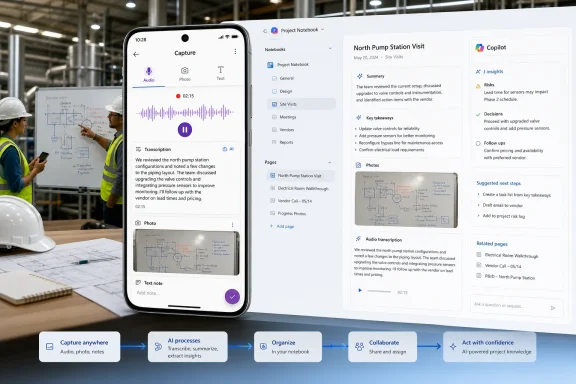
Microsoft is bringing OneNote’s multimodal Capture experience to Android, giving Microsoft 365 Copilot users a mobile workspace where audio transcription, photographs, and typed observations can be collected during a single real-world session. Scheduled for preview in August 2026 and general availability in September 2026, the feature will turn that mixed source material into a structured Copilot Page, add AI-generated insights, and save the result inside a user-selected Copilot Notebook. The development matters because it moves Copilot beyond summarizing documents that already exist: Microsoft wants Android phones and tablets to become intake points for conversations, whiteboards, site visits, workshops, and other offline work that traditionally falls through the gaps between meetings and formal documentation.
Microsoft has spent decades positioning OneNote as a flexible digital notebook rather than a conventional word processor. Its free-form canvas, section hierarchy, handwriting support, media embedding, and synchronization made it useful for information that did not fit neatly into Word documents, Excel workbooks, or Outlook messages.
Generative AI has complicated that identity. OneNote remains a durable place for collecting and organizing information, while Copilot Notebooks are designed as curated, AI-grounded workspaces that can reason over selected references. Multimodal Capture connects those roles by using OneNote as the mobile collection interface and Copilot Notebooks as the destination for structured, reusable knowledge.
Copilot Notebooks offer a different model. Users gather relevant files, pages, chats, links, meeting notes, and other references into a defined workspace, after which Copilot answers questions or creates material grounded in that selected content rather than indiscriminately searching an entire account.
That boundary is important. A notebook associated with a product launch, customer engagement, training course, or research project can become a focused context layer for Copilot. Multimodal Capture makes it easier to add information that originated outside Microsoft 365.
The roadmap lists Worldwide Standard Multi-Tenant availability, with both Preview and General Availability release phases. It does not identify sovereign, government, or specialized cloud deployments, so administrators in those environments should not assume that the September target applies to them.
As always, a Microsoft 365 Roadmap date is a deployment target rather than an unchangeable promise. Preview is planned for August 2026, while broad production availability is targeted for September 2026, but staged delivery can mean that eligible tenants and devices receive the interface at different times.
When the session ends, Copilot assembles the collected material into a Copilot Page. That page includes the user’s content, the transcript, captured images, and generated insights, and it is then stored in the Copilot Notebook selected by the user.
Combining them produces a richer record than any one mode can provide on its own. A transcript might contain the sentence “use the layout on the board,” but the accompanying photograph supplies the missing layout. A typed note such as “confirm this with legal” can distinguish an unresolved issue from an approved decision.
The value comes from their shared session context. If Capture maintains meaningful relationships among timestamps, photographs, notes, and transcript segments, Copilot has a better chance of reconstructing what happened than it would when processing unrelated files uploaded days later.
Microsoft’s proposed workflow shortens that path by creating a structured Copilot Page immediately after capture. The page becomes an editable artifact rather than a sealed AI summary, allowing users to correct transcription mistakes, remove irrelevant details, reorganize conclusions, and supplement the generated result.
This distinction is essential. AI-generated insights should be treated as a working interpretation of the captured evidence, not as an authoritative record. The original user-captured content remains necessary for verification, especially when the discussion includes names, technical terms, commitments, measurements, or compliance-sensitive statements.
The precise Android interface may differ from the iPhone and iPad implementation, particularly around camera permissions, microphone controls, background behavior, and tablet layouts. Nevertheless, the published iOS workflow provides a useful indication of Microsoft’s intended sequence.
Requiring or prompting the user to select a notebook introduces a lightweight classification step. The person closest to the event decides whether the session belongs to a sales opportunity, engineering investigation, research project, course, or personal initiative.
That decision also has governance implications. Selecting the wrong notebook could expose captured information to collaborators who should not see it, particularly if notebook sharing or linked-file permissions have already been configured. The destination screen therefore needs to communicate notebook identity and sharing status clearly.
The distinction matters for field workers and travelers. A session may occur in a warehouse, construction site, customer facility, classroom, laboratory, or conference venue where connectivity is unreliable, and users will want to know what the app can safely preserve before it reconnects.
A multimodal session can capture both the image and the conversation surrounding it. Copilot can potentially connect spoken explanations to visual material, while the user adds notes identifying decisions, uncertainties, owners, or items that should not be interpreted literally.
Image quality will still govern the usefulness of the result. Glare, oblique camera angles, small handwriting, partially erased diagrams, and people blocking sections of the board can all reduce machine readability. Users should not assume that photographing a board automatically converts every symbol into accurate structured data.
Capture gives those interactions a path into the project record. Once the Copilot Page sits inside a notebook alongside specifications, presentations, correspondence, and earlier notes, users can ask context-aware questions or draft follow-up material based on a broader evidence set.
The resulting convenience could also change behavior. Employees may start recording interactions that were previously ephemeral, making consent, notification, retention, and appropriate-use policies more important than the technical ability to press a microphone button.
A Copilot Page is an editable, persistent canvas that can hold and refine AI-assisted content. A Copilot Notebook is a scoped workspace containing selected references that Copilot can use to answer questions and create material in context.
Keeping the result editable is a practical safeguard. Participants can correct a speaker’s name, change an inaccurate action item, add missing context, or separate a speculative idea from an actual commitment.
A page also provides a more useful collaboration surface than raw media alone. Instead of sending coworkers a long recording and several photographs, the author can give them a structured document that points back to the underlying captured material.
Microsoft says Copilot Notebooks use curated references rather than automatically accessing a user’s entire OneDrive, mailbox, Teams history, or the general web. This scoped model can improve relevance, but only if users maintain the notebook carefully and understand which sources have been included.
The notebook can consequently become a living project memory. A capture from a Monday workshop may later contribute to a status report, implementation plan, presentation, mind map, or audio overview without requiring the user to re-upload the session record.
Bringing Capture to Android broadens the addressable audience beyond organizations standardized on iPhone and iPad. It also reduces a visible parity gap inside mixed-device companies where collaboration workflows cannot depend on every employee carrying the same mobile platform.
An Android phone can serve as the combined recorder, camera, and annotation device. For example, a technician might capture an equipment discussion, photograph damaged components, and type a serial number or safety observation within the same session.
The structured output could then support handoffs to colleagues who were not on-site. However, organizations must validate whether the feature meets their requirements for regulated data, safety records, evidentiary photographs, and formal inspection documentation before treating it as a system of record.
Background recording is one potential pressure point. Android’s privacy indicators and permission model rightly restrict microphone access, while vendor-specific power controls can interrupt long-running processes.
Enterprise mobility policies add another layer. Managed devices may disable microphones, restrict camera use, block local storage, separate work and personal profiles, or prevent data exchange between approved and unapproved applications. The mere appearance of Capture in OneNote does not guarantee that every managed Android user will be able to use all three input modes.
Each stage can introduce errors. The polished nature of the final page may make those errors less visible, so Microsoft needs to preserve traceability between generated conclusions and the user-captured evidence.
A plausible transcript error can be more dangerous than an obvious one. If “do not deploy” becomes “deploy,” or a measurement loses its decimal point, a later Copilot summary may confidently amplify the mistake.
Users should therefore review critical sessions before relying on generated actions or decisions. Microsoft can encourage this by making playback, transcript correction, and source navigation convenient rather than hiding the raw material beneath the summary.
Timestamps could provide valuable alignment. If a photograph is taken while a speaker explains “this connector is cracked,” the system can associate the visual evidence with that transcript segment more confidently than if all images are simply appended at the end.
Typed notes may deserve special weighting because they represent deliberate user input. A note such as “tentative only” should influence the generated page, but the system must avoid silently treating every personal annotation as an agreed group conclusion.
Organizations will want answers to several practical questions:
The appropriate deployment model will therefore depend on policy as much as licensing. Security, legal, compliance, records management, and frontline operations teams may all have legitimate interests in how Capture is configured and used.
That can improve handoffs across shifts, departments, and geographies. It may also reduce dependence on a single employee’s memory, especially in projects where important reasoning happens during site visits or workshops.
The opportunity is strongest when organizations define how captured pages should be named, reviewed, classified, and linked to existing processes. Without those conventions, notebooks may fill with generically titled sessions that are difficult to evaluate later.
Notebook sharing further complicates the issue. Copilot Notebooks can bring together references with different permissions, and sharing behavior may affect access to linked material. Users need to understand that choosing a collaborative notebook can have consequences beyond organizing the page.
Enterprises should test the feature with representative policies during preview rather than enabling it broadly on the first day. A controlled pilot can reveal how mobile application management, data loss prevention, sensitivity labeling, retention, eDiscovery, and access reviews interact with the generated pages and source media.
Availability may not be identical across account types, however. Microsoft’s current Capture documentation for the established iPhone experience identifies it as a commercial capability for work or school accounts, even though Copilot Notebooks more broadly are available through several business and consumer subscription paths.
That workflow should not replace active note-taking or source checking. Automated transcripts may mishandle formulas and terminology, while AI-generated insights can overstate relationships that an instructor presented as tentative.
Schools also need clear recording rules. Classroom policies, accessibility accommodations, intellectual-property concerns, and the privacy of other students may limit where Capture is appropriate even when the application technically permits it.
The main barrier is likely to be availability and licensing clarity. Users should verify whether their Microsoft account type, subscription, OneDrive or SharePoint entitlement, and regional rollout qualify for Capture rather than assuming that access to ordinary OneNote or Copilot Chat is sufficient.
Microsoft also needs to explain the boundaries between commercial and consumer implementations consistently. A feature that appears inside a familiar note-taking app can look universally available even when it depends on account-specific Copilot services.
That integration could reduce the need to export recordings from one service, photographs from another, and notes from a third. It also gives Microsoft an opportunity to apply existing identity, sharing, and compliance frameworks to a category often served by standalone tools.
The key competitive proposition is continuity:
Parity must extend beyond the feature label, however. Android users will expect comparable capture duration, transcript quality, image handling, page structure, language support, and notebook synchronization.
If the Android release feels materially less capable than the iOS version, Microsoft risks reinforcing the perception that Android is a secondary Microsoft 365 platform. A successful September rollout would instead demonstrate that Copilot’s mobile strategy can operate consistently across heterogeneous device estates.
A useful pilot should include different Android manufacturers, OS versions, account configurations, network conditions, languages, and management policies. It should also test realistic environments rather than quiet conference rooms alone.
The first indicator will be whether the August preview arrives on schedule and how broadly it is exposed. The second will be whether Android achieves functional parity with the established iPhone and iPad experience.
Users also need a recovery path for interrupted sessions. A recording that vanishes because the app closes or a network request fails would quickly undermine confidence, especially when the underlying event cannot be repeated.
Visible upload status, local draft retention, and clear error reporting would make the workflow safer. The application should never imply that material is stored in a notebook until synchronization and page creation have actually succeeded.
Microsoft should document how the original media and generated Copilot Page are stored, retained, exported, deleted, and recovered. Current Copilot Notebook behavior has included lifecycle limitations, making administrators understandably cautious about treating notebook content as permanent project documentation.
The interaction with sensitivity labels and data loss prevention deserves close attention. AI-generated insights may reproduce sensitive details from a transcript even when the photograph or recording itself is not shared directly.
Accessibility could become a major strength if implemented carefully. Live transcription and structured notes may help users who are deaf or hard of hearing, while photographs and generated organization may reduce the burden of capturing complex sessions manually.
Accessibility claims must still account for accuracy and interface usability. Controls need appropriate labels, transcript editing must work with assistive technology, and the capture process should not assume that every user can operate the camera, keyboard, and microphone in the same way.
A strong implementation would preserve the connection between conclusions and evidence. A weak one would produce an attractive summary while forcing users to search manually through a long transcript and an unordered image gallery.
Microsoft’s long-term credibility in workplace AI depends on this distinction. Copilot should not merely generate polished pages; it should help users understand why the page says what it says.
Microsoft’s Android expansion of OneNote multimodal Capture is a small roadmap entry with broader implications for how Copilot enters everyday work. If the August 2026 preview and September 2026 general release deliver reliable transcription, resilient mobile capture, clear governance, and verifiable links between evidence and generated insights, Android devices could become valuable gateways into Copilot Notebooks rather than simple endpoints for viewing Microsoft 365 content. The technology will be most effective when organizations pair its convenience with consent rules, careful notebook management, human review, and realistic expectations about AI accuracy—turning fleeting conversations and physical-world observations into useful knowledge without mistaking automation for certainty.
 Background
Microsoft has spent decades positioning OneNote as a flexible digital notebook rather than a conventional word processor. Its free-form canvas, section hierarchy, handwriting support, media embedding, and synchronization made it useful for information that did not fit neatly into Word documents, Excel workbooks, or Outlook messages.Generative AI has complicated that identity. OneNote remains a durable place for collecting and organizing information, while Copilot Notebooks are designed as curated, AI-grounded workspaces that can reason over selected references. Multimodal Capture connects those roles by using OneNote as the mobile collection interface and Copilot Notebooks as the destination for structured, reusable knowledge.
From digital notes to grounded AI workspaces
Traditional note-taking applications assume that the user will decide what to record, type it accurately, and organize it afterward. In practice, people often capture fragments: a photograph of a whiteboard, several lines of hurried text, an audio recording, or a list of decisions that makes sense only while the meeting is still fresh.Copilot Notebooks offer a different model. Users gather relevant files, pages, chats, links, meeting notes, and other references into a defined workspace, after which Copilot answers questions or creates material grounded in that selected content rather than indiscriminately searching an entire account.
That boundary is important. A notebook associated with a product launch, customer engagement, training course, or research project can become a focused context layer for Copilot. Multimodal Capture makes it easier to add information that originated outside Microsoft 365.
The rollout starts from an established iOS implementation
Microsoft says the capability is already generally available through OneNote on iPhone and iPad. The Android roadmap entry is therefore not an announcement of an entirely untested concept, but an expansion of an existing mobile workflow to another major platform.The roadmap lists Worldwide Standard Multi-Tenant availability, with both Preview and General Availability release phases. It does not identify sovereign, government, or specialized cloud deployments, so administrators in those environments should not assume that the September target applies to them.
As always, a Microsoft 365 Roadmap date is a deployment target rather than an unchangeable promise. Preview is planned for August 2026, while broad production availability is targeted for September 2026, but staged delivery can mean that eligible tenants and devices receive the interface at different times.
What Multimodal Capture Actually Does
The central idea is straightforward: one Capture session can contain several forms of input that would otherwise live in separate applications. A user can transcribe spoken audio, photograph physical material, and type personal notes without abandoning the active session.When the session ends, Copilot assembles the collected material into a Copilot Page. That page includes the user’s content, the transcript, captured images, and generated insights, and it is then stored in the Copilot Notebook selected by the user.
Three input modes, one timeline
Audio, images, and text serve different purposes during a live interaction. Audio preserves the flow of a conversation, photographs retain visual evidence, and typed notes let the user mark priorities or add context that may never be spoken aloud.Combining them produces a richer record than any one mode can provide on its own. A transcript might contain the sentence “use the layout on the board,” but the accompanying photograph supplies the missing layout. A typed note such as “confirm this with legal” can distinguish an unresolved issue from an approved decision.
The value comes from their shared session context. If Capture maintains meaningful relationships among timestamps, photographs, notes, and transcript segments, Copilot has a better chance of reconstructing what happened than it would when processing unrelated files uploaded days later.
The output is intended to be usable, not merely archival
A conventional recording is easy to create but expensive to revisit. Someone must replay it, locate the important passages, reconcile it with photographs, and convert conclusions into actions.Microsoft’s proposed workflow shortens that path by creating a structured Copilot Page immediately after capture. The page becomes an editable artifact rather than a sealed AI summary, allowing users to correct transcription mistakes, remove irrelevant details, reorganize conclusions, and supplement the generated result.
This distinction is essential. AI-generated insights should be treated as a working interpretation of the captured evidence, not as an authoritative record. The original user-captured content remains necessary for verification, especially when the discussion includes names, technical terms, commitments, measurements, or compliance-sensitive statements.
How the Android Workflow Is Expected to Operate
Microsoft’s current description indicates that Android users will enter Copilot Notebooks through OneNote, start a Capture session, collect multiple forms of information, end the session, and choose a destination notebook. Copilot then handles the initial organization.The precise Android interface may differ from the iPhone and iPad implementation, particularly around camera permissions, microphone controls, background behavior, and tablet layouts. Nevertheless, the published iOS workflow provides a useful indication of Microsoft’s intended sequence.
A likely five-stage process
The experience can be understood as five sequential stages:- The user opens Copilot Notebooks from OneNote for Android and starts Capture.
- The device transcribes the ongoing discussion while permitting photographs and typed notes to be added.
- The user ends the session after the conversation, visit, or whiteboard exercise is complete.
- The user selects the Copilot Notebook that should receive the captured material.
- Copilot creates a structured Copilot Page containing the transcript, images, notes, and generated insights.
Why explicit notebook selection matters
AI tools become less useful when their context grows without discipline. Adding every conversation, photograph, and informal observation to a single broad workspace would increase clutter and make it harder to distinguish current evidence from obsolete material.Requiring or prompting the user to select a notebook introduces a lightweight classification step. The person closest to the event decides whether the session belongs to a sales opportunity, engineering investigation, research project, course, or personal initiative.
That decision also has governance implications. Selecting the wrong notebook could expose captured information to collaborators who should not see it, particularly if notebook sharing or linked-file permissions have already been configured. The destination screen therefore needs to communicate notebook identity and sharing status clearly.
Turning Offline Activity Into Searchable Knowledge
Microsoft describes the feature as a way to capture offline work moments, but “offline” in this context primarily refers to work happening away from digital documents. It does not necessarily mean that every stage of transcription, analysis, and synchronization will operate without internet connectivity.The distinction matters for field workers and travelers. A session may occur in a warehouse, construction site, customer facility, classroom, laboratory, or conference venue where connectivity is unreliable, and users will want to know what the app can safely preserve before it reconnects.
Whiteboards are a natural use case
Whiteboards remain common because they allow groups to sketch relationships quickly. Their weakness is persistence: the final board may be photographed, but the reasoning that produced it is rarely preserved.A multimodal session can capture both the image and the conversation surrounding it. Copilot can potentially connect spoken explanations to visual material, while the user adds notes identifying decisions, uncertainties, owners, or items that should not be interpreted literally.
Image quality will still govern the usefulness of the result. Glare, oblique camera angles, small handwriting, partially erased diagrams, and people blocking sections of the board can all reduce machine readability. Users should not assume that photographing a board automatically converts every symbol into accurate structured data.
In-person conversations can become project references
Many organizations have strong systems for scheduled online meetings but weak systems for hallway conversations, customer visits, and impromptu design sessions. Important decisions may be remembered differently by each participant or lost entirely.Capture gives those interactions a path into the project record. Once the Copilot Page sits inside a notebook alongside specifications, presentations, correspondence, and earlier notes, users can ask context-aware questions or draft follow-up material based on a broader evidence set.
The resulting convenience could also change behavior. Employees may start recording interactions that were previously ephemeral, making consent, notification, retention, and appropriate-use policies more important than the technical ability to press a microphone button.
Copilot Pages and Copilot Notebooks Have Different Roles
Microsoft’s naming can create confusion because OneNote notebooks, Copilot Notebooks, Copilot Pages, and Loop pages all overlap conceptually. The products are related, but they are not interchangeable.A Copilot Page is an editable, persistent canvas that can hold and refine AI-assisted content. A Copilot Notebook is a scoped workspace containing selected references that Copilot can use to answer questions and create material in context.
The page is the captured artifact
For multimodal Capture, the Copilot Page acts as the session record. It can contain the transcript, photographs, typed observations, generated takeaways, and other structured output arising from one event.Keeping the result editable is a practical safeguard. Participants can correct a speaker’s name, change an inaccurate action item, add missing context, or separate a speculative idea from an actual commitment.
A page also provides a more useful collaboration surface than raw media alone. Instead of sending coworkers a long recording and several photographs, the author can give them a structured document that points back to the underlying captured material.
The notebook supplies ongoing context
The destination Copilot Notebook gives the page a wider purpose. The captured session joins other references associated with the project, allowing Copilot to use it in later analysis and content generation.Microsoft says Copilot Notebooks use curated references rather than automatically accessing a user’s entire OneDrive, mailbox, Teams history, or the general web. This scoped model can improve relevance, but only if users maintain the notebook carefully and understand which sources have been included.
The notebook can consequently become a living project memory. A capture from a Monday workshop may later contribute to a status report, implementation plan, presentation, mind map, or audio overview without requiring the user to re-upload the session record.
Why Android Availability Is Strategically Important
Android is not merely an additional checkbox on Microsoft’s platform list. It is widely deployed across personal devices, corporate fleets, ruggedized field equipment, tablets, and specialized hardware, making it especially relevant to work that takes place away from a desk.Bringing Capture to Android broadens the addressable audience beyond organizations standardized on iPhone and iPad. It also reduces a visible parity gap inside mixed-device companies where collaboration workflows cannot depend on every employee carrying the same mobile platform.
Field and frontline scenarios stand to benefit
A desktop-first note workflow is poorly suited to technicians, inspectors, healthcare administrators, retail managers, manufacturing staff, consultants, and service personnel. These users may need to document a physical environment while speaking with someone and keeping their hands available for other tasks.An Android phone can serve as the combined recorder, camera, and annotation device. For example, a technician might capture an equipment discussion, photograph damaged components, and type a serial number or safety observation within the same session.
The structured output could then support handoffs to colleagues who were not on-site. However, organizations must validate whether the feature meets their requirements for regulated data, safety records, evidentiary photographs, and formal inspection documentation before treating it as a system of record.
Android fragmentation introduces practical challenges
Microsoft must account for a wide range of Android versions, manufacturer customizations, camera implementations, microphone quality, battery management rules, and screen sizes. A feature that behaves reliably on a current flagship device may encounter more constraints on an older handset or aggressively managed corporate phone.Background recording is one potential pressure point. Android’s privacy indicators and permission model rightly restrict microphone access, while vendor-specific power controls can interrupt long-running processes.
Enterprise mobility policies add another layer. Managed devices may disable microphones, restrict camera use, block local storage, separate work and personal profiles, or prevent data exchange between approved and unapproved applications. The mere appearance of Capture in OneNote does not guarantee that every managed Android user will be able to use all three input modes.
Technical and AI Considerations
Multimodal Capture is best understood as a processing pipeline rather than a single feature. Audio must be acquired and transcribed, images must be stored and potentially interpreted, typed notes must retain their context, and Copilot must assemble the sources into a coherent page.Each stage can introduce errors. The polished nature of the final page may make those errors less visible, so Microsoft needs to preserve traceability between generated conclusions and the user-captured evidence.
Transcription quality will shape trust
Speech recognition performs best with clear audio, distinct speakers, moderate pacing, and familiar vocabulary. It becomes less dependable in noisy rooms, when people interrupt each other, when participants stand far from the phone, or when a discussion includes unusual names and specialized terminology.A plausible transcript error can be more dangerous than an obvious one. If “do not deploy” becomes “deploy,” or a measurement loses its decimal point, a later Copilot summary may confidently amplify the mistake.
Users should therefore review critical sessions before relying on generated actions or decisions. Microsoft can encourage this by making playback, transcript correction, and source navigation convenient rather than hiding the raw material beneath the summary.
Multimodal reasoning requires alignment
Collecting three data types is easier than interpreting their relationship. Copilot must determine whether a photograph illustrates the current discussion, documents an unrelated issue, or serves only as a reminder for the user.Timestamps could provide valuable alignment. If a photograph is taken while a speaker explains “this connector is cracked,” the system can associate the visual evidence with that transcript segment more confidently than if all images are simply appended at the end.
Typed notes may deserve special weighting because they represent deliberate user input. A note such as “tentative only” should influence the generated page, but the system must avoid silently treating every personal annotation as an agreed group conclusion.
Processing location and synchronization need clarity
The roadmap description does not specify which operations occur locally on the Android device and which require Microsoft’s cloud services. That affects connectivity expectations, battery consumption, data residency analysis, and the handling of temporary media.Organizations will want answers to several practical questions:
- Whether transcription continues when connectivity drops.
- Whether unprocessed recordings remain encrypted on the device.
- Whether users can resume an interrupted upload.
- Whether administrators can control Capture independently of broader Copilot access.
- Whether retention policies apply immediately or only after the Copilot Page is created.
- Whether original recordings and images can be deleted separately from generated output.
Enterprise Impact
For enterprises, the feature’s greatest promise is reducing the loss of informal knowledge. Its greatest challenge is that capturing informal knowledge can also create new corporate records, expose sensitive conversations, and expand the material subject to discovery or retention requirements.The appropriate deployment model will therefore depend on policy as much as licensing. Security, legal, compliance, records management, and frontline operations teams may all have legitimate interests in how Capture is configured and used.
Project continuity and handoffs
A well-maintained Copilot Notebook can give new team members faster access to a project’s history. Multimodal pages may explain not only what decision was recorded but also which whiteboard diagram, customer comment, or field observation led to it.That can improve handoffs across shifts, departments, and geographies. It may also reduce dependence on a single employee’s memory, especially in projects where important reasoning happens during site visits or workshops.
The opportunity is strongest when organizations define how captured pages should be named, reviewed, classified, and linked to existing processes. Without those conventions, notebooks may fill with generically titled sessions that are difficult to evaluate later.
Governance cannot be an afterthought
A recording can contain more sensitive information than the user intends. Nearby conversations, visible documents, computer screens, customer details, badges, addresses, health information, and proprietary diagrams may all enter the capture.Notebook sharing further complicates the issue. Copilot Notebooks can bring together references with different permissions, and sharing behavior may affect access to linked material. Users need to understand that choosing a collaborative notebook can have consequences beyond organizing the page.
Enterprises should test the feature with representative policies during preview rather than enabling it broadly on the first day. A controlled pilot can reveal how mobile application management, data loss prevention, sensitivity labeling, retention, eDiscovery, and access reviews interact with the generated pages and source media.
Consumer and Education Impact
Although the roadmap language emphasizes work moments, multimodal capture has obvious value for individual productivity and education. Students, researchers, volunteers, and families routinely combine spoken information, photographs, and personal observations.Availability may not be identical across account types, however. Microsoft’s current Capture documentation for the established iPhone experience identifies it as a commercial capability for work or school accounts, even though Copilot Notebooks more broadly are available through several business and consumer subscription paths.
Students gain a powerful capture tool—with caveats
A student could record a permitted discussion, photograph a diagram, and add typed questions during a study session. The resulting page could then support summaries, revision plans, practice questions, or explanations grounded in the selected notebook.That workflow should not replace active note-taking or source checking. Automated transcripts may mishandle formulas and terminology, while AI-generated insights can overstate relationships that an instructor presented as tentative.
Schools also need clear recording rules. Classroom policies, accessibility accommodations, intellectual-property concerns, and the privacy of other students may limit where Capture is appropriate even when the application technically permits it.
Personal knowledge management becomes more immediate
For individuals, the feature could turn Copilot Notebooks into a repository for home projects, interviews, community meetings, travel planning, or creative brainstorming. A photograph of measurements, a spoken explanation from a contractor, and personal notes could be preserved together instead of scattered across multiple apps.The main barrier is likely to be availability and licensing clarity. Users should verify whether their Microsoft account type, subscription, OneDrive or SharePoint entitlement, and regional rollout qualify for Capture rather than assuming that access to ordinary OneNote or Copilot Chat is sufficient.
Microsoft also needs to explain the boundaries between commercial and consumer implementations consistently. A feature that appears inside a familiar note-taking app can look universally available even when it depends on account-specific Copilot services.
Competitive Implications
The mobile productivity market already includes recording applications, transcription services, camera scanners, AI note tools, and knowledge-management platforms. Microsoft’s advantage is not that it invented any individual input mode, but that it can connect capture directly to the Microsoft 365 environment where many organizations already store and create work.That integration could reduce the need to export recordings from one service, photographs from another, and notes from a third. It also gives Microsoft an opportunity to apply existing identity, sharing, and compliance frameworks to a category often served by standalone tools.
Microsoft is competing on workflow integration
Specialist transcription products may offer sophisticated speaker identification or meeting analysis, while dedicated scanning apps may produce better image correction. Microsoft can still win users if its integrated workflow removes enough friction.The key competitive proposition is continuity:
- Capture the event in OneNote.
- Structure it as a Copilot Page.
- Place it in a relevant Copilot Notebook.
- Reason over it with project references.
- Turn it into deliverables using Microsoft 365 tools.
Platform parity strengthens Microsoft’s position
An enterprise feature limited to iOS can be difficult to standardize globally. Android support removes a significant deployment objection, particularly in organizations with bring-your-own-device programs or cost-sensitive mobile fleets.Parity must extend beyond the feature label, however. Android users will expect comparable capture duration, transcript quality, image handling, page structure, language support, and notebook synchronization.
If the Android release feels materially less capable than the iOS version, Microsoft risks reinforcing the perception that Android is a secondary Microsoft 365 platform. A successful September rollout would instead demonstrate that Copilot’s mobile strategy can operate consistently across heterogeneous device estates.
Strengths and Opportunities
Multimodal Capture addresses a genuine gap between real-world activity and digital knowledge systems. Its strengths come from combining familiar phone capabilities with a project-scoped AI destination.Where the feature could deliver the most value
- It reduces application switching. Users can collect speech, photographs, and text within one session instead of assembling them manually afterward.
- It converts passive media into an editable artifact. The structured Copilot Page should be easier to review, correct, share, and reuse than a raw recording.
- It gives offline-originated work a project context. Saving directly into a selected Copilot Notebook connects the session with related files, pages, and discussions.
- It supports mobile and frontline workflows. Android availability expands the feature to varied corporate fleets, tablets, and field-oriented devices.
- It can improve organizational memory. Properly reviewed captures can preserve reasoning that would otherwise disappear after an in-person conversation.
- It creates downstream content opportunities. Captured material can contribute to reports, plans, presentations, follow-ups, and other outputs grounded in the notebook.
- It encourages deliberate AI scoping. Selecting a relevant notebook can produce more focused results than asking a general-purpose assistant to infer context from an entire account.
Risks and Concerns
The same qualities that make Capture useful also make it sensitive. Phones can collect information quickly and unobtrusively, while generated summaries can make uncertain interpretations appear settled.Issues administrators and users should address
- Recording consent must be explicit. Laws and workplace policies vary, and technical availability does not remove the responsibility to notify participants or obtain permission.
- Transcription errors can propagate. An incorrect transcript may lead to incorrect insights, action items, reports, or later Copilot answers.
- Images may reveal unintended information. Whiteboard photographs can include faces, screens, badges, customer data, or unrelated confidential material.
- Notebook selection can create access problems. Saving to the wrong shared workspace may expose the page or its linked content to an unintended audience.
- Mobile interruptions may threaten completeness. Calls, battery limits, connectivity failures, permission changes, and operating-system restrictions can disrupt capture.
- AI summaries can flatten disagreement. A generated page may present a contested discussion as consensus unless users review and edit it.
- Retention requirements may change. A casual conversation can become a managed organizational record once it is transcribed, analyzed, and stored.
- Licensing may confuse users. Access to OneNote, Copilot Chat, or a consumer subscription does not necessarily guarantee access to this specific Capture experience.
Preparing for the Preview
The August 2026 preview gives Microsoft and its customers a limited window to identify technical and governance problems before the planned September 2026 general release. IT teams should treat preview as an evaluation phase, not merely an early-access perk.A useful pilot should include different Android manufacturers, OS versions, account configurations, network conditions, languages, and management policies. It should also test realistic environments rather than quiet conference rooms alone.
A practical evaluation plan
- Confirm eligibility and licensing. Determine which commercial users, Copilot plans, and SharePoint or OneDrive service entitlements are required.
- Select low-risk pilot scenarios. Begin with internal workshops or simulated field sessions that do not contain regulated or highly confidential information.
- Test device diversity. Include managed and unmanaged Android phones, tablets, different vendors, and representative OS versions.
- Measure capture reliability. Evaluate long sessions, poor connectivity, incoming calls, app switching, low battery, and interrupted uploads.
- Assess output accuracy. Compare transcripts and insights against human notes, paying particular attention to names, numbers, technical language, and negation.
- Review governance behavior. Verify storage, sharing, deletion, retention, labeling, auditing, and eDiscovery outcomes.
- Train users before expansion. Explain consent, notebook selection, review expectations, and situations where recording is prohibited.
What to Watch Next
Several important details remain outside the roadmap entry. Microsoft’s support documentation and administrative guidance will need to fill those gaps before organizations can make fully informed deployment decisions.The first indicator will be whether the August preview arrives on schedule and how broadly it is exposed. The second will be whether Android achieves functional parity with the established iPhone and iPad experience.
Offline behavior and failure recovery
Microsoft needs to clarify whether Capture can continue without a network connection, which source material remains local, and how synchronization resumes after a failure. These questions are central for the field scenarios used to justify the feature.Users also need a recovery path for interrupted sessions. A recording that vanishes because the app closes or a network request fails would quickly undermine confidence, especially when the underlying event cannot be repeated.
Visible upload status, local draft retention, and clear error reporting would make the workflow safer. The application should never imply that material is stored in a notebook until synchronization and page creation have actually succeeded.
Administrative controls and compliance coverage
Organizations will look for controls that govern who can use Capture, whether audio or image input can be disabled separately, and whether the feature respects existing mobile application management restrictions. Reporting and audit events will also matter.Microsoft should document how the original media and generated Copilot Page are stored, retained, exported, deleted, and recovered. Current Copilot Notebook behavior has included lifecycle limitations, making administrators understandably cautious about treating notebook content as permanent project documentation.
The interaction with sensitivity labels and data loss prevention deserves close attention. AI-generated insights may reproduce sensitive details from a transcript even when the photograph or recording itself is not shared directly.
Language and accessibility support
Transcription quality across languages, accents, and mixed-language discussions will influence global adoption. Microsoft should distinguish between languages supported by Copilot generally and those fully supported for live mobile transcription and subsequent multimodal analysis.Accessibility could become a major strength if implemented carefully. Live transcription and structured notes may help users who are deaf or hard of hearing, while photographs and generated organization may reduce the burden of capturing complex sessions manually.
Accessibility claims must still account for accuracy and interface usability. Controls need appropriate labels, transcript editing must work with assistive technology, and the capture process should not assume that every user can operate the camera, keyboard, and microphone in the same way.
The quality of source traceability
Perhaps the most important design question is whether users can move easily from an AI-generated insight back to the supporting transcript, image, or note. Traceability makes verification practical and exposes uncertainty before it spreads.A strong implementation would preserve the connection between conclusions and evidence. A weak one would produce an attractive summary while forcing users to search manually through a long transcript and an unordered image gallery.
Microsoft’s long-term credibility in workplace AI depends on this distinction. Copilot should not merely generate polished pages; it should help users understand why the page says what it says.
Microsoft’s Android expansion of OneNote multimodal Capture is a small roadmap entry with broader implications for how Copilot enters everyday work. If the August 2026 preview and September 2026 general release deliver reliable transcription, resilient mobile capture, clear governance, and verifiable links between evidence and generated insights, Android devices could become valuable gateways into Copilot Notebooks rather than simple endpoints for viewing Microsoft 365 content. The technology will be most effective when organizations pair its convenience with consent rules, careful notebook management, human review, and realistic expectations about AI accuracy—turning fleeting conversations and physical-world observations into useful knowledge without mistaking automation for certainty.
References
- Primary source: Microsoft 365 Roadmap
Published: 2026-07-20T22:37:15.9046041Z
Microsoft 365 Roadmap | Microsoft 365
The Microsoft 365 Roadmap lists updates that are currently planned for applicable subscribers. Check here for more information on the status of new features and updates.www.microsoft.com
- Official source: support.microsoft.com
Get started with Microsoft 365 Copilot Notebooks | Microsoft Support
Copilot Notebooks is your AI-powered workspace for focused tasks. Gather chats, files, pages, links, and more, and get tailored answers grounded in your content.support.microsoft.com