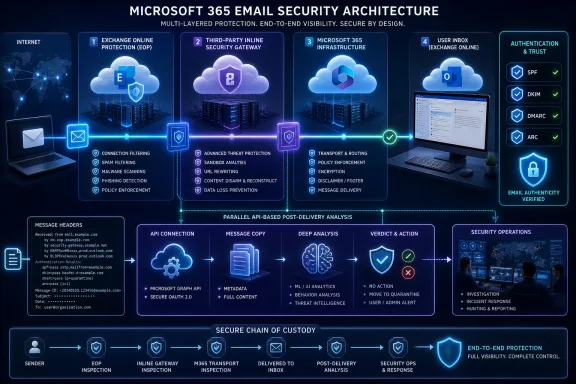
Microsoft’s latest guidance on routing email through third-party security services has reopened an important architectural debate for Microsoft 365 customers: whether inline inspection adds meaningful protection or merely inserts another point of complexity into an already sophisticated cloud mail system. The practical answer is not that inline security is inherently good or bad. Its value depends on where inspection occurs, how identity and authentication signals survive each hop, whether Microsoft’s native verdicts remain trustworthy, and how quickly the organization can diagnose failures when several control planes touch the same message.
Microsoft 365 email security has evolved far beyond the basic spam filtering once associated with hosted Exchange. Exchange Online Protection provides foundational filtering, while Microsoft Defender for Office 365 can add anti-phishing, Safe Links, Safe Attachments, campaign analysis, automated investigation, threat hunting, and other advanced capabilities.
Organizations nevertheless continue to deploy third-party secure email gateways and integrated cloud email security products. Some want an independent detection engine, some have regulatory or insurance requirements, and others already operate a security platform that covers endpoints, networks, cloud workloads, identities, and email.
Microsoft 365 complicated that model because the cloud service is no longer merely a mailbox destination. It is also a security, compliance, identity, transport, collaboration, and automation platform. Routing a message away from Microsoft 365 and then back again can therefore affect far more than delivery.
Modern third-party products use several architectural approaches:
A third-party hop can obscure the original sending IP address, modify headers, rewrite URLs, alter attachments, or cause Microsoft 365 to evaluate a returning message as though it were newly received. Poorly designed connectors and broad transport-rule exceptions can make matters worse by granting excessive trust to mail arriving from the security service.
The real issue is not the existence of another scanner. It is whether the added scanner causes the rest of the security stack to reason from incomplete or misleading evidence.
That means an inline service must preserve more than the visible body and attachments. It must avoid undermining the evidence used by later controls, including:
The service must not become an unrestricted relay, damage DKIM signing, cause recipients to reject mail, or create an unexpected mismatch between the organization’s published SPF policy and actual sending infrastructure. It must also preserve Microsoft Purview controls where those controls are expected to apply.
Outbound failures are particularly visible because they affect customer communications and domain reputation. A small configuration error can produce widespread non-delivery reports, DMARC failures, duplicate disclaimers, or messages that appear to originate from unfamiliar infrastructure.
That is why Microsoft provides Enhanced Filtering for Connectors, sometimes called skip listing, for supported inbound scenarios. Proper configuration allows Microsoft 365 to look past trusted intermediary systems and identify the relevant original source.
Administrators should not interpret “skip listing” as permission to skip security inspection. It tells Microsoft which known infrastructure belongs to the routing chain so that filtering can evaluate the message more accurately.
URL rewriting, footer insertion, MIME reconstruction, attachment transformation, and character-encoding changes can all have consequences. A security service may have a legitimate reason to transform content, but the resulting authentication impact must be understood and tested.
This is one reason apparently harmless routing changes can produce unexpected filtering behavior. The message is not necessarily malicious, but the evidence supporting its legitimacy has deteriorated.
Check Point emphasizes ARC as part of its integration with Microsoft 365, and its use is relevant. However, ARC is not a magical restoration mechanism. It preserves assertions made by participating systems, so the trustworthiness of the chain still depends on correct implementation, protected signing keys, sound routing, and confidence in the intermediary.
ARC should therefore be treated as one component of a broader design. It cannot compensate for indiscriminate connector trust, undocumented message transformations, or a routing loop.
That approach can provide independent detection diversity. Different vendors use different intelligence sources, machine-learning models, detonation systems, behavioral indicators, and campaign correlations. A message missed by one engine may still be identified by another.
The reverse situation also requires planning. If Microsoft quarantines a message that Check Point regards as clean, administrators need a clearly defined policy for which system has final authority. Automatic restoration features can improve operational efficiency, but they also introduce the possibility that one product will reverse another product’s more cautious verdict.
For buyers, the significant questions are more concrete:
Automated processes can act even faster. Inbox rules can forward content, customer-service systems can ingest mail, ticketing tools can create cases, and AI assistants can use mailbox content as grounding data. The meaningful measure is therefore not simply time to detection, but time to first possible interaction.
Pre-delivery controls reduce that exposure by withholding the message until a verdict exists. They are especially valuable for threats where one click, credential submission, OAuth authorization, QR-code scan, or payment instruction can trigger a damaging outcome.
A strong platform should support both prevention and remediation:
This technique is known as indirect prompt injection. It attempts to make external content behave like a trusted instruction, potentially manipulating an assistant’s output or actions.
Microsoft documented pre-delivery prompt-injection detection in Defender for Office 365 in July 2026. That development is important because it shows Microsoft pursuing the same prevention-first objective that third-party vendors use to justify inline controls.
Consequently, buyers should avoid assuming that third-party inspection is the only way to protect AI-assisted inbox workflows. The correct comparison is between the actual coverage, efficacy, licensing, telemetry, and response capabilities of the available controls.
No single probabilistic detection system should be treated as infallible. Email inspection, AI runtime safeguards, identity controls, data governance, least-privilege permissions, and monitoring all contribute to reducing the impact of an indirect prompt-injection attempt.
A third-party product may still add value if it identifies attacks that Microsoft misses, provides useful cross-platform intelligence, or supports workflows outside Microsoft 365. But customers should require comparative evidence rather than accept a generic claim that “AI threats” automatically prove the need for another routing layer.
Native and third-party systems therefore need visibility into east-west mail flow between users in the same Microsoft 365 tenant. A product that only protects messages arriving through the public MX path may miss this class of attack entirely.
Check Point supports inline inspection of internal Microsoft 365 email, and that capability can be useful where organizations want consistent policies across external, internal, and outbound traffic. However, internal inspection must be evaluated carefully because the service may process highly sensitive communications that were never intended to leave Microsoft’s trust boundary.
This is an area where Microsoft’s integration across Entra ID, Defender XDR, endpoints, cloud applications, and mail can be particularly powerful. A third-party email specialist may provide deeper message analysis, but Microsoft may possess broader tenant-native identity and workload context.
The best result can come from correlation rather than duplication. Security teams should determine whether alerts and incidents flow into their central detection platform with enough context to show that an unusual sign-in, malicious mailbox rule, and payment-fraud email belong to the same attack.
Administrators must document precedence. At a minimum, they need to know:
Message tracing should show every meaningful hop, but cross-vendor investigations often require correlating timestamps, message IDs, vendor tracking IDs, quarantine events, and header values. Logging retention and time synchronization become operational necessities.
Organizations should conduct simulated failure exercises before production deployment. Security architecture that works only when every component is healthy is not resilient enough for a business-critical service.
Average latency is not enough. Buyers should request percentile measurements and test worst-case conditions, including:
Trust should be restricted using every reliable condition the architecture supports, such as certificates, specific domains, controlled IP ranges, and expected message characteristics. Administrators should also monitor for messages that claim to have passed through the service but arrived by another route.
A broad rule that sets the spam confidence level to bypass filtering is especially risky. Microsoft recommends designs that preserve its ability to evaluate mail rather than using blanket exceptions to force delivery.
Every implementation should define a deterministic route marker. That marker must resist spoofing, survive expected transformations, and be recognized only in combination with a trusted connection source.
Teams should test messages addressed to aliases, distribution groups, shared mailboxes, Microsoft 365 Groups, hybrid recipients, external contacts, and cross-tenant destinations. Edge cases are where elegant architecture diagrams often fail.
Data residency promises require precise interpretation. A vendor may process content in one region while storing telemetry, support records, backups, or threat indicators elsewhere.
Regulated organizations should assess contractual terms, subprocessors, encryption, key management, privileged support access, breach notification, deletion procedures, and legal discovery obligations. Vendor membership in a Microsoft partner program can indicate integration work, but it does not replace customer due diligence.
Security teams should test sensitivity-labeled mail, S/MIME, Microsoft Purview Message Encryption, password-protected documents, and protected attachments. A dashboard showing 100 percent message processing does not necessarily mean 100 percent content inspection.
The organization must decide whether uninspectable content is delivered, quarantined, rejected, or routed for manual review. Each choice has security and business consequences.
The relevant comparison is not theoretical detection performance. It is the quality of protection the organization can sustain every day.
A lightly staffed business should be cautious if a third-party deployment requires frequent connector maintenance, policy reconciliation, quarantine management, and cross-platform investigation. Managed service support can offset that burden, but it also changes cost and trust calculations.
The decision should follow a risk assessment rather than a company-size threshold. High-value transactions, sensitive records, public-facing executives, and repeated impersonation attempts can make specialized protection worthwhile.
Unique detections deserve manual validation. A vendor may claim to have found thousands of additional threats when many are low-risk spam, already-disabled URLs, or messages Microsoft would have removed through later remediation.
The most useful question is not how many verdicts differed. It is how many consequential attacks the additional layer prevented without introducing unacceptable disruption.
Third-party vendors will need to prove differentiated efficacy, not simply claim that Microsoft lacks pre-delivery inspection. Buyers should expect more comparative testing around business email compromise, QR-code phishing, multilingual social engineering, account takeover, malicious OAuth consent, and AI-targeted content.
That change strengthens the argument for prevention before content enters trusted context, but email filtering alone will not solve the problem. AI systems must treat all external content as untrusted data, maintain strict action boundaries, request confirmation for sensitive operations, and prevent retrieved text from silently acquiring command authority.
The strongest evaluations will compare complete operating models: licensing, administration, user experience, false positives, resilience, detection diversity, incident response, data governance, and support. A product that identifies one additional phishing message but regularly delays critical business mail may not improve the organization’s total risk position.
Inline email security can be a valuable addition to Microsoft 365, but only when it preserves the platform’s authentication context, maintains the integrity of Microsoft’s native controls, and delivers a measurable reduction in successful attacks. Check Point’s architecture illustrates how a third-party service can pursue that goal without presenting itself as a wholesale replacement for Microsoft Defender, yet customers must still validate every connector, trust decision, failure mode, and policy interaction. The future of secure Microsoft 365 mail will not be defined by choosing Microsoft or a third party in isolation; it will be defined by whether multiple layers exchange trustworthy signals, fail safely, and stop malicious content before either a person or an AI system can act on it.
 Background
Microsoft 365 email security has evolved far beyond the basic spam filtering once associated with hosted Exchange. Exchange Online Protection provides foundational filtering, while Microsoft Defender for Office 365 can add anti-phishing, Safe Links, Safe Attachments, campaign analysis, automated investigation, threat hunting, and other advanced capabilities.Organizations nevertheless continue to deploy third-party secure email gateways and integrated cloud email security products. Some want an independent detection engine, some have regulatory or insurance requirements, and others already operate a security platform that covers endpoints, networks, cloud workloads, identities, and email.
From perimeter gateways to cloud-integrated inspection
Traditional email gateways occupied a straightforward position at the network edge. An organization’s MX records directed incoming mail to an appliance or hosted filtering provider, which inspected the message before forwarding acceptable mail to an internal Exchange server.Microsoft 365 complicated that model because the cloud service is no longer merely a mailbox destination. It is also a security, compliance, identity, transport, collaboration, and automation platform. Routing a message away from Microsoft 365 and then back again can therefore affect far more than delivery.
Modern third-party products use several architectural approaches:
- MX-based gateways receive internet mail before Microsoft 365 does.
- Post-Microsoft inline services inspect mail after Microsoft’s initial processing but before final mailbox delivery.
- API-based products inspect messages through Microsoft Graph or other service interfaces, sometimes before users can access them and sometimes after delivery.
- Hybrid products combine API integration with transport-based controls, journaling, mailbox rules, connectors, or internal-message inspection.
- Post-delivery systems search mailboxes continuously and retract messages when a later verdict identifies a threat.
Why Microsoft is warning about routing
Microsoft’s concern centers on preserving accurate signals and predictable control behavior. SMTP records the most recent systems through which a message passed, but Microsoft’s filtering engines need to understand the message’s original source, authentication results, prior handling, and organizational trust boundaries.A third-party hop can obscure the original sending IP address, modify headers, rewrite URLs, alter attachments, or cause Microsoft 365 to evaluate a returning message as though it were newly received. Poorly designed connectors and broad transport-rule exceptions can make matters worse by granting excessive trust to mail arriving from the security service.
The real issue is not the existence of another scanner. It is whether the added scanner causes the rest of the security stack to reason from incomplete or misleading evidence.
The Anatomy of Microsoft 365 Mail Flow
Enterprise mail flow rarely follows a single clean line from the internet to an inbox. Messages may pass through inbound connectors, Exchange Online Protection, Defender policies, transport rules, data loss prevention controls, journaling services, encryption systems, signature products, archiving platforms, and third-party inspection layers.Inbound processing is a chain of decisions
An incoming message can be evaluated for connection reputation, sender authentication, spoofing, malware, phishing indicators, bulk-mail characteristics, malicious URLs, dangerous attachments, policy violations, and organizational routing requirements. Each stage may add headers, assign a verdict, redirect the message, quarantine it, or deliver it with warnings.That means an inline service must preserve more than the visible body and attachments. It must avoid undermining the evidence used by later controls, including:
- The originating infrastructure and sending domain.
- SPF, DKIM, DMARC, and composite authentication results.
- Microsoft anti-spam and anti-phishing verdicts.
- Message trace identifiers and transport metadata.
- Sensitivity labels, encryption state, and compliance properties.
- Headers used by transport rules, security tools, or incident responders.
Outbound routing creates a different risk profile
Outbound mail raises separate concerns. Organizations may route messages through third-party services for data loss prevention, encryption, malware detection, brand protection, or account-compromise monitoring.The service must not become an unrestricted relay, damage DKIM signing, cause recipients to reject mail, or create an unexpected mismatch between the organization’s published SPF policy and actual sending infrastructure. It must also preserve Microsoft Purview controls where those controls are expected to apply.
Outbound failures are particularly visible because they affect customer communications and domain reputation. A small configuration error can produce widespread non-delivery reports, DMARC failures, duplicate disclaimers, or messages that appear to originate from unfamiliar infrastructure.
Authentication Is the Architectural Fault Line
Email authentication was designed around domains, authorized senders, cryptographic signatures, and observable message paths. Every additional processing hop creates an opportunity to alter one of those elements.SPF cannot follow a message through every intermediary
Sender Policy Framework checks whether the connecting infrastructure is authorized to send mail for a domain. When a gateway forwards a message to Microsoft 365, Microsoft may initially see the gateway’s IP address rather than the original sender’s address.That is why Microsoft provides Enhanced Filtering for Connectors, sometimes called skip listing, for supported inbound scenarios. Proper configuration allows Microsoft 365 to look past trusted intermediary systems and identify the relevant original source.
Administrators should not interpret “skip listing” as permission to skip security inspection. It tells Microsoft which known infrastructure belongs to the routing chain so that filtering can evaluate the message more accurately.
DKIM can survive forwarding, but only if content remains stable
DomainKeys Identified Mail adds a cryptographic signature covering selected headers and message content. Forwarding alone does not necessarily break DKIM, but modifying signed fields can invalidate the signature.URL rewriting, footer insertion, MIME reconstruction, attachment transformation, and character-encoding changes can all have consequences. A security service may have a legitimate reason to transform content, but the resulting authentication impact must be understood and tested.
DMARC depends on alignment
DMARC evaluates whether authenticated identities align with the domain visible to the recipient. If forwarding breaks SPF and content modification breaks DKIM, DMARC may fail even when the original message was legitimate.This is one reason apparently harmless routing changes can produce unexpected filtering behavior. The message is not necessarily malicious, but the evidence supporting its legitimacy has deteriorated.
ARC preserves authentication history, not absolute truth
Authenticated Received Chain allows trusted intermediaries to record authentication results and handling information across forwarding hops. A downstream recipient can use that chain when evaluating why SPF, DKIM, or DMARC changed during transit.Check Point emphasizes ARC as part of its integration with Microsoft 365, and its use is relevant. However, ARC is not a magical restoration mechanism. It preserves assertions made by participating systems, so the trustworthiness of the chain still depends on correct implementation, protected signing keys, sound routing, and confidence in the intermediary.
ARC should therefore be treated as one component of a broader design. It cannot compensate for indiscriminate connector trust, undocumented message transformations, or a routing loop.
What Check Point’s Model Is Trying to Achieve
Check Point presents its Email Security platform, also known through the Harmony Email & Collaboration product family, as an additional prevention layer around Microsoft 365. In its described enforcement flow, Microsoft evaluates a message first, after which Check Point can inspect it before final delivery under an inline prevention policy.Microsoft remains part of the decision path
This distinction matters because Check Point is not proposing that customers disable Exchange Online Protection or Microsoft Defender. The intended model allows Microsoft’s native filtering to perform its work and then gives Check Point another opportunity to quarantine a message that Microsoft considered deliverable.That approach can provide independent detection diversity. Different vendors use different intelligence sources, machine-learning models, detonation systems, behavioral indicators, and campaign correlations. A message missed by one engine may still be identified by another.
The reverse situation also requires planning. If Microsoft quarantines a message that Check Point regards as clean, administrators need a clearly defined policy for which system has final authority. Automatic restoration features can improve operational efficiency, but they also introduce the possibility that one product will reverse another product’s more cautious verdict.
Inline and API-based are not mutually exclusive
Check Point describes its service as API-based inline protection, which demonstrates why traditional category boundaries are becoming less useful. The service can integrate with the cloud platform through APIs while enforcing a decision before the user sees the message.For buyers, the significant questions are more concrete:
- At what exact point does the message become visible in the mailbox?
- Can a user, delegate, mobile client, rule, add-in, Copilot process, or automation access it before the security verdict?
- Which system controls quarantine and release?
- What happens if the third-party service is unavailable or slow?
- Can administrators trace the complete message journey from one console?
- Does internal mail receive the same protection as external mail?
- Can the product reverse or override Microsoft’s verdict, and under which conditions?
Pre-Delivery Prevention Versus Post-Delivery Remediation
The strongest argument for inline enforcement is simple: a message that never reaches the mailbox cannot be opened, forwarded, summarized, indexed, or processed by a mailbox-connected workflow. Post-delivery remediation accepts a period during which at least some of those actions may occur.The exposure window is real
An API-driven security product might detect and remove a malicious email seconds after delivery. That sounds fast, but users can respond just as quickly, especially when a notification appears on a phone or the lure creates urgency.Automated processes can act even faster. Inbox rules can forward content, customer-service systems can ingest mail, ticketing tools can create cases, and AI assistants can use mailbox content as grounding data. The meaningful measure is therefore not simply time to detection, but time to first possible interaction.
Pre-delivery controls reduce that exposure by withholding the message until a verdict exists. They are especially valuable for threats where one click, credential submission, OAuth authorization, QR-code scan, or payment instruction can trigger a damaging outcome.
Post-delivery capabilities still matter
Inline inspection does not eliminate the need for later analysis. Threat intelligence changes, malicious websites activate after delivery, and campaigns that initially appear benign can become recognizable only after more samples emerge.A strong platform should support both prevention and remediation:
- It should block known and suspected threats before delivery.
- It should reevaluate delivered messages when intelligence changes.
- It should search for similar messages across mailboxes.
- It should retract malicious content consistently.
- It should preserve evidence for investigation.
- It should identify users who clicked, replied, forwarded, or submitted credentials.
Microsoft’s Native Security Is Also Moving Earlier
Third-party vendors often contrast their pre-delivery controls with Microsoft’s post-delivery capabilities, but that comparison can be incomplete. Microsoft Defender for Office 365 already performs substantial inspection during mail flow, before a message reaches the mailbox, and Microsoft continues to expand that layer.Prompt injection is now an email-security concern
The rise of Microsoft 365 Copilot and other AI assistants has created a new reason to inspect untrusted content before delivery. An attacker can embed instructions in an email that are intended not for the human recipient but for an AI system that later reads or summarizes the message.This technique is known as indirect prompt injection. It attempts to make external content behave like a trusted instruction, potentially manipulating an assistant’s output or actions.
Microsoft documented pre-delivery prompt-injection detection in Defender for Office 365 in July 2026. That development is important because it shows Microsoft pursuing the same prevention-first objective that third-party vendors use to justify inline controls.
Consequently, buyers should avoid assuming that third-party inspection is the only way to protect AI-assisted inbox workflows. The correct comparison is between the actual coverage, efficacy, licensing, telemetry, and response capabilities of the available controls.
Defense in depth remains justified
Microsoft also applies safeguards at the AI layer, including mechanisms intended to separate system instructions, user requests, and untrusted grounded content. Those controls operate at a different point from email filtering.No single probabilistic detection system should be treated as infallible. Email inspection, AI runtime safeguards, identity controls, data governance, least-privilege permissions, and monitoring all contribute to reducing the impact of an indirect prompt-injection attempt.
A third-party product may still add value if it identifies attacks that Microsoft misses, provides useful cross-platform intelligence, or supports workflows outside Microsoft 365. But customers should require comparative evidence rather than accept a generic claim that “AI threats” automatically prove the need for another routing layer.
Internal Email Changes the Threat Model
Internet-facing filtering receives most of the attention, yet internal messages can be equally dangerous after an account takeover. A compromised employee mailbox may send highly convincing requests from a legitimate address, within the tenant, without crossing the traditional internet gateway.Compromised accounts inherit organizational trust
Internal business email compromise can exploit existing conversation threads, address-book relationships, shared projects, and executive authority. The attacker may know which invoice is due, which employee handles payments, and how the organization normally communicates.Native and third-party systems therefore need visibility into east-west mail flow between users in the same Microsoft 365 tenant. A product that only protects messages arriving through the public MX path may miss this class of attack entirely.
Check Point supports inline inspection of internal Microsoft 365 email, and that capability can be useful where organizations want consistent policies across external, internal, and outbound traffic. However, internal inspection must be evaluated carefully because the service may process highly sensitive communications that were never intended to leave Microsoft’s trust boundary.
Identity telemetry matters as much as message content
An internal message can look legitimate because its sender authentication is legitimate. Detection then depends on behavioral and contextual signals such as unusual login locations, impossible travel, token theft, atypical recipients, abnormal sending volume, new forwarding rules, suspicious OAuth applications, and deviations from established communication patterns.This is an area where Microsoft’s integration across Entra ID, Defender XDR, endpoints, cloud applications, and mail can be particularly powerful. A third-party email specialist may provide deeper message analysis, but Microsoft may possess broader tenant-native identity and workload context.
The best result can come from correlation rather than duplication. Security teams should determine whether alerts and incidents flow into their central detection platform with enough context to show that an unusual sign-in, malicious mailbox rule, and payment-fraud email belong to the same attack.
Operational Complexity Is a Security Issue
Adding an inspection layer is not merely a procurement decision. It creates a second policy engine, another administrative console, a separate quarantine experience, additional service dependencies, and potentially another support boundary during incidents.Duplicate controls can create contradictory outcomes
Two security systems may assign different verdicts to the same message. One may rewrite a URL while another evaluates the rewritten destination. One may remove an attachment before the other detonates it. One may mark a message as phishing while another restores it.Administrators must document precedence. At a minimum, they need to know:
- Which platform makes the final delivery decision.
- Which quarantine users should review.
- Which product sends end-user notifications.
- Which allow list takes priority.
- Which system handles false-positive submissions.
- Which headers and verdicts incident responders should trust.
- Which vendor owns diagnosis when mail is delayed or lost.
Mail-flow failures require rapid diagnosis
A connector certificate can expire. A vendor’s sending IP range can change. A transport rule can be reordered. An administrator can create a broad bypass while troubleshooting a false positive and forget to remove it.Message tracing should show every meaningful hop, but cross-vendor investigations often require correlating timestamps, message IDs, vendor tracking IDs, quarantine events, and header values. Logging retention and time synchronization become operational necessities.
Organizations should conduct simulated failure exercises before production deployment. Security architecture that works only when every component is healthy is not resilient enough for a business-critical service.
Latency must be measured at scale
Inline inspection adds processing time even when it functions correctly. Most users will not notice a short delay, but large attachments, encrypted content, sandbox analysis, traffic spikes, or regional service degradation can produce longer queues.Average latency is not enough. Buyers should request percentile measurements and test worst-case conditions, including:
- Peak inbound volume.
- Large and nested archives.
- Password-protected attachments.
- Messages with many rewritten links.
- Bulk campaigns to thousands of recipients.
- Regional service interruption.
- API throttling or Microsoft service degradation.
- Third-party scanning timeouts.
Connector Trust Must Be Narrow and Verifiable
Connectors are a normal part of Exchange Online, but they can become dangerous when administrators use trust as a shortcut. A connector that broadly permits mail from a third-party service can unintentionally weaken spoofing and spam protections.IP-based trust has limitations
Cloud security providers may publish ranges of sending addresses that customers must allow. Those ranges can change, overlap with multi-tenant infrastructure, or be implemented differently across regions.Trust should be restricted using every reliable condition the architecture supports, such as certificates, specific domains, controlled IP ranges, and expected message characteristics. Administrators should also monitor for messages that claim to have passed through the service but arrived by another route.
A broad rule that sets the spam confidence level to bypass filtering is especially risky. Microsoft recommends designs that preserve its ability to evaluate mail rather than using blanket exceptions to force delivery.
Routing-loop prevention deserves explicit testing
Loops can occur when Microsoft routes a message to a third party, which then returns it to a connector or domain that routes it back again. Even if hop limits eventually stop the cycle, the result can include delays, non-delivery reports, duplicate processing, and unnecessary scanning costs.Every implementation should define a deterministic route marker. That marker must resist spoofing, survive expected transformations, and be recognized only in combination with a trusted connection source.
Teams should test messages addressed to aliases, distribution groups, shared mailboxes, Microsoft 365 Groups, hybrid recipients, external contacts, and cross-tenant destinations. Edge cases are where elegant architecture diagrams often fail.
Compliance, Privacy, and Data Residency
Email security services inspect some of the most sensitive information in an organization. Contracts, medical details, intellectual property, authentication tokens, financial instructions, legal advice, and personal data may all pass through the scanning layer.Another processor means another governance decision
Before deployment, enterprises should determine what message content and metadata the provider processes, where processing occurs, how long data is retained, and whether samples are used for threat research or machine-learning improvement. They should also establish whether quarantined messages are stored outside Microsoft 365.Data residency promises require precise interpretation. A vendor may process content in one region while storing telemetry, support records, backups, or threat indicators elsewhere.
Regulated organizations should assess contractual terms, subprocessors, encryption, key management, privileged support access, breach notification, deletion procedures, and legal discovery obligations. Vendor membership in a Microsoft partner program can indicate integration work, but it does not replace customer due diligence.
Encryption can create coverage gaps
Encrypted or rights-protected messages may not be fully inspectable by an external service. The exact outcome depends on where encryption is applied, which keys are available, and whether the product integrates with Microsoft’s information-protection framework.Security teams should test sensitivity-labeled mail, S/MIME, Microsoft Purview Message Encryption, password-protected documents, and protected attachments. A dashboard showing 100 percent message processing does not necessarily mean 100 percent content inspection.
The organization must decide whether uninspectable content is delivered, quarantined, rejected, or routed for manual review. Each choice has security and business consequences.
Consumer and Small-Business Impact
Large enterprises can assign specialists to messaging, security operations, identity, compliance, and vendor management. Small organizations often have one administrator responsible for the entire Microsoft 365 tenant.Simplicity may outweigh marginal detection gains
Microsoft’s native stack has a strong advantage in operational consistency. Policies, alerts, investigations, identities, licensing, and support remain within the Microsoft ecosystem. A small business may obtain better practical security by correctly configuring Defender, multifactor authentication, Conditional Access, DMARC, and user reporting than by adding a sophisticated third-party product it cannot manage.The relevant comparison is not theoretical detection performance. It is the quality of protection the organization can sustain every day.
A lightly staffed business should be cautious if a third-party deployment requires frequent connector maintenance, policy reconciliation, quarantine management, and cross-platform investigation. Managed service support can offset that burden, but it also changes cost and trust calculations.
Targeted organizations may still benefit
Small legal firms, healthcare providers, financial advisers, contractors, and companies handling frequent payments can face concentrated phishing and business email compromise risk. For them, an additional prevention layer may be justified even with relatively few mailboxes.The decision should follow a risk assessment rather than a company-size threshold. High-value transactions, sensitive records, public-facing executives, and repeated impersonation attempts can make specialized protection worthwhile.
Enterprise Deployment and Validation
A safe rollout should begin with architecture discovery rather than connector creation. Organizations need a complete inventory of every service that sends, receives, modifies, archives, or analyzes email.A phased implementation reduces hidden failure modes
A practical deployment sequence is:- Map the existing mail path. Document MX records, connectors, transport rules, hybrid servers, relays, signatures, journaling, encryption, archiving, and mailbox integrations.
- Establish baseline behavior. Record delivery latency, false-positive rates, authentication outcomes, quarantine volumes, and incident-response times before adding the new layer.
- Define control ownership. Decide which product has authority over delivery, restoration, URL rewriting, attachment handling, and end-user notifications.
- Pilot representative users. Include executives, mobile users, shared mailboxes, automated systems, international offices, and departments with unusual compliance requirements.
- Exercise failure scenarios. Simulate vendor unavailability, connector errors, API throttling, routing loops, certificate problems, and delayed sandbox results.
- Validate authentication. Inspect SPF, DKIM, DMARC, ARC, composite authentication, and message headers across legitimate and malicious test cases.
- Expand gradually. Use measurable acceptance criteria rather than enabling the entire tenant immediately.
- Review continuously. Reassess the design after Microsoft, the security vendor, or the organization changes its mail-processing behavior.
Success requires measurable outcomes
The project should have defined security and operational goals. Useful metrics include the number of malicious messages uniquely detected by each platform, median and high-percentile delivery latency, false-positive rates, user-reported phishing rates, quarantine-release time, and mean time to investigate.Unique detections deserve manual validation. A vendor may claim to have found thousands of additional threats when many are low-risk spam, already-disabled URLs, or messages Microsoft would have removed through later remediation.
The most useful question is not how many verdicts differed. It is how many consequential attacks the additional layer prevented without introducing unacceptable disruption.
Strengths and Opportunities
A well-integrated inline email security service can strengthen Microsoft 365, particularly when an organization has the staff and processes to operate a multi-vendor architecture effectively.- Pre-delivery enforcement reduces the time in which users and automated systems can interact with malicious content.
- Independent detection engines can catch phishing, impersonation, malware, QR-code lures, and credential theft missed by another provider.
- Internal-message inspection can identify attacks originating from compromised accounts inside the tenant.
- Cross-platform security can help organizations apply related policies to Microsoft 365, Google Workspace, collaboration tools, file-sharing services, and other SaaS applications.
- Additional threat intelligence may provide earlier visibility into campaigns observed across networks, endpoints, cloud services, and email.
- Continuous post-delivery analysis can complement inline prevention when a threat’s reputation changes after initial delivery.
- Specialized tools may offer investigation, remediation, or managed-service workflows that better match an organization’s security operating model.
Risks and Concerns
The same architecture can produce significant problems when it is implemented without disciplined routing, authentication, policy, and operational design.- Additional hops can obscure source information or alter authentication results if connectors and ARC handling are not configured correctly.
- Broad trusted-connector rules can weaken Microsoft’s native filtering and create a route for spoofed or inadequately inspected mail.
- Conflicting verdicts can lead to inconsistent quarantine, restoration, and investigation behavior.
- Inline dependency can delay or interrupt business communications during service degradation.
- Message transformations can invalidate DKIM, affect DMARC, or interfere with compliance processing.
- Another provider expands the data-processing, privacy, residency, and supply-chain risk surface.
- Duplicate alerting and separate consoles can increase analyst workload rather than improve detection.
- Marketing comparisons may understate Microsoft’s own pre-delivery capabilities, including its expanding protection against AI-oriented attacks.
- Encrypted, protected, or unusually formatted content may create inspection gaps that are not obvious from headline coverage statistics.
- Automatic reversal of another security product’s quarantine decision can create dangerous edge cases unless authority is tightly controlled.
What to Watch Next
The email-security market is moving toward architectures that blend transport enforcement, API visibility, identity intelligence, collaboration protection, and AI-aware content analysis. The old contest between a perimeter gateway and a mailbox API is giving way to a more complicated competition over who can make the best decision at the right time.Microsoft will continue closing feature gaps
Microsoft has strong incentives to expand Defender for Office 365 because email is a primary entry point into identity, endpoint, data, and Copilot-related attacks. Its July 2026 documentation of pre-delivery prompt-injection detection shows that AI security is becoming a native mail-flow function rather than a separate experimental category.Third-party vendors will need to prove differentiated efficacy, not simply claim that Microsoft lacks pre-delivery inspection. Buyers should expect more comparative testing around business email compromise, QR-code phishing, multilingual social engineering, account takeover, malicious OAuth consent, and AI-targeted content.
AI agents will raise the cost of inbox mistakes
As assistants gain permission to summarize messages, draft replies, create tasks, retrieve files, and initiate workflows, a malicious email may affect more than one human reader. The inbox is becoming an input channel for software agents.That change strengthens the argument for prevention before content enters trusted context, but email filtering alone will not solve the problem. AI systems must treat all external content as untrusted data, maintain strict action boundaries, request confirmation for sensitive operations, and prevent retrieved text from silently acquiring command authority.
Evidence will matter more than architecture labels
Customers should demand transparent test methods, independently reproducible results, and telemetry showing exactly where a message was detected and what would have happened without the added layer. Claims of “zero-day,” “AI-powered,” or “prevention-first” protection are too broad to support a purchasing decision on their own.The strongest evaluations will compare complete operating models: licensing, administration, user experience, false positives, resilience, detection diversity, incident response, data governance, and support. A product that identifies one additional phishing message but regularly delays critical business mail may not improve the organization’s total risk position.
Inline email security can be a valuable addition to Microsoft 365, but only when it preserves the platform’s authentication context, maintains the integrity of Microsoft’s native controls, and delivers a measurable reduction in successful attacks. Check Point’s architecture illustrates how a third-party service can pursue that goal without presenting itself as a wholesale replacement for Microsoft Defender, yet customers must still validate every connector, trust decision, failure mode, and policy interaction. The future of secure Microsoft 365 mail will not be defined by choosing Microsoft or a third party in isolation; it will be defined by whether multiple layers exchange trustworthy signals, fail safely, and stop malicious content before either a person or an AI system can act on it.
References
- Primary source: IT Voice Media
Published: 2026-07-21T08:25:09+00:00
Inline Email Security and Microsoft 365: A Practical View of Mail Routing, Risk, and Prevention
Microsoft’s guidance on inbound and outbound mail routing for third-party email security has prompted a fair question from customers: how should organizations evaluate inline email security for Microsoft 365? The answer depends less on whether a solution is inline and more on how that inline...www.itvoice.in - Official source: learn.microsoft.com
Enhanced filtering for connectors in Exchange Online | Microsoft Learn
Learn how to use Enhanced Filtering for Connectors (also known as skip listing) if your organization sends mail to a non-Microsoft service or device before Microsoft 365.learn.microsoft.com - Related coverage: sc1.checkpoint.com
- Official source: microsoft.com
Microsoft Intelligent Security Association grows to more than 80 members | Microsoft Security Blog
MISA serves as a central place for introductions to other engineering teams to help support integrations with Microsoft Security.www.microsoft.com - Official source: microsoftpartners.microsoft.com
- Related coverage: checkpoint.com
Email Security Plans - Check Point Software
Explore the different pricing plans and packages for Check Point Email Security that’s the right fit for your organization and offers the best security www.checkpoint.com