

Microsoft 365 Organizational Messages should reach employee inboxes only when a narrowly targeted Copilot onboarding campaign fills a documented communication gap. Email delivery is now generally available worldwide, but the current eight Microsoft-authored templates are too limited to become a general corporate broadcast system—and careless use risks teaching employees that centrally generated inbox mail is promotional noise.
The capability rolled out from mid-May through mid-June 2026, extending Organizational Messages beyond Windows surfaces and Teams into email. Microsoft’s current documentation positions the channel around Copilot adoption, with two welcome messages for Copilot and Copilot Chat plus six messages from the Great M365 Copilot Journey.
That scope makes the immediate administrative decision relatively clear: treat Organizational Messages email as a controlled adoption campaign, not an all-purpose announcement channel. Start with a defined audience, establish ownership with internal communications or security, and measure whether employees actually engage before expanding delivery.
Organizational Messages began as an in-product communications feature. Messages displayed through Windows Spotlight, Notification Center, the taskbar, or Teams could meet employees inside the product being promoted without competing directly with operational email, HR notices, security alerts, and messages from colleagues.
Inbox delivery changes that relationship. An Organizational Message sent by email enters a space where users already make constant trust decisions: Is this legitimate? Is action required? Does the link belong to the company? Is this another product promotion that can be ignored?
That makes email more powerful, but also more expensive in organizational attention. The technical setup may be centralized, yet the consequences reach phishing awareness, internal communications standards, help-desk expectations, and the credibility of future admin mail.
Administrators considering the feature should therefore make four decisions before sending the first campaign:
That limitation prevents Organizational Messages email from immediately becoming a free-form tenant broadcasting tool. Administrators cannot use the email surface to write arbitrary outage notices, policy updates, benefits announcements, or locally tailored training messages through this initial template set.
The restriction provides a useful governance boundary. Microsoft-authored templates reduce the chance that a hastily written admin campaign will contain inaccurate instructions, inconsistent branding, or unsafe links. They also narrow the feature’s practical purpose to Copilot onboarding and adoption rather than general internal communications.
The trade-off is that a Microsoft-authored message may not match an organization’s terminology, deployment phase, support process, or employee expectations. A polished template can still be mistimed or irrelevant. If recipients have not received access, training, managerial context, or a reason to use Copilot, an adoption email may look less like enablement and more like advertising.
Non-customizability also limits remediation. An organization cannot rewrite the message to explain its internal data-handling rules, identify its help desk, distinguish Copilot from Copilot Chat in locally approved language, or acknowledge a staged deployment. Those details may have to arrive through a separate communication, undermining the simplicity that Organizational Messages is supposed to provide.
The appropriate test is not whether the templates are professionally written. It is whether one of the eight messages accurately represents the recipient’s current situation without requiring the employee to infer important local context.
They do not, by themselves, demonstrate successful adoption. A click can indicate curiosity, confusion, accidental interaction, or an attempt to determine whether the email is legitimate. An impression confirms exposure, not understanding.
Administrators should interpret the metrics alongside outcomes that already matter to their organization. If the goal is to close a Copilot onboarding gap, the campaign should be judged against that gap—not merely against the number of people who opened or clicked a message.
The aggregate reporting model also reinforces why smaller pilots are preferable. Sending a template to a tightly selected group makes it easier to assess whether the message was timely and relevant. A tenant-wide campaign may produce a larger number of clicks while concealing that many recipients considered it unnecessary.
CSV export can support regular reviews by IT, adoption teams, or internal communications. It should not turn click-through rate into a vanity metric that rewards more inbox traffic. The most valuable result may be evidence that one message worked for one stage of deployment and should then stop.
A practical pilot should answer three questions:
It also means administrators may be able to start an inbox campaign without working through the device-management controls that make Windows delivery a more deliberate project. Easier activation is not the same as lower organizational risk.
The relevant control plane now extends beyond endpoint management. Responsibility should include whoever governs employee email, awareness training, brand presentation, and internal announcements. A technically authorized administrator may not be the appropriate person to decide when thousands of employees should receive a Copilot campaign.
This distinction matters because the inbox is already contested territory. WindowsForum’s coverage of Microsoft 365 High Volume Email, Exchange Online internal messaging, and Microsoft Defender mail-bombing detection reflects a broader administrative challenge: organizations need reliable ways to distribute legitimate internal mail while preserving employees’ ability to recognize abnormal or malicious messages.
Adding another centrally managed sender does not automatically weaken security, but inconsistent use can weaken user judgment. Employees who repeatedly receive generic platform-promotional messages may learn to ignore centrally generated mail. Alternatively, they may become accustomed to clicking Microsoft-branded calls to action without examining context.
Neither habit is desirable. Security teams spend considerable effort teaching users to pause before acting on unexpected email, even when it appears to originate inside the organization. Organizational Messages campaigns should reinforce that training through predictable timing, clear internal notice, and tightly controlled frequency—not work against it.
The weakest case is convenience for the sender. Centralized campaign management can encourage organizations to add email to every available surface because doing so requires less effort than determining which surface fits the message.
That approach mistakes distribution for communication. Repeating the same adoption message across Windows, Teams, and email may increase impressions while making the campaign feel unavoidable. It can also blur which channel employees should trust for urgent operational information versus optional product education.
The better policy is to assign each surface a purpose. Windows and Teams can support contextual prompts encountered during work. Email can be reserved for onboarding material that employees may need to retain, revisit, or act on outside a brief notification.
Administrators should also establish a stopping rule. Once a target group has received the relevant welcome or journey message, continuing to send Microsoft-authored adoption content without evidence of benefit turns a campaign into background noise.
Organizations with a clear Copilot onboarding gap should run a small campaign, review aggregate impressions, clicks, and click-through rate, export the results if deeper analysis is needed, and decide whether the message created useful action. Organizations that already have effective training and internal communications should feel no obligation to introduce another inbox source.
The next meaningful milestone will not be broader availability; that has already arrived. It will be whether Microsoft expands email beyond non-customizable Copilot templates—and whether administrators have built governance strong enough to keep a convenient adoption feature from becoming just another reason employees distrust their inboxes.
The capability rolled out from mid-May through mid-June 2026, extending Organizational Messages beyond Windows surfaces and Teams into email. Microsoft’s current documentation positions the channel around Copilot adoption, with two welcome messages for Copilot and Copilot Chat plus six messages from the Great M365 Copilot Journey.
That scope makes the immediate administrative decision relatively clear: treat Organizational Messages email as a controlled adoption campaign, not an all-purpose announcement channel. Start with a defined audience, establish ownership with internal communications or security, and measure whether employees actually engage before expanding delivery.
 Email Changes the Governance Question
Organizational Messages began as an in-product communications feature. Messages displayed through Windows Spotlight, Notification Center, the taskbar, or Teams could meet employees inside the product being promoted without competing directly with operational email, HR notices, security alerts, and messages from colleagues.Inbox delivery changes that relationship. An Organizational Message sent by email enters a space where users already make constant trust decisions: Is this legitimate? Is action required? Does the link belong to the company? Is this another product promotion that can be ignored?
That makes email more powerful, but also more expensive in organizational attention. The technical setup may be centralized, yet the consequences reach phishing awareness, internal communications standards, help-desk expectations, and the credibility of future admin mail.
Administrators considering the feature should therefore make four decisions before sending the first campaign:
- Define the specific communication problem that existing Teams posts, training sessions, service-desk content, or manager communications are failing to solve.
- Limit the initial audience to employees for whom the selected Copilot message is relevant.
- Have communications and security stakeholders review how the email will appear alongside other trusted internal mail.
- Use impressions, clicks, and click-through rate to decide whether the campaign deserves to continue.
The Eight Templates Are a Safeguard and a Constraint
As of July 2026, email delivery supports only eight non-customizable Microsoft templates. Two welcome users to Copilot or Copilot Chat, while six belong to Microsoft’s Great M365 Copilot Journey.That limitation prevents Organizational Messages email from immediately becoming a free-form tenant broadcasting tool. Administrators cannot use the email surface to write arbitrary outage notices, policy updates, benefits announcements, or locally tailored training messages through this initial template set.
The restriction provides a useful governance boundary. Microsoft-authored templates reduce the chance that a hastily written admin campaign will contain inaccurate instructions, inconsistent branding, or unsafe links. They also narrow the feature’s practical purpose to Copilot onboarding and adoption rather than general internal communications.
The trade-off is that a Microsoft-authored message may not match an organization’s terminology, deployment phase, support process, or employee expectations. A polished template can still be mistimed or irrelevant. If recipients have not received access, training, managerial context, or a reason to use Copilot, an adoption email may look less like enablement and more like advertising.
Non-customizability also limits remediation. An organization cannot rewrite the message to explain its internal data-handling rules, identify its help desk, distinguish Copilot from Copilot Chat in locally approved language, or acknowledge a staged deployment. Those details may have to arrive through a separate communication, undermining the simplicity that Organizational Messages is supposed to provide.
The appropriate test is not whether the templates are professionally written. It is whether one of the eight messages accurately represents the recipient’s current situation without requiring the employee to infer important local context.
A Pilot Should Prove More Than Clicks
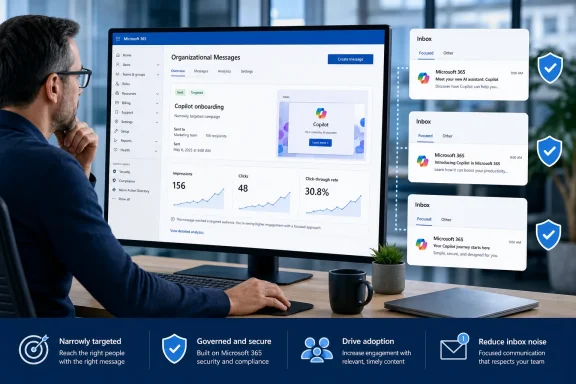
Organizational Messages reports aggregate impressions, clicks, and click-through rate, and administrators can export performance data to CSV. Those measurements give IT teams a useful starting point for comparing campaigns and identifying messages that attract little engagement.They do not, by themselves, demonstrate successful adoption. A click can indicate curiosity, confusion, accidental interaction, or an attempt to determine whether the email is legitimate. An impression confirms exposure, not understanding.
Administrators should interpret the metrics alongside outcomes that already matter to their organization. If the goal is to close a Copilot onboarding gap, the campaign should be judged against that gap—not merely against the number of people who opened or clicked a message.
The aggregate reporting model also reinforces why smaller pilots are preferable. Sending a template to a tightly selected group makes it easier to assess whether the message was timely and relevant. A tenant-wide campaign may produce a larger number of clicks while concealing that many recipients considered it unnecessary.
CSV export can support regular reviews by IT, adoption teams, or internal communications. It should not turn click-through rate into a vanity metric that rewards more inbox traffic. The most valuable result may be evidence that one message worked for one stage of deployment and should then stop.
A practical pilot should answer three questions:
- Did the intended employees recognize the email as an authorized organizational communication?
- Did the message direct them toward a useful next step at the correct point in their Copilot journey?
- Did the campaign reduce a known support, awareness, or onboarding problem rather than merely generate engagement?
The Low Technical Barrier Raises the Policy Stakes
Email and Teams delivery do not require the Intune tenant policies needed for delivery through Windows Spotlight, Notification Center, and the taskbar. That reduces deployment friction and makes Organizational Messages available to organizations that have not configured the Windows-specific surfaces.It also means administrators may be able to start an inbox campaign without working through the device-management controls that make Windows delivery a more deliberate project. Easier activation is not the same as lower organizational risk.
The relevant control plane now extends beyond endpoint management. Responsibility should include whoever governs employee email, awareness training, brand presentation, and internal announcements. A technically authorized administrator may not be the appropriate person to decide when thousands of employees should receive a Copilot campaign.
This distinction matters because the inbox is already contested territory. WindowsForum’s coverage of Microsoft 365 High Volume Email, Exchange Online internal messaging, and Microsoft Defender mail-bombing detection reflects a broader administrative challenge: organizations need reliable ways to distribute legitimate internal mail while preserving employees’ ability to recognize abnormal or malicious messages.
Adding another centrally managed sender does not automatically weaken security, but inconsistent use can weaken user judgment. Employees who repeatedly receive generic platform-promotional messages may learn to ignore centrally generated mail. Alternatively, they may become accustomed to clicking Microsoft-branded calls to action without examining context.
Neither habit is desirable. Security teams spend considerable effort teaching users to pause before acting on unexpected email, even when it appears to originate inside the organization. Organizational Messages campaigns should reinforce that training through predictable timing, clear internal notice, and tightly controlled frequency—not work against it.
Copilot Adoption Does Not Need Another Always-On Channel
The strongest case for inbox delivery is reach. Employees may miss a taskbar message, dismiss a notification, overlook Windows Spotlight, or treat a Teams popover as an interruption. Email remains searchable and can be revisited when the user has time.The weakest case is convenience for the sender. Centralized campaign management can encourage organizations to add email to every available surface because doing so requires less effort than determining which surface fits the message.
That approach mistakes distribution for communication. Repeating the same adoption message across Windows, Teams, and email may increase impressions while making the campaign feel unavoidable. It can also blur which channel employees should trust for urgent operational information versus optional product education.
The better policy is to assign each surface a purpose. Windows and Teams can support contextual prompts encountered during work. Email can be reserved for onboarding material that employees may need to retain, revisit, or act on outside a brief notification.
Administrators should also establish a stopping rule. Once a target group has received the relevant welcome or journey message, continuing to send Microsoft-authored adoption content without evidence of benefit turns a campaign into background noise.
The Inbox Should Be Earned
Microsoft 365 Organizational Messages email is best enabled as a limited, governed option rather than a default addition to every Copilot rollout. The worldwide general availability milestone makes the technical capability available, but the eight fixed templates keep the real use case narrow.Organizations with a clear Copilot onboarding gap should run a small campaign, review aggregate impressions, clicks, and click-through rate, export the results if deeper analysis is needed, and decide whether the message created useful action. Organizations that already have effective training and internal communications should feel no obligation to introduce another inbox source.
The next meaningful milestone will not be broader availability; that has already arrived. It will be whether Microsoft expands email beyond non-customizable Copilot templates—and whether administrators have built governance strong enough to keep a convenient adoption feature from becoming just another reason employees distrust their inboxes.
References
- Primary source: learn.microsoft.com
Organizational messages in Microsoft 365 - Microsoft 365 admin | Microsoft Learn
Learn how to create and manage organizational messages in the Microsoft 365 admin center. Drive adoption and configure delivery to Windows and Teams.learn.microsoft.com - Independent coverage: mc.merill.net
MC1189665 - Microsoft 365 admin center: Organizational Messages to support email delivery | Microsoft 365 Message Center Archive
Organizational Messages in Microsoft 365 will add email as a delivery channel, alongside Windows and Teams surfaces. Public Preview runs mid-November 2025 to late January 2026;…mc.merill.net - Primary source: WindowsForum
Microsoft 365 High Volume Email Changes: Security, External Delivery, and Strategic Migration | Windows Forum
For many enterprise IT leaders, the intersection of security and high-volume email workflows within Microsoft 365 represents a challenging balancing act. On...windowsforum.com
