

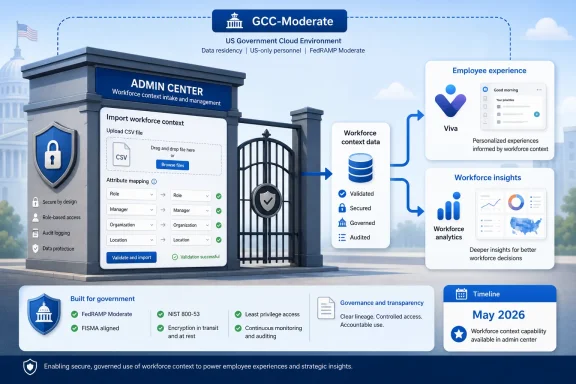
Microsoft has launched Organizational Data in Microsoft 365 for GCC-Moderate tenants, bringing the Viva-connected data ingestion service to U.S. government cloud customers as a generally available web feature in the Microsoft 365 admin center with roadmap ID 508518 and a May 2026 availability window. The practical effect is simple: agencies and public-sector contractors can now feed structured HR and organizational context into Microsoft 365 without relying on the same workarounds commercial tenants have already outgrown. The strategic effect is larger, because Microsoft is turning organizational data from an app-by-app administrative chore into shared substrate for Viva, Copilot-adjacent analytics, profile experiences, and future workforce intelligence. For government IT, that is both a convenience and a governance challenge.
Organizational Data in Microsoft 365 is not a flashy feature by Microsoft standards. It does not redraw Teams, generate a document, or promise to summarize a meeting before the coffee is cold. It is infrastructure: a controlled way to import employee attributes such as role, manager, organization, location, skills, and related workforce metadata into Microsoft 365 so that other Microsoft services can use them consistently.
That makes its arrival in GCC-Moderate more important than the modest roadmap language suggests. Government cloud customers often receive Microsoft 365 features later than commercial tenants, not because the use cases are less urgent, but because the compliance, residency, operational, and authorization constraints are more exacting. A feature that handles organizational data is especially sensitive because it describes people, structures, reporting lines, and institutional relationships.
The new availability means GCC customers can use the Microsoft 365 admin center as the intake point for this data rather than treating Viva-specific upload flows as the long-term center of gravity. Microsoft has been moving in this direction across the service: centralize ingestion, validate data quality earlier, then make the approved data available to selected Microsoft 365 and Viva experiences.
For administrators, that sounds like less repetition. For security and compliance teams, it sounds like a larger blast radius if the data is wrong, overshared, or insufficiently governed. Both readings are correct.
That sounds mundane until you compare it with the older pattern. Historically, organizational data has often been handled in app-specific contexts: Viva Insights might have one upload process, another workforce tool might have its own expectations, and Entra ID might supply only a limited set of directory-backed attributes. The result was a patchwork in which HR reality, directory reality, and analytics reality did not always match.
Microsoft’s newer model treats organizational data as a reusable tenant-level asset. A single ingestion path can serve multiple experiences, with the Microsoft 365 admin center becoming the place where the upload is performed and where attribute access is governed. In theory, this reduces duplicate data handling and cuts down on the drift that happens when separate teams maintain separate CSVs for separate dashboards.
The admin role model matters here. Microsoft distinguishes the Global Administrator from the Organizational Data Source Administrator, a role that can manage organizational data without necessarily handing the keys to the entire tenant kingdom to an HR operations owner. That separation is exactly the sort of least-privilege design government tenants should want, though it only helps if agencies actually use it.
The danger is that centralization can be mistaken for simplification. A central intake point does not absolve agencies from deciding who owns data correctness, who approves attribute sharing, who reviews validation errors, and who signs off when HR data becomes visible to broader Microsoft 365 experiences.
That is why this launch should be read less as a green light and more as a new option that needs a controlled rollout. The feature is generally available, but the data governance around it will vary sharply by agency, municipality, school system, public-sector contractor, and regulated partner. Some will already have clean HRIS exports and mature Entra ID hygiene. Others will discover, painfully, that the org chart in HR, the manager field in Entra ID, and the operational structure used by program offices are three different maps of the same building.
Microsoft’s tooling can validate formats, required fields, mappings, and some quality conditions. It cannot decide whether “department,” “organization,” “cost center,” “mission unit,” and “job discipline” mean what the business thinks they mean. That semantic cleanup remains local work.
For GCC customers that have waited for commercial features to cross the boundary, the temptation is to catch up quickly. But organizational data is foundational. Feed bad data into one dashboard and you have a bad dashboard. Feed bad data into a shared Microsoft 365 data layer and the mistake starts appearing wherever Microsoft decides that context is useful.
That is the benign version of the story: organizational data makes analytics useful. A meeting-heavy agency can see whether the problem is concentrated in one division. A CIO can understand whether Copilot adoption differs by role or location. A manager can examine collaboration patterns without manually stitching together HR exports and service reports.
But in 2026, no Microsoft 365 data story is only a Viva story. Organizational Data in Microsoft 365 also sits adjacent to Microsoft’s broader AI strategy, where profile context, skills, roles, teams, and reporting relationships increasingly shape the quality of recommendations, search, agents, and Copilot experiences. Microsoft is not merely helping administrators upload a better spreadsheet. It is building the context layer that makes Microsoft 365 feel less like a collection of apps and more like an environment that understands the organization.
That is a powerful pitch for government work, where institutional knowledge is often trapped in acronyms, legacy structures, and informal networks. It is also a reason to slow down. The more useful organizational context becomes, the more consequential its errors and exposure become.
Microsoft’s documentation is explicit that uploaded organizational data can be used across Microsoft 365 and Viva apps and services, depending on configuration and attribute access. That should be the sentence every GCC administrator keeps in mind. The point of the feature is reuse; the risk of the feature is also reuse.
That has operational upside. Admins can import data once, map attributes once, run quality checks once, and make the data available to more than one service. Large organizations can use SharePoint-backed uploads for bigger files, local CSV import for simpler cases, and, where available, connector-based approaches for HR systems and APIs. The long-term direction is obvious: fewer manual exports, more durable pipelines.
The phased transition also reflects an uncomfortable truth about Microsoft 365 administration: governance often follows product architecture. When every app has its own upload workflow, every app team builds its own control process. When the platform consolidates ingestion, the tenant needs a cross-functional process that includes Microsoft 365 admins, HR system owners, privacy officers, security teams, records managers, and the business units represented in the data.
That is not bureaucracy for its own sake. Organizational data is not just a technical asset. It can reveal reporting structures, sensitive teams, office locations, job classifications, management chains, and inferred status. Even when individual attributes seem harmless, combinations of attributes can become revealing.
GCC-Moderate tenants should therefore treat this launch as a reason to revisit ownership. If HR owns the truth, IT owns the pipeline, compliance owns the rules, and business units own the meaning, then nobody owns the outcome unless the process is explicit.
That default is sensible. Entra ID is already the directory backbone for identity, access, and many profile experiences. Automatically allowing an uploaded HR file to override directory values everywhere would be reckless. But the default also means agencies should not assume that uploading better HR data will instantly fix profile inconsistency across Microsoft 365.
The precedence model forces a governance decision. If Entra ID is wrong but treated as authoritative, the new organizational data layer may not have the visible effect administrators expect. If organizational data is made authoritative too broadly, agencies may overwrite values that security, identity, or application teams depend on.
This is where many rollout projects bog down. The question is not merely whether the CSV validates. The question is which system gets to be right.
For government tenants, the conservative approach is to begin with targeted downstream use rather than broad profile overrides. Use the data where it clearly improves Viva or reporting scenarios, compare outputs against known organizational structures, and then consider precedence changes only after the owners of Entra ID and HR data have reconciled definitions.
That makes the first proof of concept feel deceptively simple. Most organizations can produce a CSV with email addresses, manager emails, and department names. The hard part is producing one that is complete, current, consistently formatted, privacy-reviewed, and aligned with how downstream analytics will interpret the fields.
Manager data is a classic example. A manager field can mean formal supervisor, approving official, project lead, operational lead, or HR reporting manager, depending on the system. Analytics built on management hierarchy will reflect whichever definition gets uploaded, not the definition users wish they had used.
Organization names are another trap. “IT,” “Information Technology,” “Office of the CIO,” and “Technology Services” may refer to the same unit in different systems. If those values are not normalized before import, dashboards will show fragmentation that looks like insight but is really data exhaust.
The validation process can catch some problems, and Microsoft says full upload availability in the profile store can take up to several days. But no validation engine can infer an agency’s internal taxonomy. The CSV is only the carrier; the policy decisions travel inside it.
Organizational data is often treated as low sensitivity because it is not the same as payroll, medical, investigative, or case data. Yet the fields involved can still be revealing. Reporting chains show influence. Job titles reveal responsibilities. Locations may expose facility patterns. Skills data can indicate who works on sensitive capabilities. Custom attributes can encode almost anything if administrators are careless.
The broad Microsoft 365 direction is to make context more reusable. That means government tenants should assume that today’s “just for Viva” data could become tomorrow’s input into richer profile, discovery, analytics, or AI-assisted experiences, subject to Microsoft’s controls and tenant configuration. The answer is not to avoid the feature. The answer is to classify the data before importing it.
This is where attribute-level thinking matters. Not every field belongs in every downstream service. A department attribute may be safe for broad analytics. A sensitive assignment marker may not be. A skills taxonomy may be useful for workforce planning but inappropriate for broad profile surfacing until employees and managers understand how it will be used.
Microsoft gives administrators mechanisms to select app and attribute access. GCC tenants should use them as governance controls, not as setup wizard trivia.
Better organizational data can improve workforce analytics, adoption reporting, profile accuracy, and leadership visibility. It can help agencies understand whether collaboration patterns match operational goals. It can help IT teams measure technology rollouts by mission area rather than by generic license counts. It can make skills and role-based experiences more plausible.
For public-sector contractors and regulated organizations operating in GCC-Moderate, the same logic applies. Many are under pressure to modernize collaboration while satisfying government security expectations. A centralized ingestion path for organizational data can reduce the number of shadow spreadsheets and one-off uploads used to feed executive dashboards.
The feature also fits the broader Microsoft 365 administrative trend: move specialized configuration into the admin center, rationalize roles, and make data reusable across services. That trend is not always loved by administrators, because it can blur product boundaries and create more places where a setting has downstream effects. But it is the direction of travel.
The question for GCC tenants is not whether Microsoft’s approach is convenient. It is whether they can make it accountable.
Agencies still need to decide how often data is refreshed, whether imports are manual or automated, who approves schema changes, how validation failures are handled, and what happens when a downstream dashboard contradicts a leader’s understanding of the organization. They need a rollback plan for bad uploads and a communications plan for employees if profile or skills experiences change.
They also need to monitor Microsoft’s roadmap closely. A feature that begins as support for Viva and Microsoft 365 profile context can become more important as Copilot, agents, People Skills, and analytics products mature. The value of organizational data rises as Microsoft’s AI layer becomes more dependent on context. So does the importance of getting the data right.
This is why the GCC launch should be treated as a platform milestone rather than a Viva footnote. Microsoft is giving government cloud tenants access to the same kind of organizational data substrate commercial customers have been moving toward. That narrows a capability gap, but it also imports the same governance burden.
The organizations that benefit most will not be the ones that upload first. They will be the ones that use the launch to force a long-delayed conversation about authoritative data, attribute sensitivity, and the relationship between HR systems and collaboration platforms.
 Microsoft Moves the Org Chart Into the Government Cloud
Organizational Data in Microsoft 365 is not a flashy feature by Microsoft standards. It does not redraw Teams, generate a document, or promise to summarize a meeting before the coffee is cold. It is infrastructure: a controlled way to import employee attributes such as role, manager, organization, location, skills, and related workforce metadata into Microsoft 365 so that other Microsoft services can use them consistently.That makes its arrival in GCC-Moderate more important than the modest roadmap language suggests. Government cloud customers often receive Microsoft 365 features later than commercial tenants, not because the use cases are less urgent, but because the compliance, residency, operational, and authorization constraints are more exacting. A feature that handles organizational data is especially sensitive because it describes people, structures, reporting lines, and institutional relationships.
The new availability means GCC customers can use the Microsoft 365 admin center as the intake point for this data rather than treating Viva-specific upload flows as the long-term center of gravity. Microsoft has been moving in this direction across the service: centralize ingestion, validate data quality earlier, then make the approved data available to selected Microsoft 365 and Viva experiences.
For administrators, that sounds like less repetition. For security and compliance teams, it sounds like a larger blast radius if the data is wrong, overshared, or insufficiently governed. Both readings are correct.
The Admin Center Becomes the Gatehouse
The heart of the change is the Microsoft 365 admin center. Organizational Data in Microsoft 365 lives under the setup and migration/imports area, and it gives designated administrators a way to create connections, upload CSV files, map attributes, validate imports, and decide which downstream apps and services can consume selected data.That sounds mundane until you compare it with the older pattern. Historically, organizational data has often been handled in app-specific contexts: Viva Insights might have one upload process, another workforce tool might have its own expectations, and Entra ID might supply only a limited set of directory-backed attributes. The result was a patchwork in which HR reality, directory reality, and analytics reality did not always match.
Microsoft’s newer model treats organizational data as a reusable tenant-level asset. A single ingestion path can serve multiple experiences, with the Microsoft 365 admin center becoming the place where the upload is performed and where attribute access is governed. In theory, this reduces duplicate data handling and cuts down on the drift that happens when separate teams maintain separate CSVs for separate dashboards.
The admin role model matters here. Microsoft distinguishes the Global Administrator from the Organizational Data Source Administrator, a role that can manage organizational data without necessarily handing the keys to the entire tenant kingdom to an HR operations owner. That separation is exactly the sort of least-privilege design government tenants should want, though it only helps if agencies actually use it.
The danger is that centralization can be mistaken for simplification. A central intake point does not absolve agencies from deciding who owns data correctness, who approves attribute sharing, who reviews validation errors, and who signs off when HR data becomes visible to broader Microsoft 365 experiences.
GCC-Moderate Gets Parity, But Not an Excuse to Rush
The word “available” carries different weight in government cloud than it does in commercial Microsoft 365. In a commercial tenant, admins may test a new ingestion workflow, wire it to a dashboard, and iterate quickly. In GCC-Moderate, the same action touches records management, privacy review, procurement assumptions, union or workforce policy in some environments, and the internal politics of who is allowed to define the organization’s official structure.That is why this launch should be read less as a green light and more as a new option that needs a controlled rollout. The feature is generally available, but the data governance around it will vary sharply by agency, municipality, school system, public-sector contractor, and regulated partner. Some will already have clean HRIS exports and mature Entra ID hygiene. Others will discover, painfully, that the org chart in HR, the manager field in Entra ID, and the operational structure used by program offices are three different maps of the same building.
Microsoft’s tooling can validate formats, required fields, mappings, and some quality conditions. It cannot decide whether “department,” “organization,” “cost center,” “mission unit,” and “job discipline” mean what the business thinks they mean. That semantic cleanup remains local work.
For GCC customers that have waited for commercial features to cross the boundary, the temptation is to catch up quickly. But organizational data is foundational. Feed bad data into one dashboard and you have a bad dashboard. Feed bad data into a shared Microsoft 365 data layer and the mistake starts appearing wherever Microsoft decides that context is useful.
Viva Is the Front Door, But Copilot Is the Shadow on the Wall
Microsoft is branding the roadmap item under Microsoft Viva and the Microsoft 365 admin center, and that is fair. Viva Insights, workforce analytics, Copilot Dashboard-style reporting, People Skills, and related employee experience features are obvious consumers of structured organizational data. If an analyst wants to understand collaboration trends by department, reporting chain, discipline, region, or management layer, raw Microsoft 365 activity signals are not enough. The activity needs context.That is the benign version of the story: organizational data makes analytics useful. A meeting-heavy agency can see whether the problem is concentrated in one division. A CIO can understand whether Copilot adoption differs by role or location. A manager can examine collaboration patterns without manually stitching together HR exports and service reports.
But in 2026, no Microsoft 365 data story is only a Viva story. Organizational Data in Microsoft 365 also sits adjacent to Microsoft’s broader AI strategy, where profile context, skills, roles, teams, and reporting relationships increasingly shape the quality of recommendations, search, agents, and Copilot experiences. Microsoft is not merely helping administrators upload a better spreadsheet. It is building the context layer that makes Microsoft 365 feel less like a collection of apps and more like an environment that understands the organization.
That is a powerful pitch for government work, where institutional knowledge is often trapped in acronyms, legacy structures, and informal networks. It is also a reason to slow down. The more useful organizational context becomes, the more consequential its errors and exposure become.
Microsoft’s documentation is explicit that uploaded organizational data can be used across Microsoft 365 and Viva apps and services, depending on configuration and attribute access. That should be the sentence every GCC administrator keeps in mind. The point of the feature is reuse; the risk of the feature is also reuse.
The Real Migration Is From App Data to Tenant Data
The most important architectural shift is not the availability of a new upload button. It is the migration of organizational data from an app-scoped resource to a tenant-managed resource. Microsoft has been moving Viva Insights and related experiences toward the Microsoft 365 admin center as the durable place for organizational data uploads, with tenants transitioning in phases.That has operational upside. Admins can import data once, map attributes once, run quality checks once, and make the data available to more than one service. Large organizations can use SharePoint-backed uploads for bigger files, local CSV import for simpler cases, and, where available, connector-based approaches for HR systems and APIs. The long-term direction is obvious: fewer manual exports, more durable pipelines.
The phased transition also reflects an uncomfortable truth about Microsoft 365 administration: governance often follows product architecture. When every app has its own upload workflow, every app team builds its own control process. When the platform consolidates ingestion, the tenant needs a cross-functional process that includes Microsoft 365 admins, HR system owners, privacy officers, security teams, records managers, and the business units represented in the data.
That is not bureaucracy for its own sake. Organizational data is not just a technical asset. It can reveal reporting structures, sensitive teams, office locations, job classifications, management chains, and inferred status. Even when individual attributes seem harmless, combinations of attributes can become revealing.
GCC-Moderate tenants should therefore treat this launch as a reason to revisit ownership. If HR owns the truth, IT owns the pipeline, compliance owns the rules, and business units own the meaning, then nobody owns the outcome unless the process is explicit.
Data Precedence Is Where Theory Meets Tenant Reality
One detail deserves more attention than it will probably receive: Microsoft Entra data takes precedence over Organizational Data in Microsoft 365 by default for the Microsoft 365 User Profile. In plain English, if both Entra ID and the organizational data upload have a value for the same profile attribute, Microsoft 365 generally uses the Entra value unless admins change precedence.That default is sensible. Entra ID is already the directory backbone for identity, access, and many profile experiences. Automatically allowing an uploaded HR file to override directory values everywhere would be reckless. But the default also means agencies should not assume that uploading better HR data will instantly fix profile inconsistency across Microsoft 365.
The precedence model forces a governance decision. If Entra ID is wrong but treated as authoritative, the new organizational data layer may not have the visible effect administrators expect. If organizational data is made authoritative too broadly, agencies may overwrite values that security, identity, or application teams depend on.
This is where many rollout projects bog down. The question is not merely whether the CSV validates. The question is which system gets to be right.
For government tenants, the conservative approach is to begin with targeted downstream use rather than broad profile overrides. Use the data where it clearly improves Viva or reporting scenarios, compare outputs against known organizational structures, and then consider precedence changes only after the owners of Entra ID and HR data have reconciled definitions.
The CSV Is the Easy Part
Microsoft’s import workflow supports a CSV-based path that is approachable by design. The administrator downloads a template, structures the data, imports it through the Microsoft 365 admin center, maps attributes, selects app access, and begins validation. Required attributes vary by scenario, but Microsoft_PersonEmail is the anchor for Organizational Data in Microsoft 365, while Viva Insights and Copilot Dashboard scenarios commonly depend on person, manager, and organization fields.That makes the first proof of concept feel deceptively simple. Most organizations can produce a CSV with email addresses, manager emails, and department names. The hard part is producing one that is complete, current, consistently formatted, privacy-reviewed, and aligned with how downstream analytics will interpret the fields.
Manager data is a classic example. A manager field can mean formal supervisor, approving official, project lead, operational lead, or HR reporting manager, depending on the system. Analytics built on management hierarchy will reflect whichever definition gets uploaded, not the definition users wish they had used.
Organization names are another trap. “IT,” “Information Technology,” “Office of the CIO,” and “Technology Services” may refer to the same unit in different systems. If those values are not normalized before import, dashboards will show fragmentation that looks like insight but is really data exhaust.
The validation process can catch some problems, and Microsoft says full upload availability in the profile store can take up to several days. But no validation engine can infer an agency’s internal taxonomy. The CSV is only the carrier; the policy decisions travel inside it.
Compliance Does Not Make Data Less Sensitive
GCC-Moderate availability will reassure many customers because the environment is designed for U.S. government cloud requirements. That reassurance is meaningful, but it should not be overread. A compliant platform can still be used in ways that create privacy, labor-relations, operational-security, or internal-governance issues.Organizational data is often treated as low sensitivity because it is not the same as payroll, medical, investigative, or case data. Yet the fields involved can still be revealing. Reporting chains show influence. Job titles reveal responsibilities. Locations may expose facility patterns. Skills data can indicate who works on sensitive capabilities. Custom attributes can encode almost anything if administrators are careless.
The broad Microsoft 365 direction is to make context more reusable. That means government tenants should assume that today’s “just for Viva” data could become tomorrow’s input into richer profile, discovery, analytics, or AI-assisted experiences, subject to Microsoft’s controls and tenant configuration. The answer is not to avoid the feature. The answer is to classify the data before importing it.
This is where attribute-level thinking matters. Not every field belongs in every downstream service. A department attribute may be safe for broad analytics. A sensitive assignment marker may not be. A skills taxonomy may be useful for workforce planning but inappropriate for broad profile surfacing until employees and managers understand how it will be used.
Microsoft gives administrators mechanisms to select app and attribute access. GCC tenants should use them as governance controls, not as setup wizard trivia.
The Public-Sector Use Case Is Stronger Than the Marketing Copy
Despite the risks, the case for the feature is strong. Government organizations are structurally complex, geographically distributed, and often burdened by legacy systems that do not talk to each other cleanly. Microsoft 365 has become the daily workspace for many of those employees, but the platform’s understanding of the organization has often lagged behind reality.Better organizational data can improve workforce analytics, adoption reporting, profile accuracy, and leadership visibility. It can help agencies understand whether collaboration patterns match operational goals. It can help IT teams measure technology rollouts by mission area rather than by generic license counts. It can make skills and role-based experiences more plausible.
For public-sector contractors and regulated organizations operating in GCC-Moderate, the same logic applies. Many are under pressure to modernize collaboration while satisfying government security expectations. A centralized ingestion path for organizational data can reduce the number of shadow spreadsheets and one-off uploads used to feed executive dashboards.
The feature also fits the broader Microsoft 365 administrative trend: move specialized configuration into the admin center, rationalize roles, and make data reusable across services. That trend is not always loved by administrators, because it can blur product boundaries and create more places where a setting has downstream effects. But it is the direction of travel.
The question for GCC tenants is not whether Microsoft’s approach is convenient. It is whether they can make it accountable.
Microsoft’s Launch Solves Plumbing, Not Politics
There is a familiar pattern in enterprise software launches: the vendor ships the plumbing and calls it transformation. Organizational Data in Microsoft 365 for GCC-Moderate is better plumbing. It is not, by itself, an operating model.Agencies still need to decide how often data is refreshed, whether imports are manual or automated, who approves schema changes, how validation failures are handled, and what happens when a downstream dashboard contradicts a leader’s understanding of the organization. They need a rollback plan for bad uploads and a communications plan for employees if profile or skills experiences change.
They also need to monitor Microsoft’s roadmap closely. A feature that begins as support for Viva and Microsoft 365 profile context can become more important as Copilot, agents, People Skills, and analytics products mature. The value of organizational data rises as Microsoft’s AI layer becomes more dependent on context. So does the importance of getting the data right.
This is why the GCC launch should be treated as a platform milestone rather than a Viva footnote. Microsoft is giving government cloud tenants access to the same kind of organizational data substrate commercial customers have been moving toward. That narrows a capability gap, but it also imports the same governance burden.
The organizations that benefit most will not be the ones that upload first. They will be the ones that use the launch to force a long-delayed conversation about authoritative data, attribute sensitivity, and the relationship between HR systems and collaboration platforms.
The GCC Launch Rewards the Tenants That Prepare Before They Import
The practical path forward is not complicated, but it does require discipline. GCC-Moderate customers should treat Organizational Data in Microsoft 365 as a controlled data program with a Microsoft 365 interface, not as a casual admin task.- Agencies should identify the authoritative source for each attribute before uploading data into Microsoft 365.
- Administrators should assign the Organizational Data Source Administrator role deliberately instead of defaulting every task to Global Administrators.
- Pilot imports should start with the minimum attributes needed for a specific Viva or reporting scenario.
- Privacy and compliance teams should review custom attributes before they are mapped or shared with downstream services.
- Entra ID precedence should be understood before anyone assumes an upload will change Microsoft 365 profile behavior.
- Validation success should be treated as a technical checkpoint, not as proof that the organizational model is accurate.
References
- Primary source: Microsoft 365 Roadmap
Published: 2026-07-02T23:12:48.2177075Z
Microsoft 365 Roadmap | Microsoft 365
The Microsoft 365 Roadmap lists updates that are currently planned for applicable subscribers. Check here for more information on the status of new features and updates.www.microsoft.com
- Official source: learn.microsoft.com
Organizational Data in Microsoft 365 | Microsoft Learn
Import Organizational Data in Microsoft Viva and Microsoft 365learn.microsoft.com - Official source: support.microsoft.com
Microsoft Viva help and learning | Microsoft Support
Learn how to use Microsoft Viva's suite of tools and services.support.microsoft.com - Official source: techcommunity.microsoft.com
- Official source: cdn-dynmedia-1.microsoft.com
- Official source: download.microsoft.com
