

Microsoft has launched a Viva Glint permissions overhaul, listed as Microsoft 365 Roadmap ID 547837 and last updated July 6, 2026, that adds more granular administrative controls for Advanced Configuration, Nudges, General Settings, and Viva integrations in the web version of Microsoft Viva. The change sounds like a routine admin-center cleanup, but it is really a governance correction for a product that handles unusually sensitive employee sentiment data. Microsoft is moving Viva Glint away from broad, product-local power and toward a model where privileged access is more visible, more delegated, and more dependent on Microsoft 365 administrative control planes.
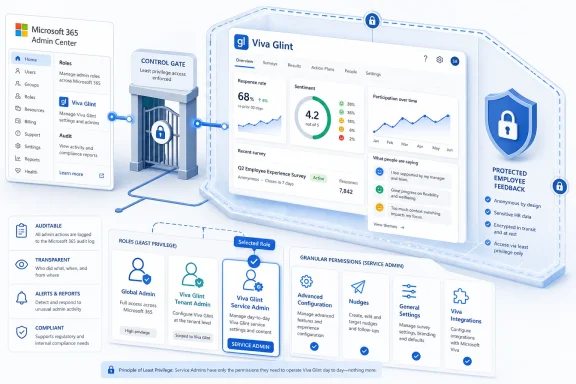
As detailed in Microsoft’s roadmap entry and reflected in Microsoft Learn documentation, the highest-privileged Glint role is now called Viva Glint Service Admin, replacing the older “Company Admin” language used inside the Glint application. More importantly, Microsoft is restricting assignment of new Service Admins to the Microsoft 365 admin center, with Microsoft 365 Global Admins and Viva Glint Tenant Admins controlling that elevation path. That is the part IT should care about.
Viva Glint is not just another Viva tile. It is Microsoft’s employee engagement and survey platform, rooted in the company’s acquisition and migration of LinkedIn Glint into the Microsoft 365 ecosystem. Its job is to collect, analyze, and operationalize employee feedback — which means the data it touches can be more politically and legally sensitive than the contents of a SharePoint library.
That context makes the old “Company Admin” framing feel increasingly out of date. In many organizations, employee listening platforms sit near HR, internal communications, analytics, and executive leadership. But in Microsoft 365, anything that grants access to sensitive data eventually becomes an identity and permissions issue.
The new permissions model acknowledges that reality. By carving administration into more specific areas — Advanced Configuration, Nudges, General Settings, and Viva integrations — Microsoft is admitting that not every administrator needs the same level of access. A person responsible for configuring nudges should not automatically inherit the ability to change deeper service settings or integration behavior.
This is the familiar least-privilege argument, but with a Viva-specific twist. The risk is not only that an admin can break a configuration. The risk is that an admin can see, shape, export, or influence the flows around employee feedback in ways the business did not intend.
That recommendation is doing a lot of work. A role with all administrative functionality and all survey data is not a convenience role. It is a trust boundary.
The sharper change is that new Viva Glint Service Admins can only be assigned through the Microsoft 365 admin center. Microsoft’s documentation says the assignment can be performed by a Microsoft 365 Global Administrator or a Viva Glint Tenant Administrator. In other words, the pathway for the most privileged Glint access is being pulled out of the app’s own local administrative workflow and into the central Microsoft 365 administrative plane.
That matters for auditability, process, and incident response. It means organizations can treat Glint elevation more like other privileged Microsoft 365 actions, rather than as a product-side decision made by whoever already holds broad Glint power. It also gives central IT a clearer place to ask a simple question: who can appoint the people who can see everything?
Advanced Configuration is the obvious high-risk area. It is where changes can affect the structure and operation of the service rather than a narrow survey workflow. If the wrong person has that permission, they may not merely make a bad edit; they may change how the platform behaves for the organization.
Nudges are more subtle. In employee engagement software, nudges can shape who is prompted, when they are prompted, and how managers or employees are steered toward action. That may sound benign, but at enterprise scale, nudges are part of the company’s internal operating system.
General Settings and Viva integrations complete the picture. Settings are where governance policies become product behavior, and integrations are where one Viva workload stops being self-contained. Microsoft has spent years trying to make Viva feel like an integrated employee experience layer across Microsoft 365; now it has to make the administration of that layer less monolithic.
Microsoft Learn says users who manage Viva Glint experiences in the Microsoft 365 admin center need roles such as Microsoft 365 Global Administrator, Viva Glint Tenant Administrator, or, for limited licensing access, License Administrator. The Service Admin tab is where organizations manage Viva Glint Service Admins for each Glint experience. That moves the sensitive assignment ceremony into a familiar admin surface.
For large tenants, this is likely welcome. Central IT can wrap the process in existing controls, ticketing, access reviews, and Privileged Identity Management practices. For smaller organizations, it may feel like one more Microsoft 365 admin dependency imposed on a business-owned tool.
But the trade-off is deliberate. Microsoft is choosing central governance over local convenience. Given the nature of Glint data, that is the safer default.
That is a powerful role, even if it is narrower than Global Administrator. In practice, it becomes the hinge between central IT and HR-owned Glint operations. If assigned carelessly, it becomes a workaround for giving someone control over the people who can access all Glint data.
This is where organizations need to resist the temptation to treat Viva-specific roles as harmless because they are not Global Admin. A scoped admin role is still a privileged role if the scope contains sensitive business data. Viva Glint Tenant Admin may be a better delegation mechanism than Global Admin, but it still deserves review, approval, and lifecycle management.
The Microsoft Learn guidance also includes a notable caveat around Privileged Identity Management. For certain Viva Glint administrative scenarios, Microsoft calls out direct assignment rather than group assignment for PIM-enabled accounts. That detail will matter to organizations that prefer group-based privilege management, because it can change how access must be modeled operationally.
That makes the role closer to a data custodian. Service Admins can set up programs and surveys, manage distribution lists, configure reporting features, and support managers in action-taking. Those tasks sit directly on top of employee feedback data, reporting hierarchies, and organizational attributes.
The renamed role also helps eliminate a historical ambiguity. “Company Admin” sounded like a Glint-native role, perhaps defined mainly by the product. “Viva Glint Service Admin” makes it clearer that this is a Microsoft 365-era administrative role with tenant-level governance implications.
The practical governance rule is simple: if an organization would not casually grant someone access to sensitive HR analytics, it should not casually grant them Viva Glint Service Admin. Microsoft’s recommendation of no more than five such admins should be treated as a ceiling to justify, not a target to fill.
That matters because AI turns permissions mistakes into data-exposure multipliers. A user who can access a dashboard may see one view of survey data. A user with AI-assisted analysis capabilities may be able to summarize, query, and operationalize patterns faster and more broadly than before.
Microsoft’s March 2026 Viva Glint communications also referenced more granular permissions and the transition to new control models around this period. The Roadmap ID 547837 item, created in January 2026 and marked generally available for February 2026, now appears as launched. The July 6 update suggests Microsoft is still actively maintaining the public status and metadata around the feature.
The direction is consistent: more Viva controls are being centralized in Microsoft 365 admin surfaces, especially where Copilot, integrations, and sensitive employee data intersect. The Glint permissions update is not an isolated cleanup. It is part of Microsoft’s larger effort to make Viva governable at enterprise scale.
Viva Glint is especially exposed to that shift because Microsoft has folded it into the Viva portfolio and the Microsoft 365 admin model. The more Glint integrates with the rest of Viva, the more its permissions matter to administrators who may never run an engagement survey themselves.
This is where WindowsForum readers should widen the frame. The story is not only about Viva Glint. It is about the continuing absorption of business applications into the Microsoft 365 security perimeter. Every time Microsoft centralizes another admin path, it gives IT more leverage — and more responsibility.
That responsibility includes understanding the data type. Glint data is not generic productivity telemetry. It can reflect morale, manager effectiveness, attrition signals, organizational health, and potentially sensitive demographic or employment attributes depending on configuration. Permissions around that data deserve a higher bar.
For fast-moving HR or people-analytics teams, the same change may feel like friction. If they previously managed Glint admins inside the app, routing Service Admin assignment through Microsoft 365 admin center may add delay. The organization may now need a Global Admin or Viva Glint Tenant Admin to make changes that once felt local.
That friction is not a bug in the model. It is the control. Microsoft is explicitly placing a gate in front of the most privileged Glint role because the old convenience model was too broad for the sensitivity of the workload.
The operational challenge is to make that gate usable. If central IT becomes a bottleneck, business teams will push for overbroad standing access. The healthier pattern is to appoint a small number of Viva Glint Tenant Admins, define a request process, and review Service Admin membership regularly.
The first task is inventory. Organizations should identify current Viva Glint Service Admins, former Company Admins, Viva Glint Tenant Admins, and Global Admins who can affect Glint administration. The point is not only to know who has access, but to know who can grant access.
The second task is role design. The new granular permissions only help if organizations stop using the top role as the default answer to every administrative request. If a user only needs to manage Nudges or General Settings, that user should not become a Service Admin merely because the old model made that easier.
The third task is documentation. HR, IT, security, and compliance teams should agree on how Glint admin access is requested, approved, assigned, reviewed, and removed. If employee feedback data is sensitive enough to ask employees for candor, it is sensitive enough to govern carefully.
Glint exposes that pressure because employee listening is inherently trust-based. Employees are more likely to participate honestly when they believe survey data is handled carefully. Managers and executives are more likely to rely on the platform when access is controlled and explainable.
Microsoft’s answer is to make Viva administration look more like Microsoft 365 administration. That brings benefits: central role assignment, stronger delegation patterns, closer alignment with Entra identity, and more predictable governance. It also brings complexity, because Viva is no longer a lightweight layer on top of Microsoft 365. It is becoming a governed estate of its own.
The permissions update is therefore both a product improvement and a maturity tax. Customers get better control, but they must now treat Viva Glint as part of their privileged access architecture. That is the price of bringing HR data, collaboration data, and AI-assisted analysis into the same administrative universe.
As detailed in Microsoft’s roadmap entry and reflected in Microsoft Learn documentation, the highest-privileged Glint role is now called Viva Glint Service Admin, replacing the older “Company Admin” language used inside the Glint application. More importantly, Microsoft is restricting assignment of new Service Admins to the Microsoft 365 admin center, with Microsoft 365 Global Admins and Viva Glint Tenant Admins controlling that elevation path. That is the part IT should care about.
 Microsoft Turns an HR Survey Tool Into an Identity Governance Problem
Viva Glint is not just another Viva tile. It is Microsoft’s employee engagement and survey platform, rooted in the company’s acquisition and migration of LinkedIn Glint into the Microsoft 365 ecosystem. Its job is to collect, analyze, and operationalize employee feedback — which means the data it touches can be more politically and legally sensitive than the contents of a SharePoint library.That context makes the old “Company Admin” framing feel increasingly out of date. In many organizations, employee listening platforms sit near HR, internal communications, analytics, and executive leadership. But in Microsoft 365, anything that grants access to sensitive data eventually becomes an identity and permissions issue.
The new permissions model acknowledges that reality. By carving administration into more specific areas — Advanced Configuration, Nudges, General Settings, and Viva integrations — Microsoft is admitting that not every administrator needs the same level of access. A person responsible for configuring nudges should not automatically inherit the ability to change deeper service settings or integration behavior.
This is the familiar least-privilege argument, but with a Viva-specific twist. The risk is not only that an admin can break a configuration. The risk is that an admin can see, shape, export, or influence the flows around employee feedback in ways the business did not intend.
The New Role Name Is Cosmetic; the Assignment Path Is Not
Renaming the top role to Viva Glint Service Admin is the least dramatic part of the change, but it matters because Microsoft is standardizing the product vocabulary around Microsoft 365 administration. Microsoft Learn now describes Service Admins as the “owners” of the Viva Glint app, with access to all administrative functionality and all survey data within the app. It also says Microsoft recommends typically no more than five users in that role.That recommendation is doing a lot of work. A role with all administrative functionality and all survey data is not a convenience role. It is a trust boundary.
The sharper change is that new Viva Glint Service Admins can only be assigned through the Microsoft 365 admin center. Microsoft’s documentation says the assignment can be performed by a Microsoft 365 Global Administrator or a Viva Glint Tenant Administrator. In other words, the pathway for the most privileged Glint access is being pulled out of the app’s own local administrative workflow and into the central Microsoft 365 administrative plane.
That matters for auditability, process, and incident response. It means organizations can treat Glint elevation more like other privileged Microsoft 365 actions, rather than as a product-side decision made by whoever already holds broad Glint power. It also gives central IT a clearer place to ask a simple question: who can appoint the people who can see everything?
Granular Permissions Are Microsoft’s Quiet Answer to Viva Sprawl
The new permission areas are telling. Advanced Configuration, Nudges, General Settings, and Viva integrations are not just arbitrary product tabs. They map to the places where Viva Glint touches organizational behavior, data flow, and cross-service connectivity.Advanced Configuration is the obvious high-risk area. It is where changes can affect the structure and operation of the service rather than a narrow survey workflow. If the wrong person has that permission, they may not merely make a bad edit; they may change how the platform behaves for the organization.
Nudges are more subtle. In employee engagement software, nudges can shape who is prompted, when they are prompted, and how managers or employees are steered toward action. That may sound benign, but at enterprise scale, nudges are part of the company’s internal operating system.
General Settings and Viva integrations complete the picture. Settings are where governance policies become product behavior, and integrations are where one Viva workload stops being self-contained. Microsoft has spent years trying to make Viva feel like an integrated employee experience layer across Microsoft 365; now it has to make the administration of that layer less monolithic.
Microsoft 365 Admin Center Becomes the Gatekeeper
The most practical consequence is that Glint administration becomes more dependent on the Microsoft 365 admin center, often abbreviated MAC in Microsoft’s own roadmap text. That is not just a UI preference. It is a statement about where Microsoft believes privileged SaaS administration should live.Microsoft Learn says users who manage Viva Glint experiences in the Microsoft 365 admin center need roles such as Microsoft 365 Global Administrator, Viva Glint Tenant Administrator, or, for limited licensing access, License Administrator. The Service Admin tab is where organizations manage Viva Glint Service Admins for each Glint experience. That moves the sensitive assignment ceremony into a familiar admin surface.
For large tenants, this is likely welcome. Central IT can wrap the process in existing controls, ticketing, access reviews, and Privileged Identity Management practices. For smaller organizations, it may feel like one more Microsoft 365 admin dependency imposed on a business-owned tool.
But the trade-off is deliberate. Microsoft is choosing central governance over local convenience. Given the nature of Glint data, that is the safer default.
Tenant Admin Is the Delegation Role IT Should Watch
The Viva Glint Tenant Administrator role becomes more important under this model. Microsoft describes it as a way to reduce the workload of Global Administrators by delegating Viva Glint-specific administrative tasks. It can read and configure Viva Glint settings in the Microsoft 365 admin center, assign or remove Service Admins, create and manage Viva Feature Access Management policies, and manage Viva Glint experiences where applicable.That is a powerful role, even if it is narrower than Global Administrator. In practice, it becomes the hinge between central IT and HR-owned Glint operations. If assigned carelessly, it becomes a workaround for giving someone control over the people who can access all Glint data.
This is where organizations need to resist the temptation to treat Viva-specific roles as harmless because they are not Global Admin. A scoped admin role is still a privileged role if the scope contains sensitive business data. Viva Glint Tenant Admin may be a better delegation mechanism than Global Admin, but it still deserves review, approval, and lifecycle management.
The Microsoft Learn guidance also includes a notable caveat around Privileged Identity Management. For certain Viva Glint administrative scenarios, Microsoft calls out direct assignment rather than group assignment for PIM-enabled accounts. That detail will matter to organizations that prefer group-based privilege management, because it can change how access must be modeled operationally.
Service Admins Are Data Custodians, Not Just Product Operators
The phrase “Service Admin” can undersell the responsibility. In many Microsoft 365 workloads, a service admin sounds like someone who manages configuration and support. In Viva Glint, Microsoft says this role has access to all administrative functionality and all survey data within the app.That makes the role closer to a data custodian. Service Admins can set up programs and surveys, manage distribution lists, configure reporting features, and support managers in action-taking. Those tasks sit directly on top of employee feedback data, reporting hierarchies, and organizational attributes.
The renamed role also helps eliminate a historical ambiguity. “Company Admin” sounded like a Glint-native role, perhaps defined mainly by the product. “Viva Glint Service Admin” makes it clearer that this is a Microsoft 365-era administrative role with tenant-level governance implications.
The practical governance rule is simple: if an organization would not casually grant someone access to sensitive HR analytics, it should not casually grant them Viva Glint Service Admin. Microsoft’s recommendation of no more than five such admins should be treated as a ceiling to justify, not a target to fill.
This Is Also About Copilot and Feature Access Management
The timing and shape of the change make more sense when viewed alongside Microsoft’s broader Viva administration work, including Viva Feature Access Management and Copilot access controls. Microsoft Learn documentation for Viva Glint Copilot access describes the use of Viva Feature Access Management in the Microsoft 365 admin center to configure who can use Copilot features in Viva Glint.That matters because AI turns permissions mistakes into data-exposure multipliers. A user who can access a dashboard may see one view of survey data. A user with AI-assisted analysis capabilities may be able to summarize, query, and operationalize patterns faster and more broadly than before.
Microsoft’s March 2026 Viva Glint communications also referenced more granular permissions and the transition to new control models around this period. The Roadmap ID 547837 item, created in January 2026 and marked generally available for February 2026, now appears as launched. The July 6 update suggests Microsoft is still actively maintaining the public status and metadata around the feature.
The direction is consistent: more Viva controls are being centralized in Microsoft 365 admin surfaces, especially where Copilot, integrations, and sensitive employee data intersect. The Glint permissions update is not an isolated cleanup. It is part of Microsoft’s larger effort to make Viva governable at enterprise scale.
HR Software Is Becoming Part of the Security Perimeter
There was a time when HR survey software could be treated as a line-of-business application with a few local admins and a vendor support contact. That model is increasingly obsolete. Employee experience platforms now sit inside identity systems, collaboration suites, analytics layers, and AI workflows.Viva Glint is especially exposed to that shift because Microsoft has folded it into the Viva portfolio and the Microsoft 365 admin model. The more Glint integrates with the rest of Viva, the more its permissions matter to administrators who may never run an engagement survey themselves.
This is where WindowsForum readers should widen the frame. The story is not only about Viva Glint. It is about the continuing absorption of business applications into the Microsoft 365 security perimeter. Every time Microsoft centralizes another admin path, it gives IT more leverage — and more responsibility.
That responsibility includes understanding the data type. Glint data is not generic productivity telemetry. It can reflect morale, manager effectiveness, attrition signals, organizational health, and potentially sensitive demographic or employment attributes depending on configuration. Permissions around that data deserve a higher bar.
The Change Will Help Enterprises and Irritate Fast-Moving Teams
For mature enterprises, the change should reduce risk. It gives identity teams a clearer administrative path, narrows product permissions, and aligns the top Glint role with central admin assignment. It also makes it easier to explain to auditors how a person became a full Glint administrator.For fast-moving HR or people-analytics teams, the same change may feel like friction. If they previously managed Glint admins inside the app, routing Service Admin assignment through Microsoft 365 admin center may add delay. The organization may now need a Global Admin or Viva Glint Tenant Admin to make changes that once felt local.
That friction is not a bug in the model. It is the control. Microsoft is explicitly placing a gate in front of the most privileged Glint role because the old convenience model was too broad for the sensitivity of the workload.
The operational challenge is to make that gate usable. If central IT becomes a bottleneck, business teams will push for overbroad standing access. The healthier pattern is to appoint a small number of Viva Glint Tenant Admins, define a request process, and review Service Admin membership regularly.
Admins Should Treat the February Launch as a Governance Deadline
The roadmap says general availability was February 2026 and the item is now launched. That means this is not a preview feature to watch from a distance. It is a production governance change that tenants using Viva Glint should already be planning around, if they have not done so.The first task is inventory. Organizations should identify current Viva Glint Service Admins, former Company Admins, Viva Glint Tenant Admins, and Global Admins who can affect Glint administration. The point is not only to know who has access, but to know who can grant access.
The second task is role design. The new granular permissions only help if organizations stop using the top role as the default answer to every administrative request. If a user only needs to manage Nudges or General Settings, that user should not become a Service Admin merely because the old model made that easier.
The third task is documentation. HR, IT, security, and compliance teams should agree on how Glint admin access is requested, approved, assigned, reviewed, and removed. If employee feedback data is sensitive enough to ask employees for candor, it is sensitive enough to govern carefully.
Microsoft’s Viva Strategy Is Growing Up Under Pressure
This change also says something about Viva itself. Microsoft launched Viva as an employee experience platform, but its future depends on whether enterprises can govern it without creating a mess of overlapping roles, product-specific admins, and unclear data boundaries.Glint exposes that pressure because employee listening is inherently trust-based. Employees are more likely to participate honestly when they believe survey data is handled carefully. Managers and executives are more likely to rely on the platform when access is controlled and explainable.
Microsoft’s answer is to make Viva administration look more like Microsoft 365 administration. That brings benefits: central role assignment, stronger delegation patterns, closer alignment with Entra identity, and more predictable governance. It also brings complexity, because Viva is no longer a lightweight layer on top of Microsoft 365. It is becoming a governed estate of its own.
The permissions update is therefore both a product improvement and a maturity tax. Customers get better control, but they must now treat Viva Glint as part of their privileged access architecture. That is the price of bringing HR data, collaboration data, and AI-assisted analysis into the same administrative universe.
The Glint Admin Model Now Has Fewer Excuses
The practical reading for IT is straightforward: Microsoft has removed some of the ambiguity around who should control Viva Glint’s most powerful role. The change does not solve governance by itself, but it gives organizations better primitives to build on.- Organizations should review all Viva Glint Service Admins and confirm that each person still needs full administrative functionality and access to all survey data.
- New Viva Glint Service Admin assignments should flow through the Microsoft 365 admin center and be limited to Global Admins or Viva Glint Tenant Admins.
- Viva Glint Tenant Administrator should be treated as a privileged delegation role, not as a harmless product-specific convenience.
- The new granular permissions should be used to avoid granting Service Admin rights for narrow operational tasks such as Nudges, General Settings, or integrations.
- HR, IT, and security teams should document a shared process for requesting, approving, reviewing, and removing Viva Glint administrative access.
- Organizations using Copilot or Viva Feature Access Management with Glint should pay extra attention to how admin permissions and AI-enabled analysis intersect.
References
- Primary source: Microsoft 365 Roadmap
Published: 2026-07-06T23:00:50.6928566Z
Loading…
www.microsoft.com - Related coverage: m365admin.handsontek.net
Loading…
m365admin.handsontek.net - Official source: learn.microsoft.com
Loading…
learn.microsoft.com - Related coverage: mwpro.co.uk
Loading…
mwpro.co.uk - Official source: techcommunity.microsoft.com
Loading…
techcommunity.microsoft.com - Official source: adoption.microsoft.com
Slide 1: Viva Glint: Ask the Expert series Advanced Configuration in Viva Glint
PDF documentadoption.microsoft.com