

Microsoft added Roadmap ID 567121 on July 6, 2026, confirming that a new Microsoft 365 admin center usage report for Copilot Chat is in development for GCC, GCC High, and DoD tenants, with general availability planned for July 2026. The feature sounds administrative, almost mundane: a dashboard with active users, app-level breakouts, and anonymized user activity. But for government cloud customers, this is not just another chart in the admin center. It is Microsoft acknowledging that Copilot adoption has moved from the experiment phase into the audit phase.
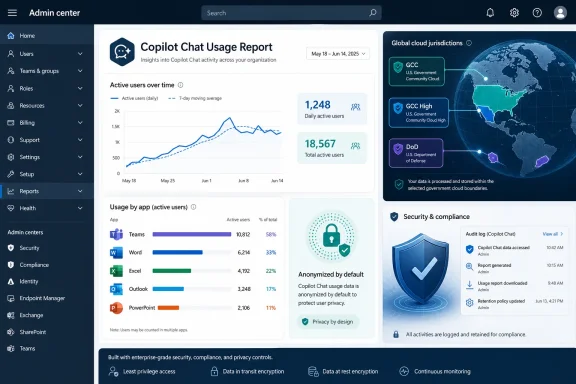
Microsoft’s roadmap entry says the report will cover total active users, Copilot Chat usage broken out by Microsoft 365 app, and user-level activity insights that are anonymized by default. Microsoft Learn already documents comparable Copilot Chat usage reporting for commercial Microsoft 365 tenants, including details such as active days, prompts submitted, and last activity date. The new roadmap item matters because it extends that management posture into the most compliance-sensitive Microsoft 365 clouds: GCC, GCC High, and DoD.
For much of Copilot’s first act, Microsoft sold the technology as a productivity layer: a conversational front end for documents, meetings, email, chats, and enterprise knowledge. That pitch worked well enough for executives and pilot teams, but it left IT leaders with a more prosaic problem. Once an organization buys or enables an AI tool, someone has to prove who is using it, where it is being used, and whether the rollout is producing anything more measurable than enthusiasm.
Usage reporting is the unglamorous answer to that problem. A Copilot Chat dashboard in the Microsoft 365 admin center gives administrators a way to separate adoption from availability. A service can be enabled tenant-wide and still barely touch daily workflows; it can also become heavily used in one app while remaining invisible in another.
That distinction is especially important for Copilot Chat because Microsoft has positioned it as a lower-friction entry point into enterprise AI. It is not only a premium assistant bolted onto Office documents. It is also a work chat surface, a web-grounded assistant where policy allows, and an on-ramp for users who may not yet have the full Microsoft 365 Copilot license experience.
The report’s arrival in government clouds is therefore a signal. Microsoft is not merely making Copilot available to public-sector and defense-adjacent customers; it is giving their administrators the instrumentation needed to defend, constrain, and justify that availability.
That is why the phrase “usage report” lands differently here. In a regulated tenant, administrators need to know not only whether people are using Copilot Chat, but whether its use is spreading into the applications where sensitive work actually happens. A breakout by Microsoft 365 app is not a vanity metric; it is an operational map.
If usage is concentrated in Teams, the governance conversation will look different than if users are leaning heavily on Word, Excel, Outlook, or PowerPoint. Chat-style summarization, document drafting, spreadsheet analysis, and email composition each carry different risks and different training needs. A single active-user number hides those distinctions. An app-level report exposes them.
Microsoft’s own documentation for Copilot Chat reporting already frames the feature as an admin center tool for understanding adoption and activity. The new roadmap item extends that idea into clouds where administrators are more likely to ask harder questions: which offices are using this, which apps are driving the traffic, and whether policy controls are aligned with observed behavior.
In practice, anonymization by default is a compromise, not a wall. Admins with the right roles and tenant settings may be able to de-anonymize user-level reporting in Microsoft 365 usage reports more broadly, depending on configuration and policy. That means the governance question does not end with Microsoft’s default; it begins there.
For government customers, this distinction matters. A tenant may be legally or culturally required to treat usage telemetry with restraint, even when the platform technically allows more granular visibility. The existence of user-level activity insights creates a responsibility to define who can see them, why they can see them, how long the data is retained, and whether employees are told what is being measured.
This is where Microsoft’s Copilot story becomes less about artificial intelligence and more about institutional trust. If users believe Copilot Chat telemetry will be used to shame teams or rank employees by prompt counts, they will adapt their behavior accordingly. Some will overuse the tool performatively. Others will avoid it entirely.
A useful report can become a bad management instrument if the organization mistakes activity for value. Prompt volume is not productivity. Active days are not mission impact. App-level usage is a clue, not a verdict.
That consolidation has benefits. Admins do not want a separate analytics island for every new AI surface. They want Copilot usage to sit alongside the rest of Microsoft 365 operational reporting, where it can be compared with licensing, service adoption, and organizational change.
But it also increases the admin center’s role as an arbiter of AI reality. If the dashboard says Copilot Chat is used mostly in Teams, that perception will shape training investment. If it shows low adoption in Excel, someone will ask whether spreadsheet users need better enablement or whether the feature simply does not fit their work. If it shows dormant users, licensing and rollout plans may be revisited.
That is not inherently bad. It is what mature software administration looks like. The risk is that dashboards compress messy human workflows into deceptively clean curves. AI usage is particularly vulnerable to that problem because the output is difficult to measure and the activity is easy to count.
A person who submits two careful prompts to summarize a policy document may get more value than someone who fires 40 shallow prompts at a meeting transcript. The admin center can count both. It cannot, by itself, explain the difference.
That staggered approach is not unusual. Government cloud parity has always been a moving target in Microsoft 365. Features often debut in commercial tenants, then move into GCC, then GCC High and DoD as engineering, compliance, and accreditation work catches up.
The new usage report fits that pattern. It is not the flashy feature that sells Copilot in a keynote. It is the follow-through that makes Copilot administrable after the keynote ends.
For IT pros, this is the more important milestone. Users may experience Copilot Chat as a box where they ask questions. Administrators experience it as a new class of workload that must be governed across identity, data boundaries, app access, audit expectations, and support channels. A workload without reporting is a liability. A workload with reporting can at least be managed.
That does not mean the report answers every question. It will not tell an agency whether a generated summary was accurate. It will not prove that a user followed records-management policy. It will not decide whether a sensitive prompt should have been entered in the first place. But it gives administrators a starting point for finding where those conversations need to happen.
Copilot Chat usage across those apps will tell different stories. Heavy use in Outlook may indicate that users are leaning on AI for email drafting and triage. Activity in Teams may suggest meeting and chat summarization patterns. Usage in Word may point to drafting, rewriting, and document comprehension. Excel activity may be rarer but more revealing, because spreadsheet work often involves more structured data and higher stakes.
For GCC High and DoD tenants, those distinctions can intersect with data sensitivity. The app where Copilot is used may indicate the kinds of content being touched, even if the report does not expose the content itself. A defense contractor may care very much whether AI usage is concentrated in general collaboration spaces or in document-heavy workflows tied to controlled programs.
This is where administrators should resist both panic and complacency. Usage in a sensitive app is not automatically misuse. Low usage in a valuable app is not automatically failure. The report should trigger investigation, not conclusion.
The healthiest organizations will use app-level data to tune training and policy. If users are adopting Copilot Chat in Outlook but not Word, perhaps they understand email assistance but not document-grounded prompting. If Teams usage spikes while other apps lag, perhaps meeting culture is driving AI adoption more than knowledge work. If Excel remains quiet, perhaps the organization needs targeted enablement for analysts rather than another all-hands Copilot webinar.
That shift changes the conversation. Pilots can survive on anecdotes. Production services require telemetry. Procurement teams want utilization. Security teams want oversight. Executives want dashboards. Users want clarity about what is monitored and what is not.
The roadmap item also arrives in the broader context of Microsoft’s expanding Copilot analytics ecosystem. Microsoft has pushed Copilot Dashboard experiences through Viva Insights and has documented Microsoft 365 Copilot usage reporting for licensed Copilot users. Third-party reporting, including coverage from Windows Central last year, has already highlighted the tension between AI adoption analytics and employee privacy.
The GCC, GCC High, and DoD report is narrower than the broader executive analytics story, but it belongs to the same trend. Microsoft is turning AI from a feature into a measurable workplace behavior. Once that happens, the politics of measurement follow.
Government customers are particularly sensitive to that politics. Their workers may include civil servants, contractors, military personnel, and regulated professionals operating under different rules and expectations. A report that seems harmless in a commercial tenant can become more complicated when applied across mission environments.
But usage data is contextual. A legal team may use Copilot sparingly because review obligations are high. A communications team may use it frequently because drafting and rewriting are central to the job. An engineering group may avoid it in certain workflows because of data handling constraints. A low number may reflect caution rather than failure.
The better use is governance calibration. If Copilot Chat is being used heavily in a given app, administrators can verify whether the relevant policies, training, and support materials are in place. If user-level activity is available, privacy officers can review who has access to the data. If anonymization settings are changed, leadership can document why.
This is also a chance to align help desk and security operations. Copilot support questions often blur categories: licensing, app availability, content access, prompt behavior, and compliance concerns. Usage data can help identify where support demand is likely to emerge before it arrives as a ticket storm.
For organizations with formal change-management processes, the report should become part of the rollout review. Not the only artifact, and certainly not the final judgment, but a recurring signal alongside user surveys, incident reviews, training completion, and business-owner feedback.
The trust issue has several layers. Users need to understand what Copilot can access. Administrators need to understand what the reports show and what they omit. Security teams need to know how Copilot activity intersects with audit, eDiscovery, retention, and data-loss prevention. Executives need to avoid overstating what usage metrics prove.
Microsoft’s documentation generally emphasizes that Copilot respects existing Microsoft 365 permissions. That is important, but it does not eliminate oversharing risks created by poor permissions hygiene. If users already have access to too much data, Copilot can make that overexposure easier to discover and summarize. A usage report can show adoption, but it cannot fix the underlying permission model.
That is why AI governance keeps circling back to old-fashioned information governance. Copilot may be new, but the hard work is familiar: least privilege, data classification, retention policy, audit readiness, and user education. The dashboard is another tool in that program, not a replacement for it.
For WindowsForum’s IT pro readership, this is the practical takeaway. Do not wait for a Copilot incident to discover that your tenant’s data estate is messy. If Copilot Chat usage is about to become more visible in government clouds, the condition of the underlying Microsoft 365 environment will become more visible too.
The missing layer is qualitative. Why are users turning to Copilot Chat? Which prompts produce useful work? Where do users distrust the answers? Which policies are unclear? Which apps feel natural, and which feel forced? No admin center chart can answer those questions alone.
There is also a licensing dimension. Copilot Chat and Microsoft 365 Copilot licensing have become part of a broader Microsoft effort to seed AI into everyday work while preserving premium upsell paths. Usage reporting may help organizations decide whether to expand licenses, constrain access, or redirect training. That makes the dashboard financially consequential.
Administrators should therefore treat the report as evidence in a larger case file. Pair it with Viva Insights where appropriate, security and compliance logs where necessary, and direct feedback from business units wherever possible. A tenant-wide active-user graph may satisfy a quarterly steering committee, but it will not tell a program manager whether Copilot improved a real workflow.
The best AI rollouts will be measured in both directions: top-down telemetry and bottom-up experience. Microsoft is providing more of the former. Customers still have to build the latter.
But Roadmap ID 567121 captures a meaningful stage in Copilot’s maturation. Microsoft is bringing Copilot Chat usage reporting into the government-cloud admin experience, and it is doing so with the familiar privacy posture of anonymized user-level data by default. That combination says Microsoft understands both sides of the enterprise AI bargain: customers want adoption data, but they also need a defensible privacy stance.
For GCC, GCC High, and DoD administrators, the arrival of this report should prompt preparation before the dashboard lights up. Decide who will review Copilot Chat usage. Decide whether anonymized reporting is sufficient. Decide how app-level adoption will be interpreted. Decide what the organization will do if the numbers show either unexpectedly high usage or embarrassingly low engagement.
The most dangerous response is to treat the report as a passive feature. It is not. It will create new facts inside the tenant, and those facts will invite decisions.
That is the only realistic path for enterprise AI. Nobody operating a serious tenant should want unmanaged AI features appearing without telemetry. At the same time, nobody should pretend telemetry is neutral. What Microsoft chooses to measure will influence what organizations choose to reward.
The new report’s value will depend on whether customers use it to ask better questions rather than enforce simplistic targets. A chart can show that Copilot Chat is active in Outlook, but leadership still has to ask whether the resulting email is better, faster, safer, or merely more abundant. A chart can show that Word usage is low, but trainers still have to determine whether users lack awareness, trust, or a compelling use case.
In that sense, the report is a mirror. It will reflect the organization’s AI rollout strategy back at itself. If the strategy is thoughtful, the report will sharpen it. If the strategy is just “turn it on and demand adoption,” the report will make that failure easier to see.
Microsoft’s roadmap entry says the report will cover total active users, Copilot Chat usage broken out by Microsoft 365 app, and user-level activity insights that are anonymized by default. Microsoft Learn already documents comparable Copilot Chat usage reporting for commercial Microsoft 365 tenants, including details such as active days, prompts submitted, and last activity date. The new roadmap item matters because it extends that management posture into the most compliance-sensitive Microsoft 365 clouds: GCC, GCC High, and DoD.
 Microsoft Moves Copilot From Promise to Proof
For much of Copilot’s first act, Microsoft sold the technology as a productivity layer: a conversational front end for documents, meetings, email, chats, and enterprise knowledge. That pitch worked well enough for executives and pilot teams, but it left IT leaders with a more prosaic problem. Once an organization buys or enables an AI tool, someone has to prove who is using it, where it is being used, and whether the rollout is producing anything more measurable than enthusiasm.Usage reporting is the unglamorous answer to that problem. A Copilot Chat dashboard in the Microsoft 365 admin center gives administrators a way to separate adoption from availability. A service can be enabled tenant-wide and still barely touch daily workflows; it can also become heavily used in one app while remaining invisible in another.
That distinction is especially important for Copilot Chat because Microsoft has positioned it as a lower-friction entry point into enterprise AI. It is not only a premium assistant bolted onto Office documents. It is also a work chat surface, a web-grounded assistant where policy allows, and an on-ramp for users who may not yet have the full Microsoft 365 Copilot license experience.
The report’s arrival in government clouds is therefore a signal. Microsoft is not merely making Copilot available to public-sector and defense-adjacent customers; it is giving their administrators the instrumentation needed to defend, constrain, and justify that availability.
Government Tenants Do Not Buy AI on Vibes
Commercial customers can sometimes pilot a new SaaS feature with a loose adoption target and a forgiving risk model. GCC, GCC High, and DoD customers live in a different world. These tenants exist because public-sector data handling, contractual controls, export restrictions, and national-security-adjacent workloads do not fit comfortably inside ordinary commercial cloud assumptions.That is why the phrase “usage report” lands differently here. In a regulated tenant, administrators need to know not only whether people are using Copilot Chat, but whether its use is spreading into the applications where sensitive work actually happens. A breakout by Microsoft 365 app is not a vanity metric; it is an operational map.
If usage is concentrated in Teams, the governance conversation will look different than if users are leaning heavily on Word, Excel, Outlook, or PowerPoint. Chat-style summarization, document drafting, spreadsheet analysis, and email composition each carry different risks and different training needs. A single active-user number hides those distinctions. An app-level report exposes them.
Microsoft’s own documentation for Copilot Chat reporting already frames the feature as an admin center tool for understanding adoption and activity. The new roadmap item extends that idea into clouds where administrators are more likely to ask harder questions: which offices are using this, which apps are driving the traffic, and whether policy controls are aligned with observed behavior.
The Anonymity Default Is the Governance Compromise
The roadmap note’s most politically important phrase may be “anonymized by default.” Microsoft has used similar defaults across Microsoft 365 usage reporting, where user names can be hidden unless an administrator changes privacy settings. That design is meant to balance two competing truths: organizations need operational visibility, and employees do not want every new productivity tool to become a surveillance console.In practice, anonymization by default is a compromise, not a wall. Admins with the right roles and tenant settings may be able to de-anonymize user-level reporting in Microsoft 365 usage reports more broadly, depending on configuration and policy. That means the governance question does not end with Microsoft’s default; it begins there.
For government customers, this distinction matters. A tenant may be legally or culturally required to treat usage telemetry with restraint, even when the platform technically allows more granular visibility. The existence of user-level activity insights creates a responsibility to define who can see them, why they can see them, how long the data is retained, and whether employees are told what is being measured.
This is where Microsoft’s Copilot story becomes less about artificial intelligence and more about institutional trust. If users believe Copilot Chat telemetry will be used to shame teams or rank employees by prompt counts, they will adapt their behavior accordingly. Some will overuse the tool performatively. Others will avoid it entirely.
A useful report can become a bad management instrument if the organization mistakes activity for value. Prompt volume is not productivity. Active days are not mission impact. App-level usage is a clue, not a verdict.
The Admin Center Becomes the AI Control Room
Microsoft has spent years turning the Microsoft 365 admin center into the place where IT sees, licenses, secures, and explains the Microsoft cloud. Copilot makes that center of gravity even stronger. The AI layer touches identity, data access, app policy, compliance, and user training, so the obvious place to observe it is the console administrators already use to manage Microsoft 365.That consolidation has benefits. Admins do not want a separate analytics island for every new AI surface. They want Copilot usage to sit alongside the rest of Microsoft 365 operational reporting, where it can be compared with licensing, service adoption, and organizational change.
But it also increases the admin center’s role as an arbiter of AI reality. If the dashboard says Copilot Chat is used mostly in Teams, that perception will shape training investment. If it shows low adoption in Excel, someone will ask whether spreadsheet users need better enablement or whether the feature simply does not fit their work. If it shows dormant users, licensing and rollout plans may be revisited.
That is not inherently bad. It is what mature software administration looks like. The risk is that dashboards compress messy human workflows into deceptively clean curves. AI usage is particularly vulnerable to that problem because the output is difficult to measure and the activity is easy to count.
A person who submits two careful prompts to summarize a policy document may get more value than someone who fires 40 shallow prompts at a meeting transcript. The admin center can count both. It cannot, by itself, explain the difference.
Copilot Chat Is Becoming a Managed Enterprise Surface
Microsoft’s public-sector Copilot rollout has unfolded in stages, with features arriving across GCC, GCC High, and DoD later and more cautiously than in commercial clouds. Microsoft Adoption materials now describe Microsoft 365 Copilot Chat as available for those government clouds, while earlier public-sector roadmap communications laid out phased availability and more conservative defaults for features such as web grounding.That staggered approach is not unusual. Government cloud parity has always been a moving target in Microsoft 365. Features often debut in commercial tenants, then move into GCC, then GCC High and DoD as engineering, compliance, and accreditation work catches up.
The new usage report fits that pattern. It is not the flashy feature that sells Copilot in a keynote. It is the follow-through that makes Copilot administrable after the keynote ends.
For IT pros, this is the more important milestone. Users may experience Copilot Chat as a box where they ask questions. Administrators experience it as a new class of workload that must be governed across identity, data boundaries, app access, audit expectations, and support channels. A workload without reporting is a liability. A workload with reporting can at least be managed.
That does not mean the report answers every question. It will not tell an agency whether a generated summary was accurate. It will not prove that a user followed records-management policy. It will not decide whether a sensitive prompt should have been entered in the first place. But it gives administrators a starting point for finding where those conversations need to happen.
App-Level Breakouts Will Expose the Real Adoption Pattern
The most useful part of the roadmap entry may be the app-level breakout. Microsoft 365 is not one product in any meaningful daily sense. It is Outlook for one user, Teams for another, Excel for a finance shop, Word for policy staff, and PowerPoint for everyone unlucky enough to prepare briefings.Copilot Chat usage across those apps will tell different stories. Heavy use in Outlook may indicate that users are leaning on AI for email drafting and triage. Activity in Teams may suggest meeting and chat summarization patterns. Usage in Word may point to drafting, rewriting, and document comprehension. Excel activity may be rarer but more revealing, because spreadsheet work often involves more structured data and higher stakes.
For GCC High and DoD tenants, those distinctions can intersect with data sensitivity. The app where Copilot is used may indicate the kinds of content being touched, even if the report does not expose the content itself. A defense contractor may care very much whether AI usage is concentrated in general collaboration spaces or in document-heavy workflows tied to controlled programs.
This is where administrators should resist both panic and complacency. Usage in a sensitive app is not automatically misuse. Low usage in a valuable app is not automatically failure. The report should trigger investigation, not conclusion.
The healthiest organizations will use app-level data to tune training and policy. If users are adopting Copilot Chat in Outlook but not Word, perhaps they understand email assistance but not document-grounded prompting. If Teams usage spikes while other apps lag, perhaps meeting culture is driving AI adoption more than knowledge work. If Excel remains quiet, perhaps the organization needs targeted enablement for analysts rather than another all-hands Copilot webinar.
The Roadmap Timing Says Microsoft Knows the Trial Period Is Ending
The July 2026 general availability target is notable because it lands after the first wave of public-sector Copilot availability and experimentation. By now, many organizations are past the novelty stage. They are no longer asking only whether Copilot exists in their cloud; they are asking whether it belongs in their standard operating model.That shift changes the conversation. Pilots can survive on anecdotes. Production services require telemetry. Procurement teams want utilization. Security teams want oversight. Executives want dashboards. Users want clarity about what is monitored and what is not.
The roadmap item also arrives in the broader context of Microsoft’s expanding Copilot analytics ecosystem. Microsoft has pushed Copilot Dashboard experiences through Viva Insights and has documented Microsoft 365 Copilot usage reporting for licensed Copilot users. Third-party reporting, including coverage from Windows Central last year, has already highlighted the tension between AI adoption analytics and employee privacy.
The GCC, GCC High, and DoD report is narrower than the broader executive analytics story, but it belongs to the same trend. Microsoft is turning AI from a feature into a measurable workplace behavior. Once that happens, the politics of measurement follow.
Government customers are particularly sensitive to that politics. Their workers may include civil servants, contractors, military personnel, and regulated professionals operating under different rules and expectations. A report that seems harmless in a commercial tenant can become more complicated when applied across mission environments.
Admins Should Treat the Report as a Policy Trigger, Not a Scoreboard
The wrong way to use this report is to rank departments by Copilot enthusiasm. That will be tempting, especially for leaders under pressure to justify AI spending. If one office shows higher active usage than another, the dashboard practically invites a management story about maturity, resistance, or productivity.But usage data is contextual. A legal team may use Copilot sparingly because review obligations are high. A communications team may use it frequently because drafting and rewriting are central to the job. An engineering group may avoid it in certain workflows because of data handling constraints. A low number may reflect caution rather than failure.
The better use is governance calibration. If Copilot Chat is being used heavily in a given app, administrators can verify whether the relevant policies, training, and support materials are in place. If user-level activity is available, privacy officers can review who has access to the data. If anonymization settings are changed, leadership can document why.
This is also a chance to align help desk and security operations. Copilot support questions often blur categories: licensing, app availability, content access, prompt behavior, and compliance concerns. Usage data can help identify where support demand is likely to emerge before it arrives as a ticket storm.
For organizations with formal change-management processes, the report should become part of the rollout review. Not the only artifact, and certainly not the final judgment, but a recurring signal alongside user surveys, incident reviews, training completion, and business-owner feedback.
Microsoft’s AI Stack Still Has a Trust Gap to Close
The report will help administrators see Copilot Chat activity, but visibility is not the same as trust. Microsoft still has to persuade risk-conscious customers that Copilot’s value outweighs the operational complexity it introduces. That is harder in government clouds, where every new capability can be read as both a productivity tool and a new attack surface.The trust issue has several layers. Users need to understand what Copilot can access. Administrators need to understand what the reports show and what they omit. Security teams need to know how Copilot activity intersects with audit, eDiscovery, retention, and data-loss prevention. Executives need to avoid overstating what usage metrics prove.
Microsoft’s documentation generally emphasizes that Copilot respects existing Microsoft 365 permissions. That is important, but it does not eliminate oversharing risks created by poor permissions hygiene. If users already have access to too much data, Copilot can make that overexposure easier to discover and summarize. A usage report can show adoption, but it cannot fix the underlying permission model.
That is why AI governance keeps circling back to old-fashioned information governance. Copilot may be new, but the hard work is familiar: least privilege, data classification, retention policy, audit readiness, and user education. The dashboard is another tool in that program, not a replacement for it.
For WindowsForum’s IT pro readership, this is the practical takeaway. Do not wait for a Copilot incident to discover that your tenant’s data estate is messy. If Copilot Chat usage is about to become more visible in government clouds, the condition of the underlying Microsoft 365 environment will become more visible too.
The Numbers Microsoft Gives You Are Not the Only Numbers You Need
A native Microsoft 365 report is valuable because it comes from the platform itself. It is also limited because Microsoft decides what is counted, how it is labeled, and which slices are exposed. Administrators should welcome the report without outsourcing their entire adoption strategy to it.The missing layer is qualitative. Why are users turning to Copilot Chat? Which prompts produce useful work? Where do users distrust the answers? Which policies are unclear? Which apps feel natural, and which feel forced? No admin center chart can answer those questions alone.
There is also a licensing dimension. Copilot Chat and Microsoft 365 Copilot licensing have become part of a broader Microsoft effort to seed AI into everyday work while preserving premium upsell paths. Usage reporting may help organizations decide whether to expand licenses, constrain access, or redirect training. That makes the dashboard financially consequential.
Administrators should therefore treat the report as evidence in a larger case file. Pair it with Viva Insights where appropriate, security and compliance logs where necessary, and direct feedback from business units wherever possible. A tenant-wide active-user graph may satisfy a quarterly steering committee, but it will not tell a program manager whether Copilot improved a real workflow.
The best AI rollouts will be measured in both directions: top-down telemetry and bottom-up experience. Microsoft is providing more of the former. Customers still have to build the latter.
The Signal Hidden Inside Roadmap ID 567121
Roadmap entries are easy to skim past because they are written in the language of release management. Status, platform, cloud instance, release ring, general availability. It is the vocabulary of Microsoft’s machinery, not the vocabulary of workplace change.But Roadmap ID 567121 captures a meaningful stage in Copilot’s maturation. Microsoft is bringing Copilot Chat usage reporting into the government-cloud admin experience, and it is doing so with the familiar privacy posture of anonymized user-level data by default. That combination says Microsoft understands both sides of the enterprise AI bargain: customers want adoption data, but they also need a defensible privacy stance.
For GCC, GCC High, and DoD administrators, the arrival of this report should prompt preparation before the dashboard lights up. Decide who will review Copilot Chat usage. Decide whether anonymized reporting is sufficient. Decide how app-level adoption will be interpreted. Decide what the organization will do if the numbers show either unexpectedly high usage or embarrassingly low engagement.
The most dangerous response is to treat the report as a passive feature. It is not. It will create new facts inside the tenant, and those facts will invite decisions.
The Copilot Control System Starts Looking Like Real Governance
The roadmap tag “copilotcontrolsystem” is an awkward bit of Microsoft-flavored taxonomy, but it points in the right direction. Copilot is no longer a single assistant experience. It is becoming a controlled system of policies, reports, dashboards, permissions, and admin decisions spread across Microsoft 365.That is the only realistic path for enterprise AI. Nobody operating a serious tenant should want unmanaged AI features appearing without telemetry. At the same time, nobody should pretend telemetry is neutral. What Microsoft chooses to measure will influence what organizations choose to reward.
The new report’s value will depend on whether customers use it to ask better questions rather than enforce simplistic targets. A chart can show that Copilot Chat is active in Outlook, but leadership still has to ask whether the resulting email is better, faster, safer, or merely more abundant. A chart can show that Word usage is low, but trainers still have to determine whether users lack awareness, trust, or a compelling use case.
In that sense, the report is a mirror. It will reflect the organization’s AI rollout strategy back at itself. If the strategy is thoughtful, the report will sharpen it. If the strategy is just “turn it on and demand adoption,” the report will make that failure easier to see.
What Public-Sector Admins Should Do Before the Dashboard Lands
The practical window is short because Microsoft lists general availability for July 2026, the same month the roadmap item was created. That does not mean every tenant will see it at the same moment, but it does mean administrators should treat the feature as imminent rather than theoretical.- Review who has access to Microsoft 365 usage reports before Copilot Chat user-level activity appears in the admin center.
- Decide whether the tenant’s default anonymization posture should remain in place, and document any decision to expose identifiable user activity.
- Map Copilot Chat usage by app to existing data-handling policies, especially for Word, Excel, Outlook, Teams, and PowerPoint workflows.
- Prepare managers to interpret adoption data cautiously, because active users and prompt counts do not prove productivity gains.
- Pair the new report with training feedback, security review, and permissions hygiene work so Copilot governance does not become dashboard theater.
- Communicate plainly to users what Copilot usage data may be collected, who can view it, and how the organization intends to use it.
References
- Primary source: Microsoft 365 Roadmap
Published: 2026-07-06T23:00:50.6928566Z
Microsoft 365 Roadmap | Microsoft 365
The Microsoft 365 Roadmap lists updates that are currently planned for applicable subscribers. Check here for more information on the status of new features and updates.www.microsoft.com
- Official source: learn.microsoft.com
Microsoft 365 Copilot Chat Usage Report - Microsoft 365 admin | Microsoft Learn
The Microsoft 365 Copilot Chat usage insights show active users, prompt counts, and app adoption across Teams, Outlook, and Microsoft Edge. Start tracking engagement now.learn.microsoft.com - Official source: adoption.microsoft.com
Microsoft 365 Copilot for US Government – Microsoft Adoption
Microsoft 365 Copilot for US Government leverages large language models (LLMs) with your organization’s data to enhance productivity for government entities. It integrates seamlessly with Microsoft 365 apps like Word, Excel, PowerPoint, Outlook, and Teams, offering real-time intelligent...adoption.microsoft.com - Official source: techcommunity.microsoft.com
- Official source: cdn-dynmedia-1.microsoft.com
- Related coverage: windowscentral.com
Copilot’s new Benchmarks compares AI usage in your company | Windows Central
Your boss wants to know if you're getting the most out of Copilot's AI tools. Guess who's going to tell them?www.windowscentral.com