Rockwell Automation has issued fixes for three security vulnerabilities in Studio 5000 Logix Designer, the Windows-based engineering environment used to develop, configure, and maintain Logix 5000 industrial control systems. Published by CISA on July 21, 2026, the advisory covers a path traversal flaw and two code-execution issues involving the application’s External Tools capability. None is known to be under public exploitation, and CISA characterizes exploitation as high complexity, but the potential consequences merit prompt attention: a compromised engineering workstation can be a gateway to altered projects, unauthorized tools, and ultimately unsafe changes in a manufacturing environment.
The advisory concerns CVE-2026-9108, CVE-2026-9127, and CVE-2026-9128 in Studio 5000 Logix Designer. The issues affect a substantial range of releases, including versions that remain common in facilities where controller firmware, validated applications, and production processes constrain upgrade schedules.
The security impact is concentrated on the engineering workstation rather than an internet-facing programmable logic controller. That distinction is important but should not be misunderstood as reassurance. Studio 5000 workstations are highly privileged operational technology assets: they often contain controller projects, credentials, network configuration data, licensed engineering software, and direct pathways to download logic into production equipment.
The incident also illustrates why patch management in operational technology cannot be treated like ordinary office IT. Updating Studio 5000 may require compatibility verification against controller firmware, project files, installed FactoryTalk components, licensed extensions, and validated production procedures. The correct response is not reckless urgency; it is disciplined urgency.
Unlike a conventional productivity application, Logix Designer participates in the lifecycle of a control system. Engineers use it to create and inspect controller logic, configure I/O and communications, perform online edits, manage safety-related projects where applicable, and download approved changes to controllers. A workstation running this software can therefore become a powerful staging point for a broader intrusion.
A threat actor that gains control of such a machine may not need to attack a controller protocol directly. They may instead abuse trusted engineering software, reuse the operator’s existing access, manipulate project content, or wait for an engineer to launch a seemingly normal utility. That makes workstation integrity central to both cyber defense and process safety.
The historical lesson is straightforward: malicious activity does not need to begin with an exposed controller. It can begin with a phishing message, a copied project archive, a contractor laptop, a shared file repository, or an overly permissive local account. The latest Studio 5000 fixes should be viewed within that larger attack-chain reality.
Rockwell Automation has released corrected versions for each issue. The remediation path differs by release branch, which is normal for industrial software that supports multiple controller and firmware ecosystems simultaneously.
In practical terms, a crafted project file could cause files to be written to attacker-chosen locations on the engineering workstation. File-write flaws are often building blocks rather than complete attacks by themselves, but they become particularly dangerous when paired with predictable startup locations, weak permissions, user interaction, or a later application launch.
That matters because engineers naturally trust the tools exposed inside a familiar environment. If a routine menu option launches an attacker-controlled executable, the malicious code can run under the permissions of the user operating Logix Designer. The weakness is therefore less about bypassing all access controls remotely and more about abusing an existing foothold to create a reliable execution path.
This is a classic Windows security pitfall, but it takes on added significance in an industrial application. Engineering workstations often include multiple drives, legacy tools, shared folders, removable media access, and permissive local paths accumulated over years of maintenance. Those conditions can turn an old programming mistake into a realistic privilege and integrity risk.
For CVE-2026-9108, affected releases include version 36.00; versions 35.00 and 35.01; versions 34.00 through 34.03; versions 33.00 through 33.03; and versions 32.00 through 32.04 and earlier. Corrected releases include version 37.00, plus 36.01, 35.02, 34.04, 33.04, and 32.05.
For CVE-2026-9128, fixed versions include 36.00, 35.01, 34.03, 33.03, and 32.05. Affected versions include 35.00, versions 34.00 through 34.02, versions 33.00 through 33.02, and versions 32.00 through 32.04 and earlier.
This is why version inventory must be exact. Asset databases that record only “Studio 5000 v34” or “Logix programming software installed” are insufficient for this event. Security teams need the installed product revision, the workstation owner, the plant or cell supported, the controller firmware dependencies, and the maintenance window constraints.
In operational technology, attackers commonly pursue layered objectives. Initial access could arrive through ordinary IT compromise, a remote-support tool, stolen credentials, contractor access, removable media, malicious email attachments, or a compromised shared repository. A local Studio 5000 vulnerability may then become the mechanism for persistence, lateral movement, privilege escalation, or manipulation of a trusted engineering workflow.
That makes CVE-2026-9108 particularly notable. An organization may have strong network segmentation and still retain exposure if a malicious project is introduced through a file share, email, cloud storage synchronization client, USB device, or contractor handoff. File provenance and validation become security controls, not administrative niceties.
This is exactly the type of activity that can evade simplistic security assumptions. The process may be launched by a legitimate signed application, initiated by an authorized user, and occur during normal work hours. Defensive tools need visibility into what child process launched, from which path, and whether that behavior matches the workstation’s approved baseline.
A secure Studio 5000 deployment should be treated as a purpose-built engineering workstation, not as a general-purpose desktop that happens to have industrial software installed. That difference affects who can log on, what they can install, where they can write files, which executables can run, and how projects enter the environment.
Application control must be designed carefully for OT. Overly broad rules can make it ineffective, while overly restrictive rules can disrupt emergency diagnostics and commissioning. The goal is a reviewed allowlist covering the Logix Designer installation, required Rockwell and FactoryTalk components, approved vendor utilities, signed administrative tools, and explicitly sanctioned support workflows.
Organizations should separate day-to-day access from elevated administration. Engineers should use standard user accounts for routine work wherever application compatibility permits, with controlled elevation for maintenance tasks. Local administrator access should be named, time-bound, logged, and reviewed rather than permanently available through generic credentials.
The first goal is to determine which workstations are affected. The second is to reduce the chance of an unsafe or disruptive patch rollout. The third is to build compensating controls for systems that cannot be updated immediately.
A failed office-software update is an inconvenience. A failed engineering-software update during a plant outage can delay production recovery. That does not justify deferring remediation indefinitely; it explains why preparation and validation are part of the security fix.
A mature response assigns a single accountable owner for each workstation while retaining shared responsibility for security decisions. This avoids the familiar failure mode in which every team believes another group is handling a specialized asset.
A laptop that is powered on only during quarterly maintenance may appear low risk in a conventional dashboard. In reality, it may be among the most sensitive devices in the plant because it has programming access and is periodically connected to critical controllers. Risk assessment must include both exposure and consequence.
Baselining matters. Some engineering workflows legitimately launch vendor utilities, scripts, communication drivers, and documentation tools. Detection logic should focus on deviations: executables launched from user profile directories, temporary folders, removable media, unexpected network shares, or newly created locations with names that resemble legitimate Windows paths.
A contractor laptop may travel between sites, connect to customer networks, exchange projects through multiple channels, and retain broad privileges for compatibility reasons. That combination can magnify the risk of malicious project-file handling or executable-path abuse.
The goal is not to create adversarial relationships with contractors. It is to ensure that the same engineering workstation standards apply whether the person using Studio 5000 is a direct employee, a machine OEM, a system integrator, or a temporary specialist responding to an outage.
That foundation makes the next advisory easier to handle. It also reduces the likelihood that a different weakness—whether in Windows, a remote-support tool, a PLC communication component, or a third-party utility—will create the same broad pathway to control-system compromise.
Sophisticated adversaries and insiders may be capable of meeting those prerequisites. More importantly, industrial defenders should assess the vulnerabilities in the context of their own controls: a heavily segmented, allowlisted, monitored workstation operated by named standard-user accounts presents a very different risk profile from a shared administrator laptop that opens projects from removable media.
The most important internal signal will be inventory completion. Until a company can state exactly which engineering workstations run Studio 5000 Logix Designer, which versions are installed, and which plants or controllers those systems support, it cannot accurately measure exposure to this advisory.
That level of rigor is necessary because the impact of a compromised engineering environment is not limited to data loss. It can affect production integrity, equipment availability, quality control, safety processes, and the confidence operators place in the systems they use every day.
Rockwell Automation’s Studio 5000 Logix Designer vulnerabilities should therefore be treated as a targeted call to protect the Windows systems that sit closest to industrial control authority. The current absence of known public exploitation offers an opportunity, not a reason to wait: inventory precisely, patch through validated change control, lock down configuration and executable paths, and ensure that the engineering workstation remains a trusted instrument of production rather than an attacker’s most convenient route into it.
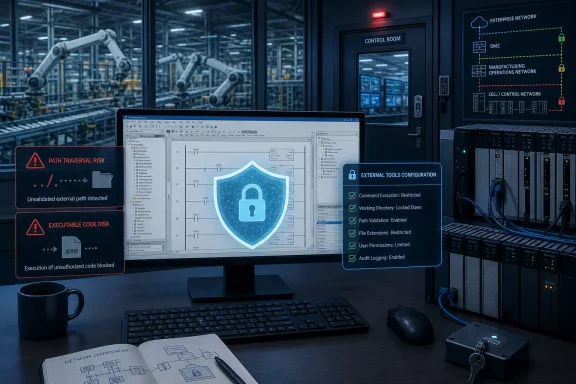 Overview
The advisory concerns CVE-2026-9108, CVE-2026-9127, and CVE-2026-9128 in Studio 5000 Logix Designer. The issues affect a substantial range of releases, including versions that remain common in facilities where controller firmware, validated applications, and production processes constrain upgrade schedules.The security impact is concentrated on the engineering workstation rather than an internet-facing programmable logic controller. That distinction is important but should not be misunderstood as reassurance. Studio 5000 workstations are highly privileged operational technology assets: they often contain controller projects, credentials, network configuration data, licensed engineering software, and direct pathways to download logic into production equipment.
The three flaws at a glance
The vulnerabilities reflect three distinct but related Windows security failure modes:- CVE-2026-9108 is a path traversal issue in the handling of ACD project files. A malicious project could reportedly write files outside the intended extraction location when opened.
- CVE-2026-9127 is an incorrect authorization issue involving the configuration of external tools. An authenticated user could modify configured tool paths and direct the application toward a malicious executable.
- CVE-2026-9128 is an unquoted search path issue in the same External Tools area. A malicious executable placed earlier in Windows’ resolution order could be launched instead of the expected program.
Why WindowsForum readers should care
For Windows administrators, this is a reminder that industrial engineering applications are not simply specialist desktop software. They are part of the control plane for physical operations. Traditional Windows hardening, endpoint detection, identity controls, application allowlisting, secure file handling, and least privilege all have direct relevance to PLC programming workstations.The incident also illustrates why patch management in operational technology cannot be treated like ordinary office IT. Updating Studio 5000 may require compatibility verification against controller firmware, project files, installed FactoryTalk components, licensed extensions, and validated production procedures. The correct response is not reckless urgency; it is disciplined urgency.
Background
Studio 5000 Logix Designer is Rockwell Automation’s integrated development environment for Logix 5000 controllers. It evolved from the RSLogix 5000 family and is used across discrete manufacturing, process control, batch systems, packaging, automotive production, utilities, and other industrial settings where ControlLogix, CompactLogix, GuardLogix, and related platforms are deployed.Unlike a conventional productivity application, Logix Designer participates in the lifecycle of a control system. Engineers use it to create and inspect controller logic, configure I/O and communications, perform online edits, manage safety-related projects where applicable, and download approved changes to controllers. A workstation running this software can therefore become a powerful staging point for a broader intrusion.
The engineering workstation as an OT crown jewel
Industrial cyber-security discussions often focus on PLCs, human-machine interfaces, remote-access gateways, and plant firewalls. Yet the engineering workstation deserves equal attention. It is frequently the asset most capable of changing controller behavior quickly and legitimately.A threat actor that gains control of such a machine may not need to attack a controller protocol directly. They may instead abuse trusted engineering software, reuse the operator’s existing access, manipulate project content, or wait for an engineer to launch a seemingly normal utility. That makes workstation integrity central to both cyber defense and process safety.
A history of workstation-centered risk
This is not a theoretical concern unique to the new advisory. Industrial environments have repeatedly faced risks created by trusted engineering tools, project files, removable media, shared network locations, and insufficient separation between business systems and operational systems.The historical lesson is straightforward: malicious activity does not need to begin with an exposed controller. It can begin with a phishing message, a copied project archive, a contractor laptop, a shared file repository, or an overly permissive local account. The latest Studio 5000 fixes should be viewed within that larger attack-chain reality.
What the Advisory Covers
The CISA advisory identifies affected versions from Studio 5000 Logix Designer version 32 through version 36, although each CVE has its own version matrix. Organizations should not assume that a system is protected because it is running a newer-looking major release; they must verify the precise major and minor version installed.Rockwell Automation has released corrected versions for each issue. The remediation path differs by release branch, which is normal for industrial software that supports multiple controller and firmware ecosystems simultaneously.
CVE-2026-9108: Malicious ACD project-file handling
CVE-2026-9108 concerns improper limitation of file paths embedded in ACD project files. The advisory describes insufficient validation of file names during project opening, which could allow path traversal sequences to escape an intended extraction directory.In practical terms, a crafted project file could cause files to be written to attacker-chosen locations on the engineering workstation. File-write flaws are often building blocks rather than complete attacks by themselves, but they become particularly dangerous when paired with predictable startup locations, weak permissions, user interaction, or a later application launch.
CVE-2026-9127: External Tools authorization weakness
CVE-2026-9127 involves incorrect authorization for a configuration file used by External Tools. According to the vendor’s description, an authenticated user may be able to change paths for external tools configured in Studio 5000 Logix Designer.That matters because engineers naturally trust the tools exposed inside a familiar environment. If a routine menu option launches an attacker-controlled executable, the malicious code can run under the permissions of the user operating Logix Designer. The weakness is therefore less about bypassing all access controls remotely and more about abusing an existing foothold to create a reliable execution path.
CVE-2026-9128: The danger of an unquoted search path
CVE-2026-9128 concerns unquoted executable paths in the External Tools configuration. Windows can interpret an executable path containing spaces in unintended ways if it is not enclosed in quotation marks, potentially preferring a similarly named malicious executable earlier in the resolution sequence.This is a classic Windows security pitfall, but it takes on added significance in an industrial application. Engineering workstations often include multiple drives, legacy tools, shared folders, removable media access, and permissive local paths accumulated over years of maintenance. Those conditions can turn an old programming mistake into a realistic privilege and integrity risk.
Affected Versions and Corrected Releases
The patch picture is more nuanced than a single “install the newest version” instruction. Rockwell Automation lists corrected releases across supported major branches, enabling organizations to mitigate the flaws without necessarily moving every engineering station to a new annual version family.For CVE-2026-9108, affected releases include version 36.00; versions 35.00 and 35.01; versions 34.00 through 34.03; versions 33.00 through 33.03; and versions 32.00 through 32.04 and earlier. Corrected releases include version 37.00, plus 36.01, 35.02, 34.04, 33.04, and 32.05.
Fix levels for the External Tools vulnerabilities
For CVE-2026-9127, Rockwell Automation identifies fixes in version 36.00, 35.01, 34.02, 33.02, and 32.05. The affected range includes version 35.00; versions 34.00 and 34.01; versions 33.00 and 33.02; and versions 32.00 through 32.04 and earlier.For CVE-2026-9128, fixed versions include 36.00, 35.01, 34.03, 33.03, and 32.05. Affected versions include 35.00, versions 34.00 through 34.02, versions 33.00 through 33.02, and versions 32.00 through 32.04 and earlier.
Do not infer protection from a major version alone
A facility running version 35.01, for example, may be protected against the two External Tools flaws but still require 35.02 to remediate the ACD path traversal flaw. A site on version 34.02 may be fixed for CVE-2026-9127 but remains exposed to CVE-2026-9108 and CVE-2026-9128.This is why version inventory must be exact. Asset databases that record only “Studio 5000 v34” or “Logix programming software installed” are insufficient for this event. Security teams need the installed product revision, the workstation owner, the plant or cell supported, the controller firmware dependencies, and the maintenance window constraints.
Why These Issues Matter in Industrial Environments
CISA notes that successful exploitation could allow a local attacker to execute arbitrary files, alter configurations, or execute arbitrary code. The phrase local attacker deserves careful interpretation. It does not mean that the weakness is unimportant; it means an adversary typically needs an initial foothold, authenticated access, or a way to persuade a user to handle malicious project content.In operational technology, attackers commonly pursue layered objectives. Initial access could arrive through ordinary IT compromise, a remote-support tool, stolen credentials, contractor access, removable media, malicious email attachments, or a compromised shared repository. A local Studio 5000 vulnerability may then become the mechanism for persistence, lateral movement, privilege escalation, or manipulation of a trusted engineering workflow.
The project file as an attack surface
Engineering teams routinely exchange project files during commissioning, troubleshooting, backup restoration, design review, and vendor support. ACD files are operationally meaningful artifacts, not disposable documents.That makes CVE-2026-9108 particularly notable. An organization may have strong network segmentation and still retain exposure if a malicious project is introduced through a file share, email, cloud storage synchronization client, USB device, or contractor handoff. File provenance and validation become security controls, not administrative niceties.
Execution inside a trusted application workflow
The External Tools flaws create another form of risk: abuse of expected user behavior. Engineers often invoke supporting utilities as part of normal diagnostic and development work. If configuration integrity is compromised, a routine click can become code execution.This is exactly the type of activity that can evade simplistic security assumptions. The process may be launched by a legitimate signed application, initiated by an authorized user, and occur during normal work hours. Defensive tools need visibility into what child process launched, from which path, and whether that behavior matches the workstation’s approved baseline.
The Windows Security Angle
All three weaknesses intersect directly with longstanding Windows hardening principles. Path traversal, writable search-path locations, unquoted executable paths, and weak configuration permissions are not merely software-development defects. They are conditions that defenders can often constrain through endpoint design and access governance.A secure Studio 5000 deployment should be treated as a purpose-built engineering workstation, not as a general-purpose desktop that happens to have industrial software installed. That difference affects who can log on, what they can install, where they can write files, which executables can run, and how projects enter the environment.
Application control is a high-value compensating safeguard
Microsoft Defender Application Control, AppLocker where appropriate, and comparable enterprise application-control products can reduce the impact of malicious executable planting. If a rogue executable written into an accessible path cannot run, an unquoted-path weakness becomes substantially less useful to an attacker.Application control must be designed carefully for OT. Overly broad rules can make it ineffective, while overly restrictive rules can disrupt emergency diagnostics and commissioning. The goal is a reviewed allowlist covering the Logix Designer installation, required Rockwell and FactoryTalk components, approved vendor utilities, signed administrative tools, and explicitly sanctioned support workflows.
Least privilege remains essential
The External Tools authorization flaw is a direct reminder that “authenticated” is not equivalent to “authorized.” Shared local administrator accounts, broad membership in workstation administrator groups, permissive configuration directories, and unrestricted technician profiles undermine the protection offered by industrial software.Organizations should separate day-to-day access from elevated administration. Engineers should use standard user accounts for routine work wherever application compatibility permits, with controlled elevation for maintenance tasks. Local administrator access should be named, time-bound, logged, and reviewed rather than permanently available through generic credentials.
Immediate Response Priorities
The most sensible response is a short, structured campaign that balances exposure reduction with operational safety. This should be led jointly by OT engineering, plant operations, Windows endpoint administration, cyber-security, and change-management personnel.The first goal is to determine which workstations are affected. The second is to reduce the chance of an unsafe or disruptive patch rollout. The third is to build compensating controls for systems that cannot be updated immediately.
A practical remediation sequence
- Inventory every Studio 5000 Logix Designer installation and capture the precise version, host name, assigned owner, supported process area, and business criticality.
- Map each installed version to all three CVEs, rather than relying on a generic statement that a workstation is “patched” or “on version 35.”
- Identify the approved corrected release for each station based on controller firmware, project compatibility, installed components, licensing, and validated vendor support requirements.
- Test the upgrade in a representative non-production environment whenever one is available, including opening approved project backups, communications tests, controller connection checks, and required external-tool workflows.
- Schedule deployment through formal OT change control, with verified project backups, a rollback plan, site-specific operating approval, and defined maintenance windows.
- Apply interim hardening to systems awaiting updates, including restricting project-file sources, locking down External Tools configuration, removing unnecessary write permissions, and enforcing application allowlisting.
- Monitor engineering stations after remediation for unusual child processes, unexpected changes to tool configuration, suspicious project-file activity, and anomalous writes outside authorized working directories.
Preserve operational continuity
Patch testing in an industrial setting should cover more than whether the installer completes successfully. Teams should validate controller upload and download procedures, online monitoring, safety approval workflows, communications drivers, add-on profiles, generated reports, project archives, and engineering change documentation.A failed office-software update is an inconvenience. A failed engineering-software update during a plant outage can delay production recovery. That does not justify deferring remediation indefinitely; it explains why preparation and validation are part of the security fix.
Enterprise Impact: IT, OT, and Governance
For enterprise security teams, the advisory is another example of why IT and OT cannot operate with disconnected asset-management and vulnerability-management processes. The Windows endpoint team may own the operating system baseline, while controls engineering owns the software, and production owns the maintenance window. An attacker benefits from gaps between those responsibilities.A mature response assigns a single accountable owner for each workstation while retaining shared responsibility for security decisions. This avoids the familiar failure mode in which every team believes another group is handling a specialized asset.
Asset inventory needs operational context
Traditional endpoint tools can report installed software versions, but that is only the beginning. An OT-aware inventory should identify whether the workstation is used for routine monitoring, active programming, safety-controller maintenance, vendor support, emergency recovery, or offline project development.A laptop that is powered on only during quarterly maintenance may appear low risk in a conventional dashboard. In reality, it may be among the most sensitive devices in the plant because it has programming access and is periodically connected to critical controllers. Risk assessment must include both exposure and consequence.
Logging and detection opportunities
Security operations teams should tune monitoring around engineering workstations without overwhelming plant personnel with false alarms. Useful events include changes to Studio 5000 or External Tools configuration files, unexpected executable creation in writable folders, suspicious process launches from engineering applications, new local administrator memberships, and project files arriving from unapproved sources.Baselining matters. Some engineering workflows legitimately launch vendor utilities, scripts, communication drivers, and documentation tools. Detection logic should focus on deviations: executables launched from user profile directories, temporary folders, removable media, unexpected network shares, or newly created locations with names that resemble legitimate Windows paths.
Consumer and Small-Organization Impact
Although this advisory is principally relevant to critical manufacturing and industrial operations, smaller systems integrators, machine builders, educational labs, and maintenance contractors should not dismiss it. These organizations often use the same programming software while having fewer dedicated security resources and more mobile workflows.A contractor laptop may travel between sites, connect to customer networks, exchange projects through multiple channels, and retain broad privileges for compatibility reasons. That combination can magnify the risk of malicious project-file handling or executable-path abuse.
Contractors are part of the security boundary
Organizations that rely on external integrators should include this advisory in their supplier and remote-access conversations. Requirements should cover version verification, patch status, malware protection, encrypted storage, approved project transfer methods, named accounts, and restrictions on using personal or shared devices for production programming.The goal is not to create adversarial relationships with contractors. It is to ensure that the same engineering workstation standards apply whether the person using Studio 5000 is a direct employee, a machine OEM, a system integrator, or a temporary specialist responding to an outage.
Strengths and Opportunities
The advisory also presents an opportunity to improve industrial workstation security beyond the immediate patches. Organizations that treat the event as a focused resilience exercise can reduce exposure to many unrelated threats.- Version-specific fixes are available across several release branches, allowing many organizations to remediate without a wholesale migration to a new Studio 5000 generation.
- No known public exploitation has been reported to CISA as of July 21, 2026, which gives defenders a valuable window to inventory, test, and deploy mitigations methodically.
- The vulnerabilities highlight concrete hardening opportunities around permissions, executable control, project-file provenance, and configuration integrity.
- The event can strengthen IT/OT collaboration by forcing accurate ownership, maintenance-window planning, and workstation criticality mapping.
- Detection engineering can become more precise when security teams build baselines for approved Studio 5000 processes and External Tools behavior.
Security maturity through repeatable controls
The best outcome is not merely a fleet of patched workstations. It is a repeatable process in which every engineering asset has a known owner, known software version, validated recovery plan, secure project-transfer method, controlled administrator access, and monitoring appropriate to its operational role.That foundation makes the next advisory easier to handle. It also reduces the likelihood that a different weakness—whether in Windows, a remote-support tool, a PLC communication component, or a third-party utility—will create the same broad pathway to control-system compromise.
Risks and Concerns
The principal risk is not necessarily mass opportunistic exploitation. It is targeted misuse inside an environment where an attacker already has a foothold or can influence an engineer’s workflow. That kind of attack may be quieter, more selective, and more difficult to distinguish from legitimate operations.- Patch deferral may persist because of compatibility concerns, especially where old controller firmware or validated production applications constrain upgrades.
- Shared engineering accounts can turn a local flaw into a broader operational risk, because accountability and least privilege are weakened.
- Project files from email, USB media, cloud-sync folders, or shared drives may be trusted too readily, particularly during urgent troubleshooting.
- External Tools configurations may receive little security scrutiny, despite being capable of launching executable code within a trusted application context.
- Overly aggressive patch deployment can create availability problems, while overly cautious deferral can leave a high-value workstation exposed for months.
High complexity does not mean low priority
CISA’s assessment that exploitation has high attack complexity is useful context, but it should not become an excuse for inaction. Complexity often reflects prerequisite conditions, such as gaining local access, crafting a suitable project, modifying a configuration, or placing a file in a required path.Sophisticated adversaries and insiders may be capable of meeting those prerequisites. More importantly, industrial defenders should assess the vulnerabilities in the context of their own controls: a heavily segmented, allowlisted, monitored workstation operated by named standard-user accounts presents a very different risk profile from a shared administrator laptop that opens projects from removable media.
What to Watch Next
Organizations should watch for updates from Rockwell Automation and CISA, including any revised affected-version information, changes in exploit status, additional mitigation guidance, or reports of observed malicious activity. Security teams should also monitor the vendor’s release documentation for compatibility implications that may influence deployment choices.The most important internal signal will be inventory completion. Until a company can state exactly which engineering workstations run Studio 5000 Logix Designer, which versions are installed, and which plants or controllers those systems support, it cannot accurately measure exposure to this advisory.
Questions leaders should ask now
Plant and security leaders should insist on clear answers to several questions:- Which exact Studio 5000 versions are installed across production, development, test, and contractor systems?
- Which stations remain vulnerable to one, two, or all three CVEs?
- What corrected release is approved for each affected workstation?
- Which workstations use External Tools, and who can modify that configuration?
- How are ACD project files received, stored, verified, and opened?
- Can unapproved executables run from user-writable folders, temporary paths, removable media, or network shares?
- What is the tested rollback and recovery process if a Studio 5000 upgrade creates an operational issue?
A useful test of OT readiness
This advisory is also a test of whether an organization can perform risk-based vulnerability response in a real operational setting. Effective teams will not merely forward the bulletin. They will create a version matrix, determine affected assets, engage engineering owners, validate corrections, implement interim safeguards, document exceptions, and track every outstanding risk to resolution.That level of rigor is necessary because the impact of a compromised engineering environment is not limited to data loss. It can affect production integrity, equipment availability, quality control, safety processes, and the confidence operators place in the systems they use every day.
Rockwell Automation’s Studio 5000 Logix Designer vulnerabilities should therefore be treated as a targeted call to protect the Windows systems that sit closest to industrial control authority. The current absence of known public exploitation offers an opportunity, not a reason to wait: inventory precisely, patch through validated change control, lock down configuration and executable paths, and ensure that the engineering workstation remains a trusted instrument of production rather than an attacker’s most convenient route into it.
References
- Primary source: CISA
Published: 2026-07-21T12:00:00+00:00