

Microsoft is setting a hard deadline for one of the biggest authentication changes in Microsoft Entra ID: on February 1, 2027, Microsoft-provided SMS text messages and voice calls for multifactor authentication will be retired, while passkeys become the default path for users still relying on telephony-based verification. For Windows administrators, this is not merely another security recommendation. It is a tenant-wide platform transition with a fixed enforcement date, a limited temporary deferral window, and real potential for sign-in disruption if organizations leave legacy MFA cleanup until the last minute.
The company’s reasoning is straightforward. SMS one-time codes and voice calls remain better than passwords alone, but they are increasingly poor defenses against modern phishing, social engineering, SIM-swap fraud, adversary-in-the-middle attacks, and automated credential theft. The rise of generative AI has made the attacker’s job cheaper and more scalable: fake sign-in pages can be produced faster, lures can be tailored more convincingly, and support-desk or carrier-targeted scams can be run at far greater volume.
Microsoft’s announcement should therefore be read carefully. It does not mean that every Entra tenant must abandon telephony forever. Organizations with valid operational, regulatory, or technical reasons can retain SMS or voice through a customer-managed telecom provider made available through the Microsoft Security Store. But it does mean that Microsoft itself will stop supplying the telecom delivery layer, and every public-cloud Entra tenant must prepare for the policy shift.
For enterprises still treating SMS as the practical default for MFA, the message is blunt: the grace period is already shrinking.
The most important distinction is between retiring Microsoft-provided SMS and voice delivery and completely banning SMS or voice authentication.
On February 1, 2027, Microsoft will no longer natively provide text-message codes or voice calls for Entra multifactor authentication. Companies that still need those channels will need to select, configure, contract with, and pay a telecom provider through the Microsoft Security Store.
That leaves organizations with two primary choices:
For most organizations, the practical result will be an accelerated move away from phone-number-based MFA. Even if a company technically can keep SMS through a third party, it will need to decide whether paying for messages, managing a provider relationship, and carrying the residual phishing risk makes business sense.
In many cases, the answer will be no.
That is the core problem with phishing-resistant authentication. Traditional MFA often proves only that a user has access to a second channel. It does not reliably prove that the user is interacting with the legitimate service.
A modern phishing kit can proxy a real Microsoft sign-in session, display a convincing branded page, intercept a password, request an MFA code, and relay that code immediately to the genuine service. The user may believe they completed a legitimate verification prompt. Meanwhile, the attacker gains access to the session.
SIM swapping introduces a separate danger. Criminals can exploit carrier processes, social engineering, stolen personal information, or compromised telecom accounts to transfer a victim’s phone number to a SIM card under their control. Once that happens, SMS-based recovery and MFA codes may be routed directly to the attacker.
Voice calls are exposed to many of the same weaknesses. They can be redirected, socially engineered, overheard, forwarded, or abused through account-recovery fraud. Neither method provides strong protection against a user who is tricked into approving or sharing the factor.
AI has not created those problems. It has amplified them.
Cybercriminals no longer need exceptional writing skills to send persuasive messages in a target’s language. They can generate tailored phishing emails, chat messages, fake invoices, password-reset notices, and executive impersonation campaigns at scale. They can also rapidly produce cloned sign-in pages that imitate familiar Microsoft 365, Entra, SharePoint, and business-application experiences.
The threat is especially serious because many users have been trained to treat an MFA code as proof that a sign-in event is legitimate. In reality, a code request can be triggered by an attacker who already has the password or is running a live proxy session.
The attack chain can look like this:
A passkey changes the security model. It does not ask the user to copy a secret from one place to another. Instead, it uses public-key cryptography to prove possession of a private key associated with the intended service.
The private key remains protected on the user’s device or in a credential manager. The website receives a cryptographic response that is tied to the legitimate relying party. A fake site cannot simply request the same authentication response for its own domain and replay it to Microsoft.
That is the critical difference: passkeys are designed to resist credential harvesting and real-time phishing relays in ways that SMS codes cannot.
The temporary opt-out is intended for organizations that need time to:
When affected users next sign in and complete MFA, they can be prompted to register a passkey.
Importantly, this is a nudge phase rather than an immediate lockout phase. Users will have the ability to postpone the registration prompt. By default, those snoozes are not limited, which means organizations cannot rely on the automated campaign alone to complete migration.
That detail matters. If users can defer enrollment repeatedly, IT teams must drive adoption through communications, targeted campaigns, support materials, compliance reporting, and executive backing.
This date is particularly important for organizations in sectors where SMS or voice remains embedded in operational processes. Financial services, healthcare, manufacturing, public-sector deployments, field services, unionized workforces, and globally distributed organizations may have legitimate reasons to preserve a telephony route for selected users.
However, the provider path introduces new work:
This leaves roughly three months before the retirement date. That is enough time for a prepared organization to pilot and deploy, but it is not much time for a company starting from zero, especially if procurement, legal review, security assessments, data-residency checks, and regional telecom validation are involved.
There is no opt-out from this enforcement behavior.
If a tenant still depends on Microsoft-managed SMS or voice and has not configured a customer-managed telecom provider, users will no longer be able to use those methods to satisfy MFA requirements.
Microsoft is not describing this as an account-disablement event. User data is not deleted, and accounts are not simply removed. But users whose only available MFA method is SMS or voice will encounter a blocking passkey registration prompt when they try to sign in.
They must complete passkey registration before they can proceed.
For users with compatible devices, reliable connectivity, and clear instructions, this may be a manageable enrollment event. For workers without supported hardware, users on locked-down shared endpoints, staff without access to approved mobile devices, or employees trying to access critical systems during an outage, it can become a business interruption.
That is why the deadline must be approached as an identity modernization project, not a routine configuration change.
The key options include:
The usability benefit is obvious. If an employee replaces a phone or starts using a new device, a synced credential can reduce recovery friction. That makes synced passkeys attractive for general knowledge workers who use multiple personal and corporate devices.
But synced passkeys come with a governance trade-off. Administrators may not have granular visibility into every device where the passkey has been synchronized. For organizations that need strict device boundaries, this limitation should be considered carefully.
The main advantage is stronger control over where the credential lives. The operational trade-off is recovery. If the device is lost, damaged, wiped, or unavailable, users need another approved authentication and recovery route.
They are also valuable for users who do not have modern smartphones, cannot use biometric authentication, work in restricted environments, or need a portable factor that is separate from a primary workstation.
For privileged identities, using FIDO2 keys with carefully designed conditional access policies can materially reduce exposure to phishing, credential theft, and help-desk-led account takeover.
Windows 11 provides the strongest integrated passkey experience, particularly through Windows Hello and newer platform credential-management capabilities. Windows 10 can also support important passwordless and Windows Hello scenarios, but organizations should validate their exact OS builds, browser versions, device capabilities, policy configuration, and hardware security posture.
Modern passkey use depends on more than operating-system version numbers. IT teams should assess:
However, it does not replace Windows Hello for Business. Windows Hello for Business remains the better fit for managed-device sign-in and seamless access to enterprise resources after the user unlocks the PC.
That distinction matters in rollout design. An organization with a mature Windows Hello for Business deployment may already have much of the phishing-resistant foundation it needs. An organization relying on password plus SMS across unmanaged Windows 10 systems may face a much larger transition.
Self-service password reset, or SSPR, is in scope. If employees use SMS or voice as part of password reset and recovery processes, those workflows require the same review as routine MFA.
This is a common blind spot. Identity teams may migrate interactive sign-in successfully while forgetting that password reset instructions, onboarding guides, help-desk scripts, and recovery policies still direct users to text-message verification.
A passwordless future also changes recovery planning. If a user loses their passkey device, the organization needs a secure, documented route back into the account. That may include temporary access passes, approved backup authentication methods, replacement security keys, managed-device enrollment processes, or carefully protected help-desk recovery workflows.
Guest and B2B users create another complication. Microsoft expects passkey support for B2B and internal guest users to become available by the end of 2026, but those users are still within the broader retirement scope. That creates a narrow planning window for organizations that collaborate extensively with contractors, vendors, subsidiaries, and partner tenants.
External MFA providers are not automatically affected by the Microsoft-provided SMS and voice retirement. But a tenant should not assume that this means its external identities are safe from review. Any user population that is also enabled for Microsoft-managed SMS or voice may still fall into scope.
Separate users into meaningful groups:
For each group, identify:
A well-designed campaign should include:
Start with:
Test situations such as:
Valid reasons may include:
First, it sets a specific and enforceable deadline. Security programs often fail because organizations can defer difficult work indefinitely. A fixed platform retirement forces priority, budget attention, and executive sponsorship.
Second, Microsoft is not simply removing a method without providing alternatives. Passkeys, Windows Hello for Business, FIDO2 security keys, and customer-managed telecom providers give organizations several ways to manage risk.
Third, the approach is aligned with a wider industry move toward phishing-resistant authentication. This is not a narrow product strategy. It reflects the limits of shared secrets, approval prompts, SMS codes, and other factors that attackers can capture or manipulate.
Fourth, the registration campaign can help organizations move users gradually rather than attempting a disruptive “big bang” cutover. The nudges beginning on September 1, 2026 create a useful adoption period before the hard enforcement date.
Finally, the model recognizes that one authentication approach does not fit every user. Synced passkeys can reduce friction for mainstream users, while device-bound credentials and security keys can provide stronger assurance for privileged or regulated populations.
The first risk is user disruption. A blocking registration prompt on February 1, 2027 may be technically preferable to an account lockout, but it can still stop someone from working. If the employee lacks a supported device or cannot complete enrollment, the distinction may feel academic.
The second risk is incomplete device readiness. Older endpoints, unmanaged hardware, incompatible mobile configurations, locked-down browsers, and shared devices can complicate registration.
The third is recovery complexity. Passwordless authentication reduces dependence on passwords and one-time codes, but organizations must engineer strong alternatives for lost devices and inaccessible credentials.
The fourth is cost and operational overhead for organizations that retain telephony. Microsoft-managed SMS may disappear, but the underlying business need may remain. Customer-managed providers introduce contract, compliance, support, and billing responsibilities.
The fifth is visibility. Synced passkeys improve convenience, but they can reduce direct insight into the devices holding copies of the credential. That is not necessarily a reason to reject synced passkeys, but it is a reason to segment users carefully and reserve device-bound credentials for situations requiring strict control.
The final risk is complacency. MFA migrations often appear straightforward in policy diagrams and become complicated only when an employee on an old laptop, a contractor in another tenant, a warehouse user without a smartphone, or an executive traveling internationally tries to sign in.
Those edge cases are not edge cases when they become help-desk tickets on the enforcement date.
For Windows organizations, the most practical response is to build on the tools already available: Windows Hello for Business for managed devices, Entra passkeys on Windows where appropriate, FIDO2 keys for high-assurance roles, and carefully governed synced passkeys for broader user populations.
The deadline is fixed. The temporary opt-out only delays part of the transition. And the post-retirement user experience will be unforgiving for tenants that have not prepared: users dependent on SMS or voice will face a blocking registration step before they can continue.
The organizations that begin inventory, pilot deployments, user education, recovery testing, and exception planning now will treat February 2027 as a completed security milestone. Those that postpone the work may find themselves trying to modernize identity under the pressure of interrupted sign-ins, confused users, and an avoidable support surge.
The company’s reasoning is straightforward. SMS one-time codes and voice calls remain better than passwords alone, but they are increasingly poor defenses against modern phishing, social engineering, SIM-swap fraud, adversary-in-the-middle attacks, and automated credential theft. The rise of generative AI has made the attacker’s job cheaper and more scalable: fake sign-in pages can be produced faster, lures can be tailored more convincingly, and support-desk or carrier-targeted scams can be run at far greater volume.
Microsoft’s announcement should therefore be read carefully. It does not mean that every Entra tenant must abandon telephony forever. Organizations with valid operational, regulatory, or technical reasons can retain SMS or voice through a customer-managed telecom provider made available through the Microsoft Security Store. But it does mean that Microsoft itself will stop supplying the telecom delivery layer, and every public-cloud Entra tenant must prepare for the policy shift.
For enterprises still treating SMS as the practical default for MFA, the message is blunt: the grace period is already shrinking.
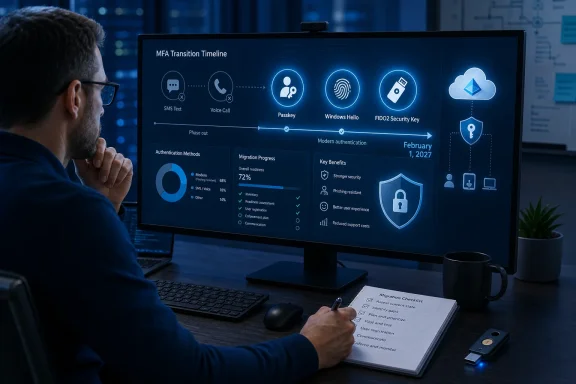 The Real Change: Microsoft Is Retiring Its Managed Telecom Layer
The most important distinction is between retiring Microsoft-provided SMS and voice delivery and completely banning SMS or voice authentication.On February 1, 2027, Microsoft will no longer natively provide text-message codes or voice calls for Entra multifactor authentication. Companies that still need those channels will need to select, configure, contract with, and pay a telecom provider through the Microsoft Security Store.
That leaves organizations with two primary choices:
- Move users to phishing-resistant authentication, including passkeys, Windows Hello for Business, or FIDO2 security keys.
- Retain SMS or voice only where necessary by implementing a customer-managed telecom provider.
For most organizations, the practical result will be an accelerated move away from phone-number-based MFA. Even if a company technically can keep SMS through a third party, it will need to decide whether paying for messages, managing a provider relationship, and carrying the residual phishing risk makes business sense.
In many cases, the answer will be no.
Why Microsoft Is Taking This Step
SMS and voice verification have always had structural weaknesses. A one-time code may be temporary, but it is still a shared secret: the server sends it to the user, and the user presents it back to the service. If an attacker persuades the user to type that code into a fraudulent site, the attacker can relay it in real time.That is the core problem with phishing-resistant authentication. Traditional MFA often proves only that a user has access to a second channel. It does not reliably prove that the user is interacting with the legitimate service.
A modern phishing kit can proxy a real Microsoft sign-in session, display a convincing branded page, intercept a password, request an MFA code, and relay that code immediately to the genuine service. The user may believe they completed a legitimate verification prompt. Meanwhile, the attacker gains access to the session.
SIM swapping introduces a separate danger. Criminals can exploit carrier processes, social engineering, stolen personal information, or compromised telecom accounts to transfer a victim’s phone number to a SIM card under their control. Once that happens, SMS-based recovery and MFA codes may be routed directly to the attacker.
Voice calls are exposed to many of the same weaknesses. They can be redirected, socially engineered, overheard, forwarded, or abused through account-recovery fraud. Neither method provides strong protection against a user who is tricked into approving or sharing the factor.
AI has not created those problems. It has amplified them.
Why AI Makes Phishable MFA a Bigger Liability
Artificial intelligence is often described as the reason security is changing, but the more precise explanation is that AI improves the economics of attacks already known to work.Cybercriminals no longer need exceptional writing skills to send persuasive messages in a target’s language. They can generate tailored phishing emails, chat messages, fake invoices, password-reset notices, and executive impersonation campaigns at scale. They can also rapidly produce cloned sign-in pages that imitate familiar Microsoft 365, Entra, SharePoint, and business-application experiences.
The threat is especially serious because many users have been trained to treat an MFA code as proof that a sign-in event is legitimate. In reality, a code request can be triggered by an attacker who already has the password or is running a live proxy session.
The attack chain can look like this:
- An employee receives a convincing email claiming that a document, invoice, shared file, or security alert needs attention.
- The link opens a fraudulent sign-in page built to resemble a Microsoft authentication page.
- The employee enters a password.
- The attacker relays the password to the legitimate service in real time.
- The legitimate service sends an SMS code or initiates a voice call.
- The employee enters the code into the phishing site.
- The attacker completes the sign-in or captures a session token.
A passkey changes the security model. It does not ask the user to copy a secret from one place to another. Instead, it uses public-key cryptography to prove possession of a private key associated with the intended service.
The private key remains protected on the user’s device or in a credential manager. The website receives a cryptographic response that is tied to the legitimate relying party. A fake site cannot simply request the same authentication response for its own domain and replay it to Microsoft.
That is the critical difference: passkeys are designed to resist credential harvesting and real-time phishing relays in ways that SMS codes cannot.
The Entra MFA Retirement Timeline Administrators Need to Track
Microsoft’s schedule contains several dates that IT departments should put into project plans, change-management calendars, and executive risk registers.August 1, 2026: Temporary Opt-Out Information and API Support
Starting August 1, 2026, Microsoft plans to make API support and guidance available for a temporary opt-out. This does not eliminate the February 2027 enforcement. It only gives tenants a way to delay the automatic passkey and registration-campaign changes while they complete transition work.The temporary opt-out is intended for organizations that need time to:
- Migrate users to passkeys or other phishing-resistant methods.
- Complete device-readiness remediation.
- Configure a customer-managed telecom provider.
- Address special populations such as frontline workers, shared-device users, contractors, or users in restricted environments.
- Finalize end-user training and help-desk documentation.
September 1, 2026: Passkey Registration Nudges Begin
On September 1, 2026, users who are enabled for SMS or voice in the Entra Authentication Methods Policy will be automatically enabled for passkeys. Microsoft will also move the relevant registration campaign settings into a Microsoft-managed state.When affected users next sign in and complete MFA, they can be prompted to register a passkey.
Importantly, this is a nudge phase rather than an immediate lockout phase. Users will have the ability to postpone the registration prompt. By default, those snoozes are not limited, which means organizations cannot rely on the automated campaign alone to complete migration.
That detail matters. If users can defer enrollment repeatedly, IT teams must drive adoption through communications, targeted campaigns, support materials, compliance reporting, and executive backing.
September 18, 2026: Telecom Provider Details Arrive
On September 18, 2026, Microsoft expects to publish information about the customer-managed telecom options available through the Microsoft Security Store.This date is particularly important for organizations in sectors where SMS or voice remains embedded in operational processes. Financial services, healthcare, manufacturing, public-sector deployments, field services, unionized workforces, and globally distributed organizations may have legitimate reasons to preserve a telephony route for selected users.
However, the provider path introduces new work:
- Evaluate available providers and regional coverage.
- Review pricing and per-message costs.
- Validate data-handling and privacy requirements.
- Confirm whether the provider meets internal compliance obligations.
- Test delivery reliability in every country or region where employees operate.
- Establish support ownership when messages fail to arrive.
October 30, 2026: Provider Configuration Becomes Available
Starting October 30, 2026, customers that need SMS or voice will be able to select and configure a supported telecom provider through the Security Store.This leaves roughly three months before the retirement date. That is enough time for a prepared organization to pilot and deploy, but it is not much time for a company starting from zero, especially if procurement, legal review, security assessments, data-residency checks, and regional telecom validation are involved.
February 1, 2027: Enforcement Begins
On February 1, 2027, Microsoft-provided SMS and voice delivery are retired in Entra ID public-cloud tenants.There is no opt-out from this enforcement behavior.
If a tenant still depends on Microsoft-managed SMS or voice and has not configured a customer-managed telecom provider, users will no longer be able to use those methods to satisfy MFA requirements.
Microsoft is not describing this as an account-disablement event. User data is not deleted, and accounts are not simply removed. But users whose only available MFA method is SMS or voice will encounter a blocking passkey registration prompt when they try to sign in.
They must complete passkey registration before they can proceed.
For users with compatible devices, reliable connectivity, and clear instructions, this may be a manageable enrollment event. For workers without supported hardware, users on locked-down shared endpoints, staff without access to approved mobile devices, or employees trying to access critical systems during an outage, it can become a business interruption.
That is why the deadline must be approached as an identity modernization project, not a routine configuration change.
Passkeys Are the Default, but They Are Not the Only Phishing-Resistant Option
The phrase “passkeys by default” can make this transition sound more rigid than it is. Microsoft’s direction is clear: passkeys are now the preferred authentication experience. But Entra environments can continue to use other phishing-resistant methods where appropriate.The key options include:
- Passkeys stored in platform credential managers
- Device-bound passkeys
- Windows Hello for Business
- FIDO2 hardware security keys
- Other supported phishing-resistant authentication approaches based on organizational policy
Synced Passkeys
A synced passkey is stored in a credential manager and can follow the user across devices within that ecosystem. Examples include passkeys held in supported cloud-backed password and credential managers.The usability benefit is obvious. If an employee replaces a phone or starts using a new device, a synced credential can reduce recovery friction. That makes synced passkeys attractive for general knowledge workers who use multiple personal and corporate devices.
But synced passkeys come with a governance trade-off. Administrators may not have granular visibility into every device where the passkey has been synchronized. For organizations that need strict device boundaries, this limitation should be considered carefully.
Device-Bound Passkeys
A device-bound passkey is linked to one specific authenticator or device. It may be stored in:- A Windows Hello container.
- A supported hardware-backed mobile authenticator.
- A FIDO2 security key.
- The Microsoft Authenticator app on supported hardware.
- Another approved device-bound authenticator.
The main advantage is stronger control over where the credential lives. The operational trade-off is recovery. If the device is lost, damaged, wiped, or unavailable, users need another approved authentication and recovery route.
FIDO2 Security Keys
FIDO2 security keys remain one of the most reliable options for high-assurance environments. A physical key can be issued to administrators, stored securely, enrolled through controlled processes, and used across compatible devices.They are also valuable for users who do not have modern smartphones, cannot use biometric authentication, work in restricted environments, or need a portable factor that is separate from a primary workstation.
For privileged identities, using FIDO2 keys with carefully designed conditional access policies can materially reduce exposure to phishing, credential theft, and help-desk-led account takeover.
Windows Device Readiness Will Define the User Experience
A major migration risk lies in assuming that “passkeys are supported” means every employee will have an equally smooth registration experience.Windows 11 provides the strongest integrated passkey experience, particularly through Windows Hello and newer platform credential-management capabilities. Windows 10 can also support important passwordless and Windows Hello scenarios, but organizations should validate their exact OS builds, browser versions, device capabilities, policy configuration, and hardware security posture.
Modern passkey use depends on more than operating-system version numbers. IT teams should assess:
- Whether the device supports Windows Hello.
- Whether a TPM or hardware-backed credential container is available.
- Whether biometric options are enabled or a Windows Hello PIN is configured.
- Whether the device is Entra-joined, Entra-registered, unmanaged, or shared.
- Which browsers employees use for Entra sign-in.
- Whether browser policies interfere with WebAuthn, Bluetooth, QR-code flows, or cross-device authentication.
- Whether users need passkeys on personal devices.
- Whether mobile-device management policies permit the required authenticator behavior.
However, it does not replace Windows Hello for Business. Windows Hello for Business remains the better fit for managed-device sign-in and seamless access to enterprise resources after the user unlocks the PC.
That distinction matters in rollout design. An organization with a mature Windows Hello for Business deployment may already have much of the phishing-resistant foundation it needs. An organization relying on password plus SMS across unmanaged Windows 10 systems may face a much larger transition.
Self-Service Password Reset and Guests Cannot Be Ignored
The retirement applies beyond ordinary MFA sign-in flows.Self-service password reset, or SSPR, is in scope. If employees use SMS or voice as part of password reset and recovery processes, those workflows require the same review as routine MFA.
This is a common blind spot. Identity teams may migrate interactive sign-in successfully while forgetting that password reset instructions, onboarding guides, help-desk scripts, and recovery policies still direct users to text-message verification.
A passwordless future also changes recovery planning. If a user loses their passkey device, the organization needs a secure, documented route back into the account. That may include temporary access passes, approved backup authentication methods, replacement security keys, managed-device enrollment processes, or carefully protected help-desk recovery workflows.
Guest and B2B users create another complication. Microsoft expects passkey support for B2B and internal guest users to become available by the end of 2026, but those users are still within the broader retirement scope. That creates a narrow planning window for organizations that collaborate extensively with contractors, vendors, subsidiaries, and partner tenants.
External MFA providers are not automatically affected by the Microsoft-provided SMS and voice retirement. But a tenant should not assume that this means its external identities are safe from review. Any user population that is also enabled for Microsoft-managed SMS or voice may still fall into scope.
A Practical Migration Plan for Entra Administrators
The strongest response is a staged migration that treats authentication as a combination of technology, user behavior, device management, and operational resilience.1. Identify Every User Still Enabled for SMS or Voice
Microsoft provides a PowerShell-based method for identifying users enabled for SMS or voice. Running the assessment requires one of several appropriate read or authentication-policy roles, including:- Global Reader
- Authentication Policy Administrator
- Security Reader
Separate users into meaningful groups:
- General employees
- Executives
- Privileged administrators
- Help-desk personnel
- Frontline and shift workers
- Contractors and guests
- Shared-device users
- Employees in low-connectivity regions
- Users with no managed mobile device
- Users with accessibility requirements
- Employees whose job function requires telephony-based recovery
2. Build an Authentication Inventory, Not Just a User Count
Knowing that 5,000 users have SMS enabled is useful. Knowing why they use it is much more valuable.For each group, identify:
- Current MFA methods.
- Primary device type.
- Operating system and browser.
- Device-management state.
- Windows Hello readiness.
- Availability of mobile devices.
- Existing FIDO2 key ownership.
- Geographic location.
- Business-critical applications.
- Password-reset and account-recovery dependencies.
- Required regulatory exceptions.
3. Start a Registration Campaign Before September
Waiting for the Microsoft-managed campaign to begin on September 1, 2026 is unnecessary and potentially risky. Organizations can enable passkey registration campaigns earlier, pilot the experience, gather support feedback, and improve instructions before the automatic nudges arrive.A well-designed campaign should include:
- A concise explanation of why SMS is being retired.
- Device-specific enrollment instructions.
- Windows Hello guidance for Windows users.
- Clear FIDO2 key procedures for privileged users.
- Mobile-device instructions for supported passkey providers.
- A support channel for enrollment failures.
- Specific deadlines for high-risk groups.
- Reporting for users who have not enrolled.
4. Pilot Privileged Users and Support Staff First
Administrators are both the most sensitive users and the people who will need to support everyone else. They should not be the last group migrated.Start with:
- Identity administrators.
- Global administrators.
- Security operations teams.
- Help-desk escalation staff.
- Executive support personnel.
- Application owners.
- Pilot business units.
5. Test Recovery Before Enforcing Enrollment
A passkey program is only as strong as its recovery process.Test situations such as:
- Lost phone.
- Replaced Windows laptop.
- Damaged or unavailable security key.
- Employee traveling without their primary device.
- New hire onboarding.
- Terminated employee cleanup.
- Shared workstation access.
- Forgotten Windows Hello PIN.
- Users who cannot use biometrics.
- Device wipe or re-enrollment.
- Help-desk verification during an urgent access issue.
6. Decide Whether Telecom Is Truly Necessary
Some organizations will need the customer-managed telecom route. But that decision should be made based on specific documented requirements, not habit.Valid reasons may include:
- A regulatory requirement for an out-of-band telecom channel.
- Workforce populations without reliable access to supported devices.
- Specialized environments where security keys and smartphones are impractical.
- Transitional operational processes that cannot be modernized before the deadline.
- Emergency fallback procedures with narrowly controlled use.
- Who qualifies.
- Why the exception exists.
- How long it will remain in place.
- What compensating controls apply.
- Who owns the provider relationship.
- How message costs will be funded.
- How the exception will be reviewed and retired.
The Strengths of Microsoft’s Approach
Microsoft’s decision has several clear benefits.First, it sets a specific and enforceable deadline. Security programs often fail because organizations can defer difficult work indefinitely. A fixed platform retirement forces priority, budget attention, and executive sponsorship.
Second, Microsoft is not simply removing a method without providing alternatives. Passkeys, Windows Hello for Business, FIDO2 security keys, and customer-managed telecom providers give organizations several ways to manage risk.
Third, the approach is aligned with a wider industry move toward phishing-resistant authentication. This is not a narrow product strategy. It reflects the limits of shared secrets, approval prompts, SMS codes, and other factors that attackers can capture or manipulate.
Fourth, the registration campaign can help organizations move users gradually rather than attempting a disruptive “big bang” cutover. The nudges beginning on September 1, 2026 create a useful adoption period before the hard enforcement date.
Finally, the model recognizes that one authentication approach does not fit every user. Synced passkeys can reduce friction for mainstream users, while device-bound credentials and security keys can provide stronger assurance for privileged or regulated populations.
The Risks and Gaps Administrators Must Manage
The transition is sensible from a security perspective, but it is not painless.The first risk is user disruption. A blocking registration prompt on February 1, 2027 may be technically preferable to an account lockout, but it can still stop someone from working. If the employee lacks a supported device or cannot complete enrollment, the distinction may feel academic.
The second risk is incomplete device readiness. Older endpoints, unmanaged hardware, incompatible mobile configurations, locked-down browsers, and shared devices can complicate registration.
The third is recovery complexity. Passwordless authentication reduces dependence on passwords and one-time codes, but organizations must engineer strong alternatives for lost devices and inaccessible credentials.
The fourth is cost and operational overhead for organizations that retain telephony. Microsoft-managed SMS may disappear, but the underlying business need may remain. Customer-managed providers introduce contract, compliance, support, and billing responsibilities.
The fifth is visibility. Synced passkeys improve convenience, but they can reduce direct insight into the devices holding copies of the credential. That is not necessarily a reason to reject synced passkeys, but it is a reason to segment users carefully and reserve device-bound credentials for situations requiring strict control.
The final risk is complacency. MFA migrations often appear straightforward in policy diagrams and become complicated only when an employee on an old laptop, a contractor in another tenant, a warehouse user without a smartphone, or an executive traveling internationally tries to sign in.
Those edge cases are not edge cases when they become help-desk tickets on the enforcement date.
The Bottom Line for Windows and Entra Environments
Microsoft’s February 1, 2027 retirement of Microsoft-provided SMS and voice authentication is a decisive move away from legacy MFA and toward phishing-resistant identity security. The company is not claiming that passkeys will eliminate every attack, nor is it completely eliminating telephony as an option. But it is making clear that SMS and voice should no longer be treated as a durable, default security control in Microsoft Entra ID.For Windows organizations, the most practical response is to build on the tools already available: Windows Hello for Business for managed devices, Entra passkeys on Windows where appropriate, FIDO2 keys for high-assurance roles, and carefully governed synced passkeys for broader user populations.
The deadline is fixed. The temporary opt-out only delays part of the transition. And the post-retirement user experience will be unforgiving for tenants that have not prepared: users dependent on SMS or voice will face a blocking registration step before they can continue.
The organizations that begin inventory, pilot deployments, user education, recovery testing, and exception planning now will treat February 2027 as a completed security milestone. Those that postpone the work may find themselves trying to modernize identity under the pressure of interrupted sign-ins, confused users, and an avoidable support surge.
References
- Primary source: Windows Latest
Published: 2026-07-22T16:31:55+00:00
Loading…
www.windowslatest.com - Official source: learn.microsoft.com
Passkeys by default and retirement of Microsoft-provided SMS and voice authentication - Microsoft Entra ID | Microsoft Learn
Learn how to prepare for the retirement of Microsoft provided SMS and Voice authentication in Microsoft Entra ID and migrate users to passkeys.learn.microsoft.com - Official source: techcommunity.microsoft.com
Loading…
techcommunity.microsoft.com