

Microsoft is preparing a meaningful convergence between SharePoint News and Viva Engage that could simplify one of the most persistent problems in internal communications: publishing a polished, authoritative story without fragmenting the employee conversation around it. The upcoming Cross-post SharePoint News to Engage capability is designed to let authors distribute a SharePoint News post to either a Viva Engage community or a storyline while retaining the original page’s full-fidelity presentation and replacing SharePoint comments with a single, richer Engage discussion thread.
Scheduled for general availability in September 2026, the feature is currently listed as in development for SharePoint and Microsoft Viva. It is intended for worldwide standard multi-tenant Microsoft 365 environments and spans the platforms that matter for modern workplace communications: web, desktop, Mac, Android, and iOS.
For organizations that have spent years balancing formal intranet publishing against the faster, more conversational culture of Viva Engage, this roadmap item has the potential to remove an awkward divide. Instead of choosing between a carefully composed SharePoint News article and a native social discussion, communicators may be able to treat the two as parts of one coordinated publishing experience.
The central promise is straightforward: authors create a news post in SharePoint, then distribute it to an Engage community or a storyline without rebuilding the content as a separate Engage post. The article should continue to appear as a SharePoint News experience rather than a stripped-down link preview or a copied-and-pasted block of content.
That distinction matters. SharePoint News is built for structured communication, branded presentation, rich page layouts, embedded media, audience targeting, and a durable intranet record. Viva Engage, meanwhile, is optimized for reactions, replies, visibility in social feeds, and broader employee participation.
Historically, combining those strengths has often required compromise. Communications teams could publish an article in SharePoint and share a link in Engage, but the discussion could become detached from the source content. They could embed or associate an Engage conversation with a page, but the editorial and social workflows still felt like parallel systems. Or they could manually recreate content in multiple channels, producing version-control and analytics problems.
Cross-post SharePoint News to Engage aims to make the SharePoint News post the communication asset while allowing Viva Engage to become the conversation layer around it.
The roadmap language is especially important on two points:
Its strengths are editorial. Communications staff can create polished announcements, leadership updates, policy explainers, event recaps, and campaign stories with a predictable layout and a central location.
Viva Engage fulfills a different role. It is designed around communities, conversations, reactions, leadership engagement, and employee voice. An Engage community can be an effective place to turn an announcement into a discussion, but the native post format is not a replacement for a long-form SharePoint page with carefully assembled visual structure.
The practical result has been a familiar internal communications pattern:
An employee may see a revised SharePoint News article but an older Engage summary. A correction added to the intranet page may not appear in a social post. A major update may generate a new conversation rather than continuing the original one. In regulated or process-sensitive organizations, that separation can create real operational confusion.
The forthcoming cross-posting model should reduce this problem by keeping the page content and social discussion more tightly connected. The article remains the source experience, while the conversation is intended to travel with it.
That is a much stronger proposition than simple link sharing.
For communications teams, this could preserve several elements that often lose impact when news is shared outside its original context:
Even so, the direction is clear. Microsoft is trying to ensure that news distributed into Viva Engage looks like a real SharePoint publication, not merely a social post pointing somewhere else.
An Engage community is the natural choice for topic-based or audience-based conversation. A benefits team might distribute enrollment news to an HR community. An IT department could cross-post a service-change announcement into a digital workplace or help community. A regional communications group may use a local community to add necessary context and gather feedback.
Storyline, by contrast, is linked to a person’s professional presence and following network. It is particularly relevant to executive communications, leadership announcements, subject-matter expert updates, and posts where the messenger is as important as the message.
The ability to select either destination gives organizations more precision than a single generic “share to Engage” command. It allows communicators to decide whether the post belongs in a collective topic space or should be amplified through an individual leader’s audience.
When a SharePoint News post is distributed to Engage, readers are expected to see the richer Engage discussion experience instead of standard SharePoint comments. That should create a single shared thread across the locations where the article appears.
In practical terms, this means an employee reading from the SharePoint news page should be able to participate in the same conversation as someone encountering the post in an Engage feed. Employees should not have to wonder whether they are commenting “in the right place.”
A unified thread can provide substantial benefits:
Some may visit a SharePoint home site during the workday. Others may primarily encounter communications through Teams. Frontline workers may depend on mobile access. Leaders and managers may receive or engage through Outlook. The value of a cross-posted news article will depend on whether its identity, presentation, and discussion remain coherent across those touchpoints.
Cross-posting to Engage adds a social distribution path without forcing authors to abandon SharePoint’s structured publishing model. A worker might see the post in Teams, enter the discussion there, and later revisit the full SharePoint article through an intranet page without losing the conversational context.
That continuity is precisely what many organizations have been missing.
This could make a SharePoint News post more resilient in organizations with uneven adoption patterns. The same article may reach a social-first employee through an Engage feed, an email-first employee through Outlook, and a mobile-first employee through the Microsoft 365 ecosystem on a phone.
The important caveat is that “consistent” does not necessarily mean every surface will offer identical interaction controls, notification behavior, or visual dimensions. Responsive design, client limitations, tenant configuration, and notification preferences will continue to shape what an individual sees.
Viva Amplify focuses on campaign-oriented communication distribution. It can help a SharePoint news author promote a story through multiple channels, including email, Teams messages, Engage-oriented formats, and additional SharePoint locations. It also emphasizes cross-channel analytics and coordinated publication workflows.
Cross-post SharePoint News to Engage appears more specifically focused on preserving the SharePoint News post as the rendered content experience inside Engage and attaching a shared Engage conversation to that post.
The cross-post capability could be the better fit when the core requirement is simpler but deeper: publish one SharePoint News article to a relevant community or storyline, preserve its article experience, and make sure every reader joins one conversation.
Microsoft has not yet published complete guidance describing whether the two features will share workflows, licensing dependencies, analytics models, or authoring controls. Administrators should avoid assuming that a rollout of one capability automatically replaces or includes the other.
The cross-posting model is promising because it does not frame those goals as opposites. The SharePoint News page remains the editorial artifact; Viva Engage supplies the discussion environment.
That separation of responsibilities is healthy. It gives communicators room to maintain a controlled message while still allowing the organization to participate around it.
A cross-posted SharePoint News article could bridge that gap. A CEO, business leader, or subject-matter expert could use a long-form SharePoint page for the complete message, then bring it into storyline or a relevant Engage community with a native conversation experience.
The result could be more substantive leadership communication without giving up accessibility.
For sensitive announcements, this matters. HR policy changes, technology migrations, return-to-office updates, benefits information, security initiatives, and organizational restructuring can all generate high volumes of employee questions. A consolidated thread gives responsible teams a better chance to respond consistently.
Combining the two may create a better long-term knowledge trail. Employees can locate the original article later, see the surrounding discussion, and understand how questions were answered at the time of publication.
Organizations will need to confirm what happens when these audiences do not align. If a news post is targeted at a limited SharePoint audience but is cross-posted to a broad community, administrators must understand whether access is blocked, the article is partially visible, or the cross-post is prevented.
The same issue is particularly important for storyline. Storyline content can have broad visibility among internal users who have access to Viva Engage, and guests are treated differently from internal employees. A leadership team should not treat storyline as a controlled distribution list.
Before publishing sensitive material, teams should verify:
Microsoft has not yet detailed how edits to a cross-posted SharePoint News article will behave across every Engage surface. Ideally, changes to the original page will remain synchronized wherever the news is rendered. But administrators should validate this rather than rely on assumption.
They should also test what happens when:
Teams should define who owns the thread. Is it the page author, the site owner, the Engage community administrator, the corporate communications team, or a designated moderator? Who answers product questions? What is the escalation path for employee relations concerns, misinformation, abusive replies, or confidential details posted in a comment?
A unified thread reduces fragmentation, but it does not remove the need for active community management.
Organizations should avoid treating a high number of reactions as proof that a critical message was understood. Likewise, a low number of replies may indicate clarity—or simply weak visibility.
A mature measurement approach should combine:
Avoid beginning with legal notices, confidential reorganization messages, security incidents, or HR matters that could trigger sensitive conversation before moderation practices are proven.
At a minimum, the organization should document:
If Microsoft delivers the feature as described, organizations will gain a stronger answer to an old intranet problem: how to make official communications easier to discover and discuss without creating duplicate posts, broken context, and scattered comment trails.
The greatest strength is the potential for one authoritative article and one shared conversation. The greatest risk is assuming that technical integration alone solves audience, moderation, lifecycle, and governance challenges.
With careful rollout planning, cross-posted SharePoint News could become a valuable communications pattern for organizations that want the polish of the intranet, the reach of employee communities, and a more unified employee conversation across Microsoft 365.
Scheduled for general availability in September 2026, the feature is currently listed as in development for SharePoint and Microsoft Viva. It is intended for worldwide standard multi-tenant Microsoft 365 environments and spans the platforms that matter for modern workplace communications: web, desktop, Mac, Android, and iOS.
For organizations that have spent years balancing formal intranet publishing against the faster, more conversational culture of Viva Engage, this roadmap item has the potential to remove an awkward divide. Instead of choosing between a carefully composed SharePoint News article and a native social discussion, communicators may be able to treat the two as parts of one coordinated publishing experience.
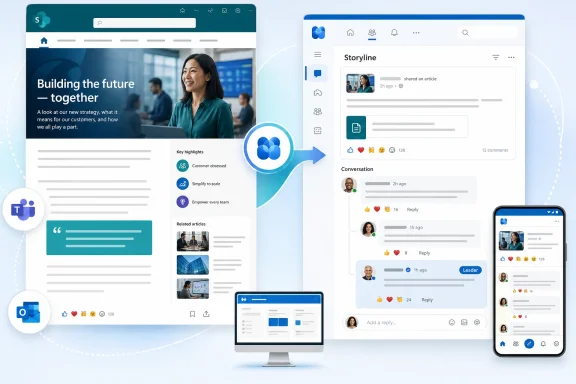 Overview: One News Story, One Conversation
The central promise is straightforward: authors create a news post in SharePoint, then distribute it to an Engage community or a storyline without rebuilding the content as a separate Engage post. The article should continue to appear as a SharePoint News experience rather than a stripped-down link preview or a copied-and-pasted block of content.That distinction matters. SharePoint News is built for structured communication, branded presentation, rich page layouts, embedded media, audience targeting, and a durable intranet record. Viva Engage, meanwhile, is optimized for reactions, replies, visibility in social feeds, and broader employee participation.
Historically, combining those strengths has often required compromise. Communications teams could publish an article in SharePoint and share a link in Engage, but the discussion could become detached from the source content. They could embed or associate an Engage conversation with a page, but the editorial and social workflows still felt like parallel systems. Or they could manually recreate content in multiple channels, producing version-control and analytics problems.
Cross-post SharePoint News to Engage aims to make the SharePoint News post the communication asset while allowing Viva Engage to become the conversation layer around it.
The roadmap language is especially important on two points:
- The SharePoint News post is expected to maintain full-fidelity rendering in Engage.
- The original SharePoint comments module will be replaced by the Viva Engage conversation module after distribution.
Why SharePoint News and Viva Engage Have Needed Better Integration
The split between publishing and participation
SharePoint News has long been the primary publishing engine for Microsoft 365 intranets. It offers a familiar page-authoring experience, supports branded communication sites, works with news web parts, and can surface stories in SharePoint, Teams-related experiences, mobile apps, and email-based news distribution.Its strengths are editorial. Communications staff can create polished announcements, leadership updates, policy explainers, event recaps, and campaign stories with a predictable layout and a central location.
Viva Engage fulfills a different role. It is designed around communities, conversations, reactions, leadership engagement, and employee voice. An Engage community can be an effective place to turn an announcement into a discussion, but the native post format is not a replacement for a long-form SharePoint page with carefully assembled visual structure.
The practical result has been a familiar internal communications pattern:
- Publish the official story in SharePoint.
- Post a separate summary or link in Viva Engage.
- Encourage employees to comment in one of several possible places.
- Attempt to monitor engagement across disconnected threads.
- Manually update multiple locations if the original message changes.
The cost of duplicate publishing
Content duplication introduces more than an administrative nuisance. A duplicated post can age differently across channels.An employee may see a revised SharePoint News article but an older Engage summary. A correction added to the intranet page may not appear in a social post. A major update may generate a new conversation rather than continuing the original one. In regulated or process-sensitive organizations, that separation can create real operational confusion.
The forthcoming cross-posting model should reduce this problem by keeping the page content and social discussion more tightly connected. The article remains the source experience, while the conversation is intended to travel with it.
That is a much stronger proposition than simple link sharing.
What the Feature Is Expected to Deliver
Microsoft’s roadmap description outlines a feature with several distinct parts. Each one addresses a practical weakness in the current multi-channel communication model.Full-fidelity SharePoint News rendering in Engage
The phrase full fidelity rendering is the headline capability. It suggests that readers opening a distributed SharePoint News post through Engage should encounter a representation that remains consistent with the authored news experience, rather than a reduced social-card treatment.For communications teams, this could preserve several elements that often lose impact when news is shared outside its original context:
- Page title and visual hierarchy
- Hero images and editorial imagery
- Rich text formatting
- Embedded content
- Brand styling and page composition
- Supporting web parts and structured page elements
- The intended reading order of the article
Even so, the direction is clear. Microsoft is trying to ensure that news distributed into Viva Engage looks like a real SharePoint publication, not merely a social post pointing somewhere else.
Distribution to communities or storyline
Authors will be able to cross-post a SharePoint News article to an Engage community or to storyline. These destinations serve different communications objectives.An Engage community is the natural choice for topic-based or audience-based conversation. A benefits team might distribute enrollment news to an HR community. An IT department could cross-post a service-change announcement into a digital workplace or help community. A regional communications group may use a local community to add necessary context and gather feedback.
Storyline, by contrast, is linked to a person’s professional presence and following network. It is particularly relevant to executive communications, leadership announcements, subject-matter expert updates, and posts where the messenger is as important as the message.
The ability to select either destination gives organizations more precision than a single generic “share to Engage” command. It allows communicators to decide whether the post belongs in a collective topic space or should be amplified through an individual leader’s audience.
A single Engage conversation thread
The planned replacement of the SharePoint comments module with the Engage conversation module may be the feature’s most consequential element.When a SharePoint News post is distributed to Engage, readers are expected to see the richer Engage discussion experience instead of standard SharePoint comments. That should create a single shared thread across the locations where the article appears.
In practical terms, this means an employee reading from the SharePoint news page should be able to participate in the same conversation as someone encountering the post in an Engage feed. Employees should not have to wonder whether they are commenting “in the right place.”
A unified thread can provide substantial benefits:
- Leaders have one place to answer questions.
- Community managers can moderate one conversation rather than several.
- Employees see replies and reactions from people using different Microsoft 365 surfaces.
- Communications teams gain a clearer view of sentiment and engagement.
- Follow-up discussion remains connected to the official story.
- Repeated questions are less likely to be answered inconsistently across parallel comments.
Reach Across Microsoft 365 Surfaces
Microsoft says the distributed SharePoint News post will appear consistently across Engage feeds, digests, Outlook, Teams, desktop, web, and mobile apps. That broad availability is significant because employees do not consume internal news in a single application.Some may visit a SharePoint home site during the workday. Others may primarily encounter communications through Teams. Frontline workers may depend on mobile access. Leaders and managers may receive or engage through Outlook. The value of a cross-posted news article will depend on whether its identity, presentation, and discussion remain coherent across those touchpoints.
Teams and the SharePoint app experience
Microsoft 365’s employee communications strategy increasingly treats Teams as a major destination for intranet content. SharePoint’s presence within Teams has continued to evolve, and the SharePoint app experience gives organizations another route to surface pages, news, and branded intranet resources inside the collaboration hub employees already use.Cross-posting to Engage adds a social distribution path without forcing authors to abandon SharePoint’s structured publishing model. A worker might see the post in Teams, enter the discussion there, and later revisit the full SharePoint article through an intranet page without losing the conversational context.
That continuity is precisely what many organizations have been missing.
Outlook and email-oriented engagement
Email is still a major communications surface, particularly for managers, remote staff, regulated industries, and employees whose roles do not involve constantly monitoring Teams or Engage. The roadmap specifically identifies Outlook and digests as part of the expected cross-surface experience.This could make a SharePoint News post more resilient in organizations with uneven adoption patterns. The same article may reach a social-first employee through an Engage feed, an email-first employee through Outlook, and a mobile-first employee through the Microsoft 365 ecosystem on a phone.
The important caveat is that “consistent” does not necessarily mean every surface will offer identical interaction controls, notification behavior, or visual dimensions. Responsive design, client limitations, tenant configuration, and notification preferences will continue to shape what an individual sees.
How It Differs From Viva Amplify
Organizations already using Viva Amplify may wonder whether this new capability overlaps with existing SharePoint-to-Engage publishing options. There is overlap in the broad goal of wider distribution, but the two concepts are not identical.Viva Amplify focuses on campaign-oriented communication distribution. It can help a SharePoint news author promote a story through multiple channels, including email, Teams messages, Engage-oriented formats, and additional SharePoint locations. It also emphasizes cross-channel analytics and coordinated publication workflows.
Cross-post SharePoint News to Engage appears more specifically focused on preserving the SharePoint News post as the rendered content experience inside Engage and attaching a shared Engage conversation to that post.
The likely practical distinction
A useful way to think about the difference is this:- Viva Amplify is a multi-channel campaign and distribution tool.
- Cross-post SharePoint News to Engage is an integration model for carrying a SharePoint News article and one Engage conversation across connected Microsoft 365 experiences.
The cross-post capability could be the better fit when the core requirement is simpler but deeper: publish one SharePoint News article to a relevant community or storyline, preserve its article experience, and make sure every reader joins one conversation.
Microsoft has not yet published complete guidance describing whether the two features will share workflows, licensing dependencies, analytics models, or authoring controls. Administrators should avoid assuming that a rollout of one capability automatically replaces or includes the other.
The Strengths for Internal Communications Teams
Better editorial control without silencing discussion
Many communications teams want formal announcements to remain accurate, branded, and easy to find. At the same time, they need employees to ask questions, react, and share perspective.The cross-posting model is promising because it does not frame those goals as opposites. The SharePoint News page remains the editorial artifact; Viva Engage supplies the discussion environment.
That separation of responsibilities is healthy. It gives communicators room to maintain a controlled message while still allowing the organization to participate around it.
Stronger leader communications
Leadership communications often suffer from an uncomfortable trade-off. A highly polished executive message published on the intranet can feel distant. A quick social post can feel more human but may not provide enough depth for strategy, policy, or organizational change.A cross-posted SharePoint News article could bridge that gap. A CEO, business leader, or subject-matter expert could use a long-form SharePoint page for the complete message, then bring it into storyline or a relevant Engage community with a native conversation experience.
The result could be more substantive leadership communication without giving up accessibility.
Less fragmented moderation
A single conversation thread can improve response quality as well as efficiency. Community managers and communications staff can identify unanswered questions, escalate concerns, and spot misinformation without monitoring duplicate threads scattered across page comments and social replies.For sensitive announcements, this matters. HR policy changes, technology migrations, return-to-office updates, benefits information, security initiatives, and organizational restructuring can all generate high volumes of employee questions. A consolidated thread gives responsible teams a better chance to respond consistently.
More durable institutional context
Social conversations often move quickly. Important information can become difficult to find once it drops out of a feed. SharePoint News provides a more durable record, while Engage brings the discussion and discovery mechanisms that make the content visible in the moment.Combining the two may create a better long-term knowledge trail. Employees can locate the original article later, see the surrounding discussion, and understand how questions were answered at the time of publication.
The Risks and Questions Organizations Should Not Ignore
Roadmap announcements describe intended functionality, not a complete implementation contract. The feature has clear potential, but several areas will require careful testing and governance before broad adoption.Permissions and audience alignment
The first challenge is audience design. A SharePoint News post has its own site permissions, audience targeting options, and publishing context. An Engage community or storyline has a different audience model and may be visible to a broader or differently defined population.Organizations will need to confirm what happens when these audiences do not align. If a news post is targeted at a limited SharePoint audience but is cross-posted to a broad community, administrators must understand whether access is blocked, the article is partially visible, or the cross-post is prevented.
The same issue is particularly important for storyline. Storyline content can have broad visibility among internal users who have access to Viva Engage, and guests are treated differently from internal employees. A leadership team should not treat storyline as a controlled distribution list.
Before publishing sensitive material, teams should verify:
- Who can view the SharePoint News article.
- Who can view and join the target Engage community.
- Whether external guests are present in relevant Microsoft 365 locations.
- How storyline visibility works in the tenant.
- Whether audience targeting remains intact after distribution.
- Which users can post, reply, react, and moderate.
Content lifecycle and editing behavior
A second unanswered question concerns lifecycle management. Communications teams frequently update news after publishing. They correct a date, revise a policy explanation, add an FAQ, replace an image, or append a leadership clarification.Microsoft has not yet detailed how edits to a cross-posted SharePoint News article will behave across every Engage surface. Ideally, changes to the original page will remain synchronized wherever the news is rendered. But administrators should validate this rather than rely on assumption.
They should also test what happens when:
- A news post is unpublished.
- A page is deleted or moved.
- Site permissions change.
- A cross-post is removed from an Engage destination.
- The author leaves the organization.
- A community is archived or deleted.
- The discussion requires moderation or removal.
- The SharePoint page’s title, image, or URL changes.
Comments are no longer just page comments
Replacing SharePoint comments with Engage conversations changes the governance profile of the news page. Engage supports a more social, dynamic experience, but that may introduce moderation expectations that some intranet publishers have not previously handled.Teams should define who owns the thread. Is it the page author, the site owner, the Engage community administrator, the corporate communications team, or a designated moderator? Who answers product questions? What is the escalation path for employee relations concerns, misinformation, abusive replies, or confidential details posted in a comment?
A unified thread reduces fragmentation, but it does not remove the need for active community management.
Analytics may remain complex
A distributed article with a shared conversation can improve the story’s reach, but analytics are likely to remain nuanced. Views, dwell time, reactions, replies, referrals, email engagement, and community activity are not interchangeable signals.Organizations should avoid treating a high number of reactions as proof that a critical message was understood. Likewise, a low number of replies may indicate clarity—or simply weak visibility.
A mature measurement approach should combine:
- Article views and unique readers
- Distribution-channel performance
- Comment themes and unanswered questions
- Reaction patterns
- Repeat visits to critical content
- Search and help-desk trends after publication
- Manager feedback from affected teams
Preparing for a September 2026 Rollout
Because the feature is listed as in development, the right response is preparation rather than immediate process redesign. Organizations can use the time before general availability to establish a pilot framework.Build a controlled pilot scenario
Select a small number of low-risk news categories that benefit from discussion but do not require tightly restricted audiences. Good early candidates may include workplace initiatives, employee events, learning opportunities, recognition programs, technology tips, or leadership Q&A articles.Avoid beginning with legal notices, confidential reorganization messages, security incidents, or HR matters that could trigger sensitive conversation before moderation practices are proven.
Standardize publishing decisions
A simple decision model can help authors determine when cross-posting is appropriate:- Publish to SharePoint only when the content is reference material, procedural guidance, or narrowly targeted information.
- Cross-post to an Engage community when the topic benefits from discussion among a defined group or interest area.
- Cross-post to storyline when a leader or recognized expert should visibly own the message and invite organization-wide engagement.
- Use a broader campaign approach when the communication needs tailored email, Teams, and social distribution alongside approval workflows and multi-channel reporting.
Review governance before launch
SharePoint administrators, Viva Engage administrators, communications leaders, legal teams, and information governance owners should jointly review the rollout. The feature touches several overlapping responsibilities: publishing, identity, retention, eDiscovery, moderation, records management, accessibility, and audience management.At a minimum, the organization should document:
- Approved use cases for cross-posting
- Community and storyline publishing permissions
- Moderator responsibilities
- Comment escalation procedures
- Expectations for author response times
- Content correction and takedown procedures
- Accessibility checks for SharePoint News templates
- Measures for evaluating communication performance
A More Coherent Future for Microsoft 365 Communications
Cross-post SharePoint News to Engage is an important signal of where Microsoft 365 communications are heading. The goal is no longer simply to place the same message in more places. It is to let a structured SharePoint publication remain intact while its discussion, discovery, and participation flow through Viva Engage and the wider Microsoft 365 ecosystem.If Microsoft delivers the feature as described, organizations will gain a stronger answer to an old intranet problem: how to make official communications easier to discover and discuss without creating duplicate posts, broken context, and scattered comment trails.
The greatest strength is the potential for one authoritative article and one shared conversation. The greatest risk is assuming that technical integration alone solves audience, moderation, lifecycle, and governance challenges.
With careful rollout planning, cross-posted SharePoint News could become a valuable communications pattern for organizations that want the polish of the intranet, the reach of employee communities, and a more unified employee conversation across Microsoft 365.
References
- Primary source: Microsoft 365 Roadmap
Published: 2026-07-22T22:41:54.4134574Z
Microsoft 365 Roadmap | Microsoft 365
The Microsoft 365 Roadmap lists updates that are currently planned for applicable subscribers. Check here for more information on the status of new features and updates.www.microsoft.com
- Official source: support.microsoft.com
Promote a SharePoint news post with Amplify for more visibility | Microsoft Support
Learn how to use Amplify from SharePoint to promote a news post to email, Teams channels, Engage posts, and additional SharePoint sites to increase visibility of your communication.support.microsoft.com - Official source: learn.microsoft.com
Include a Viva Engage feed in a SharePoint page | Microsoft Learn
Add a Viva Engage feed to a modern or classic SharePoint site page.learn.microsoft.com
