

Microsoft is preparing to move AI agents deeper into the everyday social fabric of Microsoft 365, with agents in Viva Engage communities now targeted for general availability in September 2026. Listed under Microsoft 365 Roadmap ID 499898, the web-based feature gives individual communities an AI-powered participant that can answer questions, surface institutional knowledge, cite supporting material, and help human experts manage repetitive requests. The update matters because it shifts Copilot from a private assistant responding to one employee at a time into a shared, visible knowledge intermediary whose answers can influence an entire workplace community.
That history creates an interesting foundation for AI. Unlike a conventional document repository, Viva Engage contains conversational knowledge: troubleshooting exchanges, explanations from experienced employees, policy clarifications, informal workarounds, and answers that may never have been converted into formal documentation.
The weakness of that model has always been retrieval. A useful answer may exist somewhere in years of posts and comments, but finding it requires the right search terms, awareness of the relevant community, and enough patience to separate current guidance from obsolete discussion.
Microsoft began the feature’s public preview in September 2025. According to the updated roadmap entry published on July 21, 2026, worldwide general availability for standard multi-tenant Microsoft 365 environments is now planned for September 2026.
That timeline is still a roadmap target rather than a guarantee. Microsoft frequently adjusts Microsoft 365 deployment dates as testing, compliance work, service capacity, and customer feedback reveal issues that need further attention.
The agent is not intended to reopen every historical discussion. It skips questions that already have a Best or Verified answer and ignores sufficiently old questions, with the preview documentation specifying a 14-day cutoff.
These boundaries are important. Without them, an automated participant could revive abandoned conversations, duplicate accepted answers, or flood a community with belated responses that no longer reflect the organization’s current policies.
If the system cannot find relevant grounding material, Microsoft says the agent does not answer. That behavior is preferable to generating a polished but unsupported response, although organizations should still test how reliably the system recognizes insufficient evidence.
That distinction turns the agent into a navigation layer as much as an answer engine. The immediate response may solve a simple question, while its citations can lead the employee to the full policy, original discussion, implementation guide, or approved reference document.
The agent can potentially combine those layers. It may draw the official procedure from SharePoint while using past community discussion to explain common obstacles, provided all relevant material is available to the community and eligible for grounding.
This is a form of retrieval-augmented generation. The underlying language model does not simply answer from its pretrained knowledge; the service retrieves organizational content, supplies that context to the model, and asks it to compose an answer based on the retrieved evidence.
This gives administrators and community owners a practical way to improve answer quality. A Windows support community could connect approved deployment instructions, hardware standards, security baselines, known-issue lists, and application packaging documentation rather than relying entirely on historical conversations.
The integration also introduces governance consequences. Adding a SharePoint source is not merely a search convenience; it changes the information environment from which the agent produces visible answers.
The intention is to prevent the agent from exposing information that the community’s members cannot legitimately access. In practice, however, an organization must verify that community membership and SharePoint permissions reflect the same audience before connecting the two.
An AI answer can make obscure information dramatically easier to discover. A document that was technically accessible but effectively hidden in a forgotten library may become immediately visible once an employee asks the right natural-language question.
Reviewers can approve a draft, edit it before approval, or dismiss it. An approved response appears under the agent’s identity, while reviewed content can receive a verification indicator showing that an authorized human accepted the answer.
This option will be essential in communities where incorrect guidance could cause operational, financial, safety, legal, or security problems. A casual interest group may tolerate automatic answers, but an identity-management, payroll, benefits, compliance, or Windows deployment community should begin with mandatory review.
Organizations should therefore treat confidence as a routing signal, not proof of correctness. Language models can be highly confident in an incomplete interpretation, especially when source material is contradictory, outdated, or written for multiple technical environments.
Reviewer visibility can help an expert identify whether the agent selected the correct source and interpreted it appropriately. It should not be confused with a complete forensic record of the model’s internal computation, but it can provide useful context for approval decisions.
The strongest review process checks three things separately: whether the cited material is authoritative, whether the response accurately reflects that material, and whether the answer is appropriate for the person and scenario described in the question.
A community agent can answer those recurring questions using previously approved material. This reduces the burden on specialists who would otherwise rewrite similar responses or manually locate an older thread.
The more strategic benefit is consistency. When experts answer ad hoc, wording and recommendations can drift; an agent grounded in maintained references can direct users toward a common procedure.
Experts will need to remove stale files, resolve conflicting guidance, verify high-value answers, and identify subjects for which the agent lacks sufficient evidence. Their work becomes partly editorial and partly operational.
That shift may reveal an uncomfortable truth: many organizations do not have a technology problem so much as a knowledge-management problem. Copilot can retrieve and summarize information, but it cannot independently decide which of three contradictory documents represents current policy.
A mature deployment should create a cycle:
That transition deserves advance planning. IT teams should document which communities are participating in the preview, who created each agent, which SharePoint sources were added, and whether automatic posting is enabled before the control model changes.
The roadmap currently lists only the Worldwide Standard Multi-Tenant cloud. Organizations using sovereign, government, or specialized cloud environments should not assume that the September 2026 target applies to them unless Microsoft adds those environments to the roadmap or related service communications.
A single agent is probably sufficient for general question answering, but it may limit communities with several distinct domains. A broad technology community might cover Windows endpoints, identity, networking, security, mobile devices, and line-of-business applications, all with different documentation owners and risk profiles.
Organizations may respond by creating narrower communities or carefully structuring the agent’s references. Excessive fragmentation has its own cost, however, because employees then need to know which community contains the relevant agent.
This asymmetry could make community agents an efficient way to spread some benefits of AI-assisted knowledge retrieval beyond the directly licensed population. It does not give unlicensed users a personal Copilot assistant; rather, it lets them consume responses generated within a shared community workflow.
For enterprises, that distinction affects return-on-investment calculations. A comparatively small number of licensed experts may be able to maintain an agent whose approved answers help a much larger employee population.
Community owners should conduct an access review before connecting any additional SharePoint site. They should confirm that every community member is entitled to the content, including future members who might be added through dynamic or automated processes.
This is especially important for public Viva Engage communities that are discoverable across an organization. Broad membership combined with an overly permissive SharePoint source can create an unexpectedly powerful internal discovery mechanism.
These limitations make the preview unsuitable for a careless “connect everything” rollout. Organizations should start with low-risk documentation that is already intended for the full community audience.
A citation can also create false confidence. Employees may see a source indicator and assume the entire answer has been formally approved, even when the citation supports only part of the response.
Organizations should teach users to distinguish among an automatically generated answer, an answer approved by an expert, and a formal policy document. Interface labels help, but governance and training must reinforce the distinction.
The best candidates are high-volume, low-ambiguity questions with stable answers. The agent should direct employees to established self-service steps while recognizing when a problem requires a help-desk ticket or privileged intervention.
This can reduce duplicate incidents, but only if the source material stays synchronized with the real environment. Instructions for an older Windows build, retired VPN client, or superseded Intune policy may cause more work than they save.
IT communities should structure documentation so the agent can identify these decision points. Instead of one monolithic troubleshooting page, maintain clear procedures for managed and unmanaged devices, office and remote networks, and supported Windows release channels.
Agents should also be instructed through community guidance to escalate security-sensitive scenarios. Requests involving credential resets, malware warnings, BitLocker keys, suspicious sign-in prompts, or administrative privilege should not be handled as ordinary peer-support questions.
This is valuable because employees often understand a concise, situational answer more easily than a lengthy technical standard. The verified response can translate policy into practical steps while retaining links to the authoritative source.
IT teams should nevertheless assign expiration or review processes outside the conversation itself. A verified answer from 2025 may no longer be safe after a Windows feature update, identity migration, certificate change, or application retirement.
Faster responses may be particularly useful across time zones. A global employee can receive an evidence-backed answer without waiting for the community owner in another region to start work.
The feature may also help newcomers who hesitate to ask what they fear is an obvious question. If the agent handles common requests neutrally, the community can become more approachable.
If an agent responds to every question immediately, members may stop contributing alternative experiences. Experts may disengage because the system appears to have answered, even when a more nuanced human response would have been valuable.
Community managers should therefore avoid optimizing purely for response speed. The goal is to remove repetitive friction while preserving discussion where interpretation, debate, mentoring, and lived experience matter.
Windows users may still encounter the capability through their employer’s browser-based Microsoft 365 environment. The roadmap lists the web platform, so the initial general-availability scope should not be interpreted as a new native Windows component or a replacement for the Copilot app.
The broader consumer relevance is strategic rather than immediate. Microsoft is demonstrating how it wants AI agents to become identifiable participants in shared digital spaces, a pattern that could eventually influence consumer communities, support forums, and collaborative applications.
This model can produce greater organizational leverage. A personal Copilot saves one employee time; a well-governed community agent can prevent hundreds of employees from repeating the same search or asking the same expert.
It also raises the stakes. A mistaken private answer affects one user, while a mistaken community answer can be read, copied, and acted upon across a department.
Teams remains optimized for active collaboration among defined groups, while SharePoint remains the primary document and intranet platform. Viva Engage can occupy the space between them: broad communities where questions, experiences, official resources, and expert guidance meet.
The agent reinforces that position by joining SharePoint’s structured content with Engage’s social knowledge. If the experience works reliably, it could make Viva Engage more valuable to organizations that previously treated it as an optional corporate social feed.
That integration reduces the need to export organizational content into a separate AI platform. It also encourages customers to keep knowledge, identity, communication, and governance inside Microsoft’s ecosystem.
The trade-off is deeper platform dependence. Once communities, permissions, documents, verified answers, and agent workflows are tightly linked, moving to another collaboration stack becomes more difficult.
Administrators should also watch Microsoft 365 Message Center notices for tenant-specific rollout dates. General-availability months often represent the beginning of deployment rather than the date on which every eligible tenant receives the feature.
Lifecycle management will be equally important. Organizations need a reliable way to identify answers grounded in removed files, changed policies, or archived communities, and to review knowledge sources on a recurring schedule.
A mature platform should help administrators distinguish between a model-quality failure and a source-quality failure. Those problems require different remedies: one calls for product improvement, while the other calls for better organizational documentation.
Future development could allow a community agent to coordinate with project agents, SharePoint knowledge agents, or workflow tools while retaining clear permission boundaries. A question about an application outage might eventually retrieve approved status information, summarize the related incident discussion, and direct affected users to the appropriate service workflow.
That expansion would also increase governance complexity. Administrators will need visibility not only into what an agent can read, but also what actions it can initiate and what other agents it can invoke.
Organizations should measure whether users resolve issues faster, whether duplicate questions decline, whether experts spend less time on routine responses, and whether employees continue to contribute human insight. High answer volume alone is not evidence of success.
Microsoft’s planned September 2026 release could turn Viva Engage communities into significantly more useful knowledge destinations, particularly for organizations already invested in SharePoint and Microsoft 365 Copilot. The technology’s value, however, will depend less on the fluency of its generated prose than on the quality of the underlying sources, the accuracy of permissions, and the judgment of the people reviewing its work. If Microsoft delivers the promised controls and customers resist the temptation to automate before cleaning up their knowledge estates, community agents could become one of Copilot’s more practical enterprise roles: not replacing human expertise, but making that expertise easier to find, verify, and reuse.
 Background
From Yammer conversations to Viva Engage knowledge
Viva Engage is the successor to the Yammer-branded employee social network that Microsoft acquired in 2012. Although its user interface and positioning have changed significantly, its central purpose remains recognizable: giving employees a place to form communities, ask questions, share experiences, follow leaders, and exchange information outside the stricter boundaries of project teams and email distribution lists.That history creates an interesting foundation for AI. Unlike a conventional document repository, Viva Engage contains conversational knowledge: troubleshooting exchanges, explanations from experienced employees, policy clarifications, informal workarounds, and answers that may never have been converted into formal documentation.
The weakness of that model has always been retrieval. A useful answer may exist somewhere in years of posts and comments, but finding it requires the right search terms, awareness of the relevant community, and enough patience to separate current guidance from obsolete discussion.
Copilot becomes a community participant
Microsoft originally introduced Copilot experiences in Viva Engage primarily around individual assistance, including writing support and contextual retrieval. The agents-in-communities model is different because the AI has a persistent role associated with a particular group and can respond directly inside community question threads.Microsoft began the feature’s public preview in September 2025. According to the updated roadmap entry published on July 21, 2026, worldwide general availability for standard multi-tenant Microsoft 365 environments is now planned for September 2026.
That timeline is still a roadmap target rather than a guarantee. Microsoft frequently adjusts Microsoft 365 deployment dates as testing, compliance work, service capacity, and customer feedback reveal issues that need further attention.
What the Community Agent Actually Does
It watches for unanswered questions
A Viva Engage community agent is designed to monitor its assigned community for questions that have not yet received an adequate answer. During the preview implementation, Microsoft says the agent checks periodically—roughly every 15 to 20 minutes—and considers a limited number of unanswered questions during each scan.The agent is not intended to reopen every historical discussion. It skips questions that already have a Best or Verified answer and ignores sufficiently old questions, with the preview documentation specifying a 14-day cutoff.
These boundaries are important. Without them, an automated participant could revive abandoned conversations, duplicate accepted answers, or flood a community with belated responses that no longer reflect the organization’s current policies.
It answers from community-specific evidence
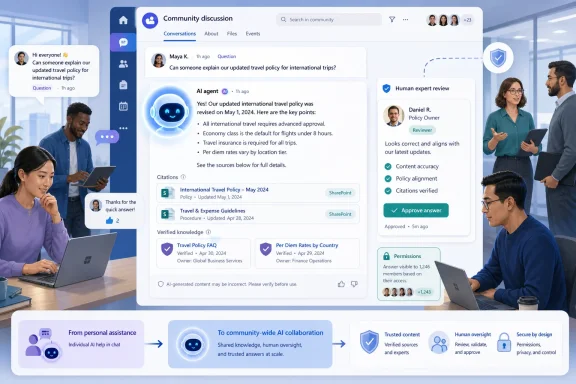
The agent grounds its response in material associated with the community rather than treating the open internet as its default authority. Its available knowledge can include community posts, comments, replies, the community’s connected SharePoint resources, explicitly added SharePoint sites or libraries, and earlier agent answers that an authorized person has verified.If the system cannot find relevant grounding material, Microsoft says the agent does not answer. That behavior is preferable to generating a polished but unsupported response, although organizations should still test how reliably the system recognizes insufficient evidence.
It places citations inside the answer
Citations are central to the feature’s credibility. A community member should be able to inspect the evidence behind an answer rather than accepting an anonymous AI summary as organizational truth.That distinction turns the agent into a navigation layer as much as an answer engine. The immediate response may solve a simple question, while its citations can lead the employee to the full policy, original discussion, implementation guide, or approved reference document.
How Grounding Works
Viva Engage supplies conversational context
Community conversations can capture practical experience that formal documentation misses. An official deployment guide might explain how to install a business application, for example, while an Engage thread records the proxy exception, regional dependency, or Windows configuration that employees actually needed to complete the installation.The agent can potentially combine those layers. It may draw the official procedure from SharePoint while using past community discussion to explain common obstacles, provided all relevant material is available to the community and eligible for grounding.
This is a form of retrieval-augmented generation. The underlying language model does not simply answer from its pretrained knowledge; the service retrieves organizational content, supplies that context to the model, and asks it to compose an answer based on the retrieved evidence.
SharePoint extends the knowledge boundary
Every Viva Engage community is associated with Microsoft 365 resources, including a connected SharePoint location. The community agent can use that material and can also be configured with additional SharePoint team sites, communication sites, or libraries.This gives administrators and community owners a practical way to improve answer quality. A Windows support community could connect approved deployment instructions, hardware standards, security baselines, known-issue lists, and application packaging documentation rather than relying entirely on historical conversations.
The integration also introduces governance consequences. Adding a SharePoint source is not merely a search convenience; it changes the information environment from which the agent produces visible answers.
Permissions remain the effective security boundary
Microsoft’s design requires the community’s Microsoft 365 group to have read access to added SharePoint resources. The community administrator configuring an external source must also hold the necessary site ownership or administrative rights.The intention is to prevent the agent from exposing information that the community’s members cannot legitimately access. In practice, however, an organization must verify that community membership and SharePoint permissions reflect the same audience before connecting the two.
An AI answer can make obscure information dramatically easier to discover. A document that was technically accessible but effectively hidden in a forgotten library may become immediately visible once an employee asks the right natural-language question.
The Human Review Model
Administrators can require approval
Community administrators can choose whether an agent posts automatically or submits drafted answers for human review. Requiring review places community administrators and designated experts between the model and the public discussion.Reviewers can approve a draft, edit it before approval, or dismiss it. An approved response appears under the agent’s identity, while reviewed content can receive a verification indicator showing that an authorized human accepted the answer.
This option will be essential in communities where incorrect guidance could cause operational, financial, safety, legal, or security problems. A casual interest group may tolerate automatic answers, but an identity-management, payroll, benefits, compliance, or Windows deployment community should begin with mandatory review.
Confidence influences the workflow
Even where automatic posting is enabled, low-confidence responses may still be routed for review. The practical value of this mechanism depends on calibration: if the threshold is too permissive, weak answers can reach users; if it is too cautious, experts may face a large backlog that defeats the automation’s purpose.Organizations should therefore treat confidence as a routing signal, not proof of correctness. Language models can be highly confident in an incomplete interpretation, especially when source material is contradictory, outdated, or written for multiple technical environments.
Reasoning is available to reviewers
Microsoft’s preview documentation indicates that reviewers can see an explanation of how the agent arrived at its proposed answer. That reasoning is not displayed in the final public post.Reviewer visibility can help an expert identify whether the agent selected the correct source and interpreted it appropriately. It should not be confused with a complete forensic record of the model’s internal computation, but it can provide useful context for approval decisions.
The strongest review process checks three things separately: whether the cited material is authoritative, whether the response accurately reflects that material, and whether the answer is appropriate for the person and scenario described in the question.
A New Operating Model for Community Experts
Repetitive questions become reusable knowledge
Large employee communities often receive the same questions repeatedly. New hires ask where to obtain approved software, sales employees request the latest presentation, and remote workers seek instructions for VPN or Windows Hello problems.A community agent can answer those recurring questions using previously approved material. This reduces the burden on specialists who would otherwise rewrite similar responses or manually locate an older thread.
The more strategic benefit is consistency. When experts answer ad hoc, wording and recommendations can drift; an agent grounded in maintained references can direct users toward a common procedure.
Experts shift from responders to curators
Automation does not eliminate the expert role. It changes that role from answering every question individually to maintaining the body of knowledge from which answers are generated.Experts will need to remove stale files, resolve conflicting guidance, verify high-value answers, and identify subjects for which the agent lacks sufficient evidence. Their work becomes partly editorial and partly operational.
That shift may reveal an uncomfortable truth: many organizations do not have a technology problem so much as a knowledge-management problem. Copilot can retrieve and summarize information, but it cannot independently decide which of three contradictory documents represents current policy.
The community becomes a feedback system
Each unanswered or poorly answered question identifies a potential knowledge gap. Administrators can use those failures to improve documentation, add sources, rewrite ambiguous guidance, or recruit the right subject-matter expert.A mature deployment should create a cycle:
- The agent detects a new question and searches its permitted knowledge.
- It answers automatically or submits a draft for review.
- Members and reviewers assess the usefulness of the response.
- Experts correct errors and identify missing source material.
- Maintainers update SharePoint documents or verify an improved answer.
- Future responses benefit from the refined knowledge base.
Enterprise Deployment and Administration
Preview activation precedes licensing control
During public preview, network administrators can enable community agents through a tenant-level setting in the Viva Engage admin center. Microsoft says that this preview toggle will be removed when the feature reaches general availability, after which availability will be managed through Microsoft 365 Copilot licensing.That transition deserves advance planning. IT teams should document which communities are participating in the preview, who created each agent, which SharePoint sources were added, and whether automatic posting is enabled before the control model changes.
The roadmap currently lists only the Worldwide Standard Multi-Tenant cloud. Organizations using sovereign, government, or specialized cloud environments should not assume that the September 2026 target applies to them unless Microsoft adds those environments to the roadmap or related service communications.
One agent is allowed per community
The preview architecture supports one agent for each eligible community. A Microsoft 365 Copilot-licensed community administrator creates and configures it.A single agent is probably sufficient for general question answering, but it may limit communities with several distinct domains. A broad technology community might cover Windows endpoints, identity, networking, security, mobile devices, and line-of-business applications, all with different documentation owners and risk profiles.
Organizations may respond by creating narrower communities or carefully structuring the agent’s references. Excessive fragmentation has its own cost, however, because employees then need to know which community contains the relevant agent.
Licensing is asymmetric
The administrator creating the agent requires an eligible Microsoft 365 Copilot license. Copilot-licensed administrators and community experts can review and manage agent-drafted answers, while ordinary community members can see posted agent responses even if they do not have an individual Copilot license.This asymmetry could make community agents an efficient way to spread some benefits of AI-assisted knowledge retrieval beyond the directly licensed population. It does not give unlicensed users a personal Copilot assistant; rather, it lets them consume responses generated within a shared community workflow.
For enterprises, that distinction affects return-on-investment calculations. A comparatively small number of licensed experts may be able to maintain an agent whose approved answers help a much larger employee population.
Security, Compliance, and Information Architecture
Existing access can become newly visible
Microsoft emphasizes that Copilot respects Microsoft 365 permissions, but permission-aware does not automatically mean risk-free. Many data exposures begin with excessive access that already existed before AI made the information easy to find.Community owners should conduct an access review before connecting any additional SharePoint site. They should confirm that every community member is entitled to the content, including future members who might be added through dynamic or automated processes.
This is especially important for public Viva Engage communities that are discoverable across an organization. Broad membership combined with an overly permissive SharePoint source can create an unexpectedly powerful internal discovery mechanism.
Preview limitations require caution
Microsoft’s preview documentation identifies several SharePoint-related limitations, including gaps involving some advanced protection and compliance scenarios. It also says that audit logging for agent administration is planned for general availability rather than fully available throughout preview.These limitations make the preview unsuitable for a careless “connect everything” rollout. Organizations should start with low-risk documentation that is already intended for the full community audience.
- Information barriers must be evaluated before communities span departments with restricted communication requirements.
- Data loss prevention rules should be tested against agent-generated responses, not merely the source documents.
- Conditional Access expectations should be reviewed when users reach Engage and SharePoint through different clients or device states.
- Rights-managed or specially protected information should remain outside the grounding set unless Microsoft explicitly supports the relevant controls.
- Administrative changes should be recorded through a separate operational process until sufficient native auditing is confirmed.
Citations do not eliminate hallucinations
Grounding and citations reduce risk, but they do not guarantee that every sentence follows from the linked evidence. A model may combine sources incorrectly, overlook an exception, or present an old conversation as though it supersedes a newer policy.A citation can also create false confidence. Employees may see a source indicator and assume the entire answer has been formally approved, even when the citation supports only part of the response.
Organizations should teach users to distinguish among an automatically generated answer, an answer approved by an expert, and a formal policy document. Interface labels help, but governance and training must reinforce the distinction.
Windows and IT Support Implications
Community agents can absorb tier-zero support
For Windows administrators, Viva Engage agents could provide a practical tier-zero support layer. An agent grounded in approved material could answer questions about Windows 11 upgrades, device enrollment, BitLocker recovery procedures, printer deployment, Windows Hello, approved applications, and remote-access troubleshooting.The best candidates are high-volume, low-ambiguity questions with stable answers. The agent should direct employees to established self-service steps while recognizing when a problem requires a help-desk ticket or privileged intervention.
This can reduce duplicate incidents, but only if the source material stays synchronized with the real environment. Instructions for an older Windows build, retired VPN client, or superseded Intune policy may cause more work than they save.
Troubleshooting demands precise context
Technical answers frequently depend on variables that users omit: Windows edition, build number, device ownership, management state, region, network, application version, and error code. An agent that assumes the wrong context may provide plausible but unusable instructions.IT communities should structure documentation so the agent can identify these decision points. Instead of one monolithic troubleshooting page, maintain clear procedures for managed and unmanaged devices, office and remote networks, and supported Windows release channels.
Agents should also be instructed through community guidance to escalate security-sensitive scenarios. Requests involving credential resets, malware warnings, BitLocker keys, suspicious sign-in prompts, or administrative privilege should not be handled as ordinary peer-support questions.
Verified answers can become an operational asset
When an expert reviews and verifies a strong answer, that response can help with future grounding. Over time, the community can build a layer of tested explanations around formal IT documentation.This is valuable because employees often understand a concise, situational answer more easily than a lengthy technical standard. The verified response can translate policy into practical steps while retaining links to the authoritative source.
IT teams should nevertheless assign expiration or review processes outside the conversation itself. A verified answer from 2025 may no longer be safe after a Windows feature update, identity migration, certificate change, or application retirement.
Employee and Community Experience
Faster answers may increase participation
Employees are more likely to use a community when questions receive timely, useful responses. An always-available agent can reduce the discouraging silence that often follows a question posted outside working hours or in a community with only a few active experts.Faster responses may be particularly useful across time zones. A global employee can receive an evidence-backed answer without waiting for the community owner in another region to start work.
The feature may also help newcomers who hesitate to ask what they fear is an obvious question. If the agent handles common requests neutrally, the community can become more approachable.
Automation can change the tone of a community
Viva Engage is not just a knowledge base. Its value also comes from human conversation, professional relationships, informal context, and the willingness of experienced people to share judgment.If an agent responds to every question immediately, members may stop contributing alternative experiences. Experts may disengage because the system appears to have answered, even when a more nuanced human response would have been valuable.
Community managers should therefore avoid optimizing purely for response speed. The goal is to remove repetitive friction while preserving discussion where interpretation, debate, mentoring, and lived experience matter.
Consumer impact remains limited
This announcement concerns Microsoft 365 workplace communities rather than the consumer Copilot experience in Windows. It does not add a Viva Engage community agent to personal Microsoft accounts, Windows 11 Home, or consumer editions of Microsoft 365.Windows users may still encounter the capability through their employer’s browser-based Microsoft 365 environment. The roadmap lists the web platform, so the initial general-availability scope should not be interpreted as a new native Windows component or a replacement for the Copilot app.
The broader consumer relevance is strategic rather than immediate. Microsoft is demonstrating how it wants AI agents to become identifiable participants in shared digital spaces, a pattern that could eventually influence consumer communities, support forums, and collaborative applications.
Competitive and Strategic Significance
Microsoft is moving beyond personal productivity
The first wave of generative AI in office software focused heavily on personal tasks: drafting an email, summarizing a document, producing a presentation, or analyzing a spreadsheet. Community agents represent a transition toward group-level AI, where one agent operates in a shared context and its output becomes visible to many people.This model can produce greater organizational leverage. A personal Copilot saves one employee time; a well-governed community agent can prevent hundreds of employees from repeating the same search or asking the same expert.
It also raises the stakes. A mistaken private answer affects one user, while a mistaken community answer can be read, copied, and acted upon across a department.
Viva Engage gains a clearer purpose
Viva Engage has sometimes struggled for attention alongside Teams, SharePoint, Outlook, and the wider Microsoft 365 portal. Embedding specialized agents may give communities a more distinctive role as curated, conversational knowledge hubs.Teams remains optimized for active collaboration among defined groups, while SharePoint remains the primary document and intranet platform. Viva Engage can occupy the space between them: broad communities where questions, experiences, official resources, and expert guidance meet.
The agent reinforces that position by joining SharePoint’s structured content with Engage’s social knowledge. If the experience works reliably, it could make Viva Engage more valuable to organizations that previously treated it as an optional corporate social feed.
The ecosystem advantage is integration
Competing enterprise collaboration products can add generative search and automated responders, but Microsoft’s advantage lies in its access to Microsoft Graph, Entra identity, SharePoint content, Microsoft 365 groups, Teams notifications, and existing compliance infrastructure.That integration reduces the need to export organizational content into a separate AI platform. It also encourages customers to keep knowledge, identity, communication, and governance inside Microsoft’s ecosystem.
The trade-off is deeper platform dependence. Once communities, permissions, documents, verified answers, and agent workflows are tightly linked, moving to another collaboration stack becomes more difficult.
Strengths and Opportunities
Viva Engage community agents address a real enterprise problem: useful knowledge exists, but employees cannot reliably find it when they need it. Several strengths stand out.- The agent answers within the community where the question was asked, reducing the need to switch applications or formulate a separate Copilot prompt.
- Grounding can combine formal SharePoint material with practical community discussion, giving responses both documentary authority and real-world context.
- Citations make answers inspectable, allowing employees and experts to trace claims back to supporting content.
- Human review can remain mandatory, which supports safer deployment in sensitive or technically complex communities.
- Unlicensed community members can benefit from posted answers, extending the reach of a smaller pool of Microsoft 365 Copilot licenses.
- Verified answers can improve future responses, turning expert review into a reusable organizational asset.
- The agent can reduce duplicate questions, freeing specialists to address exceptions, incidents, and strategic work.
- Failures reveal documentation gaps, helping knowledge owners identify subjects that need clearer or more current guidance.
- The feature fits existing Microsoft 365 identity and permission structures, avoiding a completely separate knowledge and access system.
- Global communities can provide more consistent support across time zones, particularly when experts are unavailable.
Risks and Concerns
The feature also introduces risks that organizations should address before enabling automatic answers broadly.- An agent can confidently misinterpret accurate source material, especially when documents contain exceptions, regional variations, or technical prerequisites.
- Old conversations may conflict with current policy, causing the agent to blend obsolete and authoritative information.
- Existing excessive permissions become more dangerous when AI improves discovery, even if the system technically respects access controls.
- Automatic posting can amplify a single mistake to an entire community, making human review appropriate for high-impact subjects.
- Citation indicators may create unwarranted trust, because a linked source does not necessarily validate every sentence in an answer.
- Experts may disengage if the agent appears to have closed the discussion, weakening the human knowledge-sharing culture that makes Engage useful.
- Preview-era compliance and auditing limitations can complicate investigations, particularly where administrators add or change knowledge sources.
- Licensing requirements may concentrate control among a small number of users, even though the resulting answers affect a much wider audience.
- Community sprawl may increase if organizations create separate groups solely to obtain narrowly scoped agents, making discovery harder for employees.
- Unsupported media formats can leave important knowledge unavailable, particularly where instructions depend on diagrams, recordings, or screenshots.
- Roadmap timing can change, so organizations should not build a September 2026 operational deadline around an unqualified assumption of availability.
What to Watch Next
The September 2026 general-availability scope
The most immediate question is whether Microsoft meets the September 2026 worldwide target and whether the final release retains the preview’s operating limits. General availability should clarify auditing, supported SharePoint controls, administrative reporting, and the exact licensing path that replaces the preview toggle.Administrators should also watch Microsoft 365 Message Center notices for tenant-specific rollout dates. General-availability months often represent the beginning of deployment rather than the date on which every eligible tenant receives the feature.
Better analytics and lifecycle controls
Community owners will need more than thumbs-up and thumbs-down reactions. Useful administration should eventually expose answer volume, approval rates, dismissed drafts, unanswered topics, frequently cited sources, stale references, and patterns of negative feedback.Lifecycle management will be equally important. Organizations need a reliable way to identify answers grounded in removed files, changed policies, or archived communities, and to review knowledge sources on a recurring schedule.
A mature platform should help administrators distinguish between a model-quality failure and a source-quality failure. Those problems require different remedies: one calls for product improvement, while the other calls for better organizational documentation.
Deeper coordination with Microsoft’s agent platform
Microsoft is developing agents across Teams, SharePoint, Microsoft 365 Copilot, and other workplace surfaces. Viva Engage’s agent is therefore unlikely to remain an isolated feature.Future development could allow a community agent to coordinate with project agents, SharePoint knowledge agents, or workflow tools while retaining clear permission boundaries. A question about an application outage might eventually retrieve approved status information, summarize the related incident discussion, and direct affected users to the appropriate service workflow.
That expansion would also increase governance complexity. Administrators will need visibility not only into what an agent can read, but also what actions it can initiate and what other agents it can invoke.
Evidence of real community value
The decisive test will be behavioral. Microsoft must show that agents improve answer quality and participation rather than merely increasing the amount of automated text in employee feeds.Organizations should measure whether users resolve issues faster, whether duplicate questions decline, whether experts spend less time on routine responses, and whether employees continue to contribute human insight. High answer volume alone is not evidence of success.
Microsoft’s planned September 2026 release could turn Viva Engage communities into significantly more useful knowledge destinations, particularly for organizations already invested in SharePoint and Microsoft 365 Copilot. The technology’s value, however, will depend less on the fluency of its generated prose than on the quality of the underlying sources, the accuracy of permissions, and the judgment of the people reviewing its work. If Microsoft delivers the promised controls and customers resist the temptation to automate before cleaning up their knowledge estates, community agents could become one of Copilot’s more practical enterprise roles: not replacing human expertise, but making that expertise easier to find, verify, and reuse.
References
- Primary source: Microsoft 365 Roadmap
Published: 2026-07-21T22:37:32.0478671Z
Microsoft 365 Roadmap | Microsoft 365
The Microsoft 365 Roadmap lists updates that are currently planned for applicable subscribers. Check here for more information on the status of new features and updates.www.microsoft.com
- Official source: learn.microsoft.com
The Copilot adoption community in Viva Engage | Microsoft Learn
Viva Engage rolls out a Copilot adoption community to answer questions and share best practiceslearn.microsoft.com - Official source: support.microsoft.com
Get Started with Microsoft 365 Copilot in Viva Engage | Microsoft Support
Use Microsoft 365 Copilot in your Viva Engage environmentsupport.microsoft.com - Official source: techcommunity.microsoft.com
- Official source: adoption.microsoft.com