

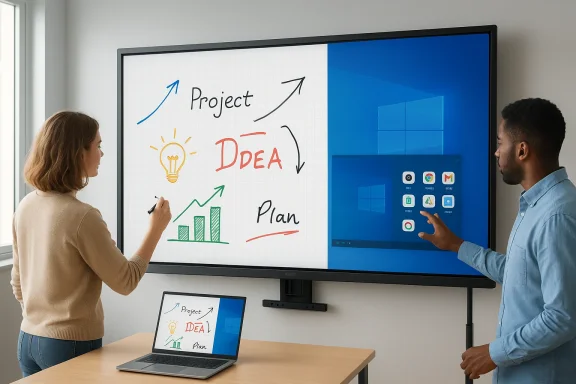
The arrival of a 65-inch 4K interactive smart board is a strong reminder that the market for collaboration hardware is no longer limited to simple displays and projectors. This category now blends touch, computing, digital whiteboarding, and signage into one appliance, and that convergence is exactly what makes the product interesting for offices and classrooms alike. With Windows 10, Android 11, a Core i3, 4GB RAM, and a 256GB SSD, this model is pitched as an all-in-one solution for meetings, lessons, and presentations. RuhrkanalNews describes it as a device that can replace a traditional whiteboard, projector, and computer, while also supporting multi-touch annotation, screen mirroring, and flexible mounting options. (ruhrkanal.news)
The appeal of this kind of interactive flat panel is easy to understand. Schools want more engaging classrooms, managers want faster meetings, and everyone wants to reduce the friction of swapping cables, launching apps, and adjusting multiple devices. A large 4K touchscreen with embedded computing can compress all of that into one familiar surface, which is a big reason the category continues to gain traction in education and business settings. RuhrkanalNews’ description makes clear that this board is intended to serve both environments, with included accessories such as a mobile stand and wall bracket supporting either a fixed or mobile deployment. (ruhrkanal.news)
That said, the value proposition is broader than the hardware spec sheet. An interactive board is not just a screen; it is a workflow hub. When teachers can write directly on content, and teams can annotate documents or sketch plans in real time, the device changes how people collaborate. That matters because collaboration tools often fail not due to missing features, but because they are inconvenient to use under pressure. A smart board works when the technology disappears into the workflow. RuhrkanalNews highlights exactly that promise with its emphasis on writing, drawing, annotating, and infinite-canvas use. (ruhrkanal.news)
There is also a practical reality behind the buzz: organizations increasingly want devices that reduce setup time and training overhead. A board that boots into a familiar operating system and supports screen sharing, video conferencing, and digital signage is attractive because it can serve multiple roles in the same room. In an office, that means a meeting display in the morning and a presentation wall in the afternoon. In a classroom, it means lesson delivery, student interaction, and the occasional standalone app environment. The fact that this unit runs both Windows and Android makes it especially versatile, even if that flexibility comes with trade-offs. (ruhrkanal.news)
At the same time, buyers should not confuse convenience with universally strong performance. A Core i3 with 4GB RAM is adequate for light productivity, annotation, browser-based tasks, and signage, but it is not a powerhouse for heavy multitasking or advanced content creation. The smart-board concept is compelling precisely because it does a lot with a focused workload. It is less compelling if users expect it to behave like a premium desktop workstation. That distinction will shape how successfully devices like this can move from novelty purchases to standard infrastructure.
The other major shift has been the convergence of display and computing. In the past, schools and businesses often paired a monitor with an external PC, then layered in a separate annotation tool or conferencing software. That setup worked, but it increased cable clutter, troubleshooting time, and maintenance complexity. The smart-board approach bundles the computing into the display itself, which simplifies deployment and makes the room easier to manage for non-technical staff. RuhrkanalNews’ featured product follows that pattern closely, combining Windows and Android in one system. (ruhrkanal.news)
This dual-OS approach is particularly notable. Windows 10 remains familiar to enterprise users and many educators because it supports mainstream productivity apps and established IT management practices. Android 11, meanwhile, provides a lighter, tablet-like interface that can be useful for rapid app access, kiosk-style tasks, and media playback. The promise of having both is obvious: users can choose the environment that best matches the job at hand. The challenge is ensuring the handoff between them is smooth enough that the feature feels like an advantage rather than a gimmick. (ruhrkanal.news)
Another reason the category continues to grow is that collaboration has become more visual. Hybrid work, remote teaching, and group-based problem solving all reward a shared digital surface. A board like this can serve as the center of a room where participants can annotate PDFs, brainstorm visually, and mirror laptop or phone content without the stop-start ritual of conventional AV systems. That’s not just a nice upgrade; in many settings, it is the difference between people participating and people watching.
Finally, there is the replacement-cycle logic. Traditional whiteboards wear out, markers run dry, projectors dim over time, and standalone PCs require constant support. A modern interactive board promises to replace all of them at once. That is why the product is framed not simply as a display, but as a complete collaboration platform. The best systems in this category win when procurement teams calculate the total cost of ownership rather than just the upfront sticker price.
Just as important is the 20-point multi-touch capability. In practical terms, that means multiple people can interact with the board at once, which is central to the collaboration story. Two students can solve a problem together, or a meeting facilitator can let several participants annotate a shared document. The included stylus support further broadens the interaction model, since some users will prefer precise pen input while others will use fingers for quick gestures.
There are, however, limits to what touch alone can solve. If the panel’s software layer is sluggish, or if palm rejection is poor, the experience quickly becomes frustrating. High-quality touch hardware is only part of the equation; the software stack has to keep pace. In this product’s case, the combination of Android and Windows is meant to improve versatility, but buyers should still evaluate latency, pen feel, and calibration before rolling out units broadly.
A further consideration is physical ergonomics. A large 65-inch panel works best when placed at the right height and angle, especially in classrooms where children and adults may need access to the same surface. The included mobile stand is helpful here because it provides flexibility for different room layouts and age groups. That adaptability is a meaningful selling point, not just a convenience.
In an office context, Windows is likely the primary draw. It integrates more naturally with common productivity tools, document workflows, and enterprise habits. The ability to attach a keyboard and mouse, launch familiar software, and treat the board like a room-scale PC gives the device real utility beyond a simple display. That makes it easier to justify in conference rooms where users need to move quickly between presentations, whiteboarding, and app-based work.
Still, dual-boot or dual-environment systems are not automatically elegant. The value depends on how seamless the transition feels, how fast the device resumes, and whether files and settings are easy to manage across contexts. If a teacher has to navigate too many menus just to start the lesson, the advantage evaporates quickly. That is why buyers should look beyond the promise of flexibility and test the real-world handoff.
The operating system choice also has lifecycle implications. Windows 10 is widely known, but it is nearing the end of its mainstream support era, which means procurement teams should think carefully about long-term deployment planning. A classroom or office buying a board now may care less about novelty than about software longevity, patch availability, and maintainability. That issue is easy to overlook in marketing copy, yet it is central to the value proposition of a compute-integrated display.
The presence of VGA is especially revealing. It may not be glamorous, but legacy compatibility still matters in many real-world environments where older laptops, projectors, or adapter chains linger in service. By including it, the product acknowledges that the installed base is not purely modern. That makes the board more practical for budget-conscious buyers who want fewer surprises during rollout.
Screen mirroring is one of the most valuable use cases in this class of hardware. Instead of relying on a separate switcher or dongle ecosystem, users can pull content from a laptop or phone and present it instantly. That creates a low-friction environment that is especially helpful for spontaneous collaboration. The less time spent debugging the connection, the more time spent on the actual meeting or lesson.
This is where interactive displays can outperform older projector-based systems. Projectors often fail in subtle but annoying ways: alignment drifts, bulb output fades, and room lighting creates visibility problems. A smart board is more self-contained and usually more predictable. For many organizations, that predictability is worth more than raw novelty.
The biggest pedagogical benefit is visibility. A 65-inch display makes shared content easy to see from most classroom positions, assuming the room is sized appropriately. That reduces the need for students to huddle close or squint at a less legible screen. It also supports a more interactive style of teaching in which annotation and demonstration happen in the same visual space.
There is also a strong inclusion angle here. When students can come to the screen and interact directly, participation becomes more distributed. That can be particularly effective for group problem solving, language practice, and collaborative reading. A teacher does not need to be the only person controlling the lesson, which opens up more active learning opportunities.
However, the board’s hardware should be judged against classroom reality. Schools are demanding environments, and devices can be used continuously, handled by dozens of users, and subjected to inconsistent technical skill levels. That means durability, ease of cleaning, and responsiveness matter as much as the feature list. If the panel or its software feels fragile, the educational payoff declines quickly.
A board like this can replace several separate devices, at least in theory. Instead of a whiteboard, a projector, a conferencing PC, and a display, an organization gets one integrated unit that can do most of those jobs. That simplifies room design and often reduces support tickets because there are fewer connection points to fail. In enterprise environments, fewer moving parts is a real advantage.
The board’s all-in-one nature, however, raises questions about admin control. Enterprises will want to know how updates are handled, whether the device supports policy management, and what happens if one OS environment needs repair while the other remains functional. Those details rarely show up in promotional copy, but they can determine whether a board is welcomed by IT or sidelined by it.
There is also a subtle productivity effect. Room technology that feels easy to use tends to get used more often. If employees can start a session, write on the screen, and share the result without thinking about the plumbing, the hardware becomes part of daily work instead of occasional theater. That distinction often separates a smart purchase from an expensive decoration.
Public-facing use cases also reveal why all-in-one hardware is appealing. A menu board, wayfinding screen, or promotional display has to be reliable, visually strong, and easy to update. By embedding computing into the panel, the owner reduces the need for external devices that can be tampered with, unplugged, or hidden awkwardly behind furniture. That makes the overall deployment cleaner.
For retail and hospitality, that adaptability is valuable because the display can be repurposed as needs change. A venue might use it for event scheduling in the morning, customer engagement in the afternoon, and staff communication after hours. That kind of flexibility can help justify the investment in a way that a single-purpose screen often cannot.
The caution is that signage use requires discipline. The more versatile the panel, the more tempting it is to overload it with content, apps, and functions that compete for attention. The best signage deployments are curated, not crowded. If the board becomes too busy, the screen’s size becomes a liability rather than an asset.
Another concern is user expectation. A board this large and feature-rich can create the impression of premium performance, but not every aspect of the experience will feel premium if the internal specifications are conservative. That mismatch can lead to disappointment if organizations expect laptop-class responsiveness from room-scale hardware. The product may be useful even if it is not fast.
Another key question is whether dual-OS boards become a durable norm or just a transitional phase. The idea of having Windows and Android in one panel is attractive, but long-term success will depend on how well vendors harmonize the user experience. If switching modes remains clumsy, buyers may eventually prefer a simpler single-environment solution.
The broader significance of a product like this is that it reflects where workplace and classroom technology is heading: fewer separate devices, more shared digital surfaces, and a stronger expectation that collaboration should be immediate rather than mediated by cables and adapters. That trend favors well-integrated, easy-to-deploy systems, but it also punishes hardware that looks impressive while hiding modest internal resources. In other words, the future belongs not just to the biggest screen, but to the most trustworthy room companion.
Source: ruhrkanal.news https://ruhrkanal.news/Interactive-Smart-Board-Touchscreen-Monitor-With-Windows-10-487119/
 Overview
The appeal of this kind of interactive flat panel is easy to understand. Schools want more engaging classrooms, managers want faster meetings, and everyone wants to reduce the friction of swapping cables, launching apps, and adjusting multiple devices. A large 4K touchscreen with embedded computing can compress all of that into one familiar surface, which is a big reason the category continues to gain traction in education and business settings. RuhrkanalNews’ description makes clear that this board is intended to serve both environments, with included accessories such as a mobile stand and wall bracket supporting either a fixed or mobile deployment. (ruhrkanal.news)That said, the value proposition is broader than the hardware spec sheet. An interactive board is not just a screen; it is a workflow hub. When teachers can write directly on content, and teams can annotate documents or sketch plans in real time, the device changes how people collaborate. That matters because collaboration tools often fail not due to missing features, but because they are inconvenient to use under pressure. A smart board works when the technology disappears into the workflow. RuhrkanalNews highlights exactly that promise with its emphasis on writing, drawing, annotating, and infinite-canvas use. (ruhrkanal.news)
There is also a practical reality behind the buzz: organizations increasingly want devices that reduce setup time and training overhead. A board that boots into a familiar operating system and supports screen sharing, video conferencing, and digital signage is attractive because it can serve multiple roles in the same room. In an office, that means a meeting display in the morning and a presentation wall in the afternoon. In a classroom, it means lesson delivery, student interaction, and the occasional standalone app environment. The fact that this unit runs both Windows and Android makes it especially versatile, even if that flexibility comes with trade-offs. (ruhrkanal.news)
At the same time, buyers should not confuse convenience with universally strong performance. A Core i3 with 4GB RAM is adequate for light productivity, annotation, browser-based tasks, and signage, but it is not a powerhouse for heavy multitasking or advanced content creation. The smart-board concept is compelling precisely because it does a lot with a focused workload. It is less compelling if users expect it to behave like a premium desktop workstation. That distinction will shape how successfully devices like this can move from novelty purchases to standard infrastructure.
Background
Interactive displays have been evolving for years, but the category has matured significantly as panel prices dropped and software became more touch-friendly. Early classroom projectors and whiteboards were often clunky, noisy, and maintenance-heavy, which made them a poor fit for everyday use. By contrast, modern interactive flat panels bring higher brightness, better resolution, and fewer mechanical parts, which makes them more reliable in high-traffic environments. The 65-inch form factor is now a common sweet spot because it is large enough for group visibility without becoming physically unwieldy.The other major shift has been the convergence of display and computing. In the past, schools and businesses often paired a monitor with an external PC, then layered in a separate annotation tool or conferencing software. That setup worked, but it increased cable clutter, troubleshooting time, and maintenance complexity. The smart-board approach bundles the computing into the display itself, which simplifies deployment and makes the room easier to manage for non-technical staff. RuhrkanalNews’ featured product follows that pattern closely, combining Windows and Android in one system. (ruhrkanal.news)
This dual-OS approach is particularly notable. Windows 10 remains familiar to enterprise users and many educators because it supports mainstream productivity apps and established IT management practices. Android 11, meanwhile, provides a lighter, tablet-like interface that can be useful for rapid app access, kiosk-style tasks, and media playback. The promise of having both is obvious: users can choose the environment that best matches the job at hand. The challenge is ensuring the handoff between them is smooth enough that the feature feels like an advantage rather than a gimmick. (ruhrkanal.news)
Another reason the category continues to grow is that collaboration has become more visual. Hybrid work, remote teaching, and group-based problem solving all reward a shared digital surface. A board like this can serve as the center of a room where participants can annotate PDFs, brainstorm visually, and mirror laptop or phone content without the stop-start ritual of conventional AV systems. That’s not just a nice upgrade; in many settings, it is the difference between people participating and people watching.
Finally, there is the replacement-cycle logic. Traditional whiteboards wear out, markers run dry, projectors dim over time, and standalone PCs require constant support. A modern interactive board promises to replace all of them at once. That is why the product is framed not simply as a display, but as a complete collaboration platform. The best systems in this category win when procurement teams calculate the total cost of ownership rather than just the upfront sticker price.
Hardware and Display Experience
The headline feature is clearly the 65-inch 4K ultra-HD panel. For shared workspaces, size and resolution matter because they determine whether the content remains legible from across the room. A 4K canvas gives enough pixel density for crisp text, clean lines, and more comfortable split-screen use than older full-HD screens. That makes the board suitable not just for slides, but for detailed charts, markup sessions, and media-rich instruction. (ruhrkanal.news)Just as important is the 20-point multi-touch capability. In practical terms, that means multiple people can interact with the board at once, which is central to the collaboration story. Two students can solve a problem together, or a meeting facilitator can let several participants annotate a shared document. The included stylus support further broadens the interaction model, since some users will prefer precise pen input while others will use fingers for quick gestures.
Why touch matters
Touch is often treated as a convenience feature, but on a display this large it becomes a workflow enabler. A board that responds well to direct input shortens the distance between thought and action, which is why it feels more natural than a mouse or remote pointer in collaborative sessions. It also changes room behavior: people stand up, walk to the screen, and engage physically with the material. That can be a surprisingly powerful driver of participation.There are, however, limits to what touch alone can solve. If the panel’s software layer is sluggish, or if palm rejection is poor, the experience quickly becomes frustrating. High-quality touch hardware is only part of the equation; the software stack has to keep pace. In this product’s case, the combination of Android and Windows is meant to improve versatility, but buyers should still evaluate latency, pen feel, and calibration before rolling out units broadly.
A further consideration is physical ergonomics. A large 65-inch panel works best when placed at the right height and angle, especially in classrooms where children and adults may need access to the same surface. The included mobile stand is helpful here because it provides flexibility for different room layouts and age groups. That adaptability is a meaningful selling point, not just a convenience.
- 65-inch size suits medium-to-large meeting rooms and classrooms.
- 4K resolution supports crisp text and higher-detail visuals.
- 20-point touch enables collaborative multi-user interaction.
- Stylus input improves precision for writing and diagramming.
- Mobile stand plus wall mount expands deployment options.
Dual Operating Systems and Usability
The dual-OS setup is arguably the most distinctive feature in the package. Having Windows 10 and Android 11 on the same board gives users a choice between a desktop-style environment and a more touch-native interface. For IT departments, that can be attractive because it means one device can be used in multiple modes depending on the audience or the task. (ruhrkanal.news)In an office context, Windows is likely the primary draw. It integrates more naturally with common productivity tools, document workflows, and enterprise habits. The ability to attach a keyboard and mouse, launch familiar software, and treat the board like a room-scale PC gives the device real utility beyond a simple display. That makes it easier to justify in conference rooms where users need to move quickly between presentations, whiteboarding, and app-based work.
Switching between modes
For classrooms and public-facing installations, Android can be the more approachable side of the equation. Its simpler interface can be easier for casual users, while app-based navigation is ideal for kiosks, media playback, or display-only scenarios. When a device can switch between operating systems, it can serve both structured tasks and more ad hoc interactions without needing a separate machine nearby.Still, dual-boot or dual-environment systems are not automatically elegant. The value depends on how seamless the transition feels, how fast the device resumes, and whether files and settings are easy to manage across contexts. If a teacher has to navigate too many menus just to start the lesson, the advantage evaporates quickly. That is why buyers should look beyond the promise of flexibility and test the real-world handoff.
The operating system choice also has lifecycle implications. Windows 10 is widely known, but it is nearing the end of its mainstream support era, which means procurement teams should think carefully about long-term deployment planning. A classroom or office buying a board now may care less about novelty than about software longevity, patch availability, and maintainability. That issue is easy to overlook in marketing copy, yet it is central to the value proposition of a compute-integrated display.
- Windows supports broader desktop software compatibility.
- Android offers quicker touch-first interaction for simple tasks.
- Dual OS options improve room versatility.
- Switch quality matters as much as the presence of two systems.
- Long-term support planning should be part of procurement decisions.
Connectivity, Ports, and Integration
One of the strongest practical advantages of an interactive board is how it sits at the center of a room’s AV ecosystem. RuhrkanalNews says this model includes HDMI, USB, VGA, Ethernet, Wi‑Fi, and Bluetooth, which suggests broad compatibility with older and newer gear alike. That matters because offices and schools rarely get to start from scratch; they inherit a messy mix of laptops, peripheral devices, and legacy infrastructure. (ruhrkanal.news)The presence of VGA is especially revealing. It may not be glamorous, but legacy compatibility still matters in many real-world environments where older laptops, projectors, or adapter chains linger in service. By including it, the product acknowledges that the installed base is not purely modern. That makes the board more practical for budget-conscious buyers who want fewer surprises during rollout.
Room integration and workflow fit
Ethernet support is equally important for reliability. Wi-Fi is convenient, but wired networking remains preferable for stable signage, conferencing, and managed deployments. In a school or office, a hardwired connection can reduce the chance of dropouts during lessons or client presentations. Bluetooth and Wi‑Fi, meanwhile, make it easier to pair accessories or cast content from mobile devices.Screen mirroring is one of the most valuable use cases in this class of hardware. Instead of relying on a separate switcher or dongle ecosystem, users can pull content from a laptop or phone and present it instantly. That creates a low-friction environment that is especially helpful for spontaneous collaboration. The less time spent debugging the connection, the more time spent on the actual meeting or lesson.
This is where interactive displays can outperform older projector-based systems. Projectors often fail in subtle but annoying ways: alignment drifts, bulb output fades, and room lighting creates visibility problems. A smart board is more self-contained and usually more predictable. For many organizations, that predictability is worth more than raw novelty.
- HDMI supports modern AV input.
- USB enables accessories and local file handling.
- VGA helps with legacy device compatibility.
- Ethernet supports stable managed deployments.
- Wi‑Fi/Bluetooth simplify wireless connectivity.
Classroom Use and Pedagogical Value
In education, a large touch display can change the rhythm of a lesson. Instead of talking at a projected slide, teachers can write on top of content, move between materials more fluidly, and invite students to participate directly at the board. RuhrkanalNews positions the product for classrooms as much as offices, and that makes sense because the educational use case is one of the clearest fits for this kind of hardware. (ruhrkanal.news)The biggest pedagogical benefit is visibility. A 65-inch display makes shared content easy to see from most classroom positions, assuming the room is sized appropriately. That reduces the need for students to huddle close or squint at a less legible screen. It also supports a more interactive style of teaching in which annotation and demonstration happen in the same visual space.
Teaching with annotation
The infinite canvas concept is especially useful in classrooms because it lets teachers build lessons progressively instead of advancing through a rigid slide deck. They can sketch diagrams, save key steps, and revisit earlier points without losing context. That style of presentation is closer to a real blackboard than to a static digital projector, but with the added benefit of screenshots, web content, and multimedia.There is also a strong inclusion angle here. When students can come to the screen and interact directly, participation becomes more distributed. That can be particularly effective for group problem solving, language practice, and collaborative reading. A teacher does not need to be the only person controlling the lesson, which opens up more active learning opportunities.
However, the board’s hardware should be judged against classroom reality. Schools are demanding environments, and devices can be used continuously, handled by dozens of users, and subjected to inconsistent technical skill levels. That means durability, ease of cleaning, and responsiveness matter as much as the feature list. If the panel or its software feels fragile, the educational payoff declines quickly.
- Supports active learning through direct student interaction.
- Improves visibility over smaller displays or short-throw projectors.
- Makes lesson pacing more flexible and visual.
- Helps teachers blend web content, notes, and multimedia.
- Requires robust build quality for daily institutional use.
Office Collaboration and Enterprise Fit
In the office, the value proposition is different but just as clear. Interactive boards are increasingly used in conference rooms, project war rooms, and hybrid meeting spaces because they give teams a shared digital surface that feels more natural than passing around laptops. The RuhrkanalNews description emphasizes collaborative meetings and presentations, which is exactly where this form factor tends to earn its keep. (ruhrkanal.news)A board like this can replace several separate devices, at least in theory. Instead of a whiteboard, a projector, a conferencing PC, and a display, an organization gets one integrated unit that can do most of those jobs. That simplifies room design and often reduces support tickets because there are fewer connection points to fail. In enterprise environments, fewer moving parts is a real advantage.
The hybrid-work connection
Hybrid work is also pushing rooms to become more flexible. A meeting display has to support remote participants, local collaborators, and quick content sharing without turning every session into an IT support call. Interactive boards fit this world well because they can host annotations, display shared files, and become a focal point for both in-room and remote discussion. If a webcam is added, the room becomes much more conference-ready.The board’s all-in-one nature, however, raises questions about admin control. Enterprises will want to know how updates are handled, whether the device supports policy management, and what happens if one OS environment needs repair while the other remains functional. Those details rarely show up in promotional copy, but they can determine whether a board is welcomed by IT or sidelined by it.
There is also a subtle productivity effect. Room technology that feels easy to use tends to get used more often. If employees can start a session, write on the screen, and share the result without thinking about the plumbing, the hardware becomes part of daily work instead of occasional theater. That distinction often separates a smart purchase from an expensive decoration.
- Reduces room complexity by combining multiple functions.
- Supports hybrid meetings with screen sharing and conferencing.
- Can improve adoption when the interface is simple.
- Needs IT-friendly management to scale well.
- Works best when used as part of a broader collaboration stack.
Digital Signage, Retail, and Public-Facing Uses
The fact that this board can also be used as a digital signage display broadens its market beyond education and meetings. Many organizations need a display that can switch from live interaction to passive information delivery, and that makes a large interactive panel especially versatile. In lobbies, retail spaces, reception areas, and event venues, the same screen can serve as an attention-grabbing information surface. (ruhrkanal.news)Public-facing use cases also reveal why all-in-one hardware is appealing. A menu board, wayfinding screen, or promotional display has to be reliable, visually strong, and easy to update. By embedding computing into the panel, the owner reduces the need for external devices that can be tampered with, unplugged, or hidden awkwardly behind furniture. That makes the overall deployment cleaner.
Signage with interaction
Interactive signage is more engaging than static signage, but only if the content is designed for quick understanding. A touch-enabled menu board or directory can invite exploration, while a non-touch version can still function as a polished information panel. The fact that this board can do both means it can adapt to different spaces and business models.For retail and hospitality, that adaptability is valuable because the display can be repurposed as needs change. A venue might use it for event scheduling in the morning, customer engagement in the afternoon, and staff communication after hours. That kind of flexibility can help justify the investment in a way that a single-purpose screen often cannot.
The caution is that signage use requires discipline. The more versatile the panel, the more tempting it is to overload it with content, apps, and functions that compete for attention. The best signage deployments are curated, not crowded. If the board becomes too busy, the screen’s size becomes a liability rather than an asset.
- Useful for lobbies, retail, and reception areas.
- Can handle both interactive and passive signage.
- Simplifies updates by integrating the computer.
- Helps reduce exposed cabling and accessory clutter.
- Requires disciplined content design to avoid visual overload.
Strengths and Opportunities
This kind of device has real strengths because it answers a genuine market demand: simpler, more collaborative room technology. It sits at the intersection of education, enterprise, and public-facing communication, which gives it a broader audience than many single-purpose devices. The most attractive opportunity is to replace multiple aging tools with one more intuitive platform.- All-in-one design reduces the number of devices in the room.
- Dual-OS flexibility supports different user types and workflows.
- Large 4K screen improves visibility and presentation quality.
- Multi-touch support encourages real collaboration.
- Broad connectivity makes integration easier in mixed environments.
- Mobile stand and wall mount increase deployment flexibility.
- Annotation tools can make lessons and meetings more interactive.
Risks and Concerns
The main risk is that the hardware configuration may not age gracefully under heavy use. 4GB RAM is modest by modern standards, especially if multiple apps, browser tabs, or conferencing tools are expected to run smoothly. Add the fact that the unit uses Windows 10, and buyers should think seriously about support, patching, and future-proofing before committing. (ruhrkanal.news)Another concern is user expectation. A board this large and feature-rich can create the impression of premium performance, but not every aspect of the experience will feel premium if the internal specifications are conservative. That mismatch can lead to disappointment if organizations expect laptop-class responsiveness from room-scale hardware. The product may be useful even if it is not fast.
- Limited memory could constrain heavier multitasking.
- Windows 10 lifecycle requires long-term planning.
- Touch quality may vary depending on software optimization.
- Dual-OS complexity can create support overhead.
- Public deployments may invite misuse without strict management.
- Mounting and mobility introduce physical installation considerations.
- Buyers may overestimate what the spec sheet can do.
What to Watch Next
The most important thing to watch is how this category responds to the broader shift toward managed, app-driven rooms. Buyers increasingly want devices that are not just functional, but secure, remotely supportable, and easy to standardize across multiple sites. If this board or products like it can show credible lifecycle management, that would strengthen the case well beyond the classroom demo.Another key question is whether dual-OS boards become a durable norm or just a transitional phase. The idea of having Windows and Android in one panel is attractive, but long-term success will depend on how well vendors harmonize the user experience. If switching modes remains clumsy, buyers may eventually prefer a simpler single-environment solution.
Likely priorities for buyers
- Evaluate real-world touch responsiveness rather than only the spec sheet.
- Confirm whether Windows 10 support aligns with the intended deployment timeline.
- Test connectivity with existing laptops, tablets, and conferencing tools.
- Measure how easily staff and teachers can learn the interface.
- Check whether installation, calibration, and updates are manageable at scale.
The broader significance of a product like this is that it reflects where workplace and classroom technology is heading: fewer separate devices, more shared digital surfaces, and a stronger expectation that collaboration should be immediate rather than mediated by cables and adapters. That trend favors well-integrated, easy-to-deploy systems, but it also punishes hardware that looks impressive while hiding modest internal resources. In other words, the future belongs not just to the biggest screen, but to the most trustworthy room companion.
Source: ruhrkanal.news https://ruhrkanal.news/Interactive-Smart-Board-Touchscreen-Monitor-With-Windows-10-487119/
