

Kotaku reports that ACEMAGIC’s K1 Windows 11 Pro mini PC is selling on Amazon for $399.98 ahead of Prime Day, a 31 percent discount from its $579.99 list price for a compact desktop with a Core i5-12600H, 16GB of RAM, and 512GB of NVMe storage. The deal is less interesting as a one-off coupon than as a sign of where the Windows desktop market has drifted: toward small, cheap, prebuilt boxes that make the traditional budget tower look increasingly ceremonial. But the K1 also carries the uncomfortable baggage that now shadows the bargain mini-PC category, where impressive spec sheets, opaque supply chains, and trust questions all arrive in the same cardboard box.
The ACEMAGIC K1 is exactly the kind of machine that would have sounded absurdly overpowered for its size a decade ago. A 12-core, 16-thread Intel Core i5-12600H, 16GB of DDR4, a 512GB PCIe NVMe SSD, triple-display output, Wi-Fi 6, Bluetooth 5.2, and Windows 11 Pro in a chassis roughly the footprint of a desk accessory is no longer exotic. It is now an Amazon deal.
That is the first important point. Mini PCs are no longer novelty devices for home theater tinkerers, digital signage installers, or people trying to hide a computer behind a monitor. They are now mainstream enough to be merchandised like earbuds: list price, coupon, strike-through discount, limited-time urgency.
The second point is more interesting. A $399 Windows 11 Pro machine with a recent-enough Intel H-series chip creates an awkward comparison for the classic “cheap desktop” category. Many office towers still ship with slower parts, more plastic, fewer display options, and the same baseline RAM and storage. The difference is that the tower looks like a computer, while the K1 looks like an accessory.
That visual demotion matters. For decades, the desktop PC’s size communicated value. Big case, big fan, big upgrade path, big seriousness. The mini PC reverses that symbolism: the less visible the computer becomes, the more modern it feels.
For everyday Windows work, the i5-12600H is comfortably beyond the threshold where the CPU is usually the bottleneck. Browser tabs, Microsoft 365, Teams calls, PDFs, light Photoshop work, remote admin consoles, and web apps do not need a giant tower. They need enough single-threaded responsiveness, enough memory, and storage that does not feel like molasses.
That is why this class of mini PC has become so compelling. It borrows laptop silicon, removes the battery and screen, gives the chip a little more thermal breathing room than many notebooks, and sells the result to people who already own a monitor, keyboard, and mouse. The economics are brutally simple.
There is a catch, of course. Integrated graphics are still integrated graphics. Intel Iris Xe is fine for desktop acceleration, video playback, light older games, and some creative workloads that do not lean heavily on GPU compute. It is not a substitute for a gaming desktop, and “mini gaming PC” remains one of the more abused phrases in the budget hardware channel.
The better framing is not gaming. The better framing is desk consolidation. For offices, students, reception desks, point-of-sale terminals, home labs, and secondary workstations, the K1’s pitch is that the computer no longer needs to be the biggest thing on the desk.
BitLocker, Remote Desktop hosting, Hyper-V, Group Policy support, domain join, and broader business management compatibility all change the machine’s usefulness. A mini PC with Windows 11 Pro can become a compact admin workstation, a test box, a kiosk, a conference-room PC, or a lightweight virtualization host in a way that a Windows 11 Home box cannot without additional work.
That is part of why these systems punch above their price. The hardware is not merely cheap; it arrives with an operating-system edition that normally signals business intent. The result is a strangely capable little package for buyers who know what they are looking at.
But Windows 11 Pro also raises the stakes. A discounted PC preloaded with Pro is especially attractive to people who may put sensitive accounts, business documents, remote-access tools, and administrative credentials on it. That makes software provenance, image cleanliness, driver quality, and firmware trust more important than they would be on a toy PC used only for streaming.
In other words, Windows 11 Pro is both a selling point and a responsibility. The more serious the use case, the less comfortable buyers should be treating the factory image as a harmless convenience.
That matters because the budget PC market has often been defined by almost enough. Almost enough USB ports. Almost enough storage. Almost enough RAM. Almost enough display output. The K1’s appeal is that, on paper, it clears the “enough” line for a large number of ordinary Windows users.
Triple 4K at 60Hz support is especially notable for office work. Not because everyone needs three 4K monitors, but because display flexibility is one of the first places cheap desktops become annoying. A machine that can handle two screens without adapters, docks, or weird compromises instantly becomes more useful in real workplaces.
The front-facing USB ports and audio jack also matter more than spec-sheet culture admits. Mini PCs live or die by convenience. If every thumb drive, headset, webcam, or external SSD requires crawling behind a monitor, the elegance evaporates.
VESA mounting completes the trick. Once attached to the back of a monitor, the K1 stops being a “small desktop” and becomes an invisible desktop. That invisibility is exactly what many buyers want.
The included 16GB of DDR4 is the correct baseline for Windows 11 in 2026. Eight gigabytes is now an economy-class apology, especially once browsers, chat clients, security tools, cloud sync agents, and background updaters are running. Sixteen gigabytes gives the system enough headroom to feel normal.
The ability to move to 64GB is more than marketing for certain users. It makes the K1 plausible as a light lab box, a VM host for testing, or a compact development machine. It does not turn a mobile Core i5 into a Xeon, but it does keep the system from aging out the moment workloads become more memory hungry.
Storage is similar. A 512GB NVMe SSD is fine for a general-purpose Windows machine, but it is not generous once games, media libraries, disk images, or development tools enter the picture. Expansion options give the buyer an escape hatch.
That escape hatch is what separates a useful mini PC from a disposable streamer with a Windows license. Small should not have to mean fixed.
That does not make the discount meaningless. It means buyers should treat the list price as context, not gospel. The real comparison is not $399.98 versus $579.99; it is $399.98 versus other current mini PCs with comparable CPUs, RAM, storage, ports, warranty terms, and brand reputation.
On that basis, the K1 looks competitive. Intel’s i5-12600H remains a strong productivity chip, 16GB of RAM is the right floor, Windows 11 Pro adds value, and the port layout is unusually complete for the size. If the machine performs as advertised, $400 is a reasonable price.
The danger is that deal framing compresses the buying decision into a countdown clock. That favors impulse over due diligence. A mini PC is not a pack of discounted batteries; it is a computer that may hold passwords, tax documents, business accounts, and remote-access credentials.
The better way to read the price is this: it is low enough to be tempting, but not so low that buyers should suspend normal scrutiny.
For enthusiasts, the obvious response is simple: wipe the drive and reinstall Windows from Microsoft’s own installation media before using the machine seriously. That is good practice for many off-brand PCs, and it is especially sensible here. A clean install does not answer every possible firmware-level question, but it removes the most obvious trust risk: the vendor’s preloaded software image.
For less technical buyers, the advice is more complicated. The appeal of a preinstalled Windows 11 Pro mini PC is that it should be plug-and-play. If the safest path requires reinstalling Windows, downloading drivers, checking Device Manager, applying firmware updates, and validating activation, then the convenience story becomes less clean.
This is where the bargain mini-PC market diverges from Dell, Lenovo, HP, or Apple. The big vendors are not perfect, and they have their own bloatware and security histories. But they sell trust as part of the product. ACEMAGIC and its peers often sell silicon per dollar, and trust comes later, if at all.
That does not mean enthusiasts should avoid the K1. It means they should approach it like a system integrator’s kit rather than a sealed retail appliance. Assume the hardware may be the value, and the factory image may be a disposable starting point.
That is why so many mini PCs share traits. Similar port layouts, similar chassis sizes, similar BIOS quirks, similar naming patterns, and similar spec-sheet language appear across brands that casual buyers may assume are unrelated. The device you buy is often less a singular product than a configuration assembled from a common parts universe.
This can be good for buyers. Competition drives down prices, and the hardware has become remarkably capable. The days when cheap mini PCs meant slow Celerons, eMMC storage, and two sad USB ports are mostly behind us.
It can also be bad for buyers. Support accountability becomes diffuse. Firmware updates may be sporadic. Documentation may be thin. Warranty service may depend more on marketplace policy than on a mature service operation.
That trade-off is not unique to ACEMAGIC. It is the bargain Windows hardware model in miniature. The buyer gets more computer than expected for the money, but less institutional assurance than the spec sheet implies.
The comparison is still useful because it shows what Windows mini PCs are trying to become. Apple made the small desktop aspirational. The Amazon mini-PC market is making it ordinary.
That ordinariness is powerful. Not everyone wants macOS. Not every office can absorb Apple pricing or management differences. Not every user wants to replace existing monitors, peripherals, Windows apps, or workflows. For those buyers, a compact Windows 11 Pro desktop is not a compromise; it is the obvious answer.
But Apple’s advantage is coherence. The Mac mini’s buyer rarely wonders whether the factory OS image is trustworthy, whether driver downloads are scattered, or whether BIOS updates will appear. Windows mini-PC vendors compete aggressively on hardware value, but they have not consistently matched that platform confidence.
The K1’s challenge is therefore not merely to be cheaper than a Mac mini. It has to be boring in the right ways: predictable, clean, supported, and quiet enough to disappear.
It is less compelling for modern gaming. The CPU can keep up with many tasks, but the integrated GPU defines the ceiling. Cloud gaming, older titles, emulation within reason, and lightweight esports games may be fine, but anyone expecting dedicated-GPU performance will be disappointed.
For families, the small footprint is underrated. A mini PC can be mounted behind a shared monitor, moved between rooms, or tucked into a homework station without turning the space into a permanent computer corner. That flexibility matters in apartments, dorms, and multipurpose rooms.
The preinstalled Windows 11 Pro license also gives technically inclined households room to experiment. Remote Desktop, Hyper-V, and BitLocker can turn a cheap desk machine into a more serious home infrastructure node. That is not the use case Kotaku’s deal copy sells, but it may be the use case WindowsForum readers care about most.
Again, the caveat is trust hygiene. A clean Windows install, BIOS review, firmware updates where available, and a full security scan should be treated as setup steps, not paranoia.
But IT purchasing is not only about the unit price. It is about supportability, replacement consistency, lifecycle planning, firmware management, warranty reliability, and supply continuity. A fleet of bargain mini PCs can become expensive if every support incident turns into detective work.
That does not rule out machines like the K1. It suggests they belong in bounded roles. A lab bench, a noncritical kiosk, a spare workstation, a conference display PC, or a pilot deployment is a better fit than a regulated workstation handling sensitive records.
The most practical enterprise posture is cautious experimentation. Buy one, wipe it, document the driver stack, test sleep and wake behavior, monitor thermals, validate Windows activation, check firmware settings, and see how the vendor responds to a support request before buying ten more.
The worst posture is to let a coupon make a procurement decision. Cheap endpoints are still endpoints. They still join networks, authenticate users, receive patches, and create operational risk.
A savvy buyer should ignore the implied gaming glamour and focus on the workhorse traits. The CPU is strong for the price. The RAM and SSD are adequate and upgradeable. The port selection is genuinely useful. The size is excellent. Windows 11 Pro is a legitimate plus.
The same buyer should also ignore the comfort of the phrase “pre-installed and activated.” Activated Windows is good. A vendor image is not automatically good. The first hour with this machine should be setup and verification, not account sign-ins and password storage.
There is a strange inversion here. The K1 is easiest to recommend to people who least need its plug-and-play promise. Enthusiasts and IT pros can make it safer, cleaner, and more predictable. Casual buyers may be more exposed to the very trust issues that careful setup would mitigate.
That is the bargain mini-PC paradox. The machines are cheap enough for ordinary users, but the best ownership experience still rewards technical discipline.
Source: Kotaku Prime Day Isn't Here, but This Windows 11 Pro Mini PC With 16GB RAM Is Already at Record Low on Amazon - Kotaku
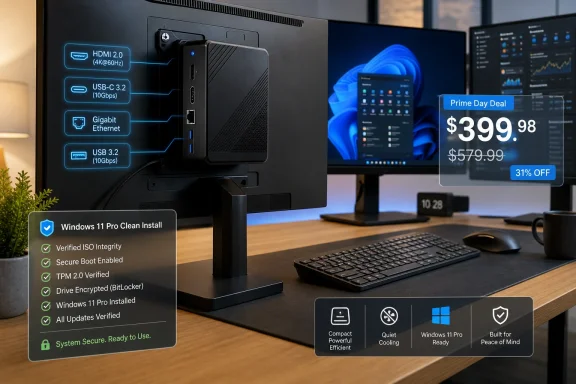 The Budget Desktop Has Been Shrunk, Not Replaced
The ACEMAGIC K1 is exactly the kind of machine that would have sounded absurdly overpowered for its size a decade ago. A 12-core, 16-thread Intel Core i5-12600H, 16GB of DDR4, a 512GB PCIe NVMe SSD, triple-display output, Wi-Fi 6, Bluetooth 5.2, and Windows 11 Pro in a chassis roughly the footprint of a desk accessory is no longer exotic. It is now an Amazon deal.That is the first important point. Mini PCs are no longer novelty devices for home theater tinkerers, digital signage installers, or people trying to hide a computer behind a monitor. They are now mainstream enough to be merchandised like earbuds: list price, coupon, strike-through discount, limited-time urgency.
The second point is more interesting. A $399 Windows 11 Pro machine with a recent-enough Intel H-series chip creates an awkward comparison for the classic “cheap desktop” category. Many office towers still ship with slower parts, more plastic, fewer display options, and the same baseline RAM and storage. The difference is that the tower looks like a computer, while the K1 looks like an accessory.
That visual demotion matters. For decades, the desktop PC’s size communicated value. Big case, big fan, big upgrade path, big seriousness. The mini PC reverses that symbolism: the less visible the computer becomes, the more modern it feels.
Intel’s Laptop Silicon Has Become the New Office Desktop
The Core i5-12600H is not a workstation chip, and nobody should pretend otherwise. It is a mobile processor from Intel’s 12th-generation hybrid era, built around Performance cores and Efficient cores, and originally aimed at laptops that needed strong burst performance without becoming portable space heaters. In a mini desktop, that compromise starts to look like a feature rather than a limitation.For everyday Windows work, the i5-12600H is comfortably beyond the threshold where the CPU is usually the bottleneck. Browser tabs, Microsoft 365, Teams calls, PDFs, light Photoshop work, remote admin consoles, and web apps do not need a giant tower. They need enough single-threaded responsiveness, enough memory, and storage that does not feel like molasses.
That is why this class of mini PC has become so compelling. It borrows laptop silicon, removes the battery and screen, gives the chip a little more thermal breathing room than many notebooks, and sells the result to people who already own a monitor, keyboard, and mouse. The economics are brutally simple.
There is a catch, of course. Integrated graphics are still integrated graphics. Intel Iris Xe is fine for desktop acceleration, video playback, light older games, and some creative workloads that do not lean heavily on GPU compute. It is not a substitute for a gaming desktop, and “mini gaming PC” remains one of the more abused phrases in the budget hardware channel.
The better framing is not gaming. The better framing is desk consolidation. For offices, students, reception desks, point-of-sale terminals, home labs, and secondary workstations, the K1’s pitch is that the computer no longer needs to be the biggest thing on the desk.
Windows 11 Pro Is the Quiet Upsell
The inclusion of Windows 11 Pro is more than a checkbox, even if Amazon listings often treat it like decorative copy. For home users, the difference between Home and Pro may not matter much. For small businesses and IT-minded buyers, Pro still means access to features that can make the machine easier to secure, manage, or repurpose.BitLocker, Remote Desktop hosting, Hyper-V, Group Policy support, domain join, and broader business management compatibility all change the machine’s usefulness. A mini PC with Windows 11 Pro can become a compact admin workstation, a test box, a kiosk, a conference-room PC, or a lightweight virtualization host in a way that a Windows 11 Home box cannot without additional work.
That is part of why these systems punch above their price. The hardware is not merely cheap; it arrives with an operating-system edition that normally signals business intent. The result is a strangely capable little package for buyers who know what they are looking at.
But Windows 11 Pro also raises the stakes. A discounted PC preloaded with Pro is especially attractive to people who may put sensitive accounts, business documents, remote-access tools, and administrative credentials on it. That makes software provenance, image cleanliness, driver quality, and firmware trust more important than they would be on a toy PC used only for streaming.
In other words, Windows 11 Pro is both a selling point and a responsibility. The more serious the use case, the less comfortable buyers should be treating the factory image as a harmless convenience.
The Port Selection Is the Real Product
The K1’s specification sheet reads like a miniaturized argument against the modern laptop. HDMI 2.0, DisplayPort 1.4, USB-C with display support, multiple USB-A ports, gigabit Ethernet, audio, Wi-Fi 6, and Bluetooth 5.2 add up to a machine that can sit quietly behind a monitor and drive a surprisingly complete desk setup.That matters because the budget PC market has often been defined by almost enough. Almost enough USB ports. Almost enough storage. Almost enough RAM. Almost enough display output. The K1’s appeal is that, on paper, it clears the “enough” line for a large number of ordinary Windows users.
Triple 4K at 60Hz support is especially notable for office work. Not because everyone needs three 4K monitors, but because display flexibility is one of the first places cheap desktops become annoying. A machine that can handle two screens without adapters, docks, or weird compromises instantly becomes more useful in real workplaces.
The front-facing USB ports and audio jack also matter more than spec-sheet culture admits. Mini PCs live or die by convenience. If every thumb drive, headset, webcam, or external SSD requires crawling behind a monitor, the elegance evaporates.
VESA mounting completes the trick. Once attached to the back of a monitor, the K1 stops being a “small desktop” and becomes an invisible desktop. That invisibility is exactly what many buyers want.
Upgradeability Keeps the Mini PC From Becoming an Appliance
The biggest fear with small computers is that they become sealed appliances. Once the RAM is soldered and the storage is awkward to reach, the user is back in laptop territory, only without the portability. The K1’s use of SO-DIMM memory slots and M.2 storage helps it avoid that trap.The included 16GB of DDR4 is the correct baseline for Windows 11 in 2026. Eight gigabytes is now an economy-class apology, especially once browsers, chat clients, security tools, cloud sync agents, and background updaters are running. Sixteen gigabytes gives the system enough headroom to feel normal.
The ability to move to 64GB is more than marketing for certain users. It makes the K1 plausible as a light lab box, a VM host for testing, or a compact development machine. It does not turn a mobile Core i5 into a Xeon, but it does keep the system from aging out the moment workloads become more memory hungry.
Storage is similar. A 512GB NVMe SSD is fine for a general-purpose Windows machine, but it is not generous once games, media libraries, disk images, or development tools enter the picture. Expansion options give the buyer an escape hatch.
That escape hatch is what separates a useful mini PC from a disposable streamer with a Windows license. Small should not have to mean fixed.
The Price Is Good, but the Word “Record” Needs Discipline
The reported $399.98 price is attractive, particularly for a Windows 11 Pro system with these specifications. But the deal ecosystem around Amazon hardware has made words like “record low” harder to trust at face value. List prices are elastic, coupons come and go, and the same device may appear under related brands or slightly different configurations.That does not make the discount meaningless. It means buyers should treat the list price as context, not gospel. The real comparison is not $399.98 versus $579.99; it is $399.98 versus other current mini PCs with comparable CPUs, RAM, storage, ports, warranty terms, and brand reputation.
On that basis, the K1 looks competitive. Intel’s i5-12600H remains a strong productivity chip, 16GB of RAM is the right floor, Windows 11 Pro adds value, and the port layout is unusually complete for the size. If the machine performs as advertised, $400 is a reasonable price.
The danger is that deal framing compresses the buying decision into a countdown clock. That favors impulse over due diligence. A mini PC is not a pack of discounted batteries; it is a computer that may hold passwords, tax documents, business accounts, and remote-access credentials.
The better way to read the price is this: it is low enough to be tempting, but not so low that buyers should suspend normal scrutiny.
ACEMAGIC’s Trust Problem Did Not Vanish With the Coupon
Any discussion of an ACEMAGIC mini PC has to contend with the company’s 2024 malware controversy. Reports at the time described certain systems shipping with malware on the factory Windows installation, and ACEMAGIC later characterized the incident as isolated to affected batches while promising corrective measures. That history does not automatically condemn every later machine, but it does change the burden of proof.For enthusiasts, the obvious response is simple: wipe the drive and reinstall Windows from Microsoft’s own installation media before using the machine seriously. That is good practice for many off-brand PCs, and it is especially sensible here. A clean install does not answer every possible firmware-level question, but it removes the most obvious trust risk: the vendor’s preloaded software image.
For less technical buyers, the advice is more complicated. The appeal of a preinstalled Windows 11 Pro mini PC is that it should be plug-and-play. If the safest path requires reinstalling Windows, downloading drivers, checking Device Manager, applying firmware updates, and validating activation, then the convenience story becomes less clean.
This is where the bargain mini-PC market diverges from Dell, Lenovo, HP, or Apple. The big vendors are not perfect, and they have their own bloatware and security histories. But they sell trust as part of the product. ACEMAGIC and its peers often sell silicon per dollar, and trust comes later, if at all.
That does not mean enthusiasts should avoid the K1. It means they should approach it like a system integrator’s kit rather than a sealed retail appliance. Assume the hardware may be the value, and the factory image may be a disposable starting point.
The Mini-PC Boom Is Really a Supply-Chain Story
The sudden abundance of capable mini PCs is not accidental. Laptop processors, commodity NVMe storage, cheap DDR4, standardized wireless modules, and global contract manufacturing have made it easier to assemble credible Windows desktops in tiny enclosures. The brands on Amazon are often the visible layer of a deeper manufacturing ecosystem.That is why so many mini PCs share traits. Similar port layouts, similar chassis sizes, similar BIOS quirks, similar naming patterns, and similar spec-sheet language appear across brands that casual buyers may assume are unrelated. The device you buy is often less a singular product than a configuration assembled from a common parts universe.
This can be good for buyers. Competition drives down prices, and the hardware has become remarkably capable. The days when cheap mini PCs meant slow Celerons, eMMC storage, and two sad USB ports are mostly behind us.
It can also be bad for buyers. Support accountability becomes diffuse. Firmware updates may be sporadic. Documentation may be thin. Warranty service may depend more on marketplace policy than on a mature service operation.
That trade-off is not unique to ACEMAGIC. It is the bargain Windows hardware model in miniature. The buyer gets more computer than expected for the money, but less institutional assurance than the spec sheet implies.
The Mac Mini Comparison Is Tempting and Mostly Wrong
Every compact desktop eventually gets compared to the Mac mini, because Apple has trained the market to understand the idea of a small, quiet, serious computer. But the K1 and the Mac mini occupy very different worlds. One is a tightly integrated platform built around Apple silicon, macOS, and Apple’s retail ecosystem. The other is a commodity Windows box designed to win a spec-per-dollar fight.The comparison is still useful because it shows what Windows mini PCs are trying to become. Apple made the small desktop aspirational. The Amazon mini-PC market is making it ordinary.
That ordinariness is powerful. Not everyone wants macOS. Not every office can absorb Apple pricing or management differences. Not every user wants to replace existing monitors, peripherals, Windows apps, or workflows. For those buyers, a compact Windows 11 Pro desktop is not a compromise; it is the obvious answer.
But Apple’s advantage is coherence. The Mac mini’s buyer rarely wonders whether the factory OS image is trustworthy, whether driver downloads are scattered, or whether BIOS updates will appear. Windows mini-PC vendors compete aggressively on hardware value, but they have not consistently matched that platform confidence.
The K1’s challenge is therefore not merely to be cheaper than a Mac mini. It has to be boring in the right ways: predictable, clean, supported, and quiet enough to disappear.
Where This Box Fits in a Windows Household
For a home user, the K1 makes the most sense as a primary productivity desktop or a secondary machine. It is well suited to web work, school, spreadsheets, email, streaming, light photo editing, and remote work. It can also serve as a living-room PC for people who still want a real Windows desktop attached to a television.It is less compelling for modern gaming. The CPU can keep up with many tasks, but the integrated GPU defines the ceiling. Cloud gaming, older titles, emulation within reason, and lightweight esports games may be fine, but anyone expecting dedicated-GPU performance will be disappointed.
For families, the small footprint is underrated. A mini PC can be mounted behind a shared monitor, moved between rooms, or tucked into a homework station without turning the space into a permanent computer corner. That flexibility matters in apartments, dorms, and multipurpose rooms.
The preinstalled Windows 11 Pro license also gives technically inclined households room to experiment. Remote Desktop, Hyper-V, and BitLocker can turn a cheap desk machine into a more serious home infrastructure node. That is not the use case Kotaku’s deal copy sells, but it may be the use case WindowsForum readers care about most.
Again, the caveat is trust hygiene. A clean Windows install, BIOS review, firmware updates where available, and a full security scan should be treated as setup steps, not paranoia.
Where IT Pros Should Draw the Line
For small businesses, the K1 is both enticing and awkward. On paper, it looks like a cheap way to refresh front desks, training rooms, shared workstations, or signage endpoints. Windows 11 Pro, multiple display outputs, Ethernet, and VESA mounting all line up with real deployment needs.But IT purchasing is not only about the unit price. It is about supportability, replacement consistency, lifecycle planning, firmware management, warranty reliability, and supply continuity. A fleet of bargain mini PCs can become expensive if every support incident turns into detective work.
That does not rule out machines like the K1. It suggests they belong in bounded roles. A lab bench, a noncritical kiosk, a spare workstation, a conference display PC, or a pilot deployment is a better fit than a regulated workstation handling sensitive records.
The most practical enterprise posture is cautious experimentation. Buy one, wipe it, document the driver stack, test sleep and wake behavior, monitor thermals, validate Windows activation, check firmware settings, and see how the vendor responds to a support request before buying ten more.
The worst posture is to let a coupon make a procurement decision. Cheap endpoints are still endpoints. They still join networks, authenticate users, receive patches, and create operational risk.
The Deal Works Best for Buyers Who Know What to Ignore
The K1’s Amazon pitch is built around abundance: lots of cores, lots of ports, Windows 11 Pro, triple displays, upgradeable memory, and a striking discount. Some of that abundance is meaningful. Some of it is just the modern language of online hardware listings.A savvy buyer should ignore the implied gaming glamour and focus on the workhorse traits. The CPU is strong for the price. The RAM and SSD are adequate and upgradeable. The port selection is genuinely useful. The size is excellent. Windows 11 Pro is a legitimate plus.
The same buyer should also ignore the comfort of the phrase “pre-installed and activated.” Activated Windows is good. A vendor image is not automatically good. The first hour with this machine should be setup and verification, not account sign-ins and password storage.
There is a strange inversion here. The K1 is easiest to recommend to people who least need its plug-and-play promise. Enthusiasts and IT pros can make it safer, cleaner, and more predictable. Casual buyers may be more exposed to the very trust issues that careful setup would mitigate.
That is the bargain mini-PC paradox. The machines are cheap enough for ordinary users, but the best ownership experience still rewards technical discipline.
The $400 Windows Box Has a Few Non-Negotiables
The ACEMAGIC K1 deal is not just about whether one Amazon listing is worth clicking. It is a reminder that the Windows desktop is being re-priced and re-sized in real time, and buyers need a sharper checklist than “small, fast, cheap.”- The K1’s reported $399.98 sale price is compelling because the hardware specification is legitimately strong for everyday Windows productivity.
- The Core i5-12600H, 16GB of RAM, and NVMe storage make more sense as an office and home-work machine than as a true gaming PC.
- Windows 11 Pro adds real value for BitLocker, Remote Desktop, Hyper-V, and small-business manageability, but it also increases the importance of trusting the software image.
- ACEMAGIC’s past malware controversy means careful buyers should strongly consider wiping the factory installation and reinstalling Windows from clean Microsoft media.
- The machine is most attractive for enthusiasts, home-office users, labs, kiosks, and bounded business roles where price and size matter more than premium vendor support.
- The discount should be treated as an opportunity to evaluate the hardware, not as a reason to skip basic security and support due diligence.
Source: Kotaku Prime Day Isn't Here, but This Windows 11 Pro Mini PC With 16GB RAM Is Already at Record Low on Amazon - Kotaku
