

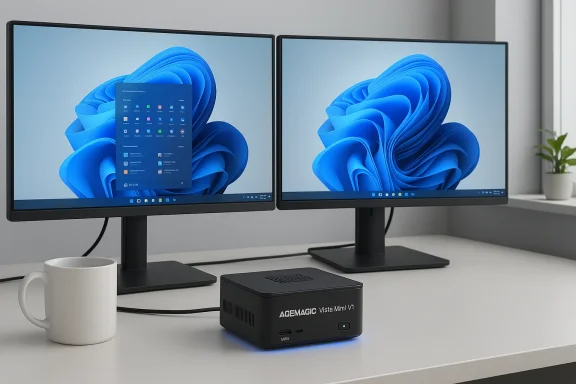
The ACEMAGIC Vista Mini V1 arrives as a pocket‑sized Windows 11 Pro desktop built around Intel’s new N150 low‑power processor, promising dual 4K output, compact upgradeability, and a full‑Windows experience for home offices, living‑room media centers, and light business tasks — but the real story is in the details: actual CPU capabilities, storage interface, memory configuration, and firmware/driver support which determine whether this tinny box is a pragmatic workhorse or an overpromised novelty.
Mini PCs have evolved from niche thin‑client boxes into a mainstream product category that targets hybrid workers, home theater enthusiasts, and edge‑compute use cases. The Vista Mini V1 sits squarely in that middle: it aims to balance low cost, small size, and broad compatibility by shipping with Windows 11 Pro, VESA‑mount hardware, and what reads like a sensible complement of ports for productivity and media playback. Early hands‑on reports and retail listings highlight the same core hardware choices: the Intel N150 processor, 8GB of DDR4 RAM, and a 256GB M.2 SSD.
At the same time, the N‑series Intel chips (N100, N150, etc.) are designed for energy efficiency rather than raw throughput. That makes devices like the Vista V1 attractive for always‑on workloads and streaming, but buyers need to match expectations: these are not replacement towers for heavy video editing or modern AAA gaming. Independent mini‑PC coverage and vendor documentation confirm this positioning.
Those numbers are important because they explain the N150’s strengths and limits: it’s optimized for low idle power and good single‑thread bursts (web pages, Office, video decode), while multi‑threaded heavy compute will simply be limited by the modest core count and power envelope. Real‑world benchmarks published by reviewers place the N150 comfortably above the older N100/N95 family for everyday tasks but clearly below mainstream laptop Core i3/Celeron and Ryzen mobile parts for sustained workloads.
Why that difference matters: single‑channel DDR4 halves memory bandwidth compared with a dual‑channel pair, which is noticeable in GPU‑bound tasks and some multitasking scenarios. Likewise, M.2 SATA SSDs cap sequential throughput to SATA speeds (~550 MB/s), while NVMe drives can be multiple times faster for bursty tasks and application load times. The Vista V1 performs well for office and media even with single‑channel/SATA class storage, but the upgrade path and the exact internal connector determine whether you can realistically improve that performance later.
Do not expect gaming performance at native 4K: the integrated GPU is designed for decoding and UI rendering, not high frame rates at high resolutions. For retro‑emulation, light esports titles, or 1080p casual gaming, the machine is usable, but benchmarks show the device is not in the same class as small desktops with discrete or high‑end integrated GPUs.
A practical takeaway from hands‑on testing: boot and app launch times scale with SSD speed and RAM bandwidth. If your Vista V1 ships with a SATA M.2 SSD and single‑channel 8GB RAM, you’ll have a perfectly usable system for day‑to‑day tasks but not a machine that feels “fast” for heavier multitasking or media production. Upgrading to an NVMe drive (if supported) and increasing RAM capacity can markedly improve responsiveness. Several reviews specifically recommend upgrading the storage to NVMe and maximizing RAM where possible for a substantial experience uplift.
Practical upgrade steps (when you confirm NVMe/SO‑DIMM compatibility):
Important software caution: consumer mini‑PC vendors frequently ship devices with vendor‑supplied drivers and a small recovery partition. Before deploying at scale, create your own recovery media and test the system image and driver updates to avoid surprises during future updates or migrations. Also verify that ACEMAGIC provides timely firmware/UEFI updates and clear driver download pages for the N150 platform. Community threads show that mini‑PCs sometimes suffer from driver availability and intermittent SSD firmware issues if vendors do not maintain a robust support channel.
Concluding recommendation: buy the Vista V1 if you need a quiet, energy‑efficient, dual‑4K capable Windows machine and you accept the N150’s power constraints; insist on written confirmation of the internal interfaces and warranty terms before purchase, and plan upgrades only after validating the exact internal layout and BIOS/NVMe support.
Source: kliksolonews.com https://kliksolonews.com/PC-Intel-N150-8GB-RAM-256GB-SSD-Win11-Pro-Dual-Display-4K-969984/
 Background / Overview
Mini PCs have evolved from niche thin‑client boxes into a mainstream product category that targets hybrid workers, home theater enthusiasts, and edge‑compute use cases. The Vista Mini V1 sits squarely in that middle: it aims to balance low cost, small size, and broad compatibility by shipping with Windows 11 Pro, VESA‑mount hardware, and what reads like a sensible complement of ports for productivity and media playback. Early hands‑on reports and retail listings highlight the same core hardware choices: the Intel N150 processor, 8GB of DDR4 RAM, and a 256GB M.2 SSD.At the same time, the N‑series Intel chips (N100, N150, etc.) are designed for energy efficiency rather than raw throughput. That makes devices like the Vista V1 attractive for always‑on workloads and streaming, but buyers need to match expectations: these are not replacement towers for heavy video editing or modern AAA gaming. Independent mini‑PC coverage and vendor documentation confirm this positioning.
What’s inside: hardware breakdown
CPU — Intel N150: what you actually get
The Vista V1 is built around the Intel Processor N150 (sometimes marketed under Intel’s “Twin Lake” name for that microarchitecture). The N150 is a 4‑core, 4‑thread part with a nominally very low 6 W thermal design point and a turbo frequency that reaches up to 3.6 GHz in short bursts. The integrated GPU is a 24‑execution‑unit Intel UHD/Gen12 part with dynamic frequencies up to roughly 1.0 GHz, which is sufficient for 4K video decoding, UI acceleration, and lightweight graphics tasks. These core attributes — 4 cores, 6 W TDP, and 3.6 GHz turbo — are consistently listed across product manuals and trusted hardware pages.Those numbers are important because they explain the N150’s strengths and limits: it’s optimized for low idle power and good single‑thread bursts (web pages, Office, video decode), while multi‑threaded heavy compute will simply be limited by the modest core count and power envelope. Real‑world benchmarks published by reviewers place the N150 comfortably above the older N100/N95 family for everyday tasks but clearly below mainstream laptop Core i3/Celeron and Ryzen mobile parts for sustained workloads.
Memory and storage — the fine print matters
ACEMAGIC ships the Vista V1 in common entry‑level SKUs that include 8GB DDR4 RAM and a 256GB M.2 SSD and advertises expandability. The official user manual confirms the base configuration and lists a single SO‑DIMM slot and an M.2 2280 slot for storage. However, retail pages and reseller listings are inconsistent about the supported maximum memory and the SSD interface: some vendor pages state the device supports up to 16GB DDR4 and uses an M.2 SATA SSD, while other reviews and comparable N150 mini PCs show NVMe PCIe support and up to 32GB as a possible upgrade. Because those expansion limits materially affect sustained performance (single‑ vs. dual‑channel RAM, SATA vs. NVMe bandwidth), buyers should confirm the exact SKU and interface before purchase.Why that difference matters: single‑channel DDR4 halves memory bandwidth compared with a dual‑channel pair, which is noticeable in GPU‑bound tasks and some multitasking scenarios. Likewise, M.2 SATA SSDs cap sequential throughput to SATA speeds (~550 MB/s), while NVMe drives can be multiple times faster for bursty tasks and application load times. The Vista V1 performs well for office and media even with single‑channel/SATA class storage, but the upgrade path and the exact internal connector determine whether you can realistically improve that performance later.
Graphics and displays — dual 4K is real but contextual
ACEMAGIC advertises dual 4K display support via HDMI and DisplayPort, and the user manual and several reviews confirm the capability to drive two 4K60 displays simultaneously for desktop productivity and media playback. The integrated 24‑EU GPU in the N150 handles hardware video decoding for modern codecs, which keeps CPU load low during 4K streaming. That makes the Vista V1 a credible choice for use as a media PC or digital signage player that needs two screens.Do not expect gaming performance at native 4K: the integrated GPU is designed for decoding and UI rendering, not high frame rates at high resolutions. For retro‑emulation, light esports titles, or 1080p casual gaming, the machine is usable, but benchmarks show the device is not in the same class as small desktops with discrete or high‑end integrated GPUs.
I/O, networking and wireless
Typical Vista V1 SKUs include:- USB 3.2 Type‑A ports and USB 2.0 legacy ports,
- HDMI 2.0 and DisplayPort 1.4 outputs,
- Gigabit Ethernet (some variants advertise a 2.5 GbE option on other vendors’ N150 boxes),
- Wi‑Fi 6 and Bluetooth for wireless connectivity,
- a 3.5 mm audio jack and a single LAN port on many retail listings.
Power, cooling and noise
The N150 targets a 6 W TDP, and many N150‑based single‑board and mini‑PC products implement passive cooling or low‑noise small fans because the chip’s heat output is modest. ACEMAGIC’s own documentation highlights a compact cooling design; third‑party industrial SBC listings for N150 note the same 6 W figure and show both fanless and low‑power fan implementations depending on chassis and thermal design. In practice, under sustained full‑load CPU stress the unit will warm but should remain reasonably quiet compared with larger tower systems.Performance expectations: benchmarks and real‑world use
Benchmarks and observed behavior
Independent reviewers who tested N150 mini PCs report a meaningful uplift over the N100/N95 generation in single‑threaded and mixed workloads — enough to make common tasks feel snappier. Published Cinebench and PCMark results place the N150 in a position that comfortably handles office suites, browser tabs, and media playback, while still trailing larger laptop CPUs in multi‑core and sustained multithreaded workloads. Expect good burst responsiveness and modest sustained throughput.A practical takeaway from hands‑on testing: boot and app launch times scale with SSD speed and RAM bandwidth. If your Vista V1 ships with a SATA M.2 SSD and single‑channel 8GB RAM, you’ll have a perfectly usable system for day‑to‑day tasks but not a machine that feels “fast” for heavier multitasking or media production. Upgrading to an NVMe drive (if supported) and increasing RAM capacity can markedly improve responsiveness. Several reviews specifically recommend upgrading the storage to NVMe and maximizing RAM where possible for a substantial experience uplift.
Typical workloads the Vista V1 can handle well
- Office productivity (e.g., Office suites, large spreadsheets with moderate complexity).
- Web browsing with many open tabs (subject to RAM limits).
- Local and streamed 4K video playback and multi‑display desktop setups.
- Point‑of‑sale, kiosk, and digital signage deployments where compactness and low power matter.
- Light software development, scripting, and small virtual machines for testing when resource expectations are modest.
Workloads to avoid
- Heavy video editing at high resolution (4K timeline renders will be slow).
- Large, complex software builds, heavy virtualization, or database server workloads.
- Modern AAA gaming at high resolutions and framerates. Use a discrete‑GPU machine for those tasks.
Upgradeability and serviceability — how flexible is the Vista V1?
ACEMAGIC advertises expandability, and the user manual indicates a user‑accessible M.2 slot and a single SO‑DIMM socket. That implies relatively straightforward upgrades to storage and memory, but there are important caveats: retail pages differ on the maximum supported RAM (16GB vs. 32GB claims) and on whether the M.2 slot is SATA‑only or supports NVMe. Because those differences alter upgrade value significantly, the only responsible recommendation is to verify the exact internal configuration for the SKU you are considering before ordering parts. If your unit supports NVMe and dual‑channel RAM (some N150 boards support DDR5 or dual slots on other vendors), upgrades will be more beneficial; if it’s single‑channel DDR4 and M.2 SATA only, the return on upgrading is smaller.Practical upgrade steps (when you confirm NVMe/SO‑DIMM compatibility):
- Open the case following static‑safe procedures and the vendor manual.
- Replace or add a SO‑DIMM module of the correct type and speed (DDR4‑3200 where applicable).
- Install an NVMe PCIe SSD in the M.2 slot if supported; otherwise choose a high‑end M.2 SATA drive.
- Update UEFI/BIOS and chipset drivers after hardware changes.
Software: Windows 11 Pro, security features, and manageability
The Vista V1 ships with Windows 11 Pro, which brings features useful to small businesses and power users: BitLocker drive encryption, Group Policy controls, itting), and advanced update options. The machine includes TPM 2.0 support on some SKUs, enabling modern Windows security features and meeting Microsoft’s requirements for certain enterprise management features. For managed deployments, Windows 11 Pro simplifies joining domains or Azure AD, but administrators should validate driver and firmware update channels with the vendor.Important software caution: consumer mini‑PC vendors frequently ship devices with vendor‑supplied drivers and a small recovery partition. Before deploying at scale, create your own recovery media and test the system image and driver updates to avoid surprises during future updates or migrations. Also verify that ACEMAGIC provides timely firmware/UEFI updates and clear driver download pages for the N150 platform. Community threads show that mini‑PCs sometimes suffer from driver availability and intermittent SSD firmware issues if vendors do not maintain a robust support channel.
Strengths — where the Vista V1 shines
- Compact footprint and VESA mount options make the Vista V1 ideal for tight desks, wall‑mounted displays, or discreet media cabinets.
- Strong single‑thread responsiveness from the Intel N150 turbo boost; everyday apps feel snappy compared with older Celeron‑class devices.
- Dual 4K output and hardware video decoding deliver a very capable HTPC and digital signage platform without needing a larger machine.
- Low power draw and minimal noise under typical use make the Vista V1 appropriate for always‑on scenarios in homes and offices.
- Windows 11 Pro provides enterprise features and security tools not always present in consumer mini PCs.
Risks and potential downsides — what to watch for
- Product listings and manuals are inconsistent about M.2 interface (SATA vs. NVMe) and maximum RAM. These inconsistencies matter because they change upgrade paths and long‑term value. Confirm the SKU’s internal hardware details before buying and treat unverified retail claims with caution.
- Single‑slot memory designs (single‑channel) limit bandwidth; for memory‑sensitive tasks this is a measurable bottleneck unless the model supports higher capacity single modules or a second slot.
- Mini‑PC vendors sometimes lag on firmware and driver updates. Community reports show occasional issues with NVMe SSD visibility or UEFI updates affecting boot behavior; these are rarer with established vendors but are a real risk with budget manufacturers. Buyers with critical uptime needs should insist on clear update and warranty policies.
- Warranty and support vary by marketplace seller. The vendor claims a three‑year warranty in some listings, but warranty length, coverage (parts vs. labor), and cross‑region support differ by seller and SKU. Verify the warranty terms in writing before purchase.
How the Vista V1 compares to alternatives
The N150‑based Vista V1 competes with other modern mini PCs from brands like Beelink, CHUWI, and Minisforum that use similar low‑power Intel or AMD silicon. Compared with many N150 sibling designs, the Vista V1’s value liero bundle and the advertised warranty. Benchmark comparisons from independent reviews show the Vista V1 performs in line with other N150 devices, sometimes edging them in specific multi‑media tests while falling behind in scenarios that favor more cores or higher memory bandwidth. If you need higher sustained CPU throughput, a small form‑factor system with a mobile Core i3/i5 or AMD Ryzen U‑class processor will be more appropriate, at the cost of size, noise, and power.Practical buying checklist — avoid buyer’s remorse
Before you click buy, perform these checks and tests:- Confirm the exact SKU’s specs in writing: CPU (N150), RAM (type and whether single‑channel), storage (M.2 form factor and SATA vs NVMe), and GPU/display output support.
- Ask the retailer whether the M.2 slot supports NVMe PCIe drives and whether the BIOS exposes NVMe boot options. If the answer is unclear, treat the storage as SATA for planning.
- Verify the warranty length and cross‑border support — get a copy of return and repair procedures.
- If you plan upgrades, confirm the maximum validated memory and supported module densities. Budget for a 32GB upgrade only if the vendor or manual explicitly supports it.
- After receiving the unit, create a backup image and recovery media, update UEFI/BIOS, and install vendor chipset/network drivers before loading critical data.
Real‑world recommendation
For buyers seeking a low‑cost, compact Windows 11 Pro machine for office work, dual‑display productivity, media streaming, or digital signage, the ACEMAGIC Vista Mini V1 is a sensible proposi validate the model’s storage interface and memory limits before purchase. If your priority is quiet 4K media playback, an inexpensive N150 mini PC will likely meet your needs out of the box. If you expect to run heavy multitasking, video editing, or multiple virtual machines, step up to a higher‑power 28–45 W laptop‑class or small‑form‑factor desktop instead. Independent reviews and product manuals consistently show the Vista V1 occupies that lower‑power, highly portable niche with good real‑world responsiveness for intended tasks.Final thoughts — balance promise with verification
The Vista Mini V1’s headline package — Intel N150, 8GB RAM, 256GB M.2 SSD, Windows 11 Pro, and dual 4K outputs — is compelling on paper and well suited for a wide range of everyday tasks. The critical follow‑up is simple: verify whether the M.2 slot is NVMe or SATA, confirm the maximum supported and validated RAM, and secure a clear warranty statement from the seller. Those three details determine whether the tiny Vista V1 will be an adaptable, long‑lived addition to your desk or a limited, sealed box with modest upgrade potential. Community discussion and vendor documentation highlight both the model’s practical strengths and the upgrade/driver caveats to watch for, so proceed informed and you’ll get a very capable, extremely compact Windows PC.Concluding recommendation: buy the Vista V1 if you need a quiet, energy‑efficient, dual‑4K capable Windows machine and you accept the N150’s power constraints; insist on written confirmation of the internal interfaces and warranty terms before purchase, and plan upgrades only after validating the exact internal layout and BIOS/NVMe support.
Source: kliksolonews.com https://kliksolonews.com/PC-Intel-N150-8GB-RAM-256GB-SSD-Win11-Pro-Dual-Display-4K-969984/
